
Norton VPN Review 2026: Can Norton Do More Than Just Antivirus?


A VPN won't protect you from viruses. Even so, more and more antivirus programs now include VPN features that promise to help you browse the internet more anonymously. Norton, the company behind the Norton 360 security suite, is one of them. But is Norton's VPN more than just a nice add-on?
We put Norton's VPN through a thorough test to see whether it holds up on its own, or whether you're better off with a dedicated VPN provider.


Norton VPN* is a VPN service from Norton, one of the world's largest providers of cybersecurity and antivirus software. The company belongs to the US corporation Gen Digital, which now brings many well-known antivirus brands under one roof, including Avast, AVG, and Avira.
Norton's core business is antivirus, but the VPN has grown into more than just an extra feature in the security suite. Norton also offers it as a standalone service called "Norton Secure VPN." So you can use the VPN on its own or as part of the Norton 360 security solution.
For this review, we deliberately set aside Norton 360's antivirus features and focused only on the VPN.
Norton VPN Review
Solid performance
In our test, the VPN connections were mostly fast and stable. Norton also did well with streaming.All the key VPN features
Norton comes with all the important VPN features, including split tunneling, double VPN, and IP rotation.Strong security setup
With AES-256 encryption, up-to-date VPN protocols (WireGuard, OpenVPN, Mimic), and post-quantum cryptography, Norton is technically up to date.Regularly audited no-logs policy
You don't have to take the provider's word for it: Norton has its no-logs policy audited regularly by independent security firms.
Annual plan only
Norton VPN is currently available only as an annual plan. There's no flexible monthly option in Germany.Weak support
Norton's help center is cluttered, and the direct support isn't very knowledgeable. Before you reach a real person, you have to fight your way through several AI chatbots.Controversies around the provider
Norton's and Gen Digital's company history isn't free of privacy and security controversies. If you're looking for a true "privacy-first" VPN, there are better options.Missing advanced features
You'll have to do without some advanced features like port forwarding or a dedicated IP address.
Installation and Features
When a VPN comes bundled with an antivirus product, we tend to be a little skeptical at first. Is it just a small add-on to a bulky security suite we don't really need?
Thankfully, that's not the case here. Norton's VPN holds its own as a standalone service. It's lightweight, easy to use, and covers all the key VPN features. There is some promotion for other Norton products, but it's not as pushy as we expected.
Easy sign-up, seven-day free trial
Getting started is quick. First, you'll need a Norton account, which is created automatically when you sign up for a plan. Norton offers a seven-day trial so you can try the VPN for free.
Just make sure you're actually subscribing to a VPN plan and not accidentally signing up for Norton 360 (more on Norton's plans later).
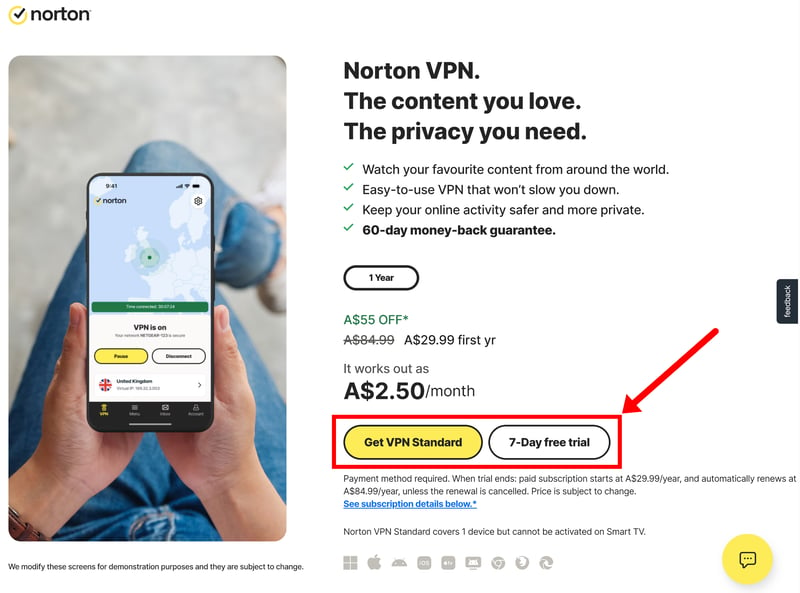
You can try Norton VPN free for seven days.
To use the trial, you have to enter a payment method right at the start. So remember to turn off automatic renewal in your account settings. Otherwise, the trial rolls over into a paid subscription once it ends.
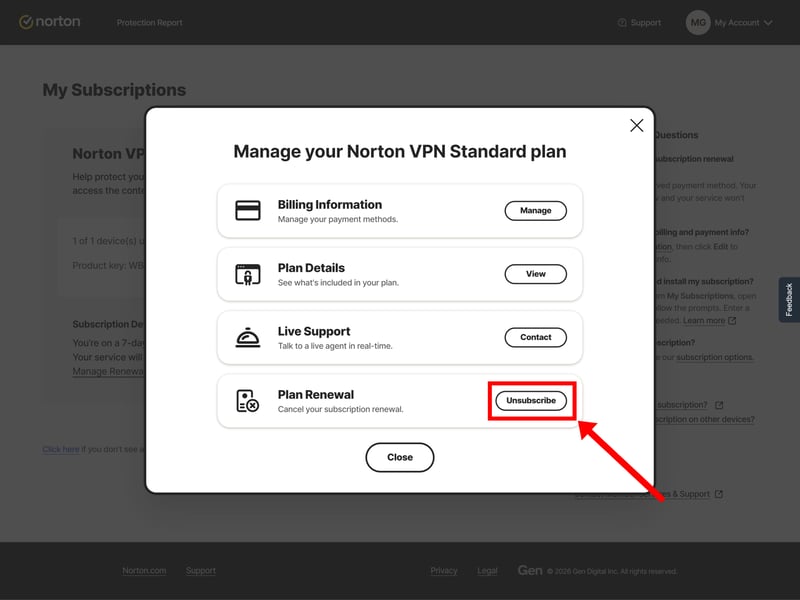
Turn off automatic renewal so you don't accidentally start a paid subscription.
The only payment options are credit or debit cards and PayPal. Other VPN services are often more flexible and also accept anonymous payment methods like cryptocurrencies or prepaid vouchers. That's probably only a concern for the most privacy-conscious users, though.
Once you finish signing up, you can download and install Norton's VPN right from your Norton dashboard.
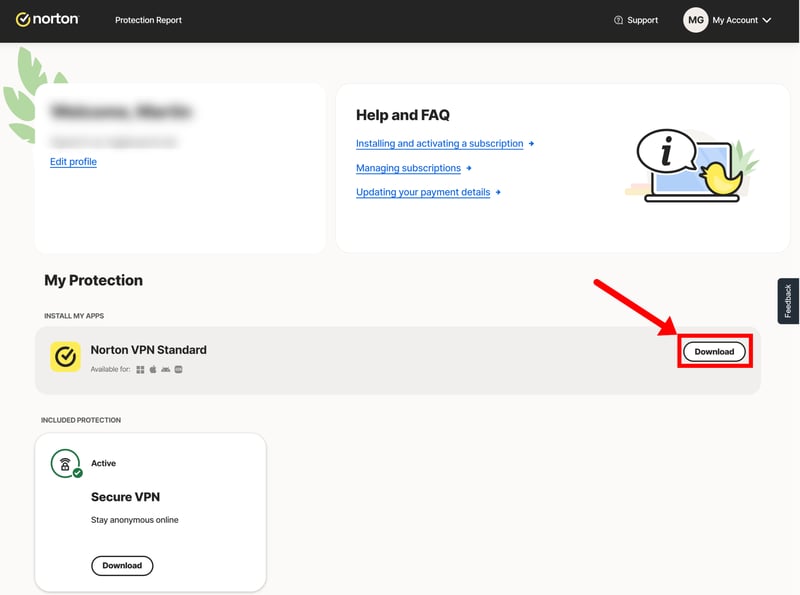
Download the Norton VPN desktop app.
Norton VPN on desktop: intuitive but a little unfinished
The Norton desktop app is available for Windows and macOS. We tested it on a laptop running Windows 11.
Norton's desktop app is pretty minimalist, partly because it uses the same interface as Norton 360. If you only use the VPN, you'll see a stripped-down version:
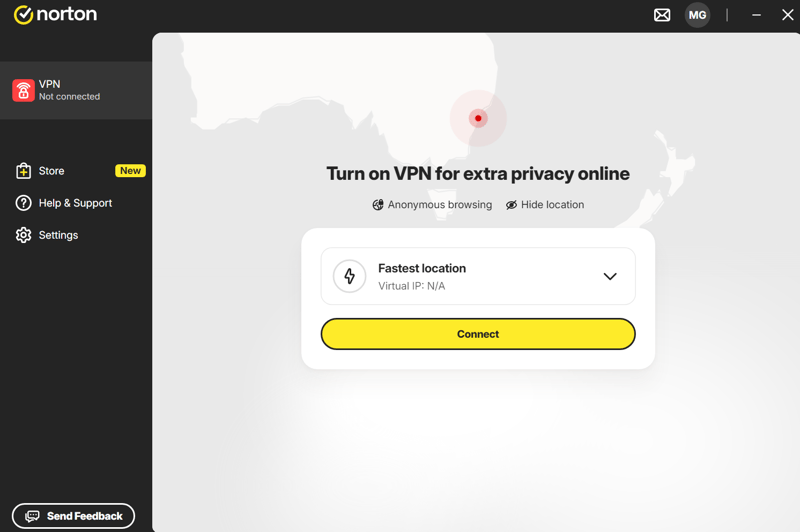
The Norton app borrows its design from the antivirus suite.
For Norton 360 users, the VPN is just one feature among many, tucked away in the “Privacy” section:
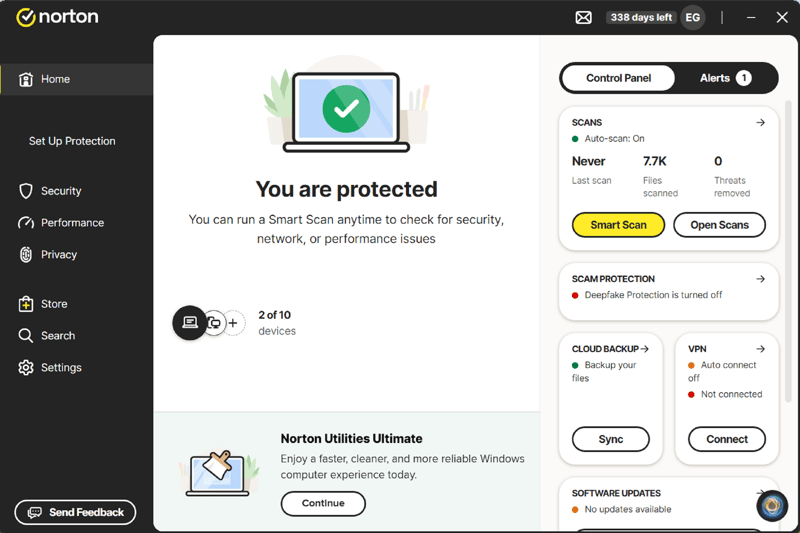
The VPN is part of the Norton 360 security suite.
Using it couldn't be simpler: pick a server and click “Connect.” The server list shows the fastest location, your recently used servers, and a few specialty servers (more on that shortly).
So all the key features sit just a few clicks away. That said, the interface feels a bit empty and unfinished. With the rest of Norton 360's features “missing,” the layout looks a little too big for a standalone VPN.
The navigation is also pretty bare-bones. There's plenty of room to fit extra info and features into the main window instead of tucking them away in the settings. A few convenience features (like a favorites list or details on server performance and load) would have done the app some good.
Performance, though, gave us no reason to complain. The app runs quickly, VPN connections came up within a few seconds during our testing, and we ran into no dropped connections or other issues.
Norton VPN features: strong lineup with a few gaps
The range of features is solid. In the main window, you pick your preferred server location and connect to the VPN. Alongside the regular locations, you can also connect to three special server types:
- 1.
P2P-optimized region: Norton automatically connects you to the fastest server suited for peer-to-peer downloads and torrenting.
- 2.
Double VPN: This routes your connection through two VPN servers. It boosts your anonymity but costs you some speed.
- 3.
IP rotation: This automatically changes your IP address at regular intervals during your session. That makes it harder to tie your activity to a single IP over time.
You'll find all the other features and settings under "Settings" > "VPN preferences."
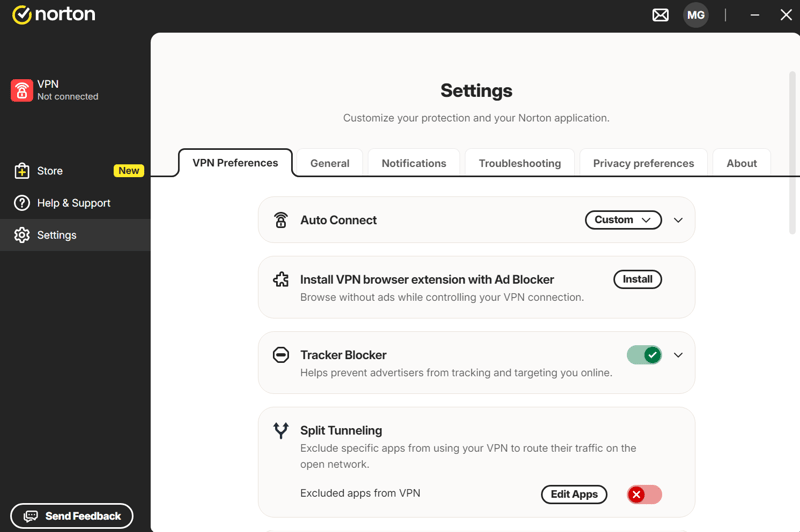
VPN settings on Norton.
Along with the protocol settings (more on that in the "Security and Privacy" section), Norton offers several other handy features here:
Automatic connection
If you want, Norton VPN connects to a server automatically, either every time you go online or only under conditions you set.Browser extension
Norton offers a VPN browser extension for Google Chrome, Mozilla Firefox, and Microsoft Edge with a built-in ad blocker.Tracking blocker
The built-in tracking blocker stops known ad and analytics trackers from following your browsing activity.Split tunneling
Split tunneling lets you divide your traffic: you decide which apps use the VPN tunnel and which keep running over your normal internet connection.Kill switch
If the VPN connection drops unexpectedly, the kill switch cuts your internet connection automatically. This keeps your data from being sent unprotected by accident.Post-quantum encryption
Post-quantum encryption is one of the big trending topics in IT security right now. It's designed to protect VPN connections against future attacks from quantum computers, which, in theory, could crack many encryption methods we consider "secure" today (more on that later).
So Norton covers the most important VPN features. That said, you'll have to do without a few advanced ones.
Norton Secure VPN doesn't offer a dedicated IP address, for example. Every time you connect, you get an IP address shared with other users. The service also doesn't support port forwarding, which lets you route incoming connections straight to your device.
In this review, we focus only on what Norton VPN offers. If you use it as part of Norton 360, you get plenty of other security features too, including malware protection, a password manager, cloud backup, dark web monitoring, and more.
Norton VPN on your phone: a solid app for the road
Norton Secure VPN also comes with a smartphone app to secure your mobile connection. It's available for Android and iOS, and we tested the Android version.

Norton VPN on a smartphone.
The smartphone app makes a good impression. It has a clean layout and is just as easy to use as the desktop version. All the key VPN features, from split tunneling to the kill switch, are available on mobile too. Performance is solid as well: the app responds quickly and reliably, and VPN connections come up within seconds.
Loaded with features and easy to use: Norton's VPN holds its own even apart from the antivirus suite. Both the desktop and smartphone apps work reliably and include all the VPN features you need day to day.
Compared to standalone VPN services, the desktop app still lacks a bit of polish, since it has to borrow the Norton 360 interface. It's also missing some advanced features like port forwarding and dedicated IP addresses. Even so, Norton VPN has nothing to hide next to specialized providers.
Server Network
The bigger a VPN provider's server network, the more choices you have when picking a location. It also raises your odds of finding a fast server near you, no matter where you are in the world.
Norton is in solid shape here. The provider runs more than 100 server locations worldwide, with physical VPN servers in over 65 countries. The rest are virtual: the server physically sits in another country, but it still gives you an IP address from the location you picked.
Physical and virtual servers
Region | Countries | Physical Server? |
|---|---|---|
North, Central & South America | Argentina | ✓ |
Bahamas | ✗ | |
Bermuda | ✗ | |
Brazil | ✓ | |
Chile | ✓ | |
Costa Rica | ✓ | |
Ecuador | ✓ | |
Jamaica | ✗ | |
Canada | ✓ | |
Colombia | ✓ | |
Mexico | ✓ | |
Panama | ✓ | |
Peru | ✓ | |
Puerto Rico | ✗ | |
USA | ✓ | |
Europe | Albania | ✓ |
Andorra | ✗ | |
Armenia | ✗ | |
Belgium | ✓ | |
Bosnia and Herzegovina | ✓ | |
Bulgaria | ✓ | |
Denmark | ✓ | |
Germany | ✓ | |
Estonia | ✓ | |
Finland | ✓ | |
France | ✓ | |
Georgia | ✗ | |
Greece | ✓ | |
Ireland | ✓ | |
Iceland | ✗ | |
Italy | ✓ | |
Jersey | ✗ | |
Croatia | ✓ | |
Latvia | ✓ | |
Liechtenstein | ✗ | |
Lithuania | ✓ | |
Luxembourg | ✓ | |
Moldova | ✓ | |
Monaco | ✗ | |
Montenegro | ✗ | |
Netherlands | ✓ | |
Norway | ✓ | |
Austria | ✓ | |
Poland | ✓ | |
Portugal | ✓ | |
Romania | ✓ | |
Serbia | ✓ | |
Slovakia | ✓ | |
Slovenia | ✓ | |
Spain | ✓ | |
Sweden | ✓ | |
Switzerland | ✓ | |
Czech Republic | ✓ | |
Turkey | ✓ | |
Tunisia | ✓ | |
Ukraine | ✓ | |
Hungary | ✓ | |
United Kingdom | ✓ | |
Cyprus | ✓ | |
Asia & Oceania | Australia | ✓ |
Azerbaijan | ✗ | |
Brunei | ✗ | |
Hong Kong | ✓ | |
India | ✗ | |
Indonesia | ✓ | |
Israel | ✓ | |
Japan | ✓ | |
Cambodia | ✗ | |
Laos | ✗ | |
Malaysia | ✓ | |
Myanmar | ✗ | |
Nepal | ✗ | |
New Zealand | ✓ | |
Pakistan | ✗ | |
Philippines | ✓ | |
Singapore | ✓ | |
South Korea | ✓ | |
Taiwan | ✓ | |
Thailand | ✓ | |
Vietnam | ✓ | |
Africa & Middle East | Algeria | ✗ |
Egypt | ✗ | |
Qatar | ✗ | |
Kenya | ✗ | |
Lebanon | ✗ | |
Libya | ✓ | |
Morocco | ✓ | |
Nigeria | ✓ | |
Saudi Arabia | ✗ | |
Senegal | ✗ | |
South Africa | ✓ | |
United Arab Emirates | ✗ |
As with most VPN services, the server network is strongest in Europe and North America. Nearly every major country is covered here, mostly with physical servers. The US, Canada, and the United Kingdom each offer several locations to choose from.
Coverage thins out in Asia, South America, Africa, and the Middle East, where Norton leans more on virtual locations. That's not unusual for VPN services, though.
Still, some competitors cast a wider net. Proton VPN, for example, offers servers in nearly 150 countries, including Uruguay, Sri Lanka, Bangladesh, Togo, and Uganda.
With more than 100 server locations and physical servers in over 65 countries, Norton offers good international coverage. Some VPN services reach even more countries, but the locations most users care about should be here.
Performance
A VPN usually slows down your internet connection a bit. After all, your data has to be encrypted and routed through a VPN server.
How much you notice that slowdown depends on a few things, including how busy the server is and how far you are from the VPN location you pick. That’s why speed is one of the most important factors in our VPN review.
Note: We’re currently reworking our VPN testing method. For our new VPN speed test, we’ll test every provider in our VPN comparison under identical conditions and with multiple measurements, so we can compare their speeds as objectively as possible.
Until our new speed test is ready, we’re basing Norton VPN’s performance score on manual checks. For Norton Secure VPN, we ran three speed tests: one without a VPN connection, one over the fastest available VPN server, and one over a very long-distance connection, in our case from Australia to Germany.
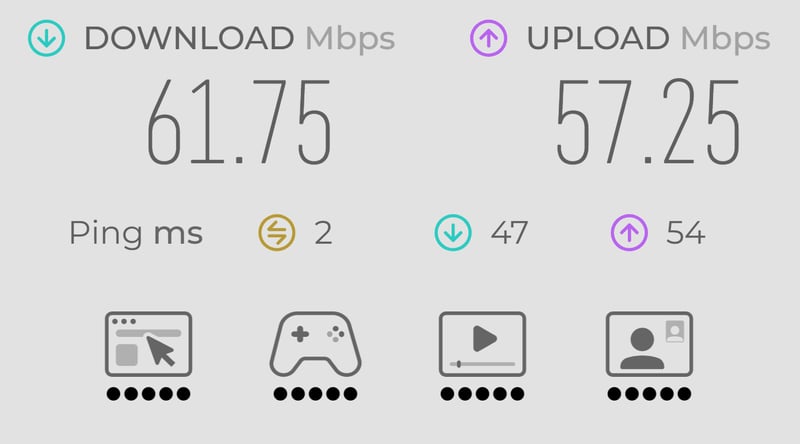
Our baseline: the connection without a VPN.
Without an active VPN connection, our starting speed was 61.75 Mbps download and 57.25 Mbps upload, with a latency of just 2 ms.
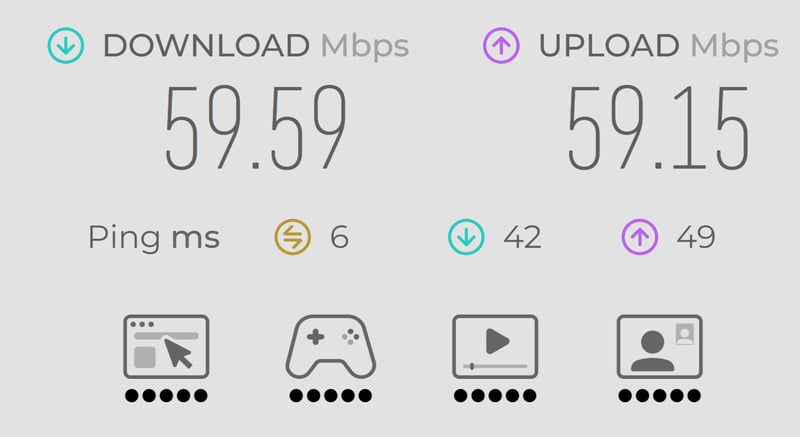
In our test, the fastest server barely cost us any speed.
With the fastest available VPN server, the speed stayed almost the same. The download dropped only to 59.59 Mbps, and the upload was even slightly higher at 59.15 Mbps. Latency rose just a little, to 6 ms. You'll barely notice a difference from a “normal” connection.
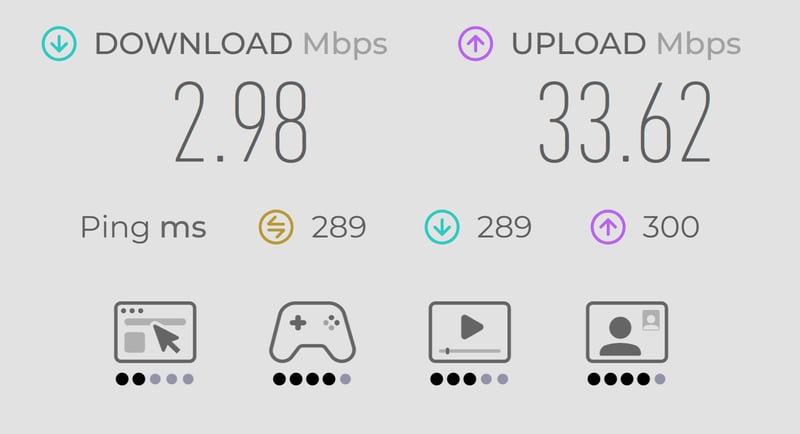
Over long distances, the speed drops sharply.
As expected, a VPN tunnel over long distances slows the connection down a lot. In our test from Australia to Germany, we reached only 2.98 Mbps for download and 33.62 Mbps for upload, with a latency of about 290 ms.
That's still fast enough for browsing, and video streaming worked pretty well despite the long distance (more on that shortly). But online gaming or larger downloads won't be any fun.
VPN providers in the speed test
For comparison, the table below shows the upload and download speeds of the VPNs from our speed tests so far.


Important: These numbers aren't directly comparable to the Norton results shown above, because we measured them under different conditions. We're also working on a new testing method that will let us compare providers even more consistently going forward.
Norton VPN in practice: fast connections, few hiccups
Numbers are one thing, but how a VPN feels in everyday use matters just as much. Here, Norton VPN gave us little to complain about. Setting up the VPN tunnel was always quick: we never had to wait long or restart the process several times, as we've had to with some other providers.
The VPN also ran smoothly in use. The connection stayed steady, and the usual annoyances that come with a VPN, like constant captcha prompts, rarely showed up in our test.
Solid streaming performance
Norton held its own with streaming, too. With most media libraries and streaming services we tried, we could unblock foreign content without any trouble:
Streaming service | Works with VPN? |
|---|---|
✓ | |
✓ | |
✓ | |
ZDF media library | ✓ |
ORF On (Austria) | ✗ |
SRF (Switzerland) | ✓ |
BBC iPlayer (United Kingdom) | ✓ |
TRT 1 (Turkey) | ✗ |
But we couldn't get around every provider's geoblocking. ORF and TRT wouldn't let us into Austria or Turkey, even with the VPN connected. Streaming quality also varied by platform. With some services, like BBC iPlayer, we could only stream in low quality.
In our test, Norton VPN impressed us with fast connections and steady performance overall. Connections came up quickly and stayed reliable, and streaming worked without a hitch most of the time.
With nearby servers, the speed loss was barely noticeable. Over longer distances, though, speeds dropped off sharply. We could also get past the geoblocks on most streaming services, if not all of them.
Security and Privacy
A VPN should not only encrypt your connection but also keep others from tracking what you do online. And by "others," we don't just mean hackers or your internet provider, but the VPN provider itself.
That's why it's not just the technical setup and security features that matter, but also whether you can trust the company behind the VPN.
Modern encryption and up-to-date protocols
Norton Secure VPN encrypts your internet connection with the AES-256 standard, the industry standard today, used by virtually every reputable VPN provider. So far, so good.
Norton is also up to date when it comes to VPN protocols. These protocols determine how your data is encrypted and transferred between your device and the VPN server.

WireGuard and OpenVPN (UDP and TCP) cover the most important protocols in use today. On top of that, Norton offers its own Mimic protocol, which disguises your VPN connection to get around VPN blocks.
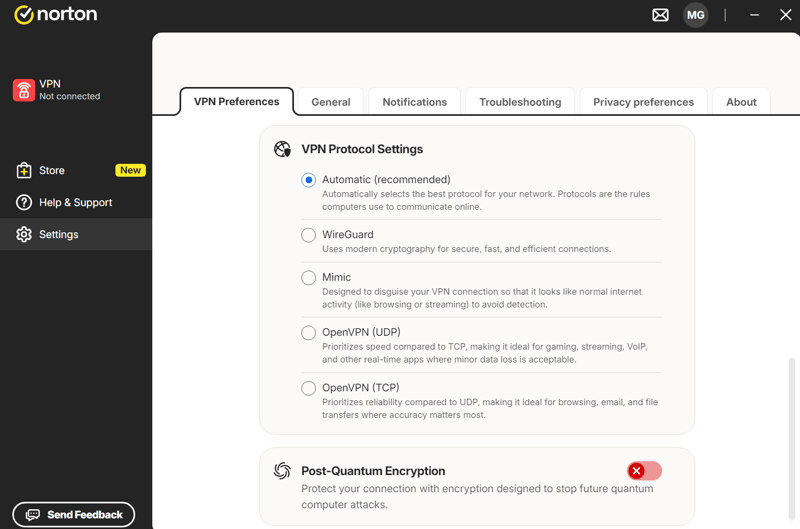
You can pick the VPN protocol in the settings.
By default, Norton picks the right protocol for you automatically. If you'd rather choose yourself, you can change it manually in the VPN protocol settings.
AES-256 is considered the gold standard for encrypting data today, but that won't necessarily hold forever. Quantum computers could one day break the encryption methods we rely on now.
If this so-called “Q-Day” ever arrives, it wouldn't just affect future connections. Attackers could follow a “harvest now, decrypt later” approach, collecting encrypted data today so they can decrypt it later with quantum computers.
That's why more and more VPN providers are adding “post-quantum resistant” protections meant to hold up against future attacks by quantum computers. Norton supports this kind of post-quantum cryptography, too. It's on by default with the Mimic protocol and optional with WireGuard.
How important this post-quantum protection will prove to be remains to be seen, but it's more than just a marketing gimmick. The BSI, Germany's federal cybersecurity agency, has spent years developing and standardizing quantum-resistant cryptography.
The security features also include a kill switch, a tracker blocker, and special tools like double VPN and a rotating IP address, all of which can give your privacy an extra layer of protection.
No issues in our leak tests
VPNs aren’t foolproof. Sometimes connection data leaks out even while you’re browsing through a VPN. That’s why we put Norton Secure VPN through our usual leak tests, checking whether IP, DNS, or WebRTC requests accidentally slipped outside the VPN tunnel.
Our test turned up no problems. Neither our IP address nor our DNS or WebRTC requests leaked:
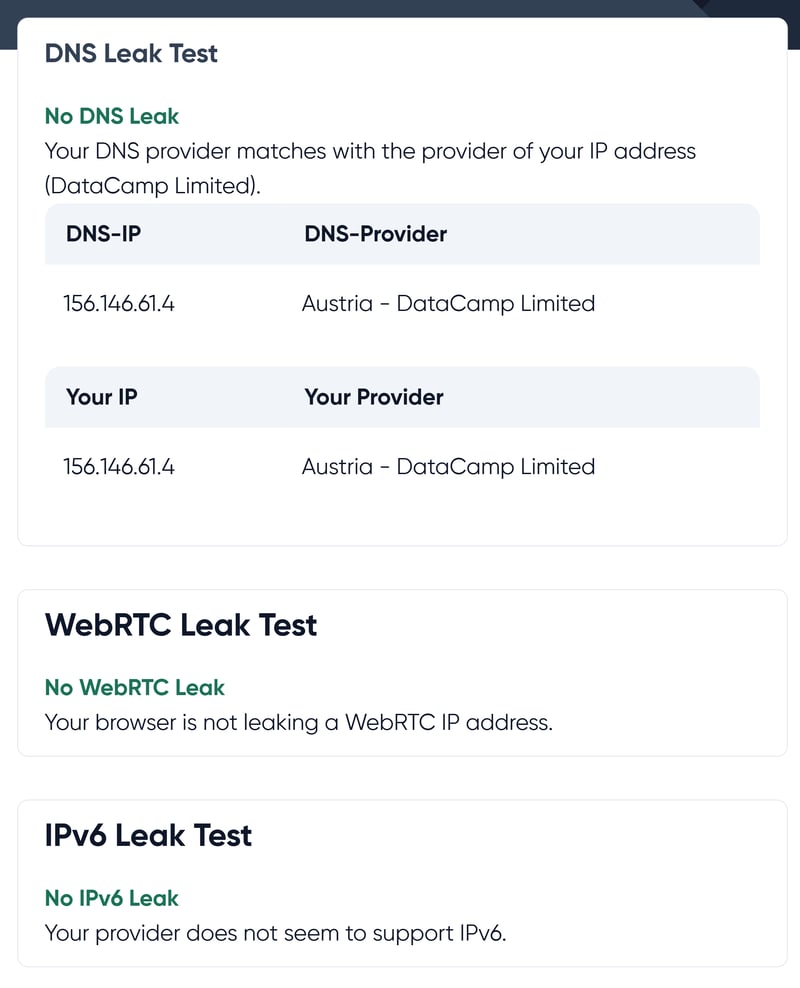
Our test showed no DNS, WebRTC, or IPv6 leaks.
How trustworthy are Norton and Gen Digital?
Security promises on paper are one thing. Whether a provider keeps them in practice is hard for you as a customer to verify, so you always have to place a certain amount of trust in the company. But that trust has to be earned, for example by handling security incidents openly.
Norton is owned by the U.S. cybersecurity company Gen Digital, which also owns the antivirus brands Avast, AVG, and Avira. With several hundred million users worldwide, it’s one of the biggest security software companies out there.
The company’s history isn’t free of controversy. Norton made negative headlines in 2022, when its antivirus software drew criticism for a built-in crypto miner. The miner was installed alongside the software to use idle processing power for mining Ethereum.
Symantec (the company Norton grew out of) also faced criticism several times over security flaws and problems with internal compliance processes.
Other brands now under Gen Digital have had their share of scandals too. One of the most serious was Avast’s Jumpshot affair: the company collected user data through browser extensions and sold it through its subsidiary Jumpshot. All of this happened before the Gen Digital takeover, though.
So Norton and Gen Digital don’t have a spotless record, but that’s rare for global companies of this size. We’re not aware of any specific scandals or privacy incidents tied directly to Norton VPN.
The U.S. headquarters isn’t ideal from a privacy standpoint. The United States belongs to the so-called Five Eyes alliance, and U.S. authorities can require companies to hand over data under certain conditions. That’s why it matters what data a VPN stores in the first place, which brings us to Norton’s no-logs policy.
A transparent no-logs policy with regular audits
In its no-logs policy, Norton promises not to track your browsing history, the destination of your traffic, your devices’ IP addresses, session length, or DNS requests.
According to the company, it collects only the data needed to run the service. That includes certain “connection events” used to monitor VPN performance and “application events,” such as which operating systems are in use.
You don’t have to take Norton’s word for it, either: the company has its no-logs policy audited regularly. At the time of our test, the most recent independent audit was carried out in 2025 by the security firm VerSprite, with the one before it just a year earlier.
From a technical standpoint, Norton’s security standards are high, which is exactly what we expect from an antivirus company. Your connection is encrypted to current standards, all the major VPN protocols are supported, and the key security features are there. We found no data leaks in our test.
That said, the company behind the service has had its share of missteps, including privacy and security controversies at both Norton and its parent company, Gen Digital. Its U.S. headquarters isn’t ideal from a privacy angle either. This is not a “privacy first” VPN.
Support
When the VPN acts up or you have a billing question, good customer support matters. Two things count most here: a clear help center and direct support that responds quickly and knows its stuff. Norton falls short on both.
A cluttered help section
Norton’s help center leaves a lot to be desired. The whole section feels disorganized. There’s a dedicated area for the VPN, but the help articles there aren’t sorted by category or topic.
On the homepage, where we'd expect a contact button or other help options, we found an ad for a “free upgrade” instead. It's not clear what Norton is trying to sell here: clicking the button just opens an empty shopping cart.
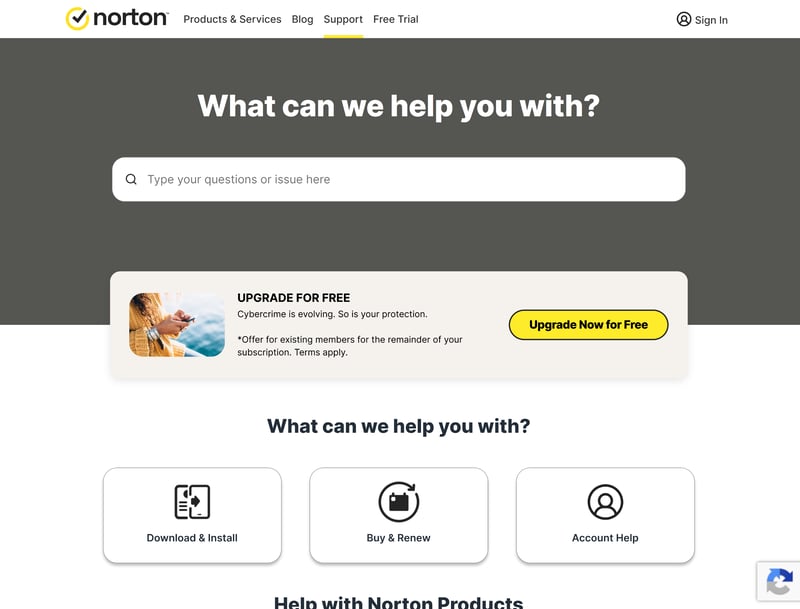
Norton's help center.
The search function wasn't much help either. After clicking a matching result, we often hit the error message “The page you requested is not available.” Finding quick answers to specific questions on our own proved difficult.
Weak direct support with an AI barrier
If you want to reach out directly, you'll have to hunt for the option first. The help center has no obvious button for live chat or other contact methods. We eventually found Norton's contact page through a quick Google search, and that detour is far from ideal.
Things don't get any easier from there. In the contact area, an AI chatbot greets you first. It's supposed to figure out your issue and suggest helpful pages. Only after we told it that it couldn't solve our problem and insisted on a human were we sent to the actual live chat.
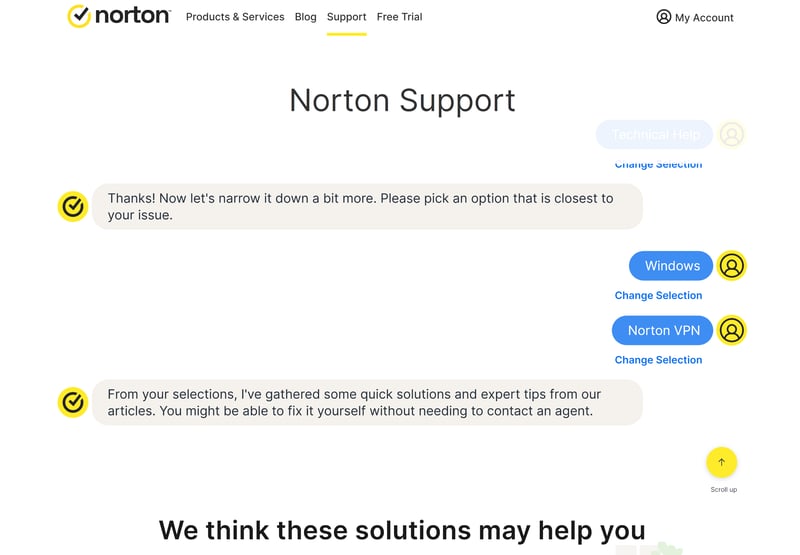
To reach the live chat, you first have to get past two bots.
But no Norton support agent waits there yet. Instead, AI bot No. 2 first hits us with a few troubleshooting suggestions, completely irrelevant to our question. So we had to ask for a human again to reach the queue for the real support chat.
After about ten minutes, someone finally replied. They didn't seem to know Norton's products very well, though, and clearly pasted canned text snippets instead of addressing our question. The responses also looked like they'd been auto-translated into German.
Support by phone
Besides the 24/7 chat, Norton also offers phone support. The German-language hotline is open Monday through Thursday from 9 a.m. to 8 p.m. and on Fridays from 9:30 a.m. to 8 p.m.
On the hotline (which you reach only after getting past AI bot #1), you again have to work through an unhelpful question-and-answer routine before an agent picks up. In our test, that took about ten minutes once more. The agent eventually helped us, but by then our patience had long since run out.
Customer support isn't one of Norton's strengths. The help center is confusing, several AI chatbots make it needlessly hard to reach a real person, and the live chat leaves a lot to be desired. If you want a provider you can reach quickly and reliably when it counts, Norton isn't the right choice.
Pricing
Norton VPN is available either as a standalone service or as part of the Norton 360 antivirus suite. The standalone version comes in three plans: Standard, Plus, and Ultimate.
For now, all plans are only available as annual subscriptions. Monthly billing is currently offered only in the U.S.
The plans differ mainly in the number of devices and the range of features.
Standard and Plus protect up to five devices at once.
The Plus plan adds features like dark web monitoring, AI-powered phishing protection, a password manager, and online backup. The VPN apps for Google TV, Fire TV, and Apple TV also come only with this plan and up.
The Ultimate plan raises the limit to ten devices and adds parental controls.
Here's a look at Norton's VPN plans side by side:
| Standard | Plus | Ultimate | |
|---|---|---|---|
| Monthly price | $5.00 | $6.67 | $7.92 |
| Contract period (months) | 12 | 12 | 12 |
| Limits | |||
| Data volume | unlimited | unlimited | unlimited |
| Number of countries | 90 | 90 | 90 |
| Devices | 5 | 5 | 10 |
| Features | |||
| Streaming allowed | ✓ | ✓ | ✓ |
| P2P allowed | ✓ | ✓ | ✓ |
| Tor access | ✗ | ✗ | ✗ |
| Double VPN | ✓ | ✓ | ✓ |
| Dedicated IP | ✗ | ✗ | ✗ |
| Add-ons | |||
| Ad blocker | ✓ | ✓ | ✓ |
| Phishing protection | ✗ | ✓ | ✓ |
| Malware protection | ✗ | ✓ | ✓ |
| Antivirus | ✗ | ✗ | ✗ |
| Password manager | ✗ | ✓ | ✓ |
| Cloud storage | ✗ | ✓ | ✓ |
| Data leak monitoring | ✗ | ✓ | ✓ |
| Scam call protection | ✗ | ✗ | ✗ |
At two to three dollars a month, all of Norton's plans look pretty cheap, at least at first. Like most VPN providers, Norton reels you in with steep first-term discounts. After that, prices jump sharply, sometimes tripling depending on the plan.
So keep an eye on the renewal prices and cancel in time if you need to (or turn off auto-renewal).
Norton's entry-level prices are among the lowest on the market, which makes the VPN attractive at first. It gets noticeably more expensive after the first term, but the prices still stay reasonable. That said, Norton VPN isn't a good fit for short-term use: it's only available as an annual subscription.
Conclusion: More Than Just an Antivirus Add-On
Norton's VPN isn't just an extra feature bundled with the company's antivirus suite. It also holds its own as a standalone VPN. It's easy to use, covers the most important features, and meets high security standards, including modern VPN protocols, regular no-logs audits, and post-quantum cryptography.
Performance was solid in our test, too. Norton set up VPN connections quickly, kept them stable, and delivered good speeds. We had no trouble getting past the geo-blocks on most streaming services.
If you're specifically after the most privacy-friendly VPN possible, Norton probably won't win you over. It's not a “privacy-first” provider but part of a large U.S. security company whose history includes its share of privacy controversies. Don't expect strong support, either.
It's also missing a few advanced features like port forwarding and dedicated IP addresses. If you can do without those (and Norton's corporate history doesn't bother you), you'll get a thoroughly solid VPN that works reliably day to day and holds up well against many established providers.

Customer Reviews
What do Norton customers think about the VPN? We searched review sites like Trustpilot and others, focusing on feedback about the VPN specifically. Norton earns solid ratings overall, but there are plenty of critical voices too:
Easy to use
Many users praise the clean interface and simple setup. Beginners in particular find the VPN easy to handle.Reliable day-to-day
Many reviews describe the VPN as stable and dependable.A good sense of security
Many customers value the VPN as part of the Norton 360 package. It adds an extra sense of security, especially on public Wi-Fi or when banking online.A handy all-in-one package
Users often see the VPN as a useful part of the Norton suite. If you already use Norton 360, having the VPN built in beats signing up with a separate provider.
Inconsistent speeds
The most common complaint is about performance. Several users report slow or unstable connections, especially when streaming, gaming, or downloading large files.Problems with automatic connection
Some customers say the VPN doesn't connect automatically as it should, or that it turns itself on and off on its own. This seems to happen more often on Android.Compatibility issues with certain services
Several reviews report trouble with email programs (like Vodafone Mail or Outlook), websites, or updates while the VPN is active.Weak customer support for VPN issues
Several negative reviews criticize the support team for being unhelpful with VPN problems. Agents often suggest only standard fixes like reinstalling, without addressing the real cause.