Best Ecommerce Website Builder 2026: 11 Platforms Tested & Ranked


Building an online store is easier than ever. Modern ecommerce website builders handle most of the heavy lifting for you, from payments and inventory management to hosting and design. But which platform is actually the best?
We tested 11 of the most popular ecommerce website builders to help you find the right platform for launching your store.


The 5 Best Ecommerce Website Builders in 2026
We tested 11 of the most popular ecommerce website builders and set up a small online store on each platform to try out their features hands-on. More on our methodology and testing process later — first, let’s take a look at our top picks.


Shopify: The Best All-Around Ecommerce Platform for Scalability
Shopify* is probably the biggest name in ecommerce, and for good reason. The Canadian platform combines the ease of use of a no-code website builder with the powerful sales and product management tools of a dedicated ecommerce platform. Whether you're launching your first small shop or managing a larger catalogue with international sales, Shopify was built to handle it.
What do we like about Shopify?
Shopify strikes a balance that very few ecommerce platforms manage: it stays approachable for beginners while still offering enough depth for more serious ecommerce operations.
Powerful sales features
Unlike quite a few other contenders on this list, Shopify was designed from the ground up for online retail. That focus shows throughout the platform, especially in areas like product management, inventory, checkout, and order handling.Scales well with growing stores
Shopify works just as well for smaller stores as it does for larger businesses with thousands of products, multiple sales channels, or international customers. The platform is built to grow with your business.Huge app ecosystem
Shopify’s app store is massive. If something isn’t built into the platform already, there’s usually an app for it — whether that’s subscriptions, advanced filtering, accounting, SEO tools, or automation.Flexible for developers
If the built-in tools aren’t enough, Shopify gives developers a lot of room to customize things through code, APIs, metafields, and custom storefront features.
Who is Shopify for?
Shopify works for a pretty broad range of users. Beginners can launch a store quickly without much technical knowledge, while larger businesses still get the tools needed for more advanced catalogues, international selling, and multichannel setups.
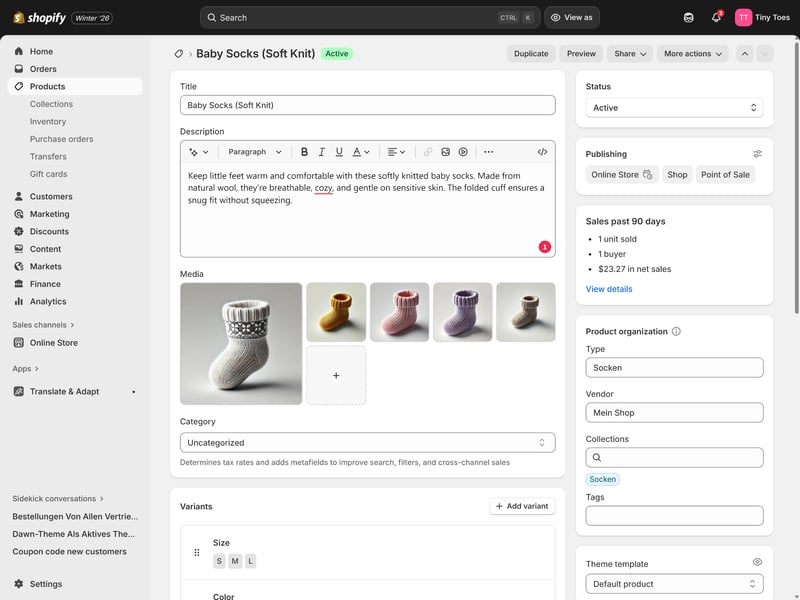
In Shopify's product editor, you can add and manage your products.
That doesn't mean Shopify is the best fit for every project. If you only need a simple website with a small shop attached to it, or mainly sell digital products, a simpler platform might make more sense.
What makes Shopify stand out from the competition?
Shopify doesn’t really dominate because of one killer feature. What makes it stand out is how polished and mature the overall ecommerce experience feels.
The backend is fast and well-organized, the core sales features are reliable, and the platform generally avoids the annoying limitations or rough edges that you'll run into with many smaller ecommerce builders. At the same time, Shopify still stays pretty approachable for non-technical users, even if there’s a bit of a learning curve.
That balance between accessibility, scalability, and depth is what makes Shopify so hard to beat.
What are the downsides of Shopify?
Despite being the market leader, Shopify definitely isn’t perfect.
The costs can add up
Shopify’s monthly subscription is only part of the story. Premium themes, paid apps, transaction fees, and third-party tools can push your monthly costs up pretty quickly.Limited no-code design freedom
The built-in website builder works well for standard layouts, but it’s not as flexible as website builders like Wix. To build a highly customized storefront, you’ll usually need custom code or a developer.Some strange limitations
Shopify is quite powerful overall, which makes some of its more arbitrary restrictions stand out even more. One example is the limit of just three variant options per product.Weak customer support
While Shopify’s help center is solid, direct support often feels scripted and unhelpful, especially for more specific technical questions.
WooCommerce: The Best Ecommerce Platform for Flexibility and Control
WooCommerce* is the official ecommerce plugin for WordPress and one of the most widely used online store systems in the world. Unlike closed website builders like Shopify or Wix, WooCommerce gives you full control over your store’s setup, design, and technical infrastructure, but also requires a lot more hands-on work in return.
What do we like about WooCommerce?
WooCommerce’s biggest strength is flexibility. Since it’s built on WordPress and fully open-source, there are very few limits to what you can build or customize.
Full control over your store setup
WooCommerce isn’t tied to a closed ecosystem. You choose your own hosting provider, payment gateways, themes, plugins, and technical setup, which gives you much more ownership and flexibility long term.Extremely customizable
With the full power of WordPress at your disposal — themes, plugins, page builders, and custom code —, you can build almost any type of online store you want.Huge plugin ecosystem
If you're missing a specific feature, there’s usually a plugin for it. The ecosystem of apps and integrations is enormous.No platform subscription fees
WooCommerce itself is free to use. There are no mandatory monthly platform fees or extra transaction charges imposed by WooCommerce itself.
Who is WooCommerce for?
If you're already familiar with WordPress (or already have a WordPress website that you want to turn into an online store) WooCommerce is the obvious choice.
It’s also a strong fit for businesses that need more flexibility than standard ecommerce website builders offer, whether that’s custom functionality, unusual product setups, or deeper technical control.
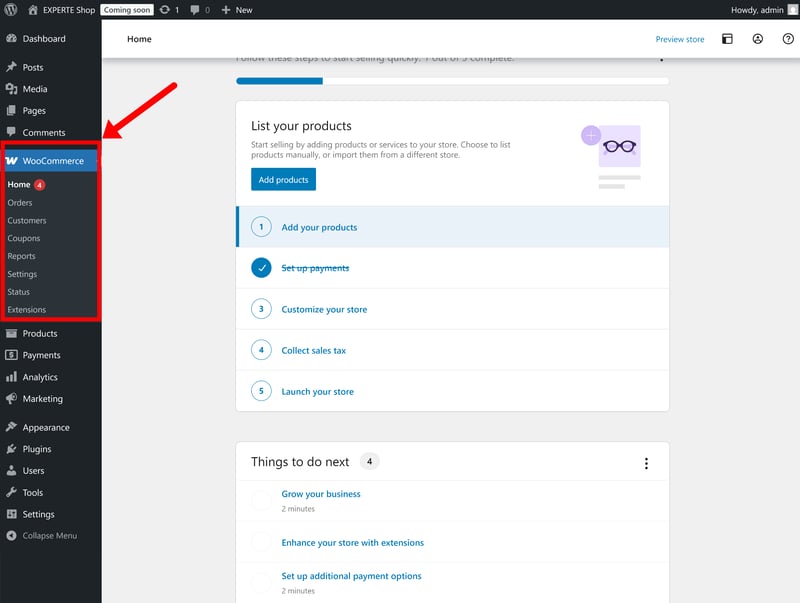
WooCommerce integrates directly into WordPress.
WooCommerce isn’t the easiest option for beginners, though. Compared to all-in-one platforms, setup and maintenance require much more technical involvement.
What makes WooCommerce stand out from the competition?
The biggest difference is that WooCommerce is open-source and self-hosted. Unlike Shopify, Squarespace, or Wix, you aren’t signing up for a closed service where everything is managed for you.
Instead, WooCommerce gives you the building blocks to create your own ecommerce setup. You’re responsible for your hosting environment, plugins, updates, and overall site maintenance yourself. But in exchange, you get the freedom to build almost anything you want, without the platform restrictions that come with closed ecommerce systems.
What are the downsides of WooCommerce?
All that freedom comes at a cost: WooCommerce definitely requires more work than hosted ecommerce builders.
More technical setup
WooCommerce isn’t plug-and-play, at least not as much as Shopify & Co. You’ll need to arrange hosting, install WordPress, configure plugins, and handle the technical setup yourself.More ongoing maintenance
You’re responsible for updates, backups, security, and keeping your plugins and themes compatible over time. With all-in-one platforms like Shopify or Wix, most of that maintenance is handled behind the scenes for you.Many features require plugins
WooCommerce is a modular platform, so the core system is intentionally quite lean. You’ll likely end up installing quite a few plugins, and the costs for premium extensions can add up quickly.Plugin bloat can become a problem
Since WooCommerce relies so heavily on plugins, stores can become bloated over time. Too many plugins can lead to slower performance, conflicts, and a higher maintenance burden.
Wix: A Powerful Website Builder With Solid Ecommerce Features
Unlike Shopify or WooCommerce, Wix* wasn’t built purely for ecommerce. It’s a website builder first, with online store features layered on top. That means a much stronger focus on no-code design and visual customization, but the sales tools are much less advanced than on dedicated ecommerce platforms.
What do we like about Wix?
Wix isn’t an ecommerce platform with a website builder attached. It’s a website builder that also happens to support online stores. That distinction explains both its strengths and its weaknesses.
High design flexibility
Wix’s drag-and-drop editor gives you a lot more creative freedom than most website builders. It’s a free-form editor that lets you position and resize elements almost anywhere on the page.Huge template library
Wix offers hundreds of ecommerce templates covering everything from fashion stores to restaurants and creator brands. All templates are included for free and can be customized heavily.Broad ecommerce features
Wix’s ecommerce features are pretty comprehensive (at least for a generalist website builder). It's got everything you need to run a smaller store.Developer tools
If the visual editor isn’t enough, Wix also offers a developer environment called Velo. This allows you to add custom logic, APIs, databases, and JavaScript functionality without fully leaving the Wix ecosystem.
Who is Wix for?
Wix works best for small and mid-sized stores where design and presentation matter just as much as (if not more than) the ecommerce side. It might be a good fit for brands that want a visually polished website with a shop built in, rather than a purely sales-focused storefront.
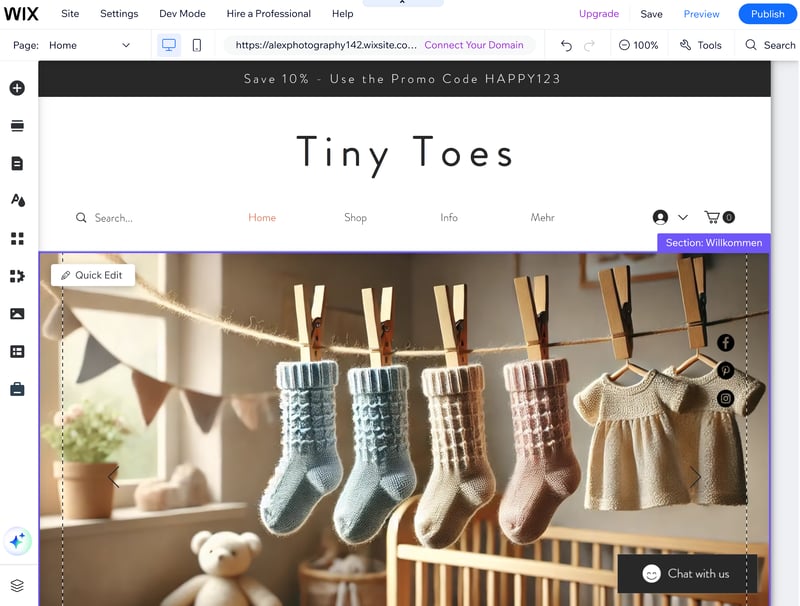
Wix stands out with a flexible website editor that's been expanded with powerful ecommerce features.
If ecommerce is the core of your business, though, a dedicated ecommerce platform like Shopify or WooCommerce is the much better long-term choice. Wix wasn't really built for large product catalogues, advanced workflows, or aggressive scaling.
What sets Wix apart from the competition?
Wix’s biggest strength is its website editor. Compared to most ecommerce platforms, it gives you far more control over page layouts and visual design without requiring code.
And while Wix’s ecommerce tools are no match for dedicated platforms like Shopify and WooCommerce, they’re more capable than what you get from many other all-purpose website builders. For many small and mid-sized stores, Wix strikes a decent enough balance between design flexibility and ecommerce functionality.
What are the downsides of Wix?
Wix packs a lot into one platform, but it’s still “just” a website builder. It’s not really designed for larger or highly complex online stores, and even the core website-building experience has a few rough edges.
Cluttered, overly complex interface
Wix is aimed at beginners, but the backend can still feel messy and overloaded. With so many tools, menus, settings, and AI features packed into the platform, navigating everything isn’t always intuitive.Sluggish editor and backend
The dashboard and editor can get annoyingly slow and laggy at times, which makes working on your site more frustrating than it should be.Lack of scalability
Wix wasn’t built for larger ecommerce operations. As your catalogue grows and your workflows become more complex, its restrictions could become a dealbreaker.
IONOS: A Foolproof Website Builder With Surprisingly Strong Ecommerce Features
IONOS* is best known as a hosting provider, but it also offers a website builder with built-in ecommerce capabilities. The platform is clearly aimed at complete beginners: everything is designed to get a simple online store up and running as quickly and easily as possible.
Under the hood, though, there’s more going on than you might expect: the ecommerce side is powered by Ecwid, which gives IONOS a surprisingly capable set of sales tools.
What do we like about IONOS?
IONOS combines an extremely beginner-friendly website builder with a surprisingly capable set of ecommerce tools.
Ultra-intuitive website builder
The website builder is so simplified that it’s almost fool-proof. Even complete beginners should be able to master it quickly.Decent ecommerce tools
Under the hood, IONOS uses Ecwid as its ecommerce engine. That gives you access to a robust set of sales features you wouldn’t really expect from such a stripped-back website builder.
Who is IONOS for?
IONOS is aimed at beginners and smaller businesses that want to launch a simple online store without much technical setup or a steep learning curve.
With Ecwid handling the ecommerce backend, IONOS offers a lot more ecommerce functionality than you’d initially expect from such a simple website builder. But that doesn’t mean the platform is well suited for larger or more complex online stores. Since the website builder itself is so simplified and restrictive, a lot of Ecwid’s more advanced ecommerce features end up feeling underused.
IONOS is much better suited to smaller catalogues and simple stores where ease of use matters more than flexibility or customization.
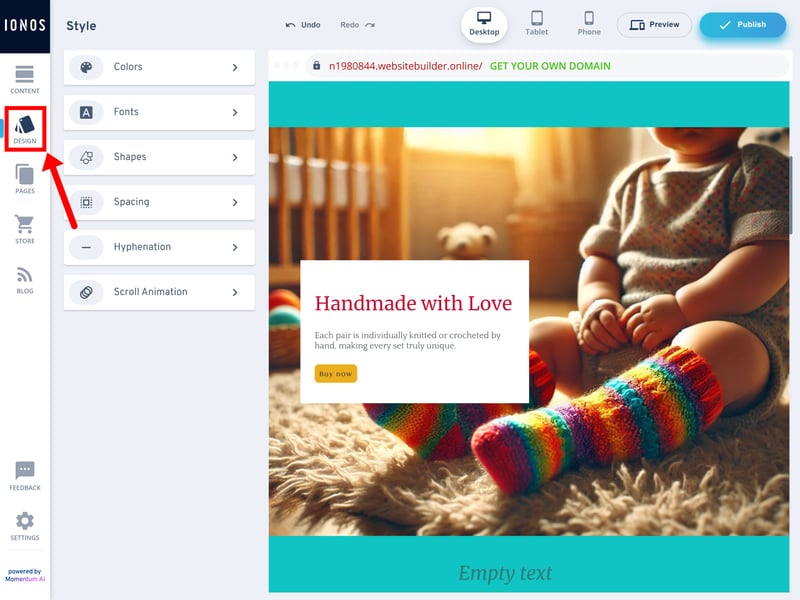
It's hard to go wrong with the IONOS website editor.
What sets IONOS apart from the competition?
The combination of an ultra-simple website builder and a surprisingly capable ecommerce backend is quite unusual. The result is a bit uneven, but it does give beginners access to stronger sales features than you’d get from similarly newbie-friendly website builders.
What are the downsides of IONOS?
In the end, the combination didn’t quite work for us, since IONOS’s website builder and Ecwid’s shop platform feel like two separate systems that never fully come together.
Very little creative freedom
The editor is easy to use, but also pretty restrictive. You’re mostly working within fixed layouts, and there’s not much room to build something that feels truly unique.Uneven experience
Ecwid’s ecommerce tools are actually pretty capable, but many of the features feel wasted in such a stripped-back website builder. It often feels like the storefront editor is holding the ecommerce side back.Pushy onboarding and upselling
IONOS isn’t the most consumer-friendly platform when it comes to signup and billing. Registration is a bit of an upselling marathon, there’s no free trial, and pricing could be more transparent.
Ecwid: A Flexible Ecommerce Platform for Existing Websites
Ecwid* is short for “ecommerce widget”, which sums up the platform’s main selling point: instead of rebuilding your whole website from scratch, you can simply plug Ecwid’s store system into a site you already have — like a widget that adds ecommerce features.
Ecwid also comes with its own built-in website builder, though. It’s fairly basic, but good enough for smaller stores that just need a simple website.
What do we like about Ecwid?
Ecwid’s biggest strength is flexibility. You can either use it as a standalone ecommerce platform or simply bolt it onto an existing website.
Easy integration with existing websites
Ecwid seamlessly integrates with platforms like WordPress, Wix, or pretty much any website that supports embed code. If your site is already up and running, you don’t need to rebuild everything from scratch.Easy-to-use backend
The Ecwid platform is pretty beginner-friendly overall. The backend is well organized, easy to navigate, and keeps the website builder, store management, and sales channels clearly separated.Robust ecommerce features
Ecwid handles the essentials well. Product management, variants, discounts, filters, and multichannel selling all work reliably and feel fairly polished.
Who is Ecwid for?
Ecwid makes the most sense for businesses that already have a website and simply want to add a store without rebuilding everything from scratch.
It’s also a good fit for smaller online stores that want solid ecommerce functionality without dealing with the complexity of larger platforms like Shopify or WooCommerce.
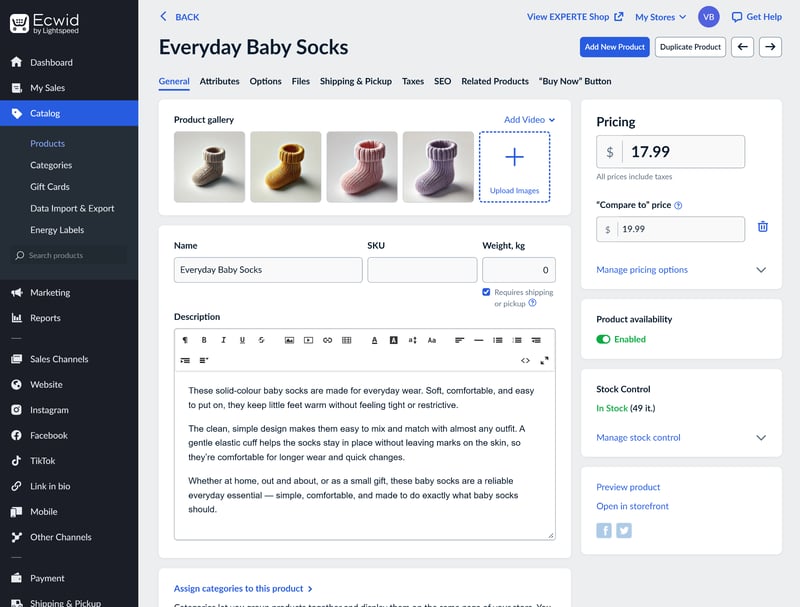
Ecwid can either run as a standalone store or integrate into an existing website.
What sets Ecwid apart from other providers?
Most ecommerce platforms want you to build your whole website with them. Ecwid is different: you can simply plug its shop system into a website you already have. That flexibility is still Ecwid’s biggest strength.
What are the downsides of Ecwid?
Ecwid works very well as a modular ecommerce backend, but the all-in-one website-builder experience is less convincing.
Limited design flexibility
Ecwid's “Instant Site” builder is intentionally simple, but also fairly restrictive. You aren’t so much building a page as you are filling in a pre-built template.Strict product limits on cheaper plans
The lower-tier plans cap you at just 10 or 100 products, so you'll have to switch to a more expensive plan pretty quickly.No free trial or free plan
Ecwid used to offer one of the best free plans in ecommerce, but that’s gone. There’s not even a free trial anymore, so you have to pay upfront.
Alternatives
Our top 5 reflect the platforms that performed best across different use cases — but they’re far from the only ecommerce platforms on the market. Here's our full ranking, with links to our in-depth reviews:


How We Tested the Ecommerce Website Builders
Ecommerce website builders all promise roughly the same thing: an easy way to launch and manage an online store, even for users with limited technical skills. How well they actually deliver on that promise varies quite a bit, though.
We put every platform through the same testing process. Besides comparing features and pricing, we also built a small store with each builder to see how they actually perform in practice. That let us evaluate not just the advertised features, but how the platforms actually feel to use in day-to-day store management.
Each builder was scored across six categories, adding up to a total of 100 points. Here’s how the scoring breaks down:
- 1.
Setup & Ease of use (15%)
- 2.
Templates & Design (15%)
- 3.
Product Management (20%)
- 4.
Sales Features (20%)
- 5.
Customer Support (10%)
- 6.
Pricing (20%)
Each category receives its own score, which then feeds into the final overall rating.
We’ll go through the individual categories in more detail below. But first, here’s the full evaluation chart:
 Shopify |  WooCommerce |  Wix |  IONOS |  Ecwid |  BigCommerce |  Squarespace |  Square |  Hostinger |  Sellfy |  Jimdo |
|---|
| Shopify | WooCommerce | Wix | IONOS | Ecwid | BigCommerce | Squarespace | Square | Hostinger | Sellfy | Jimdo | |
|---|---|---|---|---|---|---|---|---|---|---|---|
Setup & Ease of Use15% | |||||||||||
3/4 | 2.5/4 | 2.5/4 | 2/4 | 3/4 | 3/4 | 3/4 | 3/4 | 3/4 | 3/4 | 2.5/4 | |
6/8 | 5/8 | 5/8 | 5/8 | 5/8 | 5.5/8 | 6/8 | 6/8 | 6/8 | 6/8 | 6/8 | |
3/3 | 2.5/3 | 1.5/3 | 2.5/3 | 2.5/3 | 1.5/3 | 1.5/3 | 2/3 | 2.5/3 | 3/3 | 2/3 | |
Templates & Design15% | |||||||||||
2/2 | 2/2 | 2/2 | 0/2 | 0/2 | 1/2 | 1/2 | 0/2 | 1/2 | 0/2 | 0/2 | |
2.5/3 | 3/3 | 2.5/3 | 1/3 | 1.5/3 | 2/3 | 3/3 | 1.5/3 | 2/3 | 1.5/3 | 1/3 | |
3.5/4 | 3/4 | 3/4 | 1.5/4 | 2/4 | 2.5/4 | 2.5/4 | 2/4 | 3/4 | 1.5/4 | 1.5/4 | |
4/4 | 4/4 | 3/4 | 1/4 | 2/4 | 2.5/4 | 2.5/4 | 1.5/4 | 3/4 | 1/4 | 1.5/4 | |
2/2 | 2/2 | 2/2 | 0.5/2 | 1/2 | 2/2 | 1/2 | 0/2 | 1/2 | 0.5/2 | 0.5/2 | |
Product Management20% | |||||||||||
3/4 | 1.5/4 | 4/4 | 2.5/4 | 2.5/4 | 2/4 | 3/4 | 1.5/4 | 2.5/4 | 1.5/4 | 1.5/4 | |
3/3 | 3/3 | 2/3 | 2.5/3 | 2.5/3 | 2.5/3 | 2/3 | 2.5/3 | 1.5/3 | 2/3 | 1/3 | |
4/6 | 6/6 | 3.5/6 | 6/6 | 6/6 | 5/6 | 4/6 | 4/6 | 5/6 | 5.5/6 | 0/6 | |
3/3 | 2/3 | 2.5/3 | 2.5/3 | 2.5/3 | 3/3 | 2/3 | 1.5/3 | 1.5/3 | 1/3 | 1.5/3 | |
2/2 | 2/2 | 1.5/2 | 1/2 | 2/2 | 1.5/2 | 1.5/2 | 0.5/2 | 1/2 | 0.5/2 | 1/2 | |
2/2 | 2/2 | 1/2 | 1.5/2 | 1.5/2 | 2/2 | 1.5/2 | 1.5/2 | 1/2 | 1/2 | 1/2 | |
Sales Features20% | |||||||||||
3/3 | 2/3 | 2/3 | 3/3 | 3/3 | 2/3 | 2.5/3 | 1.5/3 | 1/3 | 1.5/3 | 0.5/3 | |
3/3 | 2/3 | 2.5/3 | 2/3 | 2/3 | 2.5/3 | 2/3 | 2/3 | 1.5/3 | 1/3 | 1.5/3 | |
3/3 | 2/3 | 2.5/3 | 3/3 | 3/3 | 3/3 | 2/3 | 2/3 | 1/3 | 2/3 | 1/3 | |
3/3 | 2.75/3 | 2.75/3 | 2.75/3 | 2.75/3 | 2.5/3 | 2/3 | 0.5/3 | 1/3 | 0.75/3 | 0.75/3 | |
2/2 | 2/2 | 1.5/2 | 1.5/2 | 1.5/2 | 2/2 | 1.5/2 | 2/2 | 1/2 | 1/2 | 1/2 | |
6/6 | 6/6 | 5/6 | 4.5/6 | 5/6 | 5/6 | 3/6 | 3/6 | 1/6 | 2.5/6 | 1/6 | |
Customer Support10% | |||||||||||
1.5/2 | 2/2 | 2/2 | 1.5/2 | 2/2 | 2/2 | 1.5/2 | 1/2 | 1/2 | 1.5/2 | 1/2 | |
1/2 | 0.5/2 | 1/2 | 1.5/2 | 1.5/2 | 2/2 | 1/2 | 2/2 | 1/2 | 1/2 | 1/2 | |
1/3 | 0/3 | 1/3 | 2/3 | 1.5/3 | 1.5/3 | 1/3 | 2/3 | 2/3 | 3/3 | 2/3 | |
0/3 | 0/3 | 1/3 | 2/3 | 1/3 | 0/3 | 0/3 | 1/3 | 2/3 | 2/3 | 1/3 | |
Pricing20% | |||||||||||
2/6 | 4/6 | 5/6 | 4/6 | 3/6 | 3/6 | 4/6 | 5/6 | 6/6 | 4/6 | 5/6 | |
5/6 | 6/6 | 6/6 | 6/6 | 3/6 | 0/6 | 6/6 | 6/6 | 6/6 | 0/6 | 4/6 | |
3/3 | 3/3 | 3/3 | 1/3 | 0/3 | 0/3 | 0/3 | 3/3 | 0/3 | 0/3 | 0/3 | |
2/3 | 2.5/3 | 0.5/3 | 1.5/3 | 2/3 | 1.5/3 | 1.5/3 | 2/3 | 3/3 | 2/3 | 3/3 | |
1/2 | 2/2 | 2/2 | 1/2 | 0/2 | 2/2 | 2/2 | 2/2 | 1/2 | 2/2 | 1.5/2 | |
Setup & Ease of Use
Some ecommerce website builders are clearly aimed at complete beginners, while others expect a bit more technical expertise. But all of them claim you can build an online store without coding or design experience. We wanted to see how true that actually is, and how smooth the day-to-day experience feels once you start working with the platform properly.
Getting started
First impressions matter. A good ecommerce builder should make getting your first store online feel straightforward, not frustrating. We looked at things like the signup process, account setup, onboarding flow, and how quickly you can realistically start building. Free trials or free plans were a big plus, especially when they didn’t require payment details upfront.
We also paid attention to the overall experience around signup. Aggressive upselling, confusing checkout flows, or unnecessary friction all counted against a platform. IONOS, for example, quietly added an extra product to our cart during checkout — something we definitely weren’t thrilled about.
Backend, editor, and usability
Most ecommerce website builders follow a fairly similar structure, with a central backend for managing products, orders, payments, and settings, plus a separate editor for building and customizing the storefront itself.
We tested both parts extensively to see how intuitive they actually are in practice. Are important settings easy to find? Do workflows feel natural and fluid? Can beginners find their way around without constantly relying on documentation?
We also looked at onboarding features like setup guides, checklists, and tooltips, especially for users launching their first store.
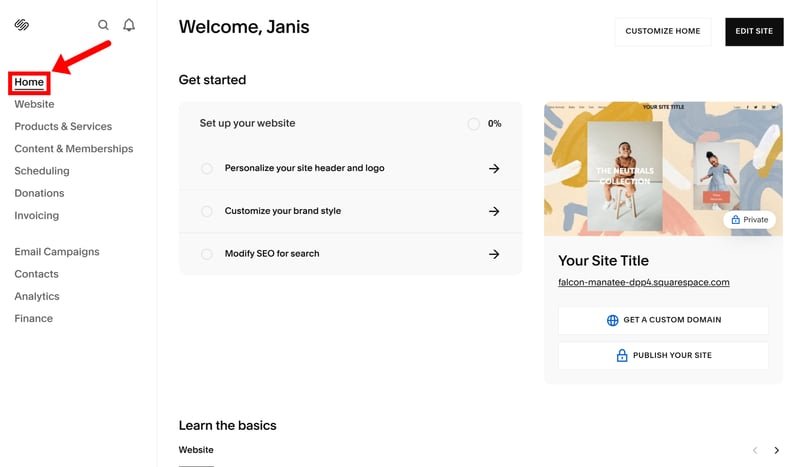
Setup guides and onboarding checklists are a nice plus.
Performance mattered as well. Slow dashboards, laggy editors, and long loading times quickly become annoying when you spend hours managing products or updating your store.
Templates & Design
In ecommerce, presentation plays a huge role in whether people trust your store and feel confident buying from it. Your storefront needs to look professional, fit your brand, and present products in an appealing way.
At the core, this category comes down to two things: the quality and variety of the available templates, and how much freedom you get to customize them.
Templates and design quality
The first obvious metric is the number of templates available. Some builders only offer a handful of themes, while others come with hundreds or even thousands.
Here’s how the platforms in our comparison stack up:
| Number of templates | |
|---|---|
 | 3,000 |
 | 1,000 |
 | 500 |
 | 225 |
 | 190 |
 | 170 |
 | 70 |
 | 47 |
 | 34 |
 | 12 |
 | 11 |
Quantity alone doesn’t tell the full story, though. We also looked at how modern, polished, and versatile the templates actually are. A good ecommerce template should work well on mobile devices, load cleanly, and suit different types of stores — whether that’s fashion, electronics, restaurants, services, or creator brands.
Website editor and customization
Templates are just the starting point. What really matters is how much control you have once you start customizing the store yourself.
All the platforms we've tested come with a visual no-code editor, but the editing experience varies a lot. Some builders — such as Wix — give you near-total freedom with drag-and-drop editing, allowing you to position elements almost anywhere on the page.
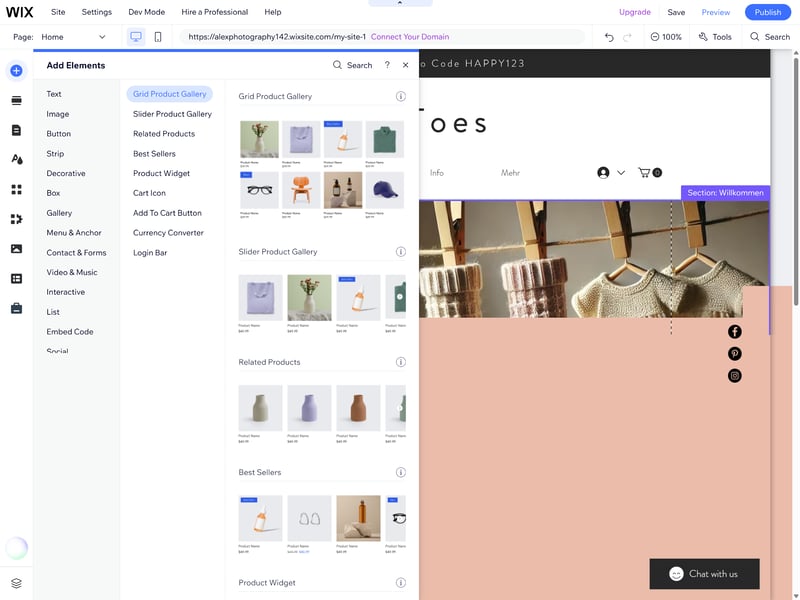
Wix offers one of the most flexible drag-and-drop editors on the market.
Others take a much more structured and restrictive approach. Builders like IONOS or Ecwid rely heavily on predefined sections and layout presets, which keeps things simple but also limits your creative freedom.
We also looked at how many page layouts and section templates are available, what kinds of content elements the editors support, and how much control you get over mobile layouts and responsive design.
Custom code and developer flexibility
Another big difference between platforms is how much access they give you behind the scenes.
Some ecommerce builders are essentially closed systems. If the editor doesn’t support a certain layout or feature, there’s often very little you can do about it.
Others leave a lot more room for customization. WooCommerce, for example, is fully open-source and can be modified almost without limits. Shopify and Wix are less flexible overall, but at least support custom code, APIs, and developer tools that let you go beyond the limits of their no-code editors.
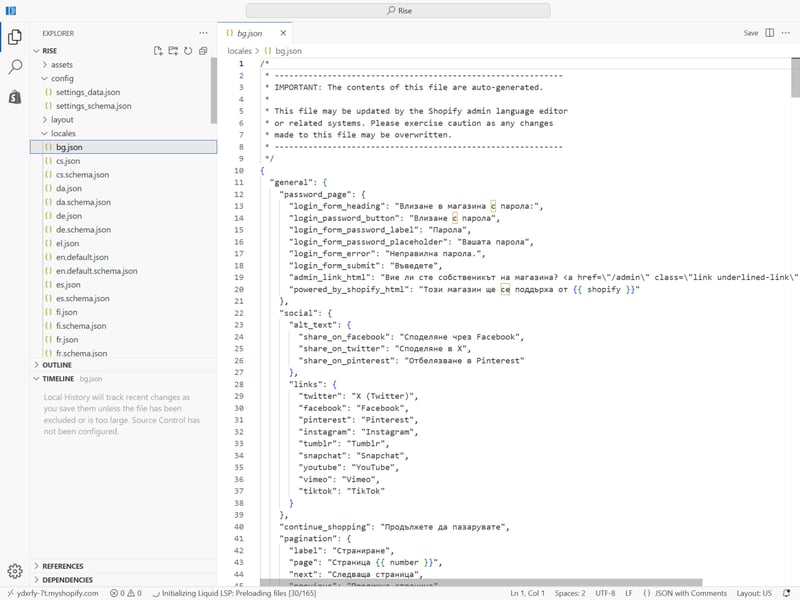
Platforms like Shopify allow direct access to theme code and custom development tools.
That flexibility matters once stores become more ambitious. The more access a platform gives you to code and custom development, the easier it becomes to build unique storefronts or add more specialized functionality later on.
Product Management
Products are the heart of your online store, so good product management tools are essential. We looked at how easy each platform makes it to add, organize, customize, and manage products, and how well those tools scale once stores become larger or more complex.
Supported product types
Physical and digital products are standard these days, but support for more specialized product types still varies quite a bit between platforms. For example: can you sell subscriptions, services, memberships, gift cards, or customizable products without relying on third-party apps?
Here’s which product types each platform supports natively, without additional plugins or integrations:
Wix | Shopify | Squarespace | Ecwid | Hostinger | IONOS | BigCommerce | Jimdo | Sellfy | Square | WooCommerce | |
|---|---|---|---|---|---|---|---|---|---|---|---|
✓ | ✓ | ✓ | ✓ | ✓ | ✓ | ✓ | ✓ | ✓ | ✓ | ✓ | |
✓ | ✓ | ✓ | ✓ | ✓ | ✓ | ✓ | ✗ | ✓ | ✓ | ✓ | |
✓ | ✗ | ✓ | ✗ | ✓ | ✓ | ✗ | ✓ | ✗ | ✗ | ✗ | |
✓ | ✓ | ✓ | ✗ | ✗ | ✗ | ✗ | ✗ | ✗ | ✗ | ✗ | |
✓ | ✓ | ✓ | ✓ | ✓ | ✓ | ✓ | ✗ | ✗ | ✗ | ✗ | |
✓ | ✗ | ✗ | ✓ | ✓ | ✓ | ✓ | ✓ | ✗ | ✗ | ✗ | |
✓ | ✓ | ✓ | ✓ | ✗ | ✗ | ✗ | ✗ | ✓ | ✗ | ✗ | |
✓ | ✓ | ✗ | ✗ | ✗ | ✗ | ✗ | ✗ | ✗ | ✓ | ✓ | |
Total | 8 | 6 | 6 | 5 | 5 | 5 | 4 | 3 | 3 | 3 | 3 |
Product management and organization
We also spent a lot of time working directly with the product management systems themselves. We paid particular attention to the following areas:
Product details and customization
How easy is it to manage product descriptions, images, pricing, and attributes? Can you create custom fields? Is bulk editing available?Product variants
How many options (e.g. size or color) and variant combinations are supported?
BigCommerce | Ecwid | Hostinger | IONOS | Shopify | Square | Squarespace | WooCommerce | Sellfy | Wix | Jimdo | |
|---|---|---|---|---|---|---|---|---|---|---|---|
Max. number of options | unlimited | unlimited | unlimited | unlimited | 3 | 6 | 6 | unlimited | unlimited | 6 | 2 |
Max. number of variants | 600 | unlimited | 100 | unlimited | 2048 | 250 | 250 | unlimited | unlimited | 1000 | 36 |
Variant-specific images | ✓ | ✓ | ✓ | ✓ | ✓ | ✓ | ✓ | ✓ | ✓ | ✗ | ✗ |
Variant-specific pricing | ✓ | ✓ | ✓ | ✓ | ✓ | ✓ | ✓ | ✓ | ✓ | ✓ | ✗ |
Variant-specific SKU | ✓ | ✓ | ✓ | ✓ | ✓ | ✓ | ✓ | ✓ | ✗ | ✓ | ✗ |
Variant-specific inventory | ✓ | ✓ | ✓ | ✓ | ✓ | ✓ | ✓ | ✓ | ✓ | ✓ | ✗ |
Total | 4 | 4 | 4 | 4 | 4 | 4 | 4 | 4 | 3 | 3 | 0 |
Pricing
Does the platform support sale prices, volume discounts, or automatic unit pricing?Categorization
How flexible is the product organization system? Does the platform support anything beyond simple categories, such as tags, filters, or automated collections? And how good are the storefront filtering options for larger catalogues?Inventory
Is there automatic stock tracking, low-stock alerts, inventory syncing, or support for multiple warehouse locations?
The more flexible these systems are, the easier it becomes to manage larger catalogues and more complex inventories over time.
Sales Features
This category covers everything involved in actually selling products online: payments, taxes, shipping, discounts, order management, and other day-to-day store operations.
The basics: payments, taxes, shipping
Every ecommerce platform supports online payments, taxes, and shipping in some form. The difference is how flexible and automated those systems are.
Most builders rely on external payment gateways like PayPal, Stripe, Klarna, or Mollie. Some platforms — including Shopify, Wix, and WooCommerce — also offer their own built-in payment solutions.
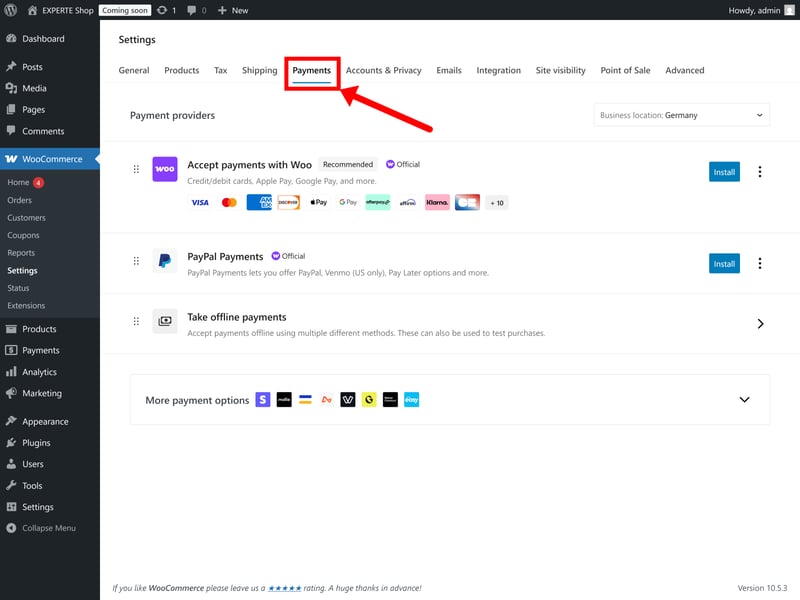
WooCommerce offers its own payment gateway alongside third-party integrations.
The number of supported payment providers varies quite a bit between platforms. Some only support a handful, while others integrate with well over 100 gateways and regional payment methods.
WooCommerce | Shopify | Ecwid | IONOS | Wix | BigCommerce | Squarespace | Hostinger | Jimdo | Sellfy | Square | |
|---|---|---|---|---|---|---|---|---|---|---|---|
Number of payment providers | 19 | 100 | 120 | 120 | 80 | 65 | 5 | 4 | 2 | 2 | 1 |
Paypal | ✓ | ✓ | ✓ | ✓ | ✓ | ✓ | ✓ | ✓ | ✓ | ✓ | ✗ |
Stripe | ✓ | ✓ | ✓ | ✓ | ✓ | ✓ | ✓ | ✓ | ✓ | ✓ | ✗ |
Square | ✓ | ✗ | ✗ | ✗ | ✗ | ✗ | ✓ | ✗ | ✗ | ✗ | ✓ |
Amazon Pay | ✓ | ✓ | ✓ | ✓ | ✗ | ✓ | ✗ | ✗ | ✗ | ✗ | ✗ |
Klarna | ✓ | ✓ | ✓ | ✓ | ✓ | ✓ | ✓ | ✗ | ✗ | ✗ | ✗ |
Mollie | ✓ | ✓ | ✓ | ✓ | ✓ | ✗ | ✗ | ✗ | ✗ | ✗ | ✗ |
Native payment solution | ✓ | ✓ | ✗ | ✗ | ✓ | ✗ | ✓ | ✗ | ✗ | ✗ | ✗ |
Manual payment methods | ✓ | ✓ | ✓ | ✓ | ✓ | ✓ | ✗ | ✓ | ✗ | ✗ | ✗ |
Total | 8 | 7 | 6 | 6 | 6 | 5 | 5 | 3 | 2 | 2 | 1 |
Taxes are ultimately your responsibility, but a good ecommerce platform can make dealing with them a lot less painful. Ideally, a platform should calculate taxes automatically while still allowing manual adjustments for different countries, regions, or product categories.
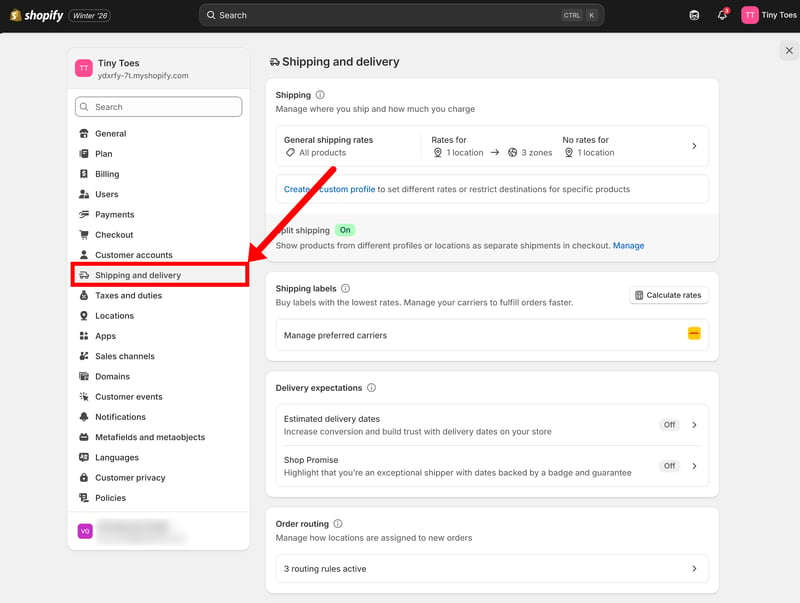
Tax settings in Shopify.
Shipping is another crucial aspect of ecommerce logistics. Different products, regions, and fulfillment methods often require different shipping rules, so flexibility matters quite a bit here as well.
We looked at whether platforms support different shipping models like free shipping, flat rates, weight- or price-based shipping, shipping zones, local pickup, and live carrier rates that calculate shipping costs automatically at checkout.
Coupons and promotions
When it comes to discounts, platforms should support both coupon codes and automatic promotions. Basic percentage or fixed-amount discounts are the bare minimum, but more advanced ecommerce platforms go much further than that.
We looked at whether platforms support things like free shipping promotions, quantity discounts, “Buy X, Get Y” deals, automatic cart discounts, scheduled sales campaigns, and customer-specific offers.
The flexibility of the discount rules is important, too. Can promotions be limited to certain products, categories, customer groups, or minimum order values? Can discounts apply automatically, or do customers always need to enter a code? The more granular the controls, the better.
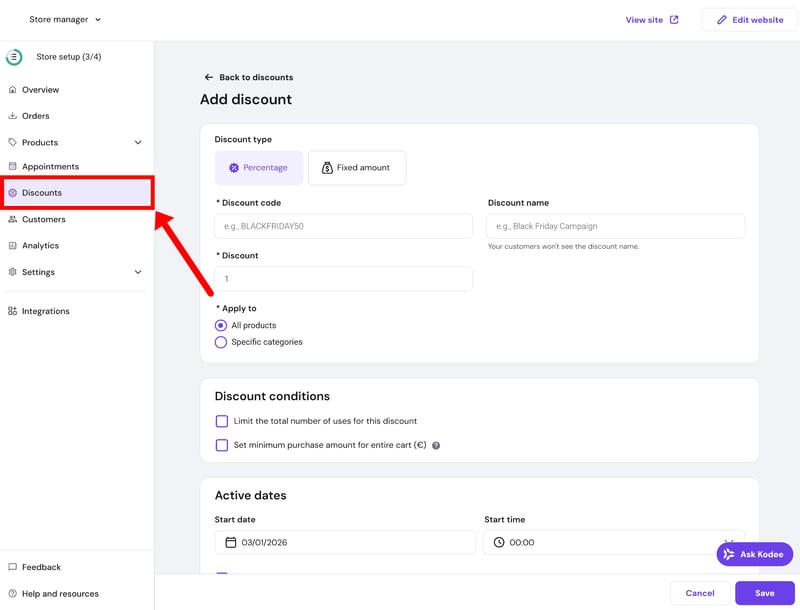
Discounts should be as flexible to configure as possible.
Other features and integrations
Here are a few more features and capabilities we paid attention to in this category:
Multilingual and multi-currency support
Important for international stores. We looked at whether platforms support multilingual storefronts, automatic currency conversion, and localized checkout experiences.Marketplace integrations
Many platforms connect directly to marketplaces like Amazon, eBay, Etsy, or Google Shopping, making it easier to sell across multiple channels from one backend.Point-of-sale (POS) systems
POS support matters if you also sell in physical locations, at pop-up stores, or at events. Good POS integrations keep online and offline inventory in sync automatically.Dropshipping integrations
Some platforms integrate directly with dropshipping providers like Printful, DSers, or Spocket, allowing products to be fulfilled automatically by suppliers.Email marketing tools
Built-in newsletter tools, abandoned-cart emails, automations, and integrations with platforms like Mailchimp or Klaviyo can save a lot of manual work.App stores and extensions
Many ecommerce builders rely heavily on apps and integrations to extend their functionality. A larger ecosystem usually means more flexibility long term.API access
APIs become important once you need to connect the store to external systems like accounting software, CRMs, ERPs, inventory tools, or custom workflows.
Customer Support
Good support usually comes down to two things: strong self-help resources and responsive direct support when you actually need human help.
Help center and support resources
We started by looking at each platform’s documentation and support content. A good ecommerce builder should offer clear instruction manuals, setup tutorials, troubleshooting articles, and explanations for more advanced features.
Many users also learn faster through videos and guided walkthroughs. So we also looked at whether platforms offer things like webinars, video tutorials, onboarding courses, or broader e-learning resources.
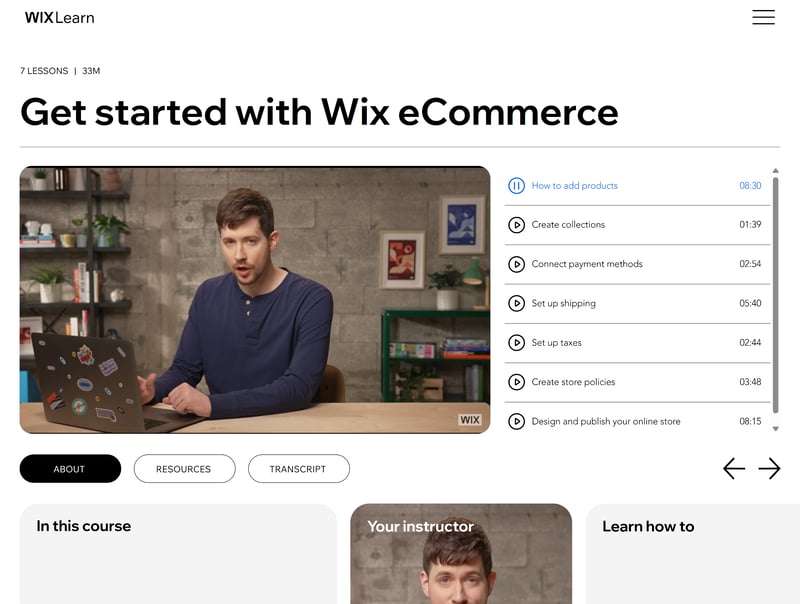
Wix offers its own e-learning platform with webinars and training content.
Direct support experience
At some point, you'll probably need to contact support directly — whether that’s because of payment issues, broken integrations, shipping problems, or account settings.
Ideally, a platform should offer several contact options. Some users prefer live chat, others want phone support, and some would rather handle things through tickets or email.
Response times and accessibility differ quite a bit between providers. Is the “live” chat actually live? How long do email replies take? And how difficult is it to reach a real person instead of getting stuck with AI chatbots?
We contacted every provider through all available support channels to evaluate response times, availability, and the overall quality of the answers.
Customer feedback
Our own support experience is ultimately just one data point. We might have caught a support team on a good day (or a bad one). To get a broader picture, we also looked through reviews on platforms like Trustpilot and G2, specifically searching for recurring praise or complaints related to customer support.
Pricing
Pricing is one of the hardest things to compare across ecommerce website builders. Not only do subscription costs vary, but the pricing models themselves can be completely different. That’s why we looked at the overall cost structure, not just the monthly headline price.
Subscription costs and pricing models
Most ecommerce platforms charge a monthly subscription fee that includes hosting and access to the platform itself. WooCommerce is the major exception here: as an open-source platform, the software itself is free. You’ll still need to pay for hosting and a domain yourself, though (as well as premium themes or plugins if you need them).
Most builders also split features across multiple pricing tiers. Cheaper plans often come with restrictions around product limits, staff accounts, advanced ecommerce features, or international selling.
Additional costs and hidden fees
The monthly subscription fee is only part of the actual running costs. There are also payment fees to consider. Some platforms charge their own transaction fees, and even when they don’t, payment processors like Stripe or PayPal still take a cut of every sale. The exact fees depend on the provider and payment methods your customers use.
Paid themes, apps, and integrations can add quite a bit to the total cost as well. Some are sold directly by the platform, others come from third-party developers. Depending on the ecosystem, you may end up paying for premium templates, advanced features, or external tools through either one-time purchases or recurring subscriptions.
Some ecommerce builders advertise aggressively low prices for new customers, but those discounts often only apply for the first billing period. Renewal prices can be significantly higher afterwards.
Comparing pricing across providers
The subscription price is only part of the picture, but it's still a useful starting point for comparing platforms. To create a fair benchmark, we defined three typical store scenarios and compared what each provider would charge in those situations:
Small store: 10 products, up to $10,000 in annual sales, custom domain
Medium store: 500 products, up to $200,000 in annual sales, product variants
Large store: 10,000 products, up to $2 million in annual sales, product variants, product filters, multilingual support
Here's the pricing chart:
| Small shop | Mid-size shop | Large shop | |
|---|---|---|---|
| $2.75 | $2.75 | |
| $10.00 | $10.00 | $19.93 |
| $10.00 | $10.00 | $19.93 |
| $11.75 | $11.75 | $11.75 |
| $12.60 | $22.00 | |
| $14.00 | $14.00 | $68.00 |
| $22.00 | $119.00 | |
| $23.00 | $23.00 | |
| $25.00 | $45.00 | $105.00 |
| $29.00 | $299.00 | |
| $29.00 | $29.00 | $29.00 |
Ideally, providers should offer a free trial so you can properly test the platform before committing. If they don’t, there should at least be a reasonably generous money-back guarantee.
Final Thoughts
It’s true that launching an online store has never been easier — but if you want to build something good, it’s still quite a bit of work. And if you pick the wrong platform, switching later can become a real headache.
There’s no single “best” ecommerce website builder for everyone. Our top picks reflect very different priorities and use cases:
- 1.
Shopify is the best all-rounder for most sellers. It combines mature ecommerce features with a polished user experience and plenty of room to scale. And since it’s fully hosted and relatively beginner-friendly, you can focus much more on actually running the store instead of maintaining the platform itself.
- 2.
WooCommerce is a powerful open-source plugin for WordPress with a high degree of flexibility and customization. It's a great fit if you want full technical control over how your store is built.
- 3.
Wix works best for smaller stores that want more design flexibility without the technical complexity of a proper ecommerce platform.
Beyond our top 3, plenty of other solid options are worth considering. In the end, it comes down to what your store needs now — and how much room you'll need to grow and adapt later on.