Proton VPN Review 2026: The Best VPN for Privacy?


A VPN should protect your data, yet most VPN services have a poor reputation in the privacy community. And for good reason: misleading pricing, murky ownership, and questionable no-logs promises are common across the industry. Proton VPN promises to do better. Does it deliver?
We put Proton VPN through extensive testing to find out whether it’s as privacy-friendly as promised and how it stacks up against competing VPNs in other areas.


Proton VPN* is a VPN from Proton AG, a Swiss company known for its secure online services. Proton also offers an email service (Proton Mail), a password manager (Proton Pass), and cloud storage (Proton Drive).
All Proton products share one promise: they put data protection and privacy first. Every VPN service makes that claim, but Proton gives it more weight. The company is relatively transparent and backs up its claims with open-source software and regular audits.
Still, a good VPN needs to do more than keep you safe. Our review explores whether Proton VPN delivers a strong all-around package.
Proton VPN Review
High security and privacy standards
Open-source apps, regular audits, and transparent ownership: Proton VPN puts privacy first and takes it more seriously than many competitors. We detected no leaks in our tests.Strong streaming performance
From Netflix to Germany’s ZDF and the BBC, Proton VPN reliably unblocked international streaming libraries in our tests.Modern, user-friendly apps
Proton VPN’s responsive, intuitive apps are easy to use despite their many features and settings.Free plan
Proton is one of the few VPN services with a permanently free plan that has no data cap.
Average performance
Proton VPN finished in the middle of the pack in our performance tests. Added latency was modest, but download and upload speeds were below average.Somewhat cluttered apps
Proton also suffers from an overload of features. Its many extras, which casual users often don’t need, make the app feel a bit crowded.Disappointing support
Replies can take a while. Many customers also criticize Proton VPN’s support.
Ease of Use & Features
| Supported platforms |
| 3.5/3.5 |
| Supported protocols |
| 2.5/2.5 |
| Setup & operation |
| 5/7 |
| Advanced features |
| 2.25/5 |
| Add-ons |
| 1.5/2 |
The most secure services aren’t always the easiest to use. Fortunately, Proton VPN also does well on usability. Its apps are modern and intuitive, though the sheer number of features can make the interface feel a little cluttered.
Getting started: Easy setup with a free plan to try
You’ll need a Proton account to use Proton VPN. You can sign up for a paid subscription right away or try the free plan with no commitment. Like most VPN services, Proton attracts paying customers with steep introductory discounts, followed by a substantial price increase after the initial term (more on that later).
Once you’ve created your Proton account, download the Proton VPN apps for your devices and sign in. The web dashboard has a download section with links to all the apps:
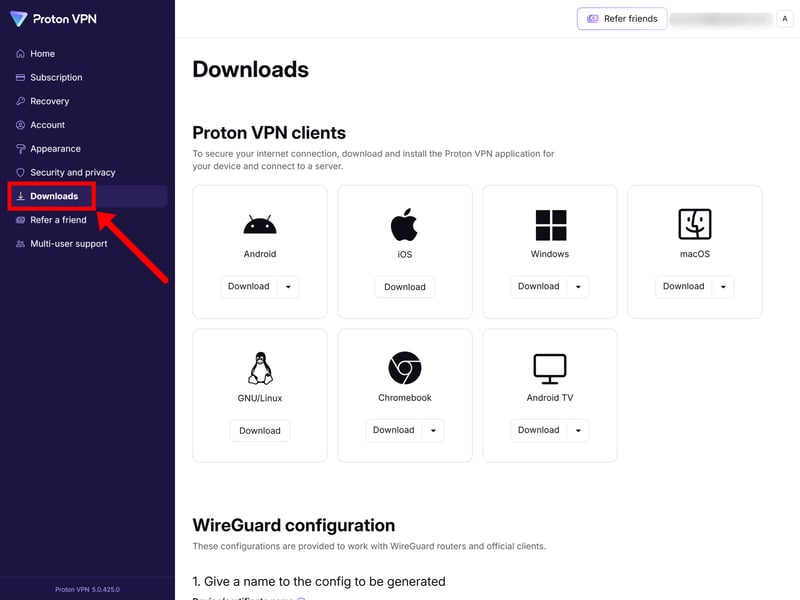
The download section in the Proton VPN dashboard.
Heads up: By default, Proton installs other Proton products alongside the VPN. If you don’t want them, you’ll need to uncheck the box before installation. Making these extras opt-in would be more user-friendly.
Which devices does Proton VPN support?
You can also set up Proton VPN on routers and other devices without official apps. WireGuard and OpenVPN configuration files are available under “Downloads” in the web dashboard:
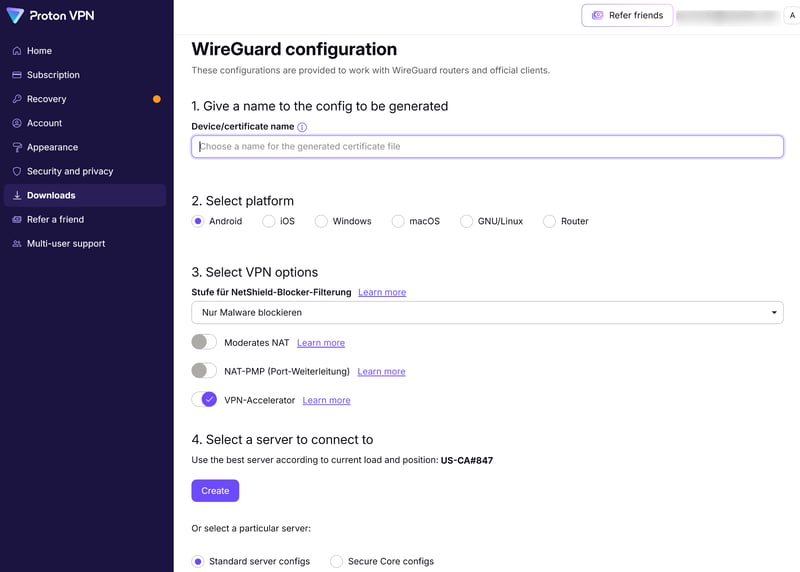
You can configure Proton VPN manually to use it on a router.
Proton leaves little to ask for when it comes to device support: You can use this VPN almost anywhere.
 Proton VPN |  Avast |  Bitdefender |  CyberGhost |  ExpressVPN |  hide.me |  HMA VPN |  Hotspot Shield |  IPVanish |  Mozilla VPN |  Mullvad |  NordVPN |  Norton |  PrivadoVPN |  Private Internet Access |  PureVPN |  Surfshark |  TunnelBear |  VeePN |  VPN Unlimited |  Windscribe | |
|---|---|---|---|---|---|---|---|---|---|---|---|---|---|---|---|---|---|---|---|---|---|
| Desktop | |||||||||||||||||||||
Windows | ✓ | ✓ | ✓ | ✓ | ✓ | ✓ | ✓ | ✓ | ✓ | ✓ | ✓ | ✓ | ✓ | ✓ | ✓ | ✓ | ✓ | ✓ | ✓ | ✓ | ✓ |
Mac | ✓ | ✓ | ✓ | ✓ | ✓ | ✓ | ✓ | ✓ | ✓ | ✓ | ✓ | ✓ | ✓ | ✓ | ✓ | ✓ | ✓ | ✓ | ✓ | ✓ | ✓ |
Linux | ✓ | ✗ | ✗ | ✗ | ✓ | ✗ | ✗ | ✗ | ✓ | ✓ | ✓ | ✓ | ✗ | ✗ | ✓ | ✓ | ✓ | ✗ | ✗ | ✓ | ✓ |
| Mobile | |||||||||||||||||||||
Android | ✓ | ✓ | ✓ | ✓ | ✓ | ✓ | ✓ | ✓ | ✓ | ✓ | ✓ | ✓ | ✓ | ✓ | ✓ | ✓ | ✓ | ✓ | ✓ | ✓ | ✓ |
iOS | ✓ | ✓ | ✓ | ✓ | ✓ | ✓ | ✓ | ✓ | ✓ | ✓ | ✓ | ✓ | ✓ | ✓ | ✓ | ✓ | ✓ | ✓ | ✓ | ✓ | ✓ |
| Browser | |||||||||||||||||||||
Chrome | ✓ | ✓ | ✗ | ✓ | ✓ | ✓ | ✗ | ✓ | ✗ | ✗ | ✗ | ✓ | ✓ | ✓ | ✓ | ✓ | ✓ | ✓ | ✓ | ✓ | ✓ |
Edge | ✓ | ✓ | ✗ | ✗ | ✓ | ✓ | ✗ | ✗ | ✗ | ✗ | ✗ | ✓ | ✓ | ✓ | ✗ | ✓ | ✓ | ✓ | ✓ | ✓ | ✓ |
Firefox | ✓ | ✓ | ✗ | ✓ | ✓ | ✓ | ✗ | ✗ | ✗ | ✓ | ✗ | ✓ | ✓ | ✓ | ✓ | ✓ | ✓ | ✓ | ✓ | ✓ | ✓ |
| Streaming | |||||||||||||||||||||
Apple TV | ✓ | ✓ | ✗ | ✗ | ✓ | ✓ | ✗ | ✗ | ✓ | ✗ | ✗ | ✓ | ✓ | ✓ | ✓ | ✓ | ✓ | ✗ | ✗ | ✓ | ✓ |
Fire TV | ✓ | ✓ | ✗ | ✓ | ✓ | ✓ | ✗ | ✓ | ✓ | ✗ | ✓ | ✓ | ✓ | ✓ | ✓ | ✓ | ✓ | ✗ | ✓ | ✓ | ✓ |
Android TV | ✓ | ✓ | ✓ | ✓ | ✓ | ✓ | ✓ | ✓ | ✓ | ✗ | ✓ | ✓ | ✓ | ✓ | ✓ | ✓ | ✓ | ✗ | ✓ | ✓ | ✓ |
| Custom | |||||||||||||||||||||
OpenVPN config | ✓ | ✗ | ✗ | ✓ | ✓ | ✓ | ✗ | ✗ | ✓ | ✗ | ✗ | ✓ | ✗ | ✓ | ✓ | ✓ | ✓ | ✓ | ✓ | ✓ | ✓ |
WireGuard config | ✓ | ✗ | ✗ | ✗ | ✗ | ✓ | ✗ | ✗ | ✓ | ✗ | ✓ | ✗ | ✗ | ✓ | ✗ | ✓ | ✓ | ✗ | ✗ | ✓ | ✓ |
CLI | ✓ | ✗ | ✗ | ✓ | ✓ | ✓ | ✗ | ✗ | ✗ | ✗ | ✓ | ✓ | ✗ | ✗ | ✓ | ✓ | ✓ | ✗ | ✗ | ✗ | ✓ |
Proton VPN’s interface: Modern but a bit cluttered
Minimalism isn’t Proton VPN’s style. Its interface has a modern design but packs in a lot of information, a little too much for our taste.
All the key features surround an interactive world map. The location picker sits on the left, advanced settings on the right, and connection details at the bottom. When the VPN is active, you’ll also see connection stats.
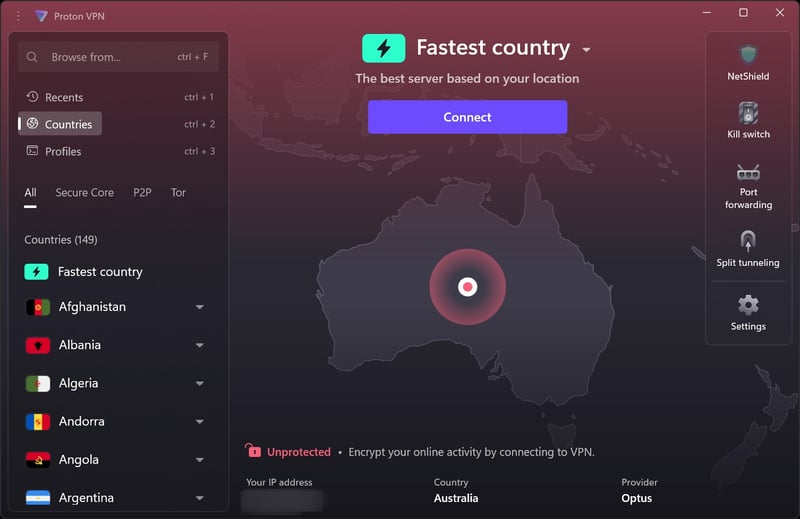
Proton VPN’s desktop app.
The location picker is always visible and offers plenty of filters. Below the search bar, a menu lets you view the full country list, recently used servers, specialty servers, and VPN profiles.
VPN profiles are custom connections that let you save both a country and advanced settings, such as your preferred protocol. Think of them as favorites with more control over the connection details.
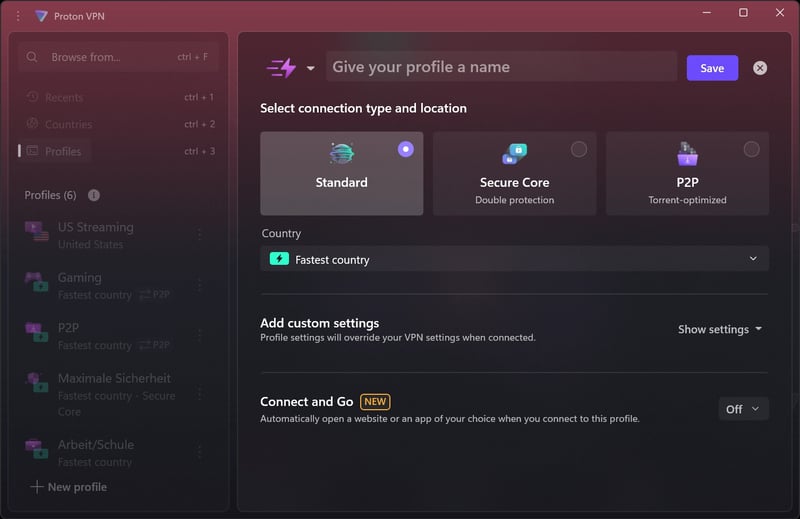
VPN profiles let you save custom connections for quick access.
You can choose a server’s country and, where multiple locations are available, its city. The three-dot menu opens a full list of available servers.
This list shows each server’s load and lets you connect to the one you want. It also tells you whether a server is physical or virtual. Many other providers don’t offer this level of control.
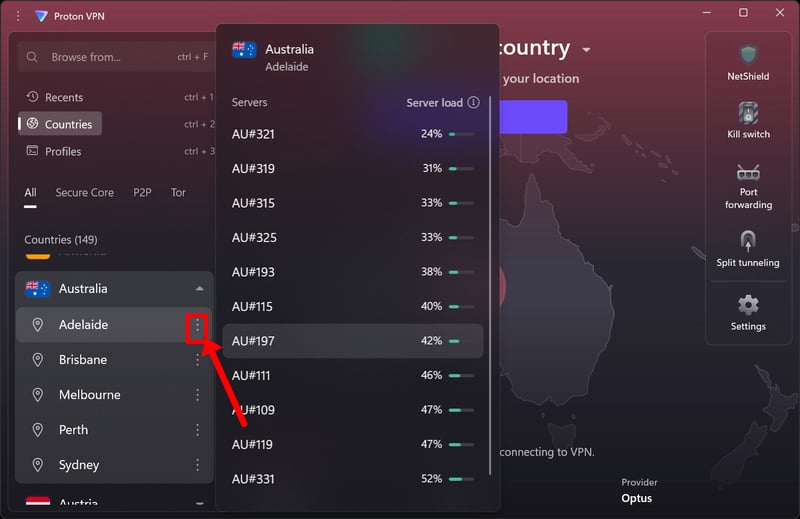
The location menu lists individual servers along with their current load.
Overall, we found the app well-designed and intuitive. It also runs smoothly: Throughout our review, the interface stayed responsive, with no lag or stuttering.
Still, the interface feels a bit cluttered, especially for casual users who won’t need many of its features. We’d like to see Proton offer a simpler view, perhaps with the world map collapsed and fewer buttons.
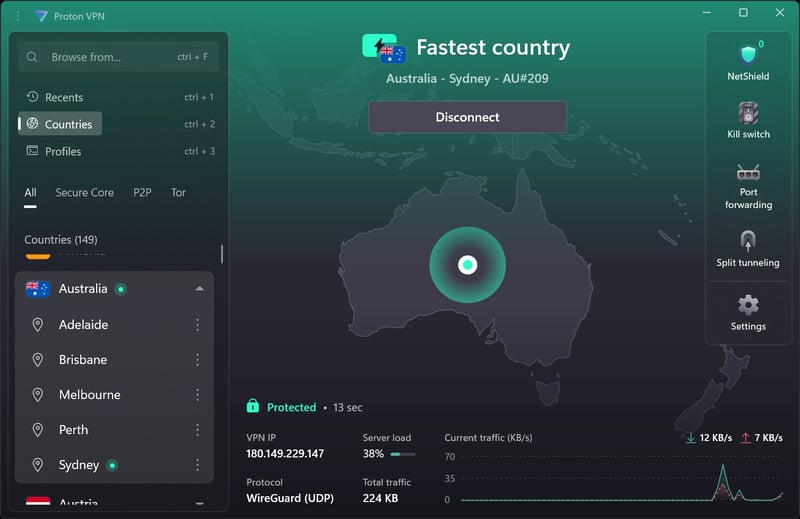
The Proton VPN app with an active VPN connection.
Proton VPN’s smartphone app shows what a simpler version could look like. It offers most of the desktop app’s features but spreads them across several screens. The home screen contains only a connect button; the navigation menu at the bottom takes you to the server locations and other features.

Proton VPN’s smartphone app.
Which VPN protocols does Proton VPN support?
A VPN protocol sets the rules for a VPN connection: It determines how your device exchanges data with the VPN server and how encryption is established. Different VPN protocols handle this in different ways.
You usually don’t need to worry about this, since Proton VPN automatically selects a protocol for each connection. If you prefer, you can choose one yourself in the settings.
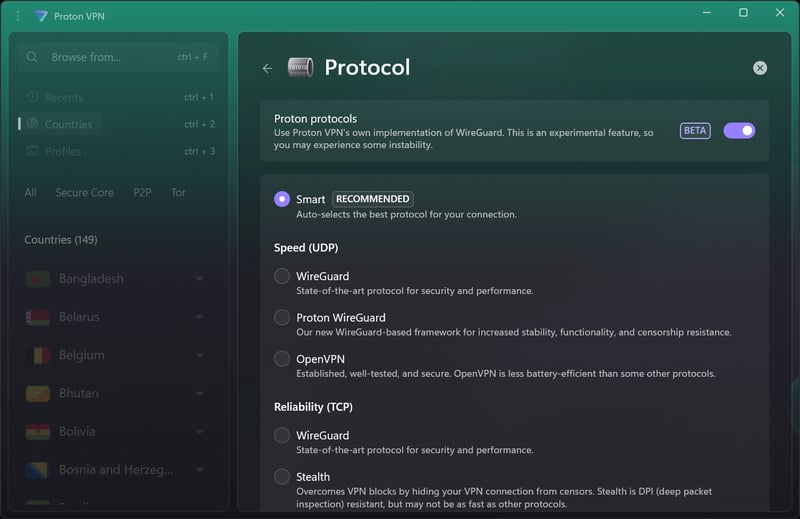
“Smart” protocol selection is enabled by default.
Proton VPN supports the two leading protocols, WireGuard and OpenVPN. It has also developed a few of its own. Alongside Proton WireGuard, its version of WireGuard, it offers a Stealth protocol that disguises your VPN connection. This can help on networks that would otherwise detect VPN use.
Here’s how Proton VPN’s protocol selection compares:
Proton VPN | Avast | Bitdefender | CyberGhost | ExpressVPN | hide.me | HMA VPN | Hotspot Shield | IPVanish | Mozilla VPN | Mullvad | NordVPN | Norton | PrivadoVPN | Private Internet Access | PureVPN | Surfshark | TunnelBear | VeePN | VPN Unlimited | Windscribe | |
|---|---|---|---|---|---|---|---|---|---|---|---|---|---|---|---|---|---|---|---|---|---|
OpenVPN | ✓ | ✓ | ✓ | ✓ | ✓ | ✓ | ✓ | ✗ | ✓ | ✗ | ✗ | ✓ | ✓ | ✓ | ✓ | ✓ | ✓ | ✓ | ✓ | ✓ | ✓ |
WireGuard | ✓ | ✓ | ✓ | ✓ | ✓ | ✓ | ✓ | ✓ | ✓ | ✓ | ✓ | ✓ | ✓ | ✓ | ✓ | ✓ | ✓ | ✓ | ✓ | ✓ | ✓ |
IKEv2/IPsec | ✓ | ✗ | ✓ | ✓ | ✓ | ✓ | ✓ | ✓ | ✓ | ✗ | ✗ | ✗ | ✗ | ✓ | ✗ | ✓ | ✓ | ✓ | ✓ | ✓ | ✓ |
Proprietary | ✓ | ✓ | ✗ | ✗ | ✓ | ✗ | ✓ | ✓ | ✗ | ✗ | ✗ | ✓ | ✓ | ✗ | ✗ | ✗ | ✓ | ✗ | ✗ | ✓ | ✓ |
Stealth protocol | ✓ | ✓ | ✗ | ✗ | ✗ | ✓ | ✓ | ✗ | ✗ | ✗ | ✗ | ✓ | ✓ | ✗ | ✗ | ✗ | ✗ | ✗ | ✓ | ✓ | ✓ |
Advanced VPN features: All the essentials covered
Proton VPN goes beyond the basics with advanced settings and specialized features you won’t find in every VPN.
Split tunneling lets you limit your VPN connection to specific apps or IP addresses, or exclude them from the VPN tunnel. It’s available on Windows, macOS, Linux, and Android, but not on iPhones. This is due to Apple’s restrictions, though some other VPN services have found ways around them.
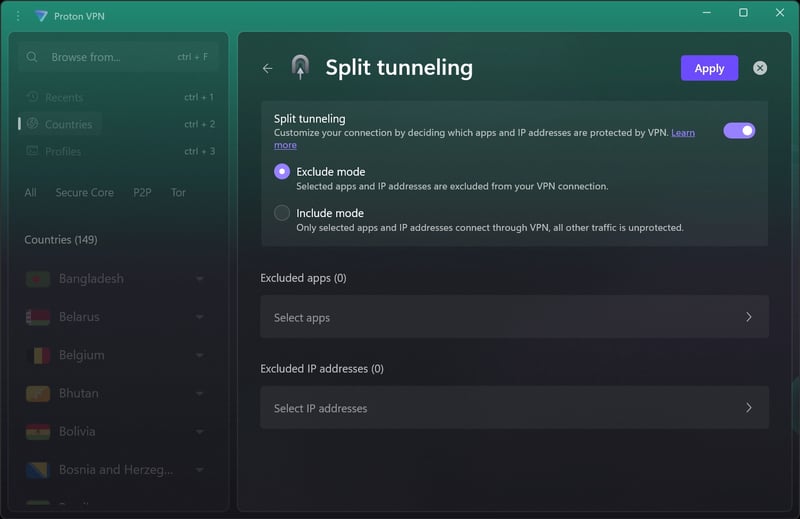
Split tunneling lets you choose which apps use the VPN.
The location menu includes several specialized server types:
P2P servers are optimized for file sharing.
Secure Core is a multi-hop feature with extra protection. It routes your connection through an additional VPN server. Unlike a standard double-hop setup, this server sits in a high-security data center in a country with strong privacy protections: Iceland, Switzerland, or Sweden.
Tor servers also route your traffic through the Tor network, adding another layer of security.
There are no dedicated obfuscated servers. Instead, obfuscation is built into Proton’s Stealth protocol.
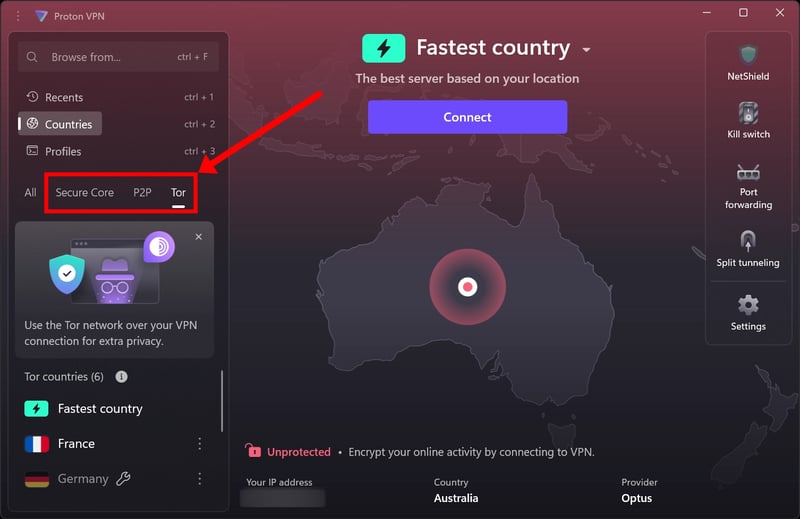
Proton VPN’s specialized servers.
Port forwarding is also supported. It lets Proton VPN route incoming internet connections through the VPN firewall directly to your device. This is useful for activities such as file sharing or hosting online games.
If your connection is too slow, you can try the VPN accelerator, which promises speed increases of up to 400%. We didn’t reach that figure, but we did measure faster connections in some of our tests with the accelerator enabled.
The settings include a few advanced configuration options. You can exclude locations you never want to connect to, choose custom DNS servers, or select a NAT type for your connection.
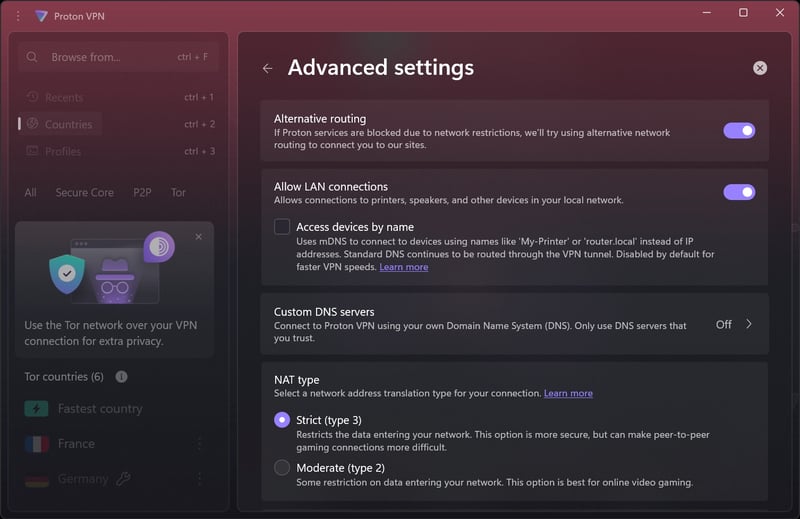
Advanced settings in Proton VPN.
We find that a few features are missing. Dedicated IP addresses are available only as an add-on for business customers, not individual users. Static IP addresses aren’t supported.
Here’s how Proton VPN’s features compare:
Proton VPN | Avast | Bitdefender | CyberGhost | ExpressVPN | hide.me | HMA VPN | Hotspot Shield | IPVanish | Mozilla VPN | Mullvad | NordVPN | Norton | PrivadoVPN | Private Internet Access | PureVPN | Surfshark | TunnelBear | VeePN | VPN Unlimited | Windscribe | |
|---|---|---|---|---|---|---|---|---|---|---|---|---|---|---|---|---|---|---|---|---|---|
Double VPN | ✓ | ✓ | ✓ | ✗ | ✗ | ✓ | ✗ | ✗ | ✓ | ✓ | ✗ | ✓ | ✓ | ✓ | ✓ | ✗ | ✓ | ✗ | ✓ | ✗ | ✓ |
Static IP | ✗ | ✗ | ✗ | ✗ | ✗ | ✗ | ✗ | ✗ | ✗ | ✗ | ✗ | ✗ | ✗ | ✗ | ✗ | ✗ | ✓ | ✗ | ✓ | ✗ | ✓ |
Dedicated IP | ✗ | ✗ | ✗ | ✓ | ✓ | ✗ | ✗ | ✗ | ✗ | ✗ | ✗ | ✓ | ✗ | ✗ | ✓ | ✓ | ✗ | ✗ | ✗ | ✓ | ✗ |
Port forwarding | ✓ | ✗ | ✗ | ✗ | ✗ | ✓ | ✗ | ✗ | ✗ | ✗ | ✗ | ✓ | ✗ | ✗ | ✓ | ✓ | ✗ | ✗ | ✗ | ✗ | ✓ |
Tor access | ✓ | ✗ | ✗ | ✗ | ✓ | ✗ | ✗ | ✓ | ✗ | ✗ | ✗ | ✓ | ✗ | ✗ | ✓ | ✓ | ✓ | ✗ | ✗ | ✗ | ✓ |
Rotating IP address | ✗ | ✓ | ✗ | ✗ | ✓ | ✗ | ✗ | ✗ | ✗ | ✗ | ✗ | ✗ | ✓ | ✗ | ✗ | ✗ | ✓ | ✗ | ✗ | ✗ | ✓ |
Hidden servers | ✗ | ✗ | ✓ | ✗ | ✗ | ✗ | ✗ | ✓ | ✓ | ✗ | ✓ | ✓ | ✗ | ✓ | ✓ | ✓ | ✓ | ✓ | ✗ | ✗ | ✗ |
Smart DNS | ✗ | ✗ | ✗ | ✓ | ✓ | ✗ | ✗ | ✗ | ✗ | ✗ | ✗ | ✓ | ✗ | ✓ | ✓ | ✗ | ✗ | ✗ | ✓ | ✓ | ✗ |
| Split tunneling | |||||||||||||||||||||
Windows | ✓ | ✓ | ✓ | ✓ | ✓ | ✓ | ✗ | ✓ | ✓ | ✓ | ✓ | ✓ | ✓ | ✓ | ✓ | ✓ | ✓ | ✓ | ✓ | ✗ | ✓ |
macOS | ✓ | ✓ | ✓ | ✗ | ✓ | ✓ | ✗ | ✓ | ✓ | ✓ | ✓ | ✗ | ✓ | ✓ | ✓ | ✗ | ✓ | ✓ | ✗ | ✗ | ✓ |
Android | ✓ | ✓ | ✓ | ✓ | ✓ | ✓ | ✓ | ✓ | ✓ | ✓ | ✓ | ✓ | ✓ | ✓ | ✓ | ✓ | ✓ | ✓ | ✓ | ✓ | ✓ |
iOS | ✗ | ✗ | ✓ | ✗ | ✓ | ✗ | ✗ | ✓ | ✓ | ✗ | ✗ | ✗ | ✗ | ✓ | ✗ | ✗ | ✓ | ✓ | ✓ | ✗ | ✗ |
Other extras: The broader Proton ecosystem
Providers that focus solely on VPNs are becoming rare. The trend is toward “all-in-one” security platforms, where the VPN is just one tool among many.
For many providers, this approach backfires by crowding their apps. But it can work if the other tools offer real value and the VPN remains a strong standalone product.
That’s the case with Proton. Alongside its VPN, it offers several security tools you can subscribe to individually or as a bundle. Its password manager (Proton Pass) and cloud storage service (Proton Drive) aren’t just “extras.” They’re high-quality products in their own right, all part of the same Proton ecosystem.
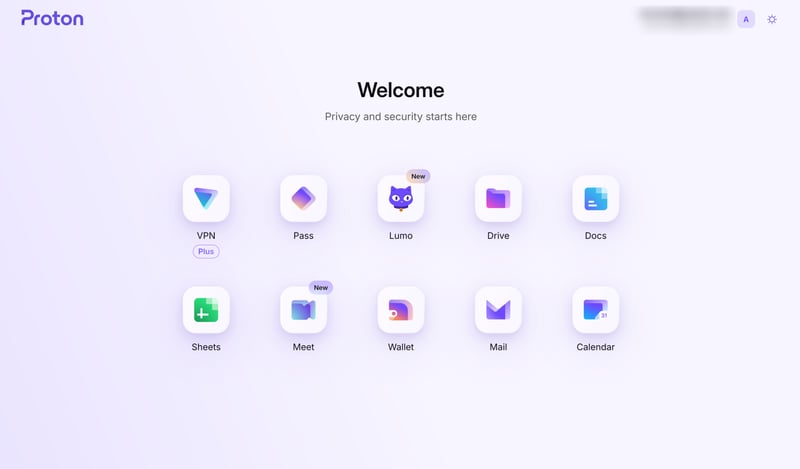
Proton has plenty to offer beyond its VPN, though additional products cost extra:
Proton VPN | Avast | Bitdefender | CyberGhost | ExpressVPN | hide.me | HMA VPN | Hotspot Shield | IPVanish | Mozilla VPN | Mullvad | NordVPN | Norton | PrivadoVPN | Private Internet Access | PureVPN | Surfshark | TunnelBear | VeePN | VPN Unlimited | Windscribe | |
|---|---|---|---|---|---|---|---|---|---|---|---|---|---|---|---|---|---|---|---|---|---|
Ad blocker | ✓ | ✓ | ✓ | ✓ | ✓ | ✓ | ✗ | ✗ | ✓ | ✓ | ✗ | ✓ | ✓ | ✓ | ✓ | ✓ | ✓ | ✓ | ✓ | ✗ | ✓ |
Phishing protection | ✓ | ✓ | ✓ | ✗ | ✓ | ✗ | ✗ | ✓ | ✓ | ✓ | ✗ | ✓ | ✓ | ✓ | ✓ | ✗ | ✓ | ✗ | ✓ | ✗ | ✓ |
Malware protection | ✓ | ✓ | ✓ | ✓ | ✓ | ✓ | ✗ | ✗ | ✓ | ✗ | ✗ | ✓ | ✓ | ✓ | ✓ | ✓ | ✓ | ✗ | ✓ | ✗ | ✓ |
Antivirus | ✗ | ✗ | ✓ | ✗ | ✗ | ✗ | ✗ | ✗ | ✗ | ✗ | ✗ | ✗ | ✗ | ✓ | ✓ | ✗ | ✓ | ✗ | ✗ | ✗ | ✗ |
Password manager | ✓ | ✗ | ✓ | ✗ | ✓ | ✗ | ✗ | ✗ | ✗ | ✗ | ✗ | ✓ | ✓ | ✗ | ✗ | ✓ | ✗ | ✗ | ✗ | ✓ | ✗ |
Cloud storage | ✓ | ✗ | ✗ | ✗ | ✗ | ✗ | ✗ | ✗ | ✓ | ✗ | ✗ | ✓ | ✓ | ✗ | ✗ | ✗ | ✗ | ✗ | ✗ | ✗ | ✗ |
Data leak monitoring | ✓ | ✗ | ✓ | ✓ | ✗ | ✗ | ✗ | ✗ | ✗ | ✗ | ✗ | ✓ | ✓ | ✗ | ✓ | ✓ | ✓ | ✗ | ✓ | ✓ | ✗ |
Scam call protection | ✗ | ✓ | ✗ | ✗ | ✗ | ✗ | ✗ | ✗ | ✗ | ✗ | ✗ | ✓ | ✗ | ✗ | ✗ | ✗ | ✗ | ✗ | ✗ | ✗ | ✗ |

Proton proves that privacy doesn’t have to come at the expense of ease of use. Proton VPN delivers a strong all-around package: a free plan to get started, an excellent feature set, and broad device support. Its apps are fast and intuitive, though the interface feels a little cluttered.
Proton delivers a modern, user-friendly VPN that’s especially appealing if you already use other Proton products.
Servers & Performance
| Server network |
| 9/10 |
| Performance |
| 7/15 |
| Streaming |
| 10/10 |
| Browsing |
| 5/5 |
A VPN service is only as good as its servers, and Proton VPN has a strong foundation. Its global server network delivered only average speeds in our speed test, but connections stayed stable in everyday use, and streaming worked well.
How large is Proton VPN’s server network?
Proton VPN’s server network is among the best on the market. It covers nearly 150 countries, with servers in almost 200 cities. Among the providers we compared, only NordVPN has slightly broader coverage.
The distribution follows the usual pattern for VPN services, with most servers in Europe and North America. Compared with other VPNs, though, Proton also has relatively strong coverage in South America, Asia, and Africa:
| Server locations | Number of countries | Europe | Americas | Asia-Pacific | Africa & Middle East | |
|---|---|---|---|---|---|---|
| 224 | 149 | 47 | 29 | 31 | 42 |
| 214 | 113 | 48 | 25 | 28 | 12 |
| 196 | 149 | 48 | 25 | 32 | 44 |
| 170 | 104 | 45 | 20 | 26 | 13 |
| 150 | 113 | 44 | 30 | 28 | 13 |
| 145 | 103 | 45 | 15 | 23 | 20 |
| 142 | 100 | 46 | 18 | 27 | 9 |
| 141 | 110 | 47 | 27 | 24 | 11 |
| 135 | 71 | 38 | 14 | 14 | 5 |
| 125 | 100 | 45 | 18 | 25 | 12 |
| 124 | 85 | 42 | 15 | 23 | 5 |
| 123 | 91 | 40 | 16 | 21 | 14 |
| 121 | 94 | 43 | 22 | 21 | 8 |
| 116 | 74 | 34 | 12 | 17 | 11 |
| 106 | 65 | 36 | 11 | 13 | 5 |
| 92 | 57 | 31 | 8 | 14 | 4 |
| 91 | 50 | 30 | 8 | 9 | 3 |
| 91 | 50 | 30 | 8 | 9 | 3 |
| 66 | 49 | 28 | 5 | 15 | 1 |
| 60 | 47 | 27 | 8 | 9 | 3 |
| 53 | 39 | 22 | 5 | 7 | 5 |
Part of that broad coverage comes from virtual servers. Proton VPN calls this Smart Routing: it provides a virtual location in a country where Proton has no physical server.
The server list shows where the physical server is located. For example, connections to Afghanistan run through servers in France and the United Kingdom:
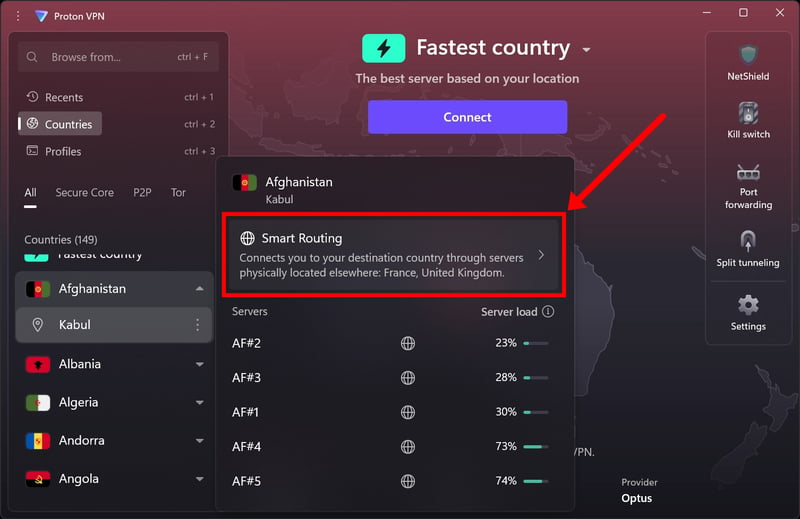
Proton VPN uses Smart Routing to connect to virtual locations.
Most VPN services use virtual servers. That’s perfectly fine as long as they clearly label them, which Proton VPN does. Still, these servers can sometimes be less reliable than physical servers.
Proton does not use RAM-only servers. Many VPN providers claim these servers offer a privacy advantage over conventional servers because all data is erased when they reboot.
Proton sees this largely as good marketing and argues that RAM-only servers offer no meaningful security advantage. It considers full-disk encryption and server location far more important, which is also part of the reason it uses Smart Routing. Proton also argues that a good VPN service shouldn’t store any logs that could be recovered if a server were seized.
Speed test: How fast is Proton VPN?
A VPN usually slows your internet connection down a little. Your traffic has to take a detour through a VPN tunnel, and the distance depends on the server’s location. The smaller the slowdown, the better.
Proton VPN slowed things down more than we’d hoped. Downloads and uploads were noticeably slower in our speed tests, though the impact on ping was limited.
We test all VPNs under the same conditions to compare their performance fairly. We use a Windows 11 test environment with a 1 Gbps internet connection in Germany and leave each provider’s default settings unchanged.
Using Ookla’s Speedtest, we measure speeds in five locations: Frankfurt, New York, London, Sydney, and Tokyo. We focus on three metrics:
- 1.
Download speed: How fast can you download data with the VPN connected?
- 2.
Upload speed: How fast can you upload data with the VPN connected?
- 3.
Latency: How much does the VPN increase the connection’s response time?
For each measurement, we use a VPN server and a Speedtest server in the same country. We repeat these tests over five days, giving us 25 comparisons per provider. We use these results to assess how much each VPN slows down the connection.
Important: These results reflect our test conditions. Your results may vary depending on the server, internet connection, and VPN protocol. Small differences between providers aren’t necessarily meaningful.
Here’s a closer look at Proton VPN’s speed test results:
Percentage drop in download speed with the VPN connected
| Without a VPN | With a VPN | Download speed loss | |
|---|---|---|---|
| 823 Mbit/s | 720 Mbit/s | 12.5 % |
| 821 Mbit/s | 667 Mbit/s | 18.8 % |
| 820 Mbit/s | 659 Mbit/s | 19.6 % |
| 821 Mbit/s | 610 Mbit/s | 25.7 % |
| 815 Mbit/s | 582 Mbit/s | 28.6 % |
| 823 Mbit/s | 569 Mbit/s | 30.9 % |
| 820 Mbit/s | 551 Mbit/s | 32.8 % |
| 823 Mbit/s | 546 Mbit/s | 33.7 % |
| 818 Mbit/s | 541 Mbit/s | 33.9 % |
| 824 Mbit/s | 540 Mbit/s | 34.5 % |
| 824 Mbit/s | 535 Mbit/s | 35.1 % |
| 821 Mbit/s | 530 Mbit/s | 35.4 % |
| 825 Mbit/s | 524 Mbit/s | 36.5 % |
| 816 Mbit/s | 477 Mbit/s | 41.5 % |
| 823 Mbit/s | 460 Mbit/s | 44.1 % |
| 820 Mbit/s | 451 Mbit/s | 45 % |
| 815 Mbit/s | 297 Mbit/s | 63.6 % |
| 823 Mbit/s | 259 Mbit/s | 68.5 % |
| 828 Mbit/s | 233 Mbit/s | 71.9 % |
| 811 Mbit/s | 176 Mbit/s | 78.3 % |
| 824 Mbit/s | 157 Mbit/s | 80.9 % |
Proton VPN slowed downloads considerably: Speeds dropped by 44.1% on average, putting it in the bottom third of the providers we compared.
Percentage drop in upload speed with the VPN connected
| Without a VPN | With a VPN | Upload speed loss | |
|---|---|---|---|
| 749 Mbit/s | 683 Mbit/s | 8.8 % |
| 756 Mbit/s | 685 Mbit/s | 9.4 % |
| 745 Mbit/s | 659 Mbit/s | 11.5 % |
| 755 Mbit/s | 666 Mbit/s | 11.8 % |
| 743 Mbit/s | 653 Mbit/s | 12.1 % |
| 751 Mbit/s | 654 Mbit/s | 12.9 % |
| 757 Mbit/s | 650 Mbit/s | 14.1 % |
| 752 Mbit/s | 644 Mbit/s | 14.4 % |
| 752 Mbit/s | 639 Mbit/s | 15 % |
| 750 Mbit/s | 634 Mbit/s | 15.5 % |
| 753 Mbit/s | 605 Mbit/s | 19.7 % |
| 760 Mbit/s | 609 Mbit/s | 19.9 % |
| 753 Mbit/s | 578 Mbit/s | 23.2 % |
| 769 Mbit/s | 589 Mbit/s | 23.4 % |
| 746 Mbit/s | 564 Mbit/s | 24.4 % |
| 757 Mbit/s | 559 Mbit/s | 26.2 % |
| 742 Mbit/s | 530 Mbit/s | 28.6 % |
| 750 Mbit/s | 392 Mbit/s | 47.7 % |
| 755 Mbit/s | 126 Mbit/s | 83.3 % |
| 718 Mbit/s | 91 Mbit/s | 87.3 % |
| 752 Mbit/s | 89 Mbit/s | 88.2 % |
Proton VPN’s upload speeds weren’t particularly impressive either. With an average drop of 28.6%, it barely stayed within an acceptable range. Only a few VPNs slowed uploads down even more.
Additional delay caused by the VPN
| Without a VPN | With a VPN | Extra latency | |
|---|---|---|---|
| 135 ms | 125 ms | 0 ms |
| 134 ms | 127 ms | 0 ms |
| 129 ms | 129 ms | 0 ms |
| 132 ms | 130 ms | 0 ms |
| 130 ms | 132 ms | 2 ms |
| 132 ms | 135 ms | 3 ms |
| 131 ms | 134 ms | 3 ms |
| 131 ms | 135 ms | 4 ms |
| 131 ms | 136 ms | 5 ms |
| 131 ms | 137 ms | 6 ms |
| 131 ms | 138 ms | 7 ms |
| 131 ms | 141 ms | 10 ms |
| 131 ms | 141 ms | 10 ms |
| 131 ms | 142 ms | 11 ms |
| 127 ms | 138 ms | 11 ms |
| 131 ms | 144 ms | 13 ms |
| 131 ms | 146 ms | 15 ms |
| 129 ms | 145 ms | 16 ms |
| 133 ms | 151 ms | 18 ms |
| 131 ms | 155 ms | 24 ms |
| 131 ms | 170 ms | 39 ms |
Proton VPN did much better in our ping test: Using the VPN increased latency by just 5 ms on average. You’re unlikely to notice such a small delay in everyday use, even when gaming.
Numbers never tell the whole story. Test results depend on many factors, including the protocol, server location, and internet connection. That’s why we also assess how a VPN performs in everyday use.
Everything ran smoothly here. Proton VPN consistently established connections quickly and kept them stable. We experienced no connection problems or unexpected disconnects.
We also avoided common VPN annoyances, such as frequent CAPTCHAs or websites and search results showing the wrong region. Using the fastest VPN connection also had no noticeable impact on speed. For the most part, the VPN ran quietly in the background.
Streaming test: How well does Proton VPN bypass geo-blocking?
Proton VPN promises digital freedom. That includes the freedom to watch content without being held back by streaming services’ regional restrictions.
We test this systematically. For each streaming service, we pick a title available only in a specific country’s library. Then we try to unblock it with the VPN seven times over seven days. The more often we succeed, the more reliable the VPN is for streaming.
Here are the results for Proton VPN:
Proton VPN | Avast | Bitdefender | CyberGhost | ExpressVPN | hide.me | HMA VPN | Hotspot Shield | IPVanish | Mozilla VPN | Mullvad | NordVPN | Norton | PrivadoVPN | Private Internet Access | PureVPN | Surfshark | TunnelBear | VeePN | VPN Unlimited | Windscribe | |
|---|---|---|---|---|---|---|---|---|---|---|---|---|---|---|---|---|---|---|---|---|---|
Netflix | 7/7 | 2/7 | 0/7 | 5/7 | 1/7 | 6/7 | 4/7 | 3/7 | 0/7 | 0/7 | 3/7 | 7/7 | 3/7 | 4/7 | 2/7 | 5/7 | 3/7 | 2/7 | 1/7 | 0/7 | 7/7 |
Prime Video | 7/7 | 7/7 | 7/7 | 4/7 | 7/7 | 0/7 | 7/7 | 7/7 | 6/7 | 0/7 | 1/7 | 7/7 | 7/7 | 6/7 | 7/7 | 7/7 | 7/7 | 1/7 | 0/7 | 0/7 | 7/7 |
Disney+ | 7/7 | 4/7 | 7/7 | 2/7 | 7/7 | 0/7 | 7/7 | 3/7 | 6/7 | 0/7 | 0/7 | 7/7 | 7/7 | 4/7 | 7/7 | 7/7 | 7/7 | 0/7 | 0/7 | 0/7 | 7/7 |
Hulu | 7/7 | 7/7 | 7/7 | 2/7 | 7/7 | 0/7 | 7/7 | 7/7 | 7/7 | 0/7 | 0/7 | 7/7 | 7/7 | 7/7 | 7/7 | 7/7 | 7/7 | 0/7 | 0/7 | 1/7 | 6/7 |
ARD | 7/7 | 7/7 | 7/7 | 7/7 | 7/7 | 7/7 | 7/7 | 7/7 | 7/7 | 7/7 | 7/7 | 7/7 | 7/7 | 0/7 | 7/7 | 3/7 | 7/7 | 7/7 | 7/7 | 7/7 | 7/7 |
BBC iPlayer | 7/7 | 7/7 | 6/7 | 4/7 | 7/7 | 0/7 | 7/7 | 7/7 | 6/7 | 3/7 | 3/7 | 7/7 | 6/7 | 5/7 | 7/7 | 7/7 | 6/7 | 2/7 | 0/7 | 0/7 | 7/7 |
RaiPlay | 7/7 | 7/7 | 7/7 | 2/7 | 7/7 | 0/7 | 7/7 | 7/7 | 7/7 | 0/7 | 0/7 | 7/7 | 7/7 | 7/7 | 6/7 | 7/7 | 7/7 | 3/7 | 2/7 | 0/7 | 7/7 |
france.tv | 7/7 | 7/7 | 3/7 | 7/7 | 7/7 | 7/7 | 7/7 | 7/7 | 0/7 | 3/7 | 6/7 | 7/7 | 7/7 | 0/7 | 7/7 | 7/7 | 7/7 | 7/7 | 4/7 | 7/7 | 2/7 |
ORF | 7/7 | 7/7 | 0/7 | 4/7 | 7/7 | 0/7 | 5/7 | 6/7 | 0/7 | 0/7 | 1/7 | 7/7 | 5/7 | 6/7 | 7/7 | 0/7 | 7/7 | 0/7 | 0/7 | 0/7 | 5/7 |
SRF | 7/7 | 7/7 | 7/7 | 7/7 | 7/7 | 7/7 | 7/7 | 6/7 | 7/7 | 6/7 | 6/7 | 7/7 | 7/7 | 6/7 | 7/7 | 7/7 | 7/7 | 6/7 | 7/7 | 6/7 | 7/7 |
Proton is one of only two providers, alongside NordVPN, to earn a perfect score in our streaming test. We had no trouble unblocking any of the selected streaming services on any attempt.
Proton VPN isn’t just for privacy enthusiasts. It’s also a great option for everyday entertainment, giving you access to streaming libraries around the world.
Proton VPN is a solid choice for everyday use, with a huge server network that reliably unblocks streaming content. Its speed test results were a little disappointing to us. Ping stayed low, but download and upload speeds dropped more than we’d like compared to other VPN services.
Security & Privacy
| Jurisdiction | Switzerland | 3/3 |
| Audits & transparency |
| 3/4 |
| VPN leak tests | No leaks found in our review | 3/3 |
| Anonymous registration |
| 1/2 |
| Credibility & track record |
| 6/8 |
Most reputable VPN services meet high security standards. Privacy policies and business practices are where the real differences emerge: Many providers aren’t as privacy-friendly as they claim. Proton does better than most here.
Technical standards and security features
Proton goes to great lengths to keep your data private, even from Proton itself. It uses state-of-the-art encryption (AES-256 or ChaCha20), modern VPN protocols (including WireGuard and OpenVPN), and infrastructure with strong physical security.
Unlike with most VPN services, you don’t have to take the provider’s word for its software’s security: Proton VPN’s apps are open source. Anyone can inspect the code on GitHub and check for security flaws.
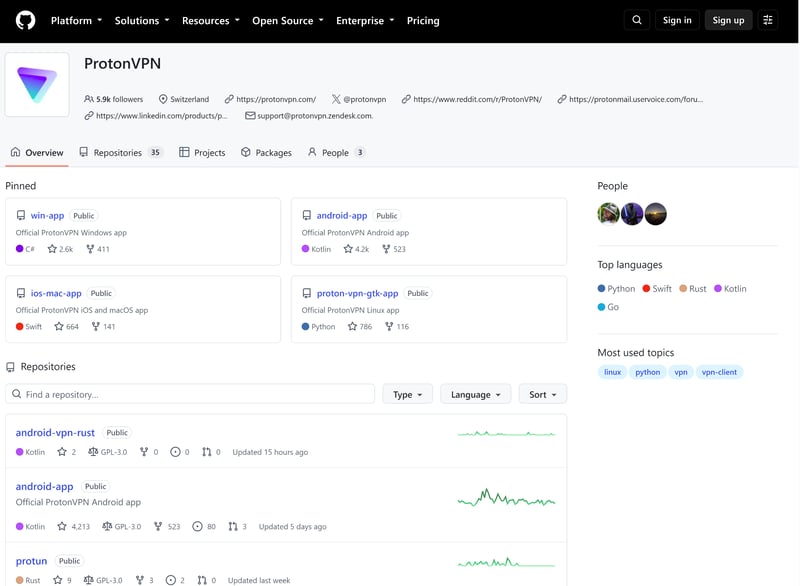
All Proton VPN apps are open source.
Proton also offers a solid set of security features. A built-in kill switch cuts your internet connection if the VPN tunnel drops. A stricter mode, called “Advanced,” only allows internet connections while the VPN is active. This prevents you from accidentally browsing without VPN protection.
Proton VPN doesn’t yet offer post-quantum encryption, which is designed to protect against future threats from quantum computers. Still, it may not be far off: Proton Mail has already rolled out the new encryption technology. According to a roadmap blog post, Proton is laying the groundwork for its VPN, too.
Leak tests: Does Proton VPN’s protection hold up in practice?
A VPN must keep your real IP address and DNS requests hidden at all times. We run several leak tests to check how reliably it does this.
Proton VPN passed all our tests without a hitch. We detected no DNS, IPv6, or WebRTC leaks during testing. Our data stayed protected throughout.
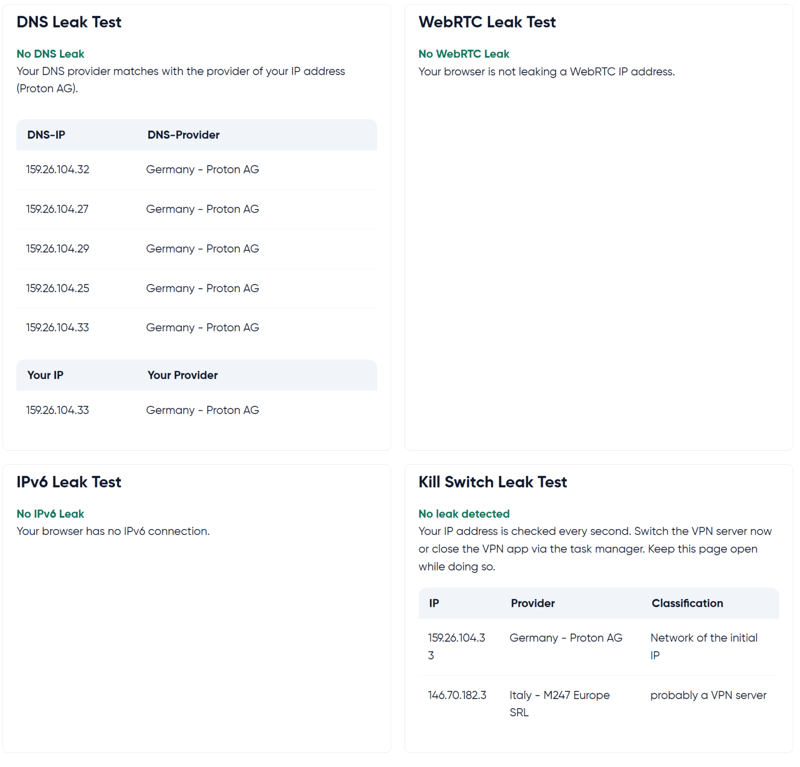
Proton VPN passed all our leak tests.
Proton VPN’s kill switch also worked reliably in our tests. It cut the connection during server switches as expected and kicked in when we deliberately crashed the Proton VPN app.
That last result is worth noting: About half the providers in our comparison leaked data during our kill switch stress test.
Which VPN services reliably protect your data?
Proton VPN | Avast | Bitdefender | CyberGhost | ExpressVPN | hide.me | HMA VPN | Hotspot Shield | IPVanish | Mozilla VPN | Mullvad | NordVPN | Norton | PrivadoVPN | Private Internet Access | PureVPN | Surfshark | TunnelBear | VeePN | VPN Unlimited | Windscribe | |
|---|---|---|---|---|---|---|---|---|---|---|---|---|---|---|---|---|---|---|---|---|---|
DNS | ✓ | ✓ | ✓ | ✗ | ✓ | ✓ | ✓ | ✓ | ✓ | ✓ | ✓ | ✓ | ✓ | ✓ | ✓ | ✓ | ✓ | ✓ | ✓ | ✓ | ✓ |
IPv6 | ✓ | ✓ | ✓ | ✗ | ✓ | ✓ | ✓ | ✓ | ✓ | ✓ | ✓ | ✓ | ✓ | ✓ | ✓ | ✓ | ✓ | ✓ | ✓ | ✓ | ✓ |
WebRTC | ✓ | ✓ | ✓ | ✗ | ✓ | ✓ | ✓ | ✓ | ✓ | ✓ | ✓ | ✓ | ✓ | ✓ | ✓ | ✓ | ✓ | ✓ | ✓ | ✓ | ✓ |
Server switch (kill switch) | ✓ | ✓ | ✓ | ✓ | ✓ | ✓ | ✓ | ✓ | ✓ | ✓ | ✓ | ✓ | ✓ | ✓ | ✓ | ✓ | ✓ | ✓ | ✓ | ✓ | ✓ |
App crash (kill switch) | ✓ | ✗ | ✗ | ✓ | ✗ | ✗ | ✗ | ✗ | ✗ | ✗ | ✓ | ✓ | ✗ | ✗ | ✗ | ✓ | ✓ | ✗ | ✗ | ✓ | ✓ |
How trustworthy is Proton VPN?
“Trust” might be the wrong word: You shouldn’t simply take a VPN provider at its word. Almost all of them claim to keep no logs and put your privacy first.
Still, a few indicators can help you judge whether a provider backs up its promises and truly respects your privacy. Let’s take a closer look at the key factors for Proton VPN:
Proton VPN is owned by Switzerland-based Proton AG, known for its privacy-focused online services. Its main shareholder is the Proton Foundation, a nonprofit organization. According to Proton, this structure ensures “that the company must always act in the best interests of the Proton community.”
Proton’s ownership structure is much more transparent than that of many other VPN services, which often belong to opaque multinational corporations with potential conflicts of interest. Proton employees own the majority of shares.
Proton AG is based in Plan-les-Ouates, near Geneva, Switzerland. This gives Proton the protection of strict Swiss privacy laws. Switzerland also stays outside the major intelligence-sharing alliances.
Proton’s no-logs policy promises to keep “no records” of users’ online activity. However, Proton’s general privacy policy isn’t quite as clear as we’d expect from a provider like Proton.
RTINGS, for example, gives its no-logs policy just 3 out of 10 points. Proton’s privacy policy allows it to store IP addresses under certain circumstances without always specifying why or for how long. Other privacy-focused VPNs are more transparent here.
Yes, Proton VPN regularly has independent auditors verify its no-logs policy. At the time of our review, the latest audit was conducted by Securitum in 2026. The reports are fairly detailed and publicly available, with no Proton account required to access them.
Proton has a trust center aimed primarily at business customers, though it also includes useful information and links for individuals. Key security and privacy information, including relevant documents, is fairly easy to find on Proton’s website.
Proton hasn’t had any major security scandals, but there have been a few incidents and controversies over the years. In 2021, Proton Mail handed over a climate activist’s data following a request from French authorities, leading to the activist’s arrest. In 2026, the FBI was able to identify a Proton user. Proton is not immune to government requests.
A minor political controversy also arose in 2025: Proton CEO Andy Yen praised Donald Trump and the Republican Party on X. He claimed they would take a tougher stance against Big Tech monopolies than the Democrats. Many users objected to the CEO taking such an explicit political position.
Proton’s messaging is fairly responsible, especially compared to other VPN services. It avoids fearmongering and explains what a VPN can do in a measured, straightforward way.
Not completely. You need an email address to create a Proton account, but you can use an existing address or create a new one with Proton. Payment options include Bitcoin and even cash.
Here are the key facts about Proton VPN’s security:
Proton VPN | Avast | Bitdefender | CyberGhost | ExpressVPN | hide.me | HMA VPN | Hotspot Shield | IPVanish | Mozilla VPN | Mullvad | NordVPN | Norton | PrivadoVPN | Private Internet Access | PureVPN | Surfshark | TunnelBear | VeePN | VPN Unlimited | Windscribe | |
|---|---|---|---|---|---|---|---|---|---|---|---|---|---|---|---|---|---|---|---|---|---|
Owner | Proton AG | Gen Digital | Bitdefender SRL | Kape Technologies | Kape Technologies | eVenture Ltd | Gen Digital | Point Wild | Ziff Davis | Mozilla | Amagicom AB | Nord Security | Gen Digital | Privado Networks ehf | Kape Technologies | PureSquare | Nord Security | McAfee Corp. | VeePN Corp | KeepSolid Inc. | Windscribe |
Jurisdiction | Switzerland | Czechia | Romania | Romania | British Virgin Islands | Malaysia | Czechia | US | US | US | Sweden | Panama | US | Iceland | US | British Virgin Islands | Netherlands | Canada | Panama | US | Canada |
Intelligence alliance | none | none | none | none | none | none | 5 Eyes | 5 Eyes | 5 Eyes | 5 Eyes | 14 Eyes | none | 5 Eyes | none | 5 Eyes | none | 9 Eyes | 5 Eyes | none | 5 Eyes | 5 Eyes |
Latest no-log review | 2026 | no review | no review | 2025 | 2025 | 2024 | 2020 | no review | 2025 | no review | 2023 | 2026 | 2025 | no review | 2025 | 2023 | 2025 | no review | no review | no review | no review |
Latest security review | no review | no review | no review | 2025 | 2026 | 2023 | no review | no review | no review | 2023 | 2026 | 2025 | no review | no review | no review | no review | 2026 | 2024 | 2021 | no review | 2024 |
Latest transparency report | 2026 | 2025 | no report | 2026 | 2026 | 2025 | no report | no report | 2026 | 2025 | no report | 2026 | 2025 | no report | 2026 | 2026 | 2026 | 2023 | no report | no report | 2026 |
Open-source | ✓ | ✗ | ✗ | ✗ | ✗ | ✗ | ✗ | ✗ | ✗ | ✓ | ✓ | ✗ | ✗ | ✗ | ✓ | ✗ | ✗ | ✗ | ✗ | ✗ | ✓ |
Anonymous sign-up | ✗ | ✗ | ✗ | ✗ | ✗ | ✗ | ✗ | ✗ | ✗ | ✗ | ✓ | ✗ | ✗ | ✗ | ✗ | ✗ | ✗ | ✗ | ✗ | ✗ | ✓ |
Cryptocurrency payments | ✓ | ✗ | ✗ | ✓ | ✗ | ✓ | ✗ | ✗ | ✗ | ✗ | ✓ | ✓ | ✗ | ✓ | ✗ | ✓ | ✓ | ✗ | ✗ | ✓ | ✓ |
Cash payments | ✓ | ✗ | ✗ | ✗ | ✗ | ✗ | ✗ | ✗ | ✗ | ✗ | ✓ | ✗ | ✗ | ✗ | ✗ | ✗ | ✗ | ✗ | ✗ | ✗ | ✓ |
Proton VPN takes privacy more seriously than most providers in our comparison. It backs strong technical standards with sound practices: The company is relatively transparent, its apps are open source, and independent auditors regularly verify its no-logs claims. Proton VPN also passed our leak tests without a hitch.
Support
| Documentation |
| 1.5/2 |
| Support channels |
| 1.5/2 |
| Speed and quality |
| 1.5/3 |
| Ratings on review sites |
| 0/3 |
Good support needs two things: a comprehensive help center where you can find answers yourself, and quick access to personal help when you get stuck.
Well-organized help center with clear guides
Proton’s help center is well designed. Like every other product in the Proton ecosystem, Proton VPN has its own dedicated support section.
Articles are organized into logical categories, and there’s a search feature, too. The content is solid, with detailed, illustrated walkthroughs and short troubleshooting guides. We found coverage a bit limited, especially when it comes to troubleshooting.
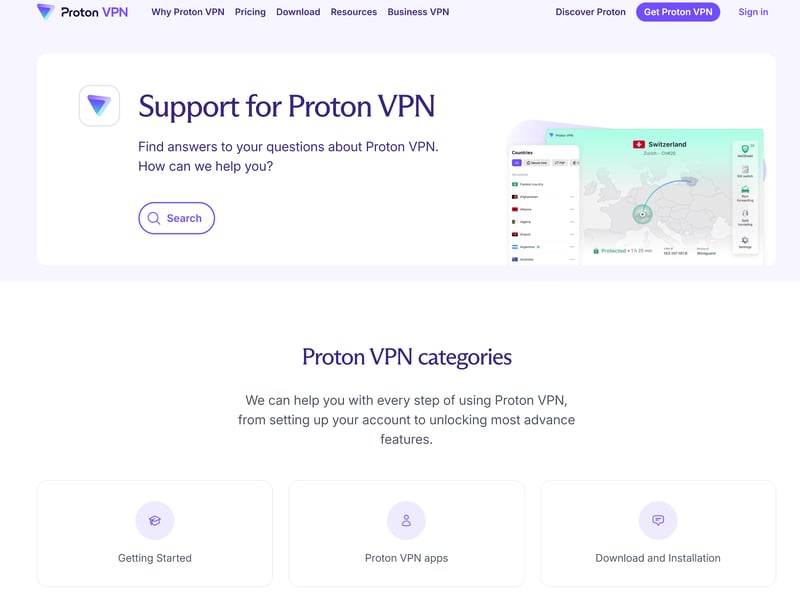
Proton’s support center.
Direct support via chat and email
If you need personal help, you have two options: contact Proton through live chat in the web dashboard (requires a paid account) or fill out a contact form to get a response by email.
Proton says live chat is available 24/7, but that doesn’t mean someone is always there to help. A chatbot responds first, but it quickly ran out of answers to our questions. You can ask to be transferred to a support agent.
During regular business hours, we usually reached an agent fairly quickly. The agents made a reasonable effort to help and answer technical questions. Outside staffed hours, expect a wait. Our contact form inquiry never received a response.
What do customers say about Proton VPN’s support?
Our experience is only a snapshot, so we also checked review sites to see what other users say about Proton’s support. Feedback on Trustpilot & similar sites is mostly negative: many users complain about slow responses or no response at all. Don’t count on quick, personal help from Proton.
Support isn’t Proton VPN’s strong suit. The help center is solid, but expect delays if you need personal assistance. Many customer reviews echo that experience.
Costs
| Free version | Yes | 1/1 |
| Cheapest plan | $2.99 | 2/3 |
| Flexible plan | $9.99 | 1/2 |
| Money-back guarantee | 30 days | 1/1 |
| Fair pricing |
| 1.5/3 |
VPN providers are known for aggressive marketing and misleading pricing. Proton VPN isn’t entirely innocent here, either.
Proton VPN plans: Free, premium, and all-in-one
Proton VPN offers three plans for personal use:
Proton Free is Proton’s free plan. There’s no data cap, but you can only use the VPN on one device, with connections limited to 10 randomly selected locations. Streaming is also unavailable or limited.
VPN Plus is Proton’s VPN-only plan. It includes Proton VPN with all its features.
Proton Unlimited is an all-in-one package that includes several other Proton products, including Proton Pass, Proton Mail, Proton Calendar, and Proton Drive.
Paid plans are available with monthly, annual, or two-year subscriptions. The longer subscriptions come with steep discounts for the initial term.
Here’s an overview of Proton VPN’s plans:
| Free | Plus | Unlimited | |
|---|---|---|---|
| Monthly price | $0.00 | from $2.99 | from $7.99 |
| Contract period (months) | 0 | 1 - 24 | 1 - 24 |
| Limits | |||
| Devices | 1 | 10 | 10 |
| Data volume | unlimited | unlimited | unlimited |
| Number of countries | 10 | 140 | 140 |
| Features | |||
| Streaming allowed | ✗ | ✓ | ✓ |
| P2P allowed | ✗ | ✓ | ✓ |
| Tor access | ✗ | ✓ | ✓ |
| Double VPN | ✗ | ✓ | ✓ |
| Dedicated IP | ✗ | ✗ | ✗ |
| Add-ons | |||
| Ad blocker | ✗ | ✓ | ✓ |
| Phishing protection | ✗ | ✓ | ✓ |
| Malware protection | ✗ | ✓ | ✓ |
| Antivirus | ✗ | ✗ | ✗ |
| Password manager | ✓ | ✓ | ✓ |
| Cloud storage | ✓ | ✓ | ✓ |
| Data leak monitoring | ✗ | ✗ | ✓ |
| Scam call protection | ✗ | ✗ | ✗ |
How Proton VPN’s prices compare
Proton VPN falls in the middle of the price range among the VPNs we reviewed. A two-year VPN Plus subscription costs only about $3 per month for the initial term, which is fairly affordable. The month-to-month plan is quite expensive. Other privacy-first VPNs, such as Mullvad VPN, offer much lower monthly rates.
| Free version available | Lowest-cost plan | Flexible plan | Money-back guarantee (days) | |
|---|---|---|---|---|
| ✓ | $1.11 | $10.99 | 30 days |
| ✗ | $1.99 | $11.99 | 30 days |
| ✗ | $2.03 | $11.95 | 30 days |
| ✗ | $2.19 | $12.99 | 45 days |
| ✗ | $2.19 | $12.99 | 30 days |
| ✗ | $2.43 | $12.95 | 31 days |
| ✗ | $2.49 | $16.45 | 30 days |
| ✓ | $2.59 | $11.99 | 30 days |
| ✗ | $2.78 | $9.99 | 30 days |
| ✗ | $2.99 | $10.99 | 30 days |
| ✓ | $2.99 | $9.99 | 30 days |
| ✗ | $3.19 | $14.99 | 30 days |
| ✓ | $3.33 | $9.99 | 30 days |
| ✗ | $3.49 | $14.99 | 30 days |
| ✗ | $3.99 | 30 days | |
| ✗ | $4.06 | 14 days | |
| ✗ | $4.37 | 30 days | |
| ✗ | $4.99 | $9.99 | 30 days |
| ✗ | $5.00 | 60 days | |
| ✓ | $5.21 | $12.99 | 45 days |
| ✓ | $5.75 | $9.00 | 7 days |
Proton VPN’s pricing practices and hidden costs
Proton VPN positions itself as a trustworthy alternative to the major VPN providers. Unfortunately, its pricing relies on the same annoying tactics and marketing tricks as its competitors:
Yes and no. Like most VPN services, Proton VPN advertises steep discounts for new customers that apply only to the initial subscription term. The renewal price is harder to find.
In 2026, Proton VPN was also accused of experimenting with dynamic pricing after different customers were shown different prices.
Yes, prices rise significantly after the initial term. The VPN Plus plan, for example, roughly doubles in price.
Yes, you can request a refund within 30 days of signing up.
Canceling is straightforward. Just go to “Subscription” in your Proton account on the web. We had no trouble canceling during our review.
Yes, some customers complain about the high renewal prices and the lack of clear pricing information.
Proton VPN is fairly affordable if you choose a long-term plan and cancel before it renews. However, the price increases after the initial term. We expected more transparent pricing from a privacy-focused VPN.
Final Verdict: Privacy Without Compromise?
VPNs are everywhere, but only a handful of providers truly earn our trust on privacy. Proton is one of them. The Swiss provider maintains high security standards, backed by open-source software, independent audits, and transparent business practices.
That security doesn’t come at the expense of usability. Proton VPN offers modern apps, stable performance, and reliable access to international streaming libraries.
Speed is the main area that needs improvement: In our speed test, Proton VPN slowed downloads and uploads considerably. Its support isn’t always reliable, either. Still, Proton VPN offers what may be the best overall balance of privacy, performance, and ease of use on the VPN market.

Proton VPN Customer Reviews
What do other users think of Proton VPN? We looked through review sites and gathered the most common feedback. Reviews in app stores and on Capterra are mostly positive, but Proton VPN faces plenty of criticism on Trustpilot:
Fast VPN connections
Many users say Proton VPN performs well, letting them browse, stream, and work without noticeable slowdowns.Easy to use
Users find the Windows and Android apps well organized and easy to navigate.Useful for streaming and travel
Some customers say Proton VPN lets them access their usual streaming services and media libraries abroad without any trouble.
Frequent disconnections
Several users report that the VPN connection drops regularly, fails to reconnect automatically, or sometimes blocks their internet access entirely.Poor customer support
Support draws plenty of criticism. Users complain about slow responses, generic replies, and problems that never get properly resolved.Problems with streaming services
Not everyone had the same luck we did: Many users report that streaming platforms detect and block their VPN connection.
Alternatives to Proton VPN
Decided Proton VPN isn’t for you? One of these alternatives might be a better fit:
Privacy-focused alternatives to Proton VPN
Proton isn’t the only VPN provider committed to privacy. Mullvad VPN and Windscribe also combine high security standards with strong privacy practices.Faster alternatives to Proton VPN
Is Proton VPN too slow for you? Avast, Mullvad, CyberGhost, and HideMyAss performed much better in our speed test.Free alternatives to Proton VPN
Don’t want to pay for a VPN? Windscribe, TunnelBear, hide.me, and Hotspot Shield also offer free plans.
Here are the best alternatives to Proton VPN: