Best Vibe Coding Tools: 5 AI Builders Compared


Want to build software but don't feel like dealing with complicated code? Then vibe coding might be exactly what you're looking for. Instead of wrestling with syntax and debugging, you simply build your application with AI.
All you need is a vibe coding tool. These tools promise an entirely new approach to app development—where your idea takes center stage, not the code. In this article, we introduce you to five of the best AI builders currently available.


What Is Vibe Coding?
Vibe coding is a new way to develop software. The key difference from traditional programming is direct interaction with AI. Rather than writing code yourself, you describe your requirements in plain language. The AI then converts them into code.

Unlike no-code platforms such as website builders, the focus isn't on piecing components together. Instead, there's a dialog-driven, intuitive development process.
Typical users include individuals and teams without a strong technical background who want to create digital solutions. This includes freelancers who want to build web apps or businesses without in-house developers.
Designers and product managers use AI builders to quickly create prototypes, while developers are also increasingly using these tools to bring ideas to life faster and speed up their workflows.
Top 5 Vibe Coding Tools
There are now countless vibe coding tools available. To help you choose, we took a closer look at five of them. We’ll show you what each tool is best suited for, which features stand out, and where the current limitations lie. This way, you can pick the right tool for your needs.
To ensure a fair comparison, all tools received the same task: create a meal planner with a shopping list as a web app. Here's the specific prompt:
Create a working web app prototype for: MealMate, a weekly meal planner & shopping list.
Must include (content + design):
3 views: Plan, Recipes, Shopping List
Plan: Mon-Sun grid with breakfast, lunch, and dinner. Add recipes per slot + clear. Clear week with confirmation/undo.
Recipes: List with 8 realistic recipes + search + filter (e.g., vegetarian, < 30 min), recipe details, create/edit recipe (name, tags, time, servings, ingredients, steps).
Shopping list: Automatically generated from the plan, merge identical ingredients and sum quantities when units match. Checkboxes + reset completed items, manually add custom items.
Persistence: Save plans, recipes, and lists in LocalStorage (or equivalent).
Design requirements:
Modern, clean premium UI: consistent spacing, cards, buttons, inputs, tags/chips.
Desktop: Sidebar + topbar. Mobile: Topbar + bottom navigation.
Light/dark mode toggle.
Nice empty states, no Lorem ipsum.
Here are the five best vibe coding tools from our comparison:
Base44: Strong All-in-One Tool
Quality: High
Result: MealMate on Base44
Free version: Yes, with basic features
Instead of just providing UI building blocks, Base44 actively helps you connect external systems like databases, APIs, and automation services to your app and reuse them. This makes the tool well-suited for projects involving multiple interacting services.
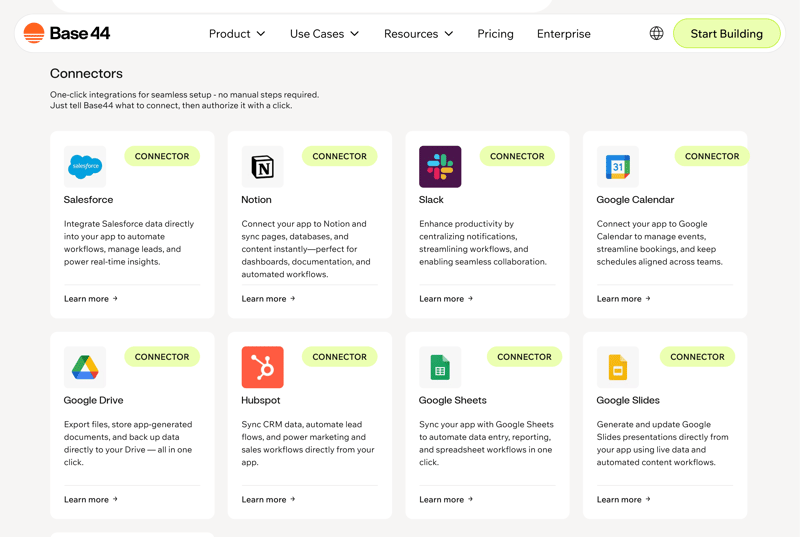
External integrations in Base44.
Reusability is a key focus. Integrations aren't just created once. They can be cataloged as building blocks within your project or team and used again. This makes it much easier to set up repeatable workflows.
How Does Base44 Work?
Like other AI builders, you start with a text-based instruction. Based on this prompt, Base44 generates an initial app structure including pages, data models, and initial integrations.
You then refine the application through an iterative process guided by AI. You incrementally adjust the behavior, logic, and workflows until the app meets your requirements. Unlike traditional UI generators, you control how data flows, which integrations are needed, and how actions are triggered across systems.
How Good Is the Quality at Base44?
In short: very good. Base44 understands the example prompt right away and builds the meal planner MealMate quickly and completely.
The AI generates not only eight realistic recipes. It also adds details like prep time, servings, and ingredients as requested. You can search, filter, edit, and expand the recipes.
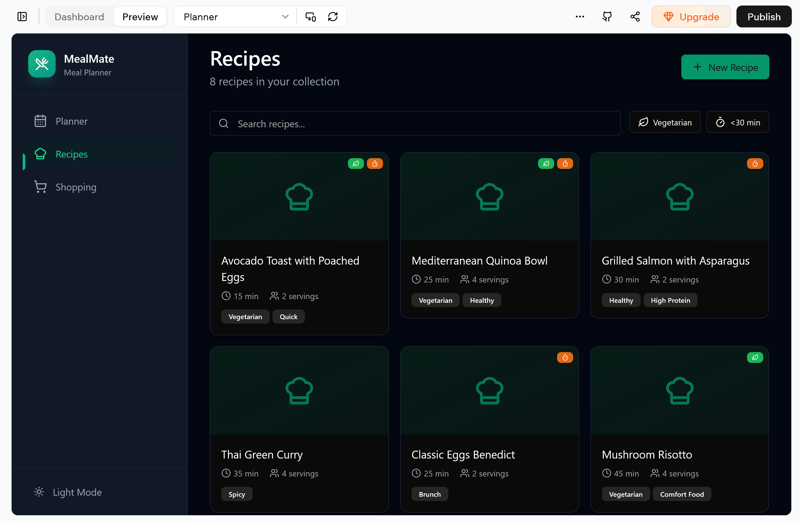
The AI created 8 searchable recipes.
The weekly planner also works reliably. Each day has slots for breakfast, lunch, and dinner. Dishes can be added or removed individually.
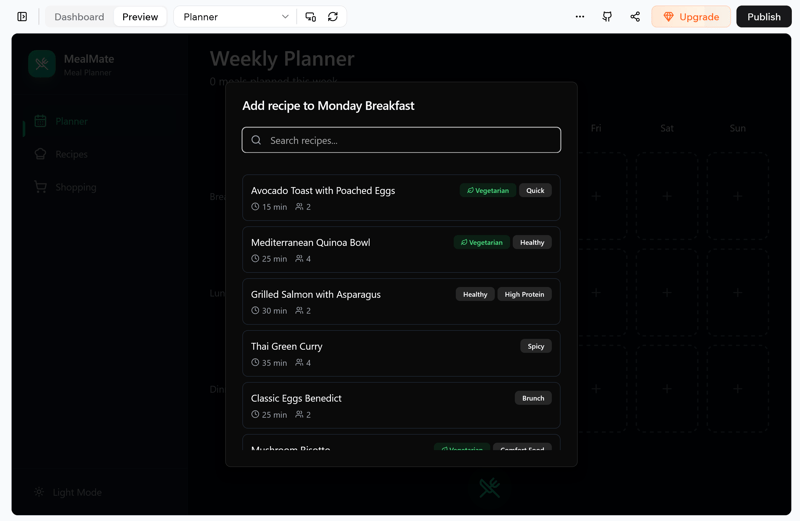
Adding recipes in the weekly planner.
The shopping list is generated correctly from the weekly plan. Ingredients are combined, quantities are added up properly, and you can also add your own items manually.
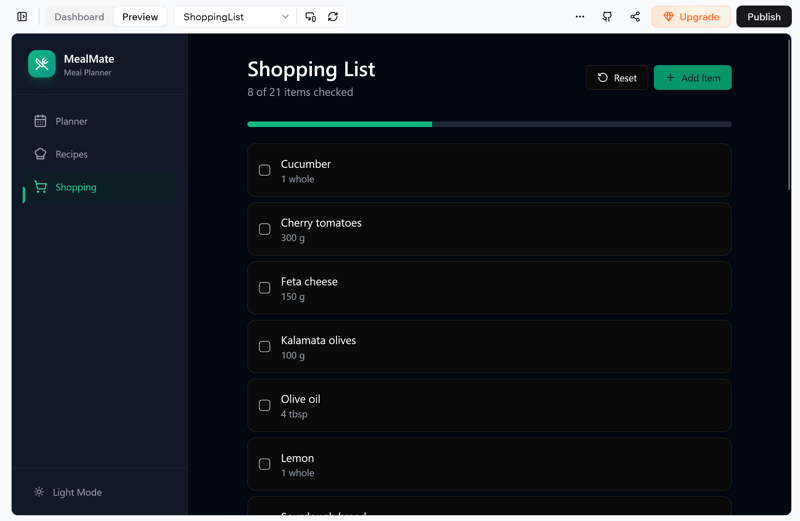
The AI-generated shopping list from Base44.
Another benefit: Base44 proactively suggests improvements. Examples include recipe ratings, categorized shopping lists, or collections for dishes (like "quick lunch" or "big breakfast").
In addition to the frontend, there's a separate backend dashboard. Here you can manage users, security settings, and external integrations. A simple analytics overview is also included.
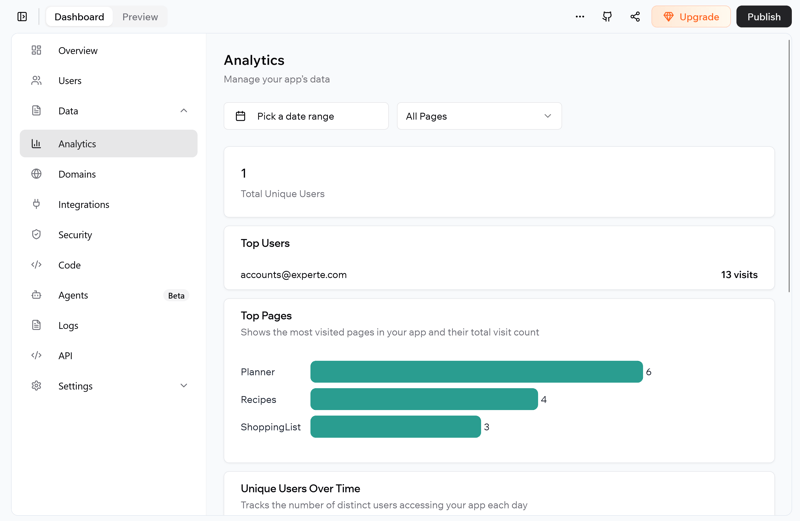
App analytics in the Base44 backend.
Base44 gives you direct access to the generated code. However, in the free version of the AI builder, you can only view it. To edit the code, you need a premium plan. The same applies to exporting your project as a ZIP file.
How Good Is Base44 for Business Use?
According to the terms of service, Base44 may be used for business purposes, but only within a broadly defined internal-use scope. You can develop and deploy apps and tools for your own company. However, you cannot operate the platform itself as a service for third parties.
Prohibited use cases include applications in medicine, critical infrastructure, or any activity that is unlawful or requires special authorization. You are liable for what happens with the generated output.
What Are the Costs and Terms for Base44?
Base44 uses a dual system: chat credits for AI interactions and separate integration credits for the actual workflows in your app. This lets you clearly distinguish whether costs come from development work or actual usage.
The free plan from Base44 offers basic features and a small monthly starter allowance. Premium plans significantly increase both types of credits and unlock additional features like in-app code editing and GitHub integration. You get a discount when you sign up for an annual subscription.
What Are the Pros and Cons of Base44?
Deep external integration
Base44 was built with external systems like databases, APIs, and automation tools in mind. These elements are tightly integrated into the app workflow and easier to configure than with most competitors.Separate credit models
Development and usage are billed via distinct credit types, giving you greater transparency and control over project costs.Reusable components
Created integrations can be saved as reusable components across teams and projects—reducing duplicate work and increasing efficiency.
Manually defined workflows
Unlike more standardized platforms, Base44 requires you to define workflows and system interactions yourself.No support for custom login flows
Authentication is fixed to a predefined structure. Even on paid plans, custom login flows or branded user management aren't available.
Lovable: Credits With Rollovers
Quality: Very good
Result: MealMate on Lovable
Free version: Yes, with many features
The Swedish platform Lovable combines the classic AI builder approach with a flexible credit system. Its standout feature is credit rollover: unused credits don't expire but automatically carry over to the next billing cycle. This is especially useful for irregular usage and helps you manage costs better.
Lovable also puts more emphasis on team features like roles, permissions, and workspace organization. These capabilities aren’t common across all vibe coding tools.
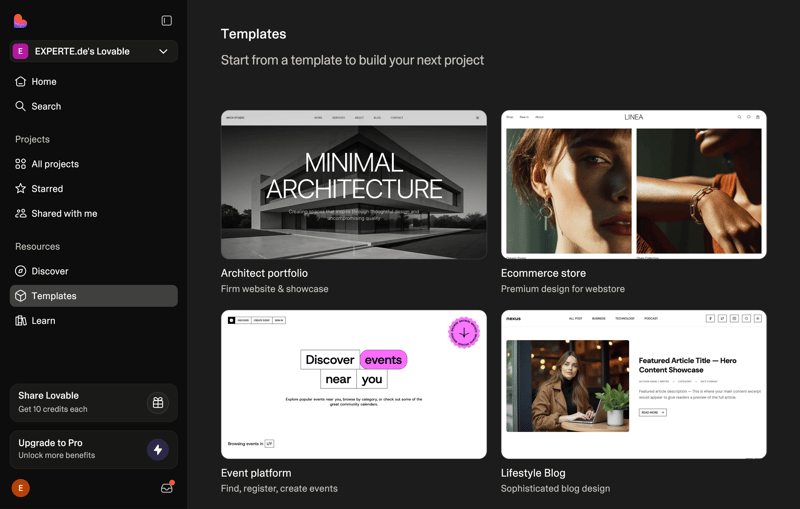
Lovable offers many optional templates.
Lovable generates complete apps from text descriptions, including frontend, backend, and deployment. According to its own positioning, the tool targets users who want a good balance between automated code generation and manual control.
How Does Lovable Work?
You describe your app or website in the chat, and Lovable creates an initial working version. You then refine the project incrementally through additional prompts. After each round, the tool clearly shows how many credits were used and which parts of the app were updated.
The separate code mode lets you make changes directly in the code without additional chat rounds. This saves credits because you don't have to trigger a new AI response for simple fixes or optimizations.
How Good Is the Quality at Lovable?
Very good. Lovable quickly produces a fully functional prototype that closely mirrors the result from Base44.
New recipes are quick to add, edit, or delete. Instead of image placeholders, Lovable displays a description of the dish. The AI also came up with ten relevant tags.
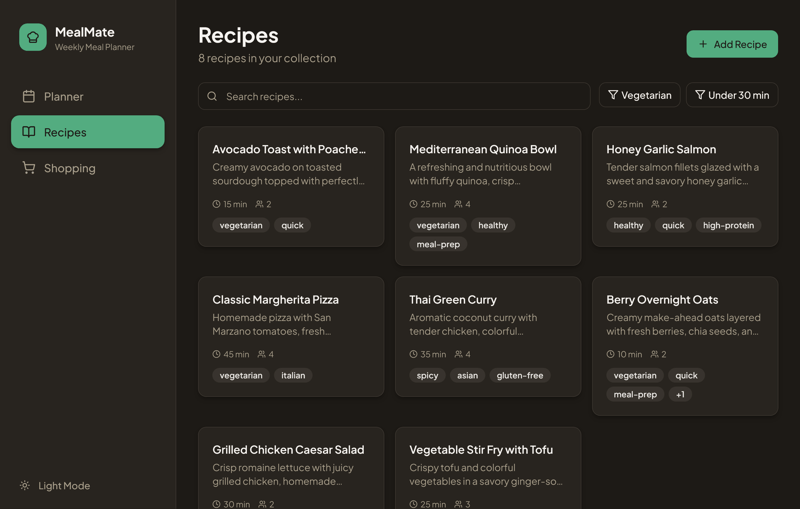
The recipe view of the web app generated by Lovable.
The tool implemented the weekly planner as requested, with breakfast, lunch, and dinner from Monday to Sunday. You can quickly add and remove individual dishes. Lovable shows preparation times directly within the weekly overview.
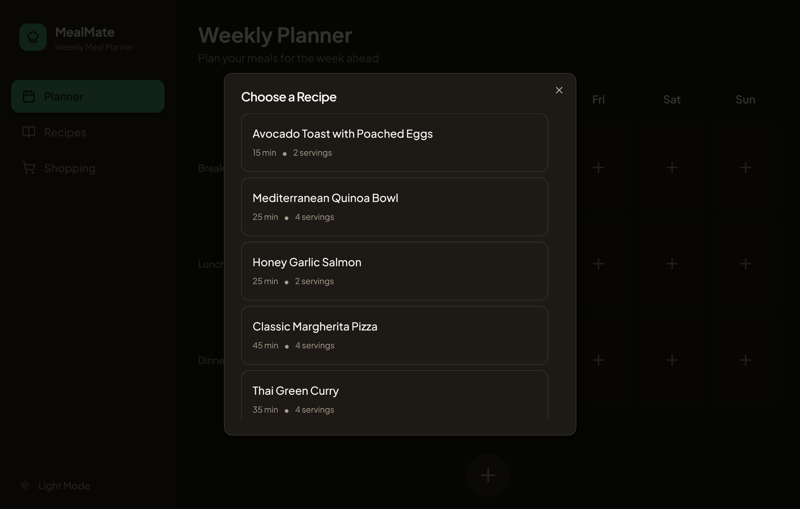
Adding dishes to the weekly planner is easy.
The shopping list is also very similar to Base44's. Here you add items directly in the default view, including a quantity field that isn't preset. As requested, the shopping list is based only on dishes already added to the weekly planner.
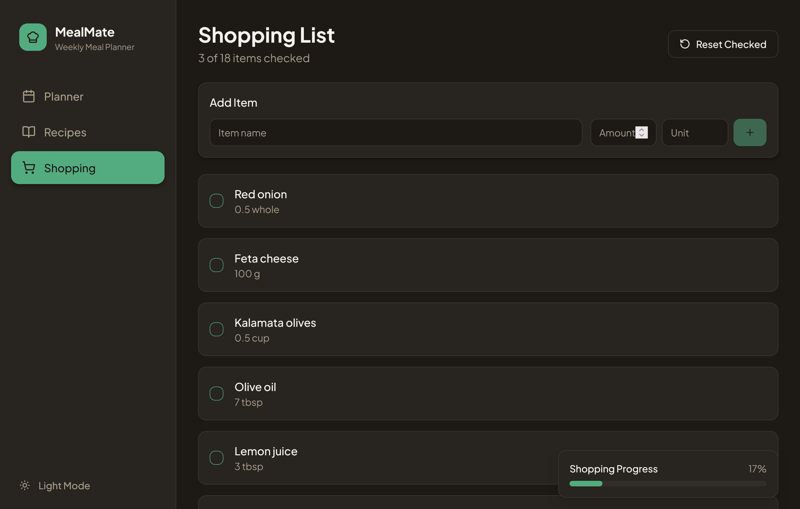
The shopping list created by Lovable is similar to Base44's.
You can customize the design without using additional credits. Beyond individual UI elements, you can also select an entirely different theme for the app.
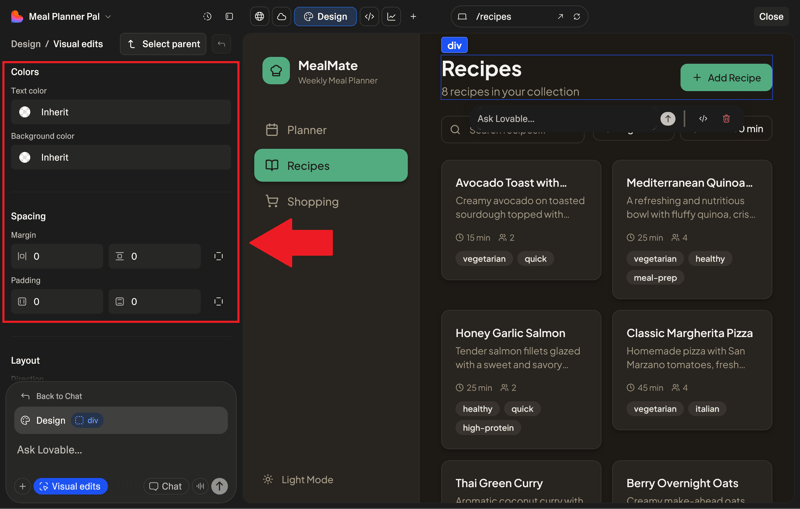
You can customize the design without using any credits.
Code access is restricted in the free version. The free version also limits you to downloading individual files instead of the entire project.
How Good Is Lovable for Business Use?
Lovable grants a license for personal or internal business use. According to the terms of service, you own the code. However, this is subject to the condition that you don't violate any third-party rights.
One important point: Lovable may use your projects to improve its models at its own discretion. If you don't want this, you need to explicitly opt out. This option is only available with the business plan.
What Are Lovable's Costs and Terms?
Lovable combines monthly credits with daily allowances. This setup provides greater flexibility for occasional users. Premium plans offer more credits, private projects, custom domains, and team features.
Enterprise customers can request a customized plan. Students get a discount on the Pro version.
What Are the Pros and Cons of Lovable?
Credit rollovers
Unused credits don't expire. They roll over automatically, which is especially helpful if you don't use the tool regularly.Daily bonus credits
You receive fresh credits daily, which are used before your monthly allowance. This extends your overall budget.Many built-in team features
Lovable supports collaboration through shared workspaces, role-based permissions, and access control for code, projects, and deployments.
Separate cloud service charges
Cloud usage is billed separately from your credit budget. Costs may vary significantly depending on how your app operates.Shared credit pool
All team members draw from a shared credit pool. Without clear management, heavy use by some can limit availability for others.
Bolt.new: Browser IDE for Vibe Coding Pros
Quality: High, but requires fine-tuning
Result: MealMate on Bolt.new
Free version: Yes, but with limited credits
Bolt.new is an AI builder from StackBlitz. The tool sets itself apart by offering a full development environment in your browser, controllable via chat. You work with real project files and access source code, previews, and the file structure—no local setup required.
This makes Bolt.new a strong choice for users who want AI support but still maintain full control over the code.
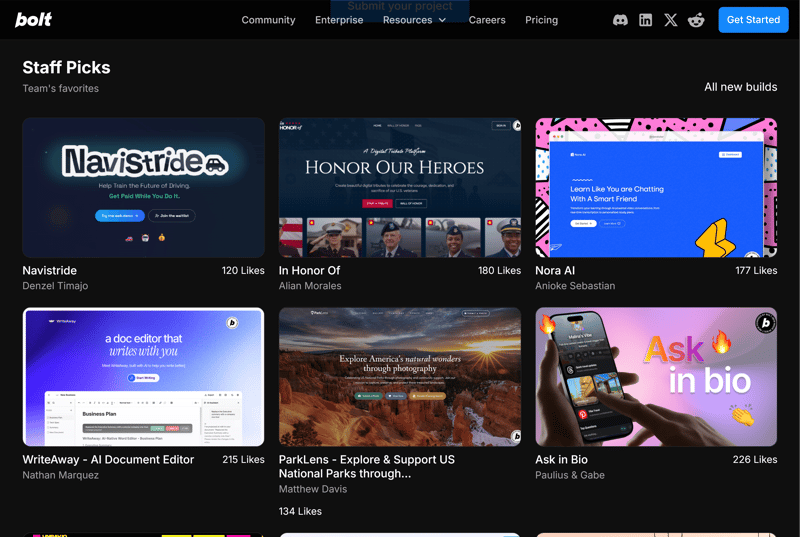
A selection of content created with Bolt.new.
Bolt.new is especially useful when the generated code needs to be developed further, version-controlled, or used by a team. Thanks to Git integration, you can plug the tool directly into existing developer workflows.
How Does Bolt.new Work?
Getting started works like with other vibe coding tools: describe your idea in the chat, and the AI creates an initial project base. Depending on your prompt, this may already include files, folder structure, and basic forms. After that, you enter change requests, and the system implements them. The full project context stays visible, so you can always see what changed and what the current state looks like.
Bolt.new goes beyond the UI layer. It generates real, editable, full-stack code directly in your browser. You can watch your project develop in real time, look inside files at any point, make manual changes, or export everything.
How Good Is the Quality at Bolt.new?
Generally high, but in our review it didn't quite match Base44's level. Initially, MealMate didn’t render correctly. Even after a reload, the preview stayed blank. The app only appeared after logging in again.
The recipes themselves match the prompt exactly. You can search, edit, and categorize them. Adding new recipes works without any issues.
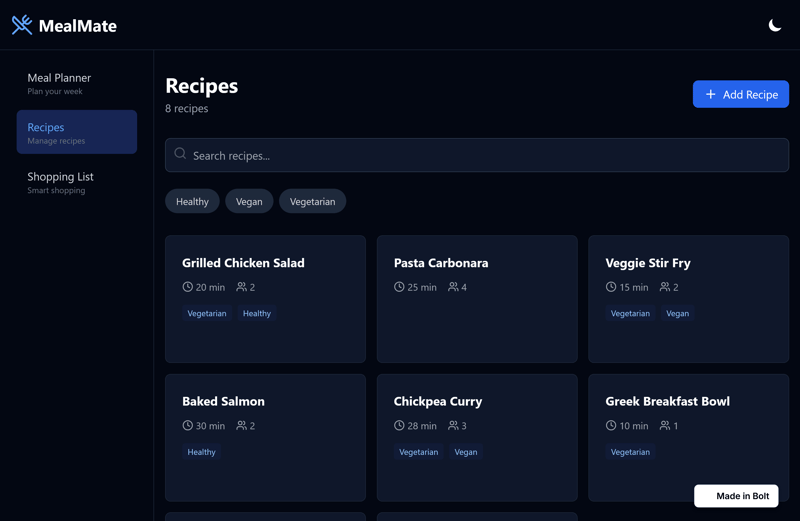
The recipe view in Bolt.new.
The weekly planner lacked a crucial feature: users couldn’t add meals. Bolt.new didn't create an "Add" button, even though it was part of the prompt. It took a second attempt before MealMate actually worked.
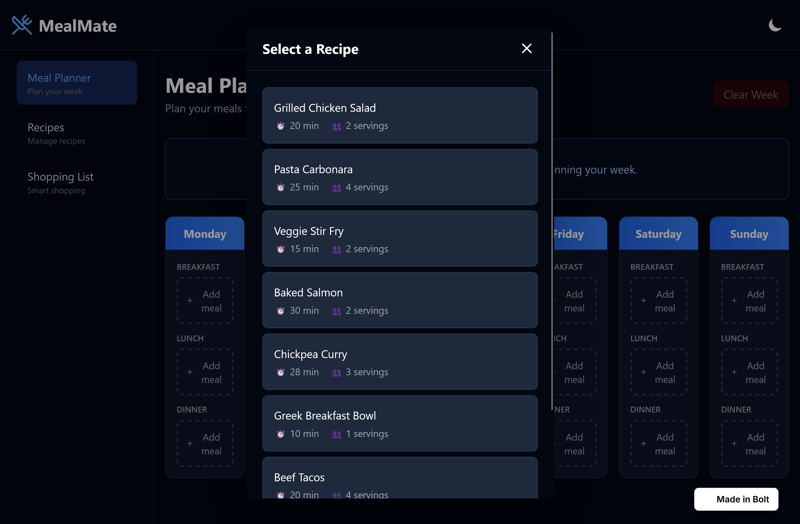
The weekly planner didn't work right away.
The shopping list appeared less refined than in Base44. When you manually add products, units aren't preset and have to be entered yourself. After the first prompt, there was also no way to mark items as completed.
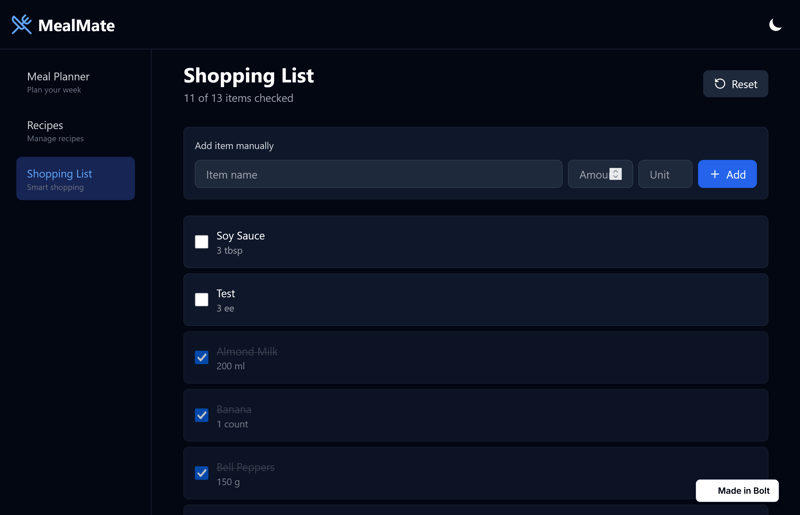
The shopping list also had weaknesses in our review.
Bolt.new generates a control panel by default, though it initially offers limited functionality. You have to tell the AI to create a database. Only then do features like user and file management become available.
How Good Is Bolt.new for Business Use?
You can use code generated by Bolt.new commercially, including in products or client projects. The official documentation states that the generated code is yours and you can use it for any legal purpose.
However, you're responsible for making sure the code doesn't violate third-party licenses and doesn't contain security risks. The platform doesn't take on that responsibility for you.
What Are the Costs and Terms for Bolt.new?
Bolt.new also uses a token-based model. Every step in the project context uses tokens included in your plan. As your project grows over time, each change requires more tokens.
A free plan with daily and monthly token limits is good for getting started. Premium plans expand your token budget and unlock additional features such as Git integration and project management.
What Are the Pros and Cons of Bolt.new?
In-browser development environment
Bolt.new runs a full Node.js environment in your browser via WebContainer, complete with terminal, file system access, and server-side execution—no local setup required.Git integration
All code changes are fully version-controllable and integrate smoothly into established Git workflows.Token-based control
You can fine-tune token usage by minimizing project context, allowing for more cost-effective development.
Loss of context overview
Reducing project context to save tokens may result in the loss of previous AI-generated code, making it harder to track changes.Requires more manual adjustments
Compared to other tools, Bolt.new needed more hands-on tuning to achieve the desired result in this test scenario.
v0: UI Generator for React Stacks
Quality: high for design
Result: MealMate on v0
Free version: yes, but only a few messages per day
v0 by Vercel specializes in generating React UI components and frontend layouts. This AI builder is designed for developers and teams who already work with modern frontend stacks and don't need a complete app platform. v0 acts more like a co-designer than a full-stack app builder.
One advantage is the tight integration with Git workflows: you can save code generated by v0 directly to repositories, version it, and continue editing from there.
How Does v0 Work?
You describe in natural language what UI component, layout, or page you need. v0 then generates matching React code, including structure and styles. You can iteratively refine the result with follow-up prompts until it meets your expectations.
If you don't want to start from scratch, you can use existing templates. These are available in twelve categories, including ecommerce, games, and landing pages.
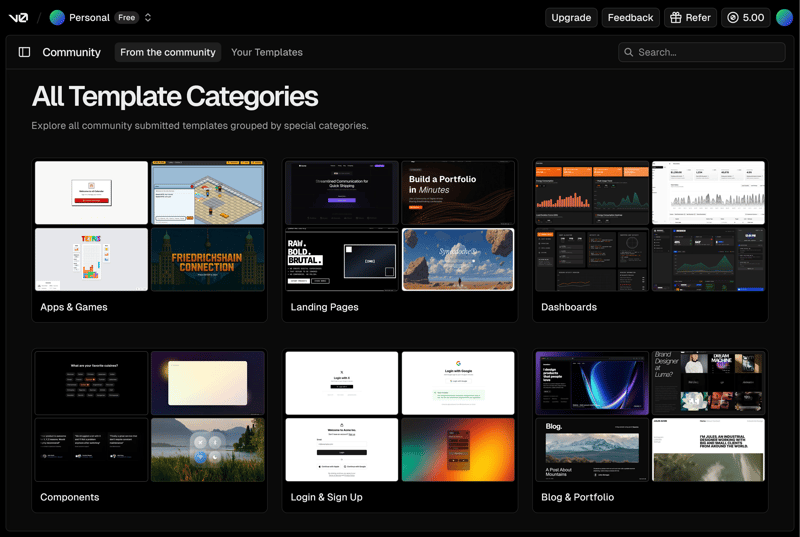
A selection of templates created by other v0 users.
v0 focuses on the UI layer. Backend logic and data flows remain your responsibility as a developer. Instead of finished apps, the tool delivers design components with functional code that you can integrate into your projects.
How Good Is the Quality at v0?
Very high, provided you’re not expecting an all-in-one solution. The meal planner design comes together quickly, and MealMate is functional after just a single prompt.
For the searchable and editable recipes, the AI builder created more filters than other tools. The UI for adding new recipes also looks better than what competitors offer.
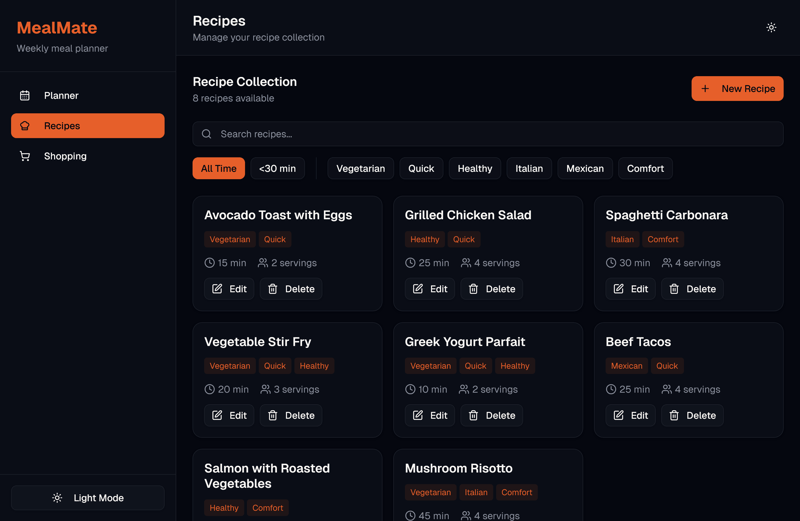
The recipe view in the prototype was created by v0's AI.
v0 could have put more effort into the weekly planner. Instead of an appealing recipe overview, the AI only created a dropdown menu with limited information. Still, the weekly planner is functional: each day has slots for three meals.
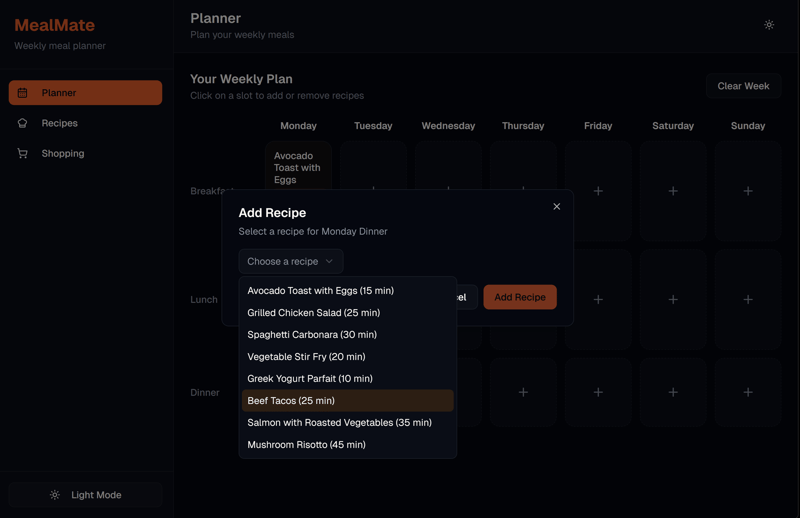
The weekly planner is limited to a basic dropdown menu.
The shopping list, on the other hand, turned out really well. It actually looks like a real shopping list. However, manually added items lack preset units.
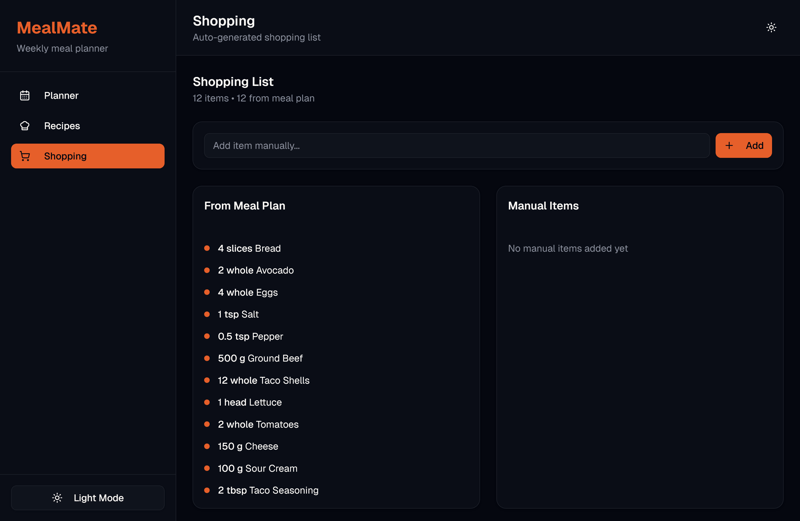
The shopping list looks realistic right from the start.
The AI builder's focus on UI is evident in its separate design mode. You can set colors, fonts, and more without using any credits. Beyond general appearance settings, you can also customize individual elements to your liking.
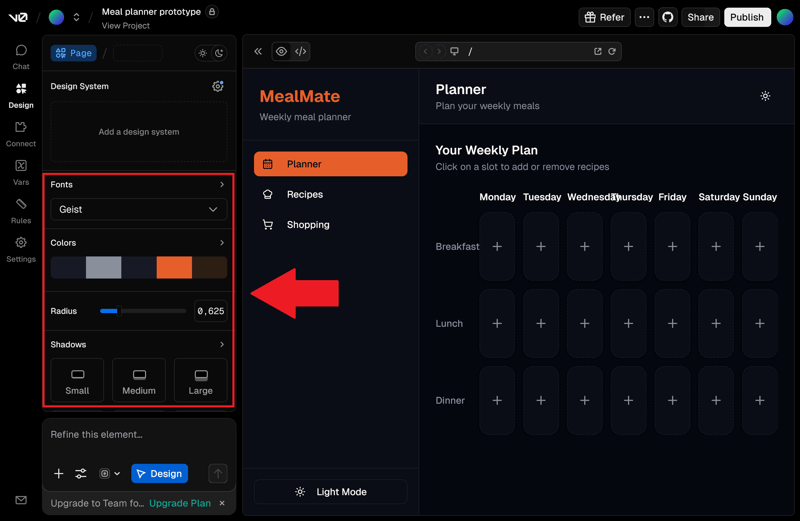
Design changes without using credits.
The AI-generated code is relatively lightweight since v0 essentially focuses on frontend design. While individual files can be downloaded, v0 doesn’t offer a ZIP export option.
How Good Is v0 for Business Use?
You can use code from v0 for business purposes without any issues. Just make sure to follow Vercel's terms of service (Vercel is the company behind v0) and the specific rules for AI products.
Privacy, confidentiality, and liability are subject to plan-specific limitations. If you work with sensitive data or need to meet industry-specific requirements, Vercel recommends a Business or Enterprise plan.
What Are the Costs and Terms for v0?
v0 uses a credit system with monthly allowances. Paid plans include higher UI generation quotas. The free tier works well for smaller prototypes. Paid plans offer larger quotas and team features like Figma import or API access. GitHub sync is included even in the free version.
What Are the Pros and Cons of v0?
Focus on React
The output integrates seamlessly with React projects, helping reduce development time during the design and prototyping phases.Git workflow integration
Generated code fits naturally into your existing Git-based workflows and can be version-controlled without extra steps.Figma import available
Bridging the gap between design and development, v0 lets you continue working directly from Figma designs—no need to rebuild components manually.
Frontend-only scope
v0 is limited to UI generation. You'll need to implement backend logic and data integration separately.Code import limitations
Some users have reported issues when re-importing previously generated code into the platform.
Hostinger Horizons: AI Builder With Hosting
Quality: High
Result: MealMate on Hostinger Horizons
Free version: Yes, but only for seven days
Hostinger Horizons takes a different approach than traditional vibe-coding tools. The AI builder is directly integrated with Hostinger's hosting services.
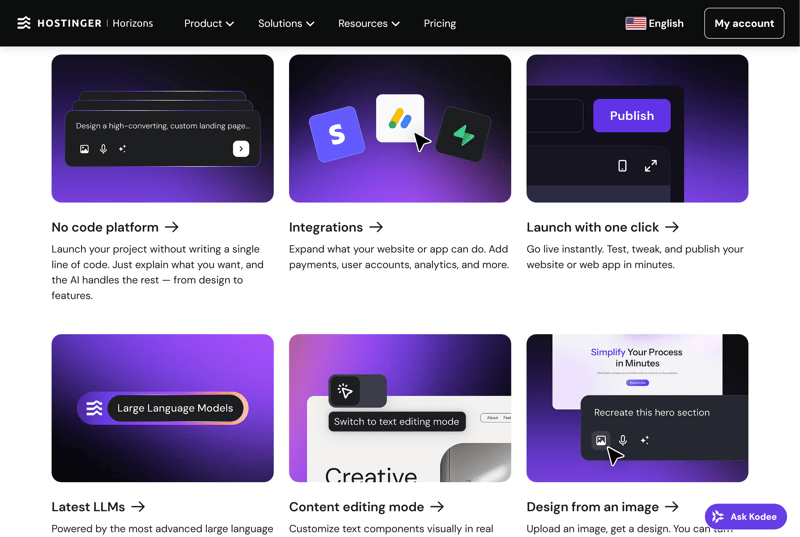
An overview of Hostinger Horizons features.
The platform is clearly aimed at the no-code segment. It focuses on fast, visible results at the expense of deep app logic or complex data models.
How Does Hostinger Horizons Work?
You describe your idea in the chat, and Horizons creates a first working version of your website or web app. Changes are also made via chat. Alternatively, you can choose one of 15 templates and customize it with the AI.
You can export the AI-generated code and host it outside the platform if needed. For more complex requirements like databases or payment integrations, Hostinger is gradually introducing external integrations.
How Good Is the Quality at Hostinger Horizons?
The results are solid overall and generated quickly. In our test, the AI independently resolved an issue on its own after the first run to improve the weekly planner's functionality.
Horizons was the only tool in our top 5 that also created AI images for recipes, even though our prompt didn't ask for them. The images usually match the content well, and the recipes themselves look good too. Recipes can be filtered, edited, deleted, and added with ease.
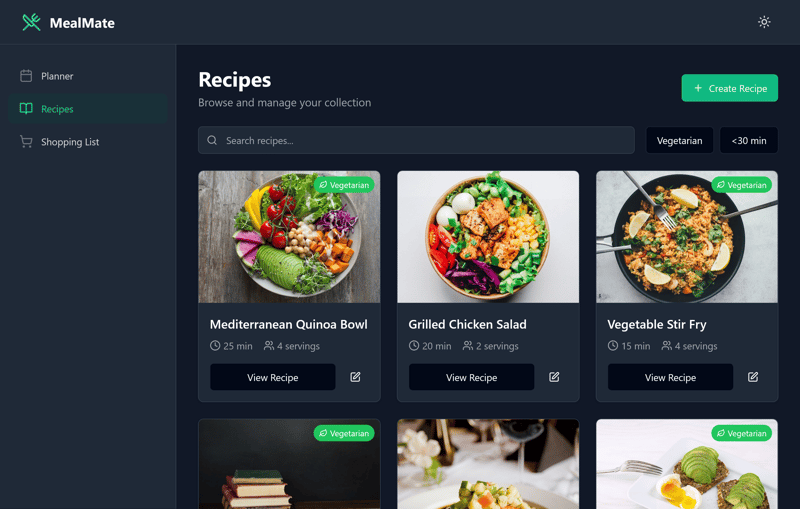
The AI also generates matching images for the recipes.
For the weekly planner, Hostinger uses a view that separates days more clearly, which makes sense. You can quickly add or remove meals for breakfast, lunch, and dinner. The generated images also appear when selecting dishes.
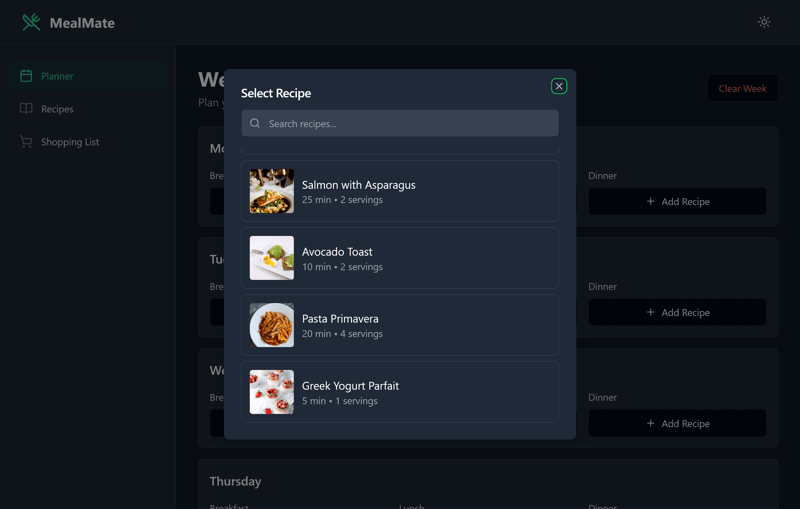
Adding dishes is straightforward.
The shopping list allows custom entries with quantity details. Unfortunately, there's no way to mark items as purchased or not. Other AI builders handle this better.
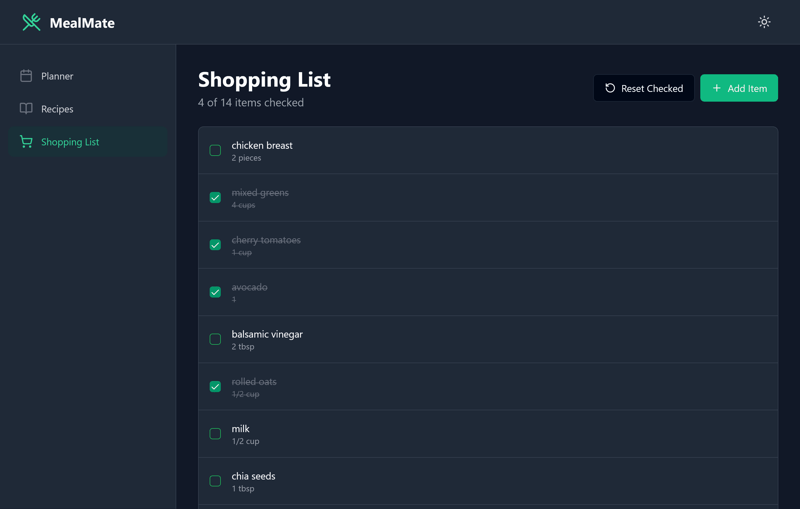
We're not impressed with Hostinger's generated shopping list.
Design changes can only be made through the chat and use up credits. Only basic elements such as headings can be edited manually without invoking the AI.
Even with the free version of Hostinger Horizons, you can view and edit the generated code. However, exporting anything, even individual files, requires a paid plan.
How Good Is Hostinger Horizons for Business Use?
You can use content created with Horizons for commercial purposes, monetize it, and publish it on your own domains.
The only restrictions come from Hostinger's general terms of service. As long as you don't create illegal content and use server resources fairly, business use is no problem.
What Are the Costs and Terms of Hostinger Horizons?
Horizons gives you a monthly credit budget. There's no token-based billing, just a clear number of interactions. Premium plans also include image and voice prompts, additional interactions, and security features.
There's no permanent free version. The free trial is limited to seven days. For premium plans, Hostinger offers a 30-day money-back guarantee.
What Are the Pros and Cons of Hostinger Horizons?
Hosting and domain included
No need to manage separate servers, domains, or SSL certificates—all essentials are bundled into the service.30-day money-back guarantee
All paid plans are covered by a 30-day refund policy, giving you time to test the product risk-free.
No native app export
The platform supports web apps only. Direct publishing to Google Play or the Apple App Store is not possible.Code export may require adjustments
User feedback suggests the exported code may not work out of the box and could require manual modifications.
Alternatives for Developers and Others
Didn't find the right tool in our top 5? No problem—the market for vibe coding tools is growing rapidly, and several strong alternatives could suit your needs better:
- 1.
Providers like Locofy, Builder.io, and Plasmic specialize in UI generation powered by AI. They bridge the gap between design and code, often converting Figma files into production-ready React components.
- 2.
For developers who work directly in code, Cursor, Claude Code, or Codeium (Qodo) are interesting options. These tools help analyze projects, suggest functions, refactor code, and support testing—all while working within your existing development environment.
- 3.
If you want to develop collaboratively in the cloud, Replit or GitHub Codespaces are better choices. They're especially useful for real-time teamwork, quick testing, and coding without local setup.
Conclusion
There's no perfect AI builder. What matters most is how you intend to use the tool. If you're building complex workflows with extensive integrations and automation, Base44 is your best option.
If you want to work directly with real code and integrate it into Git workflows, Bolt.new is a solid choice. For UI design with a React focus, v0 performs well—provided you handle backend and data integration yourself.
If you use vibe coding tools occasionally—or work in a team—Lovable provides flexible plans with daily credits, rollover, and role-based access. If you want to publish your app without handling hosting yourself, Hostinger Horizons is worth considering.
Always read the terms of service carefully. These tools typically charge based on tokens, messages, or credits. Costs can add up quickly for larger projects.