The 12 Best AI Image Generators 2026 (Free and Paid)

An AI image generator lets you create high-quality images and graphics within seconds. All you need to do is describe the image you have in mind, and the AI handles the rest. But with so many AI tools available today, which one delivers the best results?
We’ve rounded up some of the best AI image generators currently available and break down what they cost and what they can do.
What Are AI Image Generators?
AI image generators are tools that automatically create images based on text input. They use machine learning techniques to turn a written description into a visual output.
All you need to do is enter a prompt — a short or detailed description of the image you want to create. The AI analyzes your input and draws on its training data to produce a matching image.
Within seconds, you get an image that matches your description — whether it’s a realistic photo, an illustration, or a stylized graphic. Here’s an example:
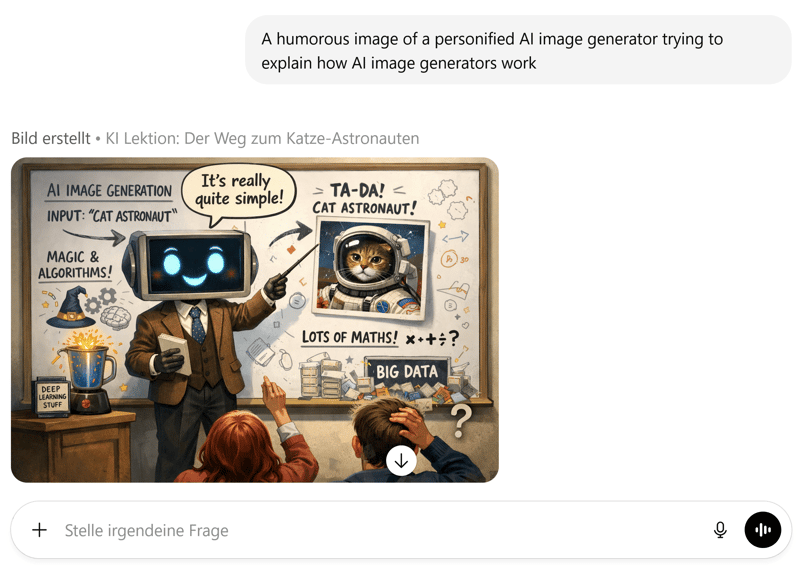
This is what image generation looks like in ChatGPT.
The use cases are wide-ranging: AI image generators can create visuals for websites, social media, marketing materials, or creative projects.
When people talk about AI image generators, they might be referring to either AI platforms or the AI models behind them.
AI platforms are online tools that make AI models accessible. They provide an intuitive interface where you can enter prompts and generate images.
The AI models themselves are algorithms trained on large datasets to turn text descriptions into images. They form the technological foundation that powers AI platforms.
Some AI platforms use proprietary models, while others license well-known models and provide the front end. We cover both categories in this article.
What Are the Most Important AI Models?
When it comes to AI image generation, these are some of the most important models on the market right now:
AI Model | Developer | Best suited for |
|---|---|---|
GPT Image 1.5 | OpenAI | Product images, social media graphics, and image editing for websites or presentations |
Nano Banana 2 | Images and image editing for marketing, blog posts, and other online content | |
Midjourney V7 | Midjourney | Ad campaigns, moodboards, and design concepts |
Firefly Image Model 5 | Adobe | Graphics and visual assets for design projects within Adobe Creative Cloud |
Stable Diffusion 3.5 | Stability AI | Custom image projects, unique styles, and internal business use |
FLUX.2 | Black Forest Labs | Realistic product visuals and concept images |
Ideogram 3.0 | Ideogram | Posters, ad graphics, and social posts with readable text |
Grok Imagine | xAI | Social media images, memes, and other quick visual content |
MAI-Image-1 | Microsoft | Realistic photos, presentations, marketing |
These AI models are often available through multiple platforms. Some providers offer them through their own web interfaces as well as through APIs. At the same time, third-party tools integrate these models into their own products.
The same AI model can offer different features, pricing, or interfaces depending on the platform. That’s why not only the model matters, but also the platform you use to access it.
What Are the Best AI Image Generators?
It’s not just AI-generated content flooding the internet — the number of tools used to create it is growing as well. There are more and more AI image generators available, and they all promise similar results.
We’ve put together a list of the best AI image generators currently available and explain what sets each one apart.
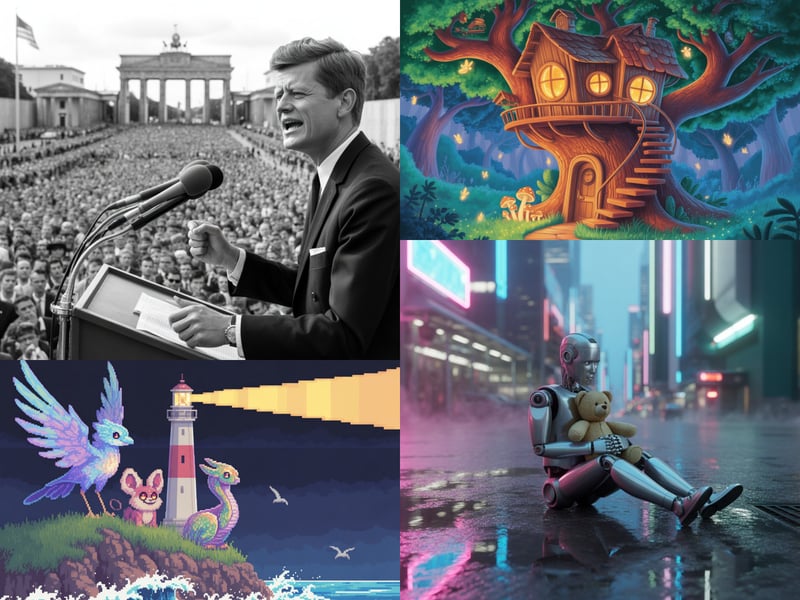
Our assessment is based on several criteria, including image quality, feature set, costs, and ease of use. To compare image quality as directly as possible, we used the same four prompts for every AI image generator:
- 1.
A lonely robot holding a stuffed animal on a neon-lit street in a futuristic metropolis, just after the rain.
- 2.
An illuminated treehouse in a fantasy forest, in a cartoon style.
- 3.
Three completely original fantasy creatures (not from books or mythology) gathered on a cliff in front of a lighthouse by the sea, in pixel art style.
- 4.
A photorealistic image of John F. Kennedy during his “Ich bin ein Berliner” speech.
In addition, we tested how well each AI tool performs for business use cases. For that, we used the following examples:
- 1.
Social media image
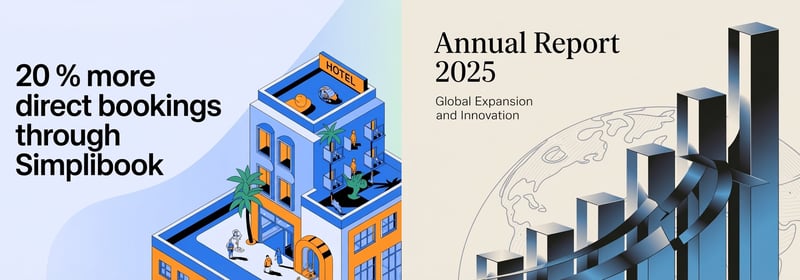
A social media asset for a tech company highlighting a B2B customer testimonial. The customer is a hotel chain that saved time and money through an innovative booking system. The asset should feature an illustration of a miniature hotel in a modern style with a vibrant blue and orange color palette that highlights these benefits. In one corner, the text ‘20% more direct bookings with Simplibook’ should be clearly visible. - 2.
Business presentation
A cover for an annual financial report that represents strength and growth, featuring an abstract image of rising bar charts and a globe in the background. The title ‘Annual Report 2025’ should appear at the top of the image, with the subtitle ‘Global Expansion and Innovation.’
Here are our top 12 AI image generators on the market:
Nano Banana 2 in Google Gemini: Great Images Even Without a Subscription
Free version: Yes, with limitations
Premium costs: starting at $7.99 per month
Maximum resolution: 1,536 × 1,024 pixels
Nano Banana 2 is Google’s latest AI image model. It’s built directly into the Google Gemini AI assistant and is free to use. Paid subscribers get higher daily limits and can also have Gemini re-render images using Nano Banana Pro.
How Does Nano Banana 2 Work?
You use Nano Banana 2 directly through Gemini in your browser or the app. Enter a prompt, generate an image, and refine the result within the same interface. Gemini doesn’t just handle standard text-to-image prompts: you can also upload images or combine multiple images.
Apart from choosing a style, Nano Banana 2 doesn’t offer any additional settings. Instead, you use natural language to achieve the desired result. For example, you can tell Gemini to create an image in a 4:3 or 16:9 aspect ratio.
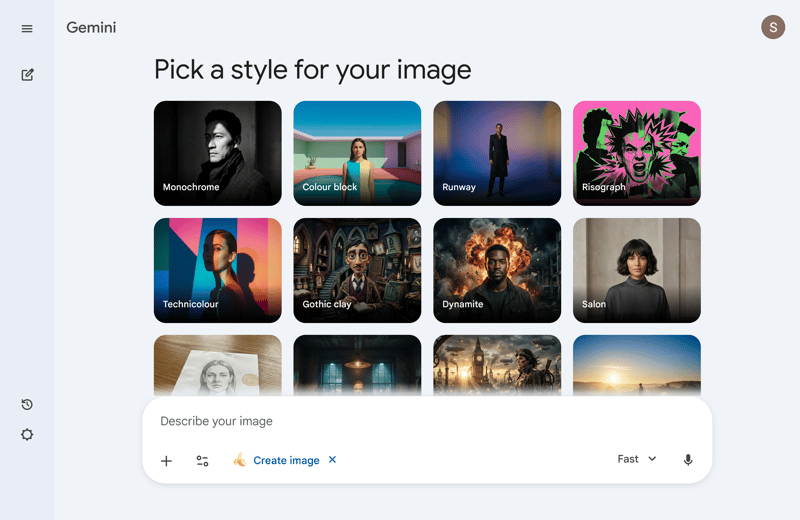
The simple Gemini interface for image generation.
How Good Is the Quality of Nano Banana 2?
Nano Banana 2 delivers strong results overall and ranks among the best AI image generators currently available. Prompts are followed accurately, subjects stay consistent across multiple variations, and the model handles complex descriptions reliably.
Even when a prompt combines multiple elements, moods, or styles, the output stays very close to the description. Not all AI models can pull that off.
Our sample prompts featuring a cartoon treehouse, a robot, and three mythical creatures were handled very well by Nano Banana 2. The robot is the only one in our comparison that meaningfully interacts with its stuffed animal.
The John F. Kennedy in Berlin image turned out better than with any other model we tested. Google’s AI even included German Chancellor Adenauer and Berlin’s governing mayor Brandt, who were both present during the speech. Flags and text are accurate too:
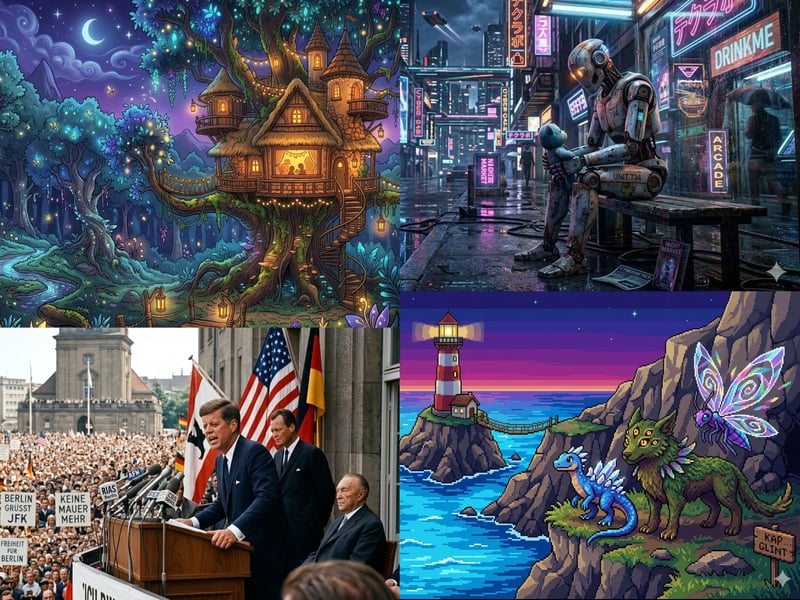
These images were generated with Nano Banana 2.
How Much Does Nano Banana 2 Cost?
Nano Banana 2 is part of Google’s AI pricing tiers in Gemini. Here’s a breakdown of the Google AI plans:
Plan | Monthly costs | Details |
|---|---|---|
Free | none |
|
Google AI Plus | $7.99 |
|
Google AI Pro | $19.99 |
|
Google AI Ultra | $249.99 |
|
Google notes that image quotas can vary depending on server load.
Paid Gemini plans also include additional AI features and extra cloud storage. If you only want to generate images, you may end up paying for features you don’t need.
How Good Is Nano Banana 2 for Business Use?
According to its Terms of Service, Google does not claim ownership of content you create. This applies to AI-generated images and videos as well.
At the same time, you grant Google a limited license to display and promote your content within its services. According to Google, you remain legally responsible for any copyrighted material in your images.
For business use, text rendering in images also matters. Nano Banana 2 handles this much better than most other models in our comparison, though it's not always flawless. Simple labels come out well, but you still need to double-check longer text or typographically complex layouts.
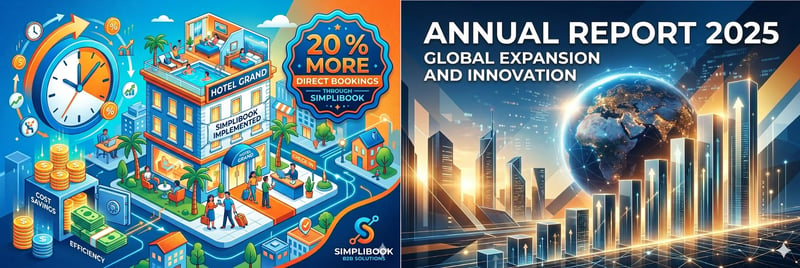
We generated these graphics with Nano Banana 2.
What Are the Pros and Cons of Nano Banana 2?
Very high image quality, even without a subscription
Google’s powerful AI model is available in the free version of Gemini and still delivers high-quality results.Daily limits instead of a credit system
Gemini does not use a credit system. Instead of paying per image, you get daily limits depending on your plan. This makes usage simpler and more predictable.Good text rendering in images
Nano Banana 2 handles text overlays relatively well. It's not perfect, but it's noticeably better than the competition.Built right into Gemini
You can use the model on the web or on your smartphone without needing a separate tool. On many Android devices, Gemini and Nano Banana 2 come preinstalled.
Not a specialized design tool
Gemini is primarily an AI assistant with a built-in image generation feature. For precise design work with specific export formats or vector graphics, dedicated tools are better suited.Only available in a bundle plan
With paid Gemini subscriptions, you also pay for additional Google features and extra cloud storage.
GPT Image on ChatGPT: Precise Prompt Understanding
Free version: Yes, with limitations
Premium costs: starting at $20 per month
Maximum resolution: 1,536 × 1,024 pixels
GPT Image 1.5 5 is the most advanced AI image generator from OpenAI, the company behind ChatGPT. It has largely replaced its predecessor DALL-E. While DALL-E was marketed as a standalone model, OpenAI now bundles image generation within the GPT model family.
Text and image processing no longer run as separate systems. Instead, both operate within a single unified model. According to OpenAI, this significantly improves the model’s ability to understand complex prompts.
How Does GPT Image 1.5 Work?
You use GPT Image 1.5 directly inside ChatGPT. Simply enter a prompt as text or voice, and the tool generates an image. The more specific your prompt, the better the output. It helps to include details such as:
Subject
Perspective
Art style
Lighting conditions
Desired format (portrait or landscape)
Unlike DALL-E 3, the newer GPT Image 1.5 allows direct post-editing. You can change individual elements, replace backgrounds, or adjust details. The model takes existing context into account when making changes.
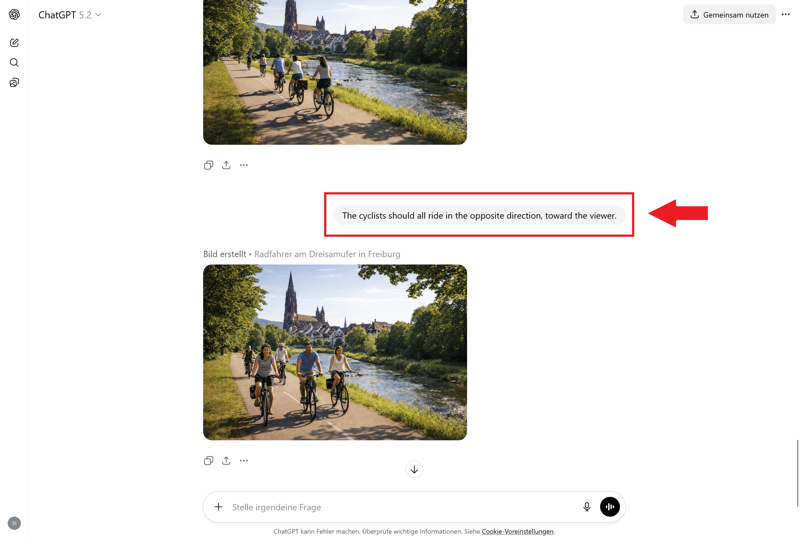
Post-editing is easy to do in ChatGPT.
How Good Is the Quality of GPT Image 1.5?
Very good. GPT Image 1.5 delivers highly consistent results, even with complex instructions. It handles multi-step descriptions reliably, with style inconsistencies being rare.
Photorealistic images are more convincing than in earlier versions, with more natural-looking people. That said, some typical AI weaknesses still show up occasionally. Very fine structures or technical details may appear flawed.
Text rendering in images has improved significantly. Short headlines or simple labels often come out correctly. Longer text passages or small font sizes can still be problematic. For print-ready designs, separate post-editing is recommended.
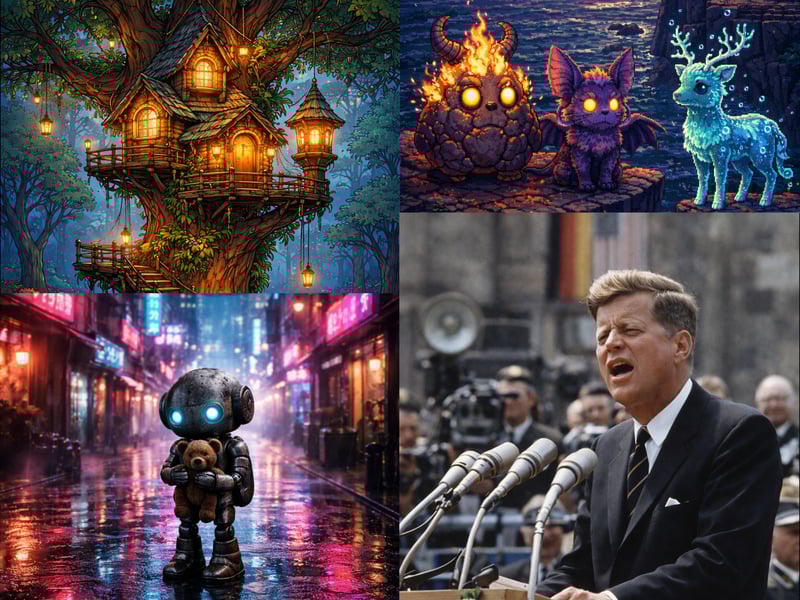
We generated these images with GPT Image 1.5.
How Well Does GPT Image 1.5 Work for Business Use?
According to OpenAI, you own the rights to images you create with GPT Image 1.5. You can use them however you want, including for commercial purposes.
GPT Image 1.5 offers a wide range of business applications. Thanks to its strong prompt understanding, it can create various assets such as social media graphics, presentation visuals, product info sheets, and ads.
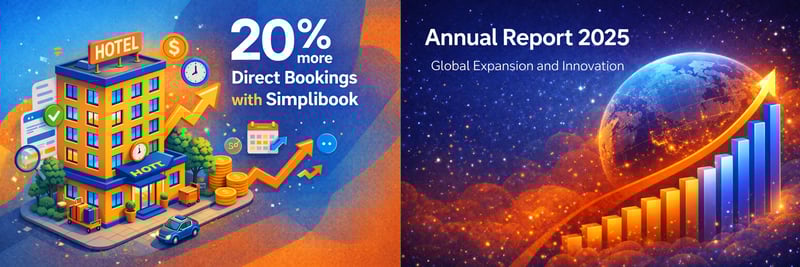
We created these business assets with ChatGPT.
How Much Does GPT Image 1.5 Cost?
You can use GPT Image 1.5 for free or with a ChatGPT subscription. OpenAI is not very transparent about the exact usage limits for the free and Plus tiers. In practice, generating images regularly requires at least the Plus plan.
There are currently four options available:
Plan | Monthly costs | Details |
|---|---|---|
Free | none |
|
Plus | $20 |
|
Business | $30 per user |
|
Pro | $200 |
|
What Are the Pros and Cons of GPT Image 1.5?
High accuracy
Compared to earlier models, GPT Image 1.5 handles complex or layered prompts reliably.Easy image editing
You can tweak individual elements without regenerating the entire image. This makes it simple to create variations or fix small details.Context stays within the chat
The model remembers earlier instructions in the conversation. You can refine your requests step by step instead of starting from scratch each time.Built right into ChatGPT
No separate tool needed. Image generation works in the familiar chat interface on the web or in the app. The model is also available through some third-party platforms.
Usage limits aren’t transparent
The limits for image generation vary by plan and server load, and OpenAI does not always communicate them clearly.Text in images can be inaccurate
Even though text rendering has improved significantly, words in the image can still be inaccurate or hallucinated. This applies to both spelling and actual content.
FLUX.2 by Black Forest Labs: AI Images for Professionals
Free version: No
Premium costs: starting at $0.014 per image
Maximum resolution: 2,304 × 1,736 pixels depending on the model
FLUX.2 models come in several variants that differ significantly in quality, speed, cost, and the level of control they offer.
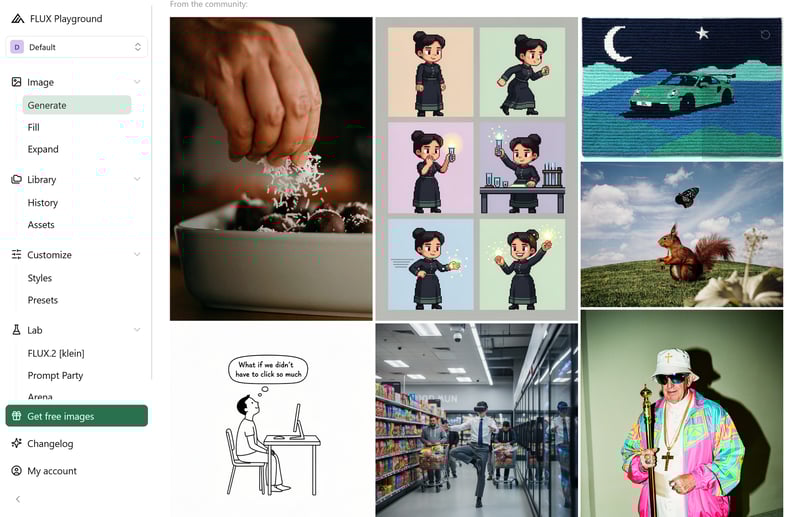
The Black Forest Labs Playground.
Overall, these AI models are geared toward advanced users and businesses that want maximum control. While older models are partly available for free through third-party platforms, the more powerful FLUX.2 variants are behind a paywall.
How Does FLUX.2 Work?
In the Black Forest Labs Playground, you start with a prompt, choose a FLUX.2 model, then set the aspect ratio and resolution as needed before generating the image.
For more control, you can upload one or more reference images. FLUX.2 can process multiple references at once and use them to match colors, subjects, or even specific people.
When it comes to models, you can choose from:
FLUX.2 [klein] 4B: fastest and cheapest option
FLUX.2 [klein] 9B: also fast, slightly more powerful
FLUX.2 [pro]: standard option with solid quality
FLUX.2 [pro-preview]: latest Pro version
FLUX.2 [flex]: more fine-tuning controls, especially good for text and details
FLUX.2 [max]: highest quality, strongest prompt accuracy
How Good Is the Quality of FLUX.2?
FLUX.2 consistently delivers high-quality results, especially with its Pro and Max models. Multi-reference inputs, precise color control, and high resolutions allow for far more controlled image generation than many simpler tools. Faces, hands, and typography are usually rendered cleanly as well.
In our test, FLUX.2 produced the most detailed results for three mythical creatures compared to competing tools. The robot and the cartoon treehouse also turned out great. The Kennedy portrait from Black Forest Labs is one of the best we saw, even though it labels him a “Beriner” instead of a Berliner.
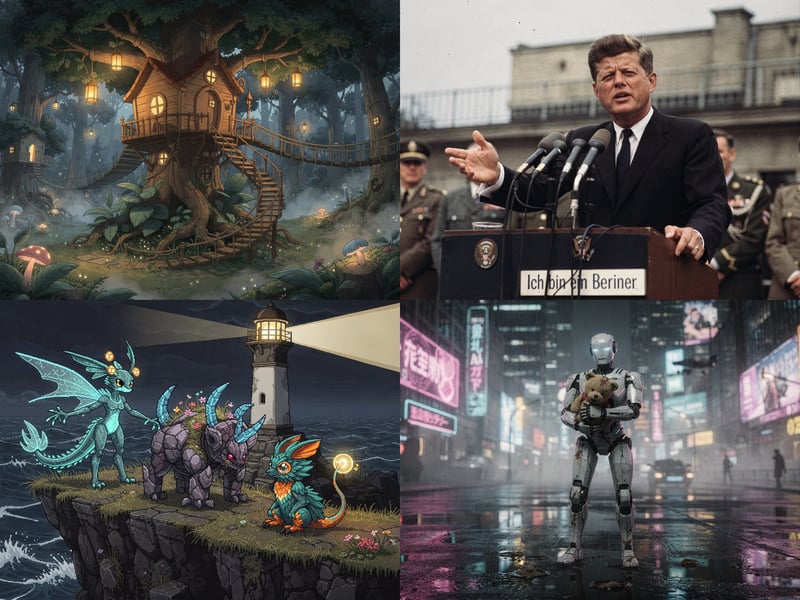
These images were generated with FLUX.2.
How Much Does FLUX.2 Cost?
There is no free plan. Black Forest Labs uses a credit system where 1 credit equals $0.01. The cost per image varies depending on the selected model and resolution.
The prices listed below are minimum costs:
Model | Price text-to-image | Price image editing |
|---|---|---|
FLUX.2 [klein] 4B | from $0.014 | from $0.014 |
FLUX.2 [klein] 9B | from $0.015 | from $0.015 |
FLUX.2 [pro] | from $0.03 | from $0.045 |
FLUX.2 [flex] | from $0.05 | from $0.10 |
FLUX.2 [max] | from $0.07 per megapixel | from $0.06 per megapixel |
How Good Is FLUX.2 for Business Use?
FLUX.2 is a strong choice for businesses that need consistent visuals across many variations. This includes product images, campaign graphics, ads, or visuals with fixed colors, recurring characters, or strict layout requirements.
FLUX.2 is designed for commercial use, as long as you access it through Black Forest Labs’ paid services. For larger companies, the provider also offers a dedicated enterprise tier.
When it comes to text in images, FLUX.2 performs well. The model renders text more reliably than many other AI image generators and keeps even longer text passages legible:
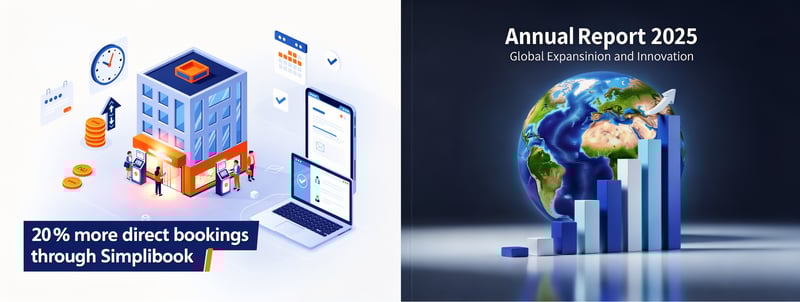
These graphics were generated with FLUX.2.
What Are the Pros and Cons of FLUX.2?
Strong image quality, even with complex prompts
FLUX.2 handles detailed descriptions with high accuracy and ranks among the most precise AI image generators currently available. Even scenes with many elements, materials, or lighting conditions stay close to the prompt.Great for recurring visuals
The models work well for visuals that need to remain consistent across multiple variations. Multiple reference images and high resolution help reproduce characters or products consistently.Multiple models for different needs
The FLUX.2 family covers a broad range of use cases. Faster models are better suited for high-volume image generation, while premium models offer higher quality.Reliable text rendering in images
FLUX.2 handles text in images very well. Even longer text passages often remain legible, which many other AI image generators struggle with.
No free tier
There’s no free plan. If you want to use FLUX.2 directly through the provider, you’ll need to purchase credits.Not ideal for casual users
FLUX.2 comes with a learning curve. Choosing the right model alone takes some research. On top of that, the pricing structure feels more like a professional production tool than a simple creative app.
Grok Imagine: AI Images Beyond X
Free version: Yes, with limitations
Premium costs: from $30 per month
Maximum resolution: 2,048 × 2,048 pixels
Grok Imagine is the image and video model from xAI. You can use it directly through the Grok AI assistant on grok.com, in the Grok apps, or via X (formerly Twitter). Image generation isn’t a standalone creative tool—it’s built right into Grok.
Even the free version of Grok lets you generate up to 10 images every 2 hours. So for occasional use, you don’t need a paid subscription.
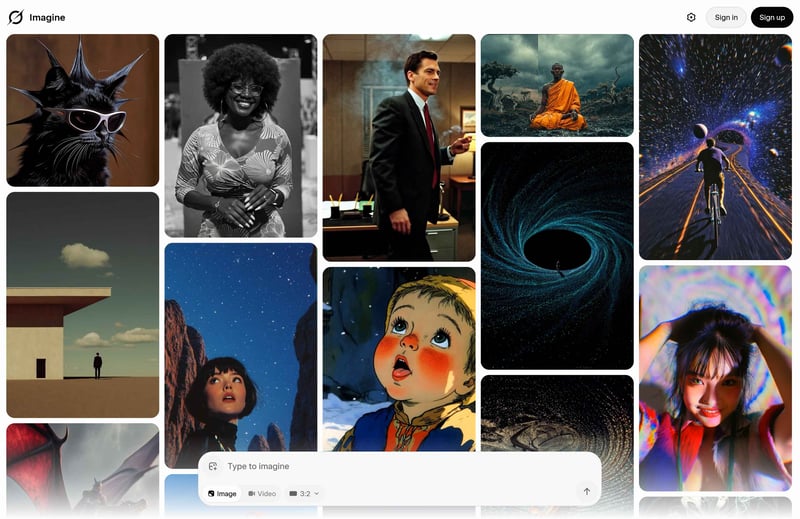
The Grok Imagine interface.
Grok Imagine is the only model available for image generation. The older Aurora model has effectively been retired. You don’t switch between different image models—you simply work with one fixed default.
How Does Grok Imagine Work?
You enter a prompt and Grok generates images from it. You can also edit existing images or create variations based on a reference. Grok Imagine isn’t just a text-to-image tool—it also works for corrections and creative exploration.
The interface is intentionally simple. xAI relies on natural language instead of sliders and settings. This makes it easy to get started and speeds up your workflow, but it also limits fine-grained control.
How Good Is the Quality of Grok Imagine?
Grok Imagine delivers solid results overall. Prompts are interpreted accurately, and the resulting images usually look cohesive. However, if you need precise control over layout, style, or brand consistency, more specialized tools are a better fit.
The image with the three mythical creatures turned out well: the characters complement each other, remain clearly distinct, and still feel like part of the same scene. The cartoon house also impresses with consistent shapes and colors.
The Kennedy portrait is also well done and instantly recognizable. At the same time, it shows that Grok Imagine is less precise when it comes to background figures.
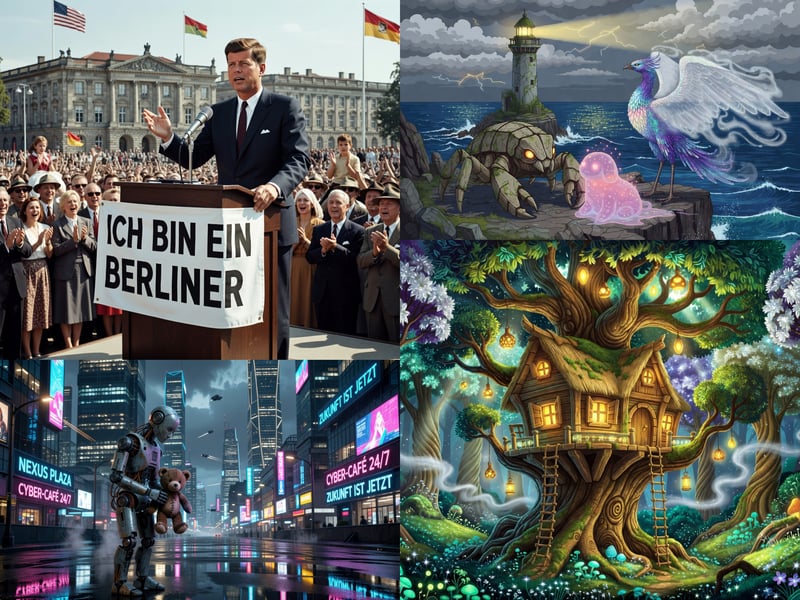
These images were generated with Grok Imagine.
How Much Does Grok Imagine Cost?
Grok Imagine is part of xAI’s broader Grok platform, which is available through several access points. Features, availability, and pricing vary depending on the platform. The exact limits for image generation aren’t always clearly communicated.
On grok.com, the following plans are currently available:
Plan | Monthly costs | Details |
|---|---|---|
Free | none |
|
SuperGrok | $30 |
|
Grok Business | $30 per user |
|
Enterprise | custom pricing |
|
How Good Is Grok Imagine for Business Use?
xAI handles usage rights fairly clearly: you own the generated output and can use the images commercially. At the same time, xAI notes that content should be labeled as “created with Grok.”
For teams, xAI offers dedicated Business and Enterprise plans. These include shared workspaces, centralized billing, user management, domain verification, and (in Enterprise) SSO, SCIM, and custom roles.
Grok Imagine also performs well with text in images. Labels tend to stay readable and contain fewer errors than with many other models.
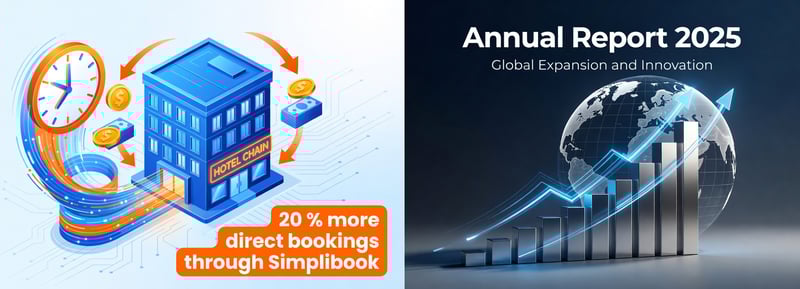
We generated these images with Grok Imagine.
What Are the Pros and Cons of Grok Imagine?
Easy to get started
Thanks to its limited feature set, the tool is refreshingly simple to use: enter a prompt, generate an image, and refine it on the spot if needed.Strong free version
You can generate plenty of images without a subscription. That's enough to properly test the tool and create occasional AI images.High image quality across different subjects
Grok Imagine delivers impressive results across a range of styles. Generation speed is also relatively fast.Accessible on many platforms
Grok Imagine is built right into the Grok AI assistant. There's no need to open a separate image tool. You can use it on grok.com, in the Grok apps, on X, or through third-party integrations.
No image-only subscription
If you only want to generate images, you still have to pay for the full Grok package. That makes the tool less appealing as a standalone image generator.Pricing and limits aren't fully transparent
The pricing structure gets a bit confusing because of the different access options. Limits aren't communicated as clearly as with other tools.
Adobe Firefly: AI for the Photoshop Ecosystem
Free version: Yes, with limitations
Premium costs: Starting at $9.29 per month
Maximum resolution: 2,304 × 1,792 pixels depending on the model
Firefly by Adobe isn’t a single AI image generator. It’s a platform with multiple models across the Adobe ecosystem. You can create images in the browser, edit them further, and transfer results directly to Adobe Express or other Adobe tools.
Adobe positions its Firefly models primarily for commercial use while also integrating numerous partner models. This makes Firefly a convenient platform for testing different models in one place.
How Does Adobe Firefly Work?
Sign in with an Adobe account and enter your prompt in the Firefly web interface. The tool then generates multiple variations depending on the selected model.
You can also adjust settings such as format, style, visual mood, and other parameters. The interface remains clean and easy to navigate.
You can guide results using reference images and desired effects without dealing with complex technical settings. This makes it much easier to get started compared to tools with extensive sliders and parameters.
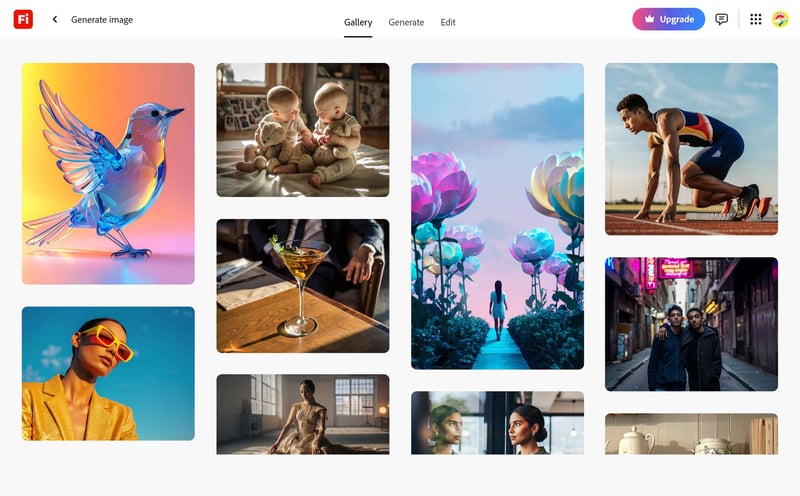
The Adobe Firefly web interface.
As an AI platform, Adobe Firefly lets you choose from several models. Some are developed by Adobe, while others come from third-party providers like Google and OpenAI:
Firefly Image 3, 4 (Ultra), 5
GPT-Image-1.0, -1.5
Nano Banana, 2, Pro
FLUX.1 Kontext (Pro, Max), FLUX.1.1 (Pro), FLUX.2 Pro
Imagen 3, 4
Ideogram 3.0
Runway Gen-4 Image
How Good Is the Quality of Adobe Firefly?
Firefly generally handles prompts well and produces coherent images. Composition, colors, and the overall concept usually align with the description. Results are consistently solid, although they can sometimes feel slightly conservative.
The cartoon treehouse and the robot holding a stuffed animal turned out especially well. These examples, created with Adobe’s latest model Firefly Image 5, show clean shapes, consistent colors, and a cohesive visual style.
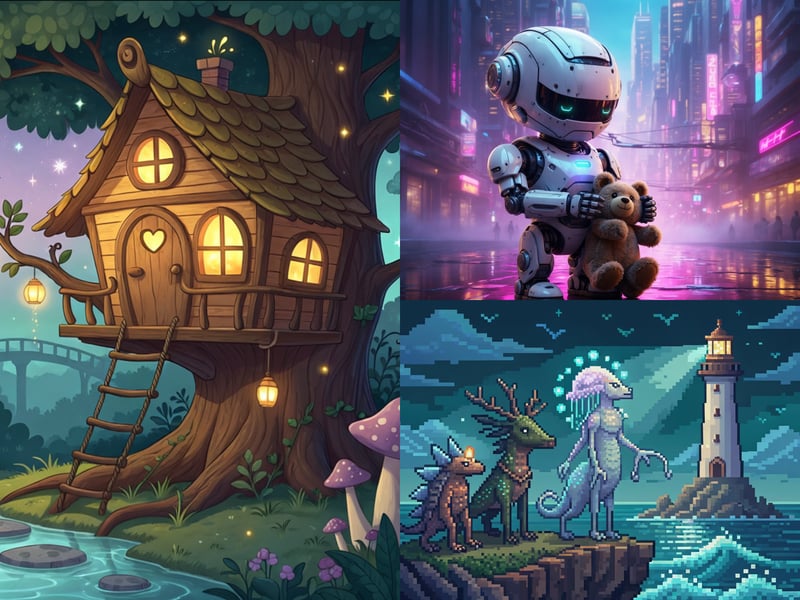
We generated these images with Adobe Firefly.
Firefly struggled with the Kennedy image. The system rejected the prompt, claiming it contained an artist name, and a second attempt with a modified prompt also failed to produce the desired result.
Instead of generating an image, Firefly returns an error message:
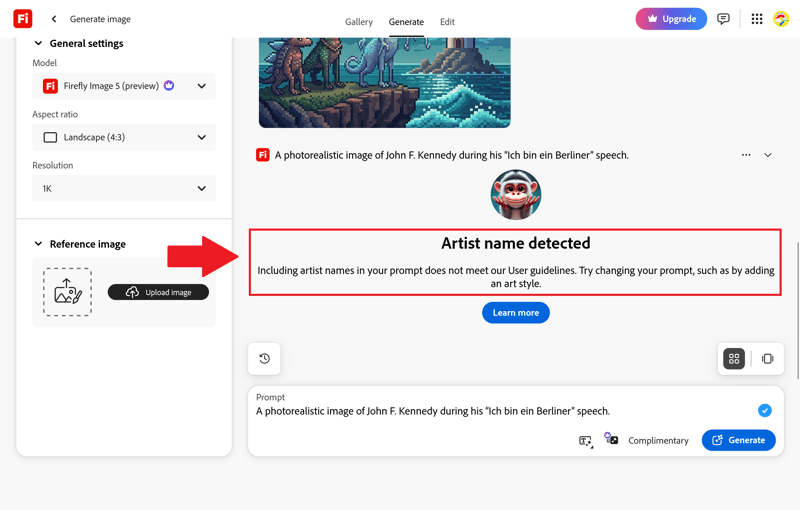
Adobe Firefly refuses to generate a realistic image of Kennedy.
How Good Is Adobe Firefly for Business Use?
Adobe actively markets its Firefly models for commercial use. However, you should pay close attention to the selected model, as partner models may come with different licensing terms.
For typical business assets, Firefly is only partially suitable. The platform delivers reasonable visual directions, but it does not always capture the intent behind complex prompts. This is especially true for images that need to convey a specific message or include text elements.
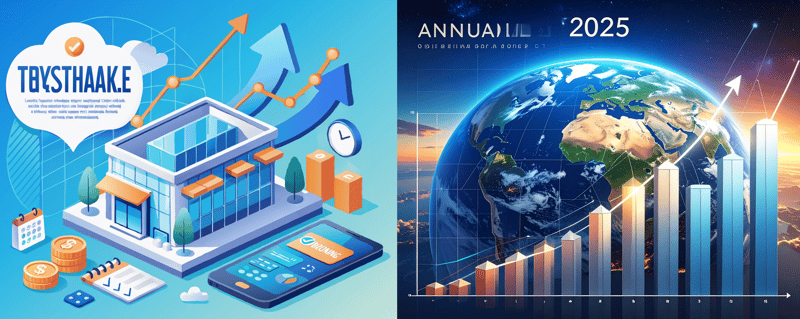
These business assets were created with Adobe Firefly.
How Much Does Adobe Firefly Cost?
Adobe uses a credit system where the number of credits required depends on the model and feature used. A basic image generation costs one credit, while larger images or third-party models require significantly more.
There are three paid Firefly plans to choose from. With annual billing, the monthly prices are as follows:
Plan | Monthly costs | Credits | Details |
|---|---|---|---|
Free | none | 10 |
|
Standard | $9.99 | 2,000 credits per month |
|
Pro | $19.99 | 4,000 credits per month |
|
Premium | $99.99 | 50,000 credits per month |
|
What Are the Pros and Cons of Adobe Firefly?
Easy to use with no technical barriers
Adobe Firefly’s image generator has a clean layout with enough controls for format, style, and references without feeling overwhelming.Seamless integration with Adobe tools
Firefly is tightly integrated with Adobe Express and other Adobe apps. This makes editing easier, as images can be transferred without extra steps. Adobe subscribers also receive additional monthly credits.Solid results for standard subjects
For general subjects, Firefly consistently delivers clean and well-composed results. This makes it a good fit for illustrative content where a polished look matters more than a distinctive visual style.
Images feel generic
Firefly produces usable images, but the results often look interchangeable. Compared to more advanced AI image generators, the output frequently lacks a clear visual impact or distinctive style.Struggles with real people
Firefly often fails to accurately depict real people or blocks those prompts entirely. This limits its usefulness for historical subjects or well-known public figures.Text in images is very unreliable
Text prompts are often rendered inaccurately. Even for simple presentation graphics, ads, or marketing materials, you will likely need significant post-editing.
Recraft: AI Image Generator for Designers
Free version: Yes, with limitations
Premium costs: Starting at $10 per month
Maximum resolution: 2,048 × 2,048 pixels depending on the model
Recraft is aimed more at designers and creatives than most other AI image generators. The platform doesn’t just create raster images but also editable vector graphics.
That makes Recraft a strong option for logos, icons, illustrations, ad creatives, and other design tasks. It uses its own Recraft V4 model, while paid plans also provide access to a large selection of third-party models.
How Does Recraft Work?
You use Recraft in your browser through Recraft Studio. Enter your prompt, then choose a model, aspect ratio, and image type. The latest model, Recraft V4, is available even on the free plan in Standard, Pro, Vector, and Vector Pro versions.
Recraft combines image generation with classic design features. You can upload images, remove backgrounds, isolate subjects, upscale, build mockups, adjust colors, or convert raster images into SVG files. For export, Recraft supports SVG, PNG, JPG, PDF, TIFF, and Lottie.
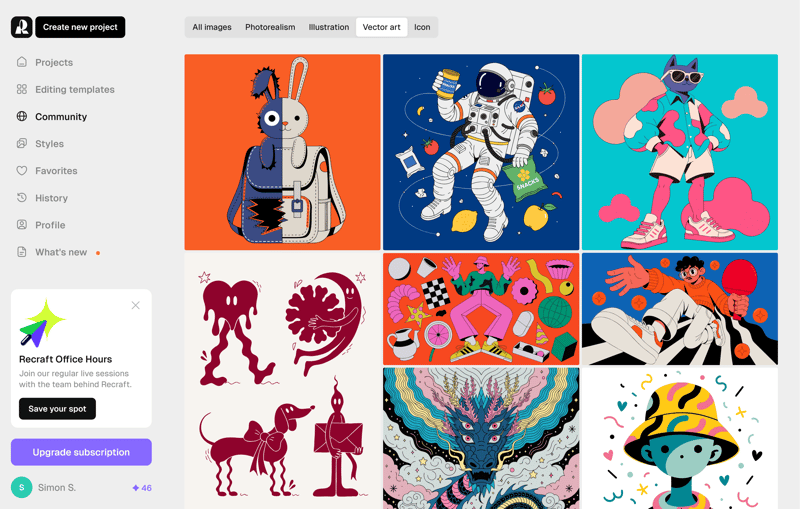
Illustrations in Recraft Studio.
With a paid plan, Recraft gives you access to an unusually large selection of third-party AI models:
GPT-Image-1.5, -1.0, -4o
Nano Banana, Pro, 2
Flux 1 (Schnell, Dev, Pro, Kontext Max, Kontext Pro)
Flux 2 (Max, Dev, Pro, Flex)
Imagen 4, 4 Ultra
Grok Imagine
Ideogram V3 (Default, Quality, Turbo)
Qwen-Image, 2, 2 Pro
Seedream 4, 4.5, 5.0 Lite
Z-Image Turbo
HiDream I1 Dev
How Good Is Recraft’s Image Quality?
Recraft delivers strong results overall, especially when you need visuals that feel like designed graphics rather than typical stock photos. The model handles colors, composition, and details with more control than many simple chat-based AI image generators.
That makes Recraft a strong fit for illustrations and designs where visual style matters more than photographic realism.
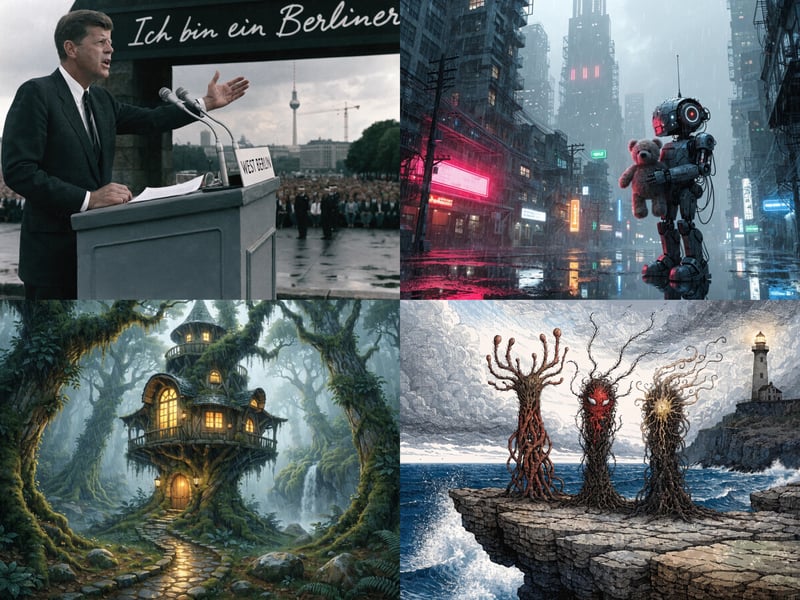
These images were generated with Recraft.
How Much Does Recraft Cost?
The free plan is fairly generous: you get 30 credits per day, which is enough for roughly 15 to 30 images. However, third-party models are only available on paid plans.
Here are the monthly costs when billed annually.
Plan | Monthly cost | Details |
|---|---|---|
Free | none |
|
Pro | $10 |
|
Team | $55 |
|
How Good Is Recraft for Business Use?
On the free plan, Recraft owns the rights to all generated images, so commercial use is not allowed. Only with a paid plan do you get full ownership and usage rights. According to Recraft, your images remain private even after your subscription ends.
As expected, Recraft performs best in business contexts where you need vector graphics, icons, logos, and posters. It works best when design matters more than photorealistic output.
Text rendering is another strength. The model handles short to medium-length text more reliably than many other AI image generators:
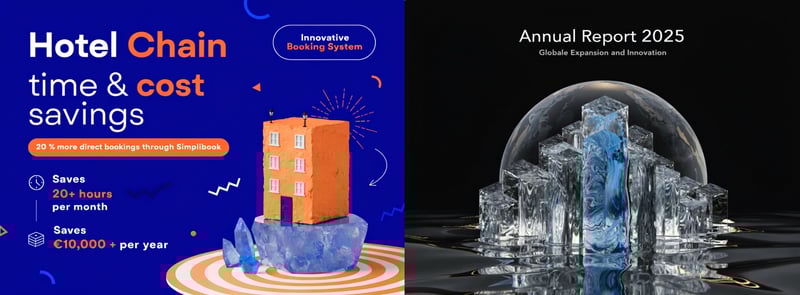
These graphics were generated with Recraft.
What Are the Pros and Cons of Recraft?
True vector graphics, not just raster images
Recraft doesn’t just generate PNGs or JPGs but also editable SVG files. This is a major advantage for logos, icons, illustrations, and brand assets.Wide selection of AI models
Beyond its own models, you can access numerous third-party models. This allows you to compare different styles and quality levels side by side.Fits well into design workflows
The platform combines generation, editing, mockups, vectorization, and export in a single interface. That means less switching between different tools.Strong control over style and branding
With reference images, color palettes, and reusable styles, you can maintain visual consistency. This makes Recraft especially useful for campaigns or recurring content formats.
Photorealism isn’t its strength
Recraft works well for design-oriented visuals but doesn’t always match the quality of specialized models when it comes to photorealistic scenes.Recraft keeps image rights on the free plan
On the free tier, Recraft retains the rights, and all images are public. This makes the free plan unsuitable for commercial projects.
Microsoft Bing Image Creator With DALL-E and MAI-Image-1
Free version: Yes, with a Microsoft account
Premium costs: None, optional for Copilot Pro
Maximum resolution: 1,792 × 1,024 pixels depending on the model
Microsoft offers several platforms for AI image generation. The Bing Image Creator is free and includes 3 AI models. You can choose which model generates your images. For our comparison, we used MAI-Image-1, released by Microsoft in October 2025.
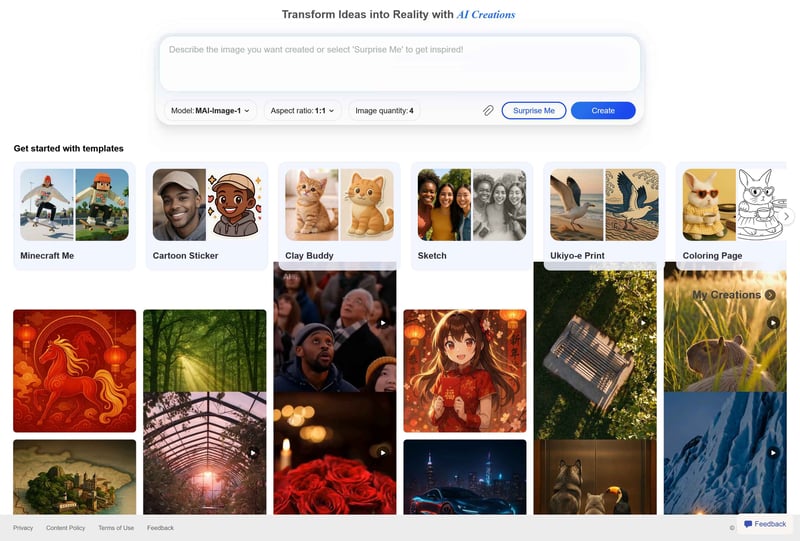
The Microsoft Bing Image Creator
How Does the Bing Image Creator Work?
Sign in with a Microsoft account. Then enter your prompt, choose a model, set the aspect ratio if needed, and generate the image. Depending on the model, Bing either shows multiple variations per run or a single image.
Bing Image Creator offers three model options:
MAI-Image-1 (Microsoft)
DALL-E 3 (OpenAI)
GPT-4o (OpenAI)
One notable aspect is the clear separation between image generation and image editing. If you upload an image to modify or expand it, GPT-4o automatically takes over. In this mode, you can’t switch to DALL-E 3 or MAI-Image-1.
How Good Is the Quality of the Bing Image Creator?
Quality was mixed in our testing. MAI-Image-1 produces usable images, but Bing does not always follow prompts accurately. Even with moderately complex scenes, certain elements are interpreted differently than described.
The treehouse image is one of the stronger results. The style, lighting, and environment all feel cohesive and largely match the description. The image with the three mythical creatures, on the other hand, was noticeably weaker.
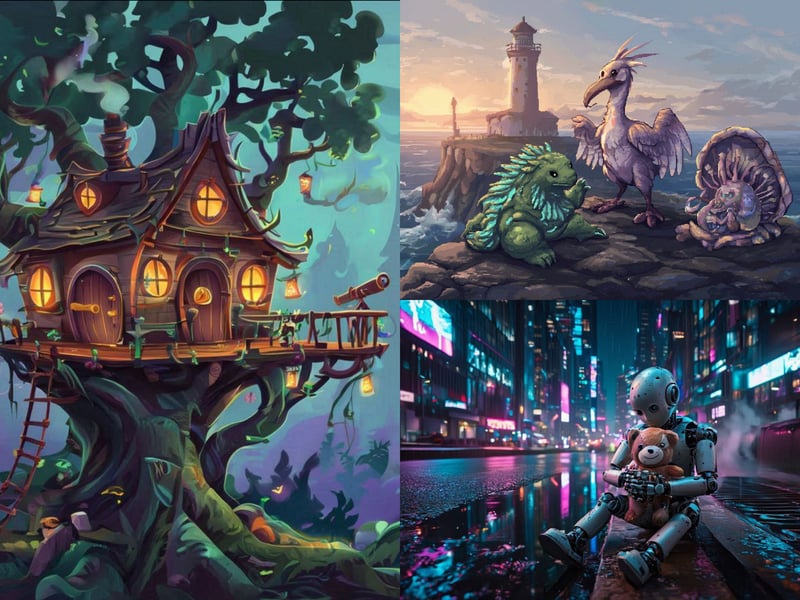
These images were generated with the Bing Image Creator.
A photorealistic image of John F. Kennedy cannot be generated. The Bing Image Creator consistently blocks such prompts and displays a generic content warning. Even rephrased prompts do not get through.
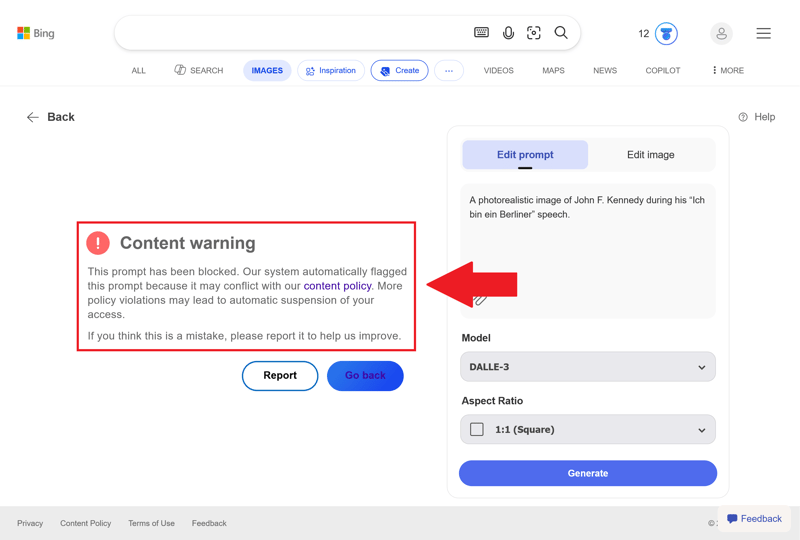
The Bing Image Creator refuses to depict Kennedy.
How Well Does the Bing Image Creator Work for Business Use?
Microsoft does not claim ownership of your prompts or images. However, you do grant Microsoft a license to use your prompts and generated images in connection with its services. That means exclusivity is not guaranteed.
Bing can also generate identical or very similar images for other users, so there is no guarantee that your results will be unique. Microsoft also adds a visible watermark and embeds origin information in the metadata (Content Credentials).
All of Microsoft’s AI models struggle with rendering text in images:
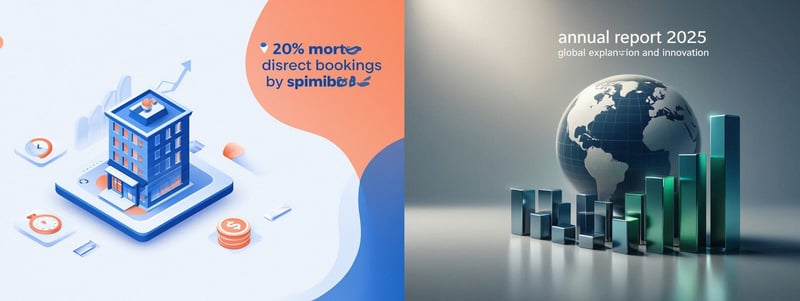
These business assets were created with the Bing Image Creator.
How Much Does the Bing Image Creator Cost?
Microsoft's image generator is free to use. It offers two speed tiers:
- 1.
Fast Creation
- 2.
Standard Creation
You get 15 free Fast Creations per day. After that, Bing continues to generate images, but at a slower speed (Standard Creation). You can earn additional Fast Creations by redeeming Microsoft Rewards points.
There's also a daily cap: the Bing Image Creator accepts up to 200 prompts within 24 hours. Each image edit also counts as a prompt.
What Are the Pros and Cons of Bing Image Creator?
Free to use
Bing Image Creator does not require a subscription. You can generate multiple images every day at no cost.Multiple AI models in one interface
Microsoft combines several image generators in a single tool, allowing you to compare results and switch models depending on your needs.Wide range of image formats
You can choose from different aspect ratios and create images in the right format for social media, presentations, or websites.
Strict content filters
Microsoft blocks certain subjects aggressively. For example, the platform prevents the generation of images of real people in certain contexts.Confusing product structure
AI image generation at Microsoft is spread across multiple services (Bing Image Creator, Copilot, Designer), so it is not always clear which platform offers which features.Image editing limited to one model
Only one model is available for editing. You can't switch between models in this mode.Limited control and settings
Compared to specialized tools, Bing offers fewer parameters, so you control the output mainly through your prompt.
Freepik: A Comprehensive AI Model Aggregator
Free version: Yes, with limitations
Premium costs: Starting at $7.50 per month
Maximum resolution: 2,048 × 2,048 pixels depending on the model
Freepik is an AI model aggregator. The platform doesn’t offer its own model but bundles around 30 third-party models in a single interface. Beyond images, Freepik also lets you generate videos and audio.
How Does Freepik Work?
In Freepik’s image generator, you start by entering a prompt and generating your first variations. From there, you can switch models at any time to try different generators if the results don’t meet your expectations.
There are also basic editing and design features: you can upscale images, make adjustments, replace backgrounds, or organize content in shared workspaces. The video and audio sections work in a similar way.
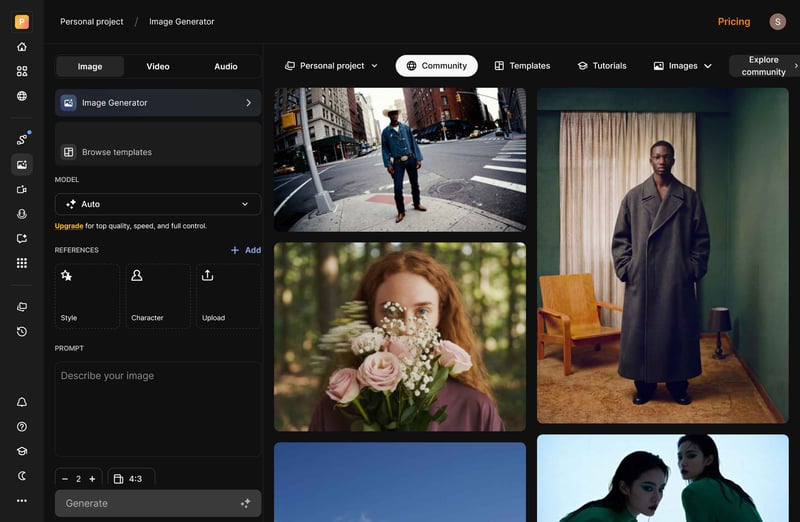
The Freepik interface.
With a paid plan, Freepik gives you access to a large selection of third-party AI models:
GPT-Image-1.5, -1.0
Nano Banana, Pro, 2
Seedream 4, 4.5, 5 Lite
Flux 1 (Fast, Kontext Max, Kontext Pro)
Flux 2 (Pro, Max, Flex, Klein)
Google Imagen 3, 4, 4 Fast, 4 Ultra
Recraft V4 (Standard, Pro)
Runway
Z-Image
Reve
Qwen-Image
Grok Imagine
Mystic 2.5 Fluid
How Good Is the Image Quality on Freepik?
Image quality on Freepik varies significantly. The auto mode, where the platform selects a model for you, didn’t deliver strong results. That is surprising, considering Freepik has access to many powerful models.
The treehouse prompt is a good example: it clearly asks for a treehouse, but the result shows a regular house in the woods. The Kennedy prompt also misses the mark, generating a random person instead of the former U.S. president.
The robot with a stuffed animal and the three mythical creatures in pixel art style turned out much better. The subjects look cohesive, the style guidelines are followed, and the overall visual language remains consistent:
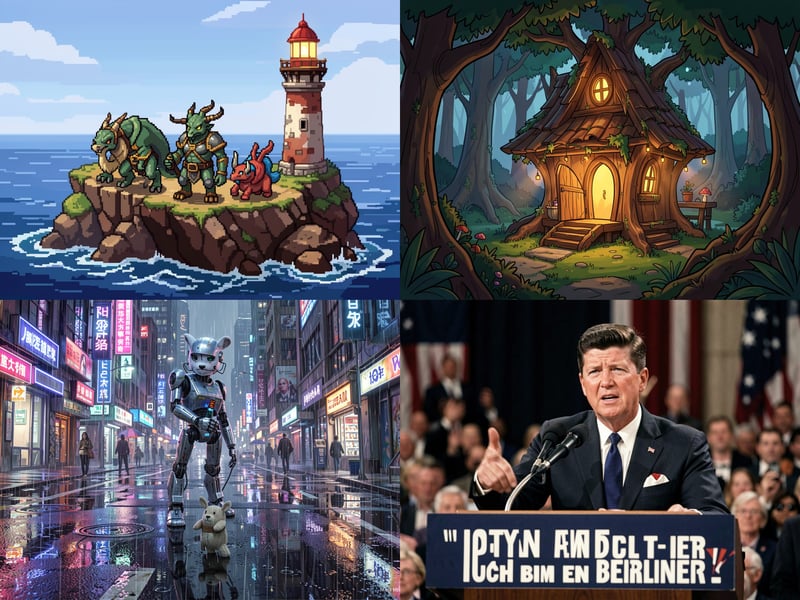
We generated these images with Freepik.
How Much Does Freepik Cost?
Every plan comes with a shared credit pool for image, video, and audio generation. Credits remain valid for up to one year and do not reset monthly. How many credits each generation uses depends heavily on the selected model and is not always easy to predict.
The free plan gives you 20 credits per day, which is enough for roughly 10 to 20 images depending on the model. The allowance resets daily.
Here are the monthly costs when billed annually:
Plan | Monthly cost | Details |
|---|---|---|
Free | none |
|
Essential | $7.50 |
|
Premium | $14.50 |
|
Premium+ | $33.75 |
|
Pro | $210.00 |
|
How Good Is Freepik for Business Use?
According to the Usage Guides, you can use images created with Freepik commercially, edit them, and monetize them. On the free plan, you need to credit “Designed by Freepik” when using images commercially, while a paid plan removes that requirement.
Text rendering is inconsistent. Letters sometimes get altered, entire words go missing, or spellings come out incorrect. Some errors are subtle and only noticeable on closer inspection:
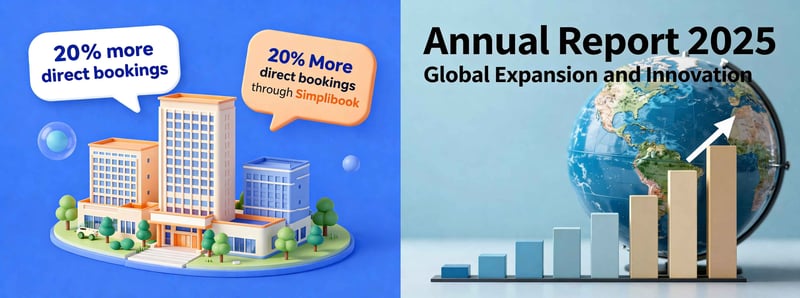
We generated these graphics with Freepik.
What Are the Pros and Cons of Freepik?
Wide selection of AI models
Freepik bundles around 30 model variants from different providers. You can compare results easily and switch between models on the fly.One platform for multiple AI formats
Beyond images, Freepik also supports video and audio generation. All formats draw from the same credit pool, which makes the platform useful for a variety of content types.AI generation and design assets in one place
Freepik combines AI tools with a large library of images, videos, and vector graphics. You can mix generated content with existing stock assets directly on the platform.
Unclear model availability
Freepik sometimes provides contradictory information about which models are available on which plan. It is not always clear what you actually have access to.Plans bundle too many features
Every plan includes image, video, and audio generation. If you only want to create images, you are paying for features you may never use..Credit system could be more transparent
Credit usage varies significantly depending on the model and tool, which makes it difficult to estimate how many images a given credit allowance will actually provide.
Ideogram: Great for AI Images With Text
Free version: Yes, with few restrictions
Premium costs: starting at $15 per month
Maximum resolution: 1,152 × 864 pixels depending on the model
Ideogram is especially useful if your images frequently need to include text, such as posters, social media graphics, ad creatives, or simple presentation slides.
That said, the provider’s own models are not flawless. Ideogram still alters words, numbers, or spellings when prompts become more complex.
On the plus side, the free version is less restrictive than most other AI image generators.
How Does Ideogram Work?
Once you’ve created your account, you use Ideogram directly in your browser. The platform provides a prompt field along with settings for the model, number of images, rendering speed, and aspect ratio.
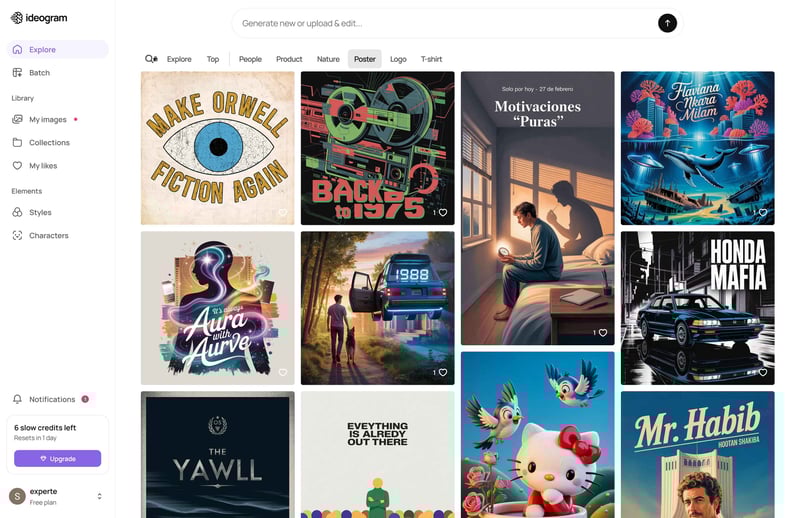
The Ideogram user interface.
Ideogram uses its own image model, available in several versions. You can choose between Ideogram 3.0 (the latest), 2a, 2.0, and 1.0. There is also an automatic mode that lets the platform decide which model fits your prompt best.
By default, all generated images are publicly visible. Private mode is only available starting with the Plus plan. Downloads also differ by tier: the free plan only allows compressed JPG downloads, while paid plans also support PNG files.
How Good Is Ideogram's Image Quality?
Ideogram often delivers strong results with stylized subjects. Realistic images are possible, but they do not always match the detail and natural look of dedicated photorealism models, especially for skin, hands, fine textures, and complex facial features.
The treehouse and the mythical creatures turned out best, while the robot holding a stuffed animal looks somewhat stiff. John F. Kennedy apparently never quite made it to Berlin in person:
These images were generated with Ideogram.
How Well Does Ideogram Work for Business Use?
Ideogram allows commercial use of generated images. The company does not claim ownership of your output and does not restrict how you use it. There is no distinction between images created on the free plan and those from paid plans.
Text in images is one of Ideogram’s strengths, but it is still not error-free in practice. The platform handles short words fairly well, while longer text often ends up with altered letters, spacing issues, or changed content.
For logos, prices, product names, or legally required disclaimers, always double-check the text and revise it in a separate layout tool if needed.
These business assets were created with Ideogram.
How Much Does Ideogram Cost?
The free plan allows up to 12 prompts per day. Generation is slower, and all images are publicly visible.
Beyond that, there are three paid plans. Here are the monthly prices when billed annually:
Plan | Monthly costs | Details |
|---|---|---|
Free | none |
|
Plus | $15 |
|
Pro | $42 |
|
Team | $20 per user |
|
What Are the Pros and Cons of Ideogram?
Useful free version
The free plan is generous enough to test the model under real conditions. You get the same core features as the paid plans, including plenty of customization options.Great for layouts and posters
Ideogram is especially well-suited for designs that combine images and text. For posters, social media graphics, or presentation slides, the model often produces usable drafts quickly.
Text rendering remains error-prone
Ideogram handles text better than many other models, but it is still not reliable enough for final use, especially for longer text, numbers, or complex typography.Photorealism isn't its strongest suit
Ideogram can produce realistic images, but it does not always achieve the natural look required for more complex scenes.Private mode requires a paid plan
On the free plan, all generated images are publicly visible. If you need to keep your content confidential, you need at least the Plus plan.
Stable Diffusion on Dream Studio: Open Source and Locally Installable
Free version: Yes (local), limited (web)
Premium costs: starting at $12 per month
Maximum resolution: 1,216 × 832 pixels (web)
Stable Diffusion by Stability AI differs from most other AI image generators. The model is open source and can be installed locally for free, allowing you to generate images on your own computer without relying on a cloud service.
Stability AI also operates DreamStudio, a web platform that makes getting started much easier. However, the free tier is very limited.
How Does Stable Diffusion Work?
There are two ways to use Stable Diffusion.
- 1.
Web version (e.g., DreamStudio)
DreamStudio provides a simple browser-based interface. You enter a prompt, choose a model and image format, and start generating images. It then creates multiple variations that you can download or edit further. - 2.
Local installation
You can also run Stable Diffusion directly on your own machine by downloading a model and launching a UI like Automatic1111 or ComfyUI. This gives you much more control over image generation but requires a powerful GPU and some technical know-how.
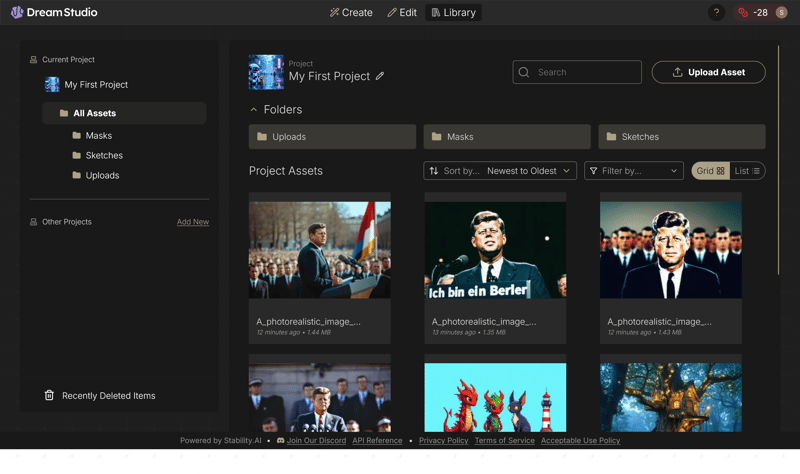
DreamStudio is a cloud-based service for Stable Diffusion.
How Good Is the Quality of Stable Diffusion?
Overall, the quality is high. DreamStudio produces detailed images and usually captures color palettes and art styles well. However, Stable Diffusion does not always fully interpret prompts, so details may be missing or rendered differently than expected.
Text rendering has improved compared to earlier versions. Short words or simple labels now appear correctly more often, but longer text is still prone to errors (e.g., "I am a Berler" instead of the intended phrase).
DreamStudio generates four versions of each image by default. Here you can see the best result from each set:
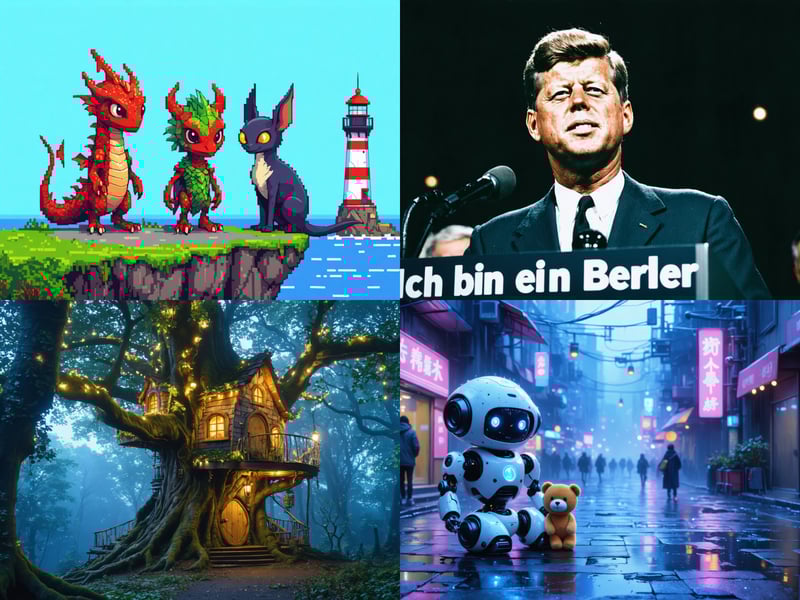
We generated these images with Stable Diffusion on DreamStudio.
How Good Is Stable Diffusion for Business Use?
Stable Diffusion is a strong choice if you value control, privacy, and customization. With a local installation, your prompts and images remain entirely on your own system.
The license depends on the model you use. SDXL is released under an Open-Rail license that generally allows commercial use, while Stable Diffusion 3.5 uses a Community License. Companies with more than $1,000,000 in annual revenue require a separate license.
When it comes to text in images, Stable Diffusion delivers solid results, especially for simple labels:
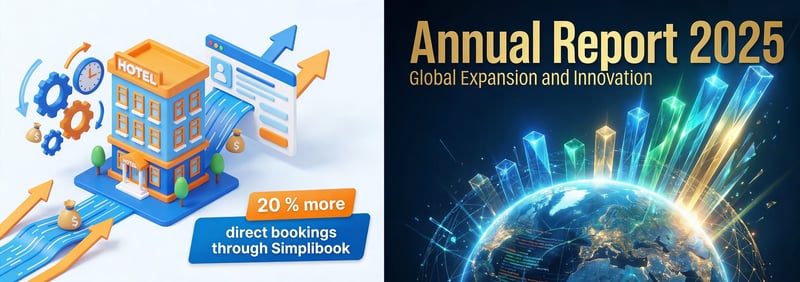
We created these business assets with Stable Diffusion.
How Much Does Stable Diffusion Cost?
DreamStudio uses a credit-based system tied to a monthly subscription. The number of credits required depends on the model and the action. For example, generating an image costs roughly 3 to 6.5 credits, while features like upscaling or additional editing require extra credits.
Plan | Monthly cost | Credits per month |
|---|---|---|
Free Trial | free | 100 credits |
Basic | $12 | 1,200 credits |
Plus | $29 | 2,900 credits |
Enterprise | custom | custom |
What Are the Pros and Cons of Stable Diffusion?
Full control with a local installation
When you run Stable Diffusion locally, you decide which models, extensions, and settings to use, giving you far more customization options than closed systems.No usage limits when running locally
A local installation generates images without using credits or hitting monthly caps. The only limit is your hardware.
Quality varies a lot
Results depend heavily on the parameters you choose. Not every combination produces good output immediately, and it requires more tweaking than many other AI image generators.Fewer convenience features on the web
Compared to other tools, workflows are less automated. The web version, in particular, often requires several adjustments before you get the desired result.Free web version is very limited
DreamStudio offers a free starting tier, but the included credits only cover a handful of generations.
Midjourney: A Bit Behind the Times
Free version: No
Premium costs: Starting at $10 per month
Maximum resolution: 2,912 × 1,632 pixels after auto-upscale
Midjourney is an image and video generator with its own AI model, available only through a paid subscription. You create content from text prompts, select the best variants, and refine your images step by step.
How Does Midjourney Work?
You can create images either through Midjourney’s website or through the chat tool Discord. Both options require a paid account.
On the website, you enter your prompt into the input field, and Midjourney generates several image variants, which you can then select and refine further.
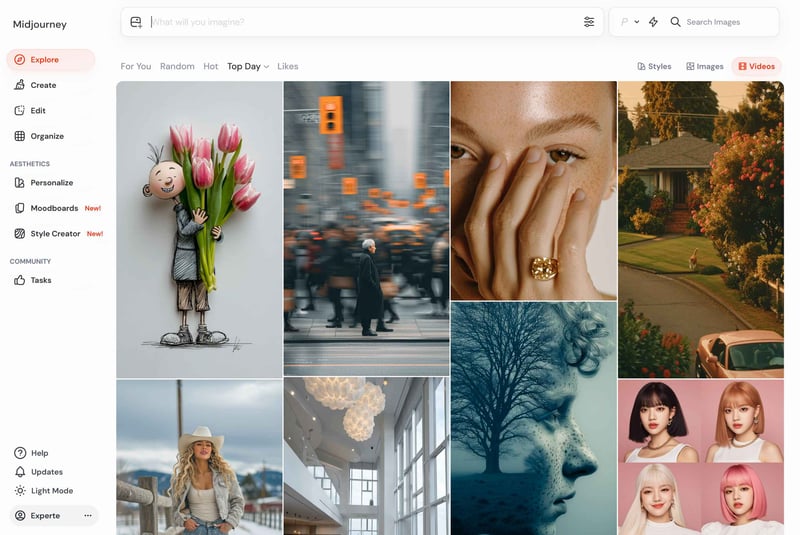
Midjourney’s web interface.
You can upscale images, adjust details, or generate new variants based on a specific image. Unlike typical AI chat systems, there is no ongoing conversation, as Midjourney only responds to the current prompt.
You can also upload reference images. Midjourney then borrows characteristics such as style, color palette, or composition, which helps keep multiple images visually consistent.
Alternatively, you can use Midjourney through Discord, where image generation is controlled via the Midjourney bot. The process is the same, but the interface is less intuitive.
By default, all generated images are publicly visible. If you want to generate images privately, you’ll need a plan with Stealth Mode or access to a protected workspace.
How Good Is Midjourney’s Image Quality?
Quality is mixed. Lighting, colors, and composition often look great, and Midjourney is especially strong with atmospheric scenes, illustrations, and cinematic imagery, where it quickly produces visually appealing results.
However, Midjourney does not always follow prompts accurately. It sometimes ignores parts of your description or interprets them differently than intended, which can affect not only minor details but also key elements of your request.
A photorealistic depiction of Kennedy’s famous Berlin speech (first image)? Not even close. And the three fantasy creatures (third image) are barely recognizable:
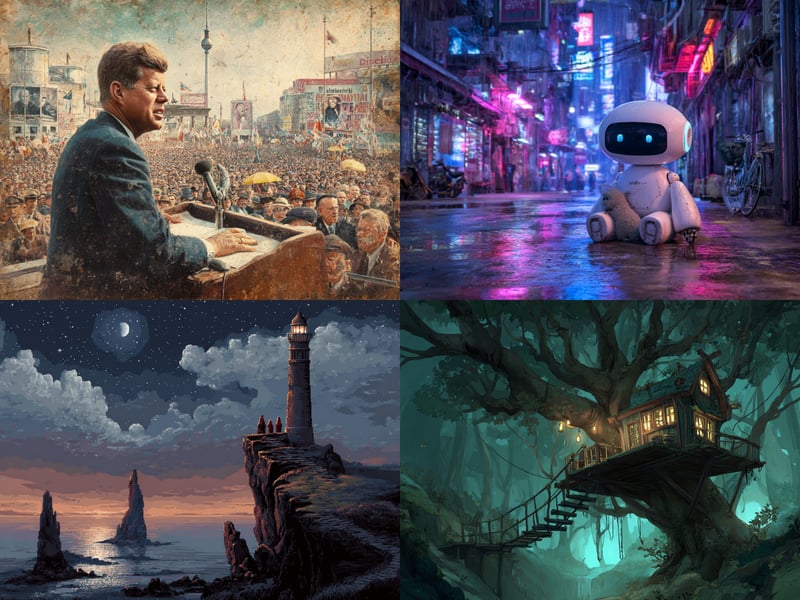
These images were generated with Midjourney.
Midjourney works best for images where style and mood matter more than precision. If your image needs to meet very specific requirements, expect several rounds of iteration.
How Well Does Midjourney Work for Business Use?
Midjourney also grants you full rights to your generated images, with a few exceptions. However, its weaker prompt comprehension makes it harder to create images that match your exact use case.
Accurate text in images remains a problem. Midjourney can render short words, but it still produces wrong letters, swapped words, or altered content.
Always double-check numbers, product names, or legal disclaimers. If needed, add text outside the image generator.

These business assets were created with Midjourney.
How Much Does Midjourney Cost?
Midjourney doesn’t use fixed image limits. Instead, it works with GPU time, which measures how long the servers dedicate processing power to generating your images.
Each plan includes a monthly allowance of fast GPU time (“Fast Mode”). Once you have used it, you can, depending on your plan, continue generating images in the slower “Relax Mode.”
The Basic plan only includes fast GPU time. Once it is used up, you cannot generate new images until the month resets or you purchase additional GPU time.
Starting with the Standard plan, Midjourney unlocks Relax Mode, which lets you generate unlimited images with longer wait times.
Here are Midjourney’s current plans:
Plan | Monthly costs | Fast GPU time per month | Additional features |
|---|---|---|---|
Basic | $10 | approx. 3.3 hours | all images are public |
Standard | $30 | approx. 15 hours | includes Relax Mode |
Pro | $60 | approx. 30 hours | Relax Mode and Stealth Mode |
Mega | $120 | approx. 60 hours | more GPU time and Stealth Mode |
What Are the Pros and Cons of Midjourney?
Strong visual impact for atmospheric scenes
Midjourney excels at creating mood-driven images. Illustrations and scenic compositions produce visually striking results quickly.Plenty of variations to choose from
Midjourney generates multiple variations of a subject and lets you refine them further. You can select versions, upscale them, or use them as a starting point for new variations.
Prompts aren’t fully followed
In our review, Midjourney ignored or reinterpreted parts of the prompt, sometimes missing core requirements rather than just minor details.Photorealism is unreliable
Midjourney struggled significantly with photorealistic images in our review.Text rendering remains error-prone
Midjourney frequently produces wrong letters, swapped words, or made-up content.Private image generation costs extra
By default, all images are publicly visible. To generate images privately, you need a significantly more expensive plan with Stealth Mode.
Leonardo.Ai: Feature-Rich AI Platform With a Weak Auto Mode
Free version: Yes, with limitations
Premium costs: starting at $10 per month
Maximum resolution: 1,536 × 1,536 pixels depending on the model
Leonardo.Ai is a comprehensive AI platform with an unusually wide range of settings. You don’t just enter a prompt—you also choose the model, format, quality, and other parameters. This makes it more flexible than simple chat-based image generators, but it also comes with a steeper learning curve.
How Does Leonardo.Ai Work?
Like other platforms, you enter a prompt in the web interface, select a model, and start generating images. From there, you can pick the best variations, refine them, or upscale them. You can also let Leonardo.Ai choose the model automatically.
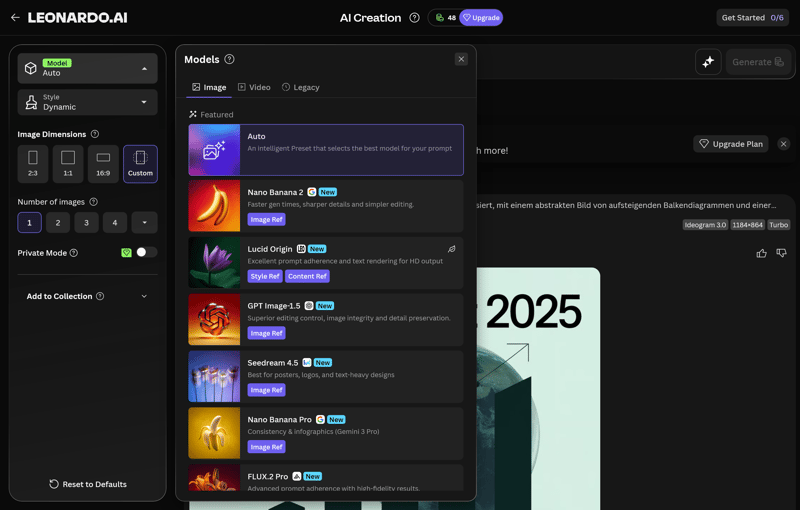
Leonardo.Ai offers a wide selection of AI models.
You can set the aspect ratio, number of images, and style preferences, as well as upload reference images. Paid plans also let you train your own custom models and styles.
Even the free version highlights one of Leonardo.Ai’s biggest strengths: its huge model selection. The platform bundles its own models alongside third-party options in a single interface. Available third-party models include:
Nano Banana, 2, Pro
Seedream 4.0, 4.5
GPT Image-1, 1.5
FLUX.1 Kontext (Dev, Schnell, Max), FLUX.2 Pro
Ideogram 3.0
Leonardo.Ai also offers its own proprietary models:
Lucid Origin, Realism
Phoenix 0.9, 1.0
How Good Is the Image Quality at Leonardo.Ai?
In auto mode, where the platform selects the model for you, the quality falls short of expectations. Leonardo.Ai produces visually appealing images with strong colors and solid detail, but it does not always follow prompts accurately.
A good example is the robot image, where the platform placed two sheep next to it instead of the requested stuffed animal, and the treehouse ended up on the ground. Photorealistic subjects are not a strong suit in auto mode either. On the other hand, the three mythical creatures in pixel art style turned out well, with the style and overall feel captured accurately:
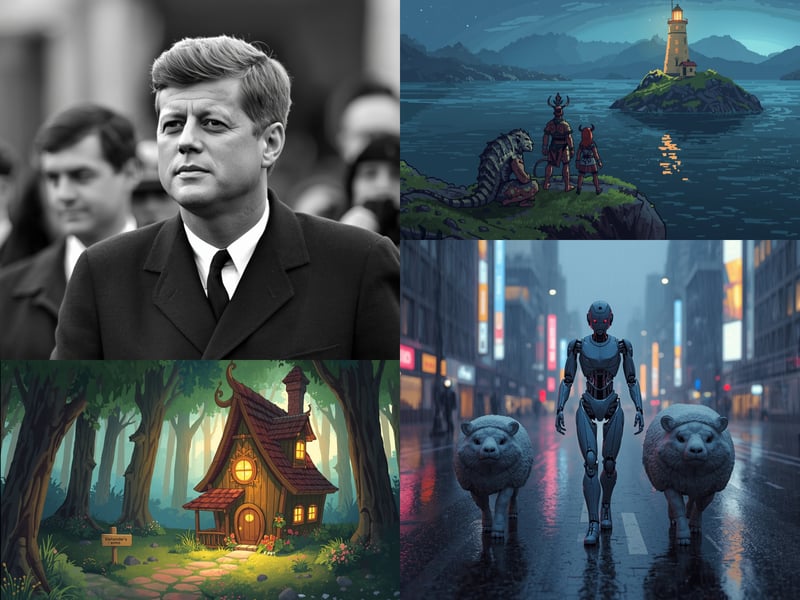
These images were generated with Leonardo.Ai.
How Good Is Leonardo.Ai for Business Use?
Usage rights depend on your plan. Paid plans give you full rights to your images. On the free plan, your images are publicly visible, and Leonardo.Ai retains broader usage rights, making the free tier unsuitable for confidential or exclusive projects.
For business assets with specific detail requirements, Leonardo.Ai performs more reliably than many other platforms. However, text in images is still not always error-free:
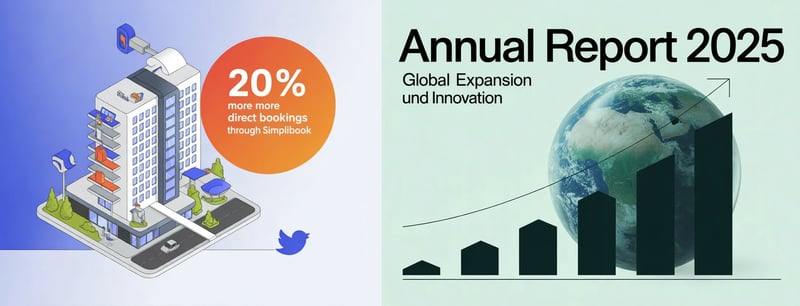
These business assets were created with Leonardo.Ai.
How Much Does Leonardo.Ai Cost?
Image generation runs on so-called Fast Tokens. The number used depends on the model, image quality, and any extra features you enable. The 150 daily Fast Tokens on the free plan only cover a handful of images in practice.
Once your tokens run out, paid plans still allow image generation, but at slower speeds and with a limited model selection. Annual subscriptions are cheaper than monthly payments.
Plan | Monthly cost | Tokens |
|---|---|---|
Free | none | 150 Fast Tokens per day |
Essential | $12 | 8,500 Fast Tokens per month |
Premium | $30 | 25,000 Fast Tokens per month |
Ultimate | $60 | 60,000 Fast Tokens per month |
What Are the Pros and Cons of Leonardo.Ai?
Huge model selection in one interface
Leonardo.Ai bundles a wide range of proprietary and third-party models. You can compare different approaches in the same tool without switching between platforms.Extensive customization options
The platform offers far more settings than basic image generators. You can fine-tune parameters and control the output in detail.
Weak prompt understanding at times
In our review, Leonardo.Ai repeatedly ignored key parts of prompts, affecting both style instructions and central subject elements.Costs are hard to predict
Token usage varies significantly depending on the model, quality settings, and extra features. Especially for new users, it is difficult to estimate how long a plan will last.Free tokens run out fast
Leonardo.Ai is less generous with free tokens than other platforms, especially if you want to generate multiple high-quality images.Rights depend on your plan
On the free plan, your images are publicly visible, and usage rights are limited. For professional or confidential projects, you'll need a paid plan.
What You Should Keep in Mind When Using AI Image Generators
AI image generators are undeniably impressive and keep improving. They can already produce photorealistic images and complex artwork in a wide range of styles, and their applications continue to expand.
These tools have the potential to reshape design workflows and entire industries. Like any new technology, however, they also come with both technical and societal risks.
Here are a few things to keep in mind when using AI image generators:
Good results require strong prompts
Skill and creativity matter in AI image generation. The quality and relevance of the images you get depend heavily on how well you write your prompts. Vague or poorly worded prompts often lead to unexpected or irrelevant results.AI-generated content is often easy to spot
Although AI is getting better at hiding its fingerprints, many AI-generated images are still recognizable at a glance. They often have a distinct, sterile look with unnatural smoothness or an eerie sense of perfection.Visual glitches: 8 fingers, impossible perspectives
Imperfections can also give AI images away. Everything may look fine at first glance, but a closer look can reveal people with three legs or distorted perspectives.Problems with text in images
There are AI text generators and AI image generators, but the combination of both is still not fully reliable. Text in AI images is often misplaced, misspelled, or complete gibberish.What about copyright?
AI-generated images raise new copyright challenges. Platforms often grant users full rights to their generated images, but since these images are frequently based on existing works the AI saw during training, many legal questions remain unresolved.Ethics and responsibility
AI images raise not only legal but also ethical concerns. The ability to create realistic images of people without their consent is a serious issue. These tools can also be misused to produce disinformation or manipulative content, and they may impact the job market, for example by replacing designers.
AI image generators are a double-edged sword. If you use them, be aware of their limitations and risks.
One thing is clear, though: these AI tools are here whether we like it or not. Like many machines and automation before them, they will change the way we work and live. Ignoring that reality means risking being left behind.
Conclusion
It’s not just AI content flooding the internet—the tools that produce it are everywhere as well. When it comes to cost, output quality, prompt understanding, and editing options, there are significant differences between platforms.
Currently, Nano Banana 2, GPT Image 1.5, and FLUX.2 are among the best AI image generator models. Google's Nano Banana 2 stands out with strong text rendering and fast speeds, ChatGPT's image generator excels at prompt understanding, and FLUX.2 offers a lot of control paired with high image quality.
f you want access to multiple AI models in one platform, Adobe Firefly and Recraft are solid options.
No matter which tool you choose, use AI image generators responsibly, especially for commercial purposes. Copyright issues, ethical concerns, and misinterpreted prompts mean these tools can be helpful, but also harmful. Handle them with care.
AI can now create not just images and text, but entire apps. Here's how that works: