What Is Vibe Coding? Here's What's Behind the Trend


Write software without programming? That’s the promise of Vibe Coding. Just describe what your app should do, and AI turns your instructions into working code. Instead of dealing with syntax, you focus entirely on your ideas and goals.
Vibe Coding speeds up development and lowers the barrier to entry—but it also comes with limitations. This guide explains how Vibe Coding works, which AI tools support it, and what to consider before getting started.


Vibe Coding is a new form of programming. You describe what should be programmed in natural language. An AI then converts your description into code.
The lower barrier to entry makes Vibe Coding interesting for designers and other non-programmers. Developers also benefit because they can quickly create prototypes and code frameworks.
The best Vibe AI tool for you depends entirely on your specific use case. The spectrum ranges from UI-focused platforms to AI-powered IDEs to CLI assistants.
Vibe Coding doesn’t replace traditional development—it complements it. Ideally, it’s about combining AI capabilities with human expertise.
What Is Vibe Coding?
Vibe Coding refers to an AI-driven approach to software development. You write instructions in natural language instead of code. Rather than typing out commands, you describe your idea. The artificial intelligence then creates machine-readable code from it.
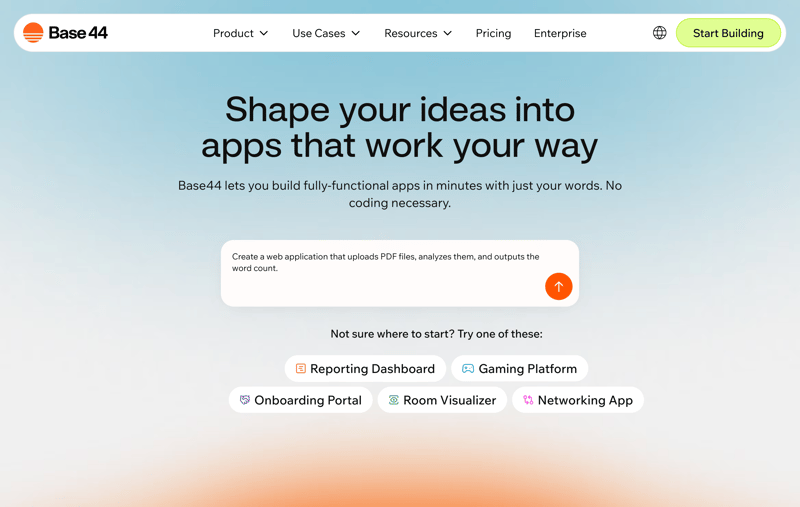
With Vibe Coding, you use natural language.
The goal: to build software without getting bogged down in syntax—just by expressing concepts, goals, and requirements.
Unlike no-code tools like website builders, Vibe Coding doesn’t limit you to fixed components or predefined templates. Instead, you express your requirements freely—in plain language.
A simple example is the instruction "Create a web application that uploads PDF files, analyzes them, and outputs the word count." The AI's result is then a React component with file upload, PDF parser, UI feedback, and results display.
The AI can generate not only the source code, but also the user interface if needed. It can also connect to databases and APIs.
The term Vibe Coding was coined in early 2025 by AI researcher Andrej Karpathy. He wanted to describe a way of working where you fully embrace the "vibes" of an idea and forget that code even exists.
You still need a basic grasp of program flow, architecture, and technical logic—to guide the AI properly and validate its output.
Here are the main pros and cons of Vibe Coding:
Fast Implementation
Vibe Coding lets you bring ideas to life much faster. Applications are created in hours rather than days or weeks.Low Barrier to Entry
If you clearly state your requirements, the AI can turn them into functioning software—no coding skills needed.Relief Through Automation
Vibe Coding automates many of the routine tasks involved in development. You focus on planning, structure, and quality while the machine handles the detail work.
Limited Code Quality
Without cleanup, the generated code can become messy and difficult to maintain. You should always review (or have someone review) the generated code.Harder Troubleshooting
If something breaks, the cause isn't always clear. The AI will happily generate a new solution—but won’t explain what went wrong before.Platform Dependency
Relying on a specific platform can become a bottleneck—especially during outages or sudden price hikes.
How Does Vibe Coding Work in Practice?
The Vibe Coding process works like a dialogue between you and the AI. A working application evolves from a rough idea through iterative steps:
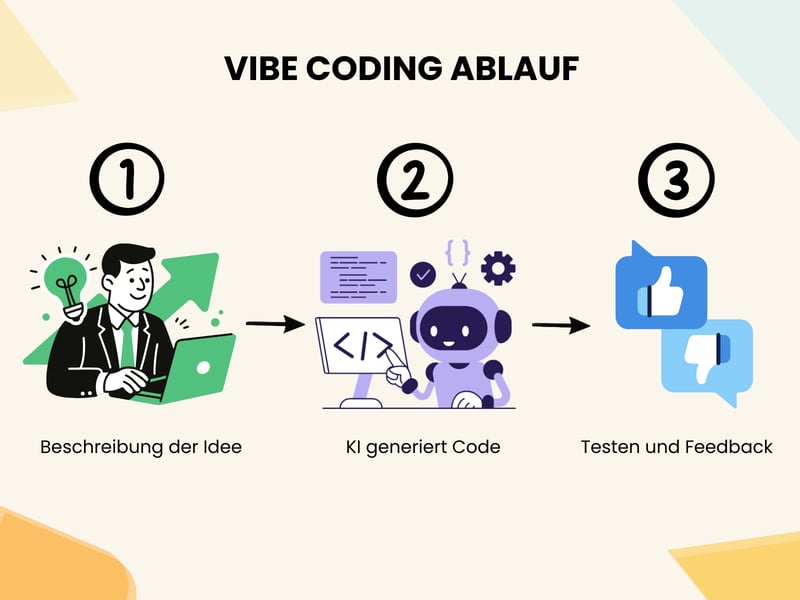
Vibe Coding is an iterative process.
- 1.
Describe the Idea
You describe what you want to build—in plain language. This could be a small feature or a full-fledged app. The more precise your description, the better the AI’s response. - 2.
AI Generates Code
The AI processes your input and generates code snippets, functions, or full components. UI-focused tools generate clickable interfaces, while backend tools set up core application logic. - 3.
Test and Provide Feedback
You test the results—by running the code or examining the interface. If something’s off, you give feedback in plain language. The AI updates the code based on your input.
This loop continues until the outcome meets your expectations. You step in when needed—fixing mistakes or adding specific requirements. Even so, automation takes care of much of the tedious detail work.
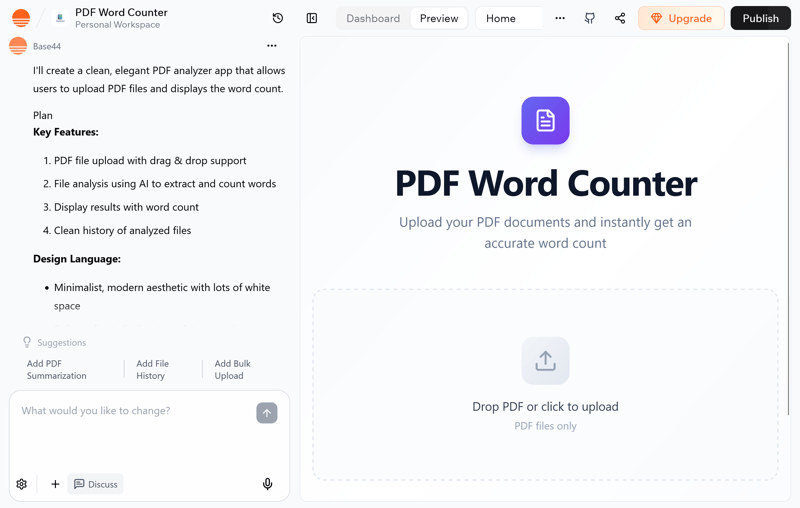
On the left is the AI's response, on the right is a preview of the result.
Note: Not every vibe coding tool suits every task. Each is optimized for different use cases. Some are great for UI design; others are stronger on backend logic. That’s why it’s important to choose the right tool for your needs (more on that below).
At its best, Vibe Coding feels like a creative conversation with an AI partner. It’s more like live brainstorming with instant results than conventional, detail-heavy coding.
Many Vibe Coding tools offer templates for common use cases. This means you don't have to start from scratch. You can adapt prebuilt templates to match your project.
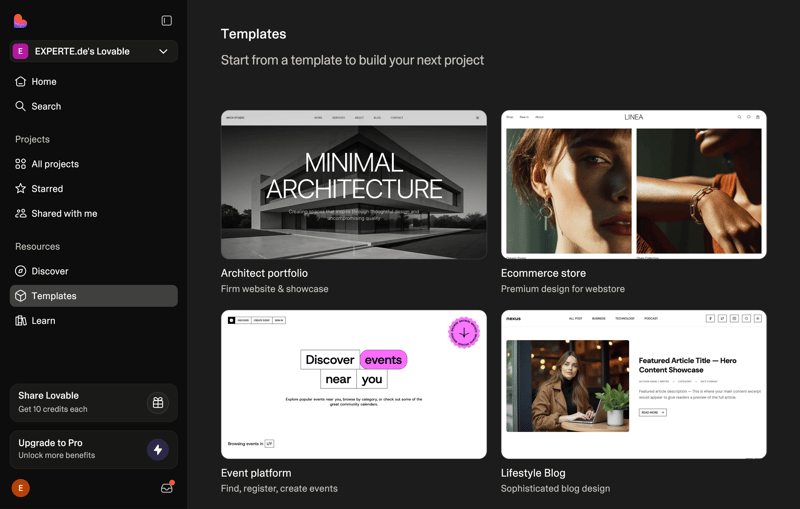
Pre-built templates from Lovable.
Who Is Vibe Coding For?
Vibe Coding is for anyone who wants to turn ideas into working software—without having to master complex programming skills. These groups benefit the most from AI-powered coding tools:
Idea people and tinkerers
If you want to quickly test an app concept or build a prototype, AI can save you valuable time. Describe your vision, and get a working result in minutes.Non-programmers
Designers, product managers, and other non-tech users can now create software independently. The usual technical barriers are gone.Developers and IT pros
Even developers use Vibe Coding to accelerate their workflows. It's especially helpful for boilerplate code and repetitive tasks.Teams and startups
When speed trumps perfection, Vibe Coding shines. Teams can roll out features in hours—and collect feedback immediately.
Keep in mind: Vibe Coding lowers the entry barrier and accelerates development—but it doesn't eliminate the need for smart software design.
Poor architectural decisions can make AI-generated code hard to maintain over time. Even with AI assistance, humans are still accountable for structure, quality, and long-term maintainability.
Types of Vibe Coding Tools
Vibe Coding tools differ greatly in structure, target audience, and feature depth. Some generate entire applications from simple prompts; others embed AI features directly into professional dev environments.
Vibe Coding tools typically fall into three categories. Here's how they differ:
Tool type | Use case | Typical features |
|---|---|---|
UI and frontend-focused tools |
|
|
AI-powered IDEs |
|
|
Command line interfaces (CLIs) |
|
|
Most tools are available in both free and paid versions. Free plans usually come with limited features but are great for testing the tool. They let you explore the platform and see if it meets your needs.
UI and Frontend-Focused Tools
These tools focus on UI design and interaction logic. You can create working prototypes—or even full web apps—just by describing what you want.
designed around visual layout and user flow
great for mockups, user testing, and fast iterations
runs entirely in the browser—no setup needed
complex UI behaviors are difficult to handle
generated code is often hard to repurpose
limited flexibility in how the app is structured or behaves
There are many examples of UI and frontend-focused tools. Here's a selection of popular options:
Base44* is a chat-driven platform with built-in hosting—easy to use for beginners.
Lovable lets you build full-stack apps through conversation—frontend, backend, and database included—with code export available.
Bolt.new is a browser-based app generator with instant execution via WebContainers.
v0 (Vercel) creates React components styled with Tailwind CSS—ideal for developers with basic coding skills.
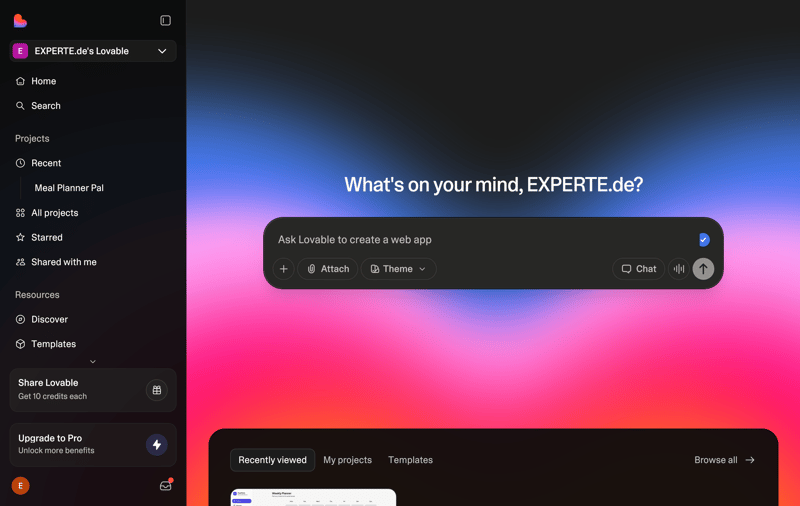
Lovable is an example of a UI tool.
These platforms are useful for designers, product teams, and startups alike. Developers also benefit—mainly from the rapid prototyping speed.
UI and frontend-focused tools reach their limits when tasks go beyond visual interface building. Complex, customized user flows are hard—or even impossible—to implement.

AI-Powered IDEs
This category is aimed at professional developers looking to enhance their workflow with AI support. In this setup, the developer stays in control. AI provides suggestions, automates repetitive tasks, and analyzes existing codebases.
tight integration with popular editors like VS Code
context-aware completions, testing, and code optimization
supports large-scale projects and complex codebases
suggestions may be vague or contextually inaccurate
AI behavior is often opaque or hard to trace
typically requires cloud-based processing
Here are some examples of AI-powered IDEs:
Cursor is an AI-enhanced editor with built-in chat that understands file context and structure.
Google Antigravity is an all-in-one platform with autonomous AI agents for on-demand code generation.
GitHub Copilot and Codeium support developers with real-time code suggestions and intelligent completions.
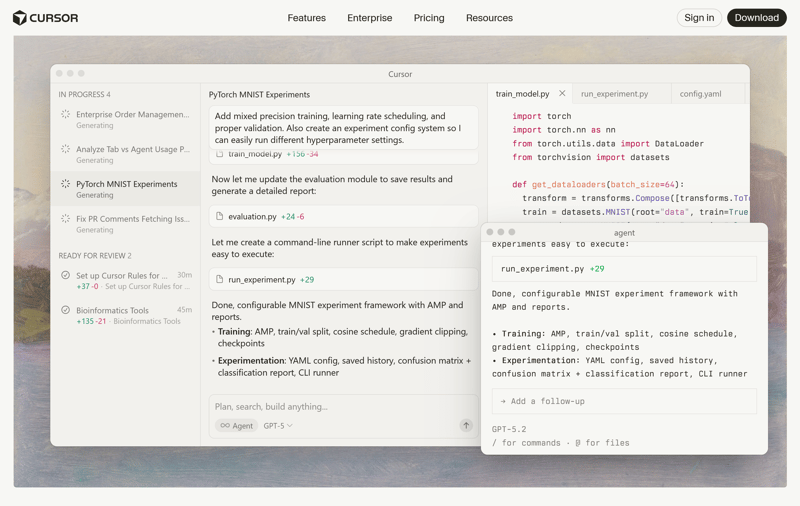
Cursor is a powerful AI IDE.
AI-powered IDEs primarily streamline routine tasks and boost productivity. They don’t replace developers—they assist with refactoring, testing, and building new components.
In complex or poorly documented codebases, AI suggestions can miss the mark. These tools rely on pattern recognition, not genuine comprehension. That can result in avoidable correction cycles.
Command Line Interfaces (CLIs)
Command-line interfaces are geared toward experienced developers who prefer the terminal and want to embed AI into existing scripts and workflows.
AI interactions via text only—no graphical interface
highly flexible; integrates seamlessly into CI/CD pipelines
capable of processing large datasets and complex project structures
steep learning curve for those new to the terminal
debugging is more difficult due to lack of visual feedback
Examples of CLI-based tools include:
Codex CLI is an OpenAI-based tool that generates code directly in the terminal.
Claude Code provides code fixes and structure suggestions via the command line.
Gemini CLI is Google's powerful AI tool for the terminal—it helps interpret code and generate functions on demand.
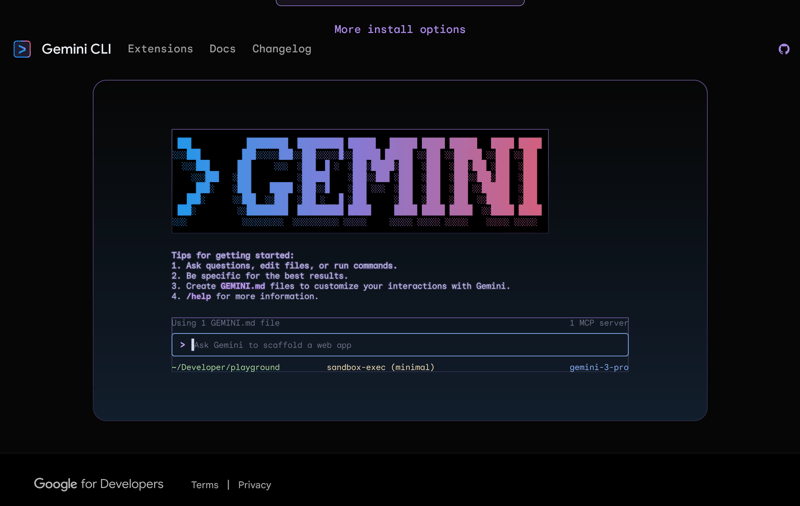
Google's Gemini in the command line.
CLI tools are well suited for automation, structured maintenance, and infrastructure-oriented development. They offer speed and precision—but only if you're comfortable using the terminal.
You’ll need to know the correct commands and how to interpret terminal errors. For beginners, CLI tools are typically not the best starting point.
How Does Vibe Coding Change Software Development?
Vibe Coding affects more than just tools and workflows—it’s reshaping the foundations of software development. New roles are emerging, familiar processes are evolving, and long-held assumptions are being questioned.
This shift introduces new risks—when AI makes decisions you previously controlled, you give up some oversight. AI suggestions can be hard to interpret, and mistakes may stay hidden for longer. For long-term success, working code alone isn’t enough.
Developers as Directors
Vibe Coding redefines the developer’s role. Instead of writing every line of code yourself, you manage the process at a higher level. You guide the process, assess the results, and decide the next steps.
This role resembles that of a director or editor. The AI writes the code—but refinement and final judgment remain human tasks. Programming skills aren’t obsolete—they’re evolving.
Mastering syntax matters less than before. What counts now is your ability to steer the AI and assess its output critically.
Massive Time Savings
One major benefit of Vibe Coding is its speed. With AI support, features that once took weeks now take hours—or even minutes. This speed is especially valuable when building prototypes or MVPs.
This speed impacts the innovation process. Development cycles are shorter, and bugs are found and fixed sooner. You can experiment more freely, as implementation takes less effort.
Vibe Coding can also raise expectations for constant, rapid delivery. That pressure can lead to shortcuts in testing, documentation, and code quality.
Greater Accessibility
Vibe Coding makes software development more accessible. People can build software based on domain expertise—even without technical training. Traditional roles begin to blur—as business teams, designers, and developers collaborate more closely, and earlier in the process.
But that doesn’t make development trivial. Long-term maintenance, security, and reliability still demand real expertise.
What Are the Limits of Vibe Coding?
Vibe coding has many advantages, but it also brings entirely new challenges. You should keep these in mind even after your AI tool has quickly produced nearly finished applications.
Code quality and maintainability
AI-generated code doesn’t automatically follow best practices. You’ll often find inconsistent formatting, redundant logic, or nonstandard structures. The risk of "AI slop" is real.Debugging
Debugging is tougher—AI tends to regenerate code rather than fix specific bugs. Human expertise remains essential.Security and performance
AI tools generally don’t prioritize security or performance out of the box. Unreviewed AI code can introduce security flaws or performance issues.Platform dependency
Vibe Coding depends on the availability of your chosen AI provider. Provider changes can disrupt workflows or drive up costs unexpectedly.Loss of system understanding
Vibe Coding favors rapid output over deliberate system design. The AI makes architectural decisions implicitly—often without clear visibility for the human developer. That makes later changes harder and may result in reduced control over your system.Misleading efficiency gains
Vibe Coding accelerates early stages—but may push complexity to later phases. Refactoring, debugging, or rework can erode or eliminate initial time gains.Limited suitability for large projects
For large-scale systems, solid architecture planning is still critical. AI can support—but not replace—human architectural decisions in complex projects.
Vibe Coding is a powerful aid—but not an autopilot. Without active oversight, you risk serious issues with quality, security, and maintainability. The bigger the project, the more essential conventional development practices become.
Conclusion: Vibe Coding Has Potential
Vibe Coding complements software development and makes it more accessible on multiple levels. It lowers the entry barrier and significantly accelerates development cycles. This is particularly beneficial for prototypes and simpler apps.
That said, traditional programming is still crucial for building complex and reliable systems. AI tools can produce impressive results—but not with the precision and reliability of skilled development teams. They also bring entirely new problems and challenges.
The real strength lies in combining both approaches. Let AI handle tasks that benefit from speed and creativity—while relying on human expertise for architecture, performance, and critical thinking. That way, Vibe Coding becomes a valuable tool in the developer’s toolkit—bridging automation and expertise.