Best Workflow Automation Tools 2026: These Are the TOP 7


Everyday work is full of time-wasters—especially repetitive tasks. AI-powered workflow automation promises relief: it handles routines and frees up time for more important things. The number of available tools is overwhelming—so which one is right for you?
This comparison presents seven leading workflow automation tools with AI capabilities. We highlight the strengths and weaknesses of each provider and help you identify the tool that best suits your needs.


What Is (AI) Workflow Automation?
AI workflow automation refers to business processes that run automatically—steered by artificial intelligence.
Unlike conventional automation, AI doesn't just follow rigid rules. It detects patterns, learns from data, and makes decisions autonomously.
AI is particularly helpful for repetitive processes—such as matching data or routing requests. AI-based tools analyze content, set priorities, and route tasks to the appropriate systems.
A typical automated workflow follows four main steps:
- 1.
Trigger: A specific event—such as a new email or form submission—initiates the process.
- 2.
Data retrieval: The system gathers the necessary data, either from internal databases or external sources.
- 3.
Data processing: AI evaluates the information, draws conclusions, or completes missing details.
- 4.
Handoff: Finally, the AI delivers the output to the relevant system—like a CRM or helpdesk platform.
Top 7 Workflow Automation Tools
We introduce seven workflow automation tools that integrate AI effectively into real-world processes—each tailored to different use cases.
For a fair comparison, we evaluate all tools using the same sample workflow—built around Asana, ChatGPT, and Google Sheets:
- 1.
Retrieve new tasks from Asana
The workflow fetches new tasks from a designated Asana project, including key fields like title, description, and due date. - 2.
Analyze tasks with ChatGPT
Each task is sent to ChatGPT, where the AI analyzes its content and returns a structured JSON output containing a summary, category, and priority level. - 3.
Output results to Google Sheets
Finally, the results are exported to Google Sheets for documentation and further use.
Here are our top 7 workflow automation tools:
n8n: Fair-Code Automation
Quality: High
Costs: Starting at $20 per month
Free version: Yes, available for 14 days
n8n is a Berlin-based workflow automation tool built for users and teams who want to automate processes with AI—flexibly and without vendor lock-in. You can either self-host n8n or use the managed cloud version.

n8n combines ease of use with extensive customization options. With a fast-growing user base, n8n has become a serious alternative to established automation platforms.
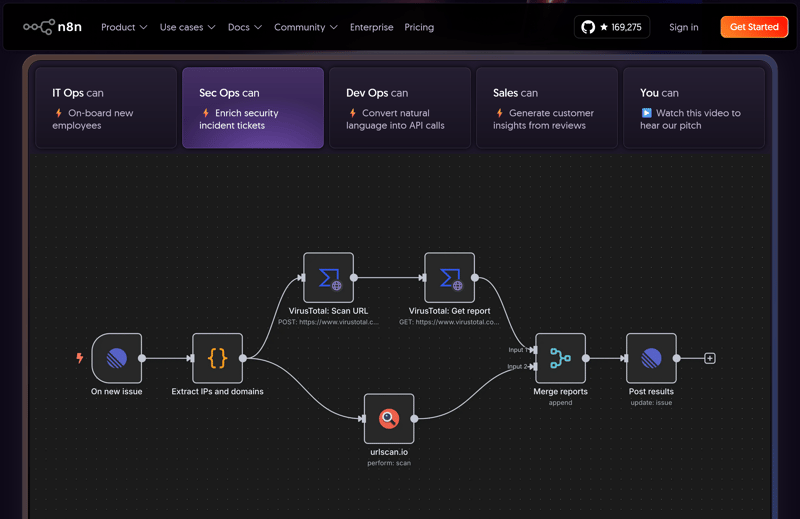
n8n is suitable for various purposes.
How Does n8n Work?
You can create workflows in n8n either visually, using modular building blocks, or via natural language input powered by AI. Each node handles a specific function—like triggering an event, transforming data, or sending a request.
A typical workflow might look like this:
- 1.
A workflow starts with an incoming email, for example.
- 2.
The content is then automatically processed and saved to another location.
- 3.
Finally, a notification is created.
Over 1,300 ready-to-use integrations are available in n8n. Missing services can be added via custom nodes or direct API integration. Whether simple or complex—with conditions, branches, or loops—you can build any workflow in a structured, visual manner.
How Good Is the Quality of n8n?
n8n delivers a strong performance across the board. Workflows are quick to build—even without prior experience. The interface remains tidy and navigable, even for complex automations. There's hardly any visual clutter, which is exactly how it should be.
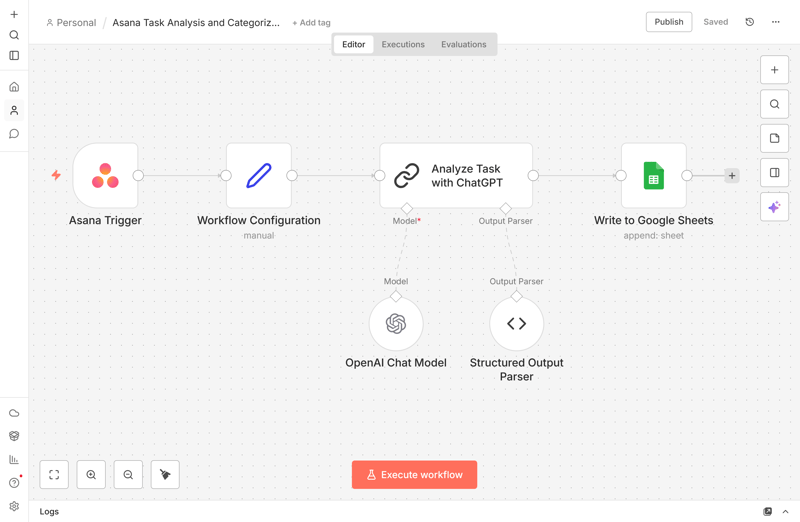
Example of a simple n8n workflow.
n8n guides you step by step when linking and configuring nodes. Step by step, you build an automated workflow that does exactly what you planned.
In our review, n8n automatically passes new tasks from Asana to ChatGPT, analyzes the content there, and saves the results in a structured format to Google Sheets.
Each node transparently shows input, processing, and output—making the data flow easy to follow. On the left, you see the input. In the middle, the processing takes place. On the right, the output is ready for the next node. You can run each node separately.
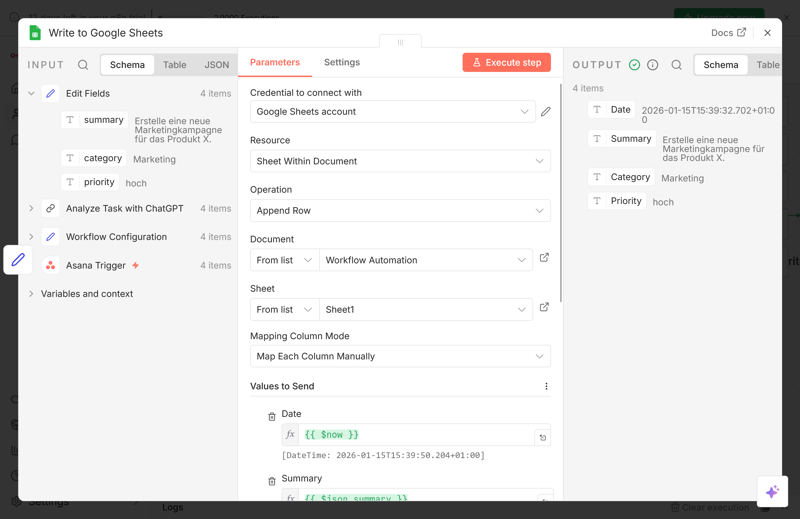
Input, parameters, and output of a node.
AI options are extensive and cover tools like ChatGPT, Claude, and other advanced components for agents and transformations. New nodes integrate seamlessly into your existing environment, both functionally and visually.
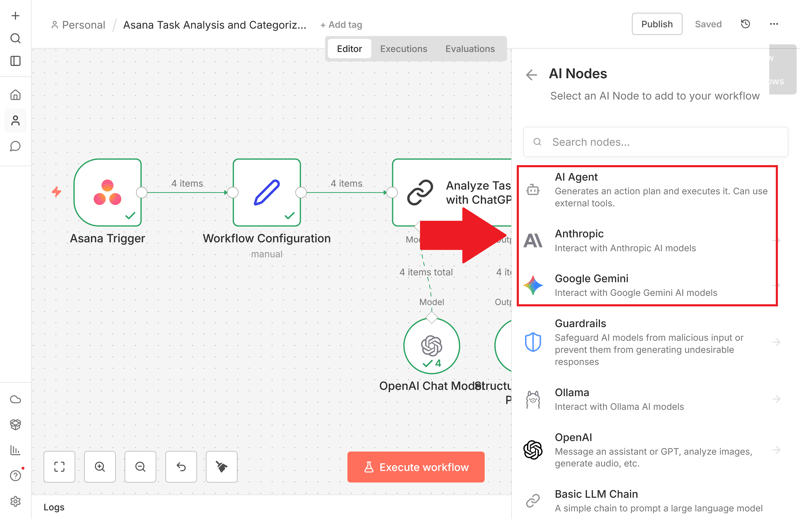
The selection of AI nodes is extensive.
You retain full control when building workflows manually—or let AI handle the setup via natural language input. If inconsistencies occur, n8n's AI detects them and suggests relevant corrections.
How Well Does n8n Integrate With Other Systems?
n8n connects with countless tools—either via prebuilt integrations or custom API calls through HTTP requests and code. This lets you trigger both data transfers and actions in other systems.
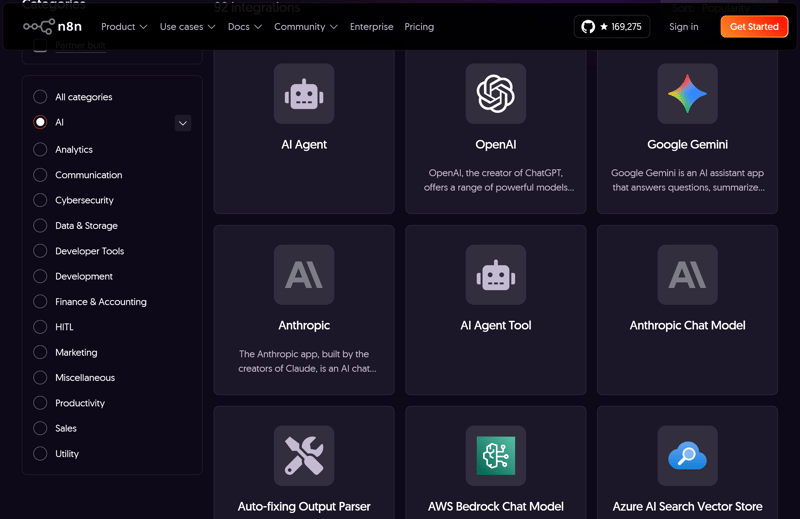
n8n provides you with a wide range of integrations.
n8n uses webhooks to respond to external events in real time. Alternatively, scheduled polling lets you retrieve data at defined intervals. This level of flexibility makes n8n highly adaptable to everyday workflows.
If you self-host n8n, you run it on the same network as your infrastructure. This lets you connect non-public systems as well. Alternatively, Hostinger offers a 1-click installation for n8n:
What Are the Costs and Terms for n8n?
The self-hosted version of n8n is free and unlimited. There are no limits on the number of workflows or users. Alternatively, you can use the cloud version in your browser. The free cloud trial includes up to 1,000 executions over 14 days.
Once you exceed that, you pay based on usage. Paid plans start at $20 per month for 2,500 workflow executions. Each execution can include unlimited steps.
For businesses, there are additional plans with guaranteed service levels, higher quotas, and advanced features like Git versioning.
What Are the Pros and Cons of n8n?
Fair-code and self-hosting
Self-hosting n8n gives you full control over your data and setup. At the same time, the cloud version offers a hosted solution.Many integrations
You can access more than 1,300 integrations and services. You can also build custom connections if needed. Connect individual systems through their APIs.Flexible workflows
With conditions, loops, and parallel paths, you can design even complex processes in a clear and easy-to-follow way.Cost-efficient at high volume
Pricing is based on workflow executions, not the number of steps—keeping costs low for large, complex automations.
Technical knowledge required
To unlock advanced features like self-hosting or custom nodes, you’ll need some technical know-how. For simple workflows, the visual interface is enough.Performance varies
Performance may decline with very large datasets or workflows involving high API traffic and file operations.
Zapier: Workflow Pioneer With 8,000+ App Integrations
Quality: High-quality
Costs: Starting at $19.99 per month
Free version: Yes, available indefinitely
Zapier is one of the longest-standing no-code automation platforms. Since its launch in 2011, it has become a go-to solution for countless use cases. It covers a broad spectrum of use cases and is especially beginner-friendly.
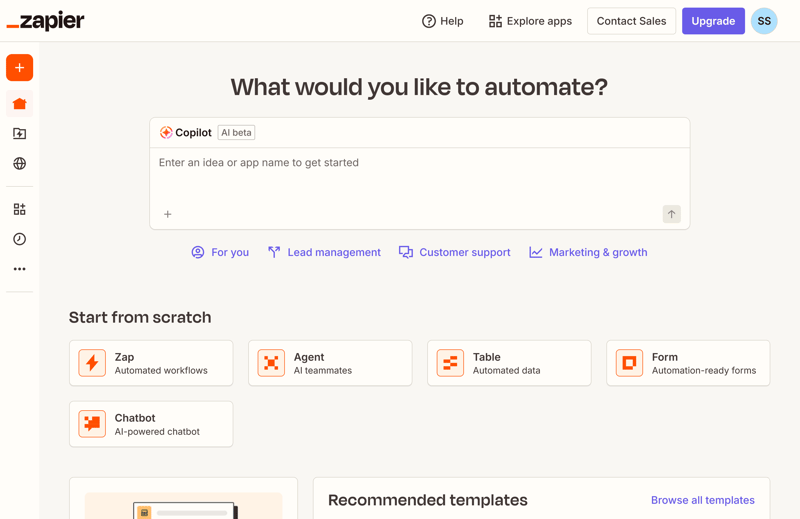
Zapier advertises a particularly large number of integrations.
More advanced users may encounter limitations—especially when building complex logic or custom processes. The value for money can also decrease at higher volumes.
How Does Zapier Work?
Each Zap consists of one trigger and at least one action:
The trigger is an event in an app, such as a new entry in Google Sheets.
This is followed by one or more actions in other apps, such as creating a task in Trello or sending a message via Gmail.
Zapier walks you through the process step by step. Fields are assigned with a click, and filters or branches are easy to configure.
Higher-priced plans also allow multi-step Zaps with multiple actions and conditions. However, some integrations are only available to paying customers.
How Good Is Zapier's Quality?
Zapier offers stable, high-quality performance across the board. The easy-to-use platform often recognizes connections between services automatically, without requiring you to configure steps manually.
Our workflow from Asana through ChatGPT to Google Sheets was set up quickly after a fast authentication process. Zapier suggests useful optimizations and prevents common errors before they occur. This is exactly how an automation tool should work.
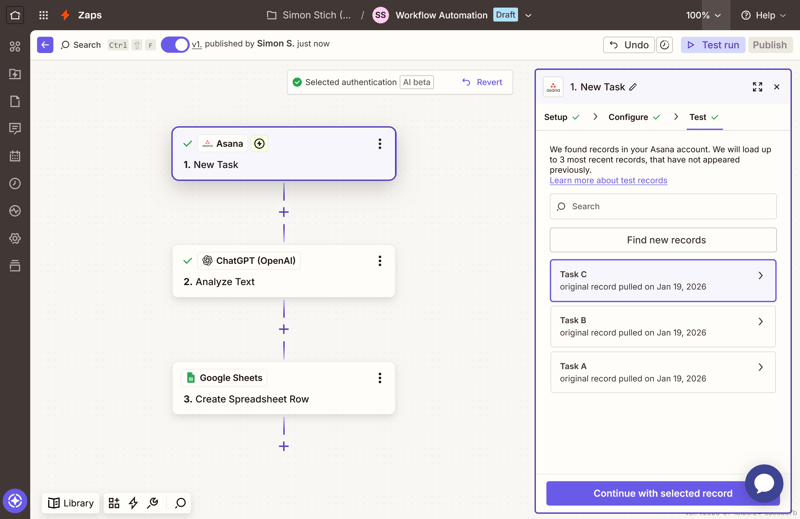
The test workflow is created quickly with Zapier.
The interface is clean and functional, though somewhat rigid in design. You create nodes in three structured steps: setup, configuration, and test.
Beyond manual workflow creation, Zapier includes a capable AI assistant. It can also analyze existing workflows, identify weaknesses, and suggest improvements. The automatic checkpoints are helpful. Before any major change, Zapier saves the workflow.
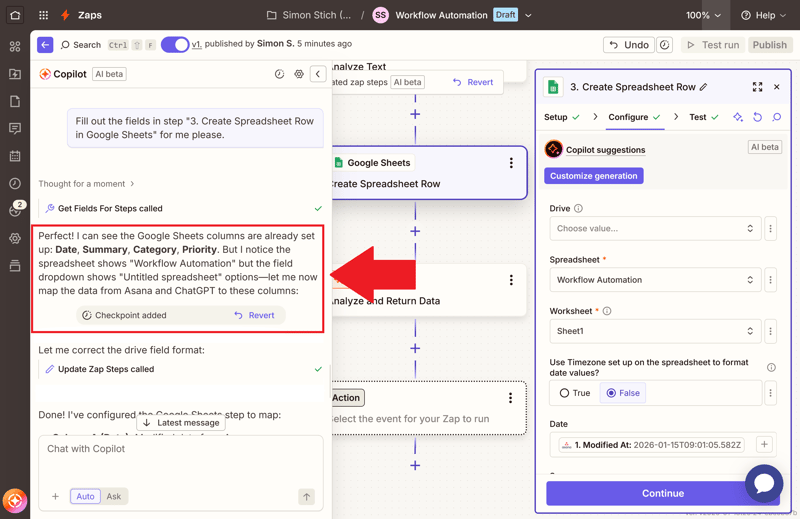
Zapier's AI assistant helps with error correction.
Zapier offers one of the most extensive libraries of app integrations and actions. It provides the most comprehensive coverage of all providers. AI integrations are also fully covered. All relevant AI tools are grouped in a dedicated category.
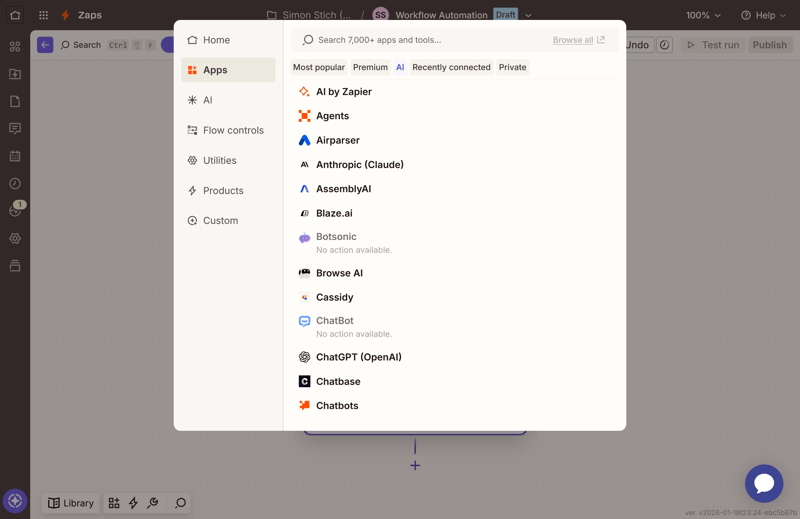
Zapier's AI category.
How Well Does Zapier Integrate With Other Systems?
With over 8,000 connected apps, Zapier offers the broadest integration coverage of any platform. The platform supports popular services like Gmail, Slack, and Salesforce, as well as many niche products. Most apps come with several triggers and actions that you can mix and match.
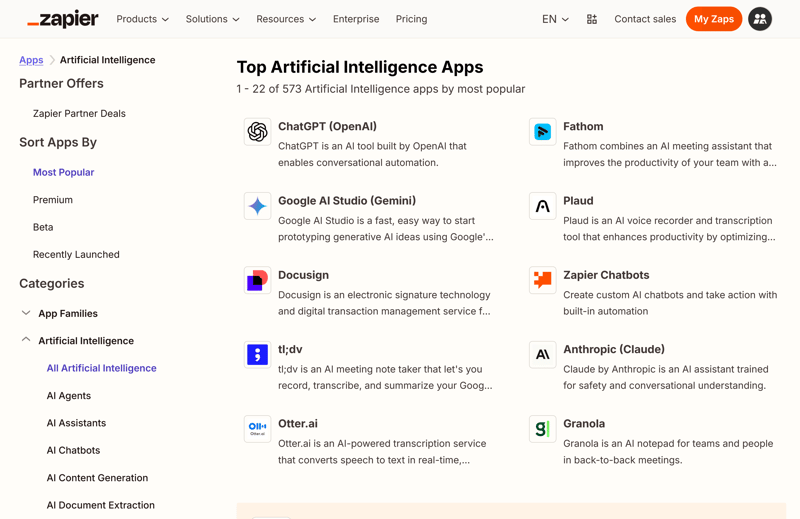
Many AI integrations available in Zapier.
You can also connect services via webhooks. An email parser is also available for extracting data from incoming messages. SQL queries or complex API control, however, are not supported.
In general, Zapier focuses on ready-made app connectors and simple handling. Many software providers now publish their own Zapier integrations.
What Are Zapier's Costs and Terms?
Zapier follows a task-based pricing model, where each action within a workflow counts as one task. The free plan allows a maximum of 100 tasks per month and simple Zaps with up to two steps.
Plans start at $19.99 per month for 750 monthly tasks. Premium apps, multi-step Zaps, and logic building blocks are available from the smallest plan. Team and Business plans include additional features for collaboration, permission management, and support.
Any unused tasks expire at the end of each billing cycle. If you exceed your limit, Zapier switches to pay-as-you-go mode and charges tasks individually.
What Are Zapier's Pros and Cons?
Huge app coverage
Zapier comes with native support for over 8,000 applications. For most use cases, a suitable connector is already available.Easy to use
The interface is relatively simple compared to other platforms. Even without technical knowledge, you can quickly create your first workflows.Extensive ecosystem
Many companies maintain their own Zapier integrations and ensure they work reliably. There are also numerous templates, tutorials, and community resources.
Expensive at high volume
Task-based pricing can become costly if you run high-frequency or multi-step workflows. When your workflows have many steps, the task count adds up quickly.Limited customization
Zapier does not support loops, recursion, or dynamic branching—making advanced logic difficult to implement. Using custom code is also heavily restricted.
Gumloop: AI Workflows via Drag and Drop
Quality: Strong
Costs: Starting at $30 per month
Free version: Yes, available indefinitely
Gumloop—formerly known as AgentHub—is a no-code platform for building AI-driven workflows using a visual drag-and-drop editor. Even complex workflows can be created and executed without writing a single line of code.
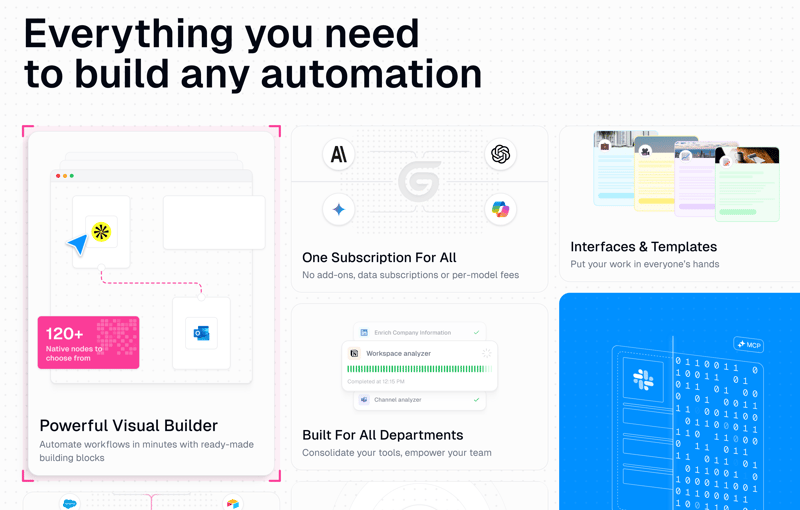
The Gumloop homepage.
Gumloop focuses on organizing and executing AI-powered processes within a visual environment. The customizable "Gumloop Agents" help with this. You can integrate them through Slack.
How Does Gumloop Work?
You can either build workflows manually using drag-and-drop blocks or generate them automatically with AI assistance.
- 1.
Each workflow begins with a trigger—typically a webhook or an external event from a third-party app.
- 2.
Then you add actions, such as sending messages, reading data, or starting an AI-powered step.
Built-in models like GPT-4 and Claude handle tasks such as text analysis, generation, or formatting—directly within the workflow. You can also map out more complex workflows with conditions and branches directly in the interface. Over 150 templates and preconfigured agents make onboarding fast and straightforward.
How Good Is the Quality at Gumloop?
High. Gumloop offers a strong technical foundation and a welcome level of flexibility. Whether you rely on AI-generated flows or assemble them manually, the platform delivers stable and predictable performance.
In our review, we set up a workflow with Asana, ChatGPT, and Google Sheets quickly. All relevant nodes were connected, configured, and ready to use in no time. Connecting external services is seamless—thanks to a guided authentication process and helpful prompts.
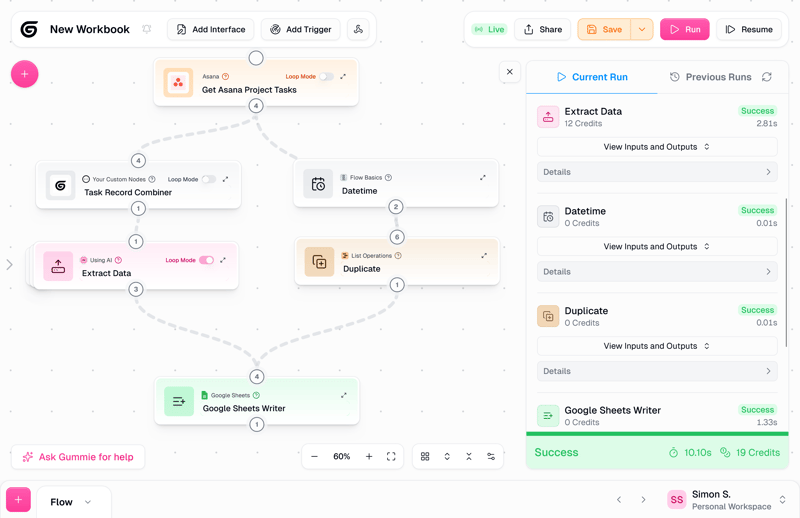
A workflow with Asana, ChatGPT, and Google Sheets.
The interface can feel a bit cluttered when workflows grow large. The node display is functional but only easy to overview when collapsed. In each node, you see the input on the left and the output on the right. Settings are hidden in separate menus and aren’t always intuitive—compact layout options could improve clarity.
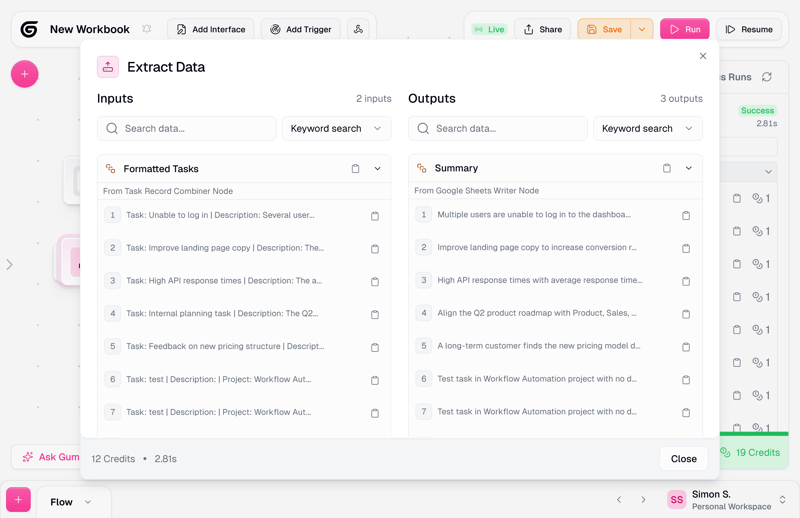
Could be clearer: the internal node display.
AI integrations are grouped in a dedicated section, offering direct access to providers like OpenAI, Google, Meta, DeepSeek, and more. Specialized AI nodes for analyzing images and videos are also available.
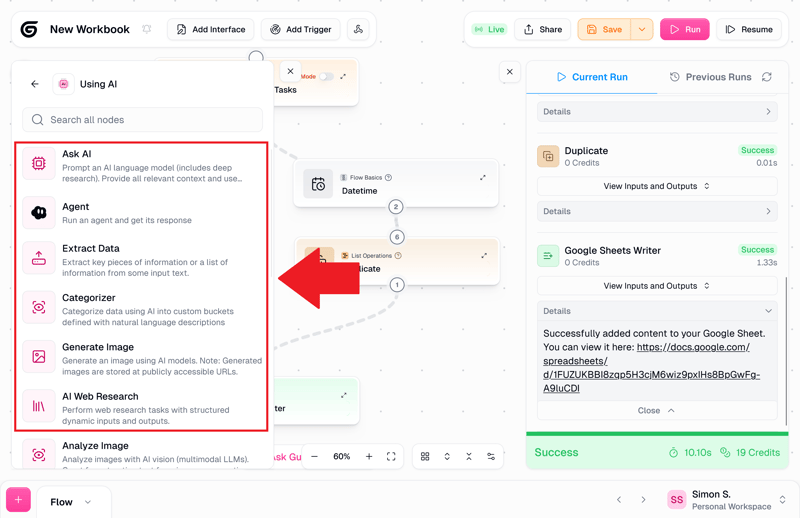
Gumloop's AI category.
Gumloop actively encourages you to use the AI assistant. Even during manual creation, an AI assistant provides real-time tips via chat—useful, though not always fully aligned with your intent.
How Well Does Gumloop Integrate With Other Systems?
Gumloop supports over 120 external services, including major platforms like Salesforce, HubSpot, Google Workspace, and Slack.

Gumloop offers more than 120 native integrations.
The platform also focuses heavily on AI services. Multiple AI models can be used in parallel—without needing to handle credentials or API keys manually. This makes it possible to combine several AI steps within a single workflow, such as text recognition, research, and image generation.
Own data sources, including CSV files and full databases, can be integrated for use in automated processes.
What Are Gumloop's Costs and Pricing Plans?
Gumloop uses a credit-based billing system. The free tier includes 2,000 credits per month. Paid plans start at $30 per month when paid annually, with at least 10,000 monthly credits and additional features like unlimited triggers and email support.
Each action in a workflow uses a certain number of credits. Basic actions like sending messages consume few credits, while complex AI steps—such as using large models or scraping web content—use significantly more.
Credits expire at the end of each billing cycle and do not roll over. Discounts for annual billing and occasional promotions are available.
What Are the Pros and Cons of Gumloop?
Strong AI integration
Gumloop offers out-of-the-box access to multiple AI models—no configuration required.Many templates
Prebuilt templates for common use cases speed up implementation and reduce setup effort.Scales for teams and businesses
Team features like user roles, shared workspaces, and enterprise-grade security make Gumloop suitable for business use.
Limited visual clarity
With many nodes, the interface can get cluttered quickly. Only the collapsed view provides a clear overview of node connections. Settings are somewhat hidden and not always where you'd expect them.Cloud only, no self-hosting
Gumloop is a cloud-only platform—on-premise installation is not supported, which can be a drawback for companies with specific data privacy requirements.
Make: Visual Scenario Automation
Quality: Premium
Costs: Starting at $9 per month
Free version: Yes, available indefinitely
Make—formerly known as Integromat—is a no-code platform for automating recurring tasks across different applications. Workflows are built visually by arranging and linking modules in a user-friendly interface.
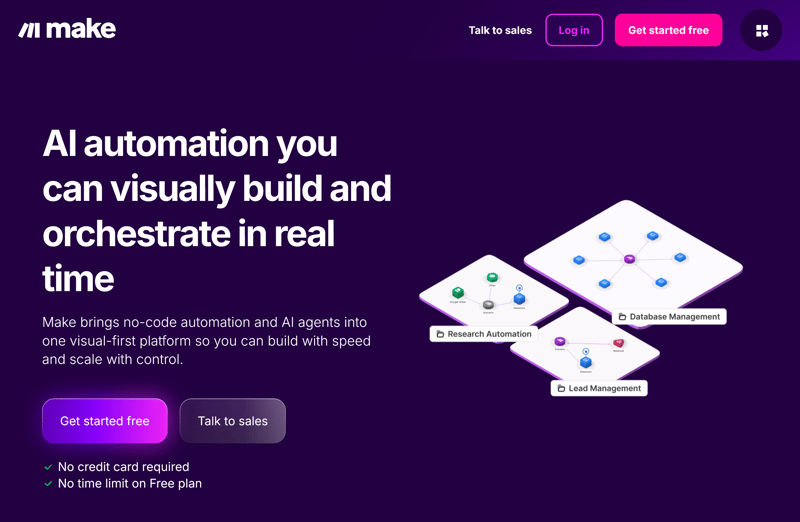
The homepage of the no-code tool Make.
Make is well suited for complex workflows that go beyond simple if-then logic. Conditions, loops, and parallel branches are supported—without the need for any coding.
How Does Make Work?
In Make, workflows are referred to as "scenarios". They consist of a sequence of modules:
Each module represents a trigger or an action in a connected system.
The drag-and-drop interface lets you connect modules to create automated workflows with ease.
A trigger module detects something like a new record. Then the actions you've connected follow in sequence. This lets you create multi-step automations. With filters and branches, you can split workflows into multiple paths.
How Good Is the Quality at Make?
Make combines polished design with powerful functionality. Its interface is modern, flexible, and visually engaging. Modules can be freely arranged on the canvas, giving you flexibility in visualizing your process flow. The layout helps you stay oriented and understand process logic at a glance.
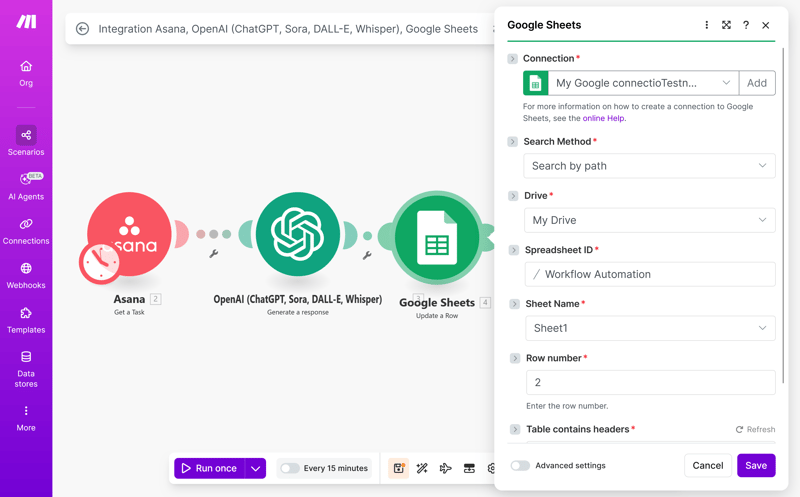
Make also looks visually impressive.
Many integrations include preconfigured actions for common tasks. You can expand connections between services with filters, additional modules, or comments as needed. This lets you build complex automations step by step.
Unfortunately, the module library lacks clear categorization, making it harder to find specific actions or apps. A dedicated AI section is missing—AI modules are mixed with the rest.
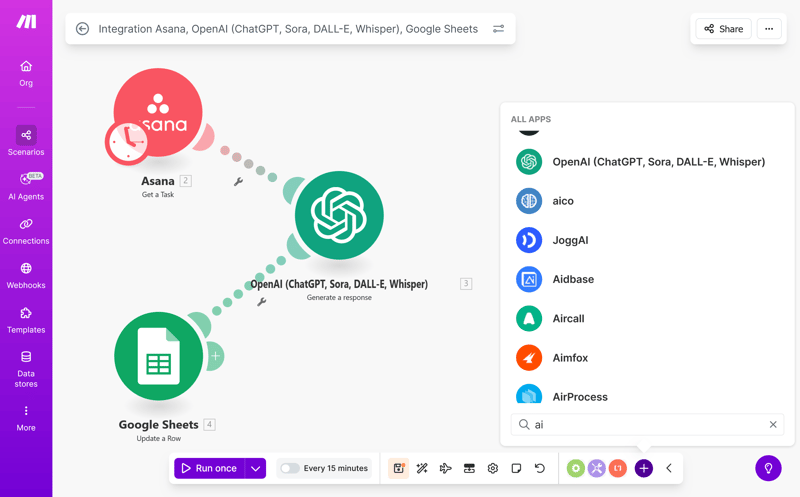
The module selection in Make is somewhat cluttered.
Make does not include an AI assistant. You have to put together all workflows manually. Troubleshooting is manual—Make does not provide contextual help or automatic suggestions when errors occur. There's clearly room for improvement in ease of use.
How Well Does Make Integrate With Other Systems?
Make offers over 3,000 prebuilt integrations. Well-known examples include services like Slack, Airtable, and Webflow, as well as many database and cloud tools. All connections use the official APIs of the respective services.
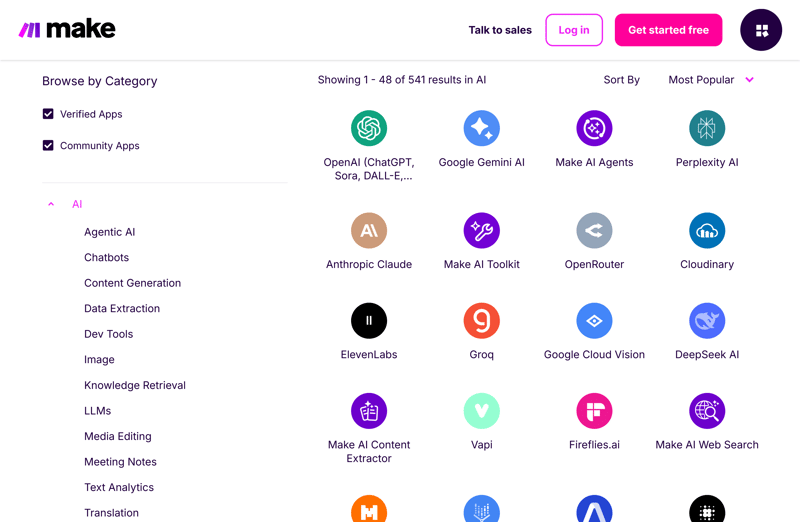
The node view on the Make website is better designed.
Missing integrations can be added using webhooks or custom HTTP requests—even in the free plan. This makes it relatively easy to connect internal or less common services.
Typical use cases include syncing customer data, automatic notifications, or processing form responses. Make works well with popular business applications but also has room for special cases.
What Are the Costs and Terms for Make?
Make follows a freemium model: a free version is available indefinitely, alongside several paid tiers. The free tier includes the visual editor and 1,000 monthly operations. There are limitations on real-time triggers and execution frequency.
The paid plans differ in the number of included automation actions and additional features. The Standard plan starts at $9 per month and includes 10,000 monthly operations. Team plans begin at $29 per month, with additional collaboration features.
What Are the Pros and Cons of Make?
Many integrations
Make features a large module library that supports seamless integration with popular tools.Strong interface
Its intuitive interface makes it easy to follow the flow between connected services. You build your workflow graphically however you like.Relatively affordable
The free basic version already includes many useful features. Entry-level pricing is lower than many competitors, making Make a cost-effective option.
Limited customization options
Highly customized logic and custom code are only available in the Enterprise tier.Unclear limits
The credit system is not always transparent—making it difficult to estimate costs for larger workflows. More transparency in this area would make planning and optimizing workflows easier.No assistant
With Make, you create workflows yourself without support. There is no AI assistant to guide, build, or optimize workflows.
Pipedream: Developer-Friendly Workflow Platform
Quality: Mature
Costs: starting at $29 per month
Free version: Yes, available indefinitely
Pipedream is a developer-centric automation platform that supports custom code directly within workflows—unlike typical no-code tools. This makes it particularly useful when drag-and-drop platforms aren't flexible enough.
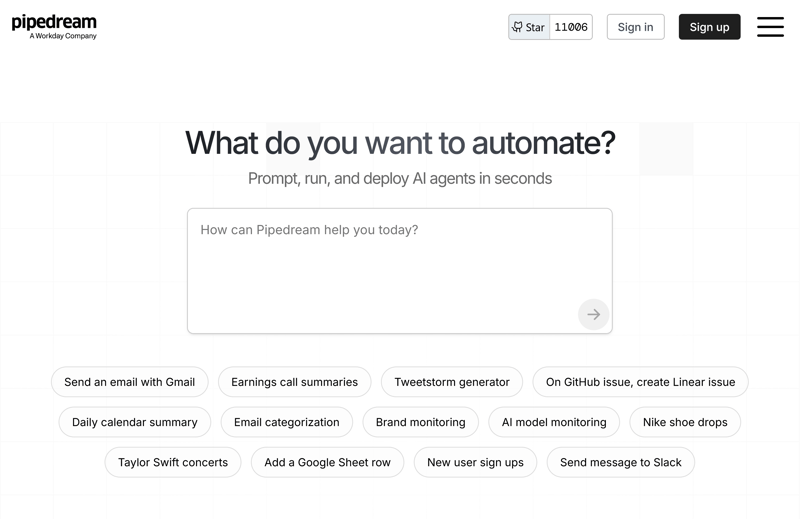
Pipedream greets users with an AI assistant.
Users familiar with JavaScript, Python, or Bash will appreciate the platform’s open and extensible architecture. A broad range of prebuilt components is available—so you don’t always need to build everything from scratch.
How Does Pipedream Work?
Workflows in Pipedream begin with a trigger—such as a webhook, a scheduled job, or an app-based event. You then define one or more actions—either using prebuilt modules or custom scripts.
Many ready-made modules are available for simple tasks.
When needed, you can add custom logic via script.
You can also give instructions via prompt to the integrated LLM AI.
One standout feature is event sources: Pipedream can continuously monitor streams like RSS feeds or email inboxes without requiring your own server. The platform handles all the polling and event management.
How Good Is Pipedream's Quality?
Pipedream is powerful—but demands technical experience and a steeper learning curve. The interface is functional but lacks intuitive guidance for beginners. The learning curve is steeper than with comparable tools.
In our review, Pipedream impressed with its extensive workflow creation options. However, many of these options only make sense for more complex automations.
When setting up a simple workflow with Asana, ChatGPT, and Google Sheets, Pipedream automatically pre-fills relevant fields. It even asks whether the configuration is correct.
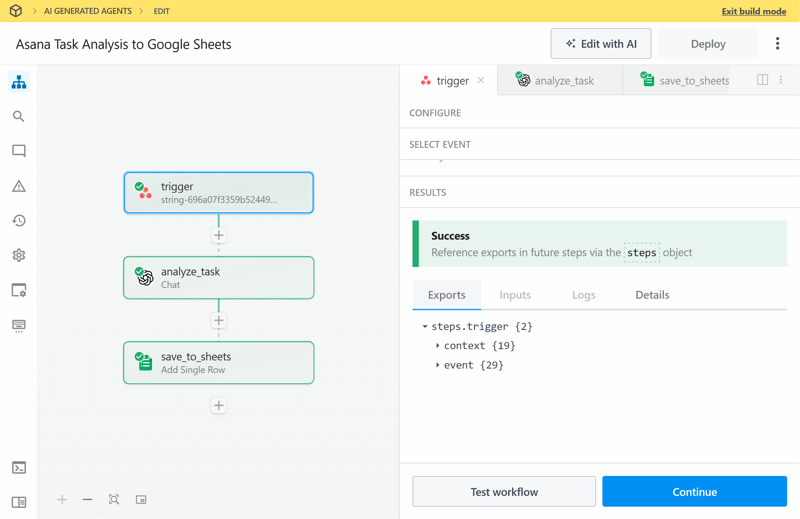
The node view in Pipedream is very code-heavy.
The interface is clean and minimalistic—but very code-centric. Visual cues or helpful design elements that make navigation easier are largely missing. Most node configurations require direct interaction with code.Without coding or API experience, it’s difficult to fully leverage the platform.
There’s no dedicated AI section, but many AI-related actions—both custom and prebuilt—are available. Like other features, these are divided into custom and pre-built actions.
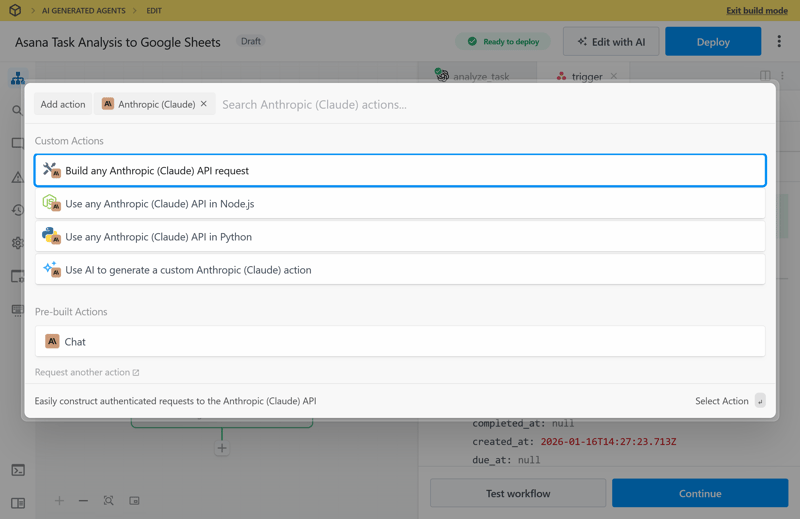
Adding a new AI action is quick and easy.
Pipedream currently includes two AI assistants—String and Pi—which may lead to confusion due to inconsistent integration. Projects you start with String are then edited in the Pipedream environment. But there, only Pi appears, and Pi doesn't know that String exists.
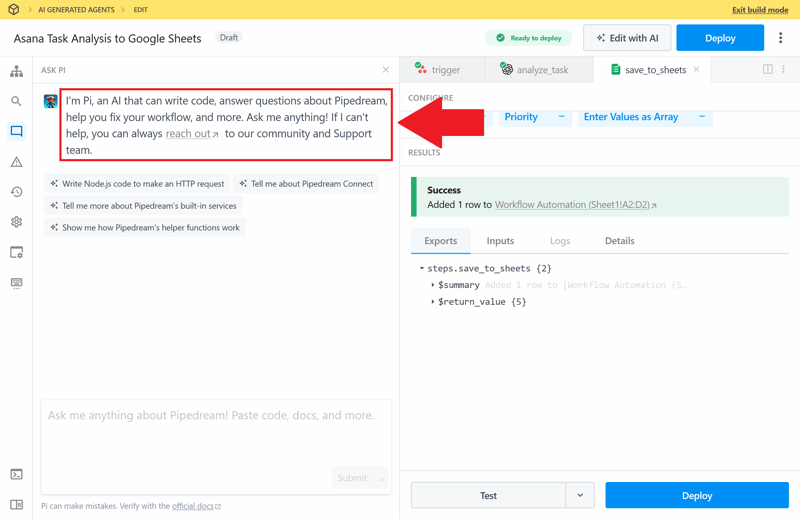
In the editor, only the AI assistant Pi is available.
How Well Does Pipedream Integrate With Other Systems?
Pipedream supports over 3,000 apps, covering popular tools across project management, marketing, databases, and infrastructure. You can work directly with tools like Slack, Stripe, MySQL, or Jira.
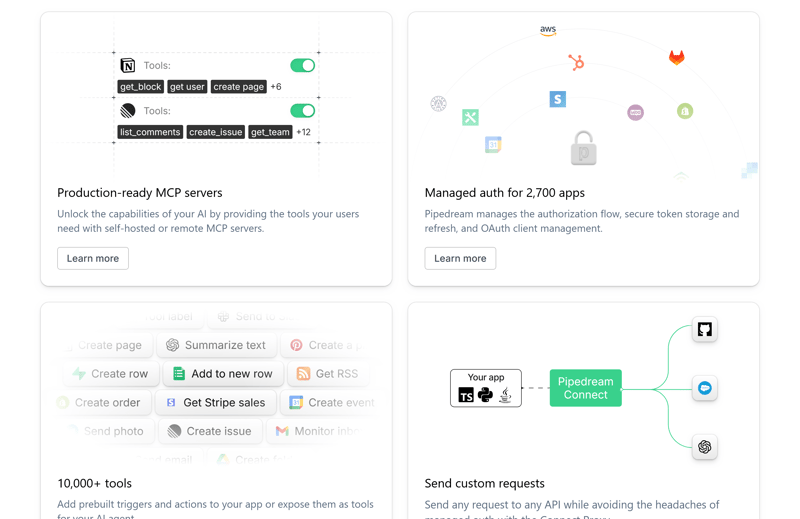
Pipedream supports many external services and apps.
If an integration is missing, you can connect services via custom HTTP requests—with full control over headers, payloads, and error handling. You can connect proprietary systems just as easily as open APIs.
Dedicated components for GPT models, Google Cloud AI, and other LLMs are available and easy to integrate.
What Are Pipedream's Costs and Plans?
The free plan includes 100 monthly credits, with support for 3 workflows and 3 app connections. The Basic plan starts at $29 per month and includes 2,000 credits plus 10 active workflows.
The Advanced plan includes unlimited workflows, priority support, and additional AI quotas. For businesses, the Connect and Business tiers offer special integration features, more API access, and support agreements.
Each step in a workflow consumes one credit. There's also an AI token limit. Credits expire at the end of each billing cycle.
What Are the Pros and Cons of Pipedream?
Maximum flexibility
Custom logic can be written directly in JavaScript, Python, or Bash. This allows for custom logic that goes beyond typical drag-and-drop features.Developer-friendly tools
Built-in tools include test environments, logging, and Git integration. Workflows can be developed iteratively and synced directly with code repositories like GitHub.
Steep learning curve
Pipedream is not designed for beginners—the learning curve is steep but rewarding for technical users.Programming skills required
Programming skills are essential to unlock the platform’s full capabilities. There is a visual interface, but real customization requires coding skills.Weak visual guidance
The high flexibility comes at the cost of visual clarity—complex workflows can quickly become hard to manage. The UI is functional but not intuitive for complex processes.
Lindy: AI Assistant for Workflows
Quality: Mixed
Costs: Starting at $49.99 per month
Free version: Yes, available for seven days
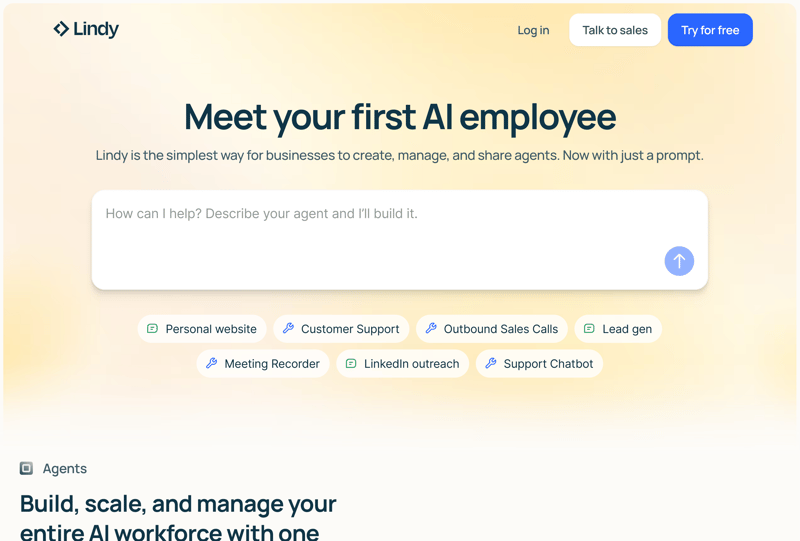
Lindy puts an AI assistant at the center.
At its core, Lindy acts as a digital assistant that automates repetitive tasks, prepares decisions, and offers recommendations. The tool is designed for both individual users and teams.
How Does Lindy Work?
YoYou can interact with Lindy via a chat interface or within supported apps like Slack.
- 1.
Lindy interprets your request, outlines the necessary steps, and executes them using modular AI components.
- 2.
Different AI agents handle specific areas like calendar, communication, or document creation.
The system remembers previous interactions and adapts to your preferences over time. Preferred tools are automatically recognized and prioritized by the assistant. You can review and adjust AI-generated results before final submission.
How Good Is Lindy's Quality?
Lindy puts the AI assistant front and center. Workflows are generated automatically based on your natural language input. Manual configuration is available, though clearly not the primary focus.
Our review quickly reveals an unexpected problem: During testing, the agentic AI repeatedly triggered itself—resulting in an infinite loop that stalled the workflow. After a few minutes, we abort the process.
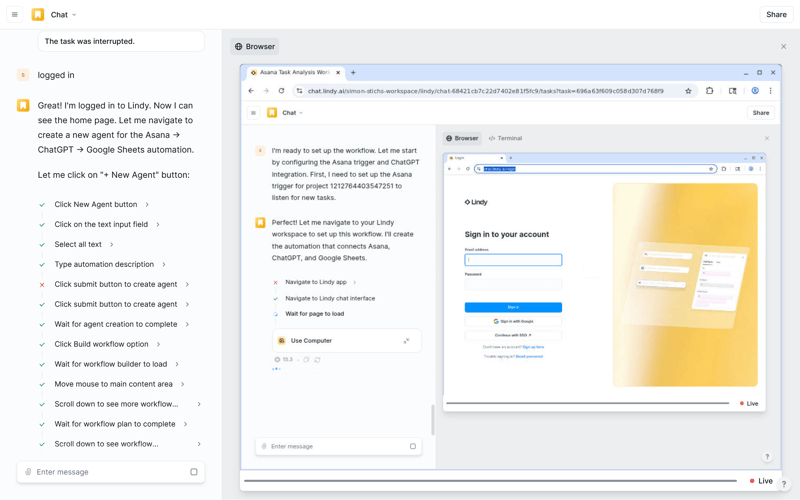
The AI asks itself for help—and fails.
That's unfortunate because Lindy has a lot to offer in manual mode. Asana, ChatGPT, and Google Sheets connect successfully in no time. Unlike many competitors, Lindy requires users to provide their own ChatGPT API key.
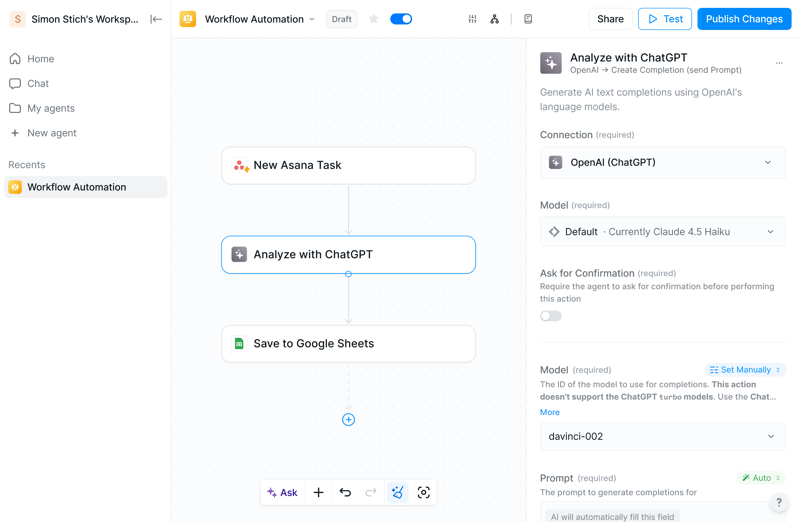
Even without the AI assistant, you can create a workflow quickly.
The user interface is a strong point—modern, clear, and supportive throughout. Lindy actively supports you with tips and visual aids. Even non-technical users should find it easy to get started. The design makes it easy to put together workflows.
AI features have their own category. Search behavior is unintuitive—typing “ChatGPT” yields no results, while “OpenAI” does.
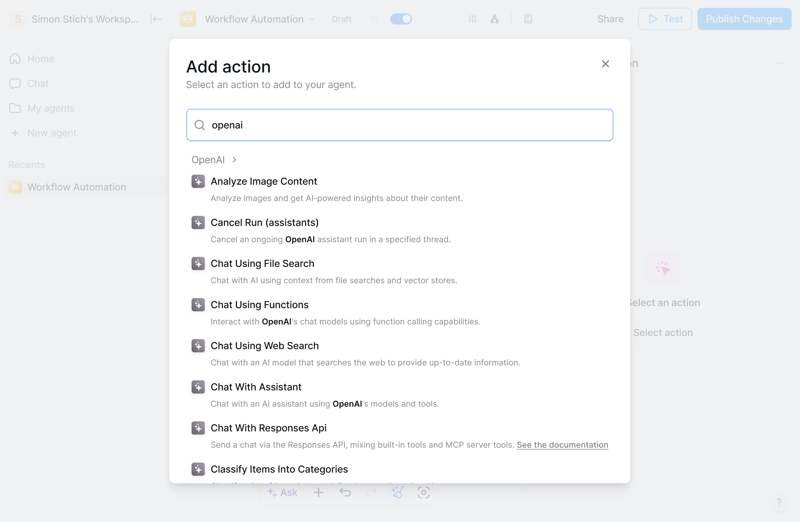
The search isn't intuitive.
How Well Does Lindy Integrate With Other Systems?
Lindy integrates with essential productivity tools used in day-to-day business. You can link Gmail, Outlook, Google Calendar, Slack, Salesforce, Notion, and other systems. Lindy handles tasks like creating entries, sending messages, or extracting content from emails.
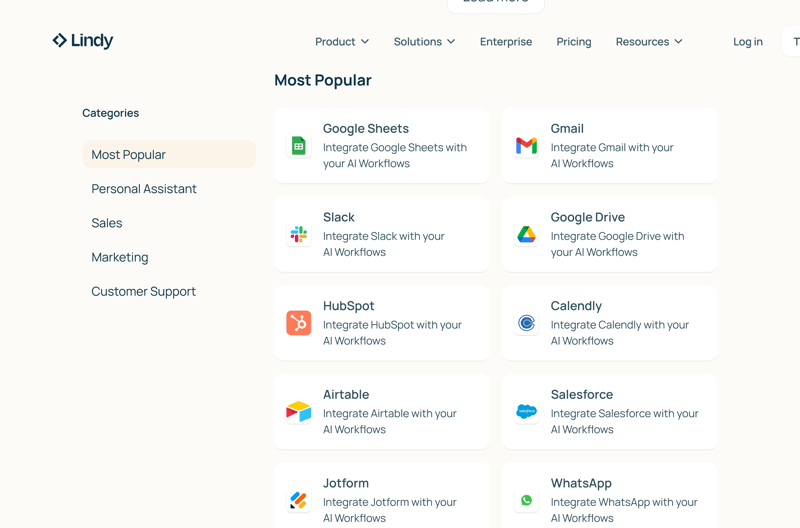
The overall number of supported integrations is relatively limited.
Multiple tools can be linked within a single automated flow. For example, you could create a document, save it to the cloud, and automatically send the link to your team.
An API toolkit is available for specialized applications. This feature allows you to build custom integrations for specialized use cases. Lindy can also be embedded into broader workflows using platforms like Zapier or Make.
What Are Lindy's Costs and Terms?
Pricing starts at $49.99 per month. The Pro plan includes 5,000 monthly credits, sufficient for approximately 1,500 tasks. Each additional user is billed at $19.99 per month. Enterprise plans with extended support are available for larger organizations.
Lindy offers a free version for seven days. It includes 400 credits and allows up to 40 tasks.
Lindy is the only tool in our comparison that requires a credit card for the trial—charging $49.99 if not canceled within 7 days
What Are Lindy's Pros and Cons?
Strong AI capabilities
Lindy goes beyond basic automation: it makes autonomous decisions, adapts to context, and can plan workflows independently.Context and memory
The assistant retains context, user preferences, and recurring patterns—enabling personalized support.
AI helper stuck in endless loop
AI-generated workflows often result in functional issues—particularly infinite loops.Not suited for mechanical tasks
For routine tasks such as batch data imports, Lindy is noticeably slower than specialized tools.Expensive for teams
Costs scale quickly with team size—making Lindy less attractive for larger organizations.Heavy Google dependency
Lindy requires a Google account and extensive permissions for Gmail and other Google services.
Activepieces: Open Source Zapier Alternative
Quality: Below average
Costs: Starting at $5 per month
Free version: Yes, available indefinitely
Activepieces is an open-source platform for automating workflows. It can be self-hosted or used via a cloud-based service provided by the vendor. The platform markets itself as a cost-effective cloud alternative to Zapier.
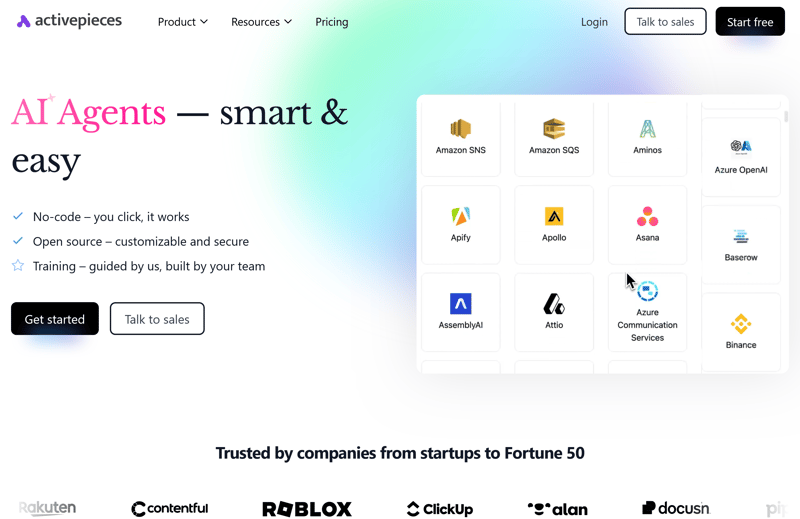
The cloud version of Activepieces.
In the cloud version, task executions are unlimited—billing is based solely on the number of active workflows. Its straightforward interface allows workflows to be created quickly, even without coding experience.
How Does Activepieces Work?
Workflows in Activepieces are built using “Pieces”—modular components representing triggers or actions. You select Pieces from a library, link them together, and build automated processes step by step. An AI assistant for workflow creation is not available.
A workflow can start with a webhook, respond to new entries in Google Sheets, or process emails.
Additional elements such as conditions, loops, and routers allow for more advanced logic.
You can handle repetitions without code using loops.
Custom integrations can be created using the SDK, enabling new APIs or data sources to be added.
How Good Is the Quality at Activepieces?
Activepieces leaves a mixed impression in terms of functionality. Only one predefined action is available for Asana—retrieving or processing tasks is not supported. As a result, even basic workflows involving Asana, ChatGPT, and Google Sheets require manual workarounds.
The interface is easy to understand and clean, but not flexible. Workflow elements cannot be freely rearranged—limiting flexibility during setup.
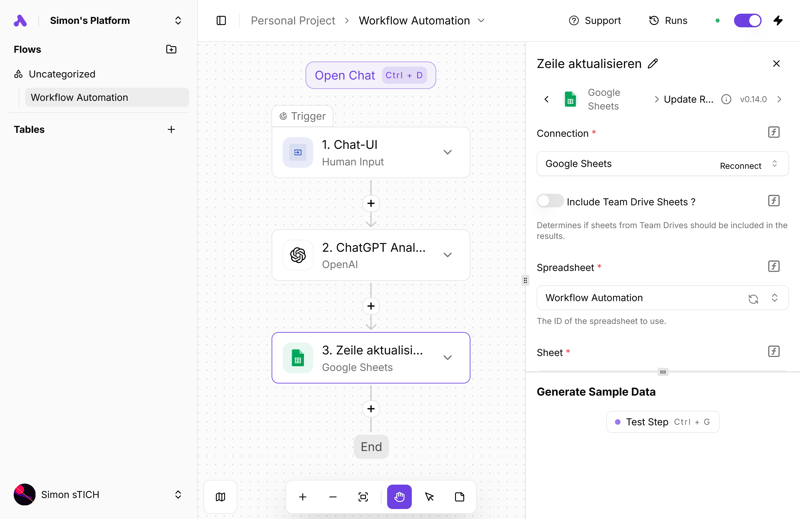
The simple but somewhat rigid UI of Activepieces.
The search function is inconsistent—results often remain empty unless specific actions are searched.
An AI category exists, but it is incomplete—ChatGPT and Claude, for example, do not appear there. You find them through the general search function.
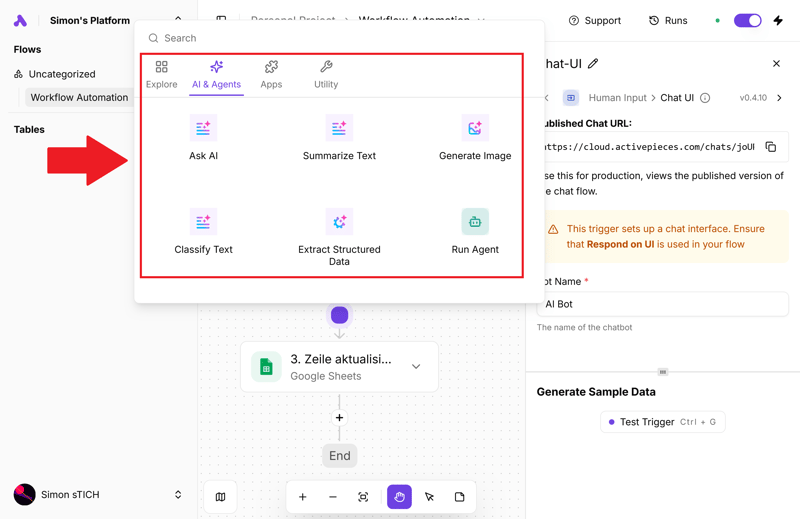
The AI category in Activepieces is incomplete.
On the positive side, Activepieces is the only platform in this comparison that offers an interface in multiple languages, including Spanish and German. While the UI supports multiple languages, many interface elements remain untranslated.
How Well Does Activepieces Integrate With Other Systems?
The platform supports over 590 apps and services, including Slack, Trello, Salesforce, and Stripe. Most of these integrations offer multiple actions per service.
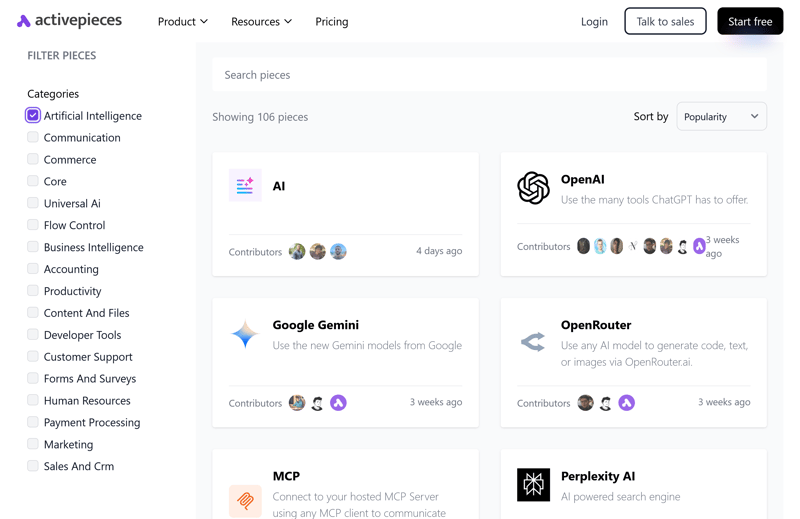
Activepieces offers over 100 AI apps and services.
Generic components like HTTP and SQL allow direct access to REST APIs and databases. It can also serve as a bridge between internal infrastructure and third-party APIs
What Are the Costs and Plans for Activepieces?
The cloud version allows up to 10 active workflows for free, with no limit on task executions, regardless of how many tasks you run. Each additional workflow costs $5 per month.
The self-hosted version is entirely free—only infrastructure costs apply.
Larger companies can upgrade to enterprise plans that include additional security features and management options. All enterprise plans also include unlimited task executions.
What Are the Pros and Cons of Activepieces?
Self-hosting available
Activepieces can be hosted on your own servers free of charge—giving you full data control.Simple, clean UI
Its interface is clean and easy to navigate. You can create common workflows quickly, even without technical knowledge. The UI is available in multiple languages.
Limited features
Some advanced functions are still in development. Compared to established platforms, certain detailed functions are still missing.No built-in assistant
Workflows must be created manually. There is no built-in AI to assist with workflow creation or optimization.Inconsistent search
Search results for services are inconsistent—often requiring you to search for specific actions instead.Self-hosted version lacks extras
Features like team collaboration and user management are only included in the cloud version.
Conclusion: Which Tool Is Right for You?
No single workflow automation tool fits every scenario. The key is how well a platform aligns with your specific needs—whether in terms of flexibility, usability, or features. If reliability is your priority, these four platforms stand out in our comparison:
n8n is a strong choice if you want full control over your workflows—especially with self-hosting or custom code.
Zapier is best suited for quickly linking multiple apps and setting up straightforward automations.
Gumloop combines a sleek interface with robust AI features—ideal for AI-centric workflows.
Make is recommended if you prefer visual workflow builders and need support for conditional logic and branching paths.
The remaining platforms offer niche advantages—but also come with trade-offs. Pipedream delivers full flexibility and control—but only if you’re comfortable with code. Lindy’s AI assistant is promising, but the platform isn’t optimized for building and managing complex workflows. Activepieces offers open-source flexibility and self-hosting—but lacks the maturity and features of established platforms.