Best n8n Alternative: These Are the Top 5 Alternatives in 2026


n8n is a flexible workflow automation platform—but it doesn’t suit every use case. You might prefer simpler handling, broader app integrations, or built-in AI features. So if not n8n, what else?
This guide presents five strong alternatives to n8n—from well-established tools to promising newcomers—so you can find the automation solution that fits your needs.


What Are the Drawbacks of n8n?
n8n is a powerful workflow automation tool—but not without limitations. Before looking at alternatives, it’s helpful to examine the tool’s key weaknesses. Which one matters most to you will shape your ideal replacement.
Here are some of n8n's disadvantages:
Requires technical expertise
n8n is highly flexible, but tapping its full potential—especially through self-hosting or custom nodes—requires technical skills. Beginners will find it harder to get started than with other no-code tools.High maintenance for self-hosting
Self-hosting n8n means managing operations, updates, security, and backups on your own. That adds complexity and consumes resources.Limited app ecosystem
While n8n supports many integrations, it doesn’t match Zapier’s 8,000+ apps. If your workflows rely on niche tools, n8n’s ecosystem may fall short.Slower performance at scale
In complex or data-heavy workflows, n8n can slow down. High volumes of parallel API calls often lead to latency—posing risks for time-sensitive or critical processes.License not fully open-source
Despite popular belief, n8n isn’t released under a traditional open-source license. Its fair-code license restricts commercial use, which limits flexibility for some businesses.Weak error reporting
Users report that n8n doesn’t reliably alert them to workflow errors. Notifications may be delayed or missing, making live monitoring and troubleshooting more difficult.

The Best n8n Alternatives
No single tool replaces n8n across the board. The best alternative depends on your specific use case. Here are five tools—each with distinct advantages:
Zapier: No-Code With a Huge App Selection
Zapier is one of the most established no-code automation platforms. Launched in 2011, it has become a go-to solution for simple workflow automation. Zapier covers a wide range of use cases and is particularly beginner-friendly—its interface walks users through each step of the workflow setup.
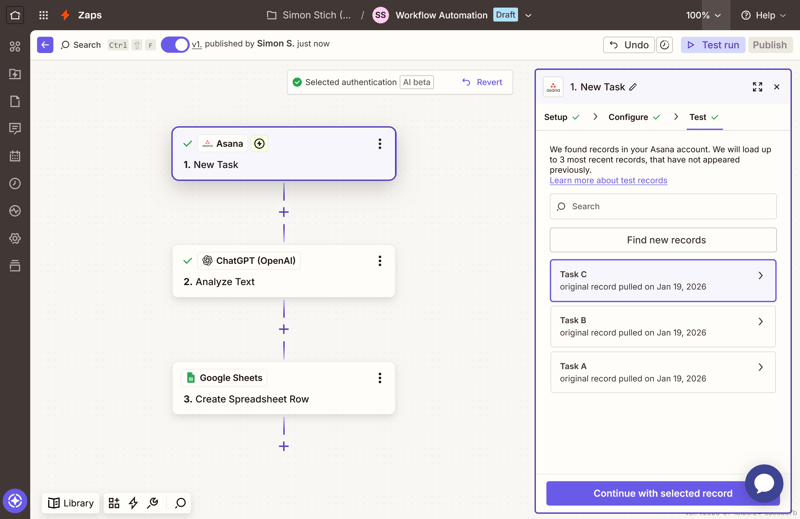
A simple workflow in Zapier.
Complex logic or custom scripting is only possible to a limited extent. For high-volume usage, the cost can add up quickly.
Zapier is a strong alternative to n8n if you:
are looking for the simplest, most beginner-friendly solution possible
value an enormous selection of app integrations
want to quickly build simple workflows without programming
prefer an established service with a large ecosystem
What Does Zapier Do Better Than n8n?
While both tools serve similar purposes, their strengths differ:
Vast app selection
Zapier supports over 8,000 apps—far more than n8n. Most tools are supported out of the box, with minimal setup required.More accessible for beginners
The interface is intuitive and supports users with helpful assistants. You can build workflows step by step—even without technical experience. The entire process is supported by assistants that catch errors early.Broad ecosystem and support
Due to its market presence, many apps offer native Zapier integrations. There's also a large community and many templates.AI-assisted automation
Built-in AI suggests triggers, actions, and even flags potential errors—something n8n doesn’t yet match.
Drawbacks: What Does Zapier Do Worse Than n8n?
Despite its strengths, Zapier shows weaknesses when flexibility is required:
Costly at scale
Each task execution is billable. With complex workflows, costs rise quickly. n8n, in contrast, offers free self-hosting and more predictable cloud pricing.Limited logic flexibility
Zapier struggles with recursive workflows, custom scripts, or advanced conditions. For advanced logic, Zapier reaches its limits.Cloud-only
Zapier is a SaaS-only platform—self-hosting is not possible. For local processing or full data control, tools like n8n or Activepieces are better suited.Premium integrations cost extra
Certain apps require a Pro or higher Zapier plan. In n8n, all integrations are accessible across all plans.Limited data control
Zapier handles all data on its own infrastructure—which can be a concern for privacy-sensitive organizations. This setup is problematic for companies with strict compliance or privacy rules.
Gumloop: AI Automation in Focus
Gumloop is a newer platform for building AI-driven workflows. Its visual drag-and-drop interface enables you to create complex workflows—entirely without coding.
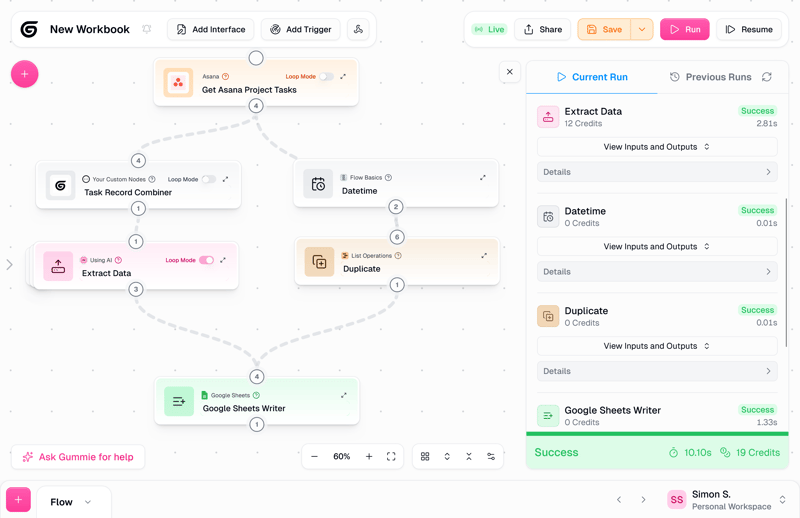
Gumloop is a modern workflow tool with an AI focus.
Gumloop is particularly interesting if your workflows rely heavily on AI components. One key feature: customizable “Gumloop Agents,” which can also be integrated into Slack.
Gumloop is a strong alternative to n8n if you:
want to integrate AI features directly into your workflows
want to create complex, AI-powered processes without programming
want to benefit from many pre-built templates
work collaboratively on automations with your team
are looking for a modern, AI-focused tool specifically for non-developers
What Does Gumloop Do Better Than n8n?
Gumloop excels when ease of use and AI support matter most:
Modern, intuitive interface
The UI is clean and easy to navigate—modules are arranged via drag-and-drop. This approach encourages experimentation and speeds up workflow creation.Extensive template library
More than 150 templates for marketing, support, and data handling speed up setup. Most are production-ready and help launch typical business workflows in minutes.Integrated AI assistant
While building workflows, the AI suggests actions and flags errors—both during setup and live execution. This assistance extends to monitoring and debugging workflows in real time.Built-in collaboration tools
Shared workspaces, user roles, and audit logs enable structured team workflows. This allows larger teams to collaborate in a structured way.
Drawbacks: What Does Gumloop Do Worse Than n8n?
Despite its polished interface, Gumloop has some clear limitations:
No self-hosting
Gumloop runs exclusively in the cloud—local installation isn’t supported. This dependency may be a dealbreaker for regulated industries or data-sensitive environments.UI overload in complex workflows
Large workflows with many nodes can become difficult to manage visually. This impacts maintainability in long-term projects.Limited integrations
The selection of supported apps is narrower than with n8n or Zapier. While major services are covered, niche apps often require custom HTTP modules.AI usage costs
Each AI action consumes credits—even basic tasks. With frequent use, this adds up.Small, young ecosystem
Gumloop’s user base is still growing. Documentation, tutorials, and community support are still limited—especially for edge cases.
Make: Control Workflows Visually and Flexibly
Make is a visual automation platform designed for complex workflows. Its flexible canvas lets you arrange and connect modules with complete freedom.
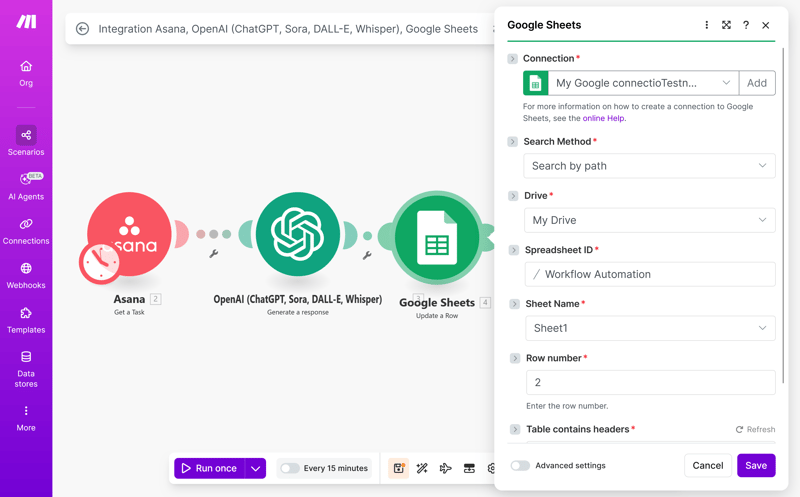
Make's flexible UI.
It combines no-code features with a large catalog of integrations. You can build loops, conditions, and parallel branches—entirely without code.
Make is a strong alternative to n8n if you:
want to create complex processes with branches and loops without code
need a tool with thousands of ready-made integrations
value an affordable entry point with a freemium model
want to build both simple and extensive automations on one platform
What Does Make Do Better Than n8n?
Make offers more visual flexibility—and advantages in integration depth and pricing:
More than 3,000 integrations
Make supports a wide range of tools—covering nearly every common use case.Flexible workflows for any scale
From basic automations to complex logic with loops and branches—Make handles it. The platform scales effortlessly as your requirements increase.Generous free plan
The free tier includes 1,000 operations per month—great for smaller projects. Paid plans start at $9, undercutting n8n’s $20 entry price. For small teams and early-stage projects, Make is the more cost-effective option.Multiple ready-made modules per app
Most integrations include multiple specific modules—speeding up setup. This allows you to automate common tasks without building from scratch
Drawbacks: Where Does Make Fall Short Compared to n8n?
Despite its strengths, Make lacks flexibility in certain areas:
Restricted customization
Advanced scripting and custom logic are only available in the Enterprise plan. Lower-tier plans exclude code modules—reducing flexibility for power users. If full control is essential, n8n is the stronger option.Unstructured module directory
The module library is large—but lacks filters, categories, or search refinement. Locating the right module, especially for niche apps, takes more time than necessary.Missing AI support
Make lacks an AI assistant—workflow building is fully manual. There are no smart suggestions, error detection, or assisted setup features. You have to plan and build every workflow manually.Cloud-only deployment
Make is available only as a hosted service—self-hosting isn’t possible. If you need full data control or run sensitive workloads, Make isn’t a suitable option.
Pipedream: Built for Developers
Pipedream is an automation platform tailored to developers. It lets you integrate JavaScript, Python, or Bash code directly into your workflows. Prebuilt modules and workflow templates are also available to speed up setup.
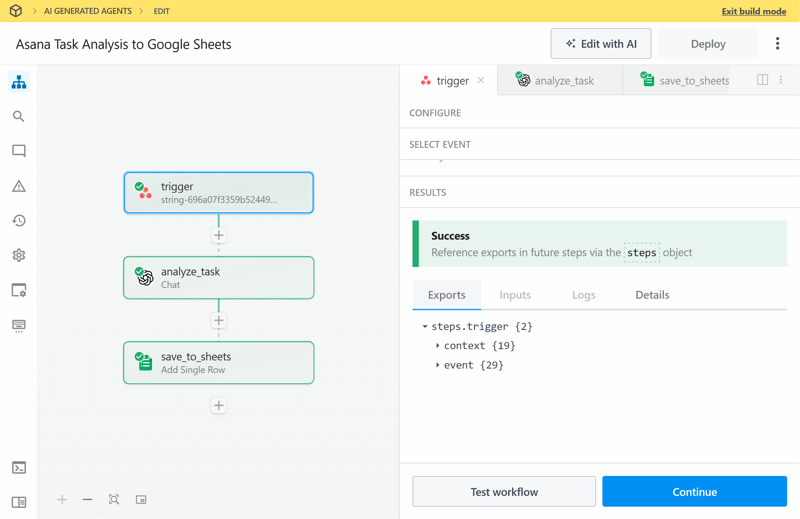
Pipedream is functional but not particularly stylish.
The tool targets developers who want to combine custom logic with ready-made integrations. It’s a strong option if you’ve outgrown the capabilities of n8n.
Pipedream is a strong alternative to n8n if you:
have programming skills and want to use them in your automations
need maximum flexibility and control over your workflows
want to connect niche or internal systems using code
value developer tools like logs and version control
What Does Pipedream Do Better Than n8n?
Pipedream surpasses n8n in several developer-focused areas:
Full developer toolkit
Built-in logs, test environments, and versioning are available out of the box. Workflows can be structured like software projects—with Git support and live debugging included.Custom code integration
Pipedream lets you inject custom code at any point—ideal for complex or highly specific use cases. No external hosting or workarounds are required. That gives developers full flexibility within a single platform.3,000+ integrations
Despite its developer focus, Pipedream includes a broad library of standard connectors. You can automate common tasks quickly—while customizing any step as needed.Powerful event sources
Pipedream continuously monitors sources such as RSS feeds, inboxes, or custom endpoints—without the need for cron jobs. This eliminates the need for manual scheduling or external polling services.Integrated AI assistants
String and PI, Pipedream’s AI helpers, assist with workflow design and optimization. Here, AI acts not just as a module—but as a hands-on assistant throughout your process.
Drawbacks: Where Does Pipedream Fall Short Compared to n8n?
Despite its strengths, Pipedream has clear downsides—especially for beginners:
Too complex for basic use
If your goal is to connect a few tools quickly, Pipedream may be more complex than necessary. Its features can overwhelm users looking for simple automations.Steep learning curve
Pipedream is powerful—but requires a solid understanding of APIs and scripting. Without prior coding experience, onboarding takes longer than with n8n.Code-first approach
Most advanced features require solid programming skills—especially in JavaScript or Python. Hands-on coding experience is a mustBasic interface
Pipedream’s UI focuses on function over form. It lacks visual polish. Minimal design elements and limited visual cues make complex workflows harder to follow.Cloud-only
Pipedream offers no self-hosted version—everything runs in the vendor’s cloud. n8n provides more control through its self-hosting capabilities.
Activepieces: A Simple Open-Source Alternative
Activepieces is a workflow automation platform with full open-source licensing. It runs either self-hosted or as a managed cloud service—with low entry costs.
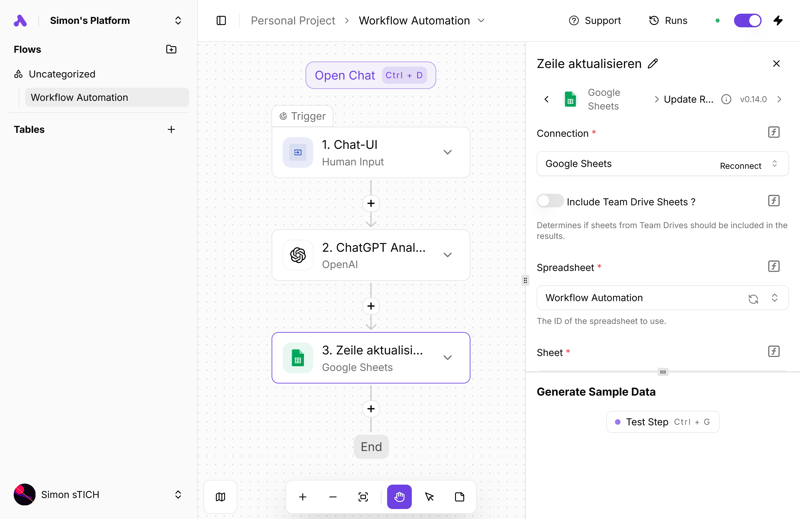
Activepieces is available in multiple languages.
The platform focuses on ease of use and aims to lower technical barriers. Unlike n8n, Activepieces uses a traditional open-source license—without usage restrictions.
Activepieces is a strong alternative to n8n if you:
prefer an open-source license with a self-hosting option
want to run unlimited tasks without per-task billing
want to configure your automations in your preferred language
What Does Activepieces Do Better Than n8n?
Activepieces offers simpler onboarding and more transparent pricing—plus a few distinct advantages:
Streamlined user interface
The design is minimal and avoids complex node canvases. Instead, a step-by-step layout guides users—ideal for beginners and non-developers.Multilingual support
Activepieces is available in multiple languages, including Spanish and German—helpful for teams working in their native language.Unlimited executions
Cloud usage isn’t billed per action—your workflows can run without artificial limits. There’s no per-task billing, even for large or frequently triggered automations. This results in more predictable costs—particularly compared to n8n’s per-step model.Simple pricing
Pricing is straightforward: each additional workflow costs a flat $5 per month. Scope, volume, or runtime don’t affect pricing—each extra workflow adds a fixed cost
Downsides: What Makes Activepieces Worse Than n8n?
Its simplicity has trade-offs—Activepieces still lacks the power and flexibility of n8n:
Feature limitations
Complex logic structures, advanced node types, and granular control options are either missing or only partially implemented. As a result, more demanding workflows may be difficult to implement.Limited integrations
Activepieces supports about 600 apps—fewer than n8n and far fewer than Zapier or Make. Niche tools often require manual API calls or custom modules.No AI support
There’s no AI assistant for workflow creation or error handling. Every step must be configured manually—no automation guidance is available. That slows down repetitive setup and increases time-to-value.Search performance issues
The in-app search for actions and integrations is inconsistent and sometimes fails. Even existing integrations may not appear reliably in search results.
Conclusion: n8n Isn't Your Only Option
n8n is a powerful automation platform—but not the best fit for every use case. Which alternative suits you best depends on your specific priorities:
Choose Zapier if you want to get started quickly and need access to thousands of integrations.
Use Gumloop if AI-powered automation and a user-friendly interface are key to your workflow.
Pick Make for a visual, flexible builder and a cost-effective freemium plan.
Go with Pipedream if you’re a developer looking to integrate custom code and developer tools.
Try Activepieces if you prefer open-source licensing, self-hosting, and transparent pricing.
Before making a decision, test each platform using your most critical workflows. All providers offer free plans or trials to evaluate their features. This gives you a risk-free way to discover which platform fits your needs best.