Best WordPress Page Builder: Our TOP 5 in 2026

Build a website without writing a single line of code? It's possible with WordPress page builders. These tools integrate directly into the system and add visual design features for layout and structure. They give you more creative freedom than traditional themes or the standard Gutenberg editor, especially when you need custom designs or more complex page layouts.
But page builders vary widely. Some focus on fast loading times, while others offer huge template libraries or smart marketing features. The best page builder for you depends on how you work and what your website needs to do.
In this comparison, we put five of the most popular WordPress page builders head-to-head. These are especially popular among freelancers, small businesses, and agencies. We'll look at how easy they are to learn, how flexible they are for design, and how much each one costs.
Page builders make it easier to create WordPress websites. You can design content with drag-and-drop, no coding skills required. Changes show up instantly and are easy to adjust.
Most page builders share similar basic features, but there are major differences in price, performance, learning curve, and design flexibility.
Elementor is geared toward beginners. The interface is intuitive, and the template library is extensive. This makes it easy to create attractive layouts quickly.
Oxygen focuses on performance and clean code. This builder is aimed at experienced users. Technical knowledge is a must.
Bricks and Beaver Builder sit between convenience and control. Both offer stable systems with clean code. They're well-suited for professional, long-term projects.


What Is a Page Builder?
A page builder is an add-on tool for WordPress that lets you design pages visually. Instead of preparing content in the backend, you see exactly how your page looks right away. If you want to change something, just drag and drop.
This is similar to website builders like Wix or Jimdo. But the advantage of WordPress page builders is that you stay within the open WordPress system. Your content, design, and data belong to you. You can add plugins freely, switch providers, and expand your website whenever you want. Website builders are quicker to set up, but they're nowhere near as flexible.
WordPress already has a built-in page builder: the Gutenberg editor. This standard block editor offers basic features but limited layout freedom. Page builders are different. They give you more control over columns, spacing, colors, and various design elements.
How Do Page Builders Differ?
Not every page builder fits every project. Here are some of the key differences and criteria we used to select our top 5:
Learning curve
Some tools can be understood in minutes, while others take longer to learn.Performance
The leaner the code, the faster the website.Price
Options include free versions, one-time payments, and subscription models.Compatibility
Does the builder work smoothly with your theme, your plugins, and WooCommerce?Design freedom
Options range from simple templates to complete layout control.Support and community
Larger user communities often mean more help and more extensions.
Our Top 5 WordPress Page Builders
We took a close look at five of the most popular page builders for WordPress. We focus on their strengths, weaknesses, and use cases, from fast websites to complex projects with high demands for design and performance.
Elementor: The Beginner-Friendly All-Rounder
With more than five million active installations, Elementor is one of the most widely used page builders. The interface is clean, and changes appear instantly in the live editor. If you want to add a button, image, or form, just drag the element to where you want it and see exactly how it will look.
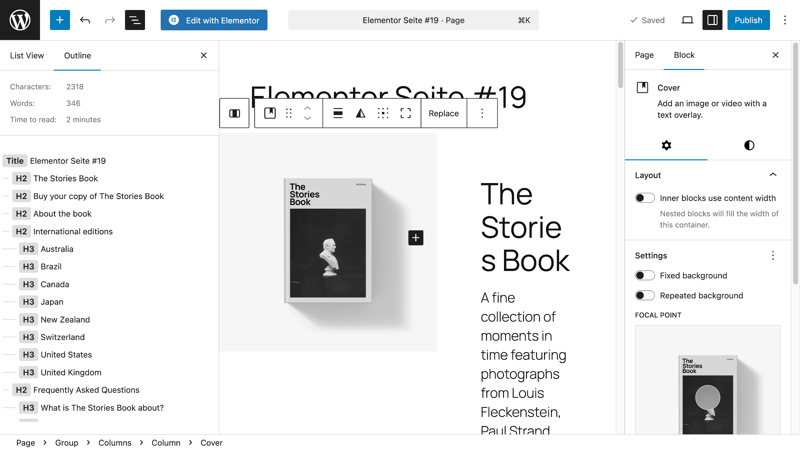
Elementor: editing view with the active widget menu on the left side.
How Extensive Are Elementor's Features?
Elementor comes with a wide range of features out of the box:
Widgets
Elementor offers standard elements like headings, text blocks, images, videos, buttons, and forms.Layout control
Elementor provides flexible columns, spacing, and responsive settings for desktop, tablet, and smartphone.More than 300 diverse templates
The template libraries include over 300 professionally designed templates.Theme builder
The built-in theme builder lets you fully customize headers, footers, blog layouts, and shop pages.Popup builder
The popup builder lets you create popups. It's great for newsletter signups, promotions, or notifications.WooCommerce integration
Elementor offers tight WooCommerce integration. You can customize product pages, category pages, and the checkout individually.
How Does Elementor Perform?
Elementor is designed to run smoothly, even on larger websites. However, performance can suffer if you use too many add-ons and effects. With quality hosting and active caching, Elementor delivers excellent load times.
Who Is Elementor Best Suited For?
Elementor is ideal for beginners, freelancers, bloggers, and small to medium-sized businesses who want to create a professional website without coding skills. It's perfect for anyone who values a flexible, visual editing system.
Bloggers can create complete article layouts with custom headings, tables of contents, and social sharing buttons.
Small businesses can build a complete online presence in just a few hours, including image galleries, contact forms, and Google Maps integration.
Agencies can use the Theme Builder to create reusable layouts and quickly adapt them for different client projects.
How Does Elementor Compare to Other Page Builders?
While the Gutenberg editor is fairly limited in terms of layouts, Elementor lets you control every detail with pixel precision. You can adjust everything from the spacing between two buttons to the exact image size.
Elementor also has a clear edge in design options, and its large community constantly provides new templates and tips. Divi, on the other hand, stands out with its unique built-in design effects.
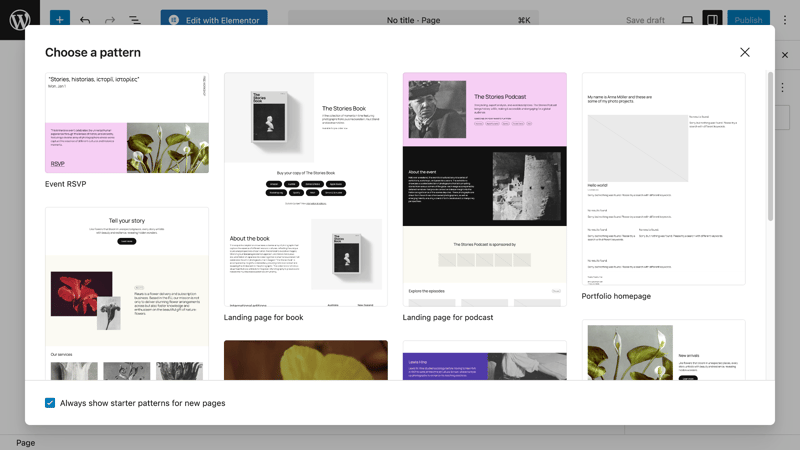
Plenty of templates make working in Elementor easier
How Much Does Elementor Cost?
Elementor offers a free version that's already enough for many smaller projects. The Pro version adds extra widgets, templates, Theme Builder features, and support. Here's what the Pro licenses cost:
Essential (1 website): about $65 per year
Advanced Solo (1 website): about $91 per year
Advanced (3 websites): about $107 per year
Expert (25 websites): about $221 per year
Agency (1,000 websites): about $432 per year
Pros and Cons of Elementor
Easy to use, even for beginners
The visual editor is intuitive and lets you work quickly without any technical background.Large template library with hundreds of layouts
Many ready-made templates make it easy to get started and speed up the creation of common pages.Wide range of integrations
Elementor works well with WooCommerce and popular marketing tools.Large community
Thanks to its popularity, you'll find plenty of extensions, tutorials, and support resources.
Performance can suffer with too many add-ons
If you use lots of widgets, extensions, or complex effects, expect longer load times, especially without proper optimization.Some key features are only available in the Pro version
Important features like the Theme Builder, dynamic content, and advanced widgets require the paid version.HTML structure is less streamlined than code-based builders
The auto-generated code isn't always ideal for developers or projects with strict performance and SEO requirements.
Divi: Versatile All-Rounder With a Lifetime License
Divi by Elegant Themes is one of the most popular premium page builders for WordPress. What makes it special? Divi isn't just a page builder. It's also a full-fledged theme, and both are designed to work together. This ensures high compatibility and reduces the need for additional plugins.
Divi combines a visual drag-and-drop editor, hundreds of professional layout templates, and built-in design tools. It's ideal for users who want a unique look without having to code every element themselves.
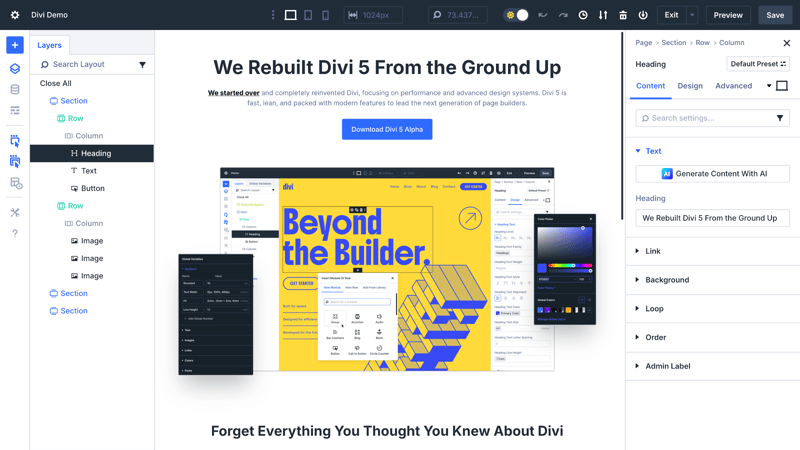
Divi in the live editor with layer structure and module settings
How Many Features Does Divi Offer?
Divi is a comprehensive WordPress theme and page builder that also works well for teams.
Visual frontend editor
Changes appear in real time as you edit content directly on the page.More than 2,000 layout packs
Divi offers more than 2,000 ready-made layout packs. These pre-built pages cover a wide range of industries and use cases.Global elements and global styles
Global elements and styles help you maintain a consistent look across your site. You can manage changes from one central location.Role editor
You can control exactly which users are allowed to edit specific elements.Responsive design tools
Divi includes dedicated responsive design tools. You can make separate adjustments for desktop, tablet, and smartphone.A/B testing
Divi has built-in A/B testing features. You can compare different versions of elements like buttons or headlines directly.WooCommerce integration
Divi offers full WooCommerce integration. You can design product lists, shopping carts, and checkout pages using ready-made modules.
How Does Divi Perform?
Divi has a slightly larger footprint than minimalist builders, which can become noticeable with very complex layouts. However, Elegant Themes has made significant performance improvements in recent years, including lazy loading and better CSS management. With good hosting, Divi can handle larger projects without issues.
What Use Cases Is Divi Best Suited For?
Divi is especially well-suited for creatives, agencies, and businesses that manage multiple projects and want a long-term all-in-one solution with an integrated theme.
Marketing agencies can quickly create landing pages for different clients, customize content with drag-and-drop, and run A/B tests directly in Divi.
Coaches and trainers can use pre-built layout packs to launch ready-to-go websites with course overviews, blogs, and contact forms.
Ecommerce store owners can combine Divi with WooCommerce to create visually consistent, mobile-optimized online stores.
How Does Divi Compare to Other Page Builders?
Compared to Elementor, Divi includes more built-in design features like animations, effects, and A/B testing. However, beginners often find the interface more complex. Unlike Oxygen, Divi focuses on visual editing and doesn't require any technical knowledge.
How Much Does Divi Cost?
Unlike many other page builders, Divi isn't priced as a per-website subscription. Instead, there are four pricing options:
Divi (annual license): about $89 per year for unlimited websites
Divi Pro (annual license): about $277 per year, includes everything in Divi plus AI tools, cloud storage, and VIP support
Divi Lifetime (one-time payment): about $249 for unlimited websites
Divi Lifetime (one-time payment) + Pro Services (annual license): about $297 one-time + about $212 per year for unlimited websites
Pros and Cons of Divi
Huge layout library
Divi comes with over 2,000 ready-made layouts. This makes it easy to get started, especially for standard business and marketing sites.Lifetime license available
You can buy Divi with a one-time payment. No ongoing license fees make it easy to budget for the long term.Built-in marketing features
A/B testing and marketing tools are included. You often won't need additional third-party tools.Theme and builder in one package
Divi works as both a theme and a page builder. Design and structure work together seamlessly.
More complex interface
The wide range of features makes the interface less intuitive than Elementor's.Performance depends on usage
Using many effects and modules can noticeably slow down load times. Keeping things lean requires discipline.Limited depth for developers
Compared to code-focused builders like Oxygen, fine-tuning design details is more restricted.
Oxygen: Flexible Page Builder for Developers
Oxygen is more than a typical page builder. It's a complete visual website editor that fully replaces your WordPress theme. Instead of relying on pre-made layout structures, you work at the code level but with a visual interface.
This makes Oxygen especially appealing to developers, designers, and tech-savvy users who want strong performance and full control over their HTML and CSS output.
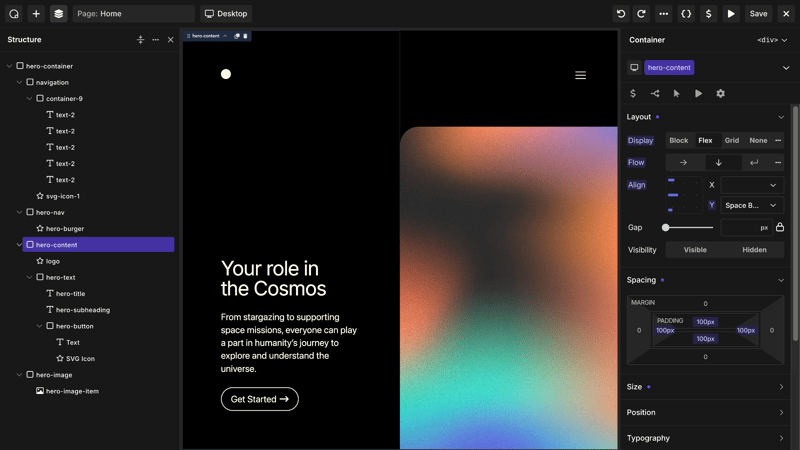
Typical Oxygen: maximum control over structure and design
How Many Features Does Oxygen Offer?
Oxygen is clearly built for tech-savvy users. It focuses on control, performance, and clean code rather than pre-made designs.
Theme builder
Oxygen includes a built-in theme builder. You get full control over headers, footers, and page layouts without needing a separate theme.Clean code
Oxygen prioritizes clean code. It keeps scripts and CSS to a minimum, which helps pages load faster.Visual CSS editor
The visual CSS editor lets you adjust styles with a simple click. You can also make changes directly in the code if you prefer.Dynamic data integration
Oxygen can pull content from custom fields. It supports ACF, Meta Box, Toolset, and more.Responsive design controls
Oxygen offers precise responsive design controls. You can fine-tune layouts for different screen sizes with full flexibility.Flexbox and grid support
Modern layout techniques like Flexbox and CSS Grid are built right into the builder. This makes it easy to create complex layouts cleanly.WooCommerce integration
Oxygen offers deep WooCommerce integration. You can create custom templates for product and category pages.
How Does Oxygen Perform?
Oxygen is one of the fastest page builders on the market. It doesn't load unnecessary code, and it skips standard WordPress elements like themes entirely. This results in much leaner HTML, CSS, and JavaScript files. With good hosting, you can achieve green Google PageSpeed scores even on complex projects.

Performance tip: Use Oxygen's global styles to manage design settings for all page types in one place. This keeps your code lean and lets you make changes in seconds.
What Use Cases Is Oxygen Best Suited For?
Oxygen is ideal for experienced web designers, developers, and agencies who want to build custom WordPress projects without any limitations. It's perfect if you care about fast load times and clean code.
Web agencies can use Oxygen to build highly customized business websites with tailored templates that are easy to expand later.
Tech startups can create data-driven platforms with dynamic content, completely free from theme restrictions.
Performance-focused bloggers can build fast, minimalist layouts that score top marks on Core Web Vitals.
How Does Oxygen Compare to Other Page Builders?
Unlike Elementor or Divi, Oxygen isn't designed for complete beginners. The learning curve is steeper, but the platform offers much more flexibility. If you prefer a visual interface with built-in themes, you might be better off with Bricks or Divi. Oxygen is the tool for purists and performance enthusiasts who want control over every detail.
How Much Does Oxygen Cost?
Oxygen is available as a one-time purchase only. There are no recurring fees. The current Lifetime bundle costs $199. Here's what's included:
Oxygen Classic and the new Oxygen version
Lifetime updates and support
Use on unlimited websites, including client projects
Premium add-ons: Breakdance Elements, Breakdance WooCommerce, and Breakdance Forms ($144)
This makes Oxygen more affordable in the long run than almost any subscription-based builder. It's especially attractive for agencies and developers who manage many websites. There's no free version available to try.
Pros and Cons of Oxygen
Full control over code and layout
Oxygen gives you direct access to structure and styling. You can fine-tune layouts with precision.Excellent performance
The lean code ensures fast load times. This is a big advantage for SEO and Core Web Vitals.One-time payment
Oxygen requires a single license fee. There are no ongoing costs.Modern web technologies
Flexbox and CSS Grid are fully integrated. You can use current web standards without workarounds.
Steep learning curve
Oxygen is geared toward experienced users. Beginners without technical knowledge will find it challenging to get started.No traditional theme
Oxygen completely replaces the theme. You'll need to build all layouts and structures from scratch.Few ready-to-use templates
Compared to Elementor or Divi, there are far fewer pre-made designs. Projects require more hands-on work.
Bricks: A Modern Page Builder With Top Performance
Bricks is a relatively new but rapidly growing WordPress page builder that installs directly as a theme. It combines a modern visual editor with strong performance and clean, modular code.
You don't have to choose between design freedom and loading speed. Bricks delivers both. It's built for web designers, agencies, and ambitious website owners who want a stable, long-term foundation.
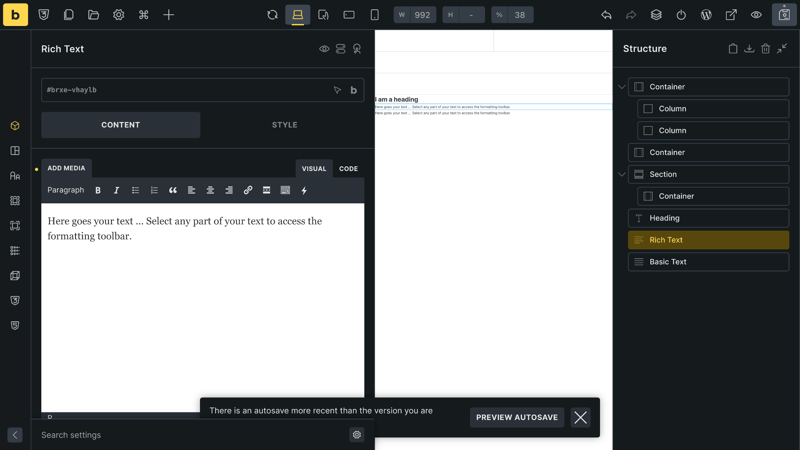
Bricks focuses on containers, clear structure, and performance
How Many Features Does Bricks Offer?
Bricks positions itself as a modern WordPress builder focused on performance, clean code, and maximum design freedom.
Built-in theme builder
Bricks includes a built-in theme builder. You can create complete website structures like headers, footers, single templates, and archives without external themes.Dynamic content
Bricks supports dynamic content from custom fields. This includes ACF, Meta Box, Toolset, and WordPress core data.Clean HTML and CSS output
Bricks generates relatively lean HTML and CSS code. This means less code bloat compared to many competitors.Modern layout techniques
Bricks offers direct integration of modern layout techniques. You can use Flexbox and CSS Grid directly in the editor.Responsive design controls
Bricks allows independent control for different devices. You can easily create separate layouts for desktop, tablet, and mobile.WooCommerce optimization
Bricks offers extensive features for WooCommerce optimization. You can fully customize your own templates for product and category pages.Template library
Bricks provides a template library. Reusable elements and templates ensure consistent designs.Developer-friendly
Bricks is also built for developers. You can integrate custom code in PHP, CSS, and JavaScript directly in the builder.
How Does Bricks Perform?
Bricks is all about speed. Minimal JavaScript usage, asynchronous asset loading, and no unnecessary libraries ensure pages render quickly and score well on Core Web Vitals.
Since Bricks serves as both theme and builder, you avoid the extra code layer that often causes performance issues when combining a separate theme with a page builder.
What Use Cases Is Bricks Best Suited For?
Bricks is especially appealing to web designers, agencies, and store owners who want to combine performance, design freedom, and clean code. It's ideal for those who prefer a long-term, update-safe solution.
Ecommerce agencies use Bricks to build high-performance WooCommerce stores that load quickly, even with many product images and filters.
Corporate websites benefit from the template structure, which makes it easy to manage layouts for news, team pages, or projects.
Freelancers use Bricks to complete client projects faster with a builder that remains easy to maintain over time.
How Does Bricks Differ From Other Page Builders?
Bricks sits between two worlds. It's more beginner-friendly than Oxygen, but technically more modern and leaner than Elementor or Divi. Bricks offers great control and clean code without sacrificing an integrated theme.
Store tip: Use Bricks' dynamic data fields to automatically pull product information from the WooCommerce database. This saves maintenance time and reduces errors.
How Much Does Bricks Cost?
Bricks is available as an annual license or a lifetime license:
Starter: $79 per year for one website
Business: $149 per year for three websites
Agency: $249 per year for unlimited websites
Ultimate (Lifetime): $599 one-time payment for unlimited websites, lifetime updates, and support
Pros and Cons of Bricks
Very fast loading times
Bricks generates lean, optimized code. This has a positive impact on performance and Core Web Vitals.Theme and page builder in one
Bricks combines theme and builder. This eliminates the duplicate structures you get with classic themes.Modern development standards
The builder consistently uses current web technologies. This makes it maintainable and future-proof in the long run.Strong WooCommerce integration
Product and category pages can be customized flexibly. The shop integrates seamlessly into the builder.German platform
Bricks is developed in Germany, and both support and community are available in German.
Smaller community
The user base is much smaller than Elementor or Divi. As a result, there are fewer templates and extensions available.Fewer ready-made widgets
Many typical elements need to be built from scratch. The focus is more on structure than convenience.Technical knowledge required
To unlock its full potential, you'll need some knowledge of CSS and layout logic.
Beaver Builder: Stable, Reliable, and Easy to Maintain
Beaver Builder has built a strong reputation in professional circles over the years. Not because it shows off flashy effects, but because it just works.
Anyone who has maintained a business website knows that stability, clean code, and smooth compatibility matter far more than fancy features. That's exactly why many agencies and freelancers choose this builder for long-term projects that need to run without technical surprises.
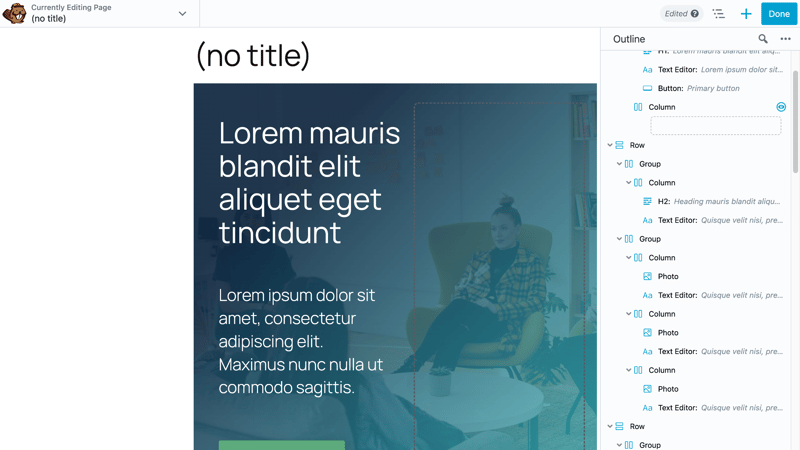
Understated and functional: Beaver Builder is designed for users who value stability over flashy effects.
How Extensive Are Beaver Builder's Features?
Beaver Builder takes a deliberately down-to-earth approach, focusing on stability and everyday usability.
Visual frontend editor
Changes are visible immediately, without having to go through the backend.Modular design
Content is added using modules like text, image, gallery, form, or call-to-action boxes.Theme integration
Beaver Builder works smoothly with almost any WordPress theme.Template library
Beaver Builder offers a template library with ready-made layouts. These include landing pages, service pages, team pages, and other page types.Responsive controls
Layouts can be adjusted for different devices directly in the editor. Settings for desktop, tablet, and smartphone are separate.Multisite support
Beaver Builder supports WordPress multisite installations. This makes it especially suitable for networks with multiple websites.White labeling
Agencies can use Beaver Builder under their own branding. The builder can be customized accordingly for clients.Developer API
Beaver Builder provides a developer API. Custom modules and features can be programmed and integrated.
How Does Beaver Builder Perform?
Beaver Builder is optimized for loading speed and code quality. The HTML output is leaner than many visual editors, and unnecessary scripts are avoided. This keeps pages fast and the website maintainable in the long run. That's a plus for small and medium-sized businesses planning for the future.
What Use Cases Is Beaver Builder Best Suited For?
Beaver Builder focuses primarily on agencies, freelancers, and businesses looking for a long-lasting, stable website solution that will still work in five years without a complete rebuild.
Business websites benefit from clear page structures and simple operation that makes regular content updates easy.
Agencies often use Beaver Builder to deliver clean client projects and provide a streamlined, white-labeled editor.
Thanks to its intuitive operation, Beaver Builder is well-suited for workshops and training environments where beginners learn how to maintain websites.
How Does Beaver Builder Compare to Other Page Builders?
Beaver Builder is leaner and more stable than Elementor or Divi, but it deliberately skips many design extras. If you want a page builder with an integrated theme and lots of features, Elementor or Divi are better choices. But if you need robust websites that work reliably for years, Beaver Builder may be the better fit.
What Does Beaver Builder Cost?
Beaver Builder is available in four packages, each with a 30-day money-back guarantee.
Ultimate: $546 for unlimited websites, includes Beaver Builder, Beaver Themer, Assistant Pro (3 years), white label, and multisite support
Agency: $299 for unlimited websites, white label, and multisite support
Pro: $179 for unlimited websites, includes Beaver Builder and Beaver Themer
Standard: $99 for three websites, page builder only without Themer
All plans include one year of updates and support. After that, you can renew your license at a reduced price.
Pros and Cons of Beaver Builder
High Stability and Compatibility
Beaver Builder is known for being very reliable. It works smoothly with almost all WordPress themes and plugins.Intuitive Interface
The interface is clean and well-organized. Even beginners can get the hang of it quickly.Clean, Maintainable Code
The generated code stays relatively lean. This makes maintenance and future development easier.Great for Client Projects
White-labeling and multisite support make Beaver Builder a solid choice for agencies.
Fewer Eye-Catching Design Effects
Compared to Divi or Elementor, Beaver Builder offers fewer visual bells and whistles.Smaller Template Library
The selection of ready-made templates is more limited. Pages often require more manual customization.
Quick Comparison: Which Page Builder Is Right for You?
Not sure which page builder is the best fit for you? Here's a quick overview of the key differences:
Page Builder | Beginner-friendliness | Performance | Price¹ | License model | Highlights |
|---|---|---|---|---|---|
Elementor | ★★★★★ | ★★★★ | from $60 | Annual subscription | Huge template library, many integrations |
Divi | ★★★★ | ★★★ | $82 / $230 one-time | Annual subscription / Lifetime | Over 2,000 layout packs, lifetime license available |
Oxygen | ★★ | ★★★★★ | $183 one-time | Lifetime | Replaces the theme completely, full code control |
Bricks | ★★★ | ★★★★★ | $73 / $550 one-time | Annual subscription / Lifetime | Modern theme + builder, high performance |
Beaver Builder | ★★★★ | ★★★★ | $90 | Annual subscription | Very stable, compatible with many themes |
Conclusion: It's All About Control, Time, and Budget
A page builder lets you create professional WordPress websites without writing any code. The right choice depends on how much control you need, how much time you want to invest, and what your budget looks like.
Elementor stands out with its ease of use and huge template selection. It's ideal for getting results fast.
Divi offers plenty of design freedom and is worth it for anyone working on multiple projects long-term.
Oxygen is built for pros who want full control over every line of code.
Bricks combines modern technology with strong performance. It's a great pick for speed-focused projects.
Beaver Builder scores points for stability and clean code. It's a safe bet for websites built to last.
The easiest way to find the right page builder is to try out free versions in a staging environment. This helps you quickly see which tool meets your needs and reduces the risk of having to switch later.