Bluehost WordPress Hosting Review 2026: How Well Does It Work in Real Life?


Bluehost has been an officially recommended WordPress host since 2005. With over two decades of experience, this company knows the space well. But does it still deliver today?
We tested Bluehost for several weeks to see how it performs in real-world use, evaluating its speed, features, and overall value for the price.


Bluehost* is a U.S.-based hosting provider that’s been in business since 2003. The company offers WordPress hosting, traditional web hosting, and modern cloud hosting. It also provides domain services, and servers, as well as SEO and web design services.
Bluehost is best known for its long-standing partnership with WordPress. For many years, the company has worked closely with Automattic, the team behind WordPress.
Bluehost WordPress Hosting Review
Fast setup
Bluehost activates hosting immediately and directs you straight to the dashboard. New WordPress sites launch quickly, and the control panel operates smoothly.Strong technical foundation
Bluehost provides modern WordPress technology with solid performance features, flexible server settings, and a complete suite of developer tools.Generous site limits
Even lower-tier plans support multiple WordPress sites, making Bluehost a practical choice for managing several projects.Multiple server locations
Bluehost operates data centers across nine countries, including the U.S., allowing you to choose the location closest to your audience.
Weak backup options
Automatic backups run only once a week, and only the most recent version is retained. Additionally, you cannot trigger manual backups directly from the control panel.
Setup & Ease of Use
| Installation & setup |
| 2/3 |
| Migration |
| 0.5/2 |
| Control Panel |
| 7/10 |
Signing up with Bluehost is simple. After selecting a plan, you can register a new domain, connect an existing one, or start immediately with a free subdomain—an option not every host provides.

Choosing a domain with Bluehost.
Your order is ready in a few minutes without account verification or manual approval, giving you instant access to the control panel. That’s how seamless setup should be.

Welcome to the Bluehost dashboard.
WordPress installs in minutes
Bluehost highlights its AI assistant in the control panel, which builds a WordPress site based on your prompt. In our testing, setup took about two minutes, and WordPress was ready to use.
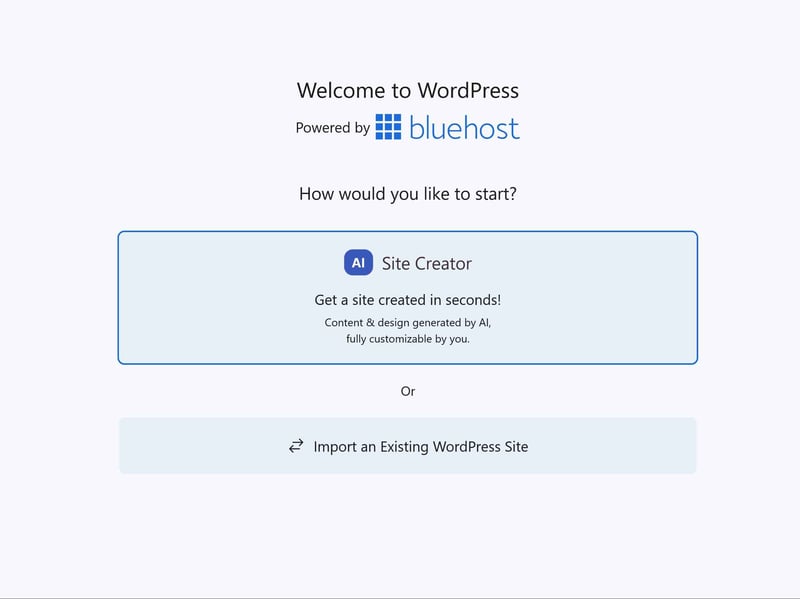
Start with AI or migrate an existing WordPress site.
Bluehost automatically installs eight WordPress plugins, including Yoast SEO, OptinMonster, and WPForms Lite. However, there is no way to perform a completely clean WordPress installation free of AI or pre-installed plugins.
While convenient, it can feel cluttered. Bluehost loads fresh WordPress sites with plugins many users don’t need, forcing you to clean house before building a lean website.
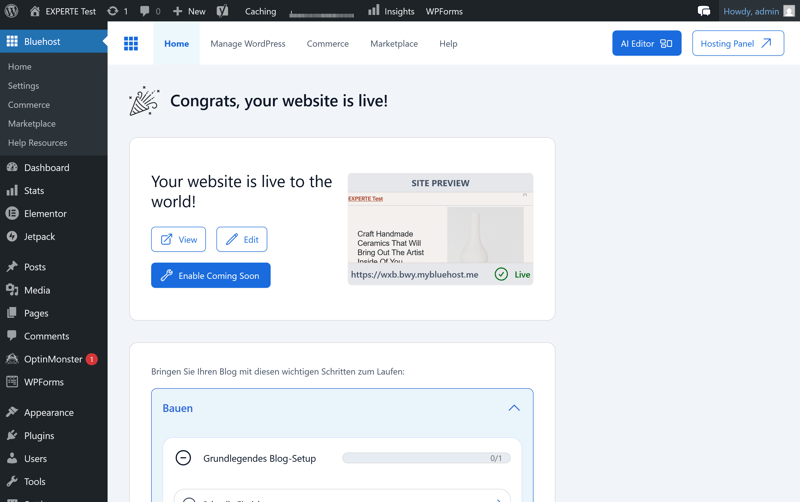
Bluehost’s WordPress installation.
Clean, user-friendly control panel
Bluehost’s control panel makes a great first impression and holds up well under closer inspection. The interface is modern and well-organized, allowing you to find what you need quickly. Even beginners should have no trouble navigating it.
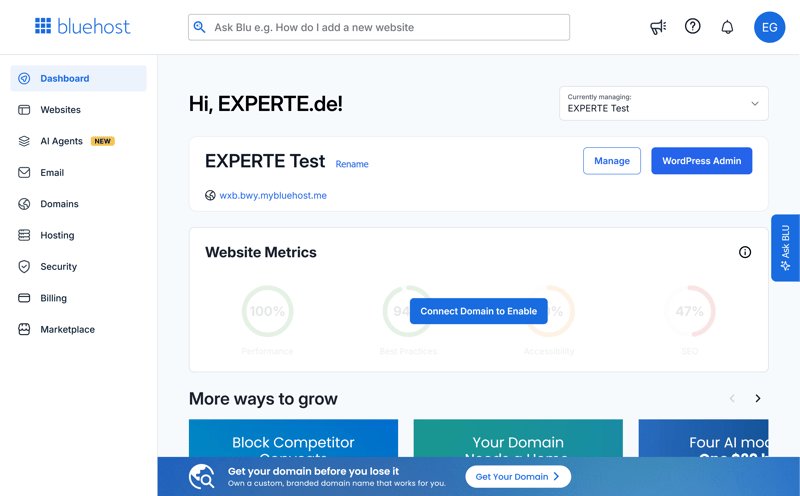
The Bluehost dashboard.
Performance is solid as well. Menus and pages load almost instantly—exactly how a modern hosting panel should feel.
The website management section gives you quick access to essential features like security, domains, and backups. From here, you can also jump straight into your WordPress admin area:

The Bluehost control panel.
Bluehost’s marketplace offers add-ons for SSL, AI, security, and ecommerce. You’ll also see ads for these products in other parts of the dashboard.

Offers in the Bluehost marketplace.
cPanel and Bluehost: two separate dashboards
Bluehost’s dashboard handles some tasks, but for more advanced settings, you’ll need cPanel, the free control panel included with your plan. Most other hosts have abandoned this setup and now offer a single, unified dashboard.
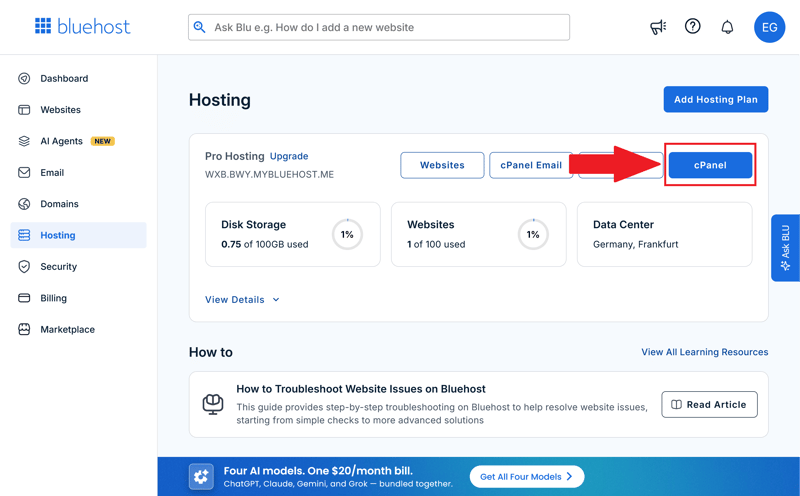
Some features require you to switch to cPanel.
cPanel works fine in our test, but jumping between two interfaces adds friction. You’ll often find yourself switching back and forth.
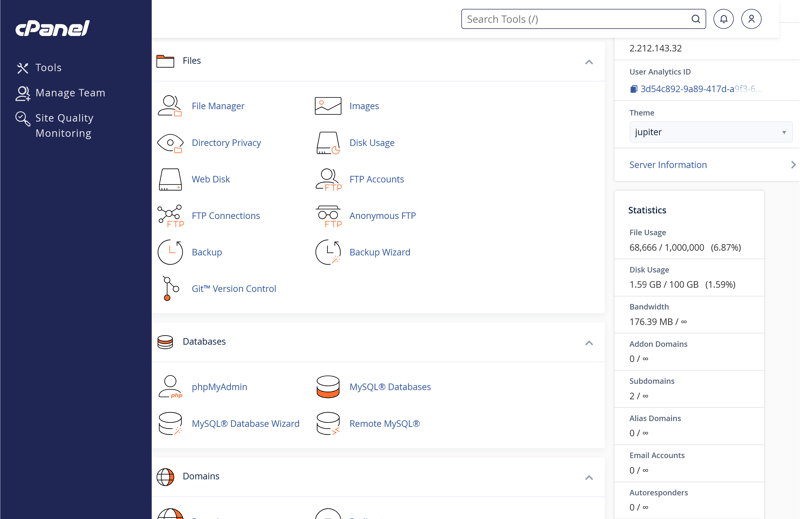
Bluehost’s cPanel.
It gets confusing when the same settings, such as domains, databases, and encryption, appear in both places: once in Bluehost’s dashboard and again in cPanel.
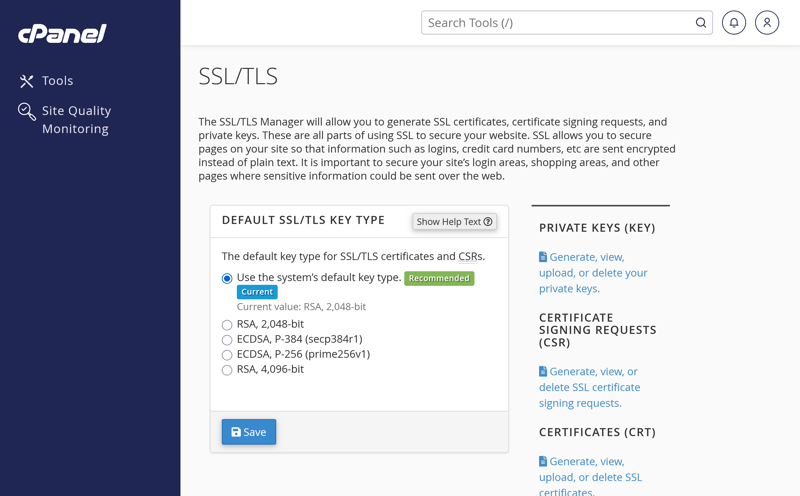
SSL settings are also available in cPanel.
Bluehost’s goal is clear: it eventually aims to replace cPanel with its custom dashboard. Because that transition is still underway, both systems currently exist side by side.
Moving to Bluehost: challenges from our testing
If you already have a WordPress site, you can migrate it to Bluehost. To start, click “Add Website” under “Websites” in the dashboard, then select “Transfer WordPress Website”.
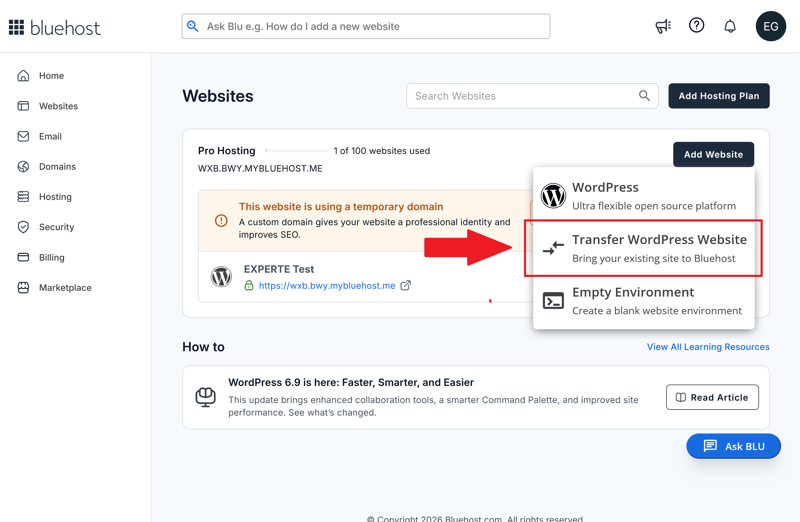
Transferring a WordPress website to Bluehost.
First, Bluehost asks for the URL of the WordPress site you want to move.
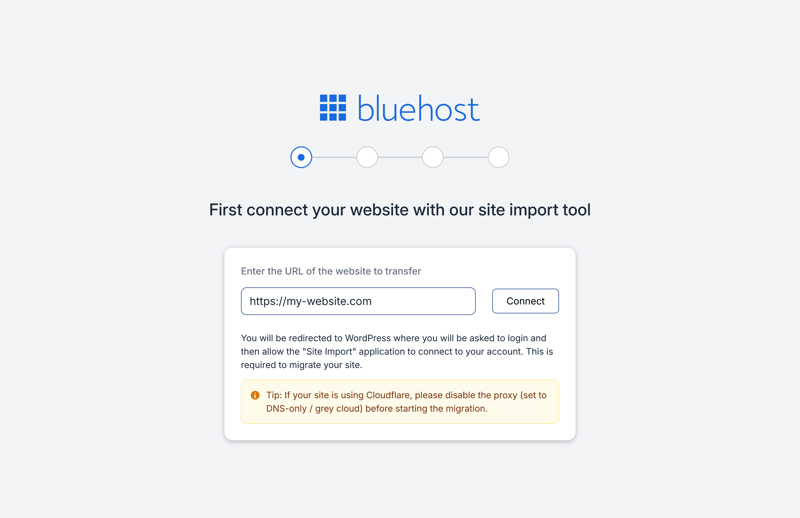
Enter the URL of your existing site.
You don’t need to share your login credentials. Instead, Bluehost redirects you straight to the admin area of your existing WordPress site, where you can authorize the move.
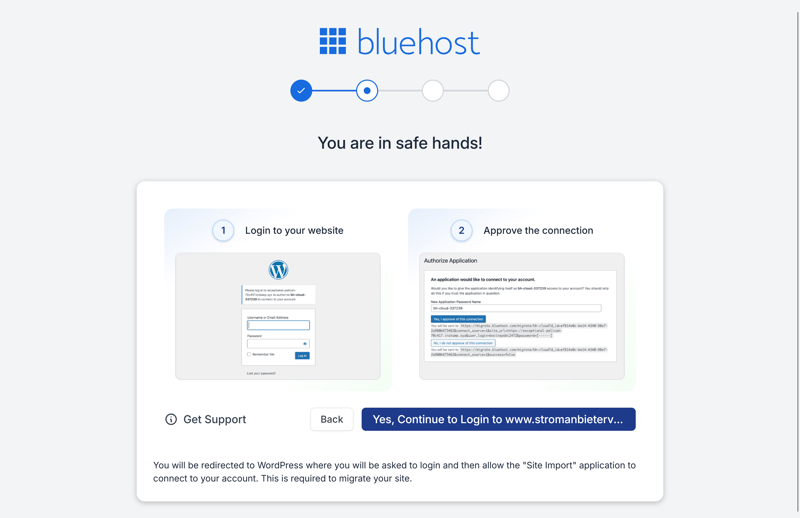
Bluehost redirects you to your site’s backend.
During testing, Bluehost displayed an error stating it could not load the required migration plugin. Support initially attributed the issue to system overload. However, subsequent attempts made over the following days also failed.
At this point, support didn’t offer a manual transfer. Instead, they simply pointed us to a knowledge base guide. We ultimately gave up on the migration—a real disappointment.

Overall, Bluehost makes getting started easy. Signing up is straightforward, the control panel is responsive, and the interface is intuitive even for beginners. The main friction comes from having to switch between the Bluehost dashboard and cPanel during daily use.
However, the failed WordPress migration during testing and Bluehost’s lack of a real fix were frustrating. Ultimately, Bluehost is far better suited for launching new projects than for switching hosting providers.
Technology & Features
| Server stack & protocols |
| 1.5/2 |
| PHP |
| 8/8 |
| Caching & CDN |
| 5/5 |
| Features |
| 5/5 |
Your tech setup determines how powerful and flexible your WordPress hosting is day to day and whether it has enough headroom for demanding projects. A modern server foundation matters, but so do PHP limits and caching. Weaknesses here often surface later, during large uploads or performance tuning.
Bluehost delivers a strong overall package. The provider uses fast NVMe storage across the board, which reads and writes data much faster than traditional SSDs.
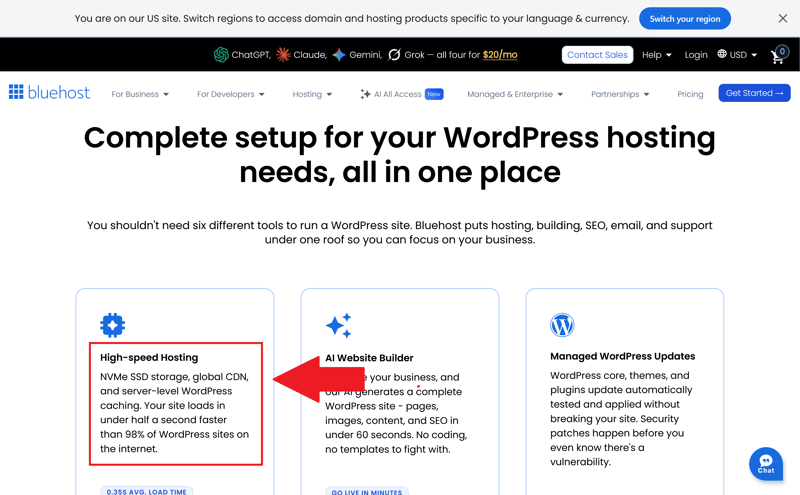
NVMe storage is standard with Bluehost.
Bluehost relies on Apache as its web server. While it isn’t the newest architecture on the market, it remains a battle-tested standard with excellent WordPress compatibility. Almost all plugins and standard .htaccess rules work out of the box without requiring manual tweaks.
Bluehost also supports HTTP/2, which enables browsers to fetch multiple assets—like images and JavaScript files—simultaneously. However, HTTP/3 is not yet supported. The newer protocol could further accelerate data transfers, particularly for users on unstable or mobile connections.
Wide selection of server locations
Bluehost also stands out when it comes to server geographic distribution. You can choose from data center locations in nine countries. This flexibility makes it straightforward to select a server location that aligns with your primary target audience.
 Bluehost |  Cloudways |  DreamHost |  GoDaddy |  Hostinger |  IONOS |  Kinsta |  SiteGround |  WordPress.com |  WP Engine | |
|---|---|---|---|---|---|---|---|---|---|---|
Server locations | 9 countries | 8 countries | 3 countries | 3 countries | 11 countries | 2 countries | 21 countries | 7 countries | 19 countries | 12 countries |
Web server | Apache | NGINX | NGINX | NGINX | LiteSpeed | Apache | NGINX | NGINX | NGINX | NGINX |
Control Panel | cPanel | Custom | Custom | Custom | Custom | Custom | Custom | Custom | Custom | Custom |
Database | MySQL | MariaDB | MySQL | MySQL | MariaDB | MariaDB | MariaDB | MySQL | MariaDB | MySQL |
Storage type | NVMe | SSD | NVMe | NVMe | NVMe | NVMe | SSD | SSD | SSD | SSD |
| Protocols | ||||||||||
HTTP/2 | ✓ | ✓ | ✓ | ✓ | ✓ | ✓ | ✓ | ✓ | ✓ | ✓ |
HTTP/3 | ✗ | ✗ | ✗ | ✗ | ✓ | ✗ | ✓ | ✗ | ✓ | ✓ |
Generous PHP limits
PHP limits determine how many resources your WordPress site can use. They govern available memory, process execution times, and maximum file upload sizes. If these thresholds are too low, you will run into errors during backups, migrations, or when running resource-intensive plugins.
We were impressed by Bluehost’s PHP configuration. On our reference plan ("Pro Hosting"), the provider allows unusually generous PHP caps, and users have the freedom to adjust them directly. Many competitors enforce significantly stricter boundaries.
Bluehost | Cloudways | DreamHost | GoDaddy | Hostinger | IONOS | Kinsta | SiteGround | WordPress.com | WP Engine | |
|---|---|---|---|---|---|---|---|---|---|---|
PHP version configurable | ✓ | ✓ | ✓ | ✓ | ✓ | ✓ | ✓ | ✓ | ✓ | ✓ |
PHP settings configurable | ✓ | ✓ | ✓ | ✗ | ✓ | ✗ | ✗ | ✓ | ✗ | ✗ |
Max PHP version | 8.5 | 8.4 | 8.5 | 8.3 | 8.5 | 8.4 | 8.5 | 8.5 | 8.4 | 8.4 |
Max memory limit | unlimited | unlimited | 768 MB | 512 MB | 3072 MB | 512 MB | 512 MB | 768 MB | 512 MB | 512 MB |
Max execution time | unlimited | unlimited | unlimited | 180s | unlimited | 360s | 300s | 120s | 850s | 43300s |
Max upload size | unlimited | unlimited | 1028 MB | 1024 MB | 3072 MB | 128 MB | 128 MB | 256 MB | 2048 MB | 50 MB |
The most critical PHP settings include:
The memory_limit sets the maximum amount of RAM a single PHP process can consume. Higher limits allow WordPress to handle resource-heavy plugins, visual page builders, WooCommerce, data imports, and complex background tasks without crashing.
The max_execution_time determines how long a PHP script can execute before the server terminates it. Higher values are essential for long-running processes such as database imports, backup generation, plugin updates, or site migrations.
The upload_max_filesize sets the maximum size for individual files uploaded via WordPress or the server. This limit dictates the size of images, videos, theme packages, plugins, and full-site backups you can import.
PHP support up to version 8.5
Bluehost supports modern PHP versions, including PHP 8.5. You can set the PHP version for each domain individually in cPanel.
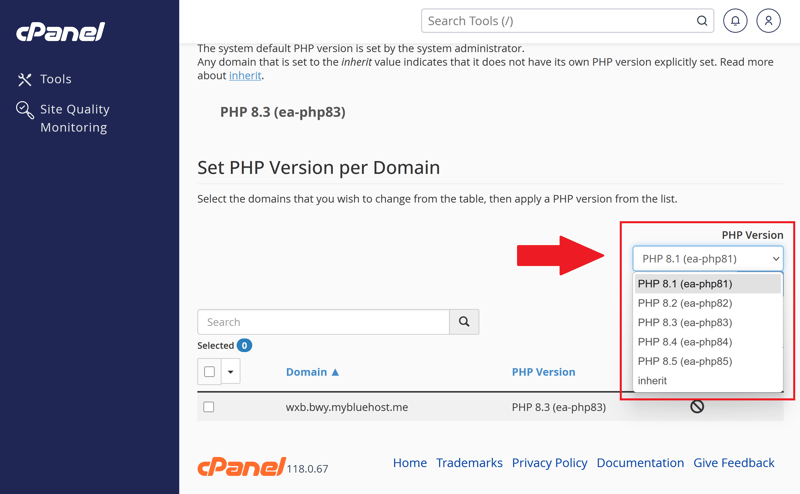
You choose the PHP version yourself.
Strong built-in caching
Caching is vital to website performance. Server-side caching speeds up load times by storing frequently accessed content so it doesn't need to be generated dynamically on every request. Object caching reduces database queries, which is particularly beneficial for dynamic WordPress sites and ecommerce stores.
A CDN distributes your content across servers worldwide, shortening response times for visitors from different geographical regions. Bluehost uses Cloudflare for this, which also helps filter out bot traffic and malicious requests.
Bluehost delivers a complete package here: server-side caching, object caching, and a CDN are all included by default, alongside options to set custom cache bypass rules.

Bluehost’s caching settings.
The configuration controls are solid. You can choose from several caching levels based on how frequently your content changes. For e-commerce stores or dynamic sites, asset-only caching is a great fit. For blogs or standard business websites, Bluehost recommends more aggressive page caching.
Here’s how Bluehost’s caching features stack up:
Bluehost | Cloudways | DreamHost | GoDaddy | Hostinger | IONOS | Kinsta | SiteGround | WordPress.com | WP Engine | |
|---|---|---|---|---|---|---|---|---|---|---|
Server side caching | ✓ | ✓ | ✓ | ✓ | ✓ | ✓ | ✓ | ✓ | ✓ | ✓ |
Object Caching | ✓ | ✓ | ✓ | ✓ | ✓ | ✗ | ✗ | ✓ | ✓ | ✓ |
CDN | ✓ | ✗ | ✓ | ✓ | ✓ | ✗ | ✓ | ✓ | ✓ | ✓ |
Cache exclusions | ✓ | ✓ | ✗ | ✗ | ✓ | ✗ | ✓ | ✓ | ✗ | ✓ |
Automatic cache purge | ✓ | ✓ | ✓ | ✓ | ✓ | ✓ | ✓ | ✓ | ✓ | ✓ |
More Bluehost features
Bluehost offers plenty of other features we haven’t covered in detail. Here are a few more tools and settings worth mentioning:
External domains: You can easily connect domains from other providers to Bluehost.
SSH access: Bluehost gives you SSH access for administrative tasks and tools like WP-CLI.
Cron jobs: Automate recurring tasks directly from the hosting panel.
Staging environment: Test changes in a demo environment before pushing them live to your WordPress site.
Multisite support: Set up a multisite network to manage multiple WordPress sites from a single installation.
No restrictions on WordPress plugins
Bluehost promises “unrestricted access to the WordPress ecosystem.” Unlike many other providers, there’s no list of banned WordPress plugins.
Bluehost gets the technical foundation right. You get plenty of features and flexibility without having to wrestle with a complicated hosting environment. The customizable PHP settings and built-in caching tools are particular highlights.
Overall, Bluehost delivers a robust technical package that works well for both small WordPress sites and larger, more demanding projects.
Security
| Free SSL | Yes | 2/2 |
| Server protection |
| 4/4 |
| WordPress updates |
| 2/2 |
| Backups | Daily backups aren't included in every plan | 0/2 |
Security is a core priority for managed WordPress hosting—after all, part of what you are paying for is proactive protection. What truly matters is how effectively the host handles common vulnerabilities like malware, broken updates, and malicious plugins.
Bluehost delivers solid results here. Automated malware scanning runs by default, continuously checking your site for suspicious files or code changes rather than waiting for you to report an issue. This proactive monitoring is essential, as malware often slips in unnoticed.
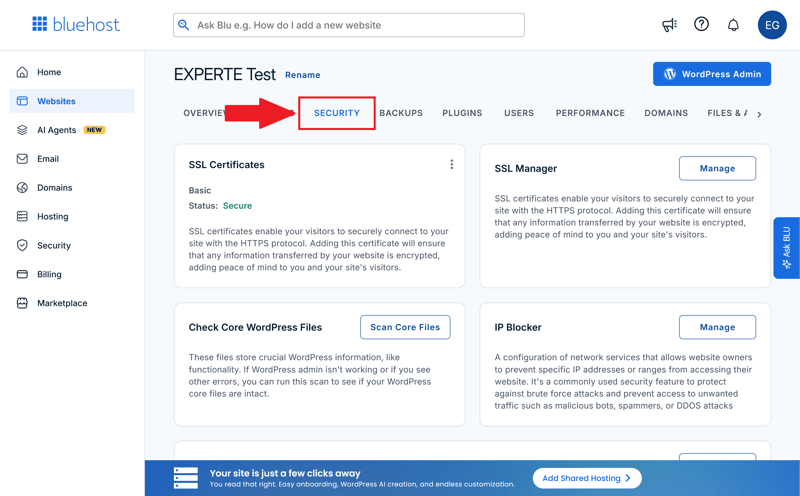
The security section in Bluehost.
Free SSL certificates are included as standard. They encrypt traffic between your site and its visitors, which is a baseline requirement for modern web hosting to safeguard data, build trust, and maintain search engine rankings.
Bluehost also protects your site with a firewall and DDoS protection. The firewall filters out malicious traffic before it ever reaches WordPress, while DDoS protection prevents your site from going offline during targeted traffic floods.
Overall, Bluehost covers all the fundamental security layers expected from a managed WordPress host.
Additional tools like the built-in IP blocker allow you to ban specific IP addresses or entire subnets during suspicious traffic spikes. Hotlink protection prevents external websites from embedding your images and assets directly from your server, protecting your bandwidth and server resources.
Staggered WordPress updates
Bluehost takes a conservative approach to WordPress updates. Rather than deploying updates immediately, the provider tests new core releases first to minimize compatibility conflicts and broken plugins. While this reduces update risks, it does mean your site receives new WordPress versions slightly later than it might on other platforms.
You can customize whether Bluehost installs these updates automatically:
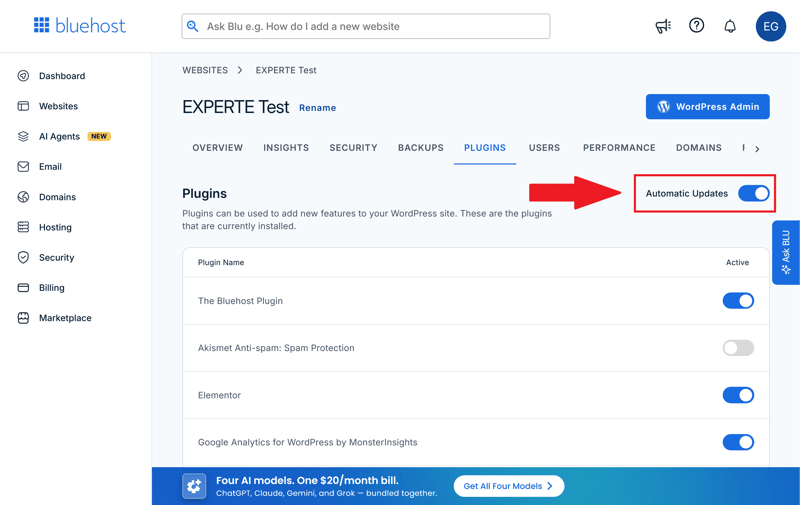
Controlling WordPress plugin updates.
Only weekly automatic backups
Bluehost’s native backup strategy falls short. The provider runs automatic backups only once a week, with no built-in option for free daily backups. You also get access to just the most recent backup, and you can’t create manual backups directly through the control panel without paying for add-ons like Jetpack or CodeGuard. Many competitors offer far more robust native backup tools out of the box.
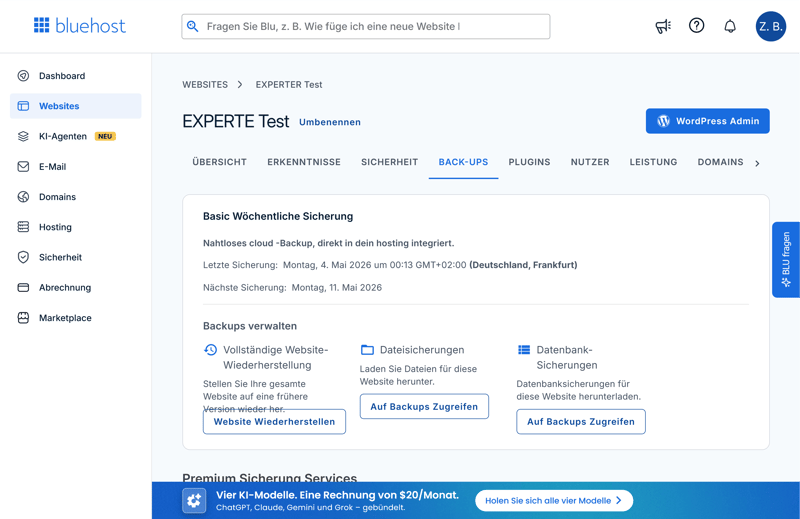
Backups could’ve been better.
Want to learn how to create a WordPress backup without relying on your host? Read this:

Here’s how Bluehost’s security features compare to other providers:
Bluehost | Cloudways | DreamHost | GoDaddy | Hostinger | IONOS | Kinsta | SiteGround | WordPress.com | WP Engine | |
|---|---|---|---|---|---|---|---|---|---|---|
Unlimited free SSL certificates (on all plans) | ✓ | ✓ | ✓ | ✗ | ✓ | ✗ | ✓ | ✓ | ✓ | ✓ |
Firewall | ✓ | ✓ | ✓ | ✓ | ✓ | ✓ | ✓ | ✓ | ✓ | ✓ |
DDoS protection | ✓ | ✓ | ✓ | ✓ | ✓ | ✓ | ✓ | ✓ | ✓ | ✓ |
Login protection | ✓ | ✓ | ✗ | ✓ | ✗ | ✗ | ✓ | ✓ | ✓ | ✗ |
Malware scanning | ✓ | ✓ | ✓ | ✓ | ✓ | ✓ | ✓ | ✗ | ✓ | ✓ |
Auto updates WordPress core | ✓ | ✗ | ✓ | ✓ | ✓ | ✓ | ✗ | ✓ | ✓ | ✓ |
Auto updates WordPress plugins/themes | ✓ | ✗ | ✓ | ✓ | ✓ | ✓ | ✗ | ✓ | ✓ | ✗ |
Daily automated backups (on all plans) | ✗ | ✓ | ✓ | ✗ | ✗ | ✓ | ✓ | ✓ | ✗ | ✓ |
Min. 14 day backup retention (on all plans) | ✗ | ✓ | ✓ | ✓ | ✓ | ✗ | ✓ | ✓ | ✗ | ✓ |
Bluehost gets security right, offering essential protections out of the box without requiring extra plugins or third-party services.
However, its native backup system is a major letdown. Weekly backups and a single restore point fall well short of the standard expected from modern managed WordPress hosting.
Performance
| Response speed (TTFB) | 0.23 s | 10/10 |
| TTFB outliers | 1.07 % | 1/5 |
| Pagespeed (LCP) | 0.95 s | 2/10 |
| Uptime | 100.00 % | 5/5 |
We tested Bluehost's performance for six weeks. We signed up for a plan around $20 per month and installed WordPress with the Elementor website builder.
We ran multiple benchmarks with and without caching enabled and compared the results to other managed WordPress hosts. You can read our full methodology in our guide to the fastest WordPress hosts.
Here's what we looked at:
- 1.
Response speed (TTFB): How quickly does the server respond to the first request for a page?
- 2.
Slow responses (outliers): How much does server speed vary during unusually slow requests?
- 3.
Pagespeed (Largest Contentful Paint): How quickly does the most important visible content appear on the page?
- 4.
Uptime: How reliably is the website available without interruptions?
Servers respond quickly
The Time to First Byte (TTFB) measures how quickly the server responds to an initial request before sending any content. Because we conducted this test with caching disabled, it serves as an excellent benchmark for raw server performance.
We measured Bluehost's TTFB every 30 seconds over six weeks. On average, it clocked in at 0.23 seconds, putting it in second place out of 14 WordPress hosts we tested.
That is an impressive result. Bluehost's infrastructure responds faster than most competitors in our benchmark, providing a strong advantage for larger, high-traffic WordPress sites handling multiple concurrent visitors.
| Response time (TTFB) | |
|---|---|
| 0.186 s |
| 0.23 s |
| 0.232 s |
| 0.264 s |
| 0.266 s |
| 0.271 s |
| 0.305 s |
| 0.387 s |
| 0.631 s |
| 0.819 s |
Occasional performance dips
For 1.07% of requests, Bluehost logged a slow TTFB, meaning the server took over a second to respond. That's just over one in every 100 page loads. Out of 14 providers, Bluehost ranks 10th.
Slow server responses happen more often than they should. Most visitors get a fast reply, but the delays are frequent enough to make performance feel inconsistent.
| TTFB outlier | |
|---|---|
| 0.09 % |
| 0.1 % |
| 0.2 % |
| 0.28 % |
| 0.41 % |
| 0.51 % |
| 0.54 % |
| 1.02 % |
| 1.07 % |
| 2.22 % |
Below-average Pagespeed
The Largest Contentful Paint (LCP) measures how quickly a page's main content loads, factoring in CSS, JavaScript, and other files. That makes it a good gauge of caching and CDN quality. For visitors, it's the difference between a site that feels fast right away and one that takes too long to load.
Bluehost averages 0.949 seconds for LCP, putting it in 11th place out of 14 WordPress hosts we tested.
Once again, this result falls below average. While the site loads quickly enough to maintain a smooth user experience, the top-performing providers in our test suite deliver main content noticeably faster.
| Pagespeed (LCP) | |
|---|---|
| 0.46 s |
| 0.519 s |
| 0.573 s |
| 0.612 s |
| 0.683 s |
| 0.683 s |
| 0.782 s |
| 0.792 s |
| 0.949 s |
| 1.282 s |
Perfect uptime
Bluehost shines when it comes to uptime. In our review, it delivered 100% uptime, tying for first place with several other providers. Over the six-week review period, there wasn’t a single outage.
| Uptime | |
|---|---|
| 100 % |
| 100 % |
| 100 % |
| 100 % |
| 100 % |
| 99.992 % |
| 99.977 % |
| 99.976 % |
| 99.932 % |
| 98.92 % |
While Bluehost doesn’t excel in every metric, it stands out for raw server responsiveness and overall reliability. Its fast average TTFB and 100% uptime demonstrate a solid, dependable infrastructure.
However, that isn't quite enough to deliver an elite managed WordPress experience. The occasional TTFB spikes and below-average PageSpeed scores mean that the server's underlying speed doesn't always translate into a consistently fast experience for your end users.
Support
| Documentation |
| 1.5/2 |
| Support channels |
| 2/2 |
| Speed and quality |
| 1/3 |
| Ratings on review platforms |
| 2/3 |
Support quality usually only becomes clear when you actually need help. That’s why we didn’t just look at Bluehost’s contact options—we also tested how quickly and effectively the team responds when things go wrong.
Extensive documentation with AI-powered search
Bluehost offers a large knowledge base packed with step-by-step guides for WordPress and hosting. For common issues and setup questions, you’ll find helpful articles right away without needing to reach out to support.

The knowledge base is extensive.
Rather than showing standard search results immediately, Bluehost leads with an AI-powered search assistant. It works well enough, though it feels unnecessary for simple queries. Fortunately, the AI clearly cites its sources and links directly to the relevant help articles.
However, localized support falls short—the translation for non-English users appears to rely heavily on automated machine translation without input from professional translators.
Multiple support channels
Beyond the knowledge base, you can reach out via an AI chatbot, live chat with human agents, or phone support. Both the AI and live chat operate 24/7.
One point of friction: support tickets can only be opened through live chat or phone. Unlike many other hosts, Bluehost doesn’t allow you to submit a ticket directly through the dashboard or via email.

How to contact Bluehost support.
When contacting support, you’ll always start with the AI, but transferring to a human agent is easy. Wait times are minimal, typically connecting you to a representative within one to two minutes.
Responses are fast and agents are friendly, but support falters on more technical requests. For instance, when a test WordPress migration failed, the team lacked the initiative needed to troubleshoot the underlying issue effectively.
Mixed customer feedback
On platforms like Trustpilot, many customers praise Bluehost’s support for quick connection times and responsive live chat. For basic WordPress troubleshooting, users frequently report positive experiences.
The primary complaint centers on inconsistent technical depth. On complex server or code-level questions, users report that answers can feel surface-level or dodge the root problem. Additionally, support is officially offered only in English.
For routine hosting questions and standard WordPress setups, Bluehost’s support gets the job done. Connection times are fast, saving you from long wait times or confusing phone menus.
However, if you run into urgent, complex technical issues, you may find the support limited. The team appears structured to handle quick, standard fixes rather than deep technical troubleshooting.
Costs
| 1 project, 10 GB storage | $8.49 | 2/3 |
| 10 projects | $8.49 | 3/3 |
| 50 GB of storage | $8.49 | 2/3 |
| Fair pricing |
| 4/6 |
Bluehost offers seven WordPress plans. They differ mainly in storage space, the number of WordPress installations, and the target audience. The core features are similar across all plans:
The Starter plan supports up to 10 WordPress installations and includes 50 GB of storage. Many caching and security features are already included.
The Business plan supports up to 50 installations with 50 GB of storage and is well-equipped for small to medium projects.
The Pro plan doubles the storage to 100 GB and raises the limit to 100 WordPress installations.
The eCommerce Essentials plan builds on the Pro plan but is tailored for WordPress sites with ecommerce features.
The Premium plan increases storage to 150 GB, with similar features otherwise.
The Enhanced plan offers 200 GB of storage for larger or multiple WordPress projects.
The Elite plan is the most comprehensive, with 250 GB of storage and support for up to 100 WordPress installations.
Here’s a quick overview of Bluehost’s plans:
| Starter | eCommerce Essentials | Business | |
|---|---|---|---|
| Monthly price | from $3.99 | from $3.99 | from $6.99 |
| Contract period (months) | 1 - 48 | 1 - 48 | 1 - 48 |
| Included | |||
| WordPress projects | 10 | 100 | 50 |
| Storage | 10 GB | 100 GB | 50 GB |
| Storage type | NVMe | NVMe | NVMe |
| Domains | 1 | 1 | 1 |
| Email accounts | 5 | unlimited | unlimited |
| Databases | - | - | - |
| Bandwith | unlimited | unlimited | unlimited |
| SSL certificates | unlimited | unlimited | unlimited |
| Backups | |||
| Backup interval | Weekly | Weekly | Weekly |
| Backup retention | 7 days | 7 days | 7 days |
| Manual backups | ✗ | ✗ | ✗ |
| Features | |||
| External domains | ✓ | ✓ | ✓ |
| SSH access | ✓ | ✓ | ✓ |
| CDN | ✓ | ✓ | ✓ |
| Cronjobs | ✓ | ✓ | ✓ |
| Staging environment | ✓ | ✓ | ✓ |
How Bluehost stacks up on price
Comparing prices between WordPress hosts isn’t always straightforward, since each provider structures its plans differently. To make things clearer, we looked at how Bluehost’s costs stack up against competitors in three real-world scenarios:
1 WordPress site with 10 GB storage
10 WordPress sites
50 GB storage
Here’s how the monthly costs break down for the matching plans:
| 1 project, 10 GB storage | 10 projects | 50 GB storage | |
|---|---|---|---|
| $3.49 | $4.49 | $4.49 |
| $5.50 | $55.00 | $6.00 |
| $6.49 | $64.90 | $14.47 |
| $6.50 | $65.00 | $20.00 |
| $7.49 | $12.49 | $12.49 |
| $8.49 | $8.49 | $8.49 |
| $17.99 | $179.90 | $24.99 |
| $24.00 | $24.00 | $24.00 |
| $32.08 | $119.17 | $302.50 |
| $41.67 | $187.50 | $283.33 |
In our comparison, Bluehost usually lands in the upper mid-range. For single websites or smaller projects, you’ll often find cheaper options. At the 50 GB tier, Bluehost costs a bit more but stays within a reasonable range.
Bluehost becomes more attractive if you’re managing multiple smaller WordPress sites. The high installation limits let you host several projects at a relatively low cost.
The fine print with Bluehost
Bluehost doesn’t always highlight the important details upfront. Pay close attention to contract terms and renewal prices:
No hard visitor limits
Bluehost doesn’t set strict bandwidth or visitor caps. Instead, it recommends how many visitors each plan can handle.Renewal prices jump significantly
After your initial term, costs can more than double. Some plans renew at over twice the introductory price.Free domain only for the first year
You only get a free domain in the first year, and only if you sign up for at least 12 months.Free backup restores
Bluehost doesn’t charge extra to restore from an existing backup.Monthly plans available
You’re not locked into a long-term contract. Monthly plans are an option.30-day money-back guarantee
Bluehost offers a standard 30-day money-back guarantee.
Bluehost delivers a generous resource package for the price. Its high site installation limits make it a particularly strong fit if you plan to run multiple WordPress projects under one account. The plans are well-equipped overall, covering all the essential hosting features.
However, the value proposition could still be stronger. At this price point, modern hosting providers typically include robust, automated daily backups rather than charging extra for them. While Bluehost isn't the absolute cheapest option on the market, its pricing remains reasonable for what it delivers.
Final Verdict: Strong Features, Performance Lags Behind
Bluehost is a solid choice if you want to manage multiple WordPress websites under a single, well-equipped hosting plan. It delivers modern technology, a comprehensive feature set, high flexibility, and generous project limits—all at a reasonable price point.
On paper, the platform covers every essential. However, one key drawback holds it back: performance. When it comes to page speed scores and consistent, low-latency loading, competing managed WordPress hosts often outperform it.
If your primary goal is running several smaller WordPress sites at a fair cost, Bluehost offers a compelling overall package. But if you are hosting a single, high-traffic, or mission-critical website that demands top-tier speed, you may be better served by a faster, performance-focused host.

Customer Reviews
What do users say about Bluehost? Reviews vary widely. Many praise how easy it is to get started but criticize the support, steep renewal prices, and struggles with more demanding projects.
Easy start with WordPress
Many users love how simple it is to get started. Account setup, 1-click WordPress installation, and initial configuration move quickly, making the onboarding process exceptionally straightforward for beginners.Well-equipped for smaller projects
Reviewers frequently highlight the generous set of built-in features, including free SSL certificates, CDN integration, and automated updates. For smaller WordPress sites, most users find that even the entry-level plans provide plenty of functionalityReliable everyday performance
Some reviews note that Bluehost runs smoothly day to day.
Mixed support experiences
Support feedback remains divided. Some users report fast, helpful responses, while others say the help falls short.High renewal prices
Many customers complain about the cost after the initial discount. The regular prices are often seen as too high.Not ideal for demanding projects
Some users say Bluehost isn’t the best fit for large, business-critical, or highly sensitive projects.
Alternatives
Not sold on Bluehost? Here are a few WordPress hosts that might be a better fit:
More affordable than Bluehost
Hostinger is a budget-friendly option for low-cost WordPress hosting with easy management and modern tech. It's especially useful if you're running multiple projects.More powerful than Bluehost
Kinsta is a great choice if you’re running a single high-priority WordPress site and need top performance.More flexible than Bluehost
Cloudways is a strong alternative if Bluehost feels too rigid. Instead of fixed plans, Cloudways lets you choose your own cloud infrastructure and scale server power as needed.
Want more options? Check out our full list of Bluehost alternatives: