Ubersuggest Review 2026: How Good Is the Budget-Friendly SEO Tool by Neil Patel?


Under the leadership of SEO expert Neil Patel, Ubersuggest has steadily evolved over the past few years. What started as a simple, free keyword tool has grown into a full-fledged SEO suite. Its goal is to make it easier for SEO beginners to boost their visibility in search results. But the question is, how well does Ubersuggest strike a balance between ease of use and feature depth?
We’ll explore whether Ubersuggest is a viable, budget-friendly alternative to the major SEO platforms or if you’ll ultimately compromise too much on features and data accuracy.
Ubersuggest* is a user-friendly SEO tool designed to simplify search engine optimization and make it accessible to beginners. It covers all the essential SEO features—from keyword research to website audits and rank tracking.
Ubersuggest’s current feature set is largely attributable to Neil Patel. The SEO and marketing expert acquired the tool in 2017, when it was still just a basic scraper for Google Suggest results. He gradually transformed it into a standalone SEO suite.
Compared to established tools, Ubersuggest positions itself as a cost-effective solution for beginners. The tool deliberately foregoes extreme data depth, instead targeting bloggers, small businesses, and marketing newcomers who need solid baseline data on keywords and competitors—without an agency-sized budget.
Ubersuggest Review
Considerable keyword database
In our testing, Ubersuggest delivered a remarkably high number of keyword ideas—sometimes even more than significantly pricier tools.Beginner-friendly interface
Ubersuggest offers a clean interface without overwhelming data views. Many technical terms are explained directly in the tool, making it easier to get started with SEO.Team-friendly pricing
While many providers charge steep fees for additional users, Ubersuggest’s team plans are relatively generous. This makes it especially efficient for small teams.
Lacks enterprise features
Professionals will quickly hit the tool’s limits. Key integrations for reporting and advanced data processing are missing, which restricts scalability for larger client projects.Limited filter options
Despite the large database, the analysis tools lack depth. The backlink analysis in particular is missing important filters for IP addresses, traffic, or source language.Limited multilingual support for knowledge base
While the interface is almost fully translated into German, the knowledge base is predominantly available only in English.
Interface and Usability
| User interface |
| 8/8 |
| Performance |
| 1.5/2 |
Ubersuggest features a clean, modern interface that’s welcoming for beginners. The layout utilizes space effectively. The design language is clear, with ample white space enhancing data readability.
Navigation is handled through a fixed sidebar on the left side of the screen, granting access to all core features. The sections are logically organized, so you can quickly switch between keyword research, competitor analysis, or site audits without digging through deeply nested submenus.
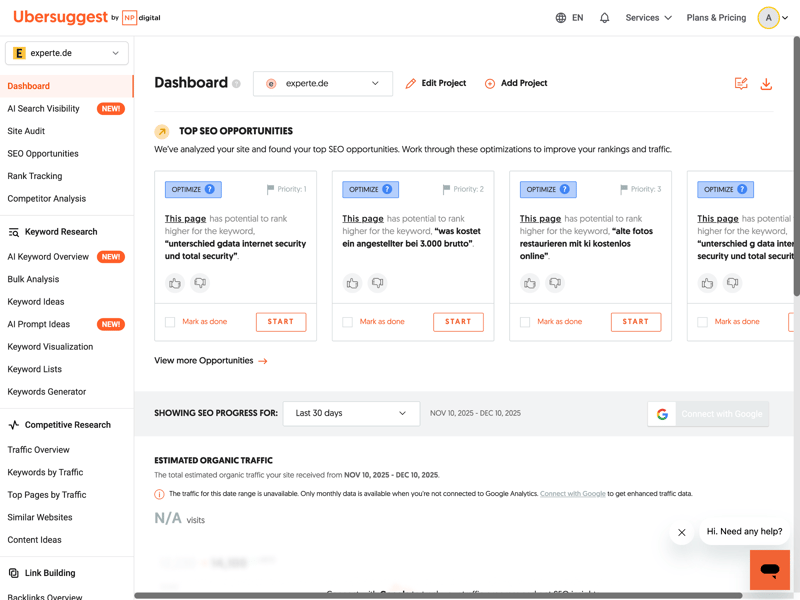
The dashboard gives you a quick overview of rankings, traffic, and SEO issues.
Compared to other tools, Ubersuggest is quite approachable. Even with little SEO experience, you should be able to navigate it quickly. The tool avoids clutter and presents the most important features right on the first level.
The database is generally considered smaller than the massive indexes of market leaders, but it provides a solid overview for standard analyses. However, you’ll have to forgo technical details like redirects or canonical tags in the main views—those are handled in the site audit.
Visual data presentation and guidance
Ubersuggest almost always presents numbers and metrics visually. Instead of raw tables, you’ll often see line charts or color-coded bars that allow for easy trend identification at a glance. This visual support helps you understand complex relationships faster.
If you encounter a technical term, the tool won’t leave you hanging. Prominently placed tooltips and small question mark icons are found throughout the interface; hovering over them provides a quick explanation of each metric.
Guided onboarding for beginners
The beginner-friendly setup process stands out. Ubersuggest walks you through the key steps one by one so you can get to actionable results quickly. This includes:
- 1.
Add your website: This instructs the software which domain to use for backlink checks and site audits.
- 2.
Add keywords: For keyword research, Ubersuggest needs to know which search terms you’re interested in.
- 3.
Add competitors: For competitor analysis, Ubersuggest delivers the best results when you add relevant competitors.
This structured setup process ensures relevant data appears immediately upon opening the dashboard, rather than leaving you to stare at empty tables.

Ubersuggest features a modern, clean design that makes it easy for SEO beginners to get started. The left sidebar navigation is logically organized, and the visual presentation of data keeps things clear, even when you’re dealing with large amounts of information.
Helpful tooltips and the guided three-step setup process reflect the goal of making SEO accessible to everyone. Power users might miss more granular settings, but for quick orientation, the layout works well.
Competitor Analysis
| Analysis level | All analysis levels except “path” are available. | 1.5/2 |
| Scope of traffic estimation |
| 4/6 |
| Accuracy of traffic estimation | 50.1 % | 4/6 |
| Keyword rankings |
| 3.5/4 |
| Page structure | Hostnames are available; however, directories, internal, and outgoing links are not supported. | 0.5/2 |
Ubersuggest integrates competitor analysis in two key places. Initial comparison data appears directly on the dashboard, while a dedicated module in the sidebar offers more in-depth analysis.
The focus is on visual data presentation. The dashboard shows estimated traffic for selected competitors over time. This lets you quickly spot whether a competitor is gaining or losing visibility:
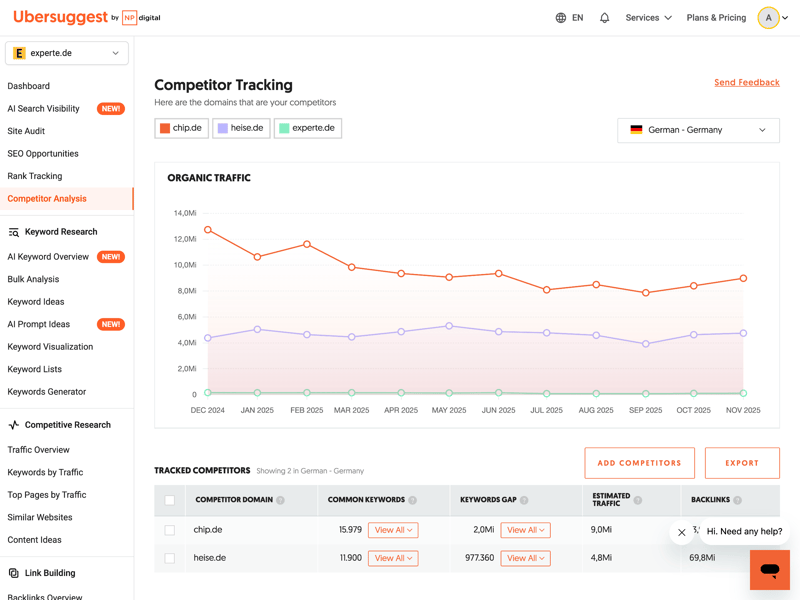
Ubersuggest visualizes competitor traffic trends so you can spot patterns.
Below these charts, Ubersuggest provides concrete metrics. A table lists all identified competitors. You can immediately see how many keywords you share, where keyword gaps exist, and what the estimated traffic and backlink counts are for each competing website.
Distinguishing between competitors and similar sites
The tool clearly distinguishes between two perspectives: “Competing Domains” and “Similar Websites.” The first view focuses on actual business rivals with the same model, while the second analyzes topical overlaps, often extending to the subdomain level.
This explains results that might seem surprising at first glance: Microsoft, for instance, may not be a direct business competitor for a site like experte.com, but it shows up in the “Similar Websites” list due to topical overlaps on certain keywords. The tool also provides a separate chart for this category:
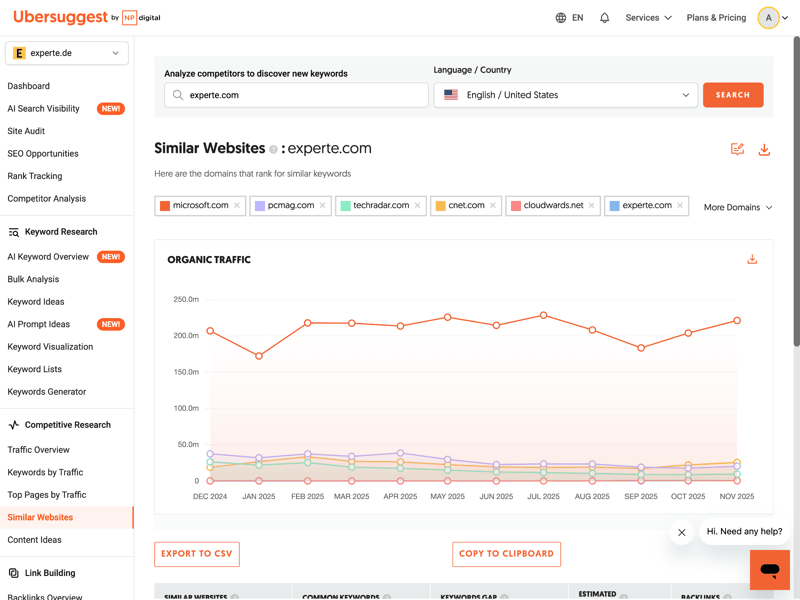
“Similar Websites” shows domains that rank for the same keywords.
Below the chart, you’ll find all the relevant information in table format. This separation helps you tailor your SEO strategy either against direct market competitors or against topical authorities.
How reliable is Ubersuggest’s traffic data?
Ubersuggest covers all the key areas for traffic data, including organic and paid traffic, estimated traffic value, and breakdowns by country.
With three years of traffic history, the data is sufficient for evaluating medium-term trends. However, most competitors go back further, ranging from 5 to 16 years:
 Ubersuggest |  Ahrefs |  Mangools |  Moz |  Semrush |  SE Ranking |  Serpstat |  Sistrix |  SpyFu | |
|---|---|---|---|---|---|---|---|---|---|
Organic traffic | ✓ | ✓ | ✓ | ✗ | ✓ | ✓ | ✓ | ✓ | ✓ |
Paid traffic | ✓ | ✓ | ✗ | ✗ | ✓ | ✓ | ✓ | ✓ | ✓ |
Trafic value | ✓ | ✓ | ✗ | ✗ | ✓ | ✓ | ✓ | ✓ | ✓ |
Traffic by country | ✓ | ✓ | ✓ | ✓ | ✓ | ✓ | ✓ | ✓ | ✓ |
Traffic history | 3 years | 5 years | 1 years | 1 years | 14 years | 8 years | 9 years | 5 years | 16 years |
But how reliable are these estimates? To find out, we compared the tools’ traffic data against real reference values. Ubersuggest delivers solid results and ranks 3rd, though the gaps between 2nd and 4th place are minimal:
| Traffic estimation accuracy | |
|---|---|
| 53.6 % |
| 51 % |
| 50.1 % |
| 49.1 % |
| 46.1 % |
| 45.9 % |
| 45.4 % |
| 18.9 % |
| 0 % |
Ubersuggest analysis features at a glance
Ubersuggest covers most of the key analysis features for competitor and content research. This includes keyword and URL history, overviews of top-performing pages, ranking changes, and a keyword gap analysis.
What’s missing is a ranking distribution by position—a feature supported by nearly every other SEO tool in our comparison:
Ubersuggest | Ahrefs | Moz | Semrush | SE Ranking | Sistrix | Mangools | SpyFu | Serpstat | |
|---|---|---|---|---|---|---|---|---|---|
Number of keywords (history) | ✓ | ✓ | ✓ | ✓ | ✓ | ✓ | ✓ | ✓ | ✓ |
Number of URLs (history) | ✓ | ✓ | ✓ | ✓ | ✓ | ✓ | ✓ | ✗ | ✗ |
Top pages | ✓ | ✓ | ✓ | ✓ | ✓ | ✓ | ✓ | ✓ | ✓ |
Ranking history per keyword | ✓ | ✓ | ✓ | ✓ | ✓ | ✓ | ✓ | ✓ | ✓ |
Ranking changes | ✓ | ✓ | ✓ | ✓ | ✓ | ✓ | ✓ | ✓ | ✓ |
Ranking distribution | ✗ | ✓ | ✓ | ✓ | ✓ | ✓ | ✓ | ✓ | ✗ |
Organic competitors | ✓ | ✓ | ✓ | ✓ | ✓ | ✓ | ✗ | ✓ | ✓ |
Keyword gap analysis | ✓ | ✓ | ✓ | ✓ | ✓ | ✓ | ✓ | ✓ | ✓ |
Total | 7 | 8 | 8 | 8 | 8 | 8 | 7 | 7 | 6 |
An interesting feature hides behind the name “Content Ideas.” It’s essentially a classic keyword gap analysis. It shows you which topics your competitors are ranking for while your own site has no content on them yet.
Overall, the competitor analysis features are partially limited compared to pricier enterprise solutions. Still, they cover the essentials for most use cases. Useful filters let you zero in on high-traffic keywords and relevant competitor pages.
Ubersuggest offers solid competitor analysis. Its strengths are a clean layout and a clear distinction between direct competitors and topically similar sites. With three years of historical data and traffic accuracy in the upper range of our test field, the tool delivers reliable numbers for everyday SEO work.
A few detailed breakdowns are missing, like exact ranking distribution. On the plus side, features like Content Ideas are especially useful for content marketers.
Backlink Analysis
| Feature set |
| 3.5/5 |
| Number of backlinks | 12,100 referring domains | 4/4 |
| Data quality |
| 2/4 |
| Backlink filters |
| 1.25/2 |
Ubersuggest splits link profile analysis into two main sections: “Backlink Overview” and “Backlink Opportunity.” The link index is updated regularly.
Backlink overview: link profile growth and quality
The Backlink Overview displays a chart showing how your backlinks have developed over time, alongside the number of referring domains. This makes it easy to spot changes in your link profile at a glance.
A key metric here is domain authority (DA) from Moz. The score ranges from 0 to 100 and serves as a rough indicator of a domain’s strength. Ubersuggest adds simple labels (like “Good”) to make interpretation easier.
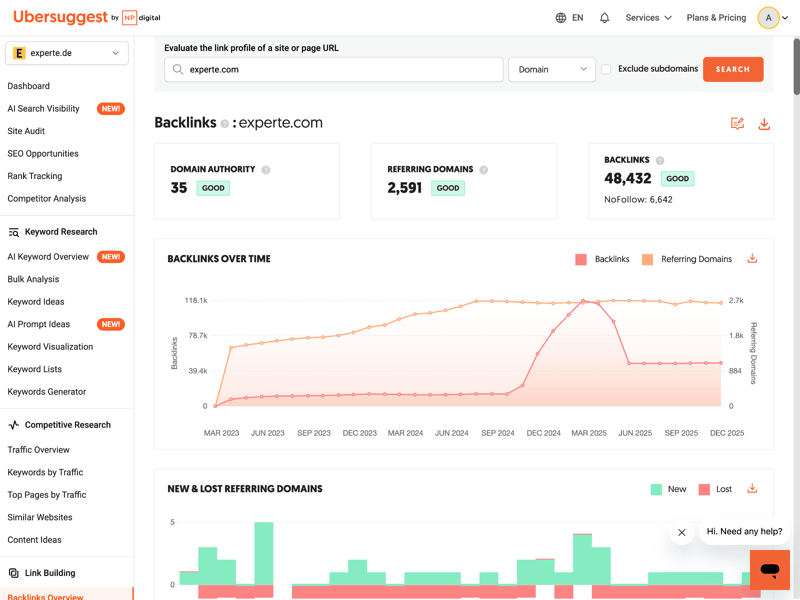
The trend chart shows at a glance whether the analyzed domain's link profile is growing.
Further down, the tool breaks down your profile’s dynamics: a visualization shows the ratio of new to lost backlinks. This is crucial for explaining sudden drops in visibility.
You also get insight into link quality. The dashboard shows how many high-DA domains link to you and what anchor texts they use. A healthy profile should have a natural mix here.
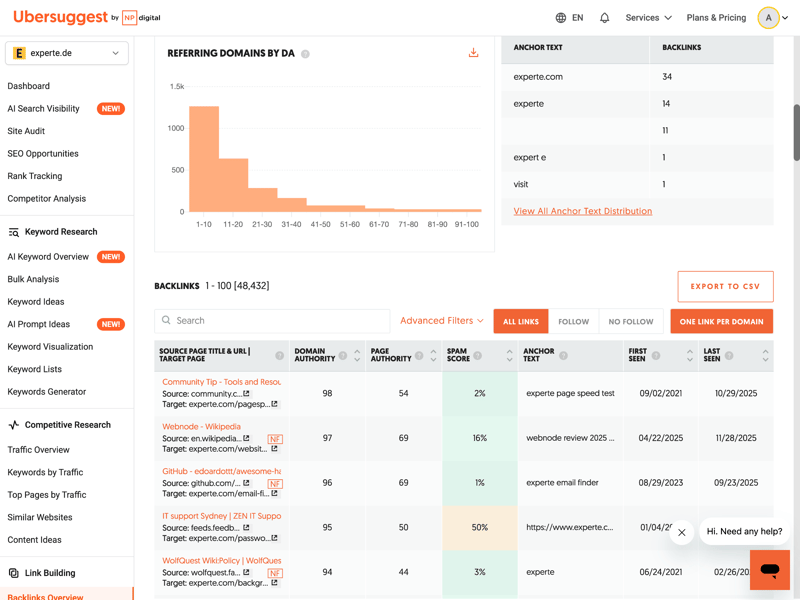
Domain authority and anchor texts help you assess a site’s quality.
Below that, you’ll find a detailed list of link sources. The table includes authority strength, spam score, and anchor texts used. You can also see when each link was first and last detected.
Finding gaps through competitors
The “Backlink Opportunity” section offers a classic gap analysis. Here you compare your profile directly with a competitor’s, hoping to find links you haven’t secured yet. One downside: you can only compare against a single competitor at a time.
Ubersuggest doesn’t offer advanced features like an explicit spam score or a “toxicity score.” This means you can’t directly disavow problematic links from within the tool.
How many backlink sources does Ubersuggest find?
A common concern with budget SEO tools is whether they can actually find enough data. Ubersuggest delivers a notable result here: In our tests, it discovered significantly more referring domains than many established competitors and holds its own against much pricier solutions.
| Referring domains (on average) | |
|---|---|
| 12,100 |
| 12,100 |
| 8,927 |
| 5,627 |
| 5,200 |
| 3,505 |
| 2,305 |
| 1,172 |
| 224 |
Solid basics, limited depth
Ubersuggest covers the essentials of backlink analysis well. The tool includes all the key basics: backlink history, referring domains, lost links, and anchor text analysis. For a general overview of your own link profile and your competitors’, everything you need is there.
What’s missing are the deeper analysis features that many other SEO tools offer. These include analysis of referring IP addresses, systematic detection of toxic links, or detailed checks for broken links.
Ubersuggest | Ahrefs | Mangools | Semrush | SE Ranking | Moz | Sistrix | Serpstat | SpyFu | |
|---|---|---|---|---|---|---|---|---|---|
Backlink history | ✓ | ✓ | ✓ | ✓ | ✓ | ✓ | ✓ | ✓ | ✓ |
Referring domains | ✓ | ✓ | ✓ | ✓ | ✓ | ✓ | ✓ | ✓ | ✓ |
Referring IPs | ✗ | ✓ | ✓ | ✓ | ✓ | ✗ | ✓ | ✓ | ✗ |
Lost links | ✓ | ✓ | ✓ | ✓ | ✓ | ✓ | ✓ | ✓ | ✓ |
Toxic links | ✗ | ✓ | ✓ | ✓ | ✓ | ✓ | ✗ | ✗ | ✗ |
Broken links | ✗ | ✓ | ✓ | ✓ | ✓ | ✓ | ✓ | ✗ | ✗ |
Link quality metrics | ✓ | ✓ | ✓ | ✓ | ✓ | ✓ | ✓ | ✓ | ✓ |
Anchor text analysis | ✓ | ✓ | ✓ | ✓ | ✓ | ✓ | ✓ | ✓ | ✓ |
Top pages by links | ✓ | ✓ | ✓ | ✓ | ✓ | ✓ | ✓ | ✓ | ✓ |
Backlink gap analysis | ✓ | ✓ | ✓ | ✓ | ✓ | ✓ | ✓ | ✓ | ✓ |
Total | 7 | 10 | 10 | 10 | 10 | 9 | 9 | 8 | 7 |
If you want to examine the backlinks in more detail, Ubersuggest does provide basic filters and detail views for link type, link target, and anchor text.
However, more advanced qualitative metrics are missing. There’s no estimated traffic data for linking pages or information about the language of linking websites. Other tools offer much more in this area:
Ubersuggest | Ahrefs | Semrush | Mangools | SE Ranking | Sistrix | Serpstat | SpyFu | Moz | |
|---|---|---|---|---|---|---|---|---|---|
Nofollow/Dofollow | ✓ | ✓ | ✓ | ✓ | ✓ | ✓ | ✓ | ✓ | ✓ |
Link authority | ✓ | ✓ | ✓ | ✓ | ✓ | ✓ | ✓ | ✓ | ✓ |
Anchor text | ✓ | ✓ | ✓ | ✓ | ✓ | ✓ | ✓ | ✓ | ✓ |
Link type (text, image, …) | ✓ | ✓ | ✓ | ✓ | ✓ | ✓ | ✓ | ✓ | ✗ |
Link position (content, footer, …) | ✗ | ✓ | ✓ | ✓ | ✗ | ✗ | ✗ | ✗ | ✗ |
Link age | ✓ | ✓ | ✓ | ✗ | ✓ | ✓ | ✓ | ✗ | ✓ |
Traffic of referring page | ✗ | ✓ | ✓ | ✗ | ✓ | ✗ | ✗ | ✓ | ✗ |
Language of referring page | ✗ | ✓ | ✓ | ✓ | ✗ | ✓ | ✗ | ✗ | ✗ |
Total | 5 | 8 | 8 | 6 | 6 | 6 | 5 | 5 | 4 |
Ubersuggest’s backlink analysis delivers mixed results. On one hand, the tool impresses with the sheer number of referring domains it finds, outperforming even some well-known competitors. The visual presentation with domain authority and trend charts works great for getting a quick overview.
On the other hand, several advanced features are missing: there's no way to filter by IP address, no traffic data for link sources, and no efficient bulk analysis against multiple competitors at once.
Bottom line: If you’re looking to build links, Ubersuggest gives you plenty to work with. If you need to run a technical link audit, you’ll hit its limits pretty quickly.
Keyword Research
| Features |
| 3/5 |
| Number of countries | 230 countries | 1/1 |
| Number of keywords | 5,325 keywords | 2/3 |
| Accuracy of search volume | 83.0 % | 5/5 |
| Filters |
| 1.5/2 |
Keyword research is Ubersuggest’s core module. It helps you discover what people are actually searching for on Google. The tool delivers a large volume of relevant keyword ideas that go far beyond simple Excel-style word lists.
Beyond individual terms, you’ll find suggestions for common question phrases, comparisons, and combinations with frequently used prepositions, all tailored to your original search term.
Solid keyword features, missing pro tools
The feature set covers the essentials, though power users might miss historical SERP data or a direct overlap analysis between two keywords:
Ubersuggest | Ahrefs | Semrush | SE Ranking | Sistrix | Mangools | Serpstat | SpyFu | Moz | |
|---|---|---|---|---|---|---|---|---|---|
Search volume by month | ✓ | ✓ | ✓ | ✓ | ✓ | ✓ | ✓ | ✓ | ✓ |
Search volume by country | ✓ | ✓ | ✓ | ✓ | ✓ | ✓ | ✓ | ✓ | ✓ |
Keyword difficulty | ✓ | ✓ | ✓ | ✓ | ✓ | ✓ | ✓ | ✓ | ✓ |
Cost per click (CPC) | ✓ | ✓ | ✓ | ✓ | ✓ | ✓ | ✓ | ✓ | ✗ |
Search intent | ✗ | ✓ | ✓ | ✓ | ✓ | ✓ | ✗ | ✗ | ✓ |
Current SERPs | ✓ | ✓ | ✓ | ✓ | ✓ | ✓ | ✓ | ✓ | ✓ |
Historical SERPs | ✗ | ✓ | ✓ | ✓ | ✓ | ✗ | ✓ | ✓ | ✗ |
SERP comparison | ✗ | ✓ | ✓ | ✓ | ✓ | ✓ | ✓ | ✓ | ✓ |
SERP overlap | ✗ | ✓ | ✓ | ✓ | ✓ | ✓ | ✓ | ✓ | ✓ |
Keyword clustering | ✓ | ✓ | ✓ | ✓ | ✓ | ✓ | ✓ | ✓ | ✗ |
Total | 6 | 10 | 10 | 10 | 10 | 9 | 9 | 9 | 7 |
Structure and filters for large keyword sets
To make sense of all this data, Ubersuggest offers a wide range of filters. You can narrow down results by monthly search volume, SEO difficulty, or cost per click (CPC). You can also include or exclude specific terms to refine your list even further.
If you already have a set list of terms in mind, the bulk analysis feature is especially useful. Enter multiple keywords at once and get all the key metrics at a glance: search volume, estimated click costs, and how hard it is to rank for each term. This makes it easy to compare your top candidates side by side.
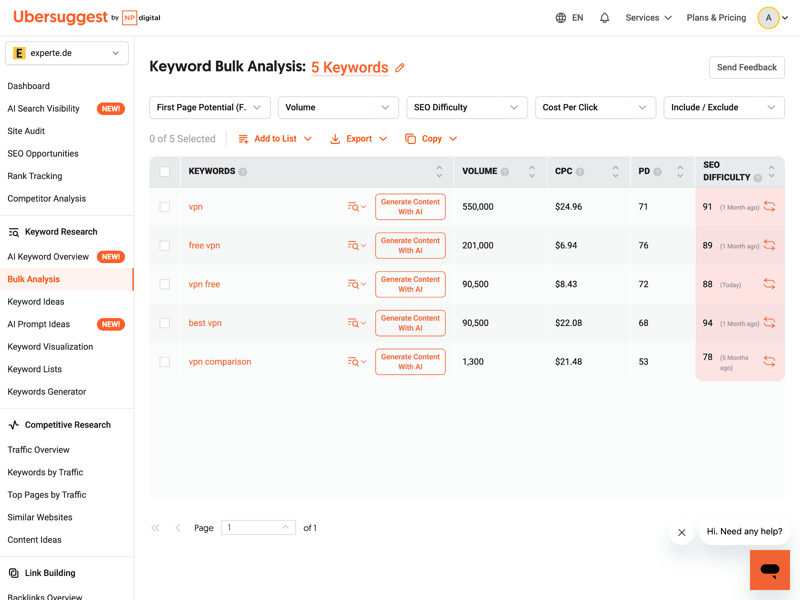
Bulk analysis lets you quickly evaluate an existing list of search terms.
If you don’t have a specific keyword in mind yet, the “Keyword Ideas” feature can help. Start with a broad seed keyword, and Ubersuggest generates hundreds of related suggestions.
The tool also shows the search intent for each keyword. You can immediately tell whether users are seeking information or ready to make a purchase.
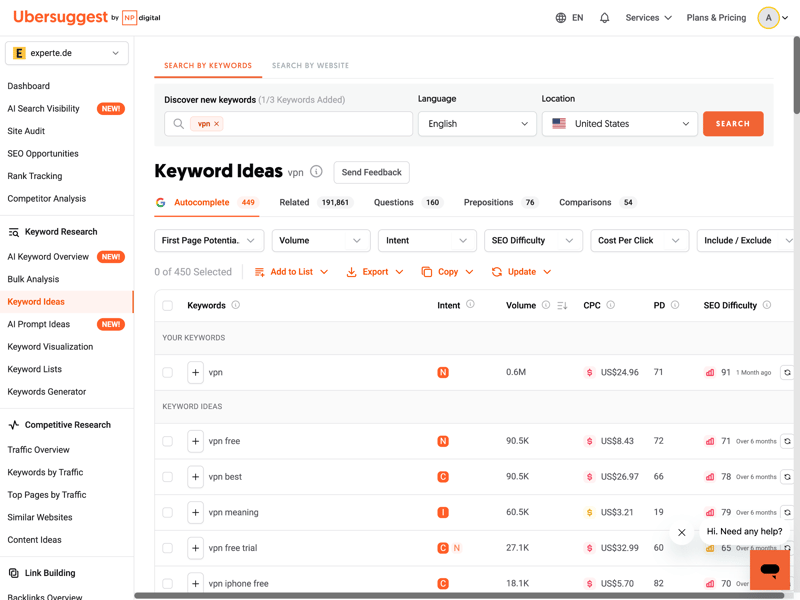
From a single word, the tool generates 469 suggestions, sorted by relevance and search intent.
Surprisingly comprehensive keyword database
To see just how extensive the keyword database really is, we ran a direct comparison. We defined 20 identical seed keywords like “vpn” and measured how many keyword variations each tool had in its database for those terms.
In our test, Ubersuggest came out on top, beating many more expensive SEO tools:
| Number of keywords (on average) | |
|---|---|
| 5,325 |
| 3,831 |
| 3,504 |
| 3,331 |
| 3,032 |
| 1,801 |
| 410 |
| 106 |
| - |
From content to keyword
Occasionally you don’t even have a seed keyword to start with. For exactly this situation, Ubersuggest offers a keyword generator that doesn’t begin with individual terms but with existing content. You can analyze either your own website or a competitor’s page.
Just enter a URL. The tool scans the text on that page and suggests keywords that match the topic. This way, you get potential target terms without having to guess what people might be searching for:
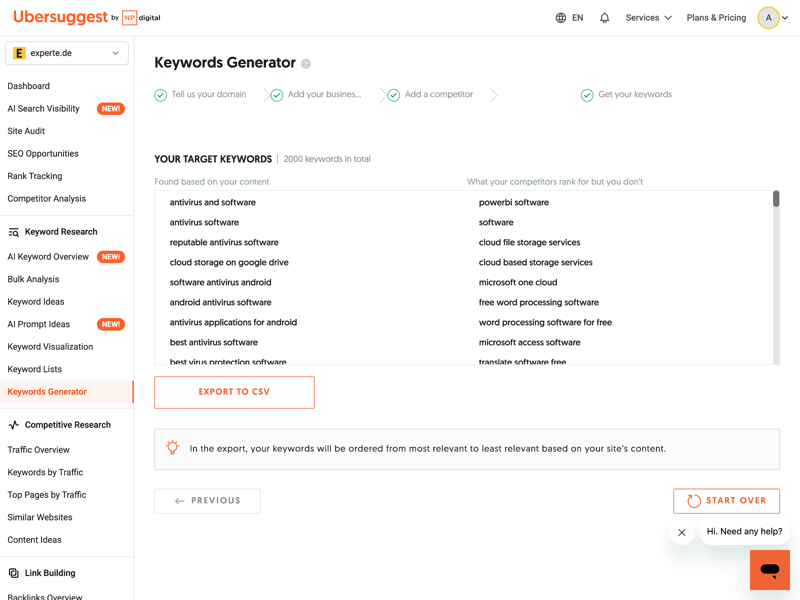
The generator scans your website and delivers keyword suggestions that fit the topic.
There’s a small workflow hiccup here, though. You have to check the suggested terms like “google drive“ or “onedrive“ individually to get detailed metrics. Processing them directly in the tool is clunky, so your best option is exporting the target keywords as a CSV file.
Keyword visualization with a sunburst chart
When it comes to keyword clustering, Ubersuggest takes a unique visual approach. The tool groups keyword combinations by topic in a sunburst chart.
This “keyword visualization” helps you decide which subpages should cover which question clusters. Beyond classic question words, you can also display comparisons or thematically related terms.
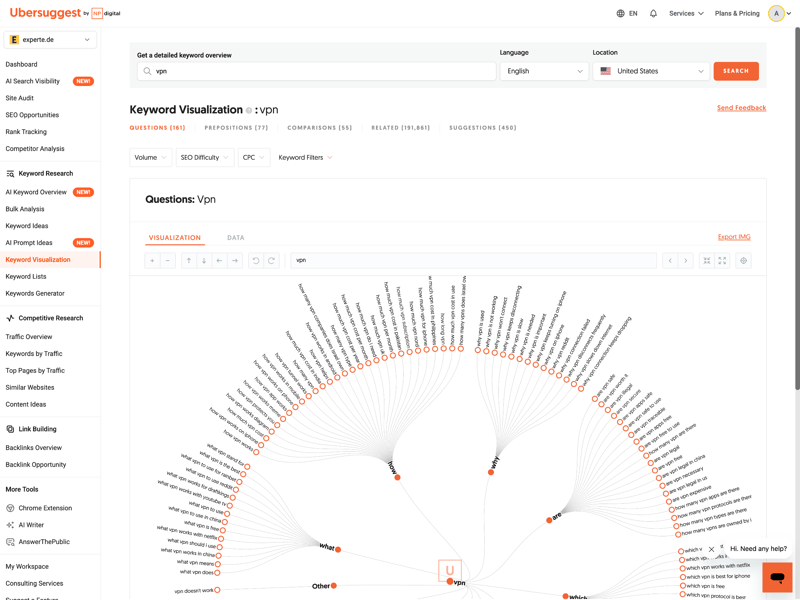
The visualization groups keywords by question words, making topic planning easier.
Standard traffic analysis and list management
You can also flip the approach and use the “Keywords by Traffic” section to see which keywords are currently driving the most visitors to a website. Instead of starting with a search term, you begin with a specific domain. Ubersuggest then shows you which terms the site ranks for and how much each keyword contributes to overall traffic.
For each keyword, you’ll see the monthly search volume, SEO difficulty, and the page’s current ranking position in search results. This makes it easy to spot which terms are already performing well and where there’s still room for improvement.
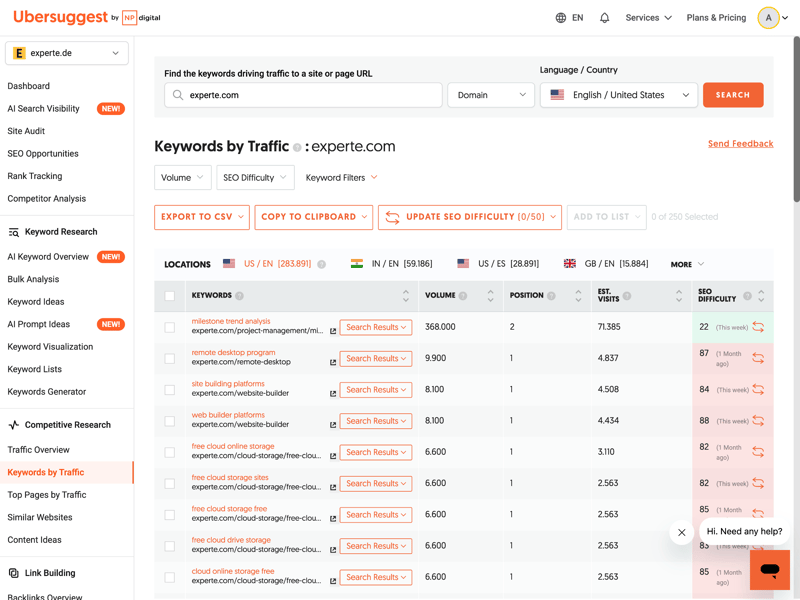
A look at the top-traffic keywords reveals which terms are currently bringing in the most visits.
You can save any keywords you find to custom lists. This makes organization easier, especially if you’re managing projects for multiple clients or building long-term content plans.
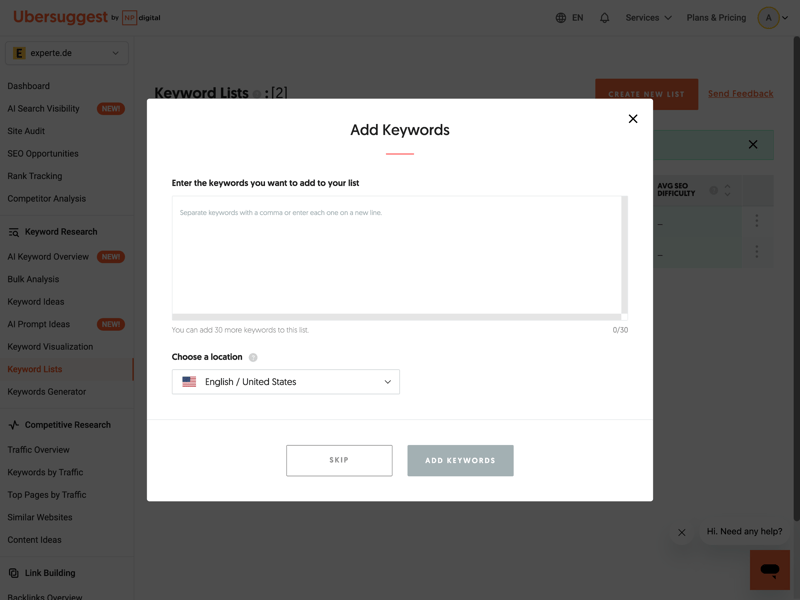
The list feature lets you save and organize your favorites for quick access later.
How reliable is Ubersuggest’s search volume data?
Ubersuggest offers an impressive keyword database. But for content planning, what really matters is how accurate the search volume estimates actually are. To find out, we compared the tool’s numbers against real-world data.
We selected 30 keywords where we or our partner websites consistently rank in the top 3 positions on Google. For these keywords, we pulled actual monthly impressions from Google Search Console to see how often they were really displayed. We then compared those real impressions to the search volumes reported by various SEO tools.
| Search volume accuracy | |
|---|---|
| 83 % |
| 75.3 % |
| 73.4 % |
| 72.4 % |
| 65.5 % |
| 55.7 % |
| 54.9 % |
| 52.8 % |
| 29.9 % |
Once again, Ubersuggest comes out on top: with 83% accuracy on search volume, it delivers more precise estimates than its well-known competitors.
Keyword research is clearly Ubersuggest’s standout feature. And rightfully so: the tool combines excellent data quality with a huge number of suggestions. In our testing, it even outperformed the much pricier market leaders. Features like keyword visualization also help spark creativity during content creation.
There are a few minor workflow hiccups: jumping from the generator to detailed analysis can feel a bit clunky, and historical SERP data is missing. But if you’re looking for reliable numbers for your content planning, Ubersuggest currently offers the best value for money on the market.
Other Features
| Rank tracking |
| 4.5/5 |
| AI-Tracking |
| 2/5 |
| Site audit |
| 3.5/5 |
| Additional features |
| 2/5 |
Beyond keyword research, Ubersuggest offers a range of additional tools to support your day-to-day SEO work. One of these is rank tracking. It lets you create projects with custom keyword lists and regularly check where your website appears in Google’s search results.
One standout here is the update frequency: all paid plans include daily ranking checks. That’s important for identifying changes quickly.
The rank tracking feature also works well for local SEO. You can monitor rankings not just by country, but by specific cities or even zip codes. This is especially useful for local service providers and businesses with a regional focus.
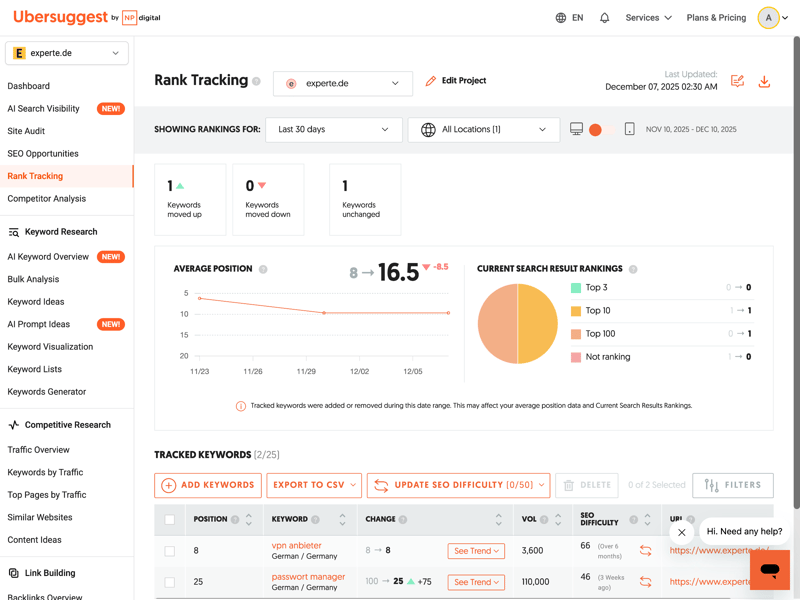
Rank tracking visualizes your ranking changes over time with daily updated data.
Site audit for website health
Another core module is the site audit. Ubersuggest automatically scans your website and checks for technical difficulties that could hurt your visibility on Google. The results are summarized in an “On-Page SEO Score,” which reflects the overall technical health of your site.
The tool sorts issues by priority. It distinguishes between critical errors that need immediate attention and less urgent warnings.
Especially helpful for beginners: Ubersuggest doesn’t just tell you what the problem is but also explains why it matters to Google.
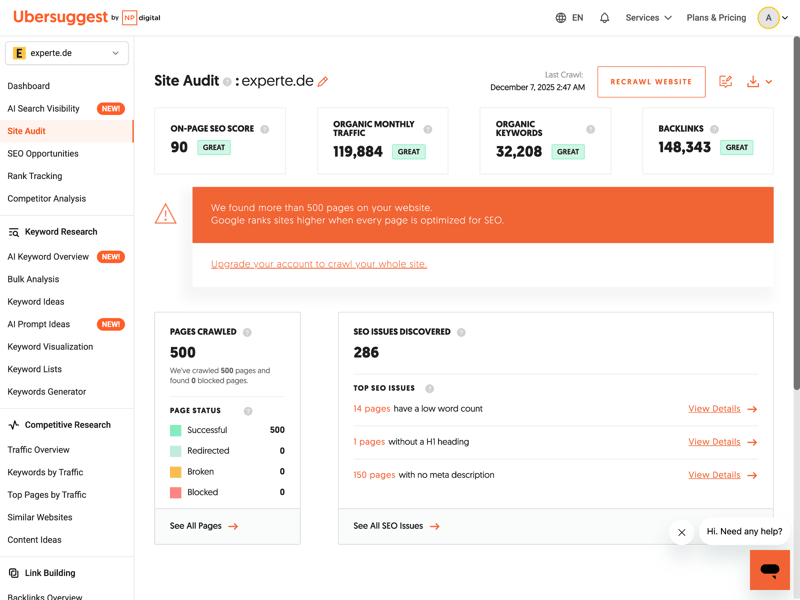
The score reflects your site’s technical health and puts it in context with traffic and backlinks.
The list of optimization opportunities is set up as an interactive to-do list. You can work through each item step by step and gradually improve your website’s technical foundation. Question mark icons help you understand what each suggestion means.
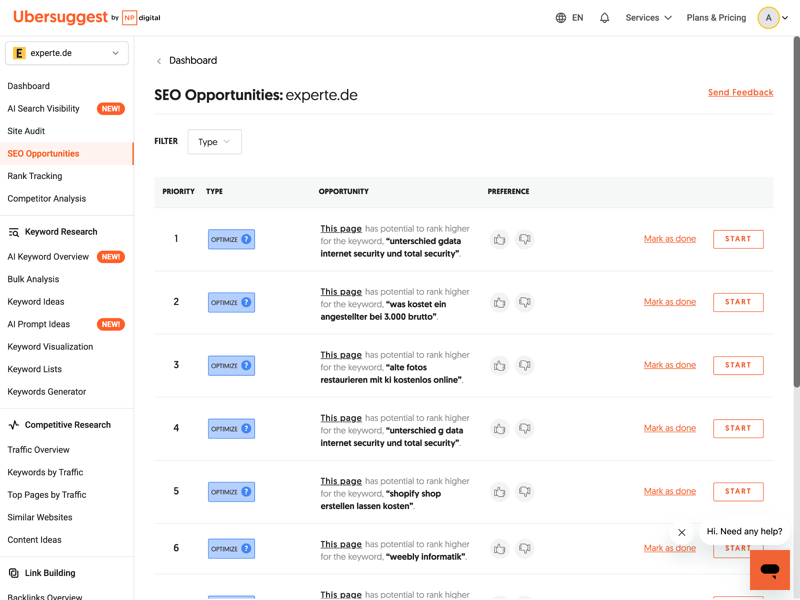
Prioritized action items help you fix critical errors first.
Early AI tracking and content support
Ubersuggest is also integrating more AI features. Currently, the focus is on simplifying certain tasks, like an “AI Writer” for content creation. However, dedicated tracking for rankings in AI chatbots like Gemini or Perplexity isn’t available yet.
That said, you do get insights into ChatGPT visibility. Ubersuggest shows whether and how often a brand was mentioned in the chatbot’s responses over the past 30 days:
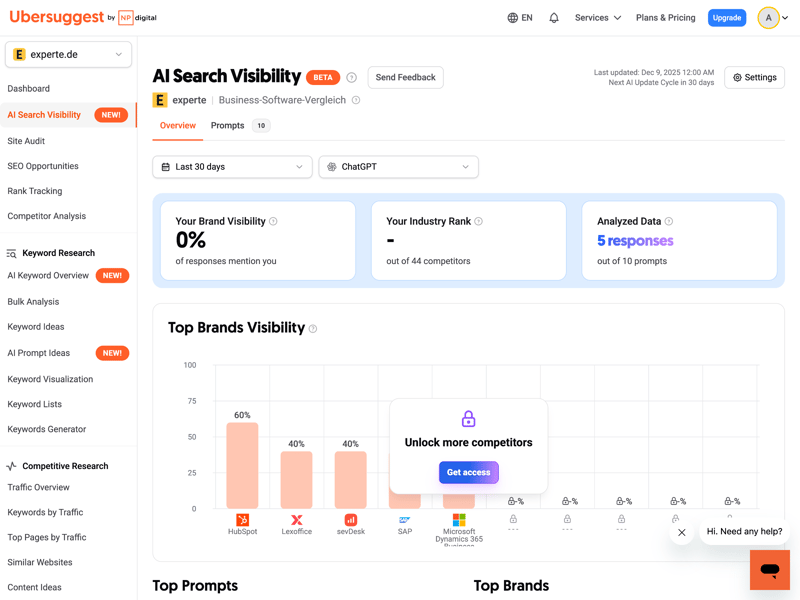
Ubersuggest tracks early AI signals through brand mentions in ChatGPT responses.
The “Content Ideas” section also helps with topic research beyond traditional Google search. The tool analyzes which content is currently being shared frequently on platforms like Facebook, Pinterest, or Reddit. This gives you a better sense of what topics resonate not just in search but also on social media.
Integrations, extensions, and limitations
When it comes to integrations, the tool is practical but limited. You can connect Google Search Console and Google Analytics, which is highly recommended for more accurate data.
Another highlight is the Chrome extension. It’s included with your subscription and displays SEO data like search volume and cost-per-click directly in Google search results. You’ll also find new experimental features in the “Labs” section that Ubersuggest rolls out for testing.
For agencies and advanced users, there are some limitations. There’s no API for automated data processing, no white-label reports with custom branding, and no bulk query options.
Ubersuggest’s additional modules clearly show its strength as a tool for freelancers, small businesses, and anyone who wants to optimize their website. The Site Audit stands out with its clear structure and easy-to-understand explanations. The daily rank tracking with local focus is also practical and reliable.
Limitations become apparent with more complex agency requirements: without an API, white-label reports, and bulk processing options, scalability is restricted. The AI features are still in their early stages but already offer a glimpse of what’s to come.
Support
| Documentation and tutorials |
| 2/3 |
| Support channels | Support is primarily available via e-mail but is also accessible via live chat; a phone hotline is not offered. | 1.5/2 |
| Quality of support |
| 0.5/2 |
| Reviews on review platforms |
| 1/3 |
Ubersuggest benefits from the strong reputation of its owner, Neil Patel, who has been a well-known SEO expert for many years.
As a result, the support and learning resources are extensive. They go beyond standard help articles and include blog posts, YouTube videos, and webinars. The goal is to teach you both how to use the tool and the fundamentals of SEO.
If you have specific questions about using Ubersuggest, the help center is your first point of reference. There you’ll find answers to the most common questions about features and settings.
One downside for German-speaking users: the technical documentation is almost entirely in English.
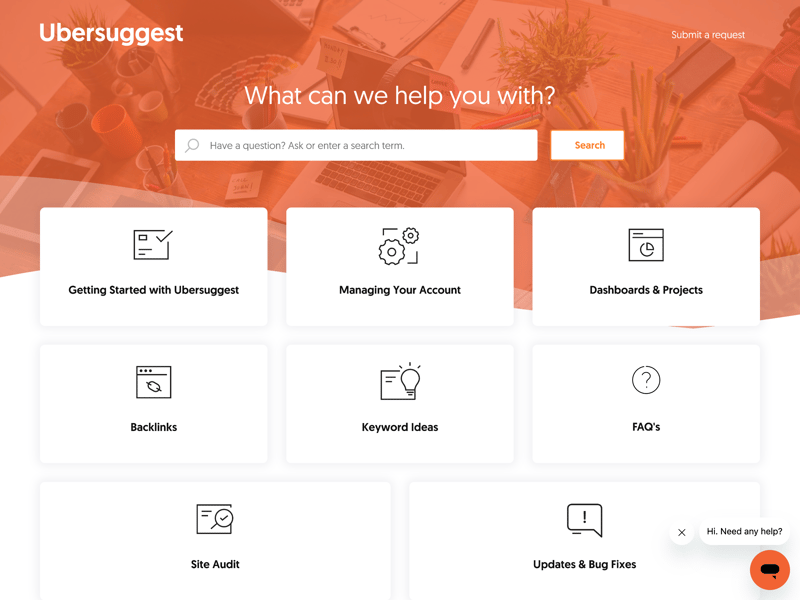
The knowledge base (English only) covers all the key features.
Direct support via contact form
If you need to reach the support team directly, there’s a contact form on the website. However, there’s no always-available live chat like some premium providers offer.
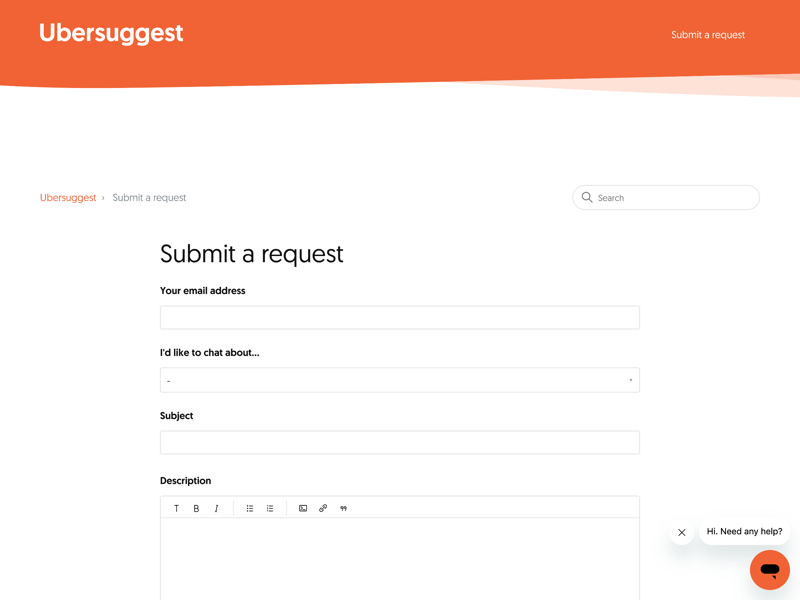
Direct communication with the support team happens through a standard contact form.
User feedback on support is mixed. Many people report getting helpful answers, but others complain about slow response times. The personal support doesn’t always seem to keep up with the pace and visibility of the marketing.
Ubersuggest’s support shines through its wealth of learning materials. The clear, well-produced videos, guides, and explanations from Neil Patel are especially helpful for beginners and make getting started with SEO much easier.
The technical customer support, on the other hand, is just average. The predominantly English documentation and inconsistent response times don’t quite match the service level of pricier premium tools.
Pricing
| Trial version |
| 2/2 |
| Starter plan | $29.00 | 2/2 |
| Advanced plan | $99.00 | 2/2 |
| Team plan | $29.83 | 2/2 |
| Rank tracking | $49.00 | 2/2 |
Ubersuggest is one of the more affordable SEO tools on the market. There’s also a permanently free plan. The number of daily searches and projects is limited, but for occasional use or small projects, it might be all you need.
Here’s a comparison of Ubersuggest’s plans:
| Individual | Business | Enterprise | |
|---|---|---|---|
| Monthly price | from $29.00 | from $49.00 | from $99.00 |
| Contract period (months) | 1 | 1 | 1 |
| General limits | |||
| Users included | 1 | 2 | 5 |
| Maximum user | unlimited | unlimited | unlimited |
| Reports per day | 150 | 300 | 900 |
| Results per report | 20,000 | 50,000 | 100,000 |
| Historical data | 1 years | 1 years | 1 years |
| Site audit | |||
| Projects | 1 | 7 | 15 |
| Crawled pages | 4,000 | 20,000 | 40,000 |
| JavaScript Rendering | ✗ | ✗ | ✗ |
| Rank tracking | |||
| Keywords | 125 | 1,050 | 4,500 |
| Frequency | Weekly | Weekly | Weekly |
The seven-day free trial lets you test the paid features with no commitment. If you decide to subscribe afterward, you’re also covered by a 30-day money-back guarantee on all plans.
Ubersuggest price comparison
How affordable is Ubersuggest compared to other SEO tools? To find out, we looked at costs across four typical use cases:
- 1.
Beginner: 1 user, 100 queries per day
- 2.
Advanced: 1 user, 500 queries per day, min. 50,000 results per query
- 3.
Team: 5 users
- 4.
Rank tracking: 1,000 keywords monitored
Here are the results:
| Beginner | Advanced | Team | Rank tracking | |
|---|---|---|---|---|
| $29.00 | $89.00 | $149.00 | $29.00 |
| $29.00 | $99.00 | $29.83 | $49.00 |
| $37.70 | $52.70 | $145.70 | $97.70 |
| $50.00 | $100.00 | $169.00 | $50.00 |
| $52.00 | $95.20 | $132.00 | $95.20 |
| $117.33 | $416.66 | $297.33 | $208.33 |
| $138.04 | $277.24 | $392.78 | $138.04 |
| $143.25 | $239.00 | $235.00 | $143.25 |
| $208.00 | $374.00 | $448.00 | $208.00 |
The advantage is especially clear for team use. While market leaders often charge steep fees for each additional seat, Ubersuggest keeps pricing generous. For a price that barely covers a single license elsewhere, you often get access for multiple team members.
Pricing is one of Ubersuggest’s strongest selling points. It ranks among the most affordable SEO tools on the market across all tiers—whether you’re a beginner, intermediate user, or part of a team. There’s also a free basic version, and paid plans come with a seven-day free trial.
Final Verdict
Is Ubersuggest a serious SEO tool—or mainly a marketing vehicle for Neil Patel? The results were surprisingly strong in several areas. In some key metrics—like the size of its keyword database and the accuracy of search volume data—Ubersuggest actually outperforms premium tools from our comparison. At the same time, it manages to present all that data in an interface that won’t overwhelm beginners.
For in-depth technical analysis or complex workflows, though, the platform reaches its limits. Support is another weak spot: direct contact is only available via a contact form, and response times can be slow. The help resources are extensive but mostly available only in English.
Overall, Ubersuggest delivers excellent value for money. It’s especially well-suited for content marketing teams and small to mid-sized businesses focused on growth and keyword research. If you need high-end features for technical audits, you’re better off looking elsewhere.

Ubersuggest User Reviews
What do Ubersuggest users think of the platform? Customer feedback on G2, Capterra, and Trustpilot highlights pros and cons that partly align with our own test results:
Strong value for money
The community almost unanimously praises the pricing. The option of a “lifetime deal” (one-time payment instead of a subscription) is also a popular highlight.Intuitive for beginners
Many newcomers appreciate the gentle learning curve. The interface doesn’t overwhelm you with complex data tables. Instead, it guides you through the analysis step by step.Excellent content inspiration
Content marketing teams love the sheer volume of keyword ideas and topic suggestions. The tool is widely regarded as a great resource for overcoming writer’s block and discovering new niches.
Support responsiveness
One common complaint is the availability and quality of support. Users also occasionally report difficulties with cancellations or refunds.Lacks depth for pros
Experts and agencies miss certain features. Some users want advanced filters, export options, or an API.Performance issues
Some reviews mention slow loading times or bugs in the interface. Reports of sluggish dashboards or timeouts come up repeatedly in user feedback.
Alternatives to Ubersuggest
Is Ubersuggest not the right SEO tool for you? One of these alternatives might be a better fit:
Serpstat
If you need more technical depth at a similar price, Serpstat offers significantly more features in the same price range. These include technical site audits and reporting tools.Mangools
Mangools also scores with a user-friendly interface and accurate keyword data. Complex enterprise features aren’t part of the package.SpyFu
SpyFu can be even cheaper than Ubersuggest in some scenarios. It provides more in-depth insights, especially for competitor analysis and PPC data.
Here’s an overview of other comparable options: