Best Backlink Checker of 2026: 9 Tools Tested & Ranked


Backlinks are one of Google’s top ranking factors—provided they’re high-quality. A good backlink checker lets you analyze your link profile, spot potentially harmful links, and see how you stack up against the competition.
We put nine of the most popular backlink tools to the test and picked the five best.
The 5 Best Backlink Checkers We Tested
In our roundup of the best SEO tools, we tested nine platforms in depth. All of them offer powerful backlink analysis tools, but they differ a lot in features, data quality, ease of use, support, and cost (more on how we rated them later).
These five stood out for their backlink features:
Semrush: Our Top Pick

Semrush is one of the most comprehensive SEO platforms out there. On top of backlink analysis, it offers tools for keyword research, technical website audits, content marketing, and social media.
In our backlink checker test, Semrush earned the top score of 1.0. What set it apart was its large backlink index, plus features like the built-in Toxicity Score, Backlink Gap tool, link-building assistant, anchor text analysis, and advanced filtering options.
What does Semrush offer for backlink analysis?
Enter a domain, and Semrush instantly delivers a detailed overview of key metrics: the number of referring domains and backlinks, the Authority Score, estimated monthly visitors, and how the link profile has changed over time.
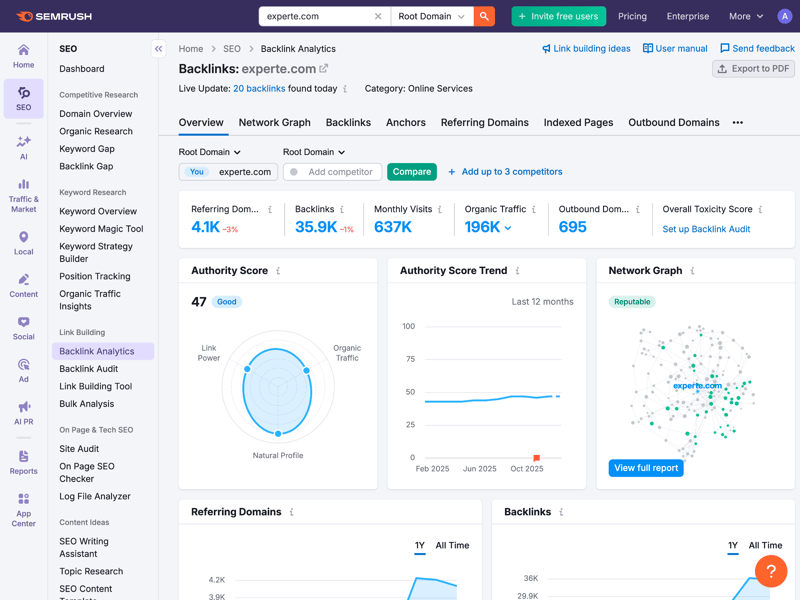
Backlink overview for experte.com with key metrics.
The backlink index updates continuously and accurately detects technical elements such as redirects, canonical tags, and JavaScript-generated links. A network diagram maps out the connections between websites and filters for link type, link placement, traffic from linking sites, and dofollow or nofollow links, letting you narrow down your analysis precisely.
One standout feature is the Toxicity Score, which automatically flags potentially toxic backlinks. The built-in link-building tool helps too, suggesting potential link sources that fit your needs.
What are Semrush’s weaknesses?
The biggest drawback is its complexity. With so many features, the interface can feel overwhelming for beginners.
Cost is another hurdle. The higher-tier plans rank among the most expensive in our test, making them difficult to justify for smaller teams.
During testing, we also noticed occasional delays in the backlink audit. Although Semrush scored highly for its backlink index, it ranked third out of nine tools for the number of referring domains identified. Moz Pro and Ubersuggest returned slightly more domains in our test.
| Referring domains (on average) | |
|---|---|
 | 12,100 |
 | 12,100 |
 | 8,927 |
 | 5,627 |
 | 5,200 |
 | 3,505 |
 | 2,305 |
 | 1,172 |
 | 224 |
Semrush is ideal for agencies, businesses, and SEO teams that need to analyze large numbers of backlinks regularly. Its extensive filtering and reporting tools make it a powerful choice. However, beginners may find the platform overwhelming because of its wide range of features.
Pros and cons of Semrush
Large and up-to-date backlink index
Semrush has one of the largest backlink databases in our test, and its index is updated continuously.Comprehensive analysis tools
Semrush covers all key aspects of backlink analysis, from toxicity scoring to anchor text analysis and backlink gap analysis.Built-in link-building tool
Semrush automatically suggests potential link sources and helps you build new backlinks strategically.Extensive learning resources
The Semrush Academy offers free certification courses that complement the detailed product documentation well.
High costs
The larger plans in particular rank among the most expensive in our comparison.Steep learning curve
The sheer number of features makes it challenging for beginners, and it may take some time to get comfortable with the dashboard.Audit delays
In our test, large domains caused noticeable loading times.
| Feature set |
| 5/5 |
| Number of backlinks | 8,927 referring domains | 3/4 |
| Data quality |
| 3.5/4 |
| Backlink filters |
| 2/2 |
Ahrefs: Premium Backlink Checker for Pros

Ahrefs is one of the most expensive SEO tools on the market. Originally launched as a specialized backlink tool, Ahrefs now also covers keyword research, technical website audits, and competitor analysis, among other features.
In our backlink checker test, Ahrefs earned a score of 1.2. Its high data quality and especially up-to-date backlink index were key factors. Ahrefs claims to update its index every 15 to 30 minutes and quickly removes deleted links.
The clean, modern design makes data easy to understand and makes it easy to find your way around the platform. Performance is another strong point: even when analyzing large domains, Ahrefs remains fast and responsive, with no noticeable lag.
What does Ahrefs offer for backlink analysis?
The “Backlink Profile” module breaks down links in detail. Ahrefs reliably detects redirects and JavaScript links and provides key metrics like Domain Rating and estimated traffic from referring pages. Powerful filters (link type, traffic from the linking page, or dofollow vs. nofollow) let you zero in on specific parts of your link profile.
One particularly useful feature is the analysis of referring IP addresses. For experte.com, Ahrefs identified 849 referring IPs and provided details on countries, internet providers, domain rating, and new or lost links.
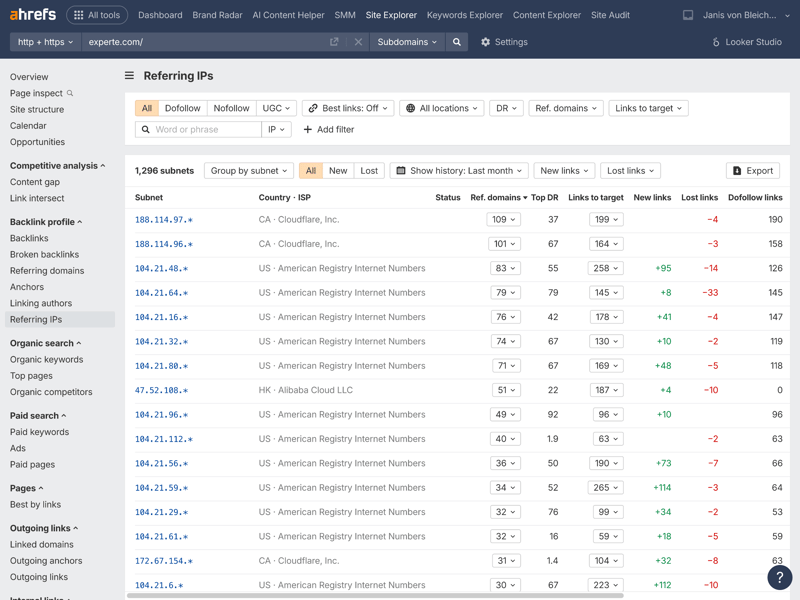
The IP address analysis provides helpful insights with plenty of details.
Ahrefs also analyzes internal linking. In the Site Explorer, the “Internal Links” section shows how pages on your website connect. For experte.com, Ahrefs found 5,523 link groups, making it easy to spot which content is well-connected and where there’s room for improvement.
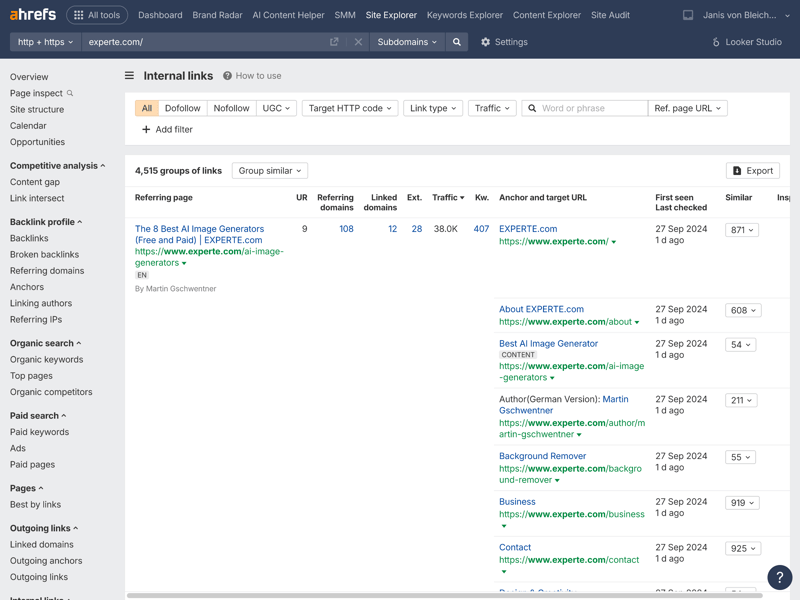
5,523 link groups with anchor texts, traffic data, and similar pages at a glance.
In our test, Ahrefs found an average of 5,627 referring domains, a solid result, though some competitors performed even better.
| Referring domains (on average) | |
|---|---|
| 12,100 |
| 12,100 |
| 8,927 |
| 5,627 |
| 5,200 |
| 3,505 |
| 2,305 |
| 1,172 |
| 224 |
What are Ahrefs’ weaknesses?
Ahrefs is a premium tool with a correspondingly high price tag. In many cases, it’s one of the most expensive options available. There’s no free trial and no money-back guarantee.
Ahrefs doesn’t offer an automatic toxicity score. Instead, you’ll need to assess link quality manually using the data provided. That takes more experience and time than tools with built-in spam detection.
Beginners may also find the interface confusing. Some sections appear multiple times or under very similar names. The Academy, blog, and most support resources are available only in English.
Ahrefs is best suited for experienced SEO professionals and agencies who rely on data-driven decisions and need an up-to-date backlink index. Its detailed IP analysis and in-depth internal linking breakdown make it especially useful for technical link profile audits.
Pros and cons of Ahrefs
Highly up-to-date backlink index
Ahrefs claims its index updates every 15 to 30 minutes and quickly removes deleted links.Detailed analysis of referring IP addresses
This helps you identify potential link networks and unusual backlink patterns more easily.Strong performance
Even when analyzing large domains, Ahrefs stays fast and responsive.Detailed internal linking analysis
The Site Explorer shows how pages on a website link to each other, including anchor texts and traffic data.
No automatic toxicity score
You’ll need to evaluate backlink quality yourself using the available data.Expensive
Ahrefs is one of the priciest SEO tools around. There’s no free trial, and no money-back guarantee either.Learning materials only in English
The Academy, blog, and most of the support content are only available in English.
| Feature set |
| 5/5 |
| Number of backlinks | 5,627 referring domains | 2/4 |
| Data quality |
| 4/4 |
| Backlink filters |
| 2/2 |
Moz Pro: Largest Backlink Index in Our Test

Moz Pro is one of the oldest SEO platforms on the market. For years, it shaped search engine optimization with metrics like Domain Authority (DA) and Page Authority (PA). Today, Moz Pro offers tools for backlink analysis, keyword research, site audits, and rank tracking.
In our backlink checker test, Moz Pro earned an A (1.3), largely because it has the largest backlink index of any tool we compared. Outside of backlink analysis, though, Moz Pro struggles to keep up. In our overall comparison, it landed in last place with a barely passing grade (2.4).
What does Moz Pro offer for backlink analysis?
Backlink analysis is one of Moz Pro’s six core features. After you enter a domain (we used experte.com in our test), the tool instantly shows key metrics: domain authority, the number of referring domains and backlinks, and ranking keywords.
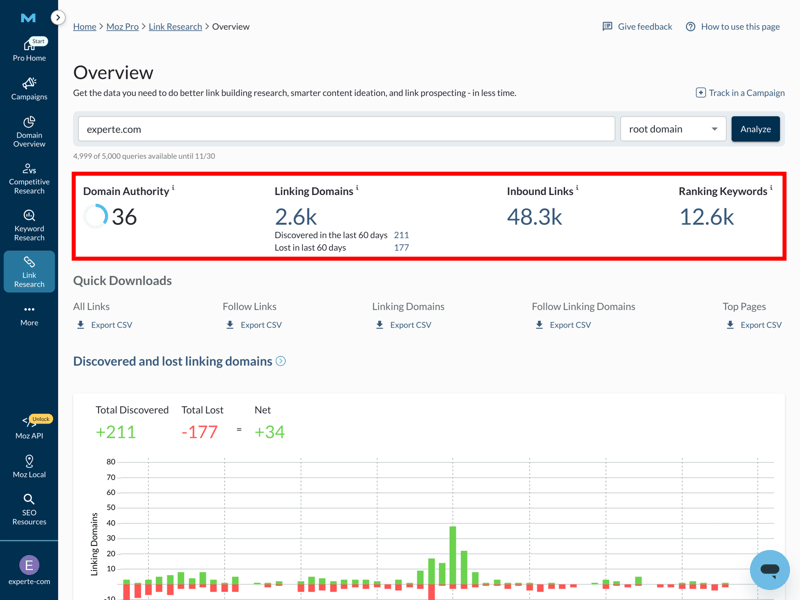
The link research overview puts all the key backlink profile metrics at a glance.
In our test, Moz Pro found an average of 12,100 referring domains per test domain. That puts it in first place, tied with Ubersuggest:
| Referring domains (on average) | |
|---|---|
| 12,100 |
| 12,100 |
| 8,927 |
| 5,627 |
| 5,200 |
| 3,505 |
| 2,305 |
| 1,172 |
| 224 |
Moz Pro also tracks how your link profile changes over time, showing when you gained or lost backlinks. In our example, there was a net gain of 34 links. To evaluate links, Moz Pro relies on its own metrics like Domain Authority and Spam Score. These don’t come from Google, but they still provide a useful indication of backlink quality.
What are the weaknesses of Moz Pro?
We noticed some gaps in the data during testing, with certain sections occasionally showing no results at all. Moz Pro also offers fewer filtering options than some competitors. For example, it lacks filters for link position and the traffic of the linking page. Its ability to detect JavaScript-generated links is also limited.
The dashboard looks modern, but the menu navigation feels layered and isn’t always intuitive.
Moz Pro sits in the mid-price range. For backlink analysis alone, you’ll find cheaper options. And if you want a full SEO suite, competitors often pack in more features at similar prices.
Moz Pro is best for teams that prioritize a large backlink index and can do without some convenience features. It’s less ideal for users who need a comprehensive SEO suite or advanced analysis filters.
Pros and cons of Moz Pro
Largest backlink index in comparison
With 12,100 referring domains, Moz Pro ties for first place with Ubersuggest. Both provide a strong foundation for in-depth backlink analysis.Spam Score as a guide
The Spam Score helps you quickly spot potentially problematic backlinks.Solid historical tracking
The timeline of new and lost backlinks makes it easy to see changes in your link profile.Lower entry price than Semrush and Ahrefs
Moz Pro is more affordable than Semrush and Ahrefs, making it a suitable option for teams on a tighter budget.
Limited features and filters
Moz Pro lacks some filter options for deeper analysis. It also doesn’t fully detect JavaScript-generated links.English only
The interface, support, and learning materials are available primarily in English.Last place in our test
Outside of backlink analysis, Moz Pro can’t keep up with modern SEO suites. In our comparison, it ranked last with an overall score of 2.4.
| Feature set |
| 4.5/5 |
| Number of backlinks | 12,100 referring domains | 4/4 |
| Data quality |
| 3/4 |
| Backlink filters |
| 1/2 |
Mangools: Simple Backlink Analysis for Beginners

Mangools takes a different approach from most SEO suites. Instead of one central platform, it offers five separate tools, each covering a specific area. This makes Mangools easy to understand and navigate, although switching between tools can feel somewhat clunky.
In our backlink checker review, Mangools scored a 1.7, earning praise for its robust toolset and intuitive interface. The one drawback? The split across five separate tools can slow down your workflow.
What does Mangools offer for backlink analysis?
Mangools handles backlink analysis through its LinkMiner module. After entering experte.com as a test domain, the tool displays a concise overview with key metrics like Citation Flow, Trust Flow, referring IPs, referring domains, and active backlinks. Mangools pulls this data from Majestic’s backlink index.
One of the most useful features is the built-in live preview. Click on any backlink, and the linking page appears in the right-hand panel. The anchor text is highlighted, so you can check the link’s position, type, and context without leaving the tool.
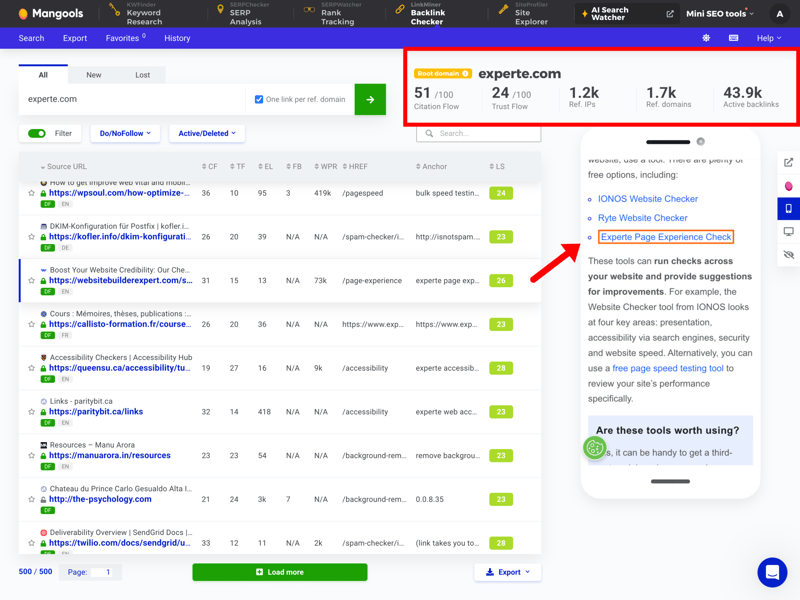
The backlink overview in LinkMiner combines key metrics with a live preview of the linking page.
In our test, Mangools identified an average of 5,200 referring domains, placing it in the middle of the pack:
| Referring domains (on average) | |
|---|---|
| 12,100 |
| 12,100 |
| 8,927 |
| 5,627 |
| 5,200 |
| 3,505 |
| 2,305 |
| 1,172 |
| 224 |
What are Mangools’ weaknesses?
The platform splits its features across five separate tools, which slows down your workflow. You can’t jump straight from keyword research in KWFinder to backlink analysis in LinkMiner, for example. Instead, you have to transfer domains and keywords manually, which costs time in daily use.
The analysis features also have some gaps. There are no filters for link age or the traffic of the linking page, and Mangools doesn’t provide an automatic toxicity score. Since it relies on Majestic’s backlink index, its JavaScript detection is less reliable than tools with their own crawlers.
Mangools is a great fit for beginners and small teams who value ease of use and clear pricing. Every plan includes the same features, and the only difference is usage limits. A 10-day free trial is also available.
Pros and cons of Mangools
Live preview of linking pages
One click opens the linking page right inside the tool, so you can check the context of a backlink.Clear pricing
Every plan includes the full set of features. Only the usage limits differ.Fast and helpful support
The chatbot Fin and email support respond quickly and reliably.
No seamless switching between modules
The five separate apps make switching between modules cumbersome, and you’ll end up jumping between browser tabs a lot.Limited analysis features
Filters for link age and traffic of the linking page are missing. There’s also no automatic toxicity score.English only
The interface, support, and learning materials are only available in English.
| Feature set |
| 5/5 |
| Number of backlinks | 5,200 referring domains | 2/4 |
| Data quality |
| 2.5/4 |
| Backlink filters |
| 1.5/2 |
Ubersuggest: A Simple Start for Backlink Analysis

Ubersuggest was founded by marketing expert Neil Patel. Over the years, it has grown from a basic keyword tool into a full SEO suite. It targets beginners and small businesses looking for an affordable, easy-to-use alternative to the major SEO platforms.
In our backlink checker test, Ubersuggest scored a 1.8, thanks in part to its large backlink index. But it lacks some key features for advanced analysis, so it doesn’t quite match the top performers.
What does Ubersuggest offer for backlink analysis?
In Ubersuggest, you’ll find backlink analysis under the Link Building module. After you enter a domain, the tool provides a quick overview of key metrics like domain authority, referring domains, and backlinks. A trend graph also shows how the link profile has evolved over the past few years.
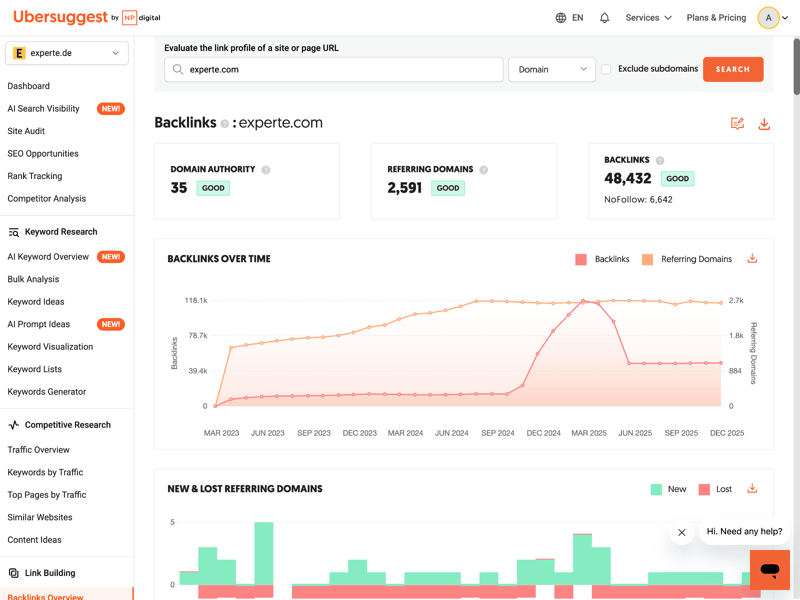
Domain Authority, referring domains, and backlinks at a glance, plus a trend graph showing how the link profile has changed over time.
Ubersuggest also highlights which backlinks and referring domains are new or lost. Another handy feature is the direct integration with AnswerThePublic: you can run trend analyses and find keyword ideas without leaving Ubersuggest.
The size of the backlink index is impressive, too. In our test, Ubersuggest found an average of 12,100 referring domains, tying it for first place with Moz Pro.
| Referring domains (on average) | |
|---|---|
| 12,100 |
| 12,100 |
| 8,927 |
| 5,627 |
| 5,200 |
| 3,505 |
| 2,305 |
| 1,172 |
| 224 |
What are Ubersuggest’s weaknesses?
Ubersuggest doesn’t have its own web crawler. Instead, it relies on external data sources for backlink analysis, so the quality of the results therefore depends heavily on those external sources.
Its ability to detect JavaScript-generated links is also limited. Redirects and canonical tags are only considered during site audits, not in the backlink analysis itself.
Filtering is another weak spot. You can’t filter by link position, traffic of the linking page, or IP addresses, which makes deeper link profile analysis harder. There’s also no live chat support.
Ubersuggest is a great fit for beginners and small teams on a budget. It’s one of the most affordable tools in our test, and even the lower-tier plans offer solid features.
It’s also the only tool in our comparison that offers a lifetime plan for a one-time payment. There’s even a free basic version with limited features.
Pros and cons of Ubersuggest
Largest backlink index in our test
Ubersuggest, alongside Moz Pro, identified the most referring domains on average.Beginner-friendly interface
Ubersuggest makes backlink analysis easy with a clean layout, tooltips, and a guided setup process.Affordable pricing
Ubersuggest is one of the most budget-friendly tools in our comparison. It’s also the only provider that offers a lifetime plan and a free basic version.
No proprietary web crawler
Ubersuggest relies on external data sources, which means data quality isn’t as consistent as tools with their own crawlers.Limited analysis features
Missing features include IP analysis, traffic data for linking sites, and an automated toxicity score.No live support
Ubersuggest doesn’t offer live chat or a chatbot. You can only reach support through a contact form.
| Feature set |
| 3.5/5 |
| Number of backlinks | 12,100 referring domains | 4/4 |
| Data quality |
| 2/4 |
| Backlink filters |
| 1.25/2 |
More Backlink Checker Alternatives
Didn’t find the right backlink tool in our top 5? Take a look at the other providers. Here’s the full ranking of all nine SEO platforms from our comparison, with links to the detailed reviews:


How We Tested the Backlink Checkers
We put nine SEO platforms through a hands-on test, evaluating every key area of a modern SEO suite: keyword research, technical website audits, backlink analysis, user interface, support, and cost.
For backlink analysis, we focused on four criteria:
- 1.
Features
- 2.
Backlink filters
- 3.
Number of backlinks
- 4.
Data quality
Features
A good backlink checker does more than count links. To truly understand your link profile, you need deeper analysis tools.
We examined what each tool can do, from analyzing anchor text and spotting toxic links to comparing your backlinks against competitors. The more features a tool offers, the easier it is to find opportunities and fix weak spots in your link profile.
Ahrefs | Mangools | Semrush | SE Ranking | Moz | Sistrix | Serpstat | SpyFu | Ubersuggest | |
|---|---|---|---|---|---|---|---|---|---|
Backlink history | ✓ | ✓ | ✓ | ✓ | ✓ | ✓ | ✓ | ✓ | ✓ |
Referring domains | ✓ | ✓ | ✓ | ✓ | ✓ | ✓ | ✓ | ✓ | ✓ |
Referring IPs | ✓ | ✓ | ✓ | ✓ | ✗ | ✓ | ✓ | ✗ | ✗ |
Lost links | ✓ | ✓ | ✓ | ✓ | ✓ | ✓ | ✓ | ✓ | ✓ |
Toxic links | ✓ | ✓ | ✓ | ✓ | ✓ | ✗ | ✗ | ✗ | ✗ |
Broken links | ✓ | ✓ | ✓ | ✓ | ✓ | ✓ | ✗ | ✗ | ✗ |
Link quality metrics | ✓ | ✓ | ✓ | ✓ | ✓ | ✓ | ✓ | ✓ | ✓ |
Anchor text analysis | ✓ | ✓ | ✓ | ✓ | ✓ | ✓ | ✓ | ✓ | ✓ |
Top pages by links | ✓ | ✓ | ✓ | ✓ | ✓ | ✓ | ✓ | ✓ | ✓ |
Backlink gap analysis | ✓ | ✓ | ✓ | ✓ | ✓ | ✓ | ✓ | ✓ | ✓ |
Total | 10 | 10 | 10 | 10 | 9 | 9 | 8 | 7 | 7 |
Backlink filters
Filters let you dig deeper into your backlinks. Sort by link type, placement, traffic, or authority to find patterns and focus on what matters most.
The more filters a tool offers, the faster you can analyze your backlinks and spot issues in your link profile.
Ahrefs | Semrush | Mangools | SE Ranking | Sistrix | Serpstat | SpyFu | Ubersuggest | Moz | |
|---|---|---|---|---|---|---|---|---|---|
Nofollow/Dofollow | ✓ | ✓ | ✓ | ✓ | ✓ | ✓ | ✓ | ✓ | ✓ |
Link authority | ✓ | ✓ | ✓ | ✓ | ✓ | ✓ | ✓ | ✓ | ✓ |
Anchor text | ✓ | ✓ | ✓ | ✓ | ✓ | ✓ | ✓ | ✓ | ✓ |
Link type (text, image, …) | ✓ | ✓ | ✓ | ✓ | ✓ | ✓ | ✓ | ✓ | ✗ |
Link position (content, footer, …) | ✓ | ✓ | ✓ | ✗ | ✗ | ✗ | ✗ | ✗ | ✗ |
Link age | ✓ | ✓ | ✗ | ✓ | ✓ | ✓ | ✗ | ✓ | ✓ |
Traffic of referring page | ✓ | ✓ | ✗ | ✓ | ✗ | ✗ | ✓ | ✗ | ✗ |
Language of referring page | ✓ | ✓ | ✓ | ✗ | ✓ | ✗ | ✗ | ✗ | ✗ |
Total | 8 | 8 | 6 | 6 | 6 | 5 | 5 | 5 | 4 |
Number of backlinks
The accuracy of a backlink analysis depends largely on the size of the tool’s index. If a tool captures only a fraction of the actual links, you get an incomplete picture of your link profile, which can lead to wrong conclusions.
That’s why we looked at how many referring domains each tool identified per test URL. A larger backlink index can provide a more complete picture of a site’s link profile, provided the underlying data is accurate and up to date.
| Referring domains (on average) | |
|---|---|
| 12,100 |
| 12,100 |
| 8,927 |
| 5,627 |
| 5,200 |
| 3,505 |
| 2,305 |
| 1,172 |
| 224 |
Data Quality
A large index doesn’t help much if the data is outdated, incomplete, or unreliable. So we checked how current the data is and whether the tools correctly identify technical details like redirects, canonical tags, and JavaScript-generated links.
We also looked at how well the tools identify potentially problematic backlinks. Features like an automatic toxicity score or spam detection make it easier to spot problematic links fast.
Scoring table
Here’s how each tool performed in our four test categories:
 Semrush |  Sistrix |  Ahrefs |  SE Ranking |  Ubersuggest |  Serpstat |  Mangools |  SpyFu |  Moz |
|---|
| Semrush | Sistrix | Ahrefs | SE Ranking | Ubersuggest | Serpstat | Mangools | SpyFu | Moz | |
|---|---|---|---|---|---|---|---|---|---|
Backlink Analysis15% | |||||||||
5/5 | 4.5/5 | 5/5 | 5/5 | 3.5/5 | 4/5 | 5/5 | 3.5/5 | 4.5/5 | |
3/4 | 1/4 | 2/4 | 1/4 | 4/4 | 1/4 | 2/4 | 0/4 | 4/4 | |
3.5/4 | 3.5/4 | 4/4 | 2.5/4 | 2/4 | 3/4 | 2.5/4 | 1.5/4 | 3/4 | |
2/2 | 1.5/2 | 2/2 | 1.5/2 | 1.25/2 | 1.25/2 | 1.5/2 | 1.25/2 | 1/2 | |
| 13.5 / 15 Points | 10.5 / 15 Points | 13 / 15 Points | 10 / 15 Points | 10.75 / 15 Points | 9.25 / 15 Points | 11 / 15 Points | 6.25 / 15 Points | 12.5 / 15 Points | |
Final Verdict: Which Backlink Checker Is Best?
The right backlink checker depends on what you need. All five of our top picks analyze backlinks reliably, but each has its own focus. The biggest differences come down to features, data quality, and the depth of analysis.
Moz Pro and Ubersuggest found the most referring domains in our test. They’re a good choice if having a large backlink index is your priority.
Mangools is one of the easiest platforms to use, making it a good choice for beginners and smaller teams.
Looking for a powerful SEO platform that does more than backlink analysis? We put nine popular tools to the test in our best SEO tools comparison, comparing them across all key SEO areas to help you find the right fit.