On-Page Analysis: How to Find and Fix SEO Issues on Your Website

Before you start optimizing your website for search engines, you need a clear picture of where it stands. That’s what an on-page analysis does: it pinpoints technical and content weaknesses and highlights untapped opportunities. With this data, you can improve rankings, visibility, and conversions in a targeted way.
Here’s how an on-page analysis works and which factors matter most.
What Is an On-Page Analysis?
Think of it like taking your car in for an inspection. You wouldn’t start replacing parts without knowing what’s wrong—you’d run a full diagnostic first. An on-page analysis does the same thing for your website.
On-page analysis is a key part of search engine optimization. It uncovers your website’s specific weaknesses and opportunities, giving you a solid foundation for optimization.
Key questions it answers:
How does Google crawl and evaluate my pages?
Are there technical issues blocking better rankings?
Is the content relevant, unique, and easy to understand?
Where are you losing potential traffic?
To get reliable results, you need accurate data. Tools like Ahrefs, Semrush, or the free Google Search Console give you the insights you need on crawling, keywords, content, and technical factors.
An on-page analysis covers many areas that often overlap and influence each other. There are three main categories: content, technical SEO, and user behavior, but some factors fall between them.
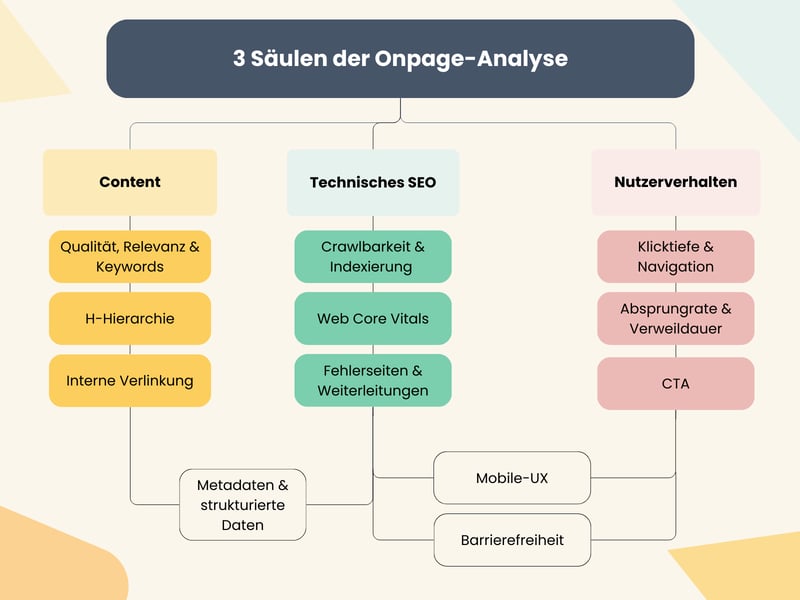
An on-page analysis can be divided into three areas.
Unlike on-page analysis, off-page analysis focuses on factors outside your website: backlinks, mentions, and other external signals that affect your site’s performance.
What Does On-Page Analysis Actually Look At?
To get a clear picture of your website’s health, dig into three key areas. Each one has specific factors that directly influence how well your pages rank on Google.
Technical Factors
For search engines to properly crawl, understand, and rank your content, your website has to be technically sound.
☑ Crawlability & Indexing
The first question is simple: can search engines like Google easily find, read, and index your website? If not, no amount of SEO work will make a difference. Here’s how to check for basic technical errors:
These quick checks help you spot and address problems fast:
Check your robots.txt file
Make sure the file is accessible and isn’t accidentally blocking important parts of your site. Check for unintended “disallow” rules or blocks on CSS/JS files, which can cause major issues.Review your XML sitemap
Your sitemap should be error-free, up-to-date, and submitted in Google Search Console. Include only relevant, indexable URLs.Meta robots tags & X-Robots-Tag
Use the noindex tag on pages you don’t want indexed and the X-Robots-Tag for files like PDFs or images. This gives you direct control over what gets indexed and how link equity is passed.Indexing status
Check the “Pages” report in Google Search Console regularly. It shows how many of your URLs are indexed, which ones aren’t, and why. That’s direct feedback from Google on what’s working and what’s not.Canonical tags
Make sure they’re set up correctly and point to the right URL. Canonical tags are key for avoiding duplicate content, consolidating ranking signals to one main URL, and preventing duplicate versions from appearing in search results.URL structure
Use clean, logical URLs with consistent formatting, and avoid unnecessary parameters. A well-structured URL helps both users and search engines understand your content and can also improve click-through rates (CTR).
☑ Core Web Vitals (Page Speed)
This section covers technical performance and the user experience while a page loads. Google groups the key metrics under Core Web Vitals. A slow page frustrates users and hurts your rankings.
Here’s how to measure and improve your page speed:

Error Pages and Redirects
This analysis checks whether your links and URLs are working properly. Errors and badly configured redirects waste crawl budget and create a poor user experience.
SEO tools give you useful insights on these key areas:
Internal 404 errors (broken links)
This identifies internal links pointing to pages that no longer exist and returns a 404 error.Server errors (5xx status codes)
Are some URLs unreachable due to server issues and returning a critical 5xx status code? This can get pages deindexed.Redirects
Permanent moves should generally use 301 redirects rather than temporary 302 redirects.Redirect chains and loops
Multi-step redirect chains slow load times and drain crawl budget. Loops make pages completely inaccessible to users and search engines.Soft 404 errors
Pages that load fine (status code 200) but offer little to no content are often treated as soft 404s by Google. Revise or remove these pages.
Content Criteria
When you analyze content, the goal isn’t just to decide whether a text is “good.” Data-driven content analysis checks whether your content meets user expectations and aligns with search engine requirements. The aim is to pin down specific steps for optimization.
Performance Analysis (Keyword Level)
Here you check which content ranks for which keywords and how well it performs. SEO tools can show you metrics like clicks, impressions, click-through rate (CTR), and each page’s average position.
Watch for pages with many impressions but a low CTR. That often points to weak metadata or an unappealing search snippet. And if you find older content stuck in positions 5–15, a content refresh is usually worth it to push it onto page 1.
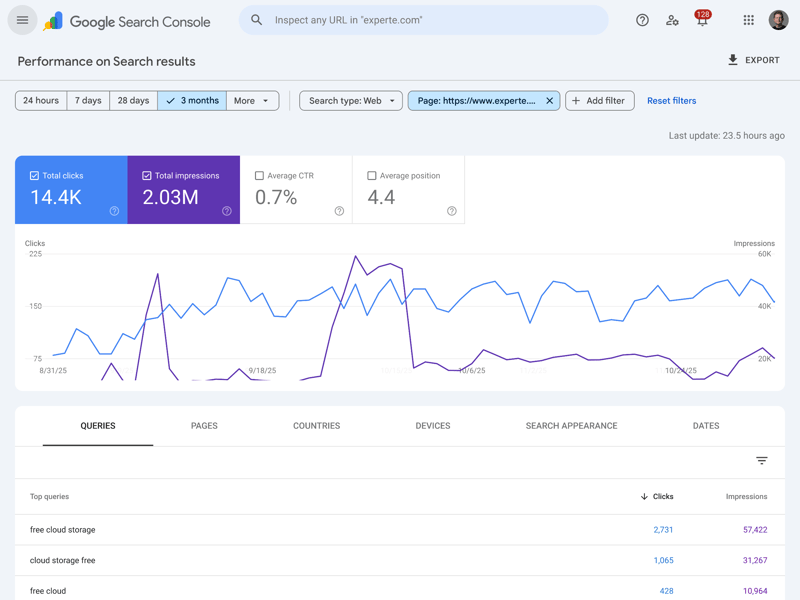
Keyword analysis for a page
☑ Keyword cannibalization
Keyword cannibalization occurs when multiple pages on the same site compete for the same keyword. This can confuse search engines and split your ranking signals.
To fix keyword cannibalization, you can rewrite the content, merge the competing pages, or take down the weaker page and redirect it to the stronger one.
Many tools also flag duplicate and thin content. Rewrite or expand these pages so they provide real value.
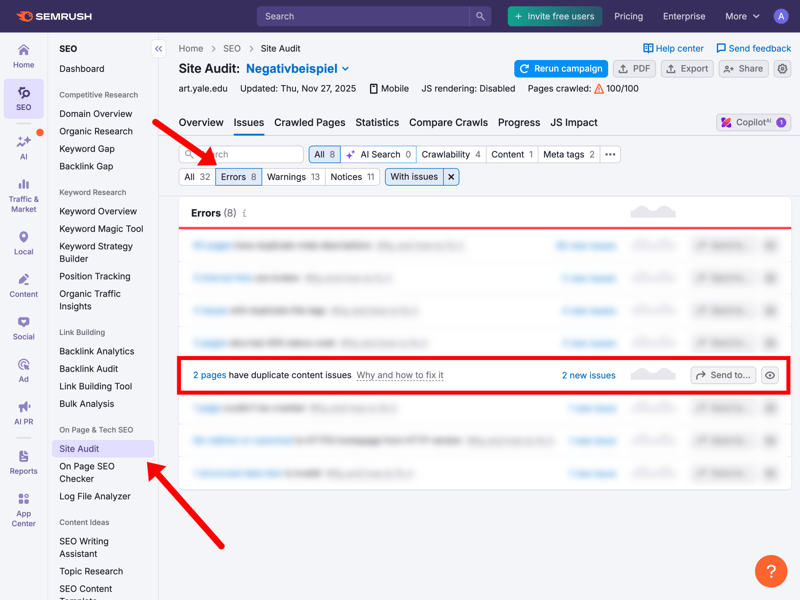
Semrush is flagging two duplicate content errors (URL: art.yale.edu).
☑ Content structure review
Crawlers don’t just look at your content itself. They also analyze its structure, which reveals a lot about how easily Google and users can understand it. That includes heading hierarchy, alt text on images, and overall readability.
Use this checklist to review your content pages (with an SEO tool) for technical accuracy:
User Experience (UX)
A good user experience means longer time on site, lower bounce rates, and a direct boost to your Google ranking. UX analysis looks at how easy your website is to use, for both visitors and search engines.
Navigation and site structure
Start with your website’s basic structure. Users and search engines should find what they need without unnecessary clicks. Many SEO tools show the click depth of each page, the number of steps from the homepage to that page.
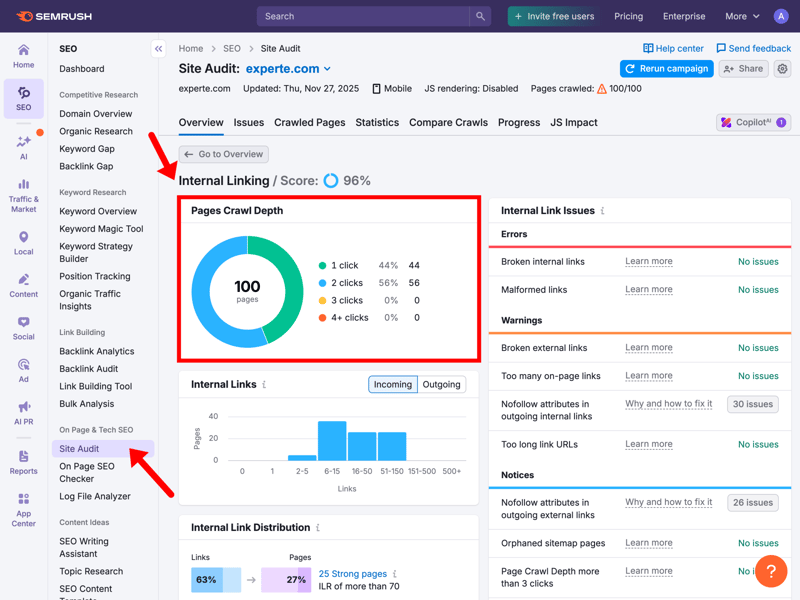
On a well-structured site, all key pages should be reachable within one or two clicks from the homepage.
If essential content sits more than three or four clicks deep, that’s a red flag. Also check your main navigation and breadcrumbs for dead ends or confusing user paths.
Readability and content presentation
This is about how easy your content is to read. Tiny text, poor color contrast, or large walls of text make reading harder. Here’s a bad example from a Norwegian classifieds site:

No structure, no style: the page looks chaotic and is barely readable (Example: arngren.net).
Back up automated analysis with a manual review of your design. Images, graphics, and interactive features should add value and reflect your brand without hurting readability.

✓ User signal analysis
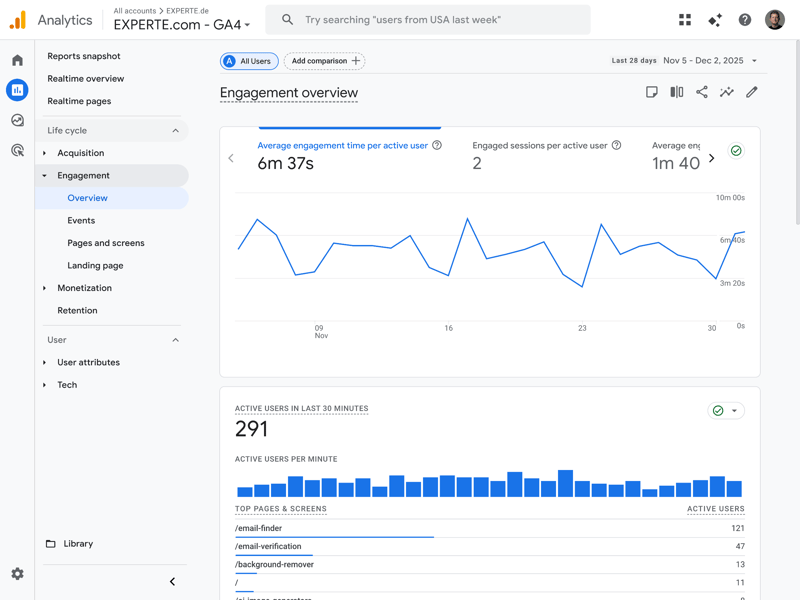
Web analytics tools show you how visitors interact with your website. Metrics like average time on page, bounce rate, and exit pages provide valuable insights.
A high bounce rate often means your content isn’t matching what visitors expect. On the flip side, look at your best-performing pages or subdomains. Figure out why they work so well for your audience.
✓ Mobile ease of use (mobile experience)
Google primarily uses the mobile version of a website for indexing and ranking.
Pro tip: Open your website in Chrome and press F12 (or right-click and select “Inspect”) to open Developer Tools. Click the small smartphone icon in the top-left corner. Now you can test how your site looks at different screen sizes.
Always pair automated crawls with manual tests. They help you judge how easy your menus are to use and how fast pages load on mobile.

✓ Accessibility
An accessible website lets everyone use your content. Most accessibility checks start with automated tools that verify the technical basics and proper HTML markup.
Manual tests matter just as much. Can users navigate your whole website with only a keyboard? Do screen readers read all your content correctly?
Accessibility means designing a website so everyone can use it, regardless of physical, cognitive, or technical limitations. The goal is to end digital exclusion.
This matters most for people with visual impairments, motor disabilities, or hearing loss who rely on screen readers, keyboard navigation, or captions.
An accessible website doesn’t just reach a wider audience. Its clearer structure and more intuitive navigation often improve the experience for everyone.
Our accessibility test can help you optimize your website:

How Does an On-Page Analysis Work Step by Step?
A structured approach is key to a successful on-page analysis. The exact steps depend on the tool you use.
If your SEO tool offers a site audit, you’ll usually start by selecting “New Crawl.” The initial crawl can take some time, depending on the size of your site.
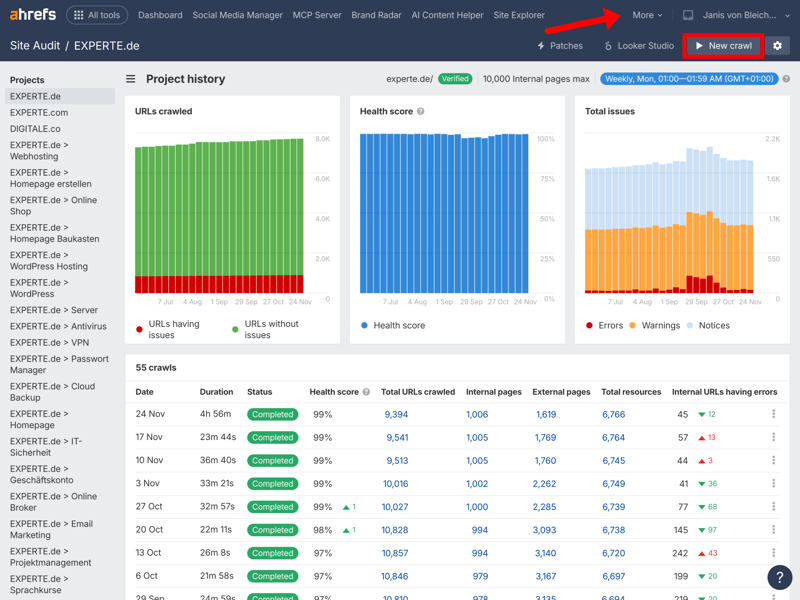
Example of a site audit in Ahrefs
Here’s what works best in practice:
- 1.
Start the website crawl
The SEO tool scans your whole website to give you a full overview of every URL and its status. - 2.
Let the tool identify errors and warnings
The tool flags technical problems, content flaws, and frequent user experience (UX) issues. - 3.
Prioritize based on SEO impact
Not all issues are equally important. Focus on the fixes that will help your rankings most. Team size, how severe the issues are, your existing knowledge, and your available time all play a role. - 4.
Create a report (audit documentation)
Compile your findings and recommendations into a clear, easy-to-follow report. - 5.
Develop a plan and start optimizing
Use the report to build a detailed action plan for on-page optimization with your team.
Conclusion: On-Page Analysis as the Foundation of Your SEO Strategy
An on-page analysis is more than a list of errors. It’s your roadmap to long-term SEO success. It shows where your biggest opportunities lie, whether in technical fixes, better content, or user experience.
Focus on the three to five improvements that will have the greatest impact, turn them into a clear action plan, and repeat your analysis regularly to keep your website technically sound and your SEO strategy on track.
Finished your on-page analysis? Now it’s time for the next step: on-page optimization.