Ahrefs Tutorial 2026: How to Analyze Competitors, Find Keywords, and Audit Your Site

Millions of websites compete for top positions in search results. Successful SEO strategies are typically based on data rather than assumptions, making SEO tools an important part of the optimization process.
In this tutorial, we’ll walk you through how to use Ahrefs to analyze your backlink profile, uncover new keyword opportunities, and dissect your competitors’ SEO strategies—step by step.
Ahrefs Tutorial: Get Started in 7 Steps
A strong SEO strategy starts with the right questions: Which keywords drive traffic? How robust is your competitors’ backlink profile? Where is your website technically weak?
Ahrefs helps you answer these and other key questions. The all-in-one SEO tool is one of the best-known on the market, and it covers four core areas of search engine optimization:
- 1.
Backlink analysis
- 2.
Competitor analysis
- 3.
Keyword research
- 4.
Technical SEO (Site Audit)
The next seven steps show you how to navigate Ahrefs and put its key features to work in your SEO analysis.
Create an Account

First, you’ll need an Ahrefs account. You can sign up right on the Ahrefs* homepage.
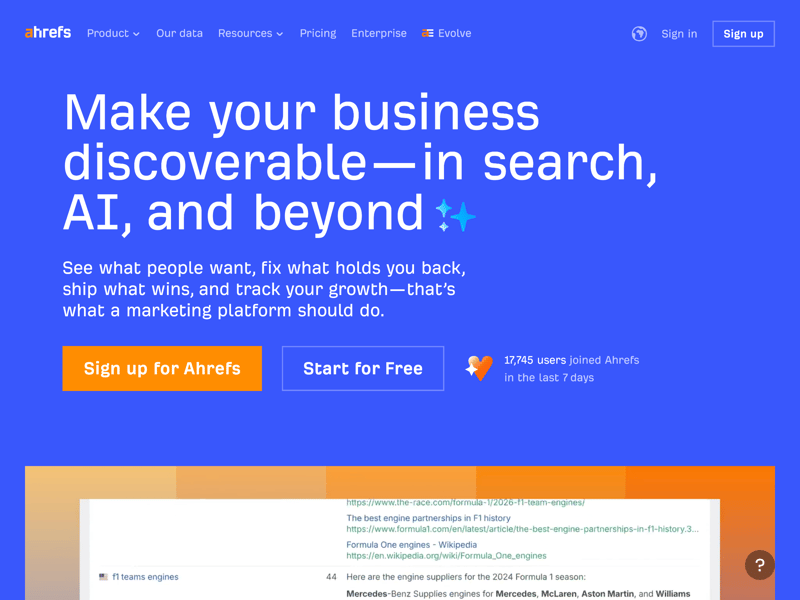
Sign up for Ahrefs right on the homepage.
Ahrefs offers five paid plans: Starter, Lite, Standard, Advanced, and Enterprise (available on request). Annual billing costs less than paying monthly.
The plans differ mainly in the number of projects, data history, and export and crawling limits. Here’s a quick overview:
| Lite | Standard | Advanced | |
|---|---|---|---|
| Monthly price | from $108.00 | from $208.00 | from $374.00 |
| Contract period (months) | 1 - 12 | 1 - 12 | 1 - 12 |
| General limits | |||
| Users included | 1 | 1 | 1 |
| Maximum user | 3 | 6 | 11 |
| Reports per day | 16 | unlimited | unlimited |
| Results per report | 2,500 | 30,000 | 75,000 |
| Historical data | 0.5 years | 2 years | 5 years |
| Site audit | |||
| Projects | 5 | 20 | 50 |
| Crawled pages | 100,000 | 500,000 | 1,500,000 |
| JavaScript Rendering | ✓ | ✓ | ✓ |
| Rank tracking | |||
| Keywords | 750 | 2,000 | 5,000 |
| Frequency | Weekly | Weekly | Weekly |
For beginners or smaller websites, the Lite plan may be sufficient, depending on the scope of their SEO activities. If you manage multiple projects or require deeper analysis, Standard or Advanced work better. The Enterprise plan suits larger businesses and agencies.
After picking your plan, follow the steps to create your account. You can sign up with your Google account or an email address, then accept the terms of service and privacy policy.
Once you log in, you’ll land in the Ahrefs dashboard. This is where you manage your projects and track rankings, backlinks, and organic traffic.
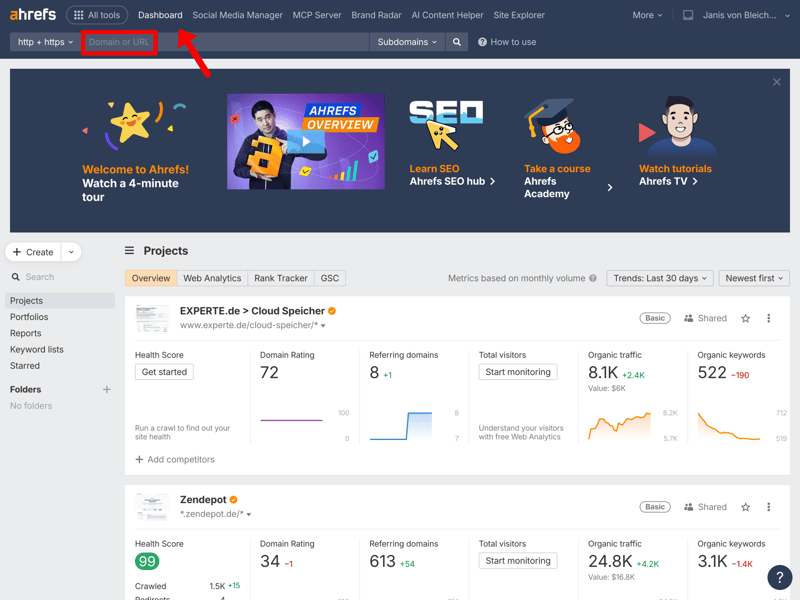
The dashboard after login: manage your projects and start analyzing here.
Tip: Connect Ahrefs directly to the Google Search Console. This gives you even more accurate ranking data straight from Google.
Understanding Site Explorer
Site Explorer is the core of Ahrefs. Enter any domain into the search bar on the dashboard, and you’ll get an instant overview of its organic performance: rankings, traffic, and backlinks.
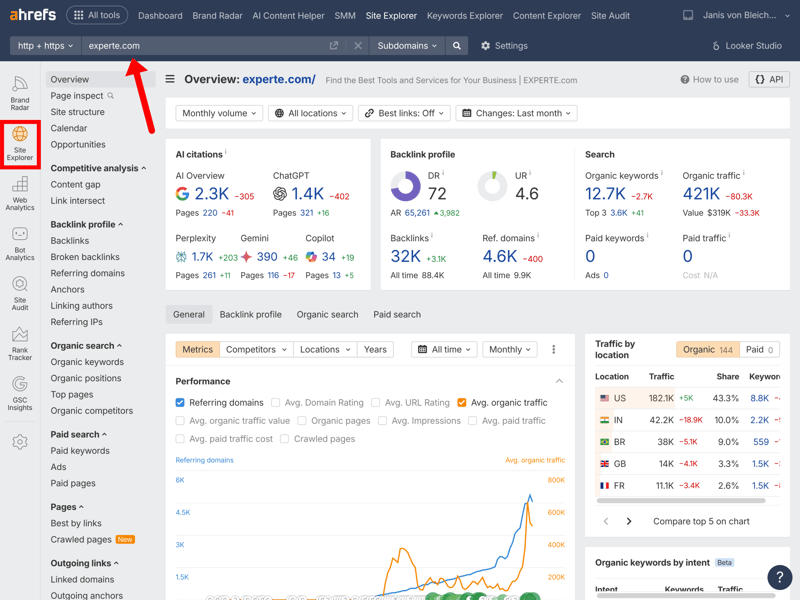
The Site Explorer dashboard: see all key SEO metrics for the domain at a glance.
For a quick assessment, focus on these three key metrics:
- 1.
Domain Rating (DR)
Domain Rating (DR) is Ahrefs' proprietary metric that estimates the relative strength of a website's backlink profile on a scale from 0 to 100. experte.com has a DR of 72, which Ahrefs rates as a strong, well-established link profile. - 2.
Organic Keywords
This number shows how many search terms Ahrefs estimates a website ranks for within the top 100 organic search results. For experte.com, Ahrefs lists 12,700 keywords, one indicator of a site’s organic search visibility over time. - 3.
Organic Traffic
Organic Traffic estimates the monthly clicks a website gets from organic search. For experte.com, Ahrefs estimates approximately 421,000 monthly organic visits.
Click on the organic keywords or organic traffic numbers to see a detailed breakdown of the rankings and pages behind them.
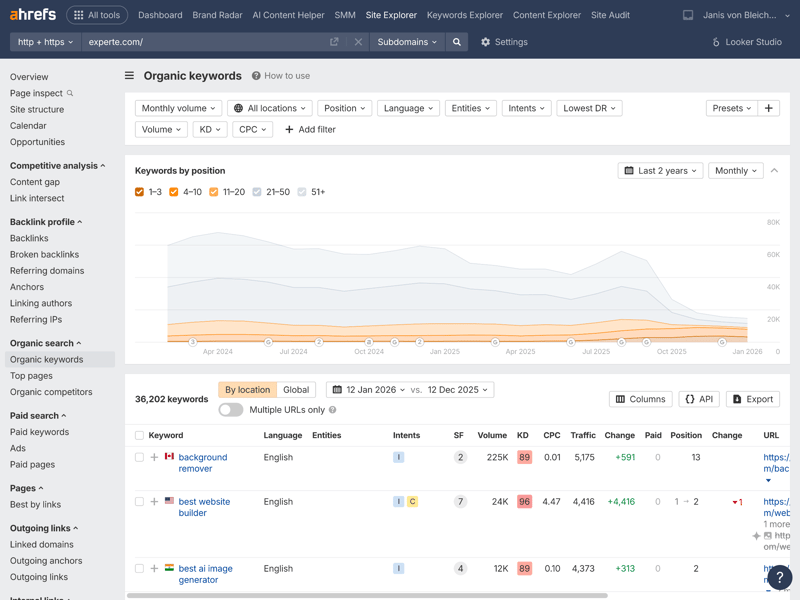
After clicking “Organic Keywords,” Ahrefs displays all rankings for the domain, including search volume, positions, and traffic estimates.
Ahrefs presents much of this data in easy-to-read charts. The “Top pages” and “Referring domains” views are especially useful for tracking visibility and backlink growth over time.
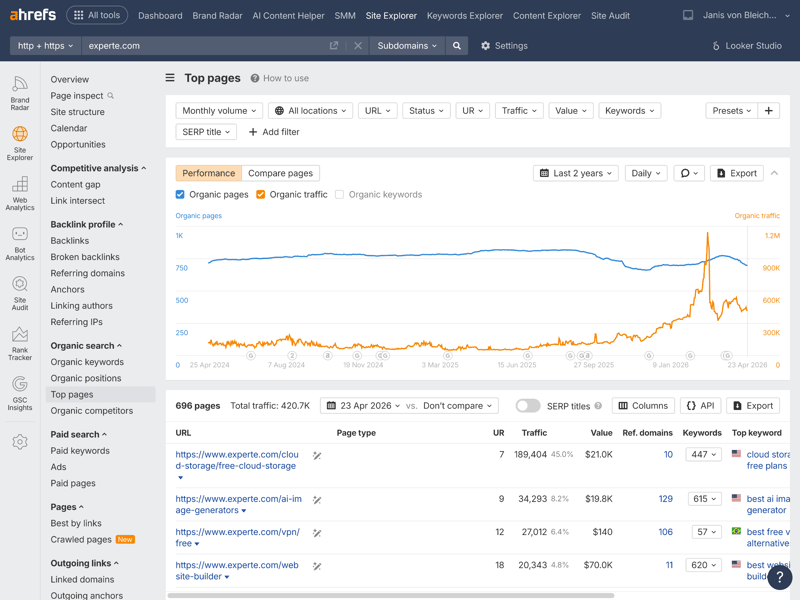
The timeline shows how organic traffic and visibility have changed over time.
These reports can help identify visibility trends and potential traffic changes over time. The Top Pages list also highlights which content drives the most organic traffic. The keyword and backlink data for these pages give you clear next steps for your analysis.
How to Run a Backlink Analysis
Backlinks are widely considered an important ranking signal in Google’s search systems. With Ahrefs’ Site Explorer, you can analyze any website’s backlink profile, including the number, quality, and relevance of its links.
To get started, enter a URL into the search bar and open Site Explorer. The overview shows every detected backlink along with key metrics. For deeper insights, use the navigation on the left.
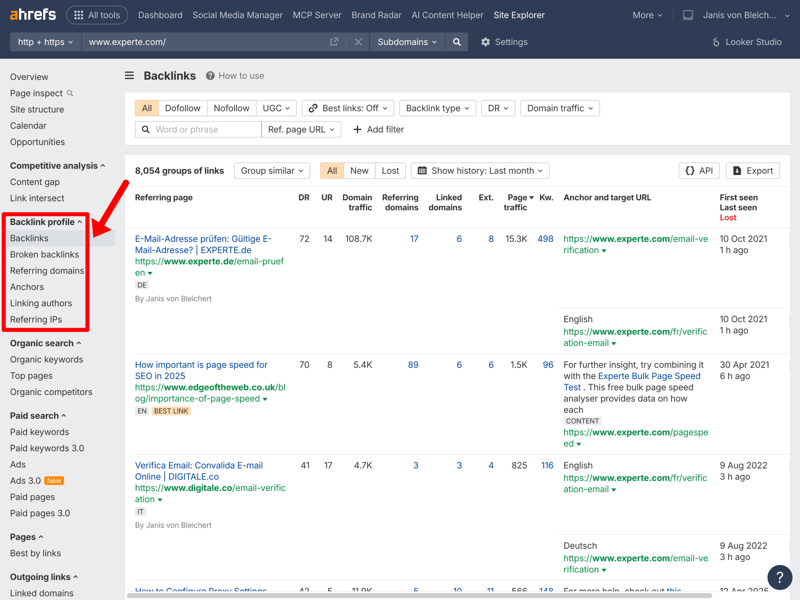
The backlink overview: For our target domain, Ahrefs found 8,054 link groups, including key metrics like DR, UR, domain traffic, and anchor texts.
Four key metrics help you assess the quality and structure of a backlink profile:
- 1.
Domain Rating (DR)
DR measures the strength of the linking domain. A backlink from a site with a DR of 72 may provide more SEO value than one with a DR of 41, although relevance and context are also critical factors. - 2.
URL Rating (UR)
UR rates the strength of a single page on a scale from 0 to 100. It’s similar to DR but focuses on individual pages. A UR of 17, for example, carries more ranking weight than one with a UR of 8. - 3.
Referring Domains
This metric shows how many unique domains link to a site. It’s often more telling than the total backlink count. In many cases, links from a larger number of unique domains may provide more value than numerous links from a single source. - 4.
Backlinks
This is the total number of inbound links. For experte.com, Ahrefs found 8,054 link groups.
Ahrefs doesn’t just analyze existing links—it also helps you spot technical issues in your backlink profile. Under “Broken backlinks,” you’ll find external links pointing to pages that no longer exist and return 404 errors.
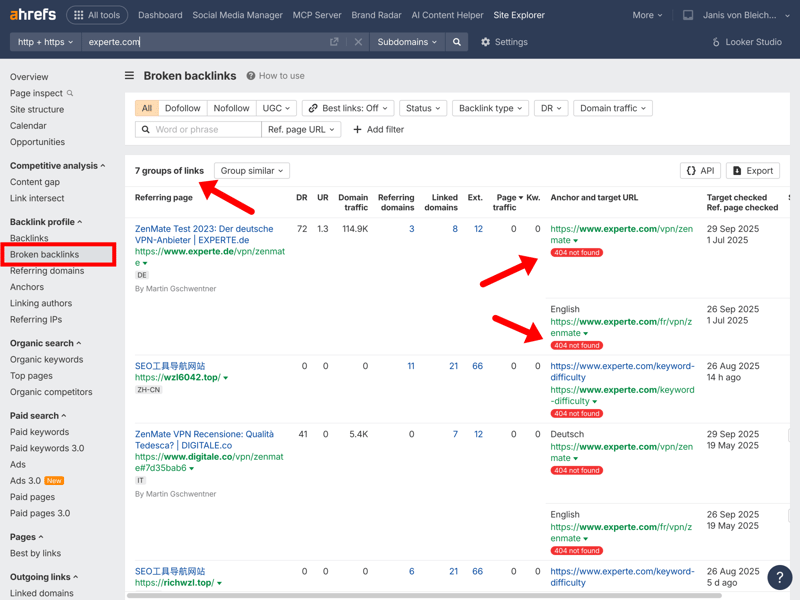
The broken backlinks analysis reveals 7 link groups currently pointing to unavailable pages.
In this example, Ahrefs found seven such link groups. Depending on the situation, setting up 301 redirects to relevant active pages may help preserve usability and potentially retain some SEO value associated with those links.
The “Best by links” view is also worth a look. It ranks all your pages by the number of referring domains, showing which content attracts the most backlinks. This report can help identify content that has attracted backlinks and highlight potential opportunities for similar content.
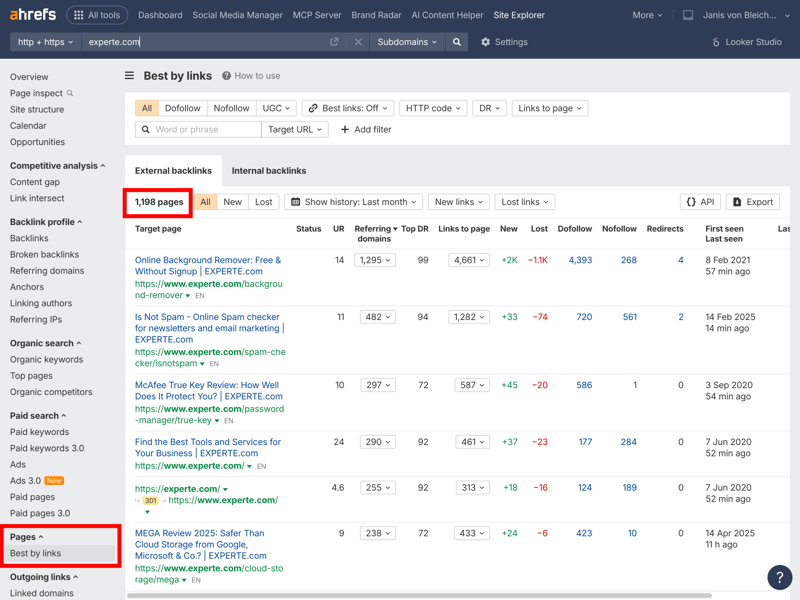
The “Best by links” view shows which content earns the most backlinks and builds the most authority.
Ahrefs also offers a free backlink checker on its website. Use it for a quick analysis. If you want to put those insights to work for link building, refer to our link building guide for more practical tips.

Run a Competitor Analysis
Ahrefs also shines at competitor analysis. Enter a competitor’s domain into Site Explorer to review their backlink profile, rankings, and organic traffic.
In this example, we compare three fast food chains: McDonald’s, Burger King, and KFC (Kentucky Fried Chicken). Ahrefs instantly shows how the three companies stack up on key metrics like Domain Rating, referring domains, and organic traffic.
Competitor comparison in Site Explorer: all three chains at a glance, with key metrics like DR, referring domains, and organic traffic.
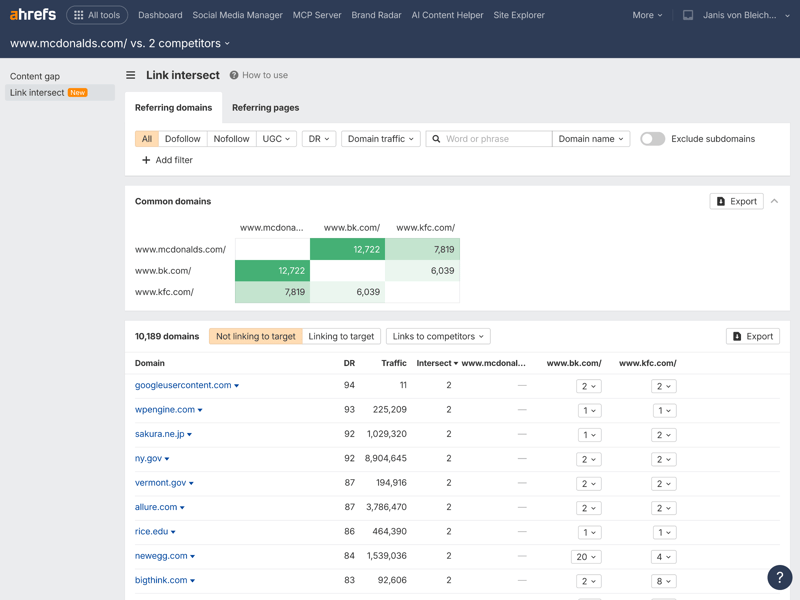
The Link Intersect tool is especially useful. It shows which domains link to several competitors at once. A significant overlap can indicate that a source is relevant within your industry or topic area. These domains may be useful prospects for further link-building research.
The Link Intersect report lists the strongest referring domains and which sites link to your competitors most frequently. That makes it easy to spot link opportunities.
For a solid competitor analysis, focus on three key questions:
What keywords are they ranking for?
The Organic Keywords report shows all the search terms your competitors appear for in search results.Which pages bring them the most traffic?
The Top Pages feature lists the subpages with the highest organic traffic.Where do their backlinks come from?
The Backlink Analysis shows you how your competitors build links. It also points you to sources you haven’t tapped yet for your own link building.
It’s also worth checking out the Content Gap Analysis. This shows keywords your competitors rank for but your website doesn’t, so you can identify topics your competitors cover that may be relevant to your own content strategy.
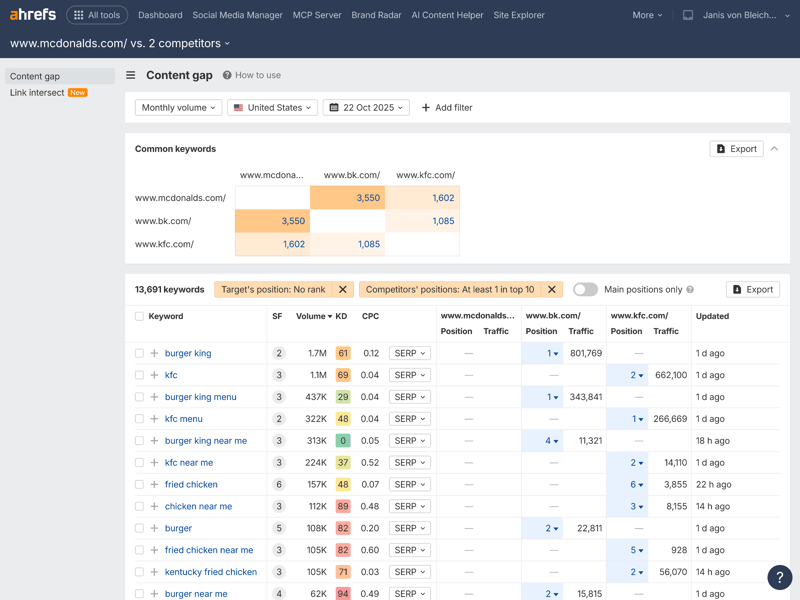
13,691 shared keywords show where the three websites overlap in their topics.
For more on competitive analysis with Ahrefs, take a look at the official Ahrefs blog.
Find the Right Keywords
The Keywords Explorer helps you find relevant search terms. Start with a seed keyword like “SEO,” and Ahrefs generates a list of keyword ideas. These are grouped into reports like “Terms match,” “Questions,” “Also rank for,” and “Also talk about.”
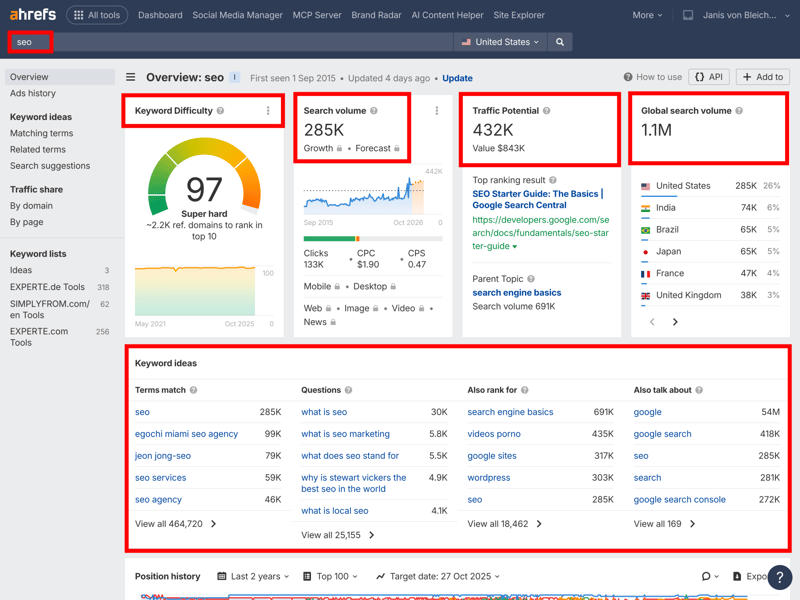
Keyword difficulty, search volume, traffic potential, and global search volume are all visible at a glance.
Four key metrics help you assess a keyword’s potential:
- 1.
Keyword Difficulty (KD)
Keyword difficulty shows how competitive a keyword is. For “SEO,” the difficulty is 97, so ranking for highly competitive keywords often requires a strong website authority profile and high-quality content. - 2.
Search Volume
Search volume is Ahrefs’ estimate of the average monthly search demand in the US. With 285,000 searches a month, “SEO” is a highly sought-after keyword. - 3.
Traffic Potential (TP)
Traffic potential is Ahrefs’ estimate of the traffic a top-ranking page could potentially receive from a keyword and related search terms. Here, that’s up to 432,000 clicks a month. It’s lower than the search volume because many users don't click any result. - 4.
Global Search Volume
Global search volume puts the US-only interest in an international context. For “SEO,” it’s 1.1 million. Based on Ahrefs’ data, India, Brazil, and Japan represent some of the largest international search markets for this keyword.
Keyword ideas are split into different reports, each offering a unique angle on a topic. The Matching terms report shows queries like “SEO agency” or “SEO ranking,” while the Questions report lists user questions like “What is SEO?” or “What does SEO mean?” These are great for blog posts, guides, and FAQ sections.
Ahrefs also features the “Also rank for” report, which reveals other terms. The “Also talk about” feature lists related topics and concepts. Both help you create more complete, relevant content.
Pro tip: The questions feature is great for content planning. It shows exactly what users ask about a topic, giving you ready-made ideas for subheadings or FAQ sections.

Site Audit for Technical SEO
Strong content alone is often not enough for sustainable search visibility. Your site’s technical foundation matters too. Ahrefs’ Site Audit evaluates your site against more than 100 technical SEO checks and best-practice recommendations.
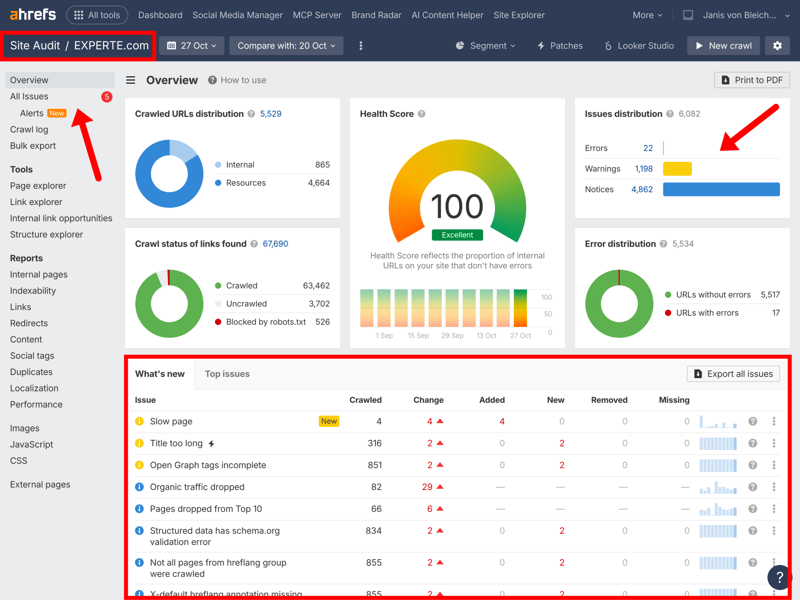
Even with a high health score, Ahrefs will often flag numerous errors, warnings, and notices that require attention.
The report sorts issues into three categories: Errors (critical), Warnings (potential problems), and Notices (minor suggestions). In this example, Ahrefs flags 22 errors, 1,198 warnings, and 4,862 notices, all while showing an excellent health score of 100.
That might seem contradictory, but the health score doesn’t mean a site is error-free. It reflects the website’s overall technical health. Even sites with high scores usually have room for small improvements.
Here, the most common issues are missing alt text for images, incomplete Open Graph tags, and overly long page titles. Many of these issues can often be resolved relatively quickly, depending on the website setup.
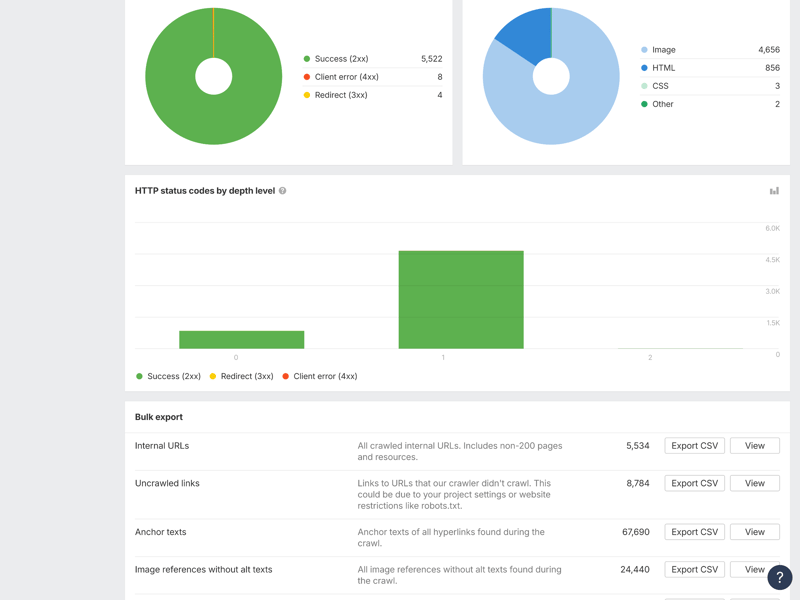
A site audit gives you targeted data on technical issues and how to fix them.
Common technical issues include broken HTTP status codes, redirect chains, or unreachable pages. Use the export feature to resolve these issues in bulk instead of checking each URL one by one.
Work through the results by priority: start with errors, then warnings, and finally notices. That way, you’ll make the biggest technical improvements with the least effort.
Set Up Projects for Long-Term Tracking
One-time audits give you a snapshot of your site. But to monitor and improve your Google rankings, you need Ahrefs projects. They let you track key keywords, backlinks, and technical metrics over time, without restarting each analysis by hand.
Open the dashboard and click “Create” to set up a new project. How many projects you can manage depends on your plan, anywhere from five to unlimited.
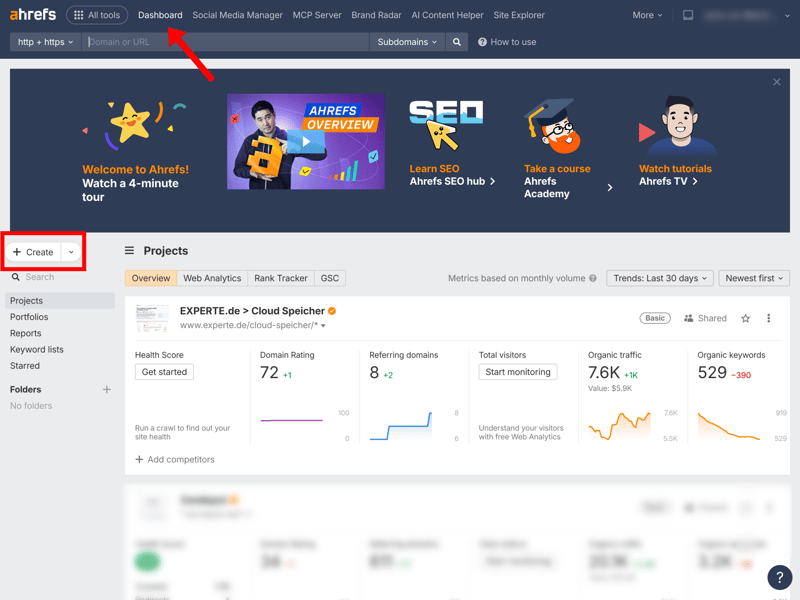
Click the “Create” button to set up a new project.
To set up your project, you can verify your website through Google Search Console or add it manually.
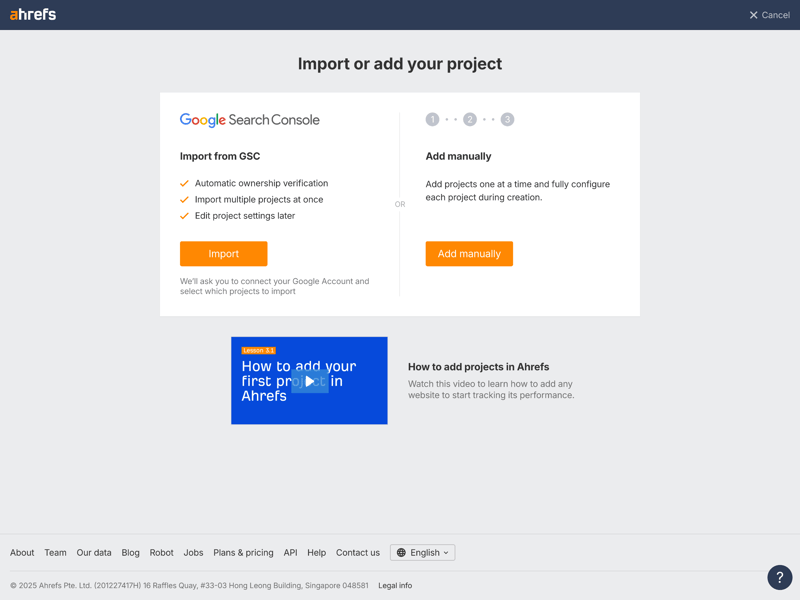
You can import domains via Google Search Console or add them manually.
Two features are especially useful for ongoing monitoring:
- 1.
Rank Tracker
Add the keywords you want to monitor regularly. Ahrefs tracks rankings by location and separately for desktop and mobile. That way, you’ll be able to monitor how rankings change over time and evaluate the impact of your SEO activities. - 2.
Alerts
Set up notifications to get an automatic email when you gain or lose backlinks, or when Ahrefs detects competitors ranking for additional keywords.
You can export the data anytime, which makes it easier to document progress and share insights with team members or clients.
Key Takeaways: How to Use Ahrefs
Ahrefs helps you research keywords, analyze competitors, evaluate backlinks, and locate technical issues on your website. With the steps in this guide, you now know its core features and can run your first analyses on your own.
But the real value isn’t in the analysis itself—it’s in what you do with the insights. Keep an eye on your rankings, spot new keyword opportunities, study what’s working for your competitors, and address technical issues early.
Using Ahrefs regularly can help support data-driven SEO decisions and provide insights for long-term optimization efforts.