Ahrefs Review 2026: Still the Best SEO Tool on the Market?


Ahrefs has built a stellar reputation in the SEO industry, largely thanks to its massive and constantly updated backlink index. Many consider it the gold standard for link analysis and other data-heavy SEO tasks. But is Ahrefs really the best SEO tool on the market—or has the competition caught up?
We tested Ahrefs in depth to see how it stacks up against the competition.
Ahrefs* is a comprehensive SEO tool that originally built its reputation on powerful backlink analysis. Its exceptionally large and frequently updated backlink index is widely regarded as an industry benchmark. This established Ahrefs as a go-to tool for link building and competitive analysis early on.
Today, Ahrefs has evolved into a full-fledged all-in-one SEO suite covering all the key areas of search engine optimization. This includes detailed keyword research, technical website audits, and comprehensive rank tracking.
Ahrefs clearly positions itself as a premium solution for professionals. The tool is aimed primarily at users who work in a data-driven way and who need in-depth analysis for strategic decisions.
Ahrefs Review
Industry-leading backlink index
Ahrefs boasts what is one of the largest backlink indexes in the industry. The crawler updates data at short intervals and reliably detects redirects, canonicals, and rendered JavaScript content.High data quality and fast performance
The platform delivers quick load times, even for large domain queries. Charts, tables, and powerful filters enable in-depth analysis without waiting around.Comprehensive all-in-one suite for professionals
Beyond backlink analysis, Ahrefs offers numerous other modules, including keyword research, rank tracking, site audits, Content Explorer, AI features, and API integrations.
High pricing
Ahrefs is one of the most expensive SEO tools on the market. There’s no traditional free trial or money-back guarantee, which makes getting started more difficult.Sometimes confusing navigation
Features aren’t always intuitively organized in the Ahrefs dashboard. This can be confusing for new users and extend the learning curve.English-only support and learning resources
For users whose primary language isn’t English, the predominantly English-only learning materials in the Academy and limited support in other languages could be a significant challenge.
Interface and Usability
| User interface |
| 7/8 |
| Performance |
| 1.5/2 |
Ahrefs features a modern, clean, and visually appealing design. The platform aims to present data in an understandable way and give users a quick overview.
Intuitive dashboard, high information density
The interface is generally intuitive. A central dashboard serves as the starting point and leads you to the most important modules and metrics in a structured way.
The sheer volume of data can feel overwhelming for beginners at first. Ahrefs addresses this with embedded tutorial videos and info icons that explain technical terms and metrics in plain language.
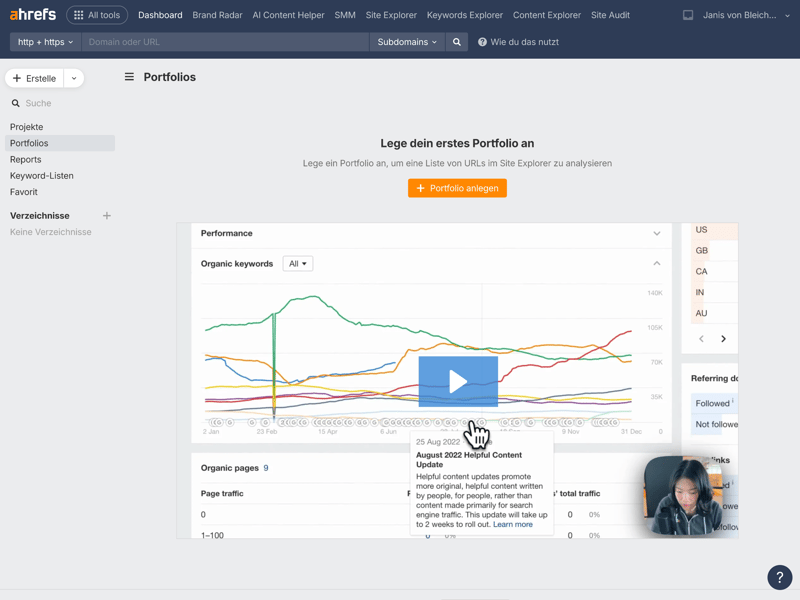
For views that need more explanation (like “Portfolios”), Ahrefs embeds helpful tutorial videos.
A clear strength of the interface is the abundance of charts and visualizations. They make complex relationships easy to grasp at a glance and help you run even extensive analyses quickly.
Central overview for projects and analyses
The dashboard gives you an overview of your projects, portfolios, reports, keyword lists, and favorites. This structure is ideal for users managing multiple projects at once.
Within individual modules, the left sidebar navigation keeps things organized. It’s clearly structured and lets you quickly access specific reports and features without having to search around.
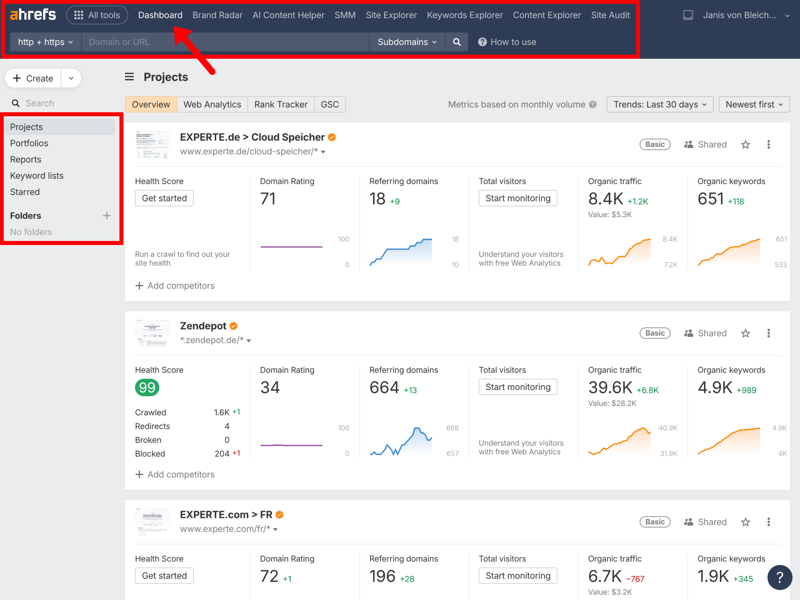
All your projects are available right from the dashboard.
Another strong point is the platform’s performance. Even when running large-scale analyses on major domains, Ahrefs responds quickly without noticeable delays. The only exception is the initial crawl of a newly added website, which takes some time to gather data. Subsequently, all reports load smoothly and without delays.
Site Explorer: the heart of domain analysis
One of Ahrefs’ core modules is the Site Explorer. Right from the domain overview—shown here using experte.com as an example—the tool displays a wealth of relevant metrics in a clear layout.
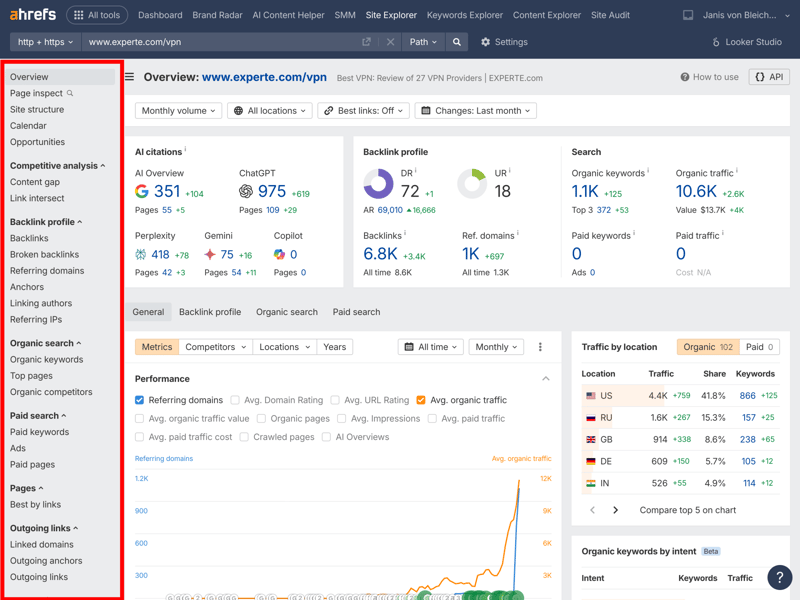
Site Explorer delivers a ton of data at a glance, right from the overview.
Ahrefs relies heavily on numbers and tables but complements them with charts and flexible filters. Switching between views is seamless, making it easy to grasp even complex relationships quickly.
Not always intuitive
Ahrefs’ extensive feature set comes with a certain level of complexity. Beginners may not always know where to find specific functions right away. In some cases, identical or similarly named sections appear multiple times in the navigation.
For example, features like “Paid Keywords,” “Ads,” and “Paid Pages” show up both under “Paid Search” and again further down in the “Legacy” section. This duplication can be confusing and makes getting started harder than it needs to be.
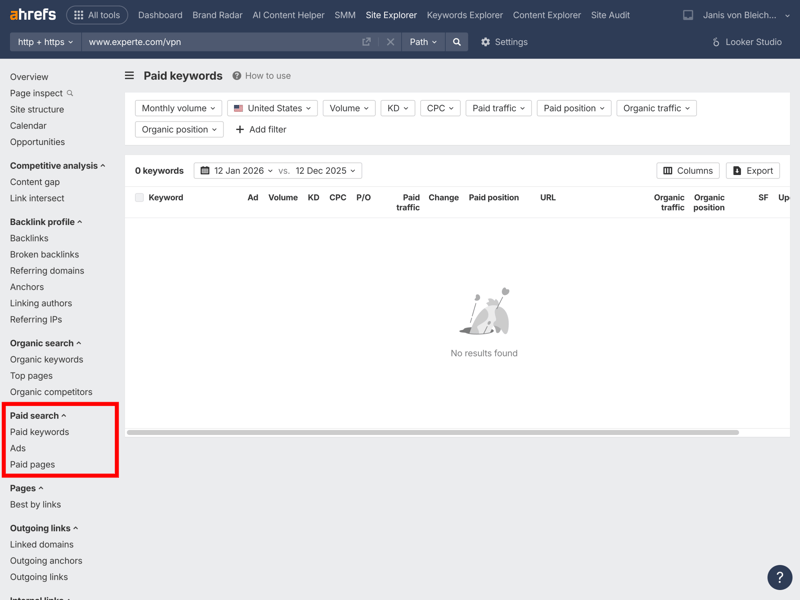
Ahrefs sometimes displays duplicate or similarly named views in the navigation, which can confuse new users.
Other useful modules
Beyond the main areas like the Dashboard, Site Explorer, and Keywords Explorer, Ahrefs offers additional modules that are especially useful for technical SEO and related marketing tasks. These include:
Brand Radar
AI Content Helper
Content Explorer
Site Audit
These modules expand Ahrefs’ capabilities and turn it into a versatile SEO suite, though the sheer number of features does require some time to learn.

Ahrefs impresses with a modern, clean design that makes it easy to find your way around. Excellent performance and fast load times contribute to a smooth workflow. Visual elements help you digest complex data quickly, and the structure works well for managing multiple projects.
Experienced users should feel at home in Ahrefs quickly, despite the volume of data. Beginners benefit from embedded tutorial videos and info icons, though the navigation and feature layout could be a bit clearer in some areas.
Competitor Analysis
| Analysis level | All four levels are available. | 2/2 |
| Scope of traffic estimation |
| 5/6 |
| Accuracy of traffic estimation | 45.4 % | 3/6 |
| Keyword rankings |
| 4/4 |
| Page structure | All four levels are available. | 2/2 |
Ahrefs handles competitor analysis in two main areas, both within Site Explorer: the “Organic search” section and the dedicated “Competitive analysis” module. Together, these views offer powerful tools for systematically analyzing and benchmarking competitors.
Analyzing competitors through organic search
Within the organic search section, Ahrefs shows in detail how a URL compares to other domains. The “Organic competitors” view identifies your main competitors based on your entire domain and the keywords you rank for.
A chart compares your site’s organic traffic to that of your competitors. This makes it easier to assess your relative visibility in search results and understand where you stand in the market.
You can filter the results in many ways, including by number of shared keywords, keyword overlap, traffic share, keyword difficulty, and estimated costs.
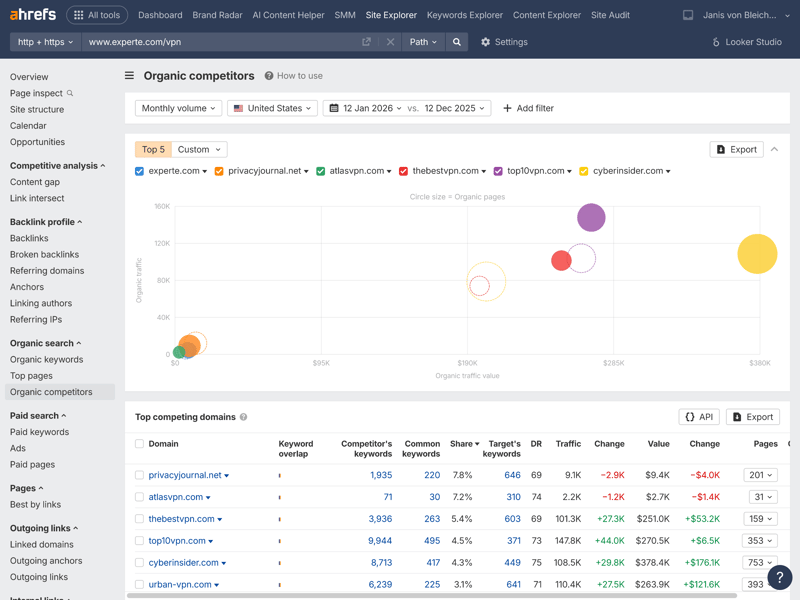
For experte.com, this view displays the five main competitors, neatly sorted by their organic traffic share.
The “Organic Keywords” view provides a detailed breakdown of the analyzed domain’s keyword coverage. You can see which search terms a URL ranks for, along with positions, search volume, and traffic share.
Identify top pages and track content performance
The “Top Pages” view shows which content on a domain performs best. You can see which pages drive the most organic traffic and how that has changed over time.
The table below sorts subdomains by their traffic share. Additional metrics like the number of ranking keywords help you understand which content delivers strong results over the long term.
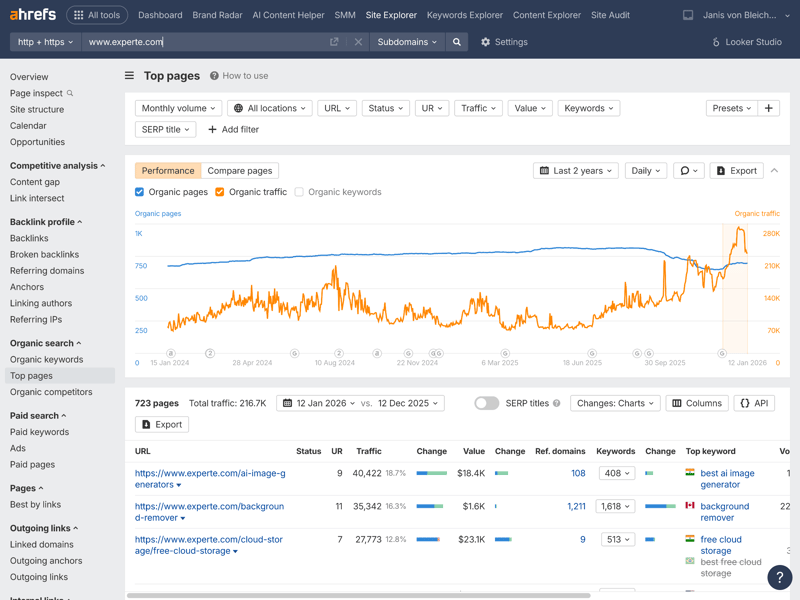
While the number of organic pages on experte.com has grown steadily, the associated traffic shows some fluctuations.
Identify topic gaps strategically
Within the competitive analysis module, Ahrefs offers a particularly useful tool called “Content Gap.” It reveals topic overlaps with up to ten competitors and goes beyond a simple comparison with your domain. It also compares your competitors against each other.
This is helpful in two ways: first, you can identify new topics and keywords your website is missing. Second, you can see which topics your domain covers that competitors don’t.
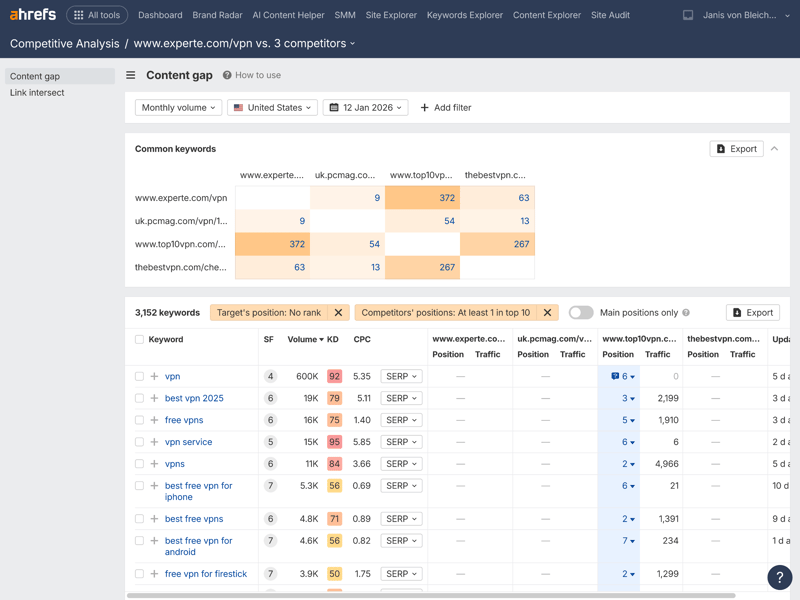
A subpage on experte.com targeting the keyword “vpn test” overlaps with Chip.de and Heise, but not with Computerbild.
Find backlink gaps: which links is your domain missing?
The backlink gap analysis works similarly. Instead of keywords, it focuses on referring domains. You can see which backlinks your competitors have that your site is missing.
A high number of quality links usually signals strong content and high authority. This overview helps you assess which topics offer realistic opportunities and where ranking well might be tough due to strong competition.
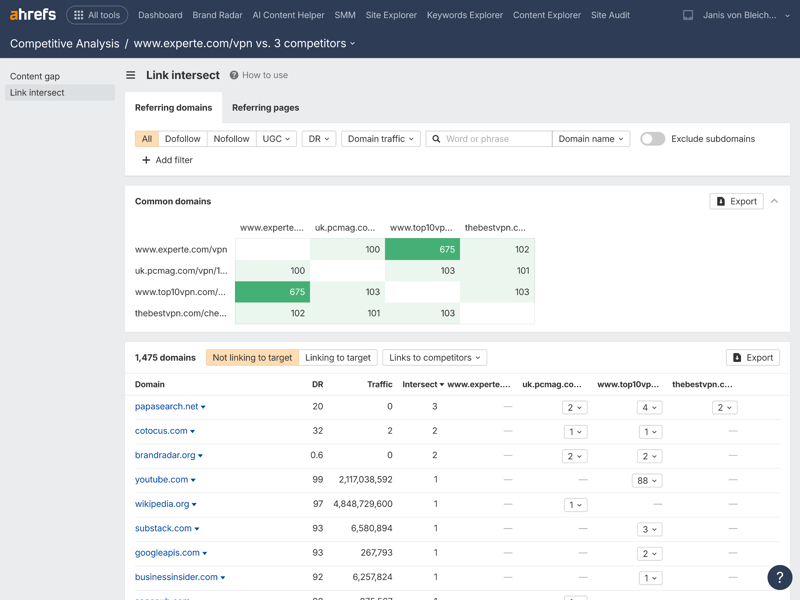
In addition to a table, a list provides information about the traffic of the linking page and keyword overlaps.
Comprehensive analysis of rankings and URLs
Ahrefs excels at connecting rankings to specific URLs. Beyond the helpful “Top Pages” feature, which shows which competitor content actually performs and ranks for many keywords at once, the ranking analysis remains consistently thorough.
From keyword counts to ranking trends to gap analysis, all the important features are included. For content-driven SEO, Ahrefs provides a solid foundation for evaluating, prioritizing, and benchmarking content against the competition.
 Ahrefs |  Moz |  Semrush |  SE Ranking |  Sistrix |  Mangools |  SpyFu |  Ubersuggest |  Serpstat | |
|---|---|---|---|---|---|---|---|---|---|
Number of keywords (history) | ✓ | ✓ | ✓ | ✓ | ✓ | ✓ | ✓ | ✓ | ✓ |
Number of URLs (history) | ✓ | ✓ | ✓ | ✓ | ✓ | ✓ | ✗ | ✓ | ✗ |
Top pages | ✓ | ✓ | ✓ | ✓ | ✓ | ✓ | ✓ | ✓ | ✓ |
Ranking history per keyword | ✓ | ✓ | ✓ | ✓ | ✓ | ✓ | ✓ | ✓ | ✓ |
Ranking changes | ✓ | ✓ | ✓ | ✓ | ✓ | ✓ | ✓ | ✓ | ✓ |
Ranking distribution | ✓ | ✓ | ✓ | ✓ | ✓ | ✓ | ✓ | ✗ | ✗ |
Organic competitors | ✓ | ✓ | ✓ | ✓ | ✓ | ✗ | ✓ | ✓ | ✓ |
Keyword gap analysis | ✓ | ✓ | ✓ | ✓ | ✓ | ✓ | ✓ | ✓ | ✓ |
Total | 8 | 8 | 8 | 8 | 8 | 7 | 7 | 7 | 6 |
How comprehensive and reliable is Ahrefs’ traffic data?
Good decisions require reliable data. If you’re planning SEO strategies, you need access to accurate metrics. Ahrefs delivers all the key features for this kind of analysis.
What makes Ahrefs especially useful for trend analysis is its extensive data history: the tool draws on up to eleven years of historical data. This lets you not only assess current developments but also track long-term changes over several years.
Ahrefs | Mangools | Moz | Semrush | SE Ranking | Serpstat | Sistrix | SpyFu | Ubersuggest | |
|---|---|---|---|---|---|---|---|---|---|
Organic traffic | ✓ | ✓ | ✗ | ✓ | ✓ | ✓ | ✓ | ✓ | ✓ |
Paid traffic | ✓ | ✗ | ✗ | ✓ | ✓ | ✓ | ✓ | ✓ | ✓ |
Trafic value | ✓ | ✗ | ✗ | ✓ | ✓ | ✓ | ✓ | ✓ | ✓ |
Traffic by country | ✓ | ✓ | ✓ | ✓ | ✓ | ✓ | ✓ | ✓ | ✓ |
Traffic history | 5 years | 1 years | 1 years | 14 years | 8 years | 9 years | 5 years | 16 years | 3 years |
With a premium tool like Ahrefs, users naturally expect top-tier accuracy. To test how precise the traffic estimates really are, we compared the tool’s data against real-world reference values.
The results were below expectations: Ahrefs achieved only 45.4% accuracy when measured against our actual traffic data. That places it in the bottom third of our test. It still beats Serpstat but trails several percentage points behind the top performers, SpyFu and Mangools. Other tools clearly come closer to reality.
| Traffic estimation accuracy | |
|---|---|
| 53.6 % |
| 51 % |
| 50.1 % |
| 49.1 % |
| 46.1 % |
| 45.9 % |
| 45.4 % |
| 18.9 % |
| 0 % |
Ahrefs offers a very thorough competitor analysis with detailed insights into organic search performance and competitor backlink profiles. Features like the content gap analysis and top pages reports provide valuable starting points for identifying successful strategies and refining your content.
That said, there’s plenty of room for improvement when it comes to traffic estimation: almost every other SEO tool in our comparison delivered more accurate results. Still, for identifying content gaps, ranking opportunities, and backlink potential, Ahrefs remains one of the most powerful tools on the market.
Backlink Analysis
| Feature set |
| 5/5 |
| Number of backlinks | 5,627 referring domains | 2/4 |
| Data quality |
| 4/4 |
| Backlink filters |
| 2/2 |
Ahrefs is best known for its powerful web crawler and one of the largest and most up-to-date backlink indexes in the industry. According to Ahrefs, the index is updated every 15 to 30 minutes, ensuring high data freshness. For analysis, Ahrefs provides the “Backlink Profile” module, which examines a URL’s links from multiple angles.
The tool reliably detects redirects and canonicals and can also render JavaScript content. One minor drawback: Ahrefs doesn’t offer an explicit toxicity score. You’ll need to evaluate link quality yourself, though the comprehensive data makes this relatively straightforward. Link lists can also be easily exported for use with disavow tools.
Identifying high-value backlinks
The “Backlinks” section gives you an overview of the most important referring links to a domain. In this context, “Successful” refers to factors like how much traffic the linking page generates.
In addition to the clickable source, the table displays key metrics (such as domain rating (DR), URL rating (UR), estimated traffic, and the number of ranking keywords).
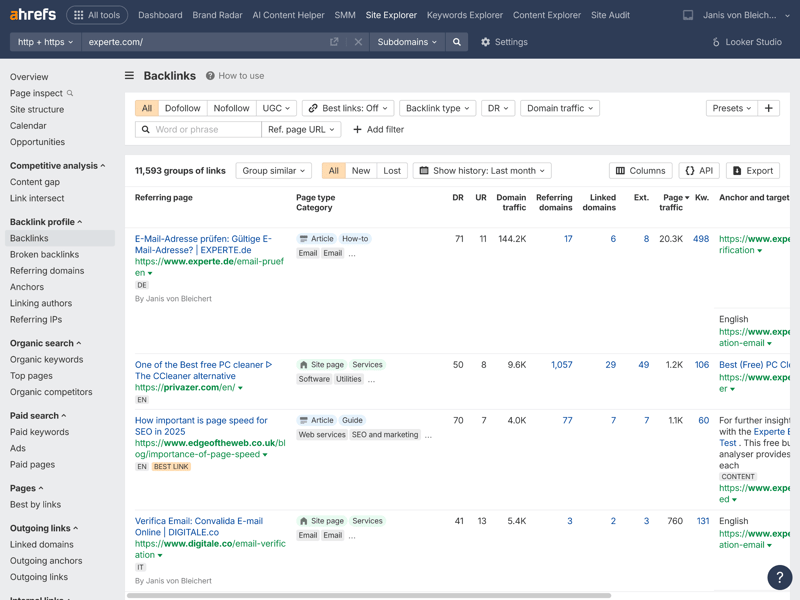
Extensive filters at the top of the interface make it easy to analyze even large link profiles in a targeted way.
Tracking internal and external links
Ahrefs also shows which external domains your website links to. While this isn’t a traditional part of backlink analysis, it can be helpful for understanding dependencies, partnerships, or thematic focus areas.
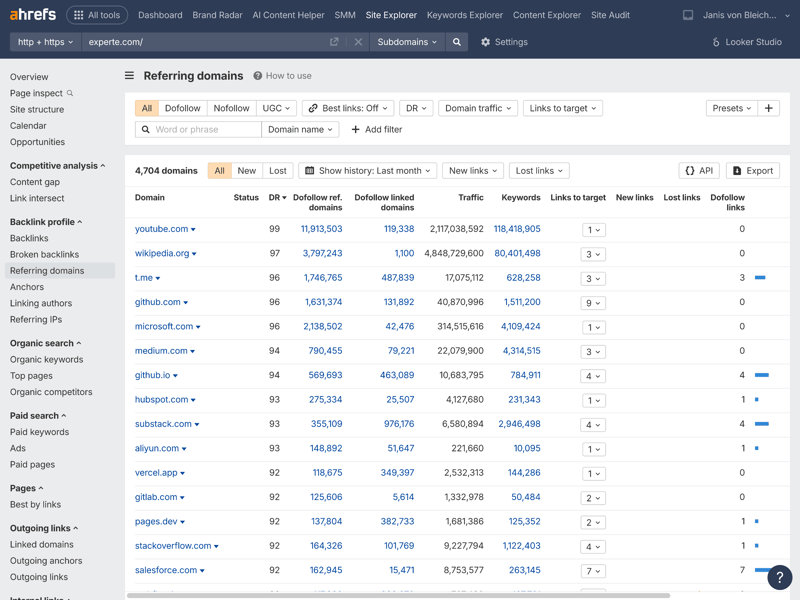
experte.de links most frequently to YouTube, experte.com, and digitale.co.
Anchor texts and additional detailed analysis
Another important component is anchor text analysis. It reveals which terms other websites use when linking to your domain and how your site is perceived thematically. Combined with social media sources, this can offer interesting insights into brand relevance and topical authority.
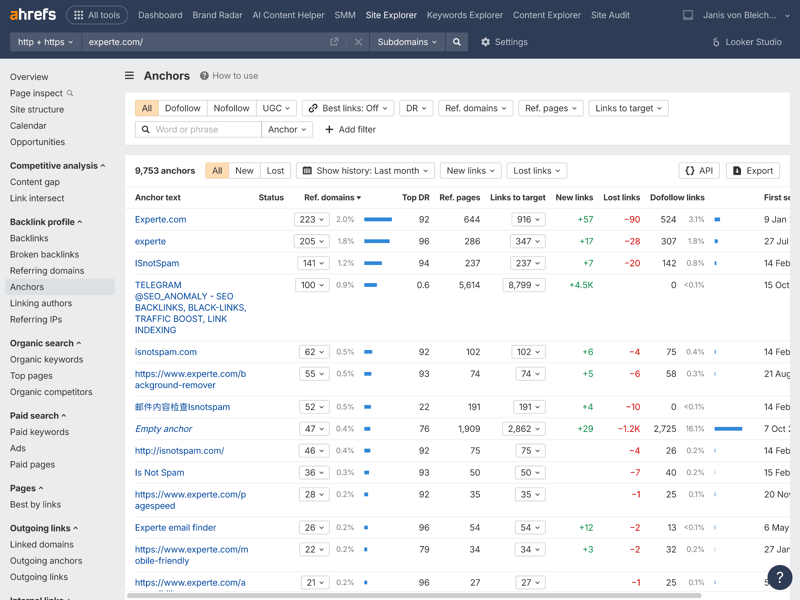
Beyond expected anchor texts like experte.com, the data shows that Telegram posts also drive traffic to the URL.
In addition to anchor texts, Ahrefs lets you filter by top pages per author, broken backlinks, and referring domains. This makes it easy to drill down even further into your analysis.
Unique insights through referring IP addresses
One standout feature in Ahrefs is the analysis of referring IP addresses. Often, this view offers more value than just looking at linking domains.
IP data can help you spot potential link farms or spam networks, draw conclusions about geographic distribution, and better assess the quality of hosting providers being used.
In short, the more unique IP addresses pointing to your domain, the more diverse, relevant, and potentially international your link profile is. Plenty of backlinks from just a few IPs can be a sign of PBNs (“private blog networks”) and may lead to negative SEO consequences.
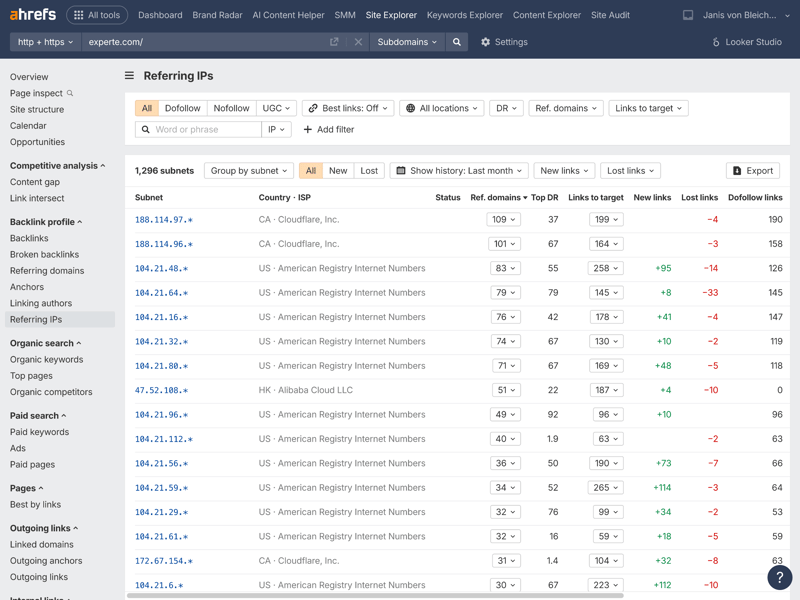
Using experte.com as an example, Ahrefs shows that links come from 849 different subnets, spread across various countries and internet providers.
Optimize internal links too
Ahrefs doesn’t just help with external backlink analysis. It also supports internal link optimization. In Site Explorer, under “Internal Links,” you can see how often individual pages on your domain link to other URLs.
The goal here is to identify which internal links actually get used and generate traffic and which ones have little impact. This helps you guide visitors through your site, connect relevant content, and increase time on page.
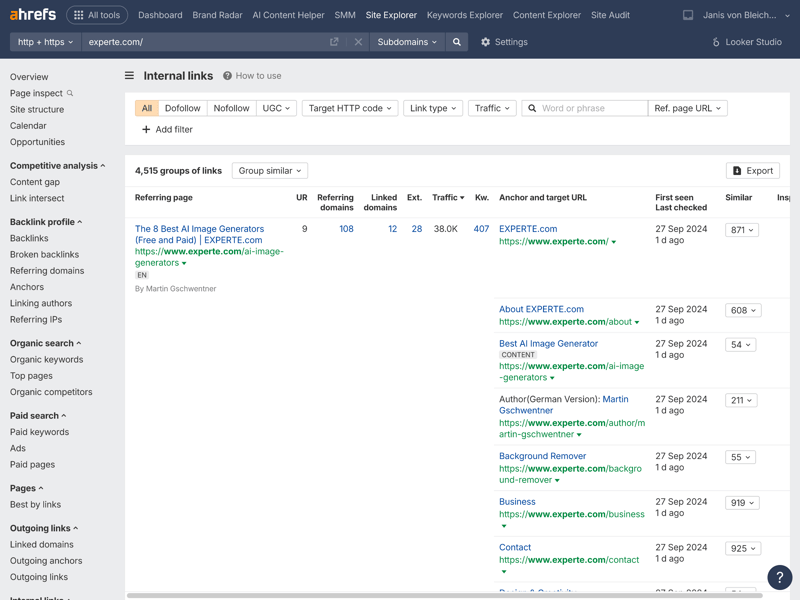
The most valuable internal link on experte.com is the homepage link embedded in the high-traffic “Email Check” widget.
All the key features for backlink analysis
When it comes to backlink analysis, Ahrefs is fully loaded. You can analyze backlinks in detail and evaluate them in many ways. Whether you’re looking for broken links, analyzing anchor texts, or tracking the history of referring domains, the feature set leaves little to be desired.
Ahrefs | Mangools | Semrush | SE Ranking | Moz | Sistrix | Serpstat | SpyFu | Ubersuggest | |
|---|---|---|---|---|---|---|---|---|---|
Backlink history | ✓ | ✓ | ✓ | ✓ | ✓ | ✓ | ✓ | ✓ | ✓ |
Referring domains | ✓ | ✓ | ✓ | ✓ | ✓ | ✓ | ✓ | ✓ | ✓ |
Referring IPs | ✓ | ✓ | ✓ | ✓ | ✗ | ✓ | ✓ | ✗ | ✗ |
Lost links | ✓ | ✓ | ✓ | ✓ | ✓ | ✓ | ✓ | ✓ | ✓ |
Toxic links | ✓ | ✓ | ✓ | ✓ | ✓ | ✗ | ✗ | ✗ | ✗ |
Broken links | ✓ | ✓ | ✓ | ✓ | ✓ | ✓ | ✗ | ✗ | ✗ |
Link quality metrics | ✓ | ✓ | ✓ | ✓ | ✓ | ✓ | ✓ | ✓ | ✓ |
Anchor text analysis | ✓ | ✓ | ✓ | ✓ | ✓ | ✓ | ✓ | ✓ | ✓ |
Top pages by links | ✓ | ✓ | ✓ | ✓ | ✓ | ✓ | ✓ | ✓ | ✓ |
Backlink gap analysis | ✓ | ✓ | ✓ | ✓ | ✓ | ✓ | ✓ | ✓ | ✓ |
Total | 10 | 10 | 10 | 10 | 9 | 9 | 8 | 7 | 7 |
How many backlink sources does Ahrefs find?
Ahrefs claims to have the largest backlink index in the industry, along with a very high update frequency. To see how this plays out in practice, we tested how many referring domains Ahrefs identifies on average per test URL.
Ahrefs cleans up its index quickly by removing deleted or inactive links. Other tools like Moz often still count old links that no longer exist. So the lower number in Ahrefs actually reflects better data hygiene rather than a weakness.
| Referring domains (on average) | |
|---|---|
| 12,100 |
| 12,100 |
| 8,927 |
| 5,627 |
| 5,200 |
| 3,505 |
| 2,305 |
| 1,172 |
| 224 |
Filter options: everything covered
If you want to analyze backlink profiles professionally, you need maximum flexibility when working with the data. Ahrefs delivers here too: the filters cover nearly every relevant criterion.
You can apply them to the backlink itself or to the referring page and combine them freely. This lets you search very precisely for specific link types, quality indicators, or anomalies — even when dealing with complex questions.
Ahrefs | Semrush | Mangools | SE Ranking | Sistrix | Serpstat | SpyFu | Ubersuggest | Moz | |
|---|---|---|---|---|---|---|---|---|---|
Nofollow/Dofollow | ✓ | ✓ | ✓ | ✓ | ✓ | ✓ | ✓ | ✓ | ✓ |
Link authority | ✓ | ✓ | ✓ | ✓ | ✓ | ✓ | ✓ | ✓ | ✓ |
Anchor text | ✓ | ✓ | ✓ | ✓ | ✓ | ✓ | ✓ | ✓ | ✓ |
Link type (text, image, …) | ✓ | ✓ | ✓ | ✓ | ✓ | ✓ | ✓ | ✓ | ✗ |
Link position (content, footer, …) | ✓ | ✓ | ✓ | ✗ | ✗ | ✗ | ✗ | ✗ | ✗ |
Link age | ✓ | ✓ | ✗ | ✓ | ✓ | ✓ | ✗ | ✓ | ✓ |
Traffic of referring page | ✓ | ✓ | ✗ | ✓ | ✗ | ✗ | ✓ | ✗ | ✗ |
Language of referring page | ✓ | ✓ | ✓ | ✗ | ✓ | ✗ | ✗ | ✗ | ✗ |
Total | 8 | 8 | 6 | 6 | 6 | 5 | 5 | 5 | 4 |
When it comes to backlink analysis, Ahrefs stands out with a massive, frequently updated backlink index and highly detailed analysis features. Internal and external links, combined with referring IP address data, allow for a thorough and nuanced look at link profiles.
Ahrefs doesn’t offer an automatic toxicity score, but the available data is more than enough to manually assess backlink quality. In terms of the number of referring domains found, Ahrefs lands in the upper midfield—but consistently delivers clean, reliable data.
Keyword Research
| Features |
| 5/5 |
| Number of countries | 170 countries | 1/1 |
| Number of keywords | 1,801 keywords | 1/3 |
| Accuracy of search volume | 73.4 % | 4/5 |
| Filters |
| 2/2 |
Keyword research is a core part of Ahrefs. It’s clearly designed for users who take a data-driven approach and want to build topics strategically.
Structured keyword research with clear focus areas
Keyword research in Ahrefs happens through the Keyword Explorer. Here you can enter one or more seed keywords or continue working with keyword lists you’ve already created.
A standout feature is how keywords are grouped into thematic “Parent Topics,” which makes structured, strategic content planning much easier.
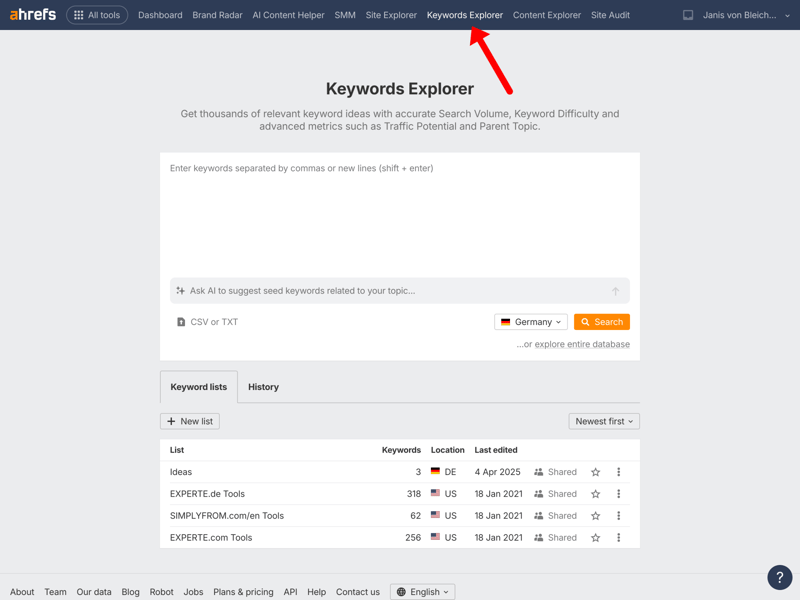
In the Keyword Explorer, you first need to enter at least one keyword as a starting point.
To work through larger datasets efficiently, you get extensive filter and sorting options. These include keyword difficulty, search volume, click potential (clicks), CPC, SERP features, word count, and the ability to include or exclude specific terms.
All the main keyword metrics you need
If you build your strategy consistently on data, you want to avoid blind spots in their analysis. That means both historical trends and thematic clusters need to be covered properly. Ahrefs delivers a well-rounded package here.
The features are well-suited for solid, practical keyword research. From historical SERPs to search intent to detailed metric analysis—all the essentials are covered. In terms of functionality, there are hardly any gaps in the keyword research department.
Ahrefs | Semrush | SE Ranking | Sistrix | Mangools | Serpstat | SpyFu | Moz | Ubersuggest | |
|---|---|---|---|---|---|---|---|---|---|
Search volume by month | ✓ | ✓ | ✓ | ✓ | ✓ | ✓ | ✓ | ✓ | ✓ |
Search volume by country | ✓ | ✓ | ✓ | ✓ | ✓ | ✓ | ✓ | ✓ | ✓ |
Keyword difficulty | ✓ | ✓ | ✓ | ✓ | ✓ | ✓ | ✓ | ✓ | ✓ |
Cost per click (CPC) | ✓ | ✓ | ✓ | ✓ | ✓ | ✓ | ✓ | ✗ | ✓ |
Search intent | ✓ | ✓ | ✓ | ✓ | ✓ | ✗ | ✗ | ✓ | ✗ |
Current SERPs | ✓ | ✓ | ✓ | ✓ | ✓ | ✓ | ✓ | ✓ | ✓ |
Historical SERPs | ✓ | ✓ | ✓ | ✓ | ✗ | ✓ | ✓ | ✗ | ✗ |
SERP comparison | ✓ | ✓ | ✓ | ✓ | ✓ | ✓ | ✓ | ✓ | ✗ |
SERP overlap | ✓ | ✓ | ✓ | ✓ | ✓ | ✓ | ✓ | ✓ | ✗ |
Keyword clustering | ✓ | ✓ | ✓ | ✓ | ✓ | ✓ | ✓ | ✗ | ✓ |
Total | 10 | 10 | 10 | 10 | 9 | 9 | 9 | 7 | 6 |
Content optimization through keyword coverage
If you want to analyze how well your existing content is performing, Ahrefs offers the right tools in Site Explorer. Under “Organic Keywords,” the tool shows which search terms a specific URL ranks for and how much those rankings contribute to organic traffic.
This makes it easy to spot which keywords matter most and which pages still have room for SEO improvement.
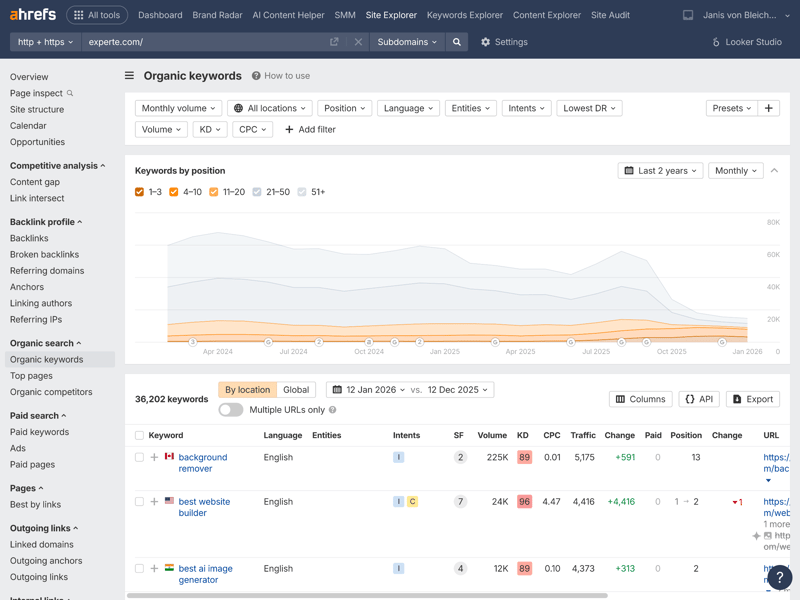
According to Ahrefs, experte.com currently covers 19,361 keywords, with “remove background,” “check email address,” and “email checker” among the top performers.
This analysis is a great starting point for content-driven on-page optimization. It shows which content is already performing well and where targeted adjustments might make sense.
Keyword database could be larger
You'd expect a premium tool to come with a massive keyword database. Unfortunately, Ahrefs falls short of expectations in our test.
To compare tools fairly, we defined 20 identical seed keywords (e.g., “vpn”) and measured how many keyword variations each database returned. Ahrefs averaged around 1,800 suggestions per term.
That puts the tool in the lower middle of our comparison, trailing behind some significantly cheaper alternatives. The data quality is high, but the sheer volume of keyword ideas for initial topic discovery remains limited.
| Number of keywords (on average) | |
|---|---|
| 5,325 |
| 3,831 |
| 3,504 |
| 3,331 |
| 3,032 |
| 1,801 |
| 410 |
| 106 |
| - |
But: highly accurate search volume data
The keyword database may be a bit disappointing, but Ahrefs makes up for it with precision. To test accuracy, we selected 30 keywords where we or our partner websites consistently rank in the top 3 Google search results. For these keywords, we can see the actual monthly impressions in Search Console. We then compared those real impressions to the search volumes reported by the SEO tools.
The result is impressive: with 73.4% accuracy, Ahrefs takes third place in our ranking, just behind Semrush. You’re working with one of the most accurate datasets in our test, which allows for realistic assessments of potential and priorities—a clear advantage for strategic planning.
| Search volume accuracy | |
|---|---|
| 83 % |
| 75.3 % |
| 73.4 % |
| 72.4 % |
| 65.5 % |
| 55.7 % |
| 54.9 % |
| 52.8 % |
| 29.9 % |
Ahrefs delivers professional, versatile keyword research with a clear focus on thematic parent topics and keyword clusters. Extensive filter and sorting options allow for very precise narrowing of results. The keyword coverage analysis in Site Explorer is especially valuable as a starting point for on-page optimization.
Ahrefs doesn’t lead in every category: while search volume data is highly accurate, the sheer number of keyword ideas falls in the middle of our test. Still, for strategic, data-driven keyword research, Ahrefs remains a powerful and reliable tool.
Other Features
| Rank tracking |
| 4/5 |
| AI-Tracking |
| 4.5/5 |
| Site audit |
| 4.5/5 |
| Additional features |
| 3.5/5 |
Beyond its core modules (competitor analysis, backlink checking, and keyword research), Ahrefs offers a range of additional features that complement your daily SEO workflow and support comprehensive website optimization.
Detailed rank tracking
The “Rank Tracker” is a central tool for monitoring your keyword sets within projects. You can create specific keyword lists to keep a constant eye on your search result positions.
Update frequency depends on your plan and ranges from weekly to daily. One standout feature is granular local rank tracking, which allows analysis at the country, state, or even city level.
AI tracking and brand radar
Ahrefs is increasingly expanding into AI tracking features. The tool can detect whether a keyword triggers Google’s AI Overviews and whether your page appears in those AI-generated answers.
With the “Brand Radar” module, you can also track a brand’s visibility in external AI chatbots:
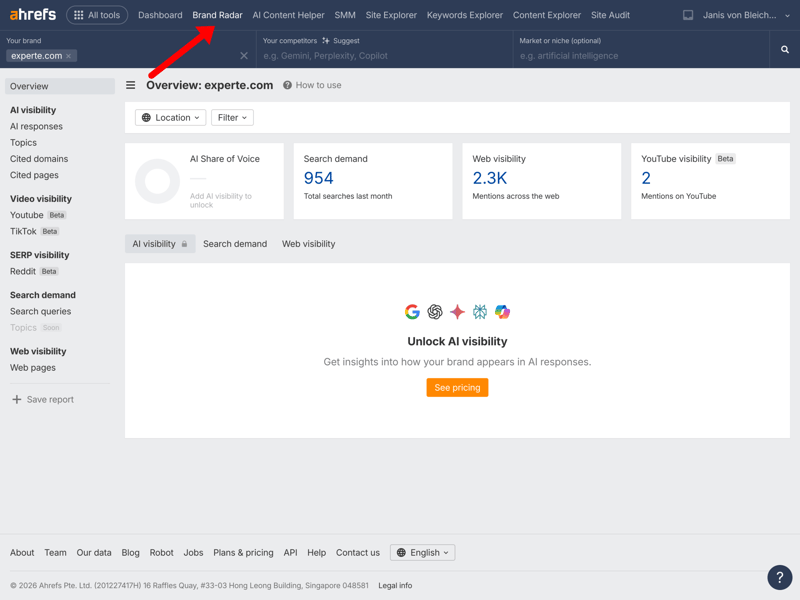
The “Brand Radar” module lets you track your brand’s visibility in AI search engines.
Ahrefs also offers an AI-powered text editor. It helps you create and revise content, suggests topics, and rates your text with a content score that provides an estimate of its potential.
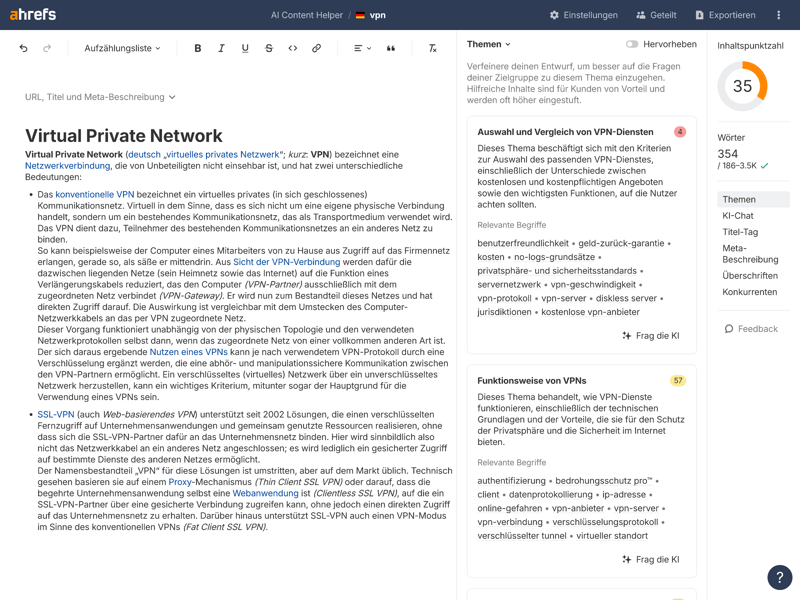
Ahrefs’ AI doesn’t seem too impressed with Wikipedia’s VPN article.
Comprehensive site audit for technical analysis
Ahrefs’ site audit tool is a cloud-based crawler for in-depth technical analysis of your website. It checks for more than 140 predefined SEO issues and automatically prioritizes them by relevance.
Issues are categorized as “Errors,” “Warnings,” and “Notices,” so you can quickly gauge their urgency. For each item, Ahrefs provides a clear explanation and specific guidance on how to fix it.
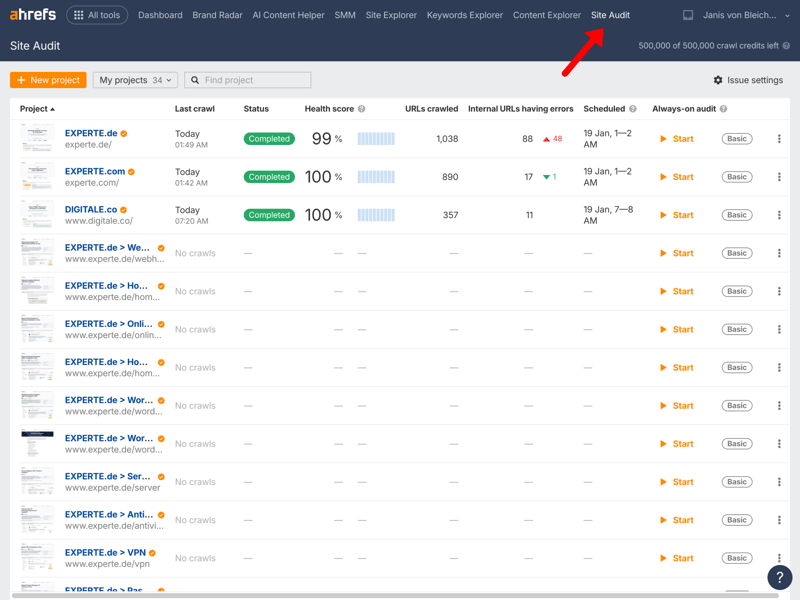
The Site Audit section displays all your projects along with their status and health scores.
One minor downside: Notably, the site audit is exclusively available in English, unlike other Ahrefs modules that may offer multilingual content.
Tailored on-page optimization
For targeted on-page optimization, Ahrefs offers the “Opportunities” feature in the site explorer. It lists specific optimization potential, broken down by content, links, and technical difficulties. This feature sits at the intersection of on-page and technical SEO.
Instead of generic advice, you get concrete suggestions on where to expand content, add internal or external links, or address technical problems.
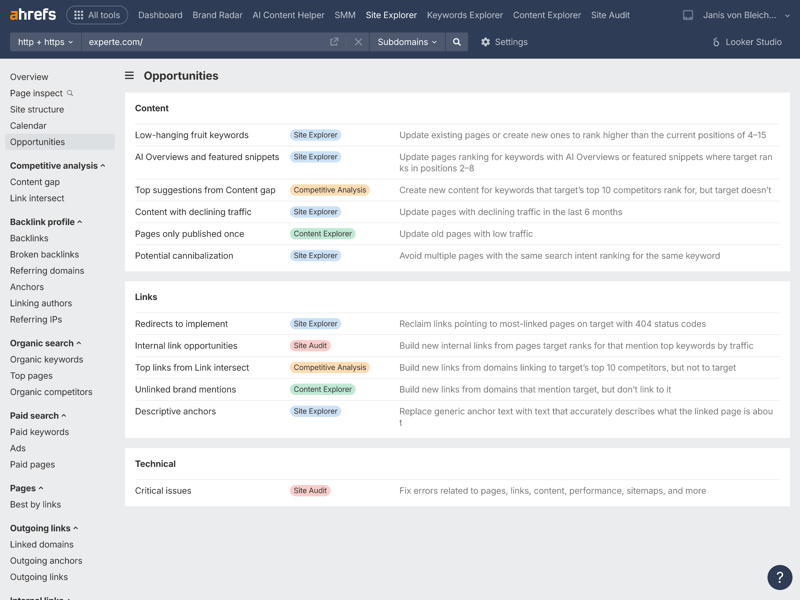
For the VPN article on experte.com, the SEO tool recommends six content tips, five link suggestions, and one fix for a critical technical issue.
Content Explorer for inspiration beyond the SERPs
The “Content Explorer” helps you find content outside traditional Google search results, including social media posts and podcast episodes. You can use these resources to research a topic before creating your own content.
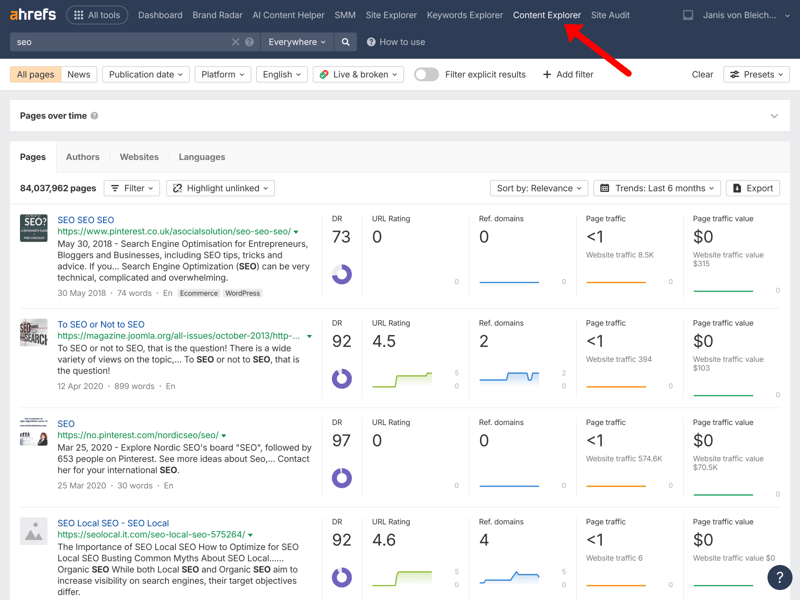
For the topic ”seo,” Ahrefs suggests over 800,000 pages, including articles, posts, and more.
Plenty of extra features and integrations
Depending on your plan, Ahrefs offers many additional features. Google Search Console integration is available to all users, while API access is only included in the higher-tier plans.
White-label reporting isn’t part of the standard package, but you can run batch analyses of up to 200 URLs or domains at once. You can also set up regular email reports for rank tracking and site audits.
Ahrefs also integrates with tools like Screaming Frog, Databox, BuzzStream, and SpamZilla.
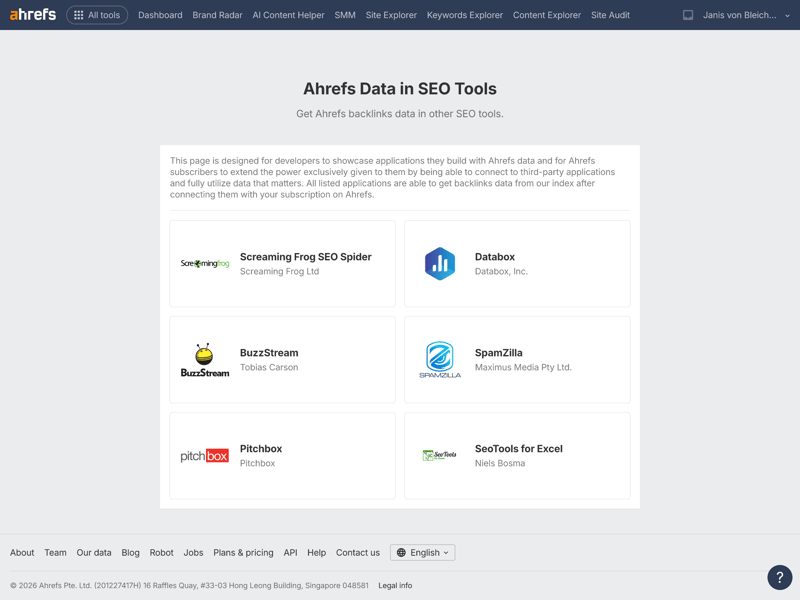
Various integrations are available in Ahrefs.
Ahrefs also offers a selection of free tools through Ahrefs Webmaster Tools.
Beyond its core SEO features, Ahrefs shines here as well. The Site Audit stands out with its thorough technical analysis and clear prioritization of issues—though it’s only available in English.
For content work, the AI-powered Content Editor and Content Explorer provide useful input for topic research and content optimization. For professionals and agencies, Ahrefs offers a versatile package that covers both technical and editorial aspects of search engine optimization.
Support
| Documentation and tutorials |
| 2.5/3 |
| Support channels | Support is available via live chat and e-mail; there is no phone hotline. | 1.5/2 |
| Quality of support |
| 2/2 |
| Reviews on review platforms |
| 3/3 |
The Ahrefs Help Center and blog are widely regarded as go-to resources in the SEO industry. The content is well-researched, data-driven, and clearly focused on practical application—for beginners and experienced SEO professionals alike.
Extensive learning resources and Academy
The official Ahrefs YouTube channel offers high-quality tutorials that explain complex features in an accessible way and build on each other logically. The videos are organized into playlists, creating a structured learning path.
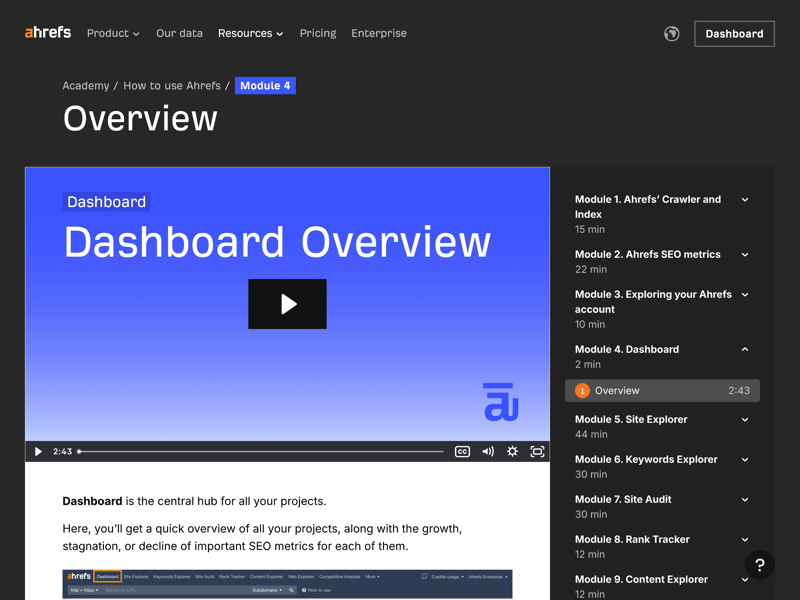
The Ahrefs video tutorials are a helpful resource.
On top of that, Ahrefs Academy provides free, in-depth courses covering each module of the tool. These courses address both fundamentals and advanced use cases.

Ahrefs Academy offers comprehensive courses in English.
Keep in mind that all learning materials, including the Academy courses, are currently only available in English.
Well-organized FAQs and direct contact
For questions about SEO topics or account management, Ahrefs provides a clear FAQ page. It’s also only available in English, even though you can select “German” in the language menu.
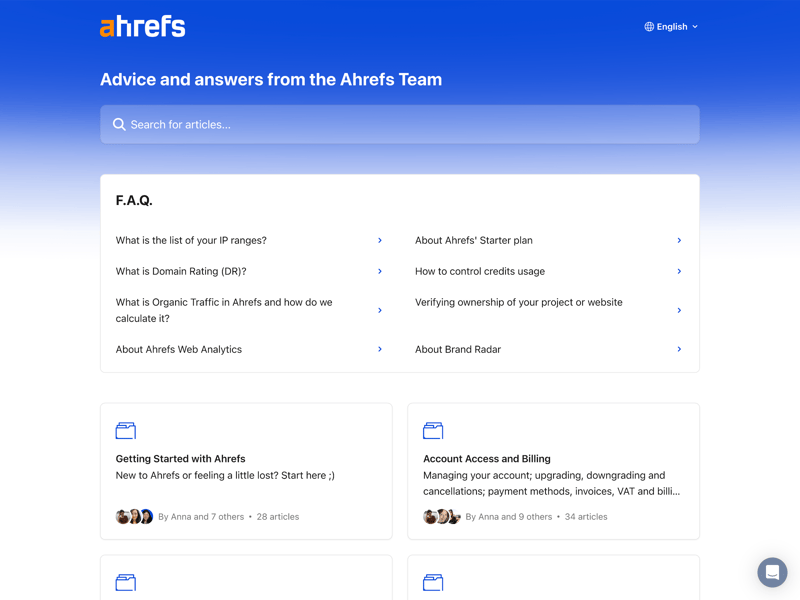
A prominent search bar on the FAQ page allows you to enter your questions directly.
For individual questions, Ahrefs offers a live chat directly in the tool, plus the option to email their support team. During our test, Ahrefs was able to respond in German:
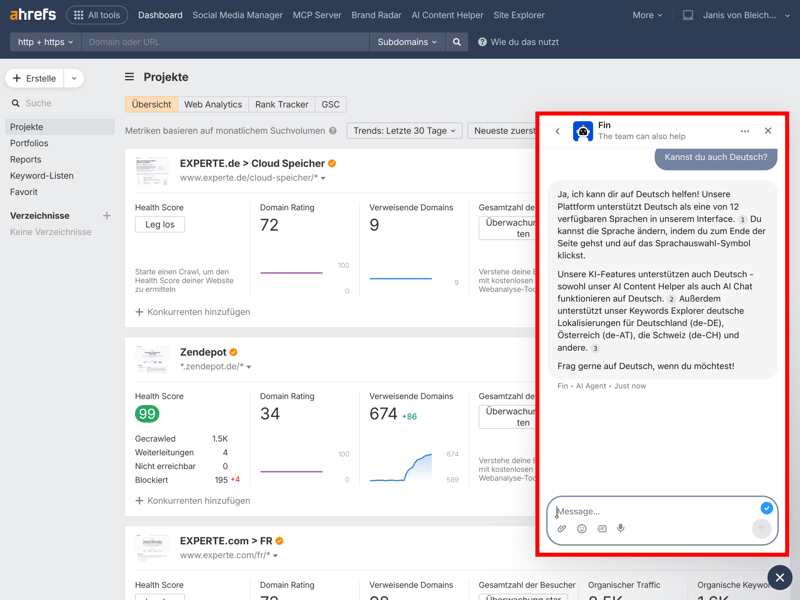
Fin, the chatbot, responds in mere seconds.
When we emailed support, we received a detailed, accurate, and easy-to-follow response from Fin in less than a minute. We asked about a niche feature and the results of our backlink check. Several review platforms also rate Ahrefs support as excellent, fast, and knowledgeable.
Ahrefs stands out with an industry-leading knowledge base backed by in-depth articles, high-quality video tutorials, and a comprehensive Academy—though only in English. The live chat and fast email support are highly responsive and user-focused.
Pricing
| Trial version |
| 0.5/2 |
| Starter plan | $208.00 | 0/2 |
| Advanced plan | $374.00 | 0/2 |
| Team plan | $448.00 | 0/2 |
| Rank tracking | $208.00 | 0/2 |
Ahrefs clearly positions itself as a premium SEO tool—and comes with premium pricing. There are three plans (Lite, Standard, and Advanced), and even the cheapest one costs more than higher-tier plans from other providers.
The plans differ not just in features but also in limits like the number of projects, keyword quotas, and available data history.
Here’s an overview of Ahrefs’ pricing:
| Lite | Standard | Advanced | |
|---|---|---|---|
| Monthly price | from $108.00 | from $208.00 | from $374.00 |
| Contract period (months) | 1 - 12 | 1 - 12 | 1 - 12 |
| General limits | |||
| Users included | 1 | 1 | 1 |
| Maximum user | 3 | 6 | 11 |
| Reports per day | 16 | unlimited | unlimited |
| Results per report | 2,500 | 30,000 | 75,000 |
| Historical data | 0.5 years | 2 years | 5 years |
| Site audit | |||
| Projects | 5 | 20 | 50 |
| Crawled pages | 100,000 | 500,000 | 1,500,000 |
| JavaScript Rendering | ✓ | ✓ | ✓ |
| Rank tracking | |||
| Keywords | 750 | 2,000 | 5,000 |
| Frequency | Weekly | Weekly | Weekly |
There’s no traditional free trial and no money-back guarantee. However, Ahrefs does offer a free version with limited but useful core features called “Ahrefs Webmaster Tools.” It lets website owners analyze key data about their domain at no cost.
Ahrefs price comparison
How does Ahrefs stack up against other SEO platforms in terms of price? To find out, we calculated and compared costs for four typical use cases:
- 1.
Beginner: 1 user, 100 queries per day
- 2.
Advanced: 1 user, 500 queries per day, min. 50,000 results per query
- 3.
Team: 5 users
- 4.
Rank tracking: monitoring 1,000 keywords
Here are the results:
| Beginner | Advanced | Team | Rank tracking | |
|---|---|---|---|---|
| $29.00 | $89.00 | $149.00 | $29.00 |
| $29.00 | $99.00 | $29.83 | $49.00 |
| $37.70 | $52.70 | $145.70 | $97.70 |
| $50.00 | $100.00 | $169.00 | $50.00 |
| $52.00 | $95.20 | $132.00 | $95.20 |
| $117.33 | $416.66 | $297.33 | $208.33 |
| $138.04 | $277.24 | $392.78 | $138.04 |
| $143.25 | $239.00 | $235.00 | $143.25 |
| $208.00 | $374.00 | $448.00 | $208.00 |
Ahrefs isn’t budget-friendly in any category. You’ll pay significantly more than you would with competitors across the board. In three out of four scenarios, Ahrefs is the most expensive tool in our comparison. Only Semrush costs slightly more in the “Advanced” category.
Ahrefs may be one of the best SEO tools on the market, but it’s definitely one of the most expensive. Even the cheapest plan costs more than advanced tiers from many competitors. This makes it a tool primarily aimed at SEO professionals who are willing to invest in high-quality data and a comprehensive feature set.
There’s no free trial and no money-back guarantee. That said, the free Webmaster Tools let you try out some of Ahrefs’ core features without paying anything.
Final Verdict
Ahrefs reinforces its position as one of the leading SEO tools. Originally known for its massive and constantly updated backlink index, the platform has evolved into a full-fledged all-in-one solution. Standout features include excellent performance, a detailed site audit, and well-designed keyword research tools.
That said, the overall package isn’t perfect. In our data quality tests, Ahrefs delivered only average results in some areas, such as traffic estimation accuracy. The keyword database was also smaller than expected. Given the high price tag—Ahrefs is one of the most expensive tools in our comparison—you might expect it to perform at the top level.
Still, Ahrefs remains one of the best choices for experienced SEO professionals, large companies, and agencies. It’s ideal for anyone who needs in-depth insights into backlinks, content, and technical SEO, and who values continuous data updates and excellent support.

Ahrefs User Reviews
What do users think of Ahrefs? We looked at reviews and ratings on well-known platforms like G2, Capterra, and Trustpilot to get a full picture. Here’s what the community says most often:
Unmatched backlink index
The SEO community generally agrees that Ahrefs offers the best and most comprehensive backlink index in the industry. Many consider it an essential tool.High data quality and freshness
Users praise the accuracy and constant updates, especially for keywords and organic traffic data. This is a major advantage when making informed decisions.Powerful all-in-one solution for professionals
Although it started out as a backlink tool, professionals now value its integration of all essential SEO features.
High pricing
Price is the most common complaint. For individuals, small teams, or businesses on a tight budget, Ahrefs is often challenging to justify despite its extensive feature set.Steep learning curve for beginners
The sheer amount of data can feel overwhelming for new users. Even though the interface is modern, it takes time to get comfortable with the tool.No explicit spam score
Some users criticize the lack of a dedicated toxicity score for backlinks. Link quality has to be assessed manually, which adds extra work when dealing with large link profiles.
Alternatives to Ahrefs
Ahrefs is primarily geared toward professionals. If the platform is too expensive or too complex for your needs, one of the following alternatives might be a better fit:
Semrush
Semrush offers a similarly large database but focuses more on content marketing, paid search, and operational marketing workflows. It’s a strong alternative for teams that want to combine SEO and paid search.Sistrix
For projects targeting the German market, Sistrix is the established standard in the DACH region. Its visibility index makes tracking ranking changes very intuitive and is the go-to metric for many SEO teams.Moz Pro
If you mainly work with link metrics and authority scores, Moz Pro remains a respected industry reference. Domain Authority (DA) and Page Authority (PA) are widely used, and the entry price is often lower than Ahrefs.
Here are some of the best alternatives to Ahrefs: