Mangools Review 2026: 5 Powerful SEO Tools in One


Many SEO tools feel like cluttered Excel spreadsheets—functional, yet rarely pleasant to use. From day one, Mangools has taken a different approach, aiming to present complex SEO data in a visually clean and accessible interface.
But the platform doesn’t just stand out visually. Instead of one monolithic tool, Mangools offers a suite of five specialized apps. This modular approach is unusual in the SEO landscape. We’ll show you how well this concept works in practice and for whom Mangools is truly worth considering.
Mangools* isn’t a single tool; it’s a suite of five standalone applications, each covering a clearly defined area of SEO:
- 1.
KWFinder—keyword research focused on search volume and competition
- 2.
SERPChecker—a competitor analysis tool for analyzing search results and direct competitors
- 3.
SERPWatcher—a rank tracker for keywords and projects
- 4.
LinkMiner—a backlink checker and link evaluation tool
- 5.
SiteProfiler—an overview of domains, key metrics, and link profiles
Mangools is developed by a Slovak company that has been building the suite since 2014. The name is a portmanteau of the company’s logo, “Mango,” and the core idea of offering multiple specialized tools instead of one large all-in-one platform.
Unlike larger platforms like Ahrefs, Semrush, or SE Ranking, Mangools positions itself as a lighter, more accessible alternative. The focus is on ease of use, clear visualizations, and a quick learning curve. It also lacks some advanced features that are standard in larger tools.
Mangools Review
Easy to use
Mangools features a modern, clean design. The interface is well-organized and intuitive, so even new users can find their way around quickly.Reliable traffic data
The algorithms deliver surprisingly accurate traffic estimates in our tests. This gives you useful benchmarks for realistically assessing the potential of competitors or possible link partners.Useful link preview
Backlinks can be evaluated faster than with many competitors. Mangools shows the linking page in a preview and automatically highlights the anchor text, so you immediately understand the context.
Breaks your workflow
The strict separation into five separate apps forces frequent switching between browser tabs. This constant tab-hopping slows down your analysis workflow.No technical on-page analysis
Mangools doesn’t include a comprehensive technical site audit. For crawls, error analysis, or in-depth on-page checks, you’ll need an additional SEO tool.Limited language options
The entire Mangools interface is available only in English. While many numbers and visualizations are self-explanatory, there are no options for other languages.
Interface and Usability
| User interface |
| 8/8 |
| Performance |
| 2/2 |
Mangools works differently from traditional SEO tools in its basic structure because it doesn’t rely on a central all-in-one interface. While other solutions pack everything into a sidebar or bundle them in a large dashboard (which often feels cluttered), Mangools takes a modular approach.
Instead of a single, overloaded interface, users work with five standalone applications. Each app covers a clearly defined use case, such as keyword research, backlink analysis, or rank tracking. The focus is always on one task, not on cramming in as many features as possible.

First, choose one of the five modules.
English only: The entire Mangools interface is available only in English. Many numbers and visualizations are self-explanatory, but there’s no option for other languages.
The five Mangools modules at a glance
Since Mangools splits its features into separate applications, it’s worth taking a brief look at what each tool is responsible for.
The naming can be a bit confusing for new users at first, since Mangools sometimes uses feature descriptions in the navigation rather than the actual tool names.
App name | Features and purpose |
|---|---|
SERPChecker (SERP Analysis) | Analyzes Google search results pages (SERPs). You can see which domains rank for a keyword and how strong these competitors are. |
SiteProfiler (SEO metrics & Insights) | Provides a quick overview of the SEO health and authority of an entire domain. It bundles metrics on traffic, backlinks, and popular content. |
LinkMiner (Backlink Analysis) | The module for backlink analysis. You can check your website’s link profile or analyze your competitors’ backlinks to identify new link sources. |
KWFinder (Keyword Research) | The core module for keyword research. You can find new search terms and analyze search volume, competition, and ranking difficulty. |
SERPWatcher (Rank Tracking) | The rank tracking tool. Here you add your keywords and monitor daily where your website ranks in Google search results. |
Tool separation can lead to interrupted workflows
The strict separation of the individual applications can noticeably slow down your workflow. You need to know ahead of time which of the five tools will provide the data you need. Seamless, cross-module work is only partially possible, and you’ll often need multiple browser tabs open.
Here’s an example of this problem: You research keywords in KWFinder and then want to analyze the backlinks of your strongest competitors. There’s no direct button for that.
Instead, you have to open LinkMiner separately and manually enter the keyword or domain. It might not seem like a big deal at first, but it adds up quickly with regular use.
Intuitive controls within each module
Despite the somewhat clunky navigation between apps, the experience within each module is solid. The design is modern, colorful, and clean. Large buttons and clear visualizations make data analysis a breeze.
Beginners will pick it up quickly, since Mangools avoids cluttered menus and unnecessary complexity.

Each Mangools tool is well-designed and easy to use. However, the workflow suffers from poor integration between modules. Another downside: the platform is only available in English.
Competitor Analysis
| Analysis level | Available at all levels except subfolders/paths. | 1.5/2 |
| Scope of traffic estimation |
| 2/6 |
| Accuracy of traffic estimation | 51.0 % | 4/6 |
| Keyword rankings |
| 3.5/4 |
| Page structure | Supports hostnames and outgoing links; directories and internal links are not tracked. | 1/2 |
Mangools doesn’t feature a dedicated competitor analysis module. Instead, this task is split across two main tools: SiteProfiler for domain-level analysis and SERPChecker for keyword-level insights.
Competitor analysis on two levels
In SiteProfiler, you enter a competitor’s URL (e.g., experte.com) and get basic metrics for that domain. You’ll see an estimated traffic trend as a line chart, along with overviews of authority, backlinks, and overall website visibility.
It’s sufficient for a quick overview, but some metric labels can be a bit abstract and require explanation:
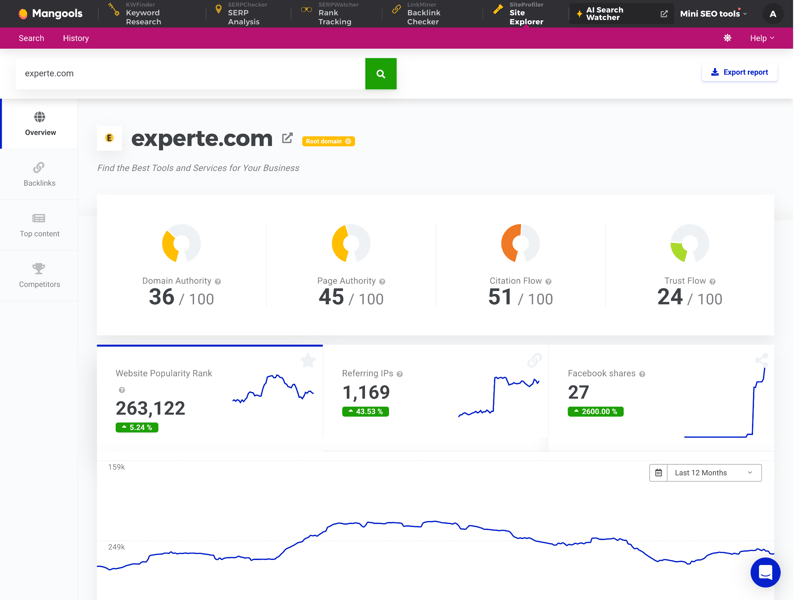
You can run a competitor analysis for any URL.
Switch to SERPChecker and enter a keyword like “seo,” and Mangools instantly shows which domains rank at the top and gives you clues about why.
The metrics (like authority or social signals) are the same as in SiteProfiler. The abbreviations aren’t immediately clear, but hovering over them reveals an explanation:
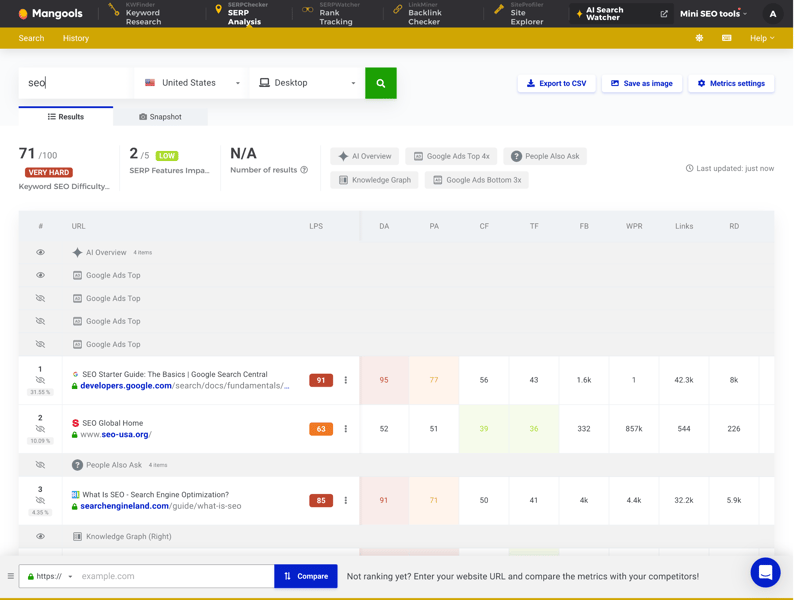
Hover over “LPS” to learn it stands for “Link Profile Strength.”
How comprehensive and reliable is the traffic data?
A comprehensive competitor analysis needs to cover two areas: organic search (SEO) and paid ads (SEA). Only then can you gauge how much a competitor is really investing. Unfortunately, Mangools ignores SEA entirely.
You won’t find any data on ads, ad budgets, or paid traffic. Historical data is also limited: by default, you can only look back one year (though for top keywords, support says it can go back up to ten years).
Other tools offer much more in this area:
 Mangools |  Ahrefs |  Moz |  Semrush |  SE Ranking |  Serpstat |  Sistrix |  SpyFu |  Ubersuggest | |
|---|---|---|---|---|---|---|---|---|---|
Organic traffic | ✓ | ✓ | ✗ | ✓ | ✓ | ✓ | ✓ | ✓ | ✓ |
Paid traffic | ✗ | ✓ | ✗ | ✓ | ✓ | ✓ | ✓ | ✓ | ✓ |
Trafic value | ✗ | ✓ | ✗ | ✓ | ✓ | ✓ | ✓ | ✓ | ✓ |
Traffic by country | ✓ | ✓ | ✓ | ✓ | ✓ | ✓ | ✓ | ✓ | ✓ |
Traffic history | 1 years | 5 years | 1 years | 14 years | 8 years | 9 years | 5 years | 16 years | 3 years |
SEO tools don’t measure traffic directly. They estimate it. That means the numbers they show can differ significantly from real analytics data. So it’s important that these estimates stay as close to reality as possible.
Mangools performs well here: When we compared 30 test domains against real traffic data from Plausible.io, the tool achieved 51% accuracy—the second-best result in our comparison. For organic traffic estimates, Mangools is one of the most reliable options on the market.
| Traffic estimation accuracy | |
|---|---|
| 53.6 % |
| 51 % |
| 50.1 % |
| 49.1 % |
| 46.1 % |
| 45.9 % |
| 45.4 % |
| 18.9 % |
| 0 % |
Good core feature, but some gaps
To target after your competitors’ rankings, you need to know which keywords they’re ranking for. Mangools provides the essentials—clear keyword lists and ranking trends over time.
Where the tool falls short is automation. There’s no feature to automatically identify organic competitors. Instead, you need to already know who your competitors are and enter them manually for analysis.
Mangools | Ahrefs | Moz | Semrush | SE Ranking | Sistrix | SpyFu | Ubersuggest | Serpstat | |
|---|---|---|---|---|---|---|---|---|---|
Number of keywords (history) | ✓ | ✓ | ✓ | ✓ | ✓ | ✓ | ✓ | ✓ | ✓ |
Number of URLs (history) | ✓ | ✓ | ✓ | ✓ | ✓ | ✓ | ✗ | ✓ | ✗ |
Top pages | ✓ | ✓ | ✓ | ✓ | ✓ | ✓ | ✓ | ✓ | ✓ |
Ranking history per keyword | ✓ | ✓ | ✓ | ✓ | ✓ | ✓ | ✓ | ✓ | ✓ |
Ranking changes | ✓ | ✓ | ✓ | ✓ | ✓ | ✓ | ✓ | ✓ | ✓ |
Ranking distribution | ✓ | ✓ | ✓ | ✓ | ✓ | ✓ | ✓ | ✗ | ✗ |
Organic competitors | ✗ | ✓ | ✓ | ✓ | ✓ | ✓ | ✓ | ✓ | ✓ |
Keyword gap analysis | ✓ | ✓ | ✓ | ✓ | ✓ | ✓ | ✓ | ✓ | ✓ |
Total | 7 | 8 | 8 | 8 | 8 | 8 | 7 | 7 | 6 |
For quick, one-off checks, Mangools works well. But if you’re looking to run a systematic or large-scale market analysis, expect to put in some extra manual effort.
Mangools’ competitor analysis leaves a mixed impression. On one hand, it delivers reliable and accurate data for organic search (SEO). On the other hand, paid advertising is thoroughly ignored. Mangools is great for quick, precise checks of individual pages, but it’s no substitute for a full-featured professional tool.
Backlink Analysis
| Feature set |
| 5/5 |
| Number of backlinks | 5,200 referring domains | 2/4 |
| Data quality |
| 2.5/4 |
| Backlink filters |
| 1.5/2 |
For link analysis, Mangools doesn’t use its crawler. Instead, it taps into the extensive database from Majestic. Through the LinkMiner module, you get access to established metrics like “Trust Flow” (a domain’s trustworthiness) and “Citation Flow” (raw link strength)—without needing a separate Majestic subscription.
The interface really shines when analyzing individual links. Click on a backlink, and a live preview of the linking page appears in the right panel. The anchor text is highlighted, so you can immediately see the context of the link:
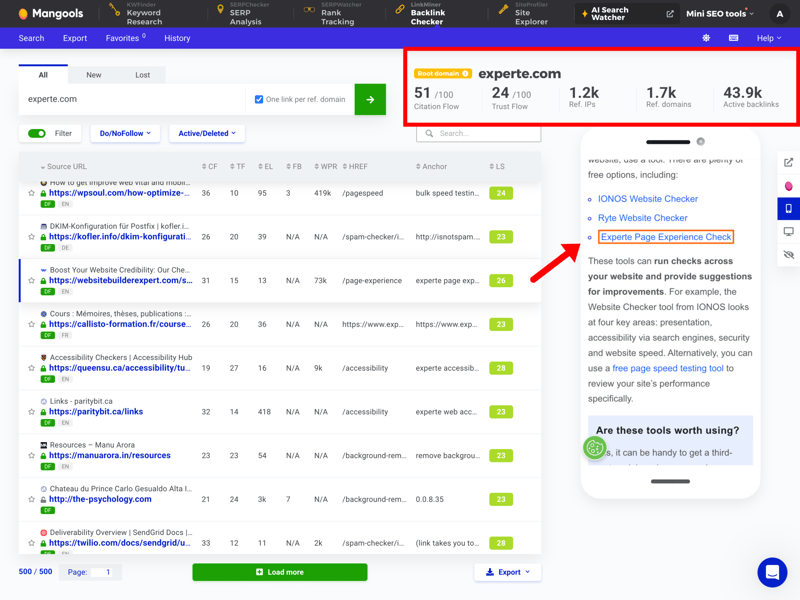
Beyond the global data at the top, you can examine each individual backlink.
This visual link preview actually saves time: you don’t have to open the target page in a new tab or dig through the source code to find the link. When you’re evaluating many backlinks in a row, that’s a noticeable efficiency boost.
Solid basics for everyday SEO
Backlinks act as endorsements: search engines treat every link as a vote of confidence for your website. Understanding who links to you helps you assess both the authority and the risk of your link profile.
Mangools focuses on everyday SEO tasks and covers the most important analytical needs. You can quickly see whether links have been added or lost. For ongoing monitoring, that’s plenty. For deep technical audits, specialized tools offer more depth.
Mangools | Ahrefs | Semrush | SE Ranking | Moz | Sistrix | Serpstat | SpyFu | Ubersuggest | |
|---|---|---|---|---|---|---|---|---|---|
Backlink history | ✓ | ✓ | ✓ | ✓ | ✓ | ✓ | ✓ | ✓ | ✓ |
Referring domains | ✓ | ✓ | ✓ | ✓ | ✓ | ✓ | ✓ | ✓ | ✓ |
Referring IPs | ✓ | ✓ | ✓ | ✓ | ✗ | ✓ | ✓ | ✗ | ✗ |
Lost links | ✓ | ✓ | ✓ | ✓ | ✓ | ✓ | ✓ | ✓ | ✓ |
Toxic links | ✓ | ✓ | ✓ | ✓ | ✓ | ✗ | ✗ | ✗ | ✗ |
Broken links | ✓ | ✓ | ✓ | ✓ | ✓ | ✓ | ✗ | ✗ | ✗ |
Link quality metrics | ✓ | ✓ | ✓ | ✓ | ✓ | ✓ | ✓ | ✓ | ✓ |
Anchor text analysis | ✓ | ✓ | ✓ | ✓ | ✓ | ✓ | ✓ | ✓ | ✓ |
Top pages by links | ✓ | ✓ | ✓ | ✓ | ✓ | ✓ | ✓ | ✓ | ✓ |
Backlink gap analysis | ✓ | ✓ | ✓ | ✓ | ✓ | ✓ | ✓ | ✓ | ✓ |
Total | 10 | 10 | 10 | 10 | 9 | 9 | 8 | 7 | 7 |
How many backlink sources does Mangools find?
The value of any backlink analysis depends on the size of the underlying index. If a tool doesn’t find a referring domain, it simply doesn’t exist in your data.
When comparing the average number of referring domains found, Mangools sits comfortably in the middle. The tool identifies around 5,200 referring domains on average, putting it nearly on par with Ahrefs (5,600).
| Referring domains (on average) | |
|---|---|
| 12,100 |
| 12,100 |
| 8,927 |
| 5,627 |
| 5,200 |
| 3,505 |
| 2,305 |
| 1,172 |
| 224 |
Mangools licensing data from the specialist Majestic clearly pays off here. While other tools with larger indexes deliver higher numbers, Mangools provides a competitive and reliable data foundation for everyday SEO work.
Good filters for link position, weaker on traffic signals
A list of 5,000 links isn’t very useful if you can’t filter out the relevant ones. Mangools addresses this well with its LinkMiner tool: you can filter backlinks by their position on the page, making it easy to separate content links from less valuable footer or sidebar links.
This helps you quickly identify higher-quality links. However, there are gaps in other important areas: filters for linkage and the traffic of the linking page are missing. The latter would be especially useful for assessing a link’s true value.
Mangools | Ahrefs | Semrush | SE Ranking | Sistrix | Serpstat | SpyFu | Ubersuggest | Moz | |
|---|---|---|---|---|---|---|---|---|---|
Nofollow/Dofollow | ✓ | ✓ | ✓ | ✓ | ✓ | ✓ | ✓ | ✓ | ✓ |
Link authority | ✓ | ✓ | ✓ | ✓ | ✓ | ✓ | ✓ | ✓ | ✓ |
Anchor text | ✓ | ✓ | ✓ | ✓ | ✓ | ✓ | ✓ | ✓ | ✓ |
Link type (text, image, …) | ✓ | ✓ | ✓ | ✓ | ✓ | ✓ | ✓ | ✓ | ✗ |
Link position (content, footer, …) | ✓ | ✓ | ✓ | ✗ | ✗ | ✗ | ✗ | ✗ | ✗ |
Link age | ✗ | ✓ | ✓ | ✓ | ✓ | ✓ | ✗ | ✓ | ✓ |
Traffic of referring page | ✗ | ✓ | ✓ | ✓ | ✗ | ✗ | ✓ | ✗ | ✗ |
Language of referring page | ✓ | ✓ | ✓ | ✗ | ✓ | ✗ | ✗ | ✗ | ✗ |
Total | 6 | 8 | 8 | 6 | 6 | 5 | 5 | 5 | 4 |
Mangools delivers a strong overall performance regarding backlink analysis. By integrating the Majestic database, you get access to an established and reliable link index.
The interface is also much more intuitive than Majestic’s own platform. The live preview with automatically highlighted anchor text speeds up manual link checks and makes it easier to assess link quality. If you can do without traffic data for your sources, this is a capable tool for analyzing your link profile or your competitors’.
Keyword Research
| Features |
| 4.5/5 |
| Number of countries | 120 countries | 1/1 |
| Number of keywords | 410 keywords | 0/3 |
| Accuracy of search volume | 65.5 % | 3/5 |
| Filters |
| 1/2 |
The KWFinder module is considered by many users to be the highlight of the Mangools suite. It’s designed to help you discover new search terms and realistically assess their potential for your project.
The interface is split into two practical sections. On the left, you’ll find a list of relevant keyword suggestions based on your input. On the right, detailed information about the selected term appears instantly, including the current SERPs and the difficulty of ranking for that keyword.
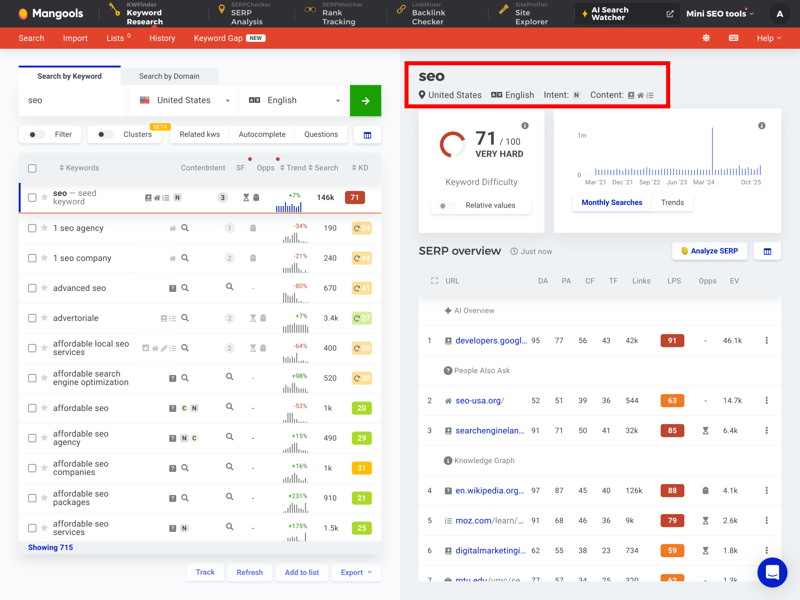
See which pages rank well for specific keywords.
The visualization of keyword difficulty stands out as a real plus. KWFinder doesn't just show a number; it also uses color coding to indicate how hard it is to rank. This makes it much easier for beginners to realistically gauge their ranking chances.
Filters and clusters for better results
A raw list of hundreds or thousands of keywords offers little strategic value on its own. That’s why Mangools provides extensive filtering options. You can narrow down results by search volume, word count, and more.
For example, you can quickly group all potential “seo“ keywords together. This helps you spot not only strong individual terms but also which broader keywords can serve as cluster topics, covering multiple relevant searches at once:
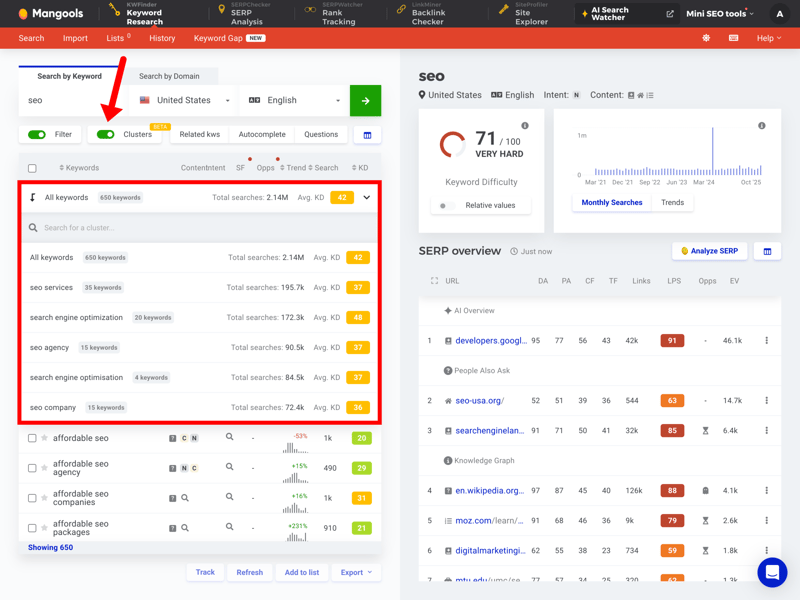
The cluster feature is still labeled “Beta,” but we found it worked well in practice.
Plenty of features for day-to-day keyword research
When it comes to features, Mangools holds its own. You get keyword suggestions pulled directly from Google’s autocomplete, plus related questions (W-questions) for your topic.
Results can be saved to organized lists for further use. This makes Mangools a great choice for quickly exploring topic areas and building out initial content structures.
Mangools | Ahrefs | Semrush | SE Ranking | Sistrix | Serpstat | SpyFu | Moz | Ubersuggest | |
|---|---|---|---|---|---|---|---|---|---|
Search volume by month | ✓ | ✓ | ✓ | ✓ | ✓ | ✓ | ✓ | ✓ | ✓ |
Search volume by country | ✓ | ✓ | ✓ | ✓ | ✓ | ✓ | ✓ | ✓ | ✓ |
Keyword difficulty | ✓ | ✓ | ✓ | ✓ | ✓ | ✓ | ✓ | ✓ | ✓ |
Cost per click (CPC) | ✓ | ✓ | ✓ | ✓ | ✓ | ✓ | ✓ | ✗ | ✓ |
Search intent | ✓ | ✓ | ✓ | ✓ | ✓ | ✗ | ✗ | ✓ | ✗ |
Current SERPs | ✓ | ✓ | ✓ | ✓ | ✓ | ✓ | ✓ | ✓ | ✓ |
Historical SERPs | ✗ | ✓ | ✓ | ✓ | ✓ | ✓ | ✓ | ✗ | ✗ |
SERP comparison | ✓ | ✓ | ✓ | ✓ | ✓ | ✓ | ✓ | ✓ | ✗ |
SERP overlap | ✓ | ✓ | ✓ | ✓ | ✓ | ✓ | ✓ | ✓ | ✗ |
Keyword clustering | ✓ | ✓ | ✓ | ✓ | ✓ | ✓ | ✓ | ✗ | ✓ |
Total | 9 | 10 | 10 | 10 | 10 | 9 | 9 | 7 | 6 |
Relatively small keyword database
With keyword databases, bigger is better. The larger the database, the more useful it is. This is especially true when searching for specific long-tail keywords, where variety is key to fully covering niches and subtopics.
This is where Mangools hits its limits. The tool returns far fewer results than the major players. For common search terms and initial research, it may be enough. But if you want to dive deep into specialized niches or build very granular topic clusters, you won’t always find every relevant variation.
| Number of keywords (on average) | |
|---|---|
| 5,325 |
| 3,831 |
| 3,504 |
| 3,331 |
| 3,032 |
| 1,801 |
| 410 |
| 106 |
| - |
High accuracy for search volume
Quantity isn’t everything, though. Data quality matters just as much. When you choose keywords, you’re trusting that the displayed search volume is at least roughly accurate. Otherwise, you end up optimizing for terms that barely generate any traffic. Mangools delivers a pleasant surprise here.
To test accuracy, we compared the tools’ search volumes against real data from Google Search Console. We used 30 keywords where we or partner websites consistently rank in the top 3 positions on Google.
For these keywords, we pulled the actual monthly impressions from Search Console, meaning how often they were really shown. We then compared these figures to the search volumes estimated by the SEO tools.
The result: Mangools lands in the solid upper midfield with an accuracy of 65.5%. That makes it the most precise tool among the “smaller” providers, and it even beats some significantly more expensive competitors.
| Search volume accuracy | |
|---|---|
| 83 % |
| 75.3 % |
| 73.4 % |
| 72.4 % |
| 65.5 % |
| 55.7 % |
| 54.9 % |
| 52.8 % |
| 29.9 % |
In practice, this means the search volumes are reliable enough for planning, especially when comparing keywords within the same topic area.
Keyword research is probably Mangools’ biggest strength. KWFinder combines an intuitive interface with relevant metrics and excellent search volume accuracy.
While the total number of keyword suggestions is noticeably smaller than what the industry giants offer, the data quality largely compensates for it. Thanks to strong filtering options and direct SERP integration, you can quickly get actionable results for your project.
Other Features
| Rank tracking |
| 5/5 |
| AI-Tracking |
| 0.5/5 |
| Site audit | Mangools does not offer a site audit tool. | 0/5 |
| Additional features |
| 1/5 |
Mangools focuses on its core apps and keeps the feature set lean beyond the main tools. While competitors like SE Ranking position themselves as all-in-one marketing suites, Mangools stays a clearly focused SEO tool.
That said, the tool does offer a few supplementary features outside its main modules that can be genuinely useful in day-to-day work.
Rank tracking with a focus on relevance
The SERPWatcher module handles your rank tracking. Like most SEO tools, you’ll need to create a project first. Once you enter your domain, target keywords, and location, Mangools starts collecting data.
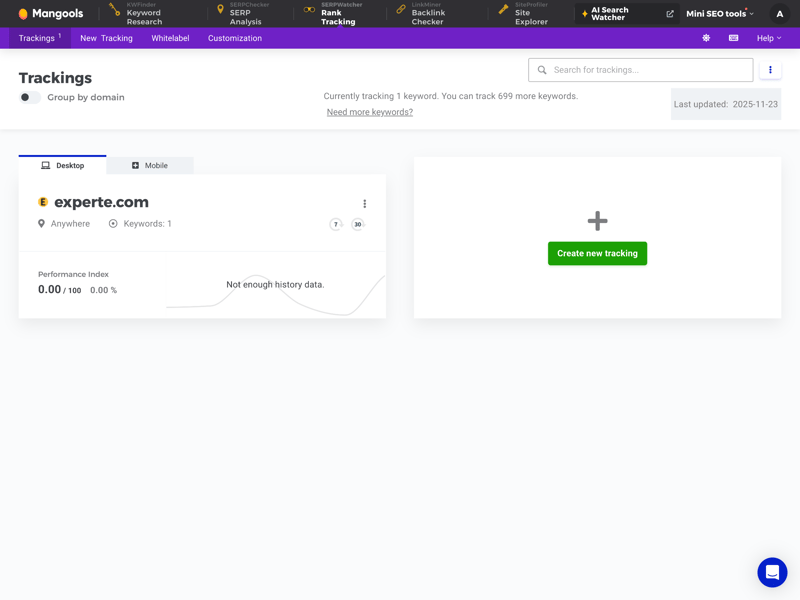
Create a project to get started with rank tracking.
One useful feature is the “Performance Index.” Instead of simply displaying raw ranking positions, Mangools calculates an overall score based on search volume and current keyword positions. This method significantly clarifies the real business impact of ranking changes.
For agencies and freelancers, Mangools also offers a reporting feature. You can set up automated weekly or monthly reports delivered straight to your inbox.
Missing features due to a focused approach
By keeping things lean, Mangools excludes some features that are standard in larger SEO suites. Here are a few examples:
No Google integrations
You can’t connect Google Search Console or Google Analytics, so there’s no way to cross-reference real traffic data.Missing technical site audit
There’s no crawler to scan your site for technical issues like 404 errors or poor Core Web Vitals.AI tracking not possible
You can’t monitor your visibility in AI tools like ChatGPT or Perplexity.No white-labeling
You can’t remove the Mangools logo from reports or replace it with your agency branding.Limited batch analysis
Querying large amounts of data at once is slow and subject to strict limits.
On the bright side, Mangools also offers a separate online tool for AI visibility. It lets you check how often your brand name appears in AI search engines or AI-generated answers.
Browser extension for quick checks
A real bonus is the browser extension for Chrome and Firefox. It brings Mangools data directly into your browser, letting you run quick SEO checks without opening the main tool. One click gives you key metrics for whatever site you’re viewing.
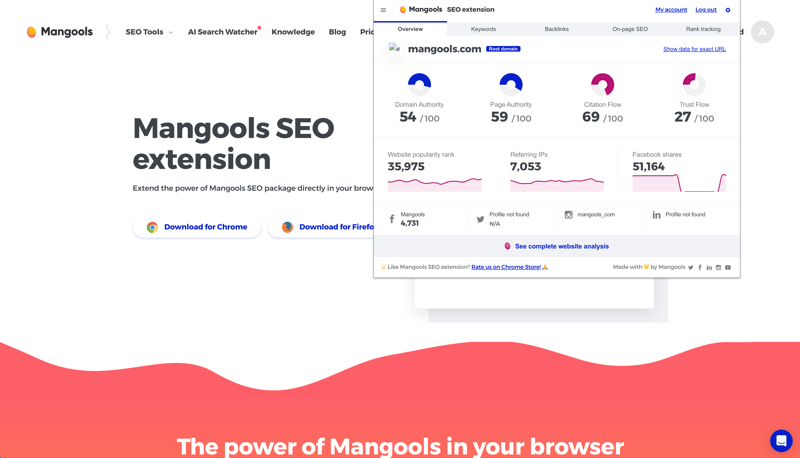
The browser extension is also divided into five modules.
Just like the main platform, the extension is split into five modules. It displays domain authority, estimated traffic, and the backlink profile of any page you’re on.
Particularly handy is the Keyword Difficulty (KD) display: you can see how competitive a search term is directly within the Google search results, without opening a separate tool.
Mangools shines with well-designed features like the Performance Index and a tightly integrated browser extension. They make daily monitoring of rankings, keywords, and competitors noticeably easier and keep your workflow smooth.
When it comes to deeper technical analysis, though, the tool hits its limits. The lack of a full site audit and key integrations makes it clear that Mangools is built for content and marketing professionals, not technical SEO specialists.
Support
| Documentation and tutorials |
| 1/3 |
| Support channels | Support is available via e-mail and livechat, no hotline. | 1.5/2 |
| Quality of support |
| 2/2 |
| Reviews on review platforms |
| 3/3 |
Mangools puts a strong emphasis on content marketing and education, and that shows in its support resources. A well-maintained help center covers the technical side of each tool. Moreover, there’s an active blog and detailed SEO guides that answer many questions before you even need to ask.
What’s missing compared to some competitors is a dedicated “Academy.” There are no certified video courses or structured training programs. If you prefer interactive e-learning, the text-based content and guides might not be enough.
Direct contact via livechat and e-mail
If the documentation doesn’t help, you can reach Mangools directly. There are two channels: email and live chat. The chat is easy to find on both the website and the dashboard. Phone support, however, isn’t available.
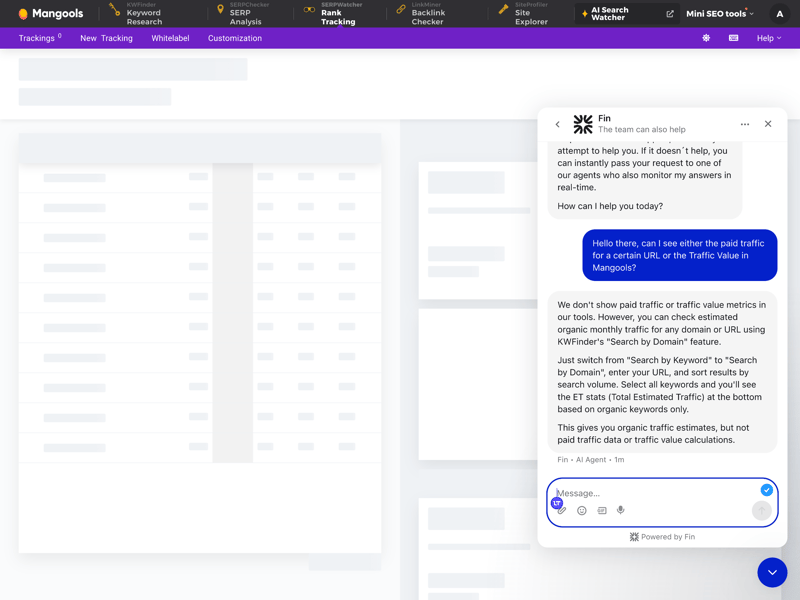
Mangools offers a chatbot that helps answer questions about features and content right away.
What the users say: external reviews
A look at popular review platforms paints a very consistent picture. Mangools’ support receives above-average ratings. Users frequently highlight the following points:
Friendliness: The tone is often described as very human, humorous, and personal.
Expertise: Users report that support doesn’t just answer technical questions but also helps interpret SEO data.
Flexibility: Several reviews praise the hassle-free handling of subscription questions or refunds.
Critical feedback rarely targets the support itself. Most complaints focus on missing features in the tool.
That matches our experience. We received a helpful response via live chat within minutes. We appreciated that we didn't have to navigate through multiple layers of chatbots before reaching a real person.
However, users who prefer support in a language other than English may find this limiting, as all communication is in English by default.
Mangools delivers on support. While it lacks video courses or structured training programs, the high-quality guides and responsive customer service make up for it. We’re not alone in this assessment. Many users on review platforms agree: real people respond quickly and competently here. The only downside is that support is only available in English.
Pricing
| Trial version |
| 2/2 |
| Starter plan | $37.70 | 2/2 |
| Advanced plan | $52.70 | 2/2 |
| Team plan | $145.70 | 2/2 |
| Rank tracking | $97.70 | 1/2 |
Mangools positions itself as a budget-friendly SEO solution, targeting freelancers and small to mid-sized businesses. Unlike many larger SEO suites, the pricing structure is fairly simple: all five modules are included in every plan. The only differences are usage limits.
Mangools offers four plans: Entry, Basic, Premium, and Agency. Data quality is identical across all tiers. Only the limits for queries, keywords, and rank tracking increase with price.
Here’s an overview of Mangools’ plans:
| Basic | Premium | Agency | |
|---|---|---|---|
| Monthly price | from $37.70 | from $52.70 | from $97.70 |
| Contract period (months) | 1 - 12 | 1 - 12 | 1 - 12 |
| General limits | |||
| Users included | 1 | 1 | 1 |
| Maximum user | 1 | 4 | 6 |
| Reports per day | 100 | 500 | 1,200 |
| Results per report | 200 | unlimited | unlimited |
| Historical data | 8 years | 8 years | 8 years |
| Site audit | |||
| Projects | - | - | - |
| Crawled pages | - | - | - |
| JavaScript Rendering | ✗ | ✗ | ✗ |
| Rank tracking | |||
| Keywords | 200 | 700 | 1,500 |
| Frequency | Daily | Daily | Daily |
You can try Mangools risk-free first: there’s a free 10-day trial that doesn’t require a credit card. If you sign up for a subscription but aren’t satisfied, you can request a refund within 48 hours.
Mangools price comparison
How affordable is Mangools in practice compared to other SEO tools? To answer that, we looked at costs for four typical use cases:
- 1.
Beginner: 1 user, 100 queries per day
- 2.
Advanced: 1 user, 500 queries per day, min. 50,000 results per query
- 3.
Team: 5 users
- 4.
Rank tracking: monitoring 1,000 keywords
Here’s the price comparison:
| Beginner | Advanced | Team | Rank tracking | |
|---|---|---|---|---|
| $29.00 | $89.00 | $149.00 | $29.00 |
| $29.00 | $99.00 | $29.83 | $49.00 |
| $37.70 | $52.70 | $145.70 | $97.70 |
| $50.00 | $100.00 | $169.00 | $50.00 |
| $52.00 | $95.20 | $132.00 | $95.20 |
| $117.33 | $416.66 | $297.33 | $208.33 |
| $138.04 | $277.24 | $392.78 | $138.04 |
| $143.25 | $239.00 | $235.00 | $143.25 |
| $208.00 | $374.00 | $448.00 | $208.00 |
Yes, Mangools is quite affordable—though tools like SpyFu, Serpstat, or Ubersuggest can be even cheaper depending on your use case. And if you’re using Mangools primarily for rank tracking, the limits may push you toward a higher-tier plan (Premium or Agency) sooner than expected.
Overall, Mangools delivers solid value for money with a transparent and fair pricing structure. It’s a great option for anyone who needs professional SEO data but doesn’t have the budget for the big enterprise suites. Thanks to the free trial and money-back guarantee, you can test the platform risk-free before committing.
Final Verdict
Mangools shows that professional SEO tools don’t have to be complex or overwhelming. Split into five standalone apps, the platform offers a user-friendly interface that makes getting started with SEO surprisingly easy—even for beginners. Functionally, the tool excels in many areas.
The KWFinder stands out with strong keyword research capabilities and might be reason enough on its own to subscribe. That said, the strict separation into five individual tools has its downsides. Constantly switching between modules disrupts your workflow. The keyword database is also relatively small, and overall, Mangools can’t match the feature depth of larger SEO platforms.
If you’re looking for a comprehensive all-in-one solution with deep technical audits, SEA data, and centralized project management, Mangools will feel limited. However, for beginners, marketing teams, and anyone primarily focused on keyword research and rank tracking, it’s definitely worth considering.

Mangools User Reviews
What do Mangools users have to say about the platform? We looked at feedback from G2, Capterra, and Trustpilot to identify common themes:
Modern design and clear data presentation
Users across nearly all platforms praise the modern design. Many highlight that the data visualization is much easier to understand than what competitors offer.KWFinder features
Many users subscribe to Mangools primarily for the KWFinder. The accuracy of the keyword difficulty score and the simple interface are often cited as the main reasons for signing up.Great support
According to reviews, customer service is fast, friendly, and knowledgeable.
Small database
Experienced SEOs note in reviews that LinkMiner finds fewer backlinks, which makes analyzing larger URLs more difficult.No all-in-one dashboard
We’re not the only ones who noticed: some users also criticize having to constantly switch between browser tabs for the five different apps.Data limits (lower-tier plans)
Some users complain about the daily limits on the cheapest plan. If you want to research plenty of keywords in one day, the entry-level package can slow you down quickly.
Alternatives to Mangools
Mangools not quite the right SEO tool for your needs? One of these alternatives might be a better fit:
Ubersuggest
If you want more features at a similar price, Ubersuggest is a solid alternative. It also has a beginner-friendly interface and adds AI features plus a built-in site audit on top of what Mangools offers.SE Ranking
When your project outgrows the beginner or hobbyist stage, SE Ranking is a logical next step. It stays clean and organized at its core but adds pro-level features like white-label reports, deeper backlink analysis, and local rankings.Moz Pro
If you’re looking for simple, well-established SEO metrics in an intuitive package, Moz is another user-friendly option. Metrics like Domain Authority (DA) and Page Authority (PA) help beginners and strategists quickly evaluate sites.
Here are the best alternatives to Mangools: