On-Page Optimization: How To Improve UX, Technical SEO, and Content on Your Website


Strong visibility in search results is a key driver of digital growth. But how can you improve your visibility and compete more effectively for top search positions? The answer starts right on your website, with high-quality content, solid technical foundations, and a clear site structure. That’s where on-page optimization comes in.
On-page optimization includes all the SEO improvements you can make directly on your website to improve its relevance, usability, and search visibility. In this guide, we’ll walk you through the process step by step and show you what to focus on at each stage to build a stronger, more visible site.
What Is On-Page Optimization?
On-page optimization covers all the SEO improvements you can make directly on your website to boost its search visibility. Unlike off-page SEO, which relies on external signals like backlinks, on-page optimization gives you direct control over many aspects of your site’s technical setup, content, and structure.
On-page optimization rests on three core pillars:
- 1.
Content
This is all about the quality and relevance of what you publish: well-written, engaging content, a smart keyword strategy, clear headings, optimized images, and polished metadata such as titles and descriptions that show up in search results. - 2.
Technical SEO
For search engines to crawl and index your site smoothly, the technical basics need to be solid. Key factors include clean URL structure, fast load times (PageSpeed), mobile-friendliness, and clear technical signals and instructions for search engine bots. - 3.
User experience
This focuses on how visitors actually interact with your site. Logical navigation, a clear structure, easy readability, and helpful content keep users engaged and bring them back.
All of these steps build on a thorough on-page analysis. It gives you the data to skip the guesswork and focus your efforts where they’ll have the biggest impact.

Why Does On-Page Optimization Matter?
On-page optimization helps search engines understand, crawl, and evaluate your website more effectively. The payoff is clear:
More qualified traffic: Target the right keywords to attract visitors who are actively searching for what you offer, whether that’s information, products, or services.
Better user experience: A fast, intuitive, helpful website creates a positive experience and builds trust in your brand.
Higher conversion rates: Remove barriers and add clear calls to action to guide more users toward your goal, whether that’s a purchase, download, or booking.
Better rankings: Help search engines understand the topic, relevance, and purpose of your page.
The impact of on-page optimization can be measured through metrics such as rankings, traffic, engagement, and conversions. It doesn’t just lift your Google rankings; it also improves key metrics across the board.
Here’s an example of how key metrics may improve after a successful on-page optimization project:
Area | Metric (KPI) | Before | After |
|---|---|---|---|
Visibility & traffic | Average position | 14 | 4 |
Monthly organic clicks | 150 | 850 | |
CTR in search results | 1.5% | 4.5% | |
User experience & technical performance | Page speed (LCP, mobile) | 4.8 sec | 2.1 sec |
Bounce rate | 75% | 40% | |
Business success | Conversion rate (e.g., leads) | 0.8% | 2.5% |
Indexed pages without critical errors | 85% | 99% |
How to Implement On-Page Optimization: A 7-Step Guide
On-page optimization isn’t a one-time project. It’s an ongoing process. These phases give you a clear roadmap. Think of them as a toolkit: pick the steps that matter most to you and decide where to start.
Phase: Preparation
Before you change anything technical or content-related, you need a solid plan. This phase sets you up for smooth execution later. Make sure your tools are in place and every task has a clear owner so you avoid delays down the road.
Here’s what matters most:
- 1.
Sort and prioritize your audit results
Go through your on-page analysis and rank tasks by urgency and potential impact. For example, a technical issue blocking indexing is typically more critical than optimizing a single image. - 2.
Assign responsibilities
Decide who handles what: Who takes care of technical fixes (IT or development)? Who updates content (editorial or marketing)? And who oversees SEO? - 3.
Set tasks and timelines
Create tasks with realistic deadlines and measurable goals (KPIs). That way, everyone knows what to do, when it’s due, and how success will be measured.
Phase: Technical Corrections
A solid technical foundation helps search engines discover, crawl, and index your content effectively. Before getting into the details, fix the most critical issues and make sure your site is technically sound:
Check crawling, indexing, and redirects
Make sure search engines can reach your key pages so they aren’t accidentally blocked by robots.txt or a noindex tag. Also check that redirects work correctly and don’t lead to error pages (like 404s).Optimize the mobile view
Test how your website looks and works on different mobile devices. Since Google uses mobile-first indexing, providing a strong mobile experience is essential.
Want to check whether your performance tweaks worked? Try the EXPERTE.com PageSpeed Check. It analyzes key metrics like load time and Core Web Vitals to show you where you stand:
Phase: Boost Visibility
This phase focuses on how your pages appear in search results (SERPs). A compelling, informative listing decides whether users click on your result.
Avoid duplicate content
Make sure identical or nearly identical content lives under only one URL. Use canonical tags to tell Google which version is the original.Improve metadata
Write a unique, descriptive meta title and an engaging meta description for each important page. Include your main keyword and make it click-worthy.Optimize for snippets
Use structured data (schema markup) to give Google extra details about your content. This may make your listing eligible for enhanced search features such as review ratings, prices, or FAQs, although Google ultimately decides which search features to display.
Here’s how a standard search result snippet compares to an optimized rich snippet:
Pizza Chicago: The Top 10 Pizzerias
www.example-chicago.com/pizza
Discover the top 10 pizzerias in Chicago, based on reviews and recommendations.
Pizza Chicago: The Top 10 Pizzerias (Rating: 4.8/5)
www.example-chicago.com/pizza
★★★★☆ Rating: 4.8/5 (1,250 reviews) 🍕 Price: $9–$16
📍 Address: 123 Example Street, Chicago, IL. Discover the top 10 pizzerias in Chicago, based on reviews and recommendations.
Phase: Content Optimization
High-quality content is the foundation of on-page optimization. Google references E-E-A-T (Experience, Expertise, Authoritativeness, and Trustworthiness) in its Search Quality Evaluator Guidelines as a framework for assessing content quality. Here’s what that means for your to-do list:
Ensure quality
Review and refine your content. Is it well-structured, error-free, and easy to understand? Does it offer unique information that truly helps your readers? These qualities can help demonstrate value to users and support stronger search performance over time.Check relevance
Ask yourself: Does your content fully address what users are searching for? Does it answer every question they might have about the topic? Thorough keyword research helps keep your content relevant.Make media accessible
Compress your images and add descriptive alt text. Alt text improves accessibility and helps search engines understand what an image shows. Keep videos and other visuals clear, engaging, and easy to follow, too.
Great content doesn’t just help with on-page optimization. If it provides unique value, it may attract natural backlinks from other websites over time, giving you passive off-page SEO through organic backlinks.

Phase: Internal Linking
A logical internal linking structure helps both users and search engines navigate your website and understand the relationship between pages. Here’s what matters most:
Check for orphan pages and pillar pages.
Find your orphan pages and link them into your site structure where it makes sense. Strengthen key topic pages (pillar pages) by linking to them from related supporting articles.Review anchor text and internal links
Use descriptive anchor text for your internal links. Instead of “Click here,” use keywords that describe the target page.Evaluate click depth, menu structure, and breadcrumbs.
Important content should generally be easy to reach from the homepage and primary navigation. A clear menu and breadcrumb navigation go a long way toward a better user experience.
A visualization tool can map out your link structure and help you spot broken links. In Ahrefs, for example, you’ll find reports on broken backlinks and broken pages in Site Explorer.
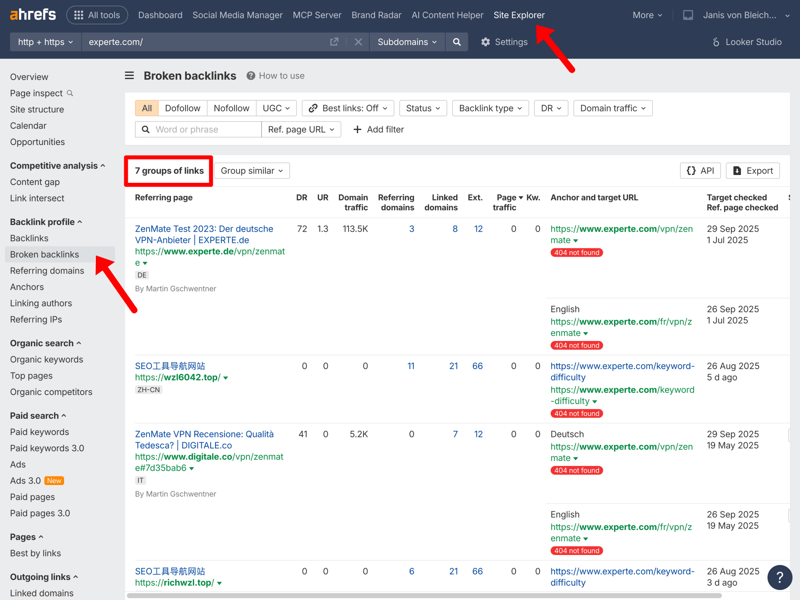
The tool Ahrefs shows information about your backlink profile, including broken backlinks.
Phase: UX Fine-Tuning
Even the best technical foundation and top-quality content won’t get you far if the user experience (UX) is poor. This phase is all about fine-tuning your site for visitors.
Test your CTAs (calls to action)
Place clear calls to action that guide users to the next step. Test different wording, colors, and placements to improve click-through rates.Improve conversions and ease of use
Analyze user behavior. Where are visitors dropping off? Are there friction points in the checkout or inquiry process? Remove those barriers to improve the user experience and potentially increase conversion rates.Make your site accessible
Make sure everyone can use your website, including people with disabilities. That covers things like sufficient color contrast, keyboard navigation, and screen reader compatibility.
With the EXPERTE.com accessibility checker, you can see how accessible your website and its subpages are. Just enter your URL to evaluate your site against 41 accessibility criteria.
Phase: Deployment and Long-Term Planning
Once everything is live, the next phase begins: monitoring results and improving your site over time. Here’s what matters most:
Plan your rollout
Roll out major changes gradually or during low-traffic periods to limit any negative impact.Set up monitoring
Track your key metrics (rankings, traffic, and conversion rates) after the rollout. Use the Google Search Console and your SEO tools to measure the impact of your changes.Schedule future checks
SEO is an ongoing process. Set a regular schedule for on-page audits (quarterly or annually, for example) to spot new opportunities and keep up with market or algorithm changes.
Follow these steps consistently, and you’ll set up your next analysis phase, too. Then the cycle starts again.
Final Verdict: How On-Page Optimization Boosts Your Website
On-page optimization is one of the most effective ways to improve your website’s visibility and support long-term growth. It starts with a structured analysis and focuses on three areas: technical setup, content, and user experience.
Follow the steps we’ve outlined, from careful planning and technical fixes to content improvements and long-term monitoring, and you’ll create a website that is easier for search engines to understand and more useful for users. The result can be stronger search visibility, more qualified traffic, and improved business outcomes over time.