7 Best SEO Site Audit Tools in 2026: Tested & Ranked


Your content is solid, but your pages still aren’t ranking? The problem might not be your content at all. It could be the technical side. Broken redirects, missing meta tags, and slow load times—these technical issues can drag your rankings down. A site audit tool shows you exactly where your website’s problems are and what’s keeping it from ranking higher. But which tool does the job best?
We put the top SEO platforms to the test to round up the best tools for technical site audits.
Our 7 Top Picks for Technical SEO Audits
In our comparison of the best SEO tools, we tested nine all-in-one suites, all of which include a site audit feature. But there are also specialized tools that focus only on technical website analysis. Here are our seven recommendations: five all-in-one suites and two specialists.
Note: The crawl numbers listed come from our tests and aren’t directly comparable across all tools, as crawl limits, project setups, and the domains tested can vary.
Screaming Frog SEO Spider: The Pro’s Tool for Deep Data Insights
The Screaming Frog SEO Spider has been a go-to tool for SEO pros since its launch in 2010. It’s one of the best-known technical SEO tools worldwide.
Unlike most all-in-one suites, Screaming Frog isn’t browser-based. It’s a desktop application built for developers and content teams who want to delve deep into a website’s technical structure.
The interface is split into four sections. At the top, you’ll see the crawled URLs and the different analysis categories. Below, a detailed view shows everything about the selected URL, alongside a pie chart that breaks down the types of media found.
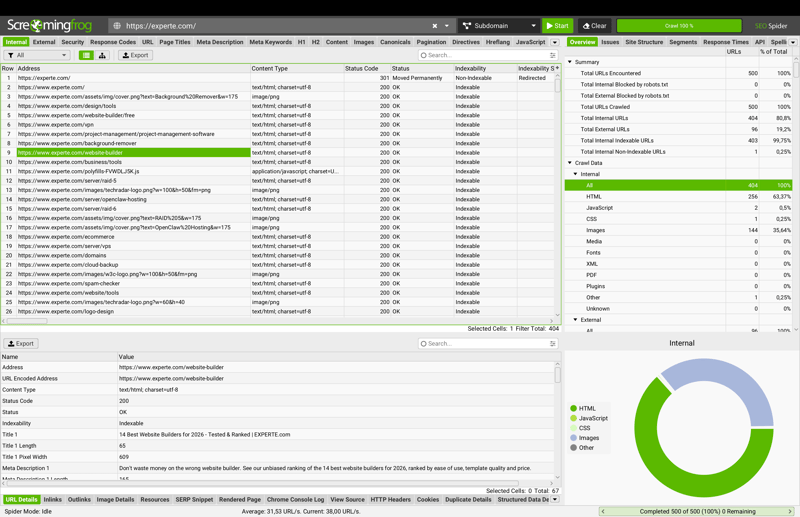
After crawling, Screaming Frog shows all the URLs it found, the factors it analyzed, and a detailed view of the page you select.
How does the site audit work in Screaming Frog?
Screaming Frog crawls websites locally on your computer instead of in the cloud. This means you don’t depend on a provider’s server capacity, and the paid version lets you analyze even very large websites. You’ll need sufficient local processing power and memory for large crawls.
You can configure every crawl in detail before you start. You decide which factors matter for the analysis, from SEO and link analysis to external URLs and page resources. This flexibility is one of Screaming Frog’s strengths, but it can also feel overwhelming, especially for beginners.
What do we like about Screaming Frog?
One of Screaming Frog’s biggest strengths is its depth of data. The tool captures nearly every technical aspect of a website: missing meta titles, broken links, redirect chains, duplicate content, load times, and JavaScript errors. If you know what to look for, you’ll find a level of technical detail that few other tools in our comparison can match.
You can approach the analysis in two ways: examine individual pages or filter for specific problems. For example, you can quickly see all pages that are missing a meta title.
The Issues tab prioritizes problems automatically and shows how many URLs are affected. Click on an issue to get a detailed explanation and specific steps to fix it.
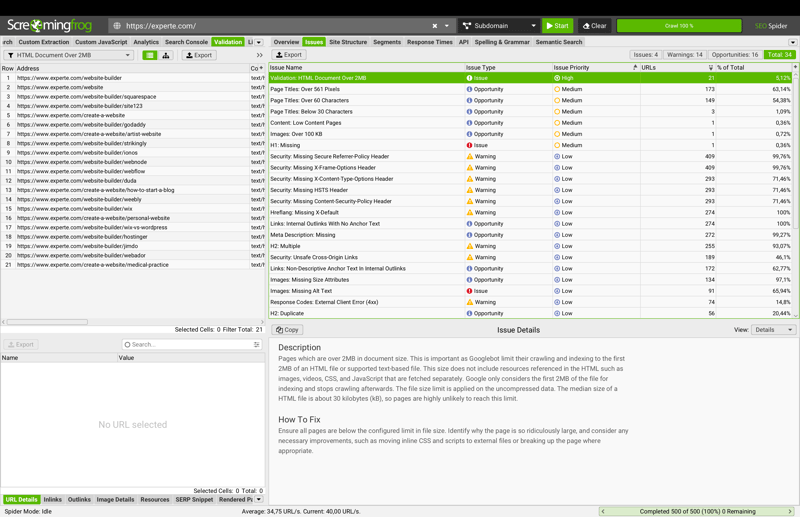
The Issues tab flags high-priority errors: ten URLs are missing HTML validation.
What are the weaknesses of Screaming Frog?
Screaming Frog’s biggest strength is also its biggest drawback: the tool gives you tons of data, but it expects you to know how to use it. If you’re not already familiar with technical SEO metrics, the interface and sheer volume of information can be overwhelming at first.
The price also makes it clear that Screaming Frog isn’t for beginners. A yearly license costs $265. For small websites or occasional users, that price is hard to justify.
Unlike all-in-one suites, Screaming Frog doesn’t give you an overall health score that sums up your website’s technical condition at a glance. You’ll need to put in more effort to assess the big picture.
Pros and cons of Screaming Frog
Most detailed data in the market
Screaming Frog captures nearly every technical aspect of a website.Flexible approach
You can audit individual URLs or filter for specific errors and issues.Local crawl with virtually no URL limits
The paid version crawls unlimited URLs and doesn’t rely on a cloud provider’s server capacity.
No health score
There’s no quick summary of your website’s overall condition. Assessing technical health takes more time than with most all-in-one suites.Steep learning curve
The complex interface assumes technical know-how, making it less beginner-friendly.High price for occasional users or small-scale users
At $265 per year, Screaming Frog is a tough investment for small websites or teams that don’t need deep technical audits on a regular basis.
Sitebulb: Technical Depth, Made Accessible
Like Screaming Frog, Sitebulb is a specialized audit tool popular with technical SEOs and agencies. However, it’s a bit more user-friendly. Alongside its desktop plans (Lite and Pro), Sitebulb also offers a cloud version, which is great for teams that don’t want to rely on local hardware.
How Sitebulb’s site audit works
Sitebulb also crawls websites locally on your computer but presents the results in a clean, visually appealing interface. After the crawl, the audit overview shows several charts at a glance: URL depth by type, HTML URL scores, and content type distribution.
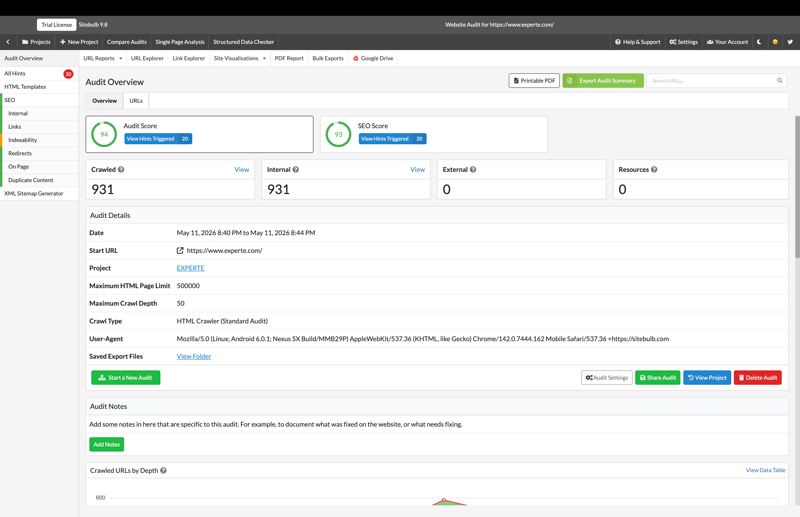
The overview shows audit and SEO scores, plus (further down) charts for URL depth and content types.
The indexability section includes a health score with a six-level color-coded system, ranking issues from “Critical” to “No Issue.”
In our example, the site scored 76. Of 935 crawled pages, 930 were indexable and 5 were not. Sitebulb checks robots.txt, indexability status, and canonicals, then shows the results in clear charts.
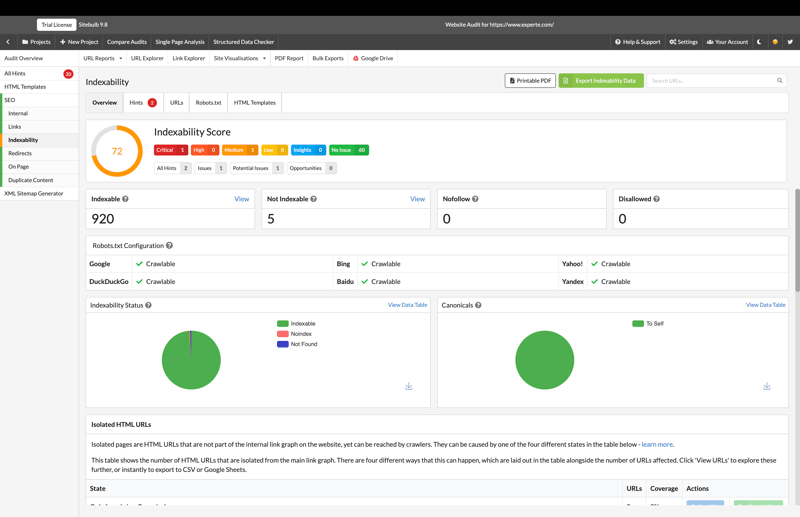
The indexability details view flags individual issues with color-coded priority: orange and red mark urgent fixes.
The six-level color-coded system stands out: from Critical to High, Medium, Low, Insights, and No Issue. Sitebulb gives every finding a clear urgency rating, and the Health Score offers a quick snapshot of your site’s overall condition.
What we like about Sitebulb
Sitebulb delivers a technical analysis as detailed as Screaming Frog but presents the results far more clearly. It focuses on the data that matters most, so it’s easier to navigate. Sitebulb still requires some technical know-how, but it’s much more intuitive than its closest competitors.
The six-level color-coded system is a big plus. It doesn't just flag problems; it tells you which ones need immediate attention. And fast crawl speeds mean even large audits wrap up quickly.
What are Sitebulb’s weaknesses?
Sitebulb is easier to use than Screaming Frog, but it doesn’t dig as deep. If you need to analyze every technical detail, you’ll hit its limits sooner. For experienced SEO pros who want full data depth and know how to use it, Screaming Frog is still the stronger tool.
As a standalone audit tool, it doesn’t seamlessly connect to a broader SEO suite. If you want backlink data, keyword rankings, and technical audits in one place, an all-in-one solution is a better fit.
Pros and cons of Sitebulb
Six-level priority system
Sitebulb rates the urgency of each issue more precisely than most tools, from “Critical” to “No Issue.”Clean, intuitive design
All key data is presented clearly. It’s technically robust but easier to understand than Screaming Frog.Fast crawls
Sitebulb analyzes even large websites quickly, with no noticeable delays.
Not part of an SEO suite
You’ll need separate tools for backlinks, keywords, and rankings.Learning curve for beginners
Sitebulb is easier to use than Screaming Frog, but it still requires some technical know-how.Less data depth
For SEO pros who need deep technical insights, Screaming Frog is still the stronger choice.
Semrush: Our Top Pick

Semrush is one of the most widely used SEO platforms in the world. It covers nearly every part of search engine optimization, from keyword research and backlink analysis to site audits. The site audit tool is one of its strongest features, pairing a detailed technical analysis with results that are easy to understand.
How does Semrush’s site audit work?
The site audit tool crawls your entire website, automatically sorting issues into three categories: Errors, Warnings, and Notices.
In our test, experte.com scored an 86% site health score. For comparison, the top 10% of websites score 92%. Out of 100 crawled pages, one was clean, one was broken, 94 had issues, and four were found to be redirected.
In this audit, Semrush flagged 191 errors and 561 warnings. The issues included missing meta descriptions, broken JavaScript files, and invalid structured data.
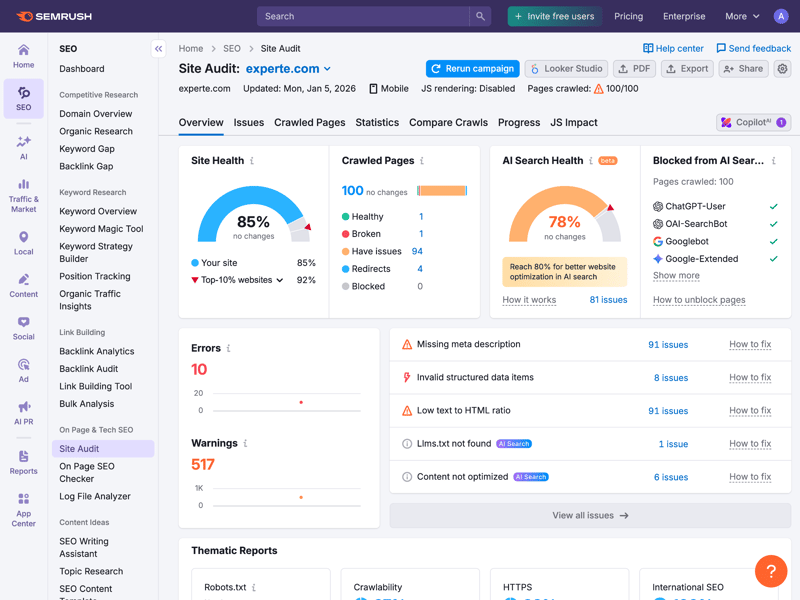
The dashboard displays the site’s health score, key technical metrics, and a prioritized list of issues.
For every issue, Semrush explains why it matters and how to fix it, often with a link to a detailed guide. The audit also checks modern metrics like Core Web Vitals and proper HTTPS setup.
What we like about Semrush
Semrush makes complex technical audits easy to understand. Its automatic prioritization helps you focus on what matters most. Critical issues stand out immediately, so you don’t have to dig through a long, unsorted list.
One notable feature is the “AI Search Readiness” score. For experte.com, it showed a 77% readiness score for AI-powered search results, something few competitors offer. Semrush also checks core technical basics like crawlability (97%) and HTTPS implementation (100%).
What are the downsides of Semrush?
Semrush’s site audit is powerful, but it’s just one part of a much larger marketing suite. If you only need technical audits, you’ll pay for features you’ll never use.
Specialized tools like Screaming Frog and Sitebulb are built specifically for technical audits and may offer better value if that’s your primary use case.
Pros and cons of Semrush
Full technical error analysis
Semrush scans websites thoroughly and automatically prioritizes issues as errors, warnings, or notices.AI search readiness assessment
One of the few tools that evaluates how well a website is optimized for AI-powered search results.Detailed error descriptions
Each issue comes with an explanation, a step-by-step fix, and extra resources, including Core Web Vitals and HTTPS checks.Seamless suite integration
The site audit is part of a full SEO suite. You can link results directly to backlink, keyword, and ranking data.
Overkill for basic audits
If you only need technical SEO audits, Semrush includes numerous health score features you won’t use.Slow crawl times for large sites
Cloud-based crawling can slow down your workflow when auditing bigger websites.
SE Ranking: A Solid Audit Tool with a Clean, Intuitive Interface

SE Ranking is a full SEO suite with a strong site audit feature. It stands out with a clean, intuitive interface and great value for the price.
How does the site audit work in SE Ranking?
The audit crawls your website, checking over 115 technical and on-page factors, including indexability, content quality, security, Core Web Vitals, and other on-page SEO factors. Results are typically available within a few minutes, depending on site size.
For experte.com, the test returned a health score of 85 (90 or higher is recommended). Out of 538 crawled pages, 329 were healthy and 209 had issues. SE Ranking found 1,524 problems in all: 213 errors, 659 warnings, and 652 notices.
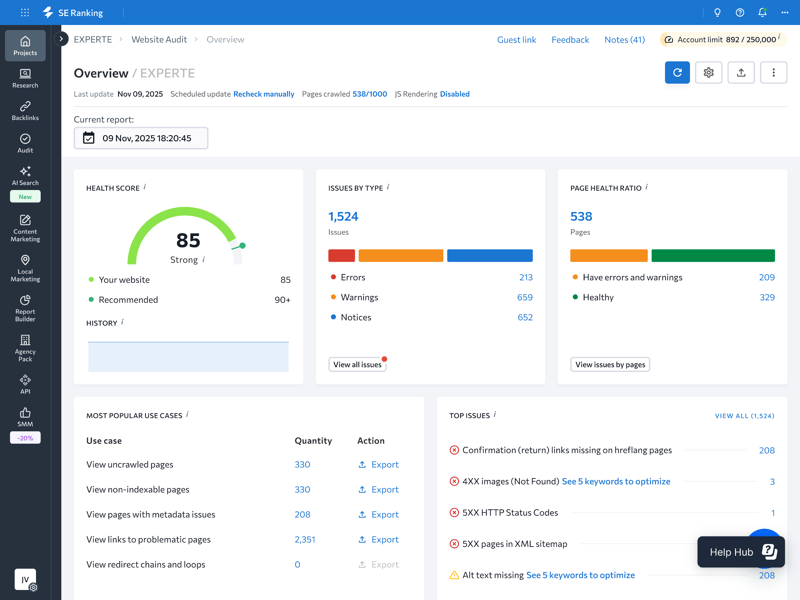
The website audit dashboard shows a prioritized overview of the most common issues.
A traffic-light system of errors, warnings, and notes shows you exactly where action is needed. SE Ranking explains each issue clearly, lists the affected URLs, and gives you specific steps to fix them.
What we like about SE Ranking
One standout feature is the flexible scan schedule. You can run audits weekly, monthly, or on demand, which is perfect for ongoing monitoring or a quick check. The error descriptions are clear and easy to understand, and the interface is well-organized throughout.
What are SE Ranking’s weaknesses?
SE Ranking’s site audit is just as strong as Semrush’s, but its modules aren’t as tightly integrated. If you want to connect audit results with keyword rankings or backlink data, you might need to expect more manual work.
The AI Search Toolkit for measuring AI visibility isn’t in the base plan. You’ll pay extra for it as an add-on. And if you need deep technical insights, you’ll hit limits sooner than with tools like Screaming Frog or Sitebulb.
Pros and cons of SE Ranking
Flexible scan schedule
Run audits weekly, monthly, or on demand for ongoing monitoring or a quick check.Clear error descriptions
SE Ranking provides explanations, affected URLs, and specific steps to resolve issues.Comprehensible documentation
The interface and audit documentation are well-organized and easy to follow.
AI Search Toolkit only available as an add-on
Measuring AI visibility isn’t included in the base plan. Basic plans only include 50 to 100 prompts.Less suite integration
Audit results don’t connect as smoothly with other modules as they do in Semrush.Less data depth than specialized tools
For deep technical analysis, tools like Screaming Frog and Sitebulb are better choices.
Sistrix: Built-In Core Web Vitals and a Clean Interface

Sistrix is a well-established SEO platform best known for its Visibility Index, a widely used metric for measuring organic search presence. Its site audit, part of the “Optimizer” module, reliably flags the most common technical SEO issues.
How does the site audit work in Sistrix?
Once you've set up a project, head to the “Onpage Analysis” section. Here you'll find all the key data neatly organized. Sistrix sorts issues into Errors, Warnings, and Notices, explains each one clearly, and tells you exactly how to fix it.
You can also pull up other key metrics for on-page optimization, like site structure, click depth, and page navigation. One standout feature is the Core Web Vitals view. Sistrix shows performance metrics like Largest Contentful Paint, Cumulative Layout Shift, First Contentful Paint, and Interaction to Next Paint right in the domain analysis.
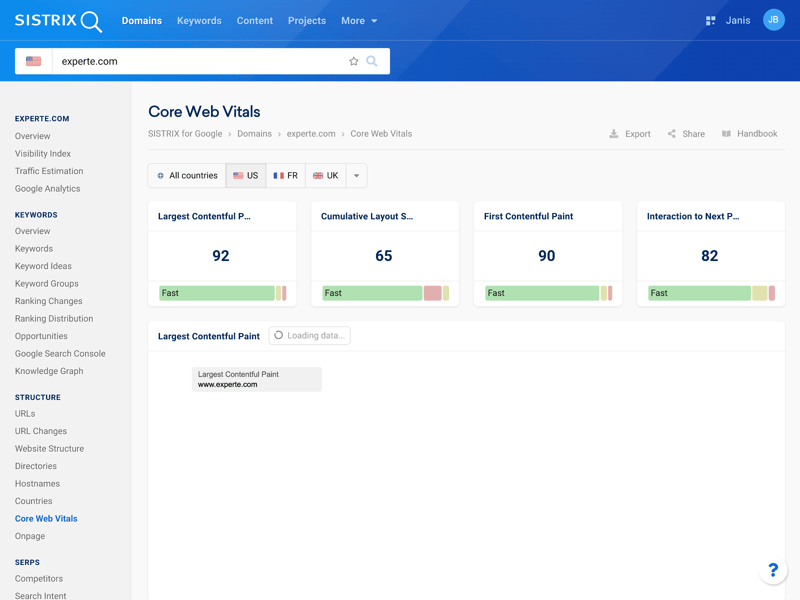
Core Web Vitals give you a quick snapshot of loading speed and user experience.
What we like about Sistrix
The Core Web Vitals view sits right inside the domain analysis. This allows you to see which keywords a site ranks for and how fast it loads, all on the same page, which makes technical reviews much faster.
Another advantage is Sistrix’s speed. It responds quickly to inputs, and most reports are ready almost instantly. The only exception is the on-page crawl, which takes a bit longer (though that’s to be expected when analyzing an entire website).
What are Sistrix’s weaknesses?
Sistrix delivers solid technical analysis, but it doesn’t always dive as deep as Semrush or SE Ranking. It skips some technical factors entirely, and the guidance on fixing issues is a bit thin.
The setup also takes some getting used to. Before you can run a crawl, you have to create a project. Other tools let you start a scan right away.
Sistrix isn’t the best choice for international SEO projects either. It covers 50 countries, far fewer than competitors like Semrush or SE Ranking.
Pros and cons of Sistrix
Core Web Vitals built right in
You can check loading speed and performance metrics directly in the domain analysis; no extra steps are needed.Clear explanations for errors
For every issue it finds, Sistrix gives you a practical explanation and clear steps to fix it.Site structure analysis
You can examine click depth and site navigation right in the Domains section, a useful addition to the standard error analysis.
Fewer factors checked
Compared to Semrush and SE Ranking, Sistrix checks fewer technical factors.Project setup required before crawling
You have to set up a project before running a scan. Other tools let you start right away.More limited international coverage
With data from around 50 countries, Sistrix covers less ground than globally focused competitors like Semrush or Ahrefs—a drawback for large-scale international campaigns.
Ahrefs: The Most Comprehensive Audit Toolkit

Ahrefs is best known for its massive backlink index. Its Site Audit tool is also one of the strongest options for technical analysis. With over 170 checks, it offers the most comprehensive audit in our comparison.
How does Ahrefs Site Audit work?
The cloud-based Site Audit tool crawls your website and checks for predefined SEO issues. It automatically sorts problems into Errors, Warnings, and Notices, so you can see at a glance which ones need immediate attention. For each problem, Ahrefs gives you a clear description and step-by-step instructions to fix it.
The project dashboard gives you a quick overview of all your audits. For experte.de and experte.com, Ahrefs shows health scores of 99% and 100%, respectively. It also displays the last crawl date, status, number of crawled URLs, internal URLs with errors, and scheduled crawls.
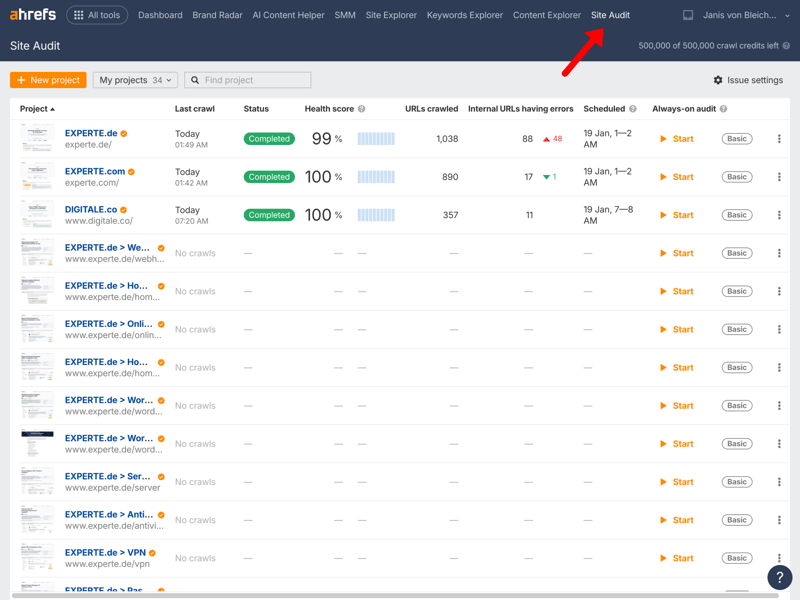
The project dashboard shows health scores, status, and error counts for all your domains.
What we like about Ahrefs
The Always-on Audit feature monitors your site continuously, requiring no manual work. It also integrates seamlessly with other Ahrefs tools, so you can combine insights from your Site Audit with backlink analysis and keyword research.
Ahrefs also delivers on performance. Even for large websites, the platform responds quickly with no noticeable lag. The first crawl of a new site takes a little time, but after that, all reports run smoothly.
What are the downsides of Ahrefs?
The navigation isn’t as clear as Semrush or SE Ranking. Some sections overlap, which can be confusing when you’re just getting started. While the guidance on issues it finds is solid, it’s not as beginner-friendly as the competition.
Pros and cons of Ahrefs
Most comprehensive audit checklist
Ahrefs checks over 170 technical and on-page factors, more than any other tool in our comparison.Always-on audit
Ahrefs offers continuous monitoring without manual input, so you can keep an eye on your site at all times.Seamless suite integration
Insights from the site audit can be directly linked to other data in the platform.
Navigation isn’t always intuitive
The menu can be confusing at first because some sections have similar names and overlap in content.Always-on audit has limitations
Continuous monitoring requires a full scheduled crawl and doesn’t work as a standalone feature.Steep learning curve
Ahrefs’ documentation and learning materials are comprehensive, but navigating them takes time, especially for users new to technical SEO.
Serpstat: A Solid Site Audit at the Lowest Price

Serpstat is a cloud-based all-in-one SEO platform that started in 2013 as an in-house keyword tool before evolving into a full SEO suite. It positions itself as a budget-friendly alternative to the bigger players, and its site audit delivers on that promise with solid results.
How does Serpstat’s site audit work?
The Site Audit module crawls your entire website and rates its technical health with an SDO score. It sorts issues into three priority levels: High, Medium, and Low.
For experte.com, Serpstat found 13,290 entries: 899 High-priority issues, 8,980 Medium-priority, 85 Low-priority, and 3,326 informational items that don’t need immediate action. Issues are grouped by topic (HTTP status codes, meta tags, headings, content, and multimedia), so you can tackle specific areas faster.
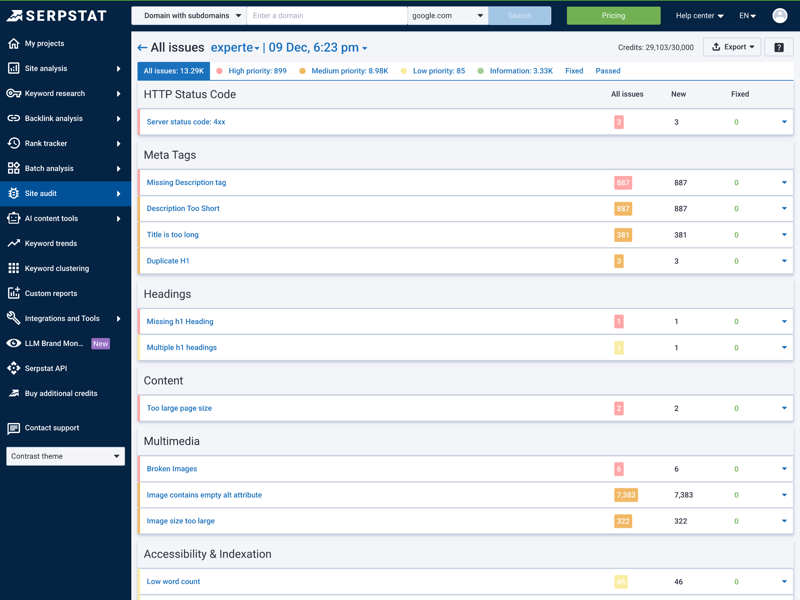
The dashboard shows the SDO score, the number of issues by priority, and a breakdown of problems by category.
For every issue, Serpstat gives you a clear description and step-by-step instructions to fix it.
What we like about Serpstat
Grouping issues by topic is a big time-saver. Instead of sifting through a long, unorganized list, you can immediately see which areas need the most attention, making it easier to prioritize tasks and assign them to your team.
The SDO score gives you a quick snapshot of your site’s overall technical health, which is great for reporting to clients or internal stakeholders. And Serpstat is much cheaper than other tools in this space.
What are Serpstat’s weaknesses?
Serpstat now supports JavaScript crawling (since its 2024 update), but it costs 10 credits per page. For larger sites, that can add up fast. Overall, Serpstat feels less user-friendly than the other tools reviewed here. The learning curve is steeper, there’s limited guidance, and the interface has limited language support.
Pros and cons of Serpstat
Grouped by issue type
Issues are sorted by category—like meta tags, HTTP status codes, and content—so you can tackle them faster and assign tasks more easily.SDO score for quick reporting
Get a clear snapshot of your website’s overall health.Great value for the price
Serpstat delivers solid site audit features at a much lower price than the top competitors.
Limited language support
Serpstat is available in English, Spanish, and Russian, with no additional localization options.JS crawling uses extra credits
JavaScript pages cost 10 credits each. For large sites, this can add up fast.Limited guidance for beginners
The interface is functional but lacks helpful explanations or visual aids.
Quick Overview of the 7 Tools Tested
Here’s a quick recap of the key findings:
Type | Tool | Site Audit Score | Standout Features |
|---|---|---|---|
Specialized | Screaming Frog | N/A | Deepest data, not cloud-based |
Specialized | Sitebulb | N/A | Best traffic-light system, easiest to understand |
Suite | Semrush | 5 / 5 | AI-powered issue assessment, detailed error descriptions |
Suite | SE Ranking | 5 / 5 | Flexible scan frequency, clean intuitive interface |
Suite | Sistrix | 4.5 / 5 | Core Web Vitals built right in |
Suite | Ahrefs | 4.5 / 5 | Checks over 170 factors, always-on audits |
Suite | Serpstat | 4 / 5 | Best value for the price |
How We Rated the Best SEO Audit Tools
For this ranking, we looked at nine all-in-one SEO platforms that we’ve also tested in our full SEO tool comparison. We also included two specialized site audit tools that weren’t part of that comparison.
Here’s what we focused on when rating each tool:
Technical error detection
A good SEO audit tool has to locate technical issues reliably and thoroughly. We tested how well each tool crawls a website and which errors and optimization opportunities it spots. We focused on key factors like indexability, redirects, internal linking, Core Web Vitals, security, and structured data.
Prioritizing Issues
Not every technical issue is equally time-critical. A good tool helps you spot the most critical problems fast. We checked whether and how well each tool sorts issues by priority. Both the number of priority levels and how clearly they’re shown counted in our evaluation.
Issues Explanations
Finding an issue is only the first step. What really counts is whether the tool explains what’s wrong and how to fix it. We rated how detailed and clear those explanations were. A good issue description saves time in your day-to-day SEO work and lets even less experienced team members address problems on their own.
Other Factors
A great SEO audit tool isn’t just about features. We also weighed ease of use, performance, and cost when making our picks.
Final Verdict: Which SEO Site Audit Tool Is Right for You?
If you’re looking for a technical SEO audit tool, you can choose between specialized tools and all-in-one SEO suites.
Among specialized tools, Screaming Frog and Sitebulb stand out. Screaming Frog delivers the deepest data but requires some technical know-how. Sitebulb offers a similarly deep analysis but presents the results in a much more user-friendly way.
Among all-in-one platforms, Semrush and SE Ranking stand out as the strongest overall options. Semrush shines with especially detailed issue explanations, while SE Ranking offers a clean, user-friendly interface and strong value for the price. Ahrefs, Sistrix, and Serpstat also provide solid site audit modules.
For in-depth reviews of all-in-one platforms, take a look at our SEO tool comparison.