Serpstat Review 2026: The SEO Tool With the Best Value for Money?


Over the past few years, Serpstat has evolved from a simple keyword tool into a comprehensive, all-in-one SEO platform. The company’s goal is simple: to offer the same range of features as established market leaders, but at a significantly lower price point.
So we took a closer look. Does this lower price point compromise data quality, or can Serpstat truly compete with the industry’s biggest names?
Serpstat’s story began in 2013 in Ukraine. It was originally developed as an internal project by the digital agency Netpeak to automate keyword research. But it quickly outgrew that original purpose. As demand increased, it became a standalone product now used worldwide.
Serpstat primarily targets marketing professionals, agencies, and in-house SEOs. The company often positions itself as a 'growth hacking tool,' providing a cost-effective alternative that bridges the gap between basic entry-level solutions and expensive enterprise software.
Serpstat Review
Strong value for money
Serpstat stands out as one of the most affordable SEO tools on the market. Despite its competitive pricing, it offers a relatively broad feature set that would cost significantly more with many competitors.Clear tree view for content structure
The intuitive tree view displays which keywords are assigned to specific subpages in a hierarchical structure. This simplifies the analysis of site structures and allows for strategic content optimization.Site audit with prioritization
The technical audit categorizes errors by urgency (high, medium, low). So you can prioritize the most critical issues and allocate resources wisely.
Inconsistent traffic estimates
The accuracy of traffic data isn’t always convincing. Estimated visitor numbers sometimes differ significantly from actual measurements and are better suited as a rough trend indicator.Limited localization options
Serpstat’s interface is exclusively in English. While this isn’t an issue for English-speaking users, teams operating in other languages may face a steeper learning curve or require additional internal support to fully utilize the tool.Confusing pricing structure
The differences between plans aren’t always clear at first glance. Make sure to check carefully whether your chosen plan includes all the features you need.
Interface and Usability
| User interface |
| 5/8 |
| Performance |
| 1/2 |
Serpstat uses a modern, minimalist design. The interface appears clean with a clear focus on data and functionality.
The interface is exclusively in English, which might pose a challenge for non-English-speaking users. This doesn’t really get in the way of day-to-day work, as analyses can be effortlessly configured for a wide array of countries and regions, including Germany.
Logical structure, easy navigation
Navigation is managed via a sidebar on the left side of the screen. You can access most important modules, and reports are accessible within just a few clicks. Serpstat employs logical internal linking, quickly guiding users through its various sections.
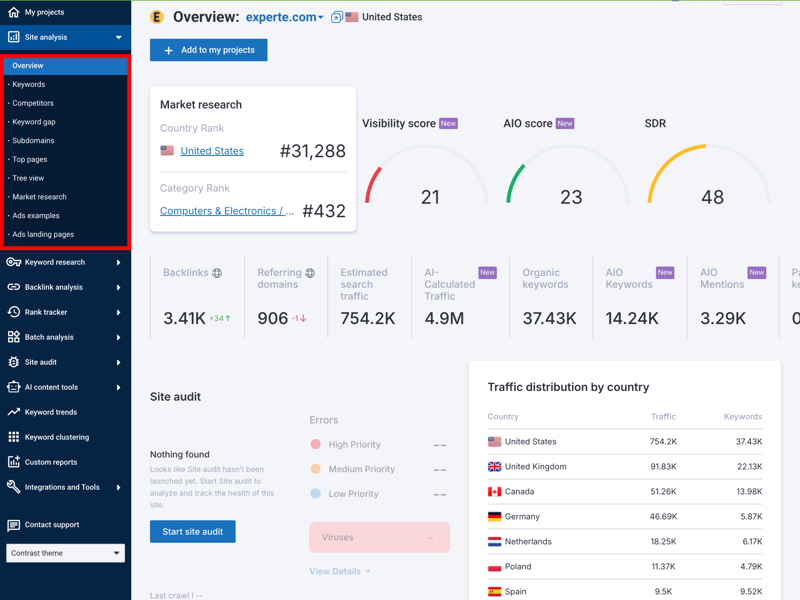
The “Domain Analysis” consolidates key metrics like visibility, traffic distribution, and keyword trends on a single page.
Serpstat follows a clear structure overall and organizes its SEO features into several main sections:
Menu item | Function and purpose |
Domain Analysis | Examine the visibility, traffic, and keywords of any website. Ideal for rapid competitor comparisons. |
Backlink Analysis | Gain detailed insights into your own or your competitors’ link profiles, including new and lost links. |
Keyword Research | This module offers data on search volume, CPC, and difficulty scores, helping you discover new ideas for organic rankings and paid advertisements. |
Rank Tracker | Track your keyword positions in search results for specific locations and devices. |
Site Audit | Serpstat crawls your site for technical errors. The report prioritizes issues by severity, allowing you to address critical ones first. |
Great for experienced users, little guidance for beginners
Serpstat’s focus is clearly on functionality. The tool is visually practical but doesn’t offer many explanatory elements or visual aids. Despite the large amount of data, navigation stays manageable, which benefits experienced users in particular. After a short learning period, SEOs with prior knowledge should find their way around quickly.
Beginners, however, might encounter some initial hurdles. While the visualizations serve their purpose, they rarely offer self-explanatory guidance. If you’re not yet familiar with SEO metrics, you’ll need to understand which numbers are significant and how to interpret them effectively.
Fast load times, but not always reliable
In regular use, Serpstat generally operates smoothly. Even with substantial data queries, load times remain brief. The primary exception occurs when initiating a larger site audit—you’ll need to wait a bit while the tool collects and processes data in the background.
That said, we did run into a few issues. The “Top Pages” report wouldn’t load at first and showed an error message. After refreshing the page, the data displayed correctly.
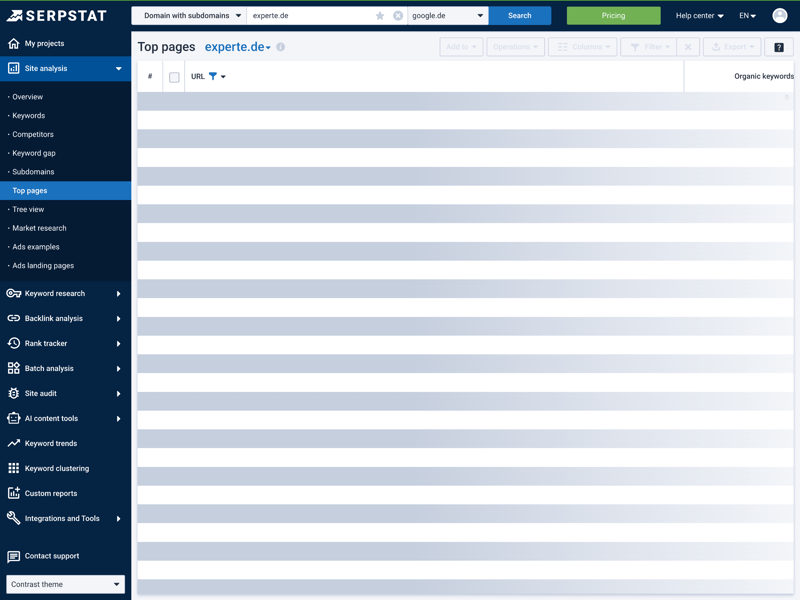
A loading error during testing: The “Top Pages” report only displayed correctly after refreshing the page.
Some features require a project setup
For rapid analyses, you can simply enter a domain into the search field. Serpstat’s “Overview“ promptly delivers a wide range of metrics from various modules, encompassing visibility, keywords, backlinks, and more.
However, if you want to use more advanced features like long-term rank tracking or regular site audits, you’ll need to create a project first. Only then do all these features become fully available.
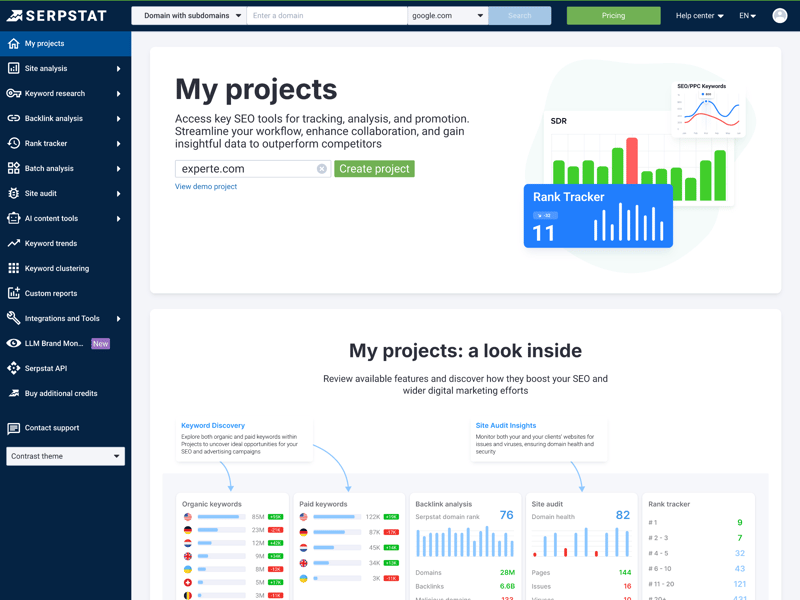
Under “My Projects,” you can manage your websites and set up long-term tracking for rankings and audits.

Serpstat offers a clean, no-frills interface that supports focused work—once you’ve gotten the hang of the menu structure. Performance is solid overall, though occasional loading errors can briefly interrupt your workflow.
One notable aspect is the English-only interface. For users less comfortable with English, this could amplify the already considerable learning curve associated with a data-rich tool like Serpstat. Additionally, the project-based structure necessitates a predefined setup, potentially making spontaneous, in-depth analyses less fluid.
Competitor Analysis
| Analysis level | All levels except path available. | 1.5/2 |
| Scope of traffic estimation |
| 5/6 |
| Accuracy of traffic estimation | 18.9 % | 0/6 |
| Keyword rankings |
| 3/4 |
| Page structure | All except directories present. | 1.5/2 |
Serpstat doesn’t consolidate competitor analysis into a single, dedicated module. Instead, its relevant features are primarily located within the domain analysis section, complemented by insights from keyword and backlink research. It can feel a bit scattered at first but still delivers solid results for direct comparisons.
For a quick overview, just enter a competitor’s domain into the domain analysis. Serpstat will show you key metrics like visibility, estimated traffic, and keyword volume—though initially without a direct comparison to your own website.
Solid feature set for ranking comparisons
Rankings fluctuate daily. More important than a single day’s position is the trend observed over weeks or months. Serpstat provides precisely this long-term perspective.
The feature set is generally convincing: you get detailed insights into ranking changes and can see which domains are competing with you for the same positions.
However, two important data points are missing for a complete picture: Serpstat doesn’t show the total number of indexed URLs for a domain, nor does it provide a detailed chart showing how rankings are distributed across search result pages.
 Serpstat |  Ahrefs |  Moz |  Semrush |  SE Ranking |  Sistrix |  Mangools |  SpyFu |  Ubersuggest | |
|---|---|---|---|---|---|---|---|---|---|
Number of keywords (history) | ✓ | ✓ | ✓ | ✓ | ✓ | ✓ | ✓ | ✓ | ✓ |
Number of URLs (history) | ✗ | ✓ | ✓ | ✓ | ✓ | ✓ | ✓ | ✗ | ✓ |
Top pages | ✓ | ✓ | ✓ | ✓ | ✓ | ✓ | ✓ | ✓ | ✓ |
Ranking history per keyword | ✓ | ✓ | ✓ | ✓ | ✓ | ✓ | ✓ | ✓ | ✓ |
Ranking changes | ✓ | ✓ | ✓ | ✓ | ✓ | ✓ | ✓ | ✓ | ✓ |
Ranking distribution | ✗ | ✓ | ✓ | ✓ | ✓ | ✓ | ✓ | ✓ | ✗ |
Organic competitors | ✓ | ✓ | ✓ | ✓ | ✓ | ✓ | ✗ | ✓ | ✓ |
Keyword gap analysis | ✓ | ✓ | ✓ | ✓ | ✓ | ✓ | ✓ | ✓ | ✓ |
Total | 6 | 8 | 8 | 8 | 8 | 8 | 7 | 7 | 7 |
Keyword insights: hits and misses
Serpstat could improve its visual representation of competitors. The graph illustrating keyword volume versus relevance quickly becomes cluttered and difficult to interpret. At best, it offers only a rough indication of which website presents the most significant keyword competition.
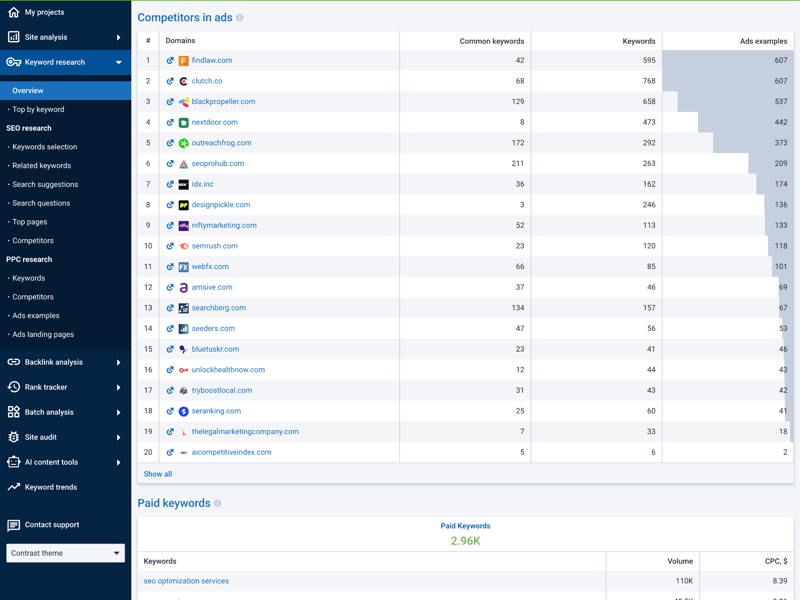
Serpstat visualizes the relationship between keyword volume and relevance in a bubble chart, though it takes some practice to interpret.
The keyword gap comparison is much more useful. Enter two or three URLs and instantly see where keywords overlap and where clear gaps exist. The tool breaks down both ranking positions and search volumes in a clear layout.
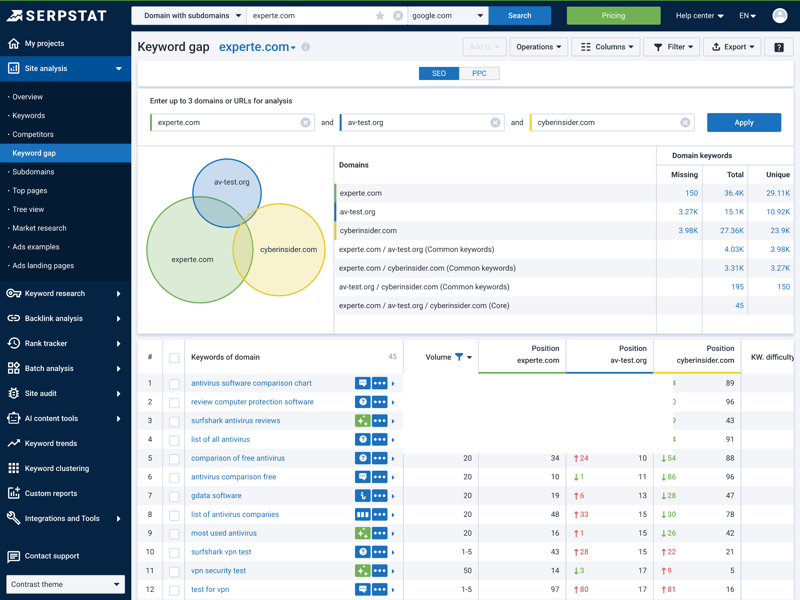
The keyword comparison shows overlaps between your site and up to two competitors. The table highlights opportunities and shared rankings.
Competitor analysis: backlink insights
Backlink analysis works the same way through the “Link Intersection” feature. Compare up to three domains to find out which websites link to your competitors but not to you.
This overlap analysis helps identify potential link sources you can target for your own outreach efforts.
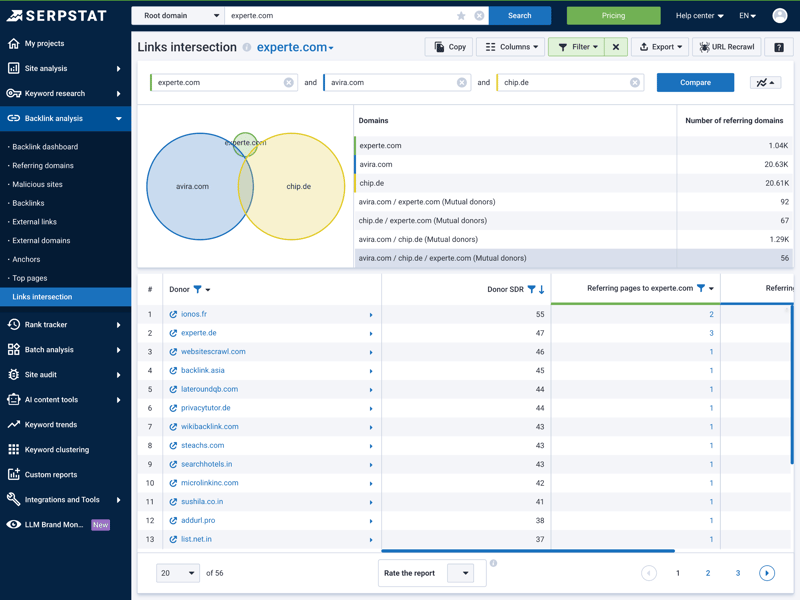
Link Intersection shows websites linking to your competitors—ideal starting points for outreach and partnerships.
How reliable is Serpstat’s traffic data?
Visitor numbers frequently fluctuate with seasonal changes. To distinguish genuine trends from short-term spikes, historical data is essential. Serpstat provides up to nine years of data history, facilitating the identification of long-term patterns. All standard traffic estimation metrics are included:
Serpstat | Ahrefs | Mangools | Moz | Semrush | SE Ranking | Sistrix | SpyFu | Ubersuggest | |
|---|---|---|---|---|---|---|---|---|---|
Organic traffic | ✓ | ✓ | ✓ | ✗ | ✓ | ✓ | ✓ | ✓ | ✓ |
Paid traffic | ✓ | ✓ | ✗ | ✗ | ✓ | ✓ | ✓ | ✓ | ✓ |
Trafic value | ✓ | ✓ | ✗ | ✗ | ✓ | ✓ | ✓ | ✓ | ✓ |
Traffic by country | ✓ | ✓ | ✓ | ✓ | ✓ | ✓ | ✓ | ✓ | ✓ |
Traffic history | 9 years | 5 years | 1 years | 1 years | 14 years | 8 years | 5 years | 16 years | 3 years |
Historical data doesn’t help much if current figures are inaccurate. Therefore, we assessed how closely Serpstat’s traffic estimates align with real-world data by comparing them against actual reference values.
Unfortunately, the results are disappointing for Serpstat:
| Traffic estimation accuracy | |
|---|---|
| 53.6 % |
| 51 % |
| 50.1 % |
| 49.1 % |
| 46.1 % |
| 45.9 % |
| 45.4 % |
| 18.9 % |
| 0 % |
With an accuracy of just 18.9%, Serpstat lands in last place by a wide margin. If you need precise, up-to-date traffic figures, you’ll have to accept significant limitations or use additional data sources.
Serpstat’s competitor analysis presents a mixed performance. On the feature side, it offers robust tools such as keyword gap analysis and link intersection, which reveal clear content and strategic opportunities.
On the data side, however, there’s a major weakness: with traffic estimation accuracy below 20%, Serpstat ranks dead last in our comparison. Some visualizations also feel cluttered, making it harder to quickly grasp the data.
Use the competitor analysis primarily to identify thematic overlaps, rankings, and opportunities—not to reliably predict visitor numbers.
Backlink Analysis
| Feature set |
| 4/5 |
| Number of backlinks | 3,505 referring domains | 1/4 |
| Data quality |
| 3/4 |
| Backlink filters |
| 1.25/2 |
Serpstat utilizes its crawler with a continuously updated index for backlink analysis, so it doesn’t rely on third-party data. This gives it a data source that extends beyond simple link lists. The visual presentation stands out as a highlight: charts and timelines make it easy to quickly assess a link profile.
Comprehensive overviews in the backlink dashboard
The backlink dashboard consolidates all key metrics in one place. It displays the Serpstat Domain Rank (SDR), the number of referring domains, and illustrates how your link profile has evolved.
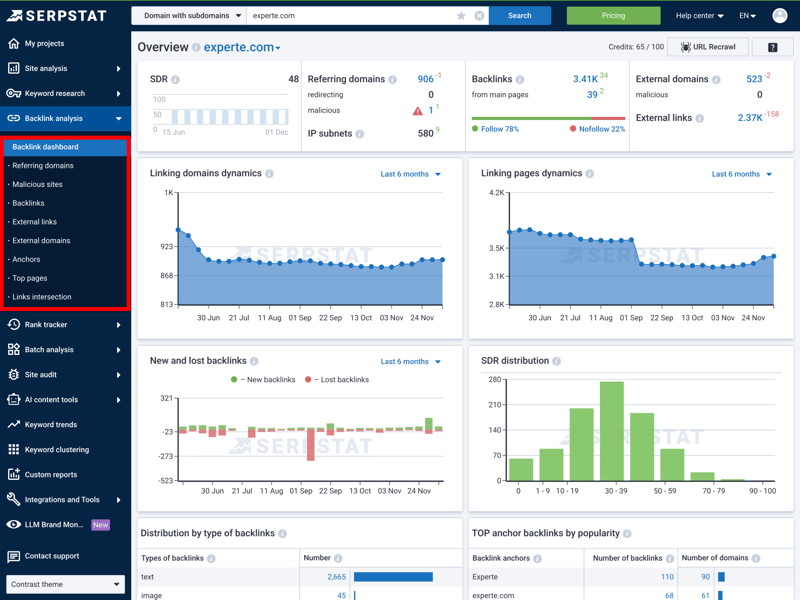
The dashboard visualizes your link profile growth and displays key metrics like the SDR (“Serpstat Domain Rank”) at a glance.
Unfortunately, the crawler currently struggles to capture JavaScript-based links fully. You won’t always get all the data that modern browsers and Google can see. This isn’t an issue for traditional websites, but with modern web apps, you might be missing important information.
Detailed views for new and lost links
The detailed views enable deeper examination of your backlink data. For instance, the “New and Lost Links“ section allows you to identify which websites recently linked to your site or where backlinks were lost during a specific period.
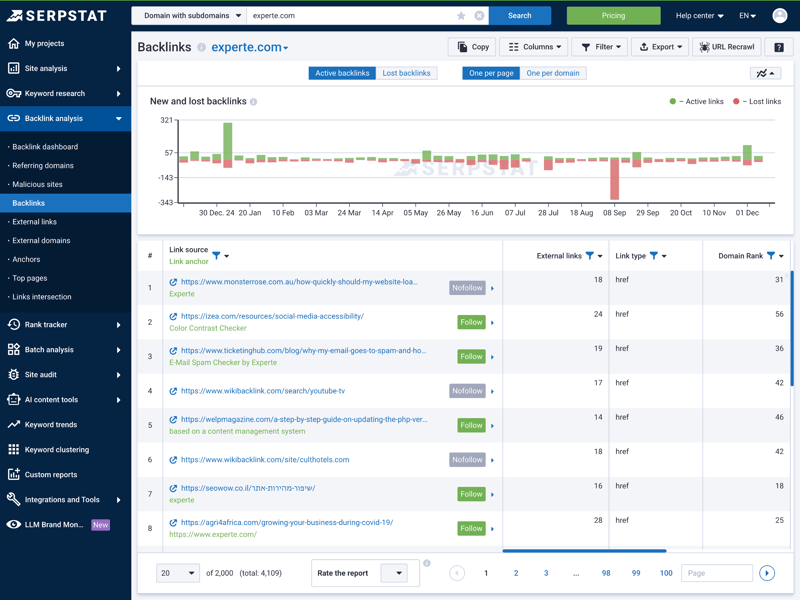
The detailed view helps you identify new link sources or analyze which backlinks were lost during a selected time.
Solid feature set with some gaps
Serpstat supports the most common backlink analysis features. You can evaluate backlink history, analyze referring domains, review anchor texts, and compare link overlaps between multiple domains.
However, certain deeper analysis capabilities are absent, such as features for identifying toxic links or analyzing broken links.
Serpstat | Ahrefs | Mangools | Semrush | SE Ranking | Moz | Sistrix | SpyFu | Ubersuggest | |
|---|---|---|---|---|---|---|---|---|---|
Backlink history | ✓ | ✓ | ✓ | ✓ | ✓ | ✓ | ✓ | ✓ | ✓ |
Referring domains | ✓ | ✓ | ✓ | ✓ | ✓ | ✓ | ✓ | ✓ | ✓ |
Referring IPs | ✓ | ✓ | ✓ | ✓ | ✓ | ✗ | ✓ | ✗ | ✗ |
Lost links | ✓ | ✓ | ✓ | ✓ | ✓ | ✓ | ✓ | ✓ | ✓ |
Toxic links | ✗ | ✓ | ✓ | ✓ | ✓ | ✓ | ✗ | ✗ | ✗ |
Broken links | ✗ | ✓ | ✓ | ✓ | ✓ | ✓ | ✓ | ✗ | ✗ |
Link quality metrics | ✓ | ✓ | ✓ | ✓ | ✓ | ✓ | ✓ | ✓ | ✓ |
Anchor text analysis | ✓ | ✓ | ✓ | ✓ | ✓ | ✓ | ✓ | ✓ | ✓ |
Top pages by links | ✓ | ✓ | ✓ | ✓ | ✓ | ✓ | ✓ | ✓ | ✓ |
Backlink gap analysis | ✓ | ✓ | ✓ | ✓ | ✓ | ✓ | ✓ | ✓ | ✓ |
Total | 8 | 10 | 10 | 10 | 10 | 9 | 9 | 7 | 7 |
How many backlink sources does Serpstat find?
For smaller or newer websites, the index size dictates whether any data is returned. In our test involving 30 domains, Serpstat ranked in the lower-mid tier, finding an average of 3,505 referring domains.
That puts it ahead of competitors like SpyFu or SE Ranking. But it doesn’t match the data depth of specialized market leaders, which sometimes uncover three times as many backlinks:
| Referring domains (on average) | |
|---|---|
| 12,100 |
| 12,100 |
| 8,927 |
| 5,627 |
| 5,200 |
| 3,505 |
| 2,305 |
| 1,172 |
| 224 |
Standard filters for daily use, limited depth for pros
Not every backlink is helpful. Some can actually harm your website. That’s why filters matter. They don’t just help you sort data; they also reveal potential risks. Serpstat’s filters primarily address basic quality assurance.
The tool detects redirects, evaluates links using a “Toxicity Score,“ and issues warnings about potentially harmful sources. While many standard filters crucial for daily operations are included, deeper analysis options are absent, such as filtering by link position (e.g., content versus footer) or by the traffic of the linking page.
Serpstat | Ahrefs | Semrush | Mangools | SE Ranking | Sistrix | SpyFu | Ubersuggest | Moz | |
|---|---|---|---|---|---|---|---|---|---|
Nofollow/Dofollow | ✓ | ✓ | ✓ | ✓ | ✓ | ✓ | ✓ | ✓ | ✓ |
Link authority | ✓ | ✓ | ✓ | ✓ | ✓ | ✓ | ✓ | ✓ | ✓ |
Anchor text | ✓ | ✓ | ✓ | ✓ | ✓ | ✓ | ✓ | ✓ | ✓ |
Link type (text, image, …) | ✓ | ✓ | ✓ | ✓ | ✓ | ✓ | ✓ | ✓ | ✗ |
Link position (content, footer, …) | ✗ | ✓ | ✓ | ✓ | ✗ | ✗ | ✗ | ✗ | ✗ |
Link age | ✓ | ✓ | ✓ | ✗ | ✓ | ✓ | ✗ | ✓ | ✓ |
Traffic of referring page | ✗ | ✓ | ✓ | ✗ | ✓ | ✗ | ✓ | ✗ | ✗ |
Language of referring page | ✗ | ✓ | ✓ | ✓ | ✗ | ✓ | ✗ | ✗ | ✗ |
Total | 5 | 8 | 8 | 6 | 6 | 6 | 5 | 5 | 4 |
Serpstat’s backlink module stands out for its independence: with its crawler and index, the platform doesn’t rely on third-party data. The well-designed visual presentation, especially in the dashboard, makes it easy to get a quick overview of your link profile.
When it comes to raw data volume and technical depth, the tool doesn’t quite match specialized market leaders. The limitations with JavaScript links and the restricted filter options become noticeable during in-depth link audits. For daily work, the module is sufficient. But for complex analyses, there are stronger alternatives.
Keyword Research
| Features |
| 4.5/5 |
| Number of countries | 200 countries | 1/1 |
| Number of keywords | null keywords | /3 |
| Accuracy of search volume | 54.9 % | 2/5 |
| Filters |
| 1.5/2 |
Keyword research remains Serpstat’s original core module and continues to play a central role today. It extends far beyond simple word lists, designed to assist users in exploring entire topic areas. The broad feature set makes it valuable for both initial brainstorming and detailed analysis of individual search terms.
Research typically starts in the “Overview“ section, where Serpstat consolidates organic and paid metrics. Alongside monthly search volume and keyword difficulty, you’ll also find cost-per-click (CPC) data and paid search (PPC) metrics.
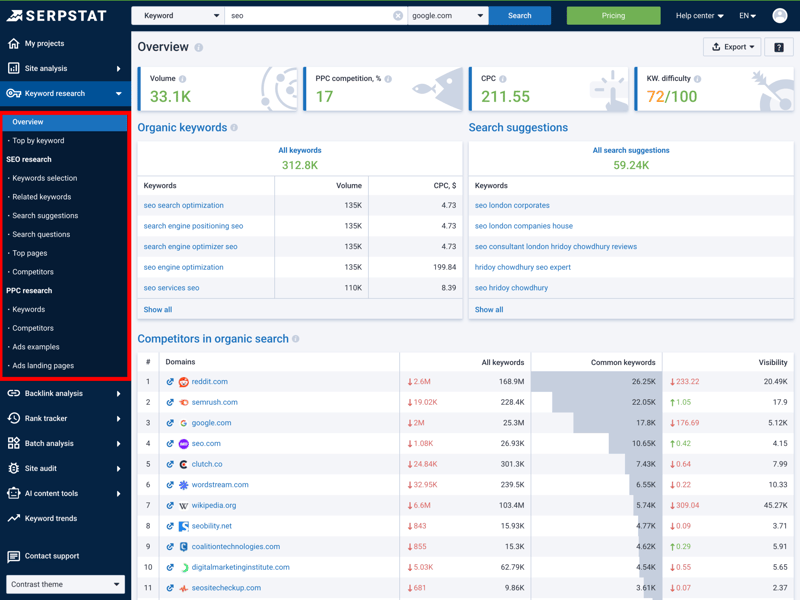
The overview delivers all the key metrics at a glance: from organic volume to ad costs (PPC).
The tool also suggests related terms and lists the top organic competitors for the keyword you entered.
Most features and filters are covered
Serpstat’s feature set is nearly exhaustive, encompassing all crucial quantitative metrics, from monthly search volume and keyword difficulty to CPC values and SERP data.
Compared to other tools in our review, there’s only one notable qualitative omission: automatic search intent detection. You’ll need to manually determine whether a keyword signals buying intent or is purely informational.
Serpstat | Ahrefs | Semrush | SE Ranking | Sistrix | Mangools | SpyFu | Moz | Ubersuggest | |
|---|---|---|---|---|---|---|---|---|---|
Search volume by month | ✓ | ✓ | ✓ | ✓ | ✓ | ✓ | ✓ | ✓ | ✓ |
Search volume by country | ✓ | ✓ | ✓ | ✓ | ✓ | ✓ | ✓ | ✓ | ✓ |
Keyword difficulty | ✓ | ✓ | ✓ | ✓ | ✓ | ✓ | ✓ | ✓ | ✓ |
Cost per click (CPC) | ✓ | ✓ | ✓ | ✓ | ✓ | ✓ | ✓ | ✗ | ✓ |
Search intent | ✗ | ✓ | ✓ | ✓ | ✓ | ✓ | ✗ | ✓ | ✗ |
Current SERPs | ✓ | ✓ | ✓ | ✓ | ✓ | ✓ | ✓ | ✓ | ✓ |
Historical SERPs | ✓ | ✓ | ✓ | ✓ | ✓ | ✗ | ✓ | ✗ | ✗ |
SERP comparison | ✓ | ✓ | ✓ | ✓ | ✓ | ✓ | ✓ | ✓ | ✗ |
SERP overlap | ✓ | ✓ | ✓ | ✓ | ✓ | ✓ | ✓ | ✓ | ✗ |
Keyword clustering | ✓ | ✓ | ✓ | ✓ | ✓ | ✓ | ✓ | ✗ | ✓ |
Total | 9 | 10 | 10 | 10 | 10 | 9 | 9 | 7 | 6 |
Plenty of views and filters for detailed work
The “Keywords“ detail view facilitates deeper analysis. Here, users can filter and sort search terms with a high degree of precision. Serpstat also employs small icons to indicate which special formats Google displays for a keyword, such as images, reviews, or other rich snippets.
Filters for AI-generated overviews (AI Overviews) are already built in as well. These help you assess how new SERP formats might affect visibility.
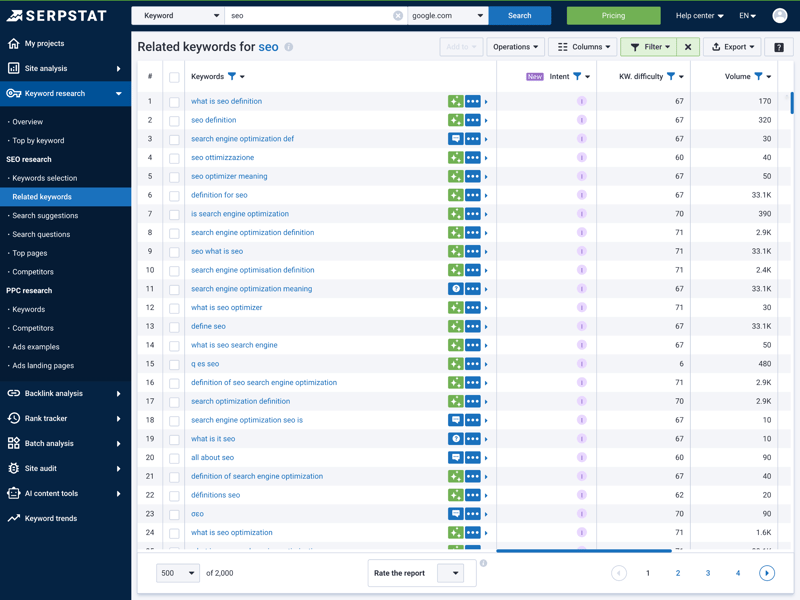
The table provides detailed values for each keyword. The icons tell you which special formats Google shows on the search results page.
Serpstat’s highlight: the “Tree View”
One of Serpstat’s standout strengths is its semantic keyword grouping feature. The tool automatically organizes keyword suggestions into thematic clusters, allowing you to quickly see how many keywords belong to a topic.
The “Tree View” takes this a step further. It breaks down a domain into its subpages and shows all the keywords each page currently ranks for. This makes it easy to check which content is well-covered and where there’s room for optimization.
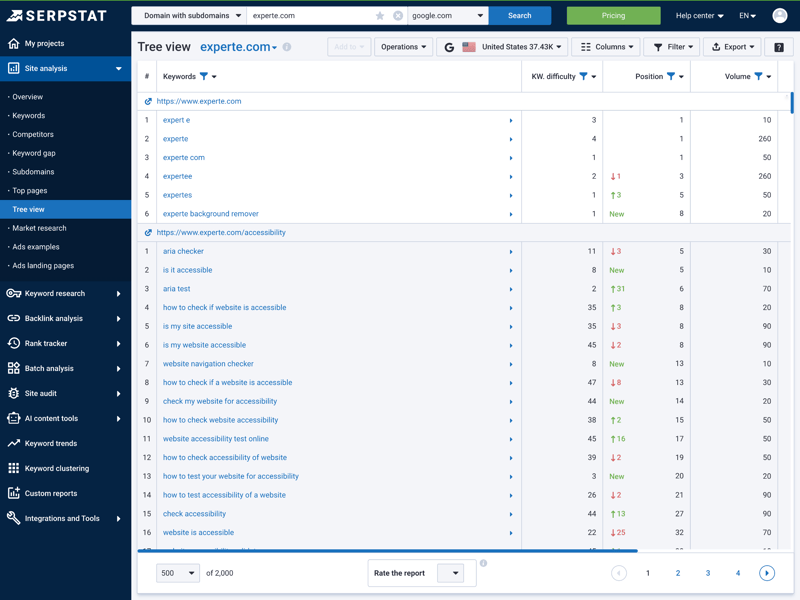
The tree view shows you hierarchically which subpages rank for which keywords. It’s ideal for understanding a website’s structure.
While this view isn’t ideal for initial keyword discovery, its true strength lies in supporting on-page optimization and the evaluation of existing content.

Useful trend data for local and regional SEO
For local optimization, Serpstat provides valuable trend analysis. Users can filter results by country and even sort lists by city.
This is a major advantage if you’re running regional marketing campaigns and need to know exactly which trends are happening where in search engines.
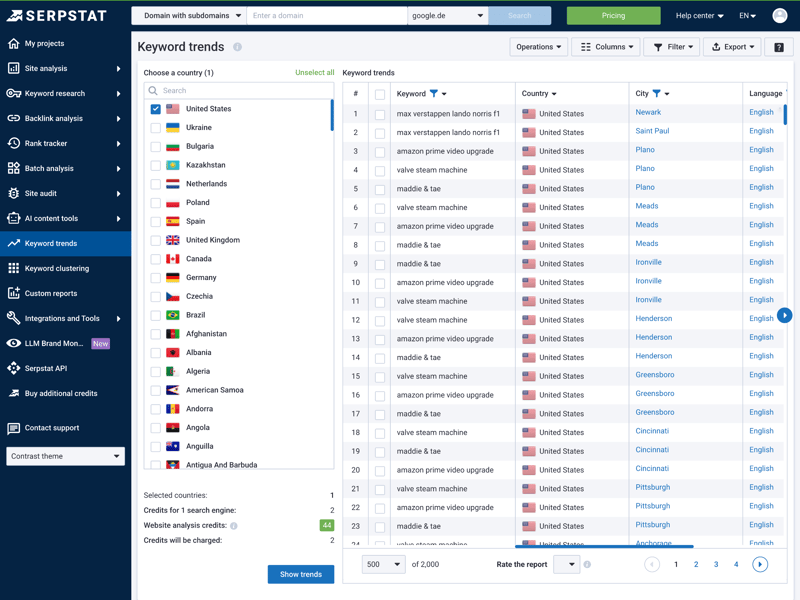
The trend analysis helps you spot seasonal fluctuations and fine-tune your campaigns by region.
Strong keyword database
The size of a keyword database is crucial, as it dictates the number of topic ideas, long-tail keywords, and niche terms you can discover. Ideally, a single seed keyword should generate hundreds of new ideas. The more suggestions a tool provides, the simpler it becomes to build topic clusters and plan content strategically.
For our evaluation, we defined 20 identical seed keywords, including terms like ”vpn.” We then measured how many keyword variations each tool returned from its database for these starting terms.
Here too, Serpstat delivers strong results: with an average of 3,625 keywords per search query, the tool earns a spot on the podium, right behind Ubersuggest and SE Ranking. The database is rich and provides plenty of material for editorial and content planning.
| Number of keywords (on average) | |
|---|---|
| 5,325 |
| 3,831 |
| 3,504 |
| 3,331 |
| 3,032 |
| 1,801 |
| 410 |
| 106 |
| - |
Data quality could be better
Search volume data forms the foundation for many decisions. However, SEO tools cannot directly measure search volumes; they can only estimate them based on proprietary models. The exact number isn’t what matters most, but rather how closely the estimate aligns with reality.
To evaluate this, we compared the search volumes provided by the tools in our comparison against actual data from Google Search Console. We utilized 30 keywords for which we or partner websites consistently ranked within the top 3 positions.
For these keywords, we pulled the actual monthly impressions from Search Console. We then compared those values against the search volumes reported by each SEO tool.
The result: Serpstat lands in the lower midfield with an accuracy of around 55%. That means its estimates deviate more than many competitors, but not as drastically as the weakest tools in our comparison.
| Search volume accuracy | |
|---|---|
| 83 % |
| 75.3 % |
| 73.4 % |
| 72.4 % |
| 65.5 % |
| 55.7 % |
| 54.9 % |
| 52.8 % |
| 29.9 % |
In practice, this means the search volumes work well for comparing keywords relative to each other or identifying trends. But they shouldn’t be treated as reliable absolute numbers for revenue or traffic forecasts.
Keyword research remains Serpstat’s backbone, evident in its impressive volume of keyword suggestions (ranking 3rd in our comparison). The Tree View feature particularly stands out, as it effectively clusters keywords and adds significant value when structuring topics and content.
That said, quantity does not always equate to quality. Our accuracy check revealed that search volumes sometimes deviated significantly from real-world data. While Serpstat provides abundant ideas and a solid foundation for topic planning, the reported volumes should be viewed as relative benchmarks rather than reliable forecasts.
Other Features
| Rank tracking |
| 4/5 |
| AI-Tracking |
| 1.5/5 |
| Site audit |
| 4/5 |
| Additional features |
| 3/5 |
Serpstat is often marketed as an all-in-one suite and adds a few extra features to its core modules with a range of additional features. The goal is to cover the entire SEO workflow, from technical analysis to reporting.
Comprehensive site audit for technical SEO
The “Site Audit“ module handles the technical side of an on-page analysis. The tool crawls your entire website and summarizes its health via the “SDO Score.“
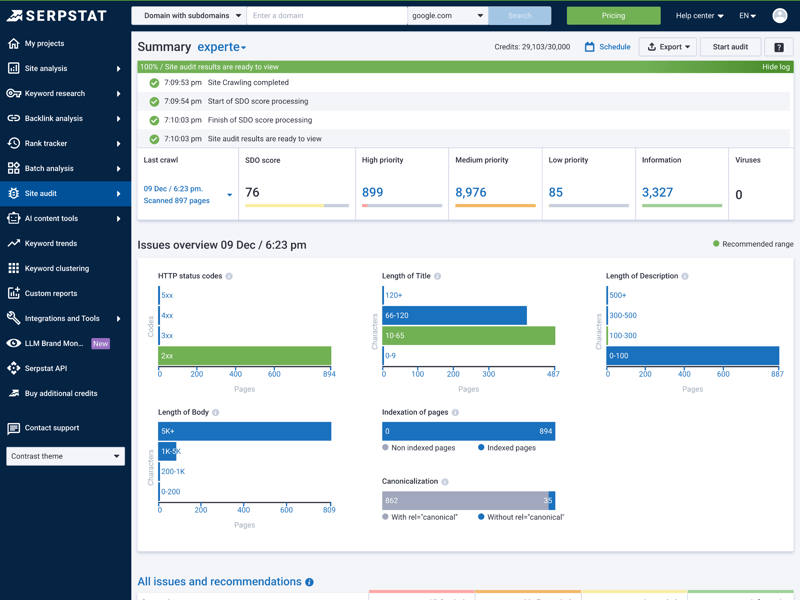
The audit dashboard shows you right away how healthy your site is technically (SDO Score) and which issues you should tackle first.
The clear prioritization of issues is especially helpful: Serpstat categorizes all detected errors as high, medium, or low priority. For each item, you get not only a description of the problem but also specific guidance on how to fix it.
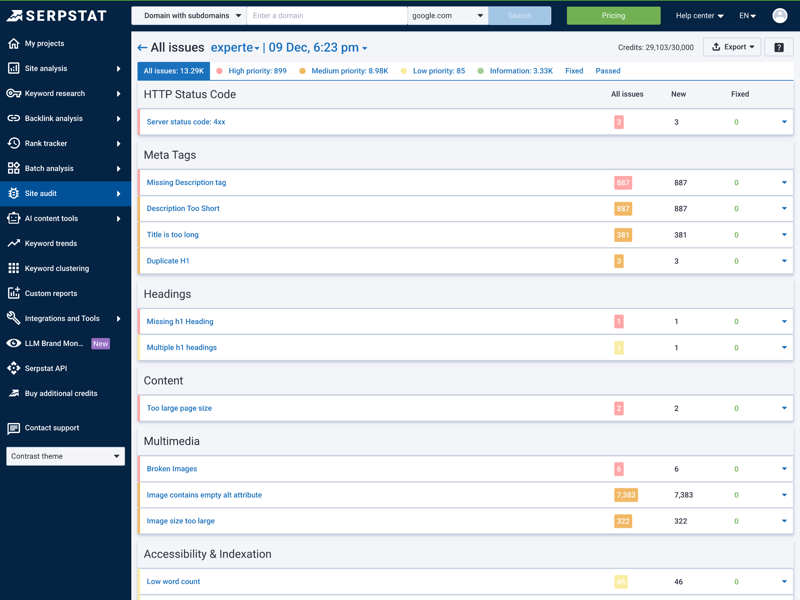
The error overview shows you exactly which areas need attention—whether it’s HTTPS, meta tags, or headings.
Rank tracking with local depth
To monitor rankings, users first create a project within the “Rank Tracking“ module and add their target keywords. Depending on the chosen plan, Serpstat updates positions daily, ensuring data remains current at all times.
The depth of analysis is impressive: you can track visibility not just at the country level but drill down to specific cities or regions. This is a clear advantage for local SEO and regional campaigns.
In addition to classic keyword monitoring, Serpstat offers a “Top Pages” analysis. Instead of looking at individual search terms, you can review the performance of your most important pages and see which content is currently driving the most visibility:
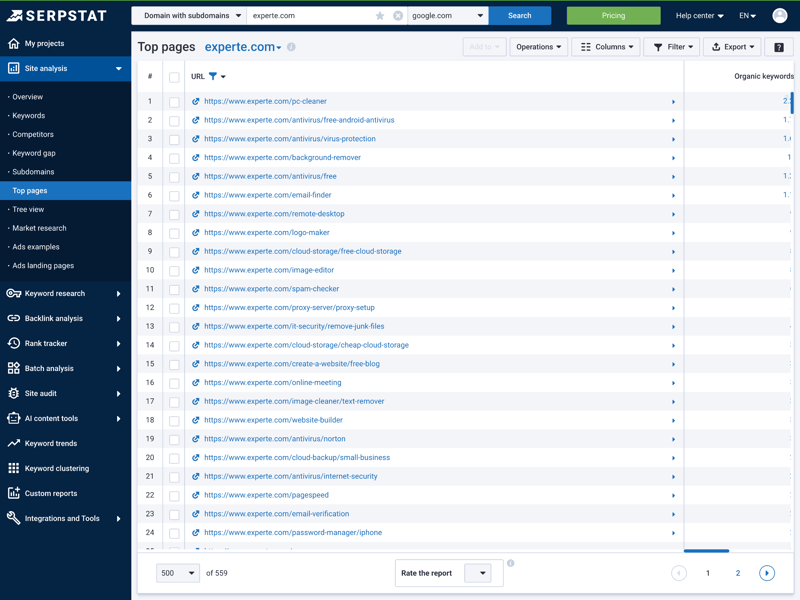
Instead of tracking individual keywords, you can also monitor the performance of your most important pages (Top Pages).
Mixed AI tracking, strong reporting
Regarding artificial intelligence, the current landscape is mixed. The tool presently lacks dedicated tracking for brand mentions within AI chatbots like ChatGPT.
However, Serpstat does detect the presence of “AI Overviews“ (AI-generated summaries in Google search results for specific keywords). The utility of this information for day-to-day SEO work, however, remains to be seen.
Serpstat excels significantly in its reporting capabilities. Customizable report templates are available for working with clients or internal teams, allowing you to assemble precisely the metrics crucial for each project. White-label reports, featuring custom branding, are exclusively included in higher-tier plans.
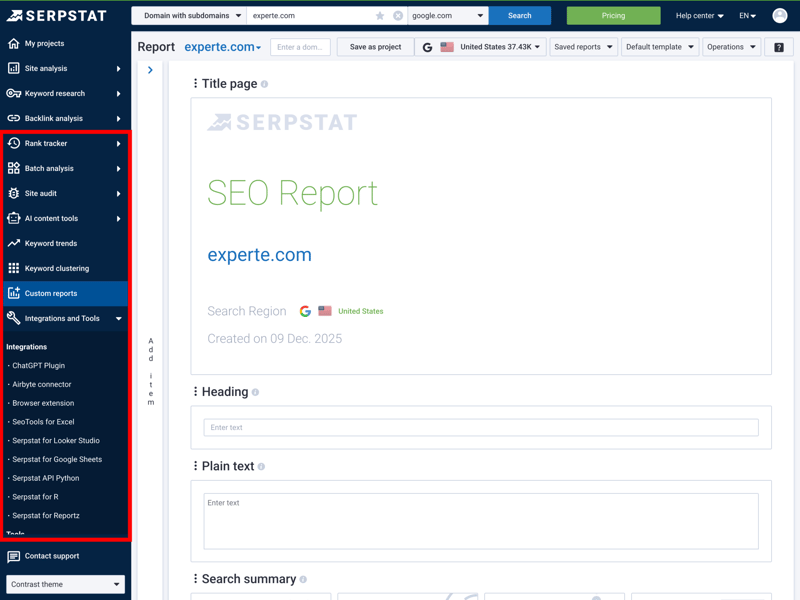
With the report templates, you can create reports that contain exactly the data your clients or managers want to see.
Useful integrations round out the feature set. These include Google Search Console integration, an API in the higher-tier plans, and a “Text Analytics” feature that lets you analyze and optimize content based on your top competitors.
Serpstat also supports batch analysis for keywords and domains, which saves a lot of time on larger projects.
Serpstat fulfills its promise as an all-in-one platform, truly excelling with its technical site audit. The intelligent prioritization of errors assists in focusing resources where they are most needed. The rank tracking further distinguishes itself with its local depth, extending all the way down to the city level.
While the AI features still have room to grow, the reporting tools—especially in the higher-tier plans—offer real value for agencies and teams. Overall, Serpstat reliably covers the entire SEO workflow without attempting to compete with specialized professional tools in every niche.
Support
| Documentation and tutorials |
| 2.5/3 |
| Support channels | Support via e-mail (ticket system) and livechat is offered; phone support is not. | 2/2 |
| Quality of support |
| 1.5/2 |
| Reviews on review platforms |
| 3/3 |
Serpstat provides comprehensive support for inquiries concerning the tool and SEO in general. The main resource is its knowledge base, which explains numerous features in depth. The articles offer sufficient detail to help users efficiently utilize each tool in their daily workflow.
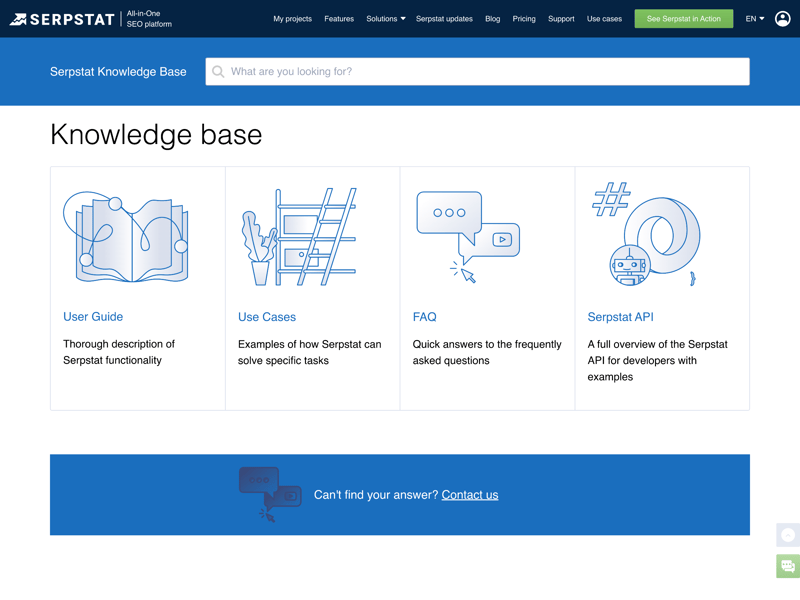
The Knowledge Base contains detailed guides for each of Serpstat’s features.
The platform also maintains an active YouTube channel featuring tutorials and webinars. The Serpstat Academy provides free SEO courses, comprehensively covering both fundamental and advanced topics in a structured format. A companion blog further enhances the learning resources with tool updates and general SEO insights.
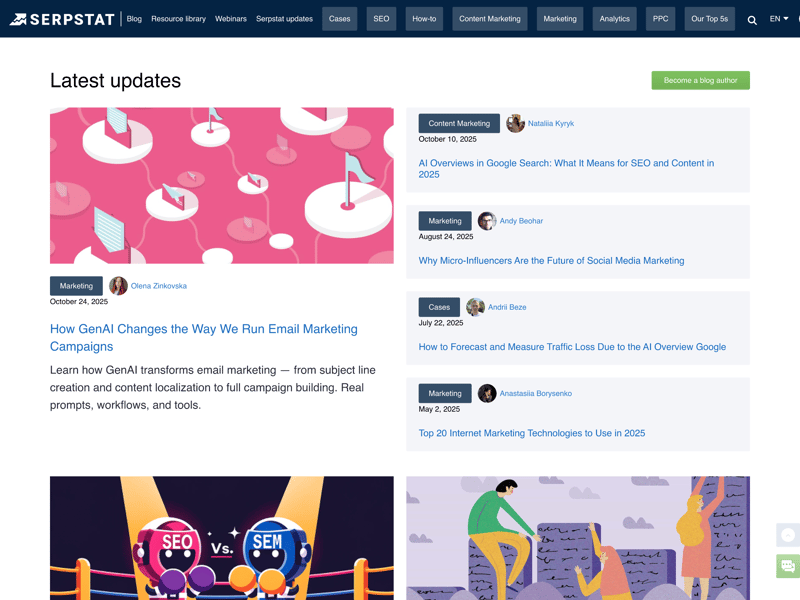
The blog regularly covers tool updates and general SEO topics.
Quick help via chat and ticket
For direct contact, Serpstat offers support via email through a ticket system and a live chat. A phone hotline, however, is not available. In our testing, the chatbot “Lonni“ responded within minutes, delivering a helpful and precise answer. The live chat proved equally reliable and swift.
Customer reviews on third-party platforms confirm this impression: users consistently praise the quick response times and helpful answers. Negative feedback is rare and usually relates to very specific edge cases.
Serpstat’s support is entirely digital. While a phone hotline is not provided, the swift and knowledgeable live chat combined with a well-functioning ticket system effectively compensates for its absence.
The educational resources deserve special mention: with the in-house Serpstat Academy, webinars, and a detailed knowledge base, Serpstat empowers you to solve problems on your own and get more out of the tool.
Pricing
| Trial version |
| 2/2 |
| Starter plan | $50.00 | 2/2 |
| Advanced plan | $100.00 | 2/2 |
| Team plan | $169.00 | 2/2 |
| Rank tracking | $50.00 | 2/2 |
In addition to a free plan with strict limits (best suited for evaluation purposes), Serpstat offers four premium tiers. These tiers vary in both features and quotas, encompassing daily queries, the number of projects, crawl depth for site audits, and export options.
Here’s how the plans compare:
| Individual | Team | Team x2 | |
|---|---|---|---|
| Monthly price | from $50.00 | from $100.00 | from $169.00 |
| Contract period (months) | 1 - 12 | 1 - 12 | 1 - 12 |
| General limits | |||
| Users included | 1 | 3 | 6 |
| Maximum user | 1 | 3 | 6 |
| Reports per day | 100 | 500 | 1,000 |
| Results per report | 50,000 | 250,000 | 500,000 |
| Historical data | 10 years | 10 years | 10 years |
| Site audit | |||
| Projects | 5 | unlimited | unlimited |
| Crawled pages | 30,000 | 150,000 | 30,000 |
| JavaScript Rendering | ✗ | ✗ | ✗ |
| Rank tracking | |||
| Keywords | 2,500 | 12,500 | 25,000 |
| Frequency | Weekly | Weekly | Weekly |
While a trial version is available, it’s not immediately apparent; you must contact support directly to access it. There’s no explicit money-back guarantee in the terms.
Serpstat price comparison
How does Serpstat’s pricing compare against other SEO tools in real-world scenarios? To see how we compared costs across four typical use cases:
- 1.
Beginner: 1 user, 100 queries per day
- 2.
Advanced: 1 user, 500 queries per day, min. 50,000 results per query
- 3.
Team: 5 users
- 4.
Rank tracking: 1,000 keywords monitored
Here are the results:
| Beginner | Advanced | Team | Rank tracking | |
|---|---|---|---|---|
| $29.00 | $89.00 | $149.00 | $29.00 |
| $29.00 | $99.00 | $29.83 | $49.00 |
| $37.70 | $52.70 | $145.70 | $97.70 |
| $50.00 | $100.00 | $169.00 | $50.00 |
| $52.00 | $95.20 | $132.00 | $95.20 |
| $117.33 | $416.66 | $297.33 | $208.33 |
| $138.04 | $277.24 | $392.78 | $138.04 |
| $143.25 | $239.00 | $235.00 | $143.25 |
| $208.00 | $374.00 | $448.00 | $208.00 |
When it comes to pricing, Serpstat is very competitive: the all-in-one SEO tool ranks among the most affordable options in all four categories we compared, whether you’re just getting started, need advanced features, or work with a team.
If budget is a primary concern, Serpstat represents one of the most attractive options on the market. The tool delivers excellent value and is notably more affordable than the major industry players across nearly all pricing tiers. That said, the provider could enhance transparency regarding its trial version and money-back guarantee.
Final Verdict
Serpstat earns our best value pick: this SEO all-rounder presents a strong option for those seeking a broad feature set without paying premium prices of industry giants. Standout features encompass its well-organized keyword research, featuring a tree-view layout, and its robust technical site audit.
The clear visual presentation of data also facilitates rapid orientation for both agencies and experienced users. Where Serpstat falls short is in the accuracy of its traffic estimates and keyword volumes. In our comparison, it landed in the lower midfield. The lack of a localized interface in languages other than English could also present a hurdle for international teams.
If you’re seeking a robust all-in-one tool for trend analysis and structural insights and can accept less-than-pinpoint-accurate traffic numbers, Serpstat provides a strong overall package. It stands out as an especially budget-friendly choice for technically minded SEOs and agencies managing multiple projects simultaneously.

Serpstat User Reviews
What do Serpstat users say about the platform? We looked at reviews on sites like G2, Capterra, and OMR Reviews and compiled the most common feedback:
Versatile all-rounder
Many agencies commend Serpstat for covering nearly every aspect of online marketing, from SEO and PPC to content marketing.Strong reporting features
Agencies particularly appreciate the customizable reports. The option to automate reporting (albeit at an additional cost) significantly saves time in day-to-day operations.Ideal for tight budgets
Several reviews highlight that Serpstat is the perfect entry point for startups and small teams that need professional-grade data without spending four figures.
Data quality varies
Experienced SEOs occasionally critique the accuracy of search volumes and keyword difficulty scores, which often appear less precise compared to market leaders.Cluttered visualizations
Some users find the graphs and charts functional but not consistently intuitive. Interpreting the data typically requires a degree of prior knowledge.Support is text-only
The absence of a phone hotline is a point of concern for some business customers, even though chat support typically responds quickly.
Alternatives to Serpstat
Serpstat is a strong generalist, but it’s not the best choice for every use case. Depending on what you’re looking for, these alternatives might be worth considering:
SE Ranking
SE Ranking offers a similarly broad feature set to Serpstat but presents it within a more modern and streamlined interface. This enhances usability, particularly for less experienced users.Ubersuggest
If your focus lies on keyword research and content planning rather than technical SEO, Ubersuggest might be the superior choice. In our tests, it provided noticeably more accurate search volumes and is particularly well-suited for planning blog posts and content strategies.SpyFu
If competitor analysis is a higher priority than technical audits, SpyFu truly plays to its strengths. The tool deliberately omits the site audit but offers exceptionally deep insights into competitors’ keyword and advertising strategies.
You can find the best alternatives to Serpstat here: