SEO tools can be expensive: many professional platforms charge hundreds of dollars a month. But do you really need to spend that much? Or are there free alternatives that get the job done?
Whether you want a permanently free solution or just want to test-drive SEO platforms without commitment, we’ll show you which tools are truly free and where they fall short.
Free Google Tools: The Foundation of Any SEO Strategy
SEO tools generally fall into two categories: those that provide data about your own website and full-featured SEO suites for deeper analysis.
Let’s start with the first group. Free tools here are plentiful, and many come straight from Google:
Google Search Console (GSC) is one of the most important free SEO tools because the data comes straight from Google. It shows which keywords your site ranks for, how many clicks and impressions each page gets, and any technical issues Google runs into while crawling your site.
Google Analytics tracks how visitors use your site: where they come from, which pages they visit, and how long they stay. This rounds out the data from GSC for a full picture of your organic performance.
Google PageSpeed Insights rates your site’s loading speed on desktop and mobile, a direct ranking factor for Google. The tool gives you recommendations to improve technical performance, for free and with no sign-up required.
Google Trends shows how search interest for specific terms changes over time. It’s especially useful for content planning, helping you spot seasonal trends and emerging topics early.
Bing Webmaster Tools is Microsoft’s answer to GSC. If you want to track traffic from Bing, just sign up for free. You’ll get features similar to those in Google’s Search Console.
Popular Free SEO Tools: Freemium Versions of Premium Platforms
Full-featured SEO suites go far beyond Google’s tools. They include keyword research, competitor analysis, backlink tracking, and technical audits. Most are paid, but some providers offer free plans or tools that let you use the platform with limitations.
We’ve reviewed a range of options and compared their free versions with their paid offerings. For in-depth reviews of the premium tools, refer to our SEO tool comparison.
Here’s our top 7 list of the best free SEO tools:
Ahrefs Free: Powerful SEO Analysis for Your Website

Ahrefs is one of the most widely used SEO tools, especially for its massive, up-to-date backlink index.
What many don’t realize: Ahrefs offers a permanently free version called Ahrefs Webmaster Tools, built specifically for website owners. All you need is an Ahrefs account, no payment method required.
What can the free version of Ahrefs do?
The Webmaster Tools only cover your own domain, so you can’t analyze other websites. But for a free tool, the features are surprisingly robust. You get nearly unrestricted access to the Site Explorer, Site Audit, and Backlink Index for your own site.
The Site Audit checks your website against over 170 technical SEO factors and sorts issues into errors, warnings, and notices. The Site Explorer shows your organic keywords, traffic estimates, and backlink profile.
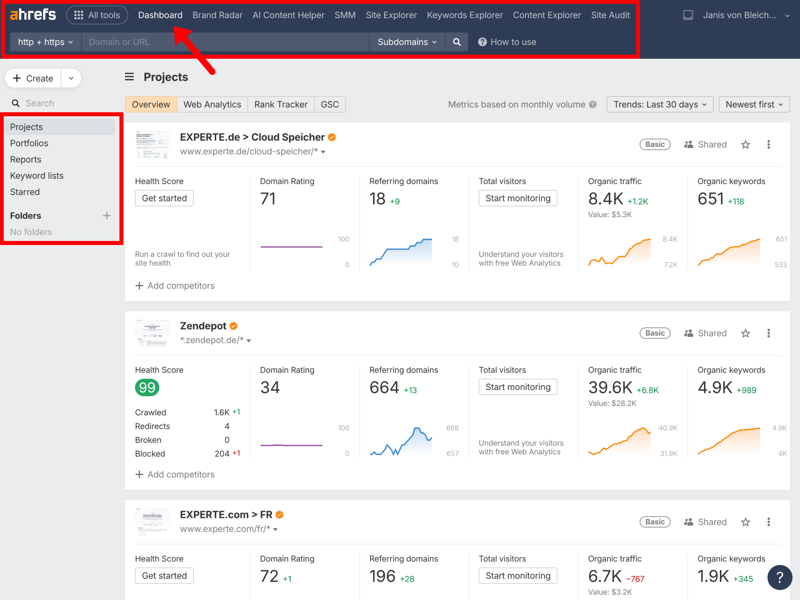
With Projects, you can keep track of all the key developments on your website.
What are the limitations of Ahrefs Free?
One of the main limitations is that Ahrefs Free focuses on your own domain. To check competitors, find new keyword ideas, or analyze other websites, the free version won’t cut it. Features like Keyword Explorer, Content Explorer, and competitor analysis are reserved for paid plans.
The data history is limited, too. Historical data access is more limited in the free version than in Ahrefs’ paid plans. The interface is also packed with information and can feel overwhelming. If you’re new to SEO, expect to spend some time getting familiar with it.
To analyze other websites, you’ll need one of Ahrefs’ paid plans. Unfortunately, they tend to be priced higher than many competing SEO platforms.
| Lite | Standard | Advanced | |
|---|---|---|---|
| Monthly price | from $108.00 | from $208.00 | from $374.00 |
| Contract period (months) | 1 - 12 | 1 - 12 | 1 - 12 |
| General limits | |||
| Users included | 1 | 1 | 1 |
| Maximum user | 3 | 6 | 11 |
| Reports per day | 16 | unlimited | unlimited |
| Results per report | 2,500 | 30,000 | 75,000 |
| Historical data | 0.5 years | 2 years | 5 years |
| Site audit | |||
| Projects | 5 | 20 | 50 |
| Crawled pages | 100,000 | 500,000 | 1,500,000 |
| JavaScript Rendering | ✓ | ✓ | ✓ |
| Rank tracking | |||
| Keywords | 750 | 2,000 | 5,000 |
| Frequency | Weekly | Weekly | Weekly |
Pros and cons of Ahrefs Free
Full site audit for your domain
Ahrefs Free checks over 170 technical SEO factors, automatically prioritizes issues, and provides clear fixes.Unlimited backlink index for your site
Ahrefs maintains a large backlink index that is updated regularly. Even the free version gives you full access for your own website.Truly free—no credit card required
Ahrefs Webmaster Tools is free forever, with no time limits or payment details required. It’s not a trial that automatically upgrades to a paid plan.
Limited to your own website
Competitor analysis, keyword research, and checking other domains are only available with a paid plan.No historical data
The free version of Ahrefs doesn’t include past trends or historical data.Steep learning curve for beginners
The interface is packed with data and assumes some technical know-how. If you’re new to SEO, expect a learning curve.
Sistrix Smart: Free On-Page Analysis for Your Website

Sistrix is a European-based SEO platform known for its Visibility Index, a widely used metric for tracking how visible a website is on Google. Sistrix also offers a free version called Sistrix Smart, designed for beginners with smaller websites.
What can the free version of Sistrix do?
Sistrix Smart only works with one domain, but it’s a great way to get started with on-page SEO. After you set up a project, the tool crawls up to 1,000 pages on your site and checks them against more than 100 criteria, from missing meta titles to broken links and technical errors.
The detailed explanations for each issue are what make it really useful. Sistrix doesn’t just flag problems; it also gives you clear, actionable fixes. That’s very valuable for beginners, who can learn to spot technical issues while building their SEO knowledge. Sistrix Smart also tracks your site’s visibility trends, key rankings, and top competitors.
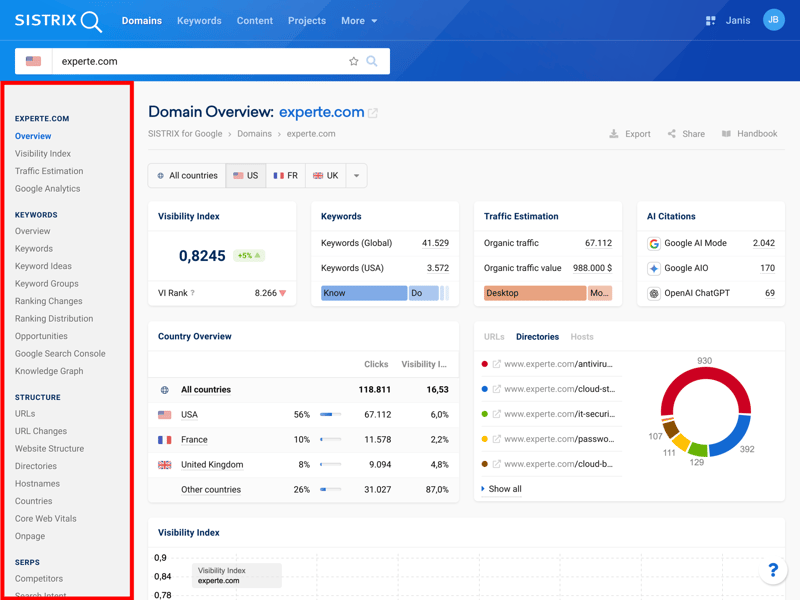
Alongside the well-known Visibility Index, Sistrix provides data on keywords, traffic, AI searches, and other key SEO metrics.
What are the limitations of Sistrix Smart?
The free version of Sistrix only works with one domain. You can’t analyze competitor websites or manage multiple projects. Keyword tracking is also limited to 100 terms, and you can only run one manual crawl per week.
If you need to research new keywords or run in-depth competitor analysis, you’ll have to upgrade to a paid plan. And those plans don’t come cheap:
| Start | Plus | Professional | |
|---|---|---|---|
| Monthly price | from $138.04 | from $277.24 | from $277.24 |
| Contract period (months) | 1 | 1 | 1 |
| General limits | |||
| Users included | 1 | 3 | 6 |
| Maximum user | 1 | unlimited | unlimited |
| Reports per day | 142 | 1,428 | 4,285 |
| Results per report | 10,000 | 50,000 | 100,000 |
| Historical data | 0.25 years | 5 years | 13 years |
| Site audit | |||
| Projects | 3 | 15 | 40 |
| Crawled pages | 30,000 | 500,000 | 2,000,000 |
| JavaScript Rendering | ✓ | ✓ | ✓ |
| Rank tracking | |||
| Keywords | 2,500 | 15,000 | 40,000 |
| Frequency | Weekly | Weekly | Daily |
Pros and Cons of Sistrix’s Free Version
Comprehensive on-page audit
Sistrix checks over 100 technical factors, giving you a solid overview of your website’s health.Beginner-friendly breakdown
The tool prioritizes issues automatically and explains them in plain language. Even without SEO experience, you can understand and fix problems.Clear, actionable explanations
The interface, error descriptions, and troubleshooting tips are detailed and easy to follow, even for SEO beginners.
Only works for your own domain
You can’t analyze competitor websites or manage multiple projects.Limited keyword research
You can only track up to 100 keywords. For deeper research, you’ll need a paid plan.Only one manual crawl per week
With just one crawl a week, it’s hard to check for new issues or changes right away.
Screaming Frog SEO Spider: Technical SEO Analysis for Up to 500 URLs
Screaming Frog SEO Spider is a specialized site audit tool for technical website analysis. Unlike most SEO tools, it doesn’t run in your browser. It’s a desktop app that crawls your site locally on your computer, not on a provider’s servers.
The free version of Screaming Frog lets you crawl up to 500 URLs without even creating an account.
What can the free version of Screaming Frog do?
Before you start, you can fine-tune the crawl settings. The tool analyzes a wide range of technical website factors: missing meta titles, broken links, redirect chains, duplicate content, load times, and JavaScript errors.
After the crawl, Screaming Frog shows all the URLs it found, the factors it analyzed, and detailed information for each page, all in one view.
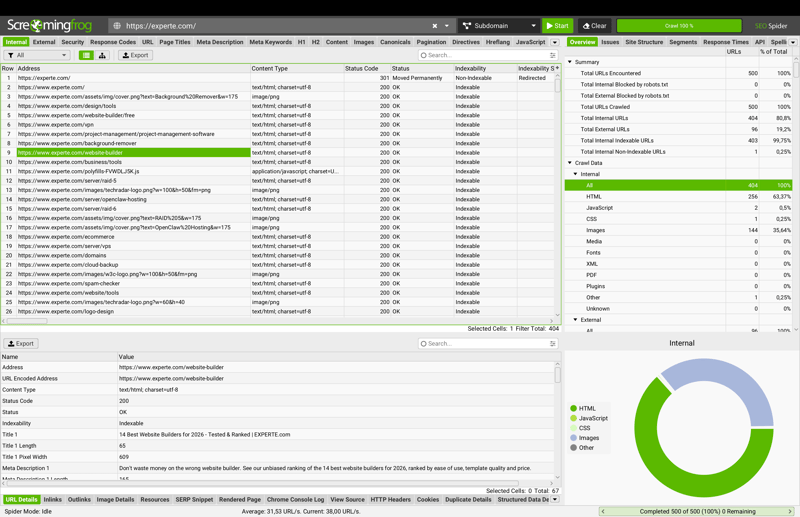
The results view shows all URLs found, technical factors, detailed information, and the distribution of different content types.
In the Issues tab, Screaming Frog prioritizes problems automatically and shows how many URLs each one affects. Click any error for a detailed explanation and clear steps to fix it.
What are the limits of Screaming Frog’s free version?
The 500-URL limit means the free version falls short for larger websites. It also can’t render JavaScript, and modern sites load a lot of content dynamically. To crawl those sites, you’ll need the paid annual license. The interface is fairly complex, too. Instead of a simple overall score, you have to interpret each error yourself.
Pros and cons of Screaming Frog
In-depth technical analysis
Even the free version covers many important technical SEO factors.No registration required
You can download and use Screaming Frog right away; no account is needed.Most key features are free
The main differences from the full version are the URL limit and the missing JavaScript rendering. Otherwise, you get the most important features for free.
500-URL limit
This works for smaller websites, but it’s not enough for larger projects.No JavaScript rendering
Dynamically loaded content isn’t captured. On modern websites, this can lead to incomplete results.No health score
Screaming Frog doesn’t give you a single number to sum up a website’s overall condition, so beginners may struggle to interpret the results.
Ubersuggest: 3 Free Searches Per Day

Ubersuggest* is a beginner-friendly SEO suite focused on keyword research and competitor analysis. It’s run by SEO expert Neil Patel. The free version lets you run three searches per day. You’ll need an account, but no payment details.
What does the free version of Ubersuggest do?
With just three searches per day, the free version is better for trying things out than for daily use. You can do keyword research, domain analysis, and basic site audits, but you’ll hit the daily limit fast.
Ubersuggest stood out in our test for its keyword data. In our evaluation, Ubersuggest provided many keyword suggestions and detailed search volume data. That makes Ubersuggest a solid free option for occasional keyword research.
The interface is beginner-friendly too. Key terms are explained right in the tool, a guided setup gets you going quickly, and clear visuals help you understand the data at a glance.
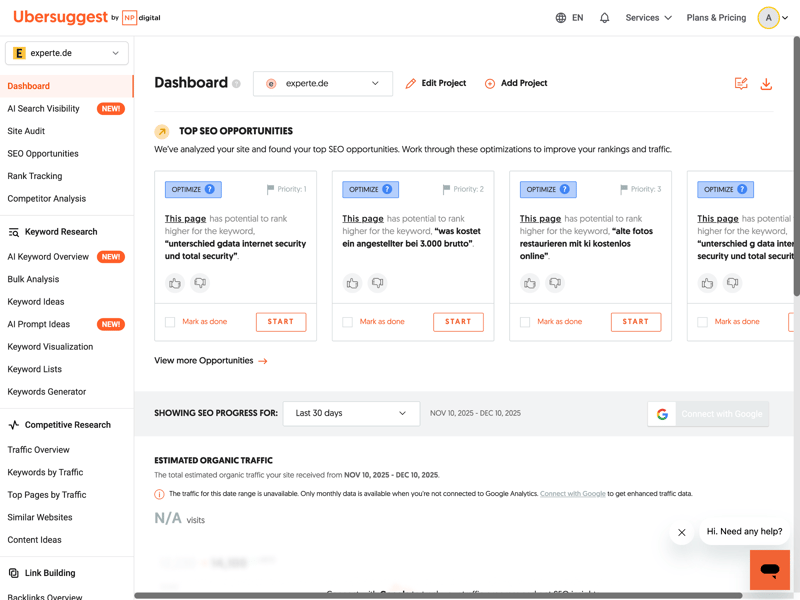
Ubersuggest’s clean interface and built-in explanations make it easy to get started.
What are the limits of Ubersuggest?
The biggest drawback is the three-search daily limit. If you want to use the tool regularly, that won’t cut it.
The good news is that upgrading won’t break the bank. Ubersuggest is one of the most affordable all-in-one SEO tools in our comparison:
| Individual | Business | Enterprise | |
|---|---|---|---|
| Monthly price | from $29.00 | from $49.00 | from $99.00 |
| Contract period (months) | 1 | 1 | 1 |
| General limits | |||
| Users included | 1 | 2 | 5 |
| Maximum user | unlimited | unlimited | unlimited |
| Reports per day | 150 | 300 | 900 |
| Results per report | 20,000 | 50,000 | 100,000 |
| Historical data | 1 years | 1 years | 1 years |
| Site audit | |||
| Projects | 1 | 7 | 15 |
| Crawled pages | 4,000 | 20,000 | 40,000 |
| JavaScript Rendering | ✗ | ✗ | ✗ |
| Rank tracking | |||
| Keywords | 125 | 1,050 | 4,500 |
| Frequency | Weekly | Weekly | Weekly |
But even the paid version is missing some features. Backlink analysis lacks important filters like IP addresses or traffic, and there’s no API access or white-label reporting.
Pros and Cons of Ubersuggest’s Free Version
Large keyword database
Extensive keyword database with a large number of keyword suggestions and search volume estimates.Beginner-friendly interface
Ubersuggest makes it easy to get started with guided setup, tooltips, and visual data. It’s highly visual and easy to navigate.Free forever
You can use the free version indefinitely without entering payment details.
Only three searches per day
The strict search limit makes the free version better for testing than regular SEO work.No in-depth technical analysis
Ubersuggest lacks key features for professional SEO audits and backlink analysis, even in its paid plans.No enterprise features
Ubersuggest doesn’t offer API access or white-label reporting in any plan.
Semrush Free: 10 Searches Per Day

Semrush* is one of the most widely used marketing platforms. It covers SEO, content marketing, social media, and paid advertising. The free version allows 10 searches per day. You’ll need to create an account, but you won’t have to enter payment details.
What can the free version of Semrush do?
With only 10 searches per day, Semrush’s free version is better for testing than regular use. The competitor analysis tool shows traffic estimates, organic keywords, and top competitors for any domain.
You can also run a site audit, though it’s limited to 100 crawled pages. To track your own domain over time, set up a project and monitor basic rankings for free.
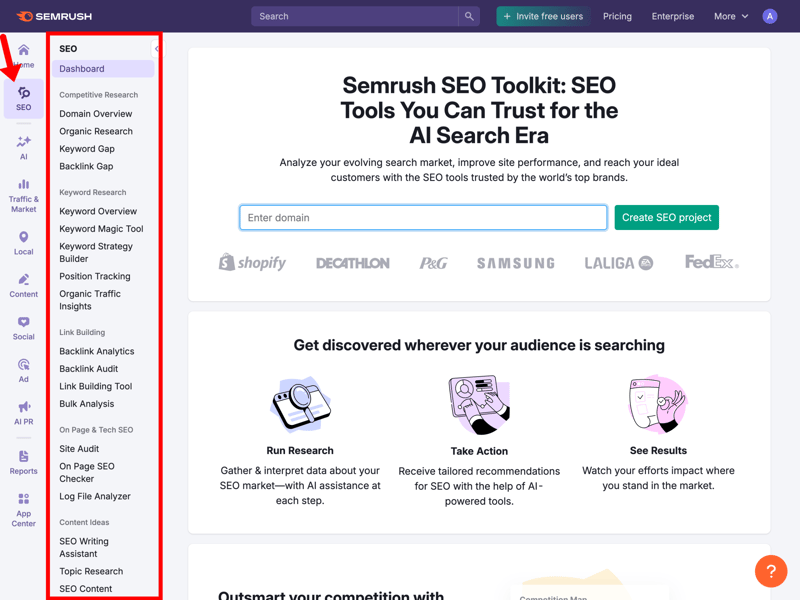
Even the free version of Semrush gives you plenty of features for your own domain.
What are the limitations of Semrush?
On top of the ten-query daily limit, the free version is missing some key features. There’s no historical data, so you can’t track traffic or ranking trends. Backlink analysis, the keyword gap tool, and in-depth competitor comparisons are also reserved for paid plans.
The free version is enough to get familiar with the platform and run the occasional one-off analysis. But for regular SEO work, the restrictions are too tight.
Want to try Semrush's full feature set? You can test the platform for free, but you’ll need to enter payment details.
Overall, Semrush is one of the most expensive SEO tools in our comparison:
| Pro | Guru | Business | |
|---|---|---|---|
| Monthly price | from $117.33 | from $208.33 | from $416.66 |
| Contract period (months) | 1 - 12 | 1 - 12 | 1 - 12 |
| General limits | |||
| Users included | 1 | 1 | 1 |
| Maximum user | unlimited | unlimited | unlimited |
| Reports per day | 3,000 | 5,000 | 10,000 |
| Results per report | 10,000 | 30,000 | 50,000 |
| Historical data | 0 years | 13 years | 13 years |
| Site audit | |||
| Projects | 5 | 15 | 40 |
| Crawled pages | 100,000 | 300,000 | 1,000,000 |
| JavaScript Rendering | ✗ | ✓ | ✓ |
| Rank tracking | |||
| Keywords | 500 | 1,500 | 5,000 |
| Frequency | Daily | Daily | Daily |
Pros and cons of Semrush’s free version
Access to core features
The free version includes the most important tools, like keyword research, domain analysis, and site audits. It’s a great way to get to know Semrush.Truly free forever
There’s no time limit: you can use the free plan indefinitely without entering payment details.Free trial of the premium version
If the free version isn’t enough, you can test the full version at no cost first.
Ten queries per day
The free version might work for occasional checks, but the limit is too strict for regular SEO work.No historical data
Tracking traffic and ranking trends is only available in paid plans.Complex interface
The sheer number of features can make it tough for SEO beginners to get started.
AnswerThePublic: 3 Free Keyword Searches Per Day
AnswerThePublic isn’t a full SEO suite but a specialized keyword research tool. It shows the questions, comparisons, and phrases people use around a search term. The free version lets you run three searches a day without signing up.
What does the free version of AnswerThePublic do?
Enter a seed keyword, and AnswerThePublic builds a visual breakdown of the questions, prepositions, comparisons, and related terms people search for around that topic.
You can view the results as a sunburst diagram or a list. That makes the tool great for brainstorming new topics, planning articles, building FAQ sections, and organizing content clusters.
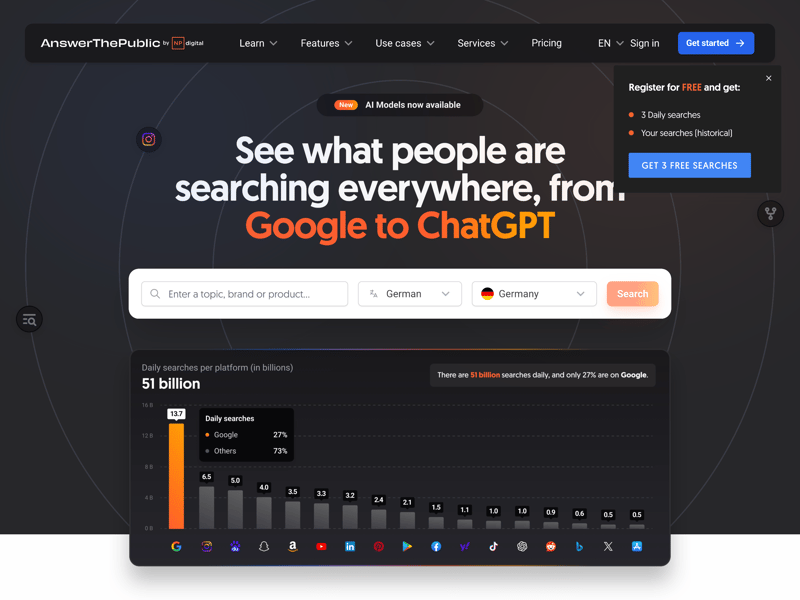
AnswerThePublic shows the questions people ask around a keyword.
If you create content regularly and want to know what your audience is really asking, this tool gives you quick, actionable ideas.
What are the limits of AnswerThePublic?
The biggest limit is three searches per day. You also can’t export results in the free version.
It also skips standard SEO metrics like search volume, keyword difficulty, or CPC. But that’s by design, not a free-version limit. AnswerThePublic focuses on what people are asking, not the numbers behind it.
That’s why a full keyword strategy always needs a second tool.
Pros and cons of AnswerThePublic
Focuses on search intent
AnswerThePublic quickly surfaces questions and phrases people use around a topic.Ready to use without signing up
No account, no download, no credit card required.Easy-to-understand visuals
The sunburst chart and list view help you spot connections between topics at a glance.
Only three searches per day
The free version is only good for occasional research.No data export
If you want to use the keywords elsewhere (and you almost always will, since the tool gives you no SEO metrics), you’ll have to copy them by hand.No SEO metrics
Search volume, keyword difficulty, and CPC aren’t available at all, not even in the paid version.
Moz Free: 2 Searches Per Day

Moz* is one of the oldest and most well-known names in SEO. The Seattle-based company popularized metrics like Domain Authority and Page Authority, which are still widely used today.
The free version gives you permanent access to some core features but limits you to just two searches per day. You’ll need to create an account, but you won’t have to enter any payment details.
What can the free version of Moz do?
The free version focuses on backlink analysis and keyword research. Moz maintains a large backlink index and is widely known for its link analysis capabilities. In our evaluation, it identified a high number of referring domains relative to other tools we reviewed.
Another plus is the MozBar. This free browser extension shows key metrics like Domain Authority, Page Authority, and backlink data right in Google's search results, even for free users.
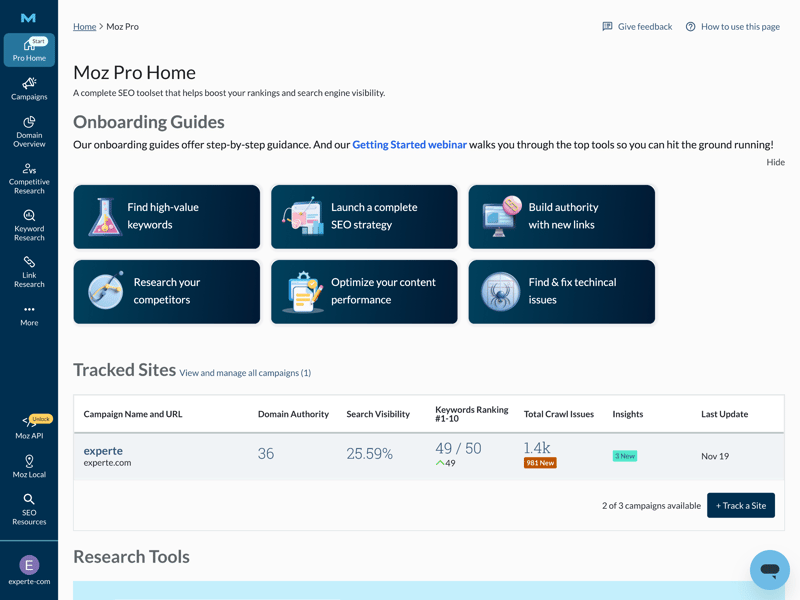
Moz Free gives you a first look at the platform.
Where does Moz Free fall short?
With only two searches per day, the free version isn’t practical for regular analysis. A few limitations apply to all Moz plans. Even the full version doesn't provide traffic estimates for other websites, despite Moz maintaining a solid backlink index.
Thinking about upgrading to a paid plan? Moz is priced in the mid-to-high range but doesn’t offer the same features as more modern tools.
| Starter | Standard | Medium | |
|---|---|---|---|
| Monthly price | from $39.00 | from $79.00 | from $143.25 |
| Contract period (months) | 1 - 12 | 1 - 12 | 1 - 12 |
| General limits | |||
| Users included | 1 | 1 | 2 |
| Maximum user | unlimited | unlimited | unlimited |
| Reports per day | 2 | 5 | 167 |
| Results per report | 5,000 | 10,000 | 30,000 |
| Historical data | - | - | - |
| Site audit | |||
| Projects | 1 | 3 | 10 |
| Crawled pages | 5,000 | 100,000 | 500,000 |
| JavaScript Rendering | ✗ | ✗ | ✗ |
| Rank tracking | |||
| Keywords | 50 | 300 | 1,500 |
| Frequency | Weekly | Weekly | Weekly |
Pros and cons of Moz Free
Free browser extension
The MozBar displays Domain Authority, Page Authority, and backlink data right in search results.Established authority metrics
Domain Authority and Page Authority are available even in the free version.Large backlink index
Moz Pro has one of the largest backlink indexes on the market, and it’s available in the free version too.
Only two queries per day
The strict daily limit makes the free version impractical for regular analysis.No traffic estimates
Even paid plans don’t show visitor numbers for external domains, data that many other SEO tools include.Smallest keyword database in our comparison
In our test, Moz returned an average of just 106 suggestions per seed keyword, far fewer than other providers.
SEO Tools With Free Trials
The tools above are free to use indefinitely. But some SEO platforms also offer time-limited trials that let you test every feature. Just remember: most require payment details up front, so cancel before the trial ends if you would rather not be charged.
Here are some SEO tools that offer free trials:
Mangools: 10-day free trial
Mangools gives you 10 days of free access to all five apps in its suite: KWFinder, SERPChecker, SERPWatcher, LinkMiner, and SiteProfiler.Serpstat: 7-day free trial
Serpstat gives you seven days of full access to its entire suite, including keyword research, site audits, and backlink analysis. In our evaluation, Serpstat’s traffic estimates differed more from benchmark data than those of several other tools.SE Ranking: 14-day free trial
SE Ranking offers a 14-day free trial of its full version. This includes up to 10 projects, 750 tracked keywords per day, and full access to keyword research, competitor analysis, and site audits.Sitebulb: 14-day free trial
Sitebulb is a specialized technical audit tool. It presents results far more clearly than Screaming Frog, which makes it especially beginner-friendly.Nightwatch: 14-day free trial
Nightwatch is a specialized rank tracker with precise local tracking down to ZIP code level, plus built-in AI Visibility Tracking.Advanced Web Ranking: 30-day free trial
Advanced Web Ranking offers the longest trial in our comparison: 30 days of full access. The tool shines at professional rank tracking, with pixel-perfect position analysis and forecasting for traffic, conversions, and revenue.
Final Verdict: Stick With Free Tools or Upgrade?
SEO doesn’t have to be expensive. On a tight budget, a combination of Google's free tools (Search Console, Analytics, Trends, and PageSpeed Insights), Ahrefs Free, Sistrix Smart, and Screaming Frog can cover many common SEO tasks.
But if you need more advanced features, you’ll eventually have to invest in a paid SEO platform. The good news: many providers offer free trials, so you can test everything before committing.
Still looking for the right SEO suite? We put nine popular SEO tools to the test to help you decide.