Moz Pro Review 2026: Is This Tool Worth It?


Moz Pro has been one of the biggest names in SEO for years. While many modern tools try to pack every discipline into a single platform, Moz Pro has stuck to a more focused approach: reliable core metrics, clean on-page analysis, keyword research, and backlink analysis.
But is that still enough today? We thoroughly tested Moz Pro to evaluate how it measures up against the all-in-one platforms currently on the market.
Moz Pro* is a cloud-based SEO platform that brings together several tools for analyzing and optimizing websites into one comprehensive software suite. Features include keyword research, backlink analysis, technical site auditing, rank tracking, and on-page optimization.
The platform is developed by Moz (formerly SEOmoz), a U.S. company that has been in the market since 2004, making it one of the longest-standing tools in the industry. The company evolved early on from a consulting and content provider into a software developer and helped shape foundational SEO standards with resources like the Beginner’s Guide to SEO.
Today, Moz Pro is aimed primarily at in-house marketing teams and agencies that want to work with reliable, well-established SEO metrics. The “Pro” is part of the official product name, not a specific pricing tier.
Moz Pro Review
“Domain authority” as an industry standard
With “Domain Authority” (DA) and “Page Authority” (PA), Moz uses widely recognized benchmarks that have become a global standard in the SEO industry.Extensive historical data archive
Thanks to its long market presence, Moz Pro provides comprehensive historical link data. This makes it easy to track a domain’s development over time.Robust on-page optimization
The “Page Grader” doesn’t just list errors. It also helps you prioritize tasks and gives you specific recommendations to optimize URLs for target keywords.
Limited language support and strong U.S. focus
The interface and support are exclusively in English. Additionally, much of the data is heavily geared towards the U.S. market, with less comprehensive coverage for other regions.Incomplete keyword data
Compared to modern all-in-one tools, Moz Pro often delivers fewer keyword suggestions. Its feature set is also relatively limited.No traffic estimates
Competitor analysis is quite limited. For example, there are no visitor estimates for third-party websites.
Interface and Usability
| User interface |
| 5.5/8 |
| Performance |
| 1.5/2 |
Moz Pro isn’t the most beginner-friendly SEO tool out there. The dashboard is packed with complex data, and some features are harder to find than they should be. On top of that, Moz Pro is only available in English, and much of the data (when available) is geared toward the U.S., UK, Canada, and Australia.
Divided into six main modules
After logging in, you land on the home screen, which serves as a hub. From here, you can choose between the main modules: Campaigns, Domain Overview, Keyword Explorer, Link Research, Competitive Research, and On-Page Grader.
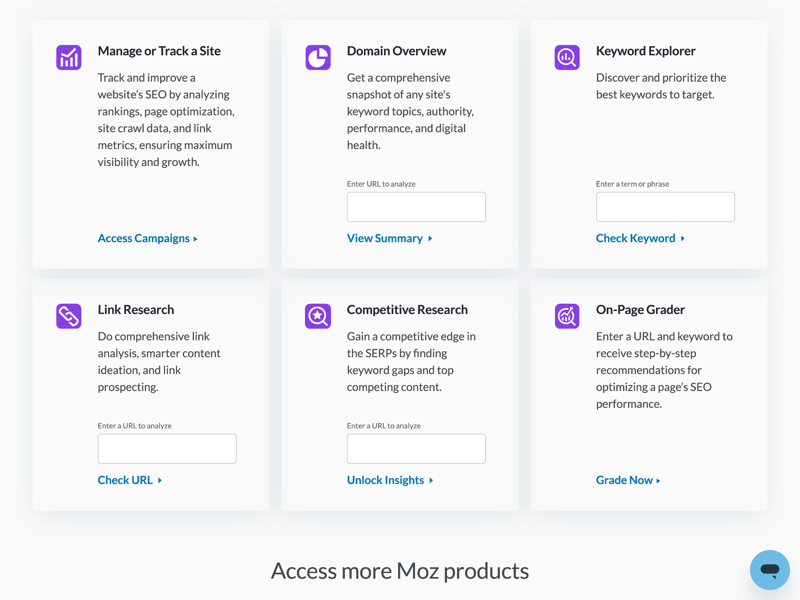
Moz Pro displays its six main modules as tiles right after you log in.
The module names and descriptions are clear, although they're only available in English. Here’s a quick breakdown of each feature:
Module name | Function and purpose |
|---|---|
Campaigns | The core feature for long-term monitoring. Track rankings, crawl errors, and visibility for your saved projects. |
Domain Overview | Your starting point for analysis. Get a quick snapshot of key metrics like domain authority, top rankings, and estimated traffic. |
Keyword Explorer | Your research tool. Find search volumes, analyze keyword difficulty, and build lists of new topic ideas. |
Link Research | Access Moz Pro’s large link index. Analyze backlink profiles, discover new link opportunities, and evaluate website authority. |
Competitive Research | Compare your site directly with competitors. Uncover “keyword gaps,” meaning search terms your competitors rank for but you don’t. |
On-Page Grader | A tool for fine-tuning. Enter a URL and a target keyword, and the system delivers specific improvement suggestions for that content. |
Lots of metrics, not always self-explanatory
Navigation happens through a sidebar on the left side of the screen. From there, you can access the home screen, your campaigns, and the modules for domain, competitor, keyword, and link analysis.
Clicking on the home dashboard takes you to the overview. Using experte.com as an example, you’ll see the key metrics here: domain authority, visibility, rankings, and crawl issues.
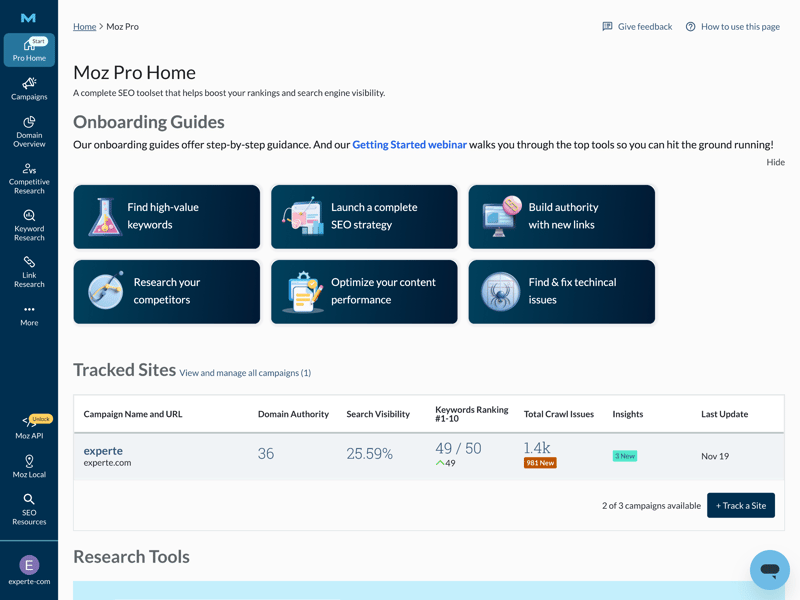
The six modules also appear as tiles on your dashboard's home view.
It’s important to understand that Moz Pro relies almost entirely on its own proprietary metrics. In addition to the domain authority we already mentioned, these include page authority (PA) and spam score. These values aren't official Google data—they’re meant to serve as benchmarks for comparison.
That’s why context matters: the numbers only make sense in relation to something else. High scores aren’t valuable on their own—they’re most useful when compared to direct competitors. Without a basic understanding of these metrics, interpreting the data can get tricky fast.
Not as intuitive or clean as other tools
At first glance, the interface looks modern and clean. But in practice, the menu structure feels a bit cluttered and nested, especially during longer sessions. Most features we looked for were there, but finding them wasn’t always intuitive and often required a second look.
We also ran into occasional loading delays that we didn’t experience with other tools. Data availability wasn’t always reliable either: in some parts of the keyword research section, results simply didn’t show up (more on that later).

Moz Pro’s interface looks clean and visually polished, but it’s not always as intuitive as other tools. The dashboard also requires some familiarity with abstract metrics, which can be a hurdle for SEO beginners. Overall, Moz Pro is usable, but it takes time and patience to get comfortable with.
Competitor Analysis
| Analysis level | Available at all levels except for the subfolder/path level. | 1.5/2 |
| Scope of traffic estimation |
| 1/6 |
| Accuracy of traffic estimation | 0.0 % | 0/6 |
| Keyword rankings |
| 4/4 |
| Page structure | Everything except directories can be accessed via Link Explorer. | 1.5/2 |
Moz Pro’s competitor analysis is a bit of a mixed bag. The tool works best for comparing competitors at the keyword level and visualizing overlaps. But when it comes to traffic data and historical trends, Moz Pro hits its limits quickly: traffic estimates are only available for four countries, and the history only goes back one year.
Clear and structured competitor comparison
After entering a domain, Moz Pro automatically identifies the top 25 competitors. From this list, you can select individual sites to compare directly. The workflow is straightforward and easy to follow.
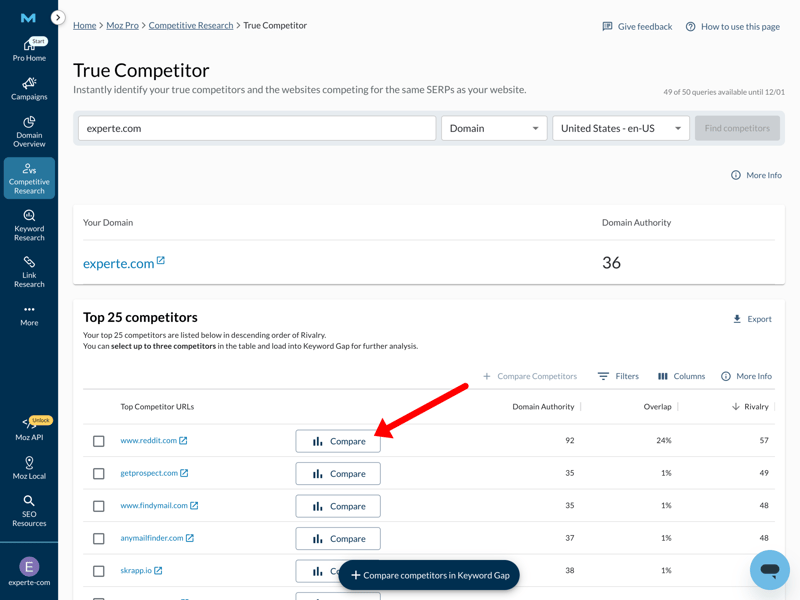
To get detailed stats, you first need to select a competitor.
Moz Pro then displays the key metrics side by side: keywords, top positions, PA, and DA. Two bubble charts visualize the keyword overlap between the domains. The number of shared keywords and the top keywords are listed right next to them.
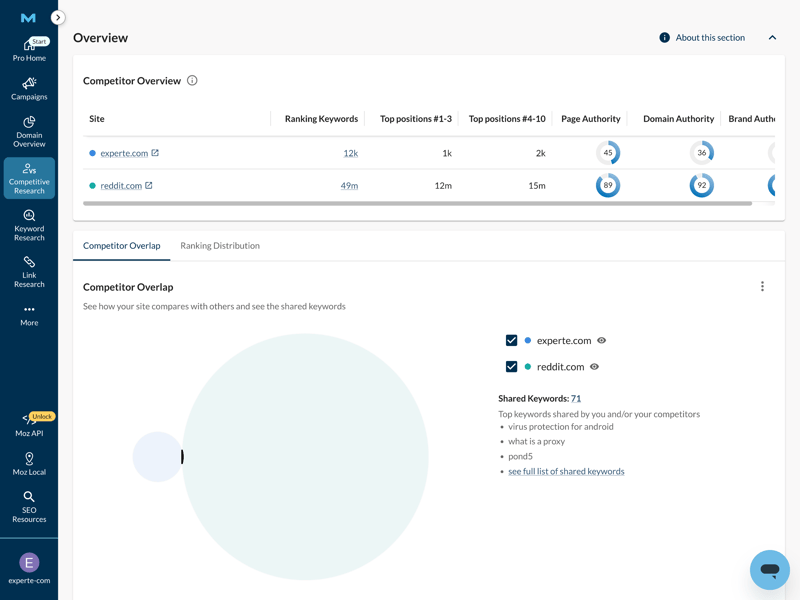
Even though both domains are considered competitors, they share only a few keywords.
Competitor keywords as a useful starting point
A key part of competitor analysis is looking at the keywords your rivals rank for. Moz Pro shows which search terms other domains are ranking for, along with positions, search volume, and keyword difficulty.
This data is great for inspiration—finding new topics or spotting keyword gaps. However, it’s less useful for in-depth traffic analysis or prioritizing keywords based on business potential.
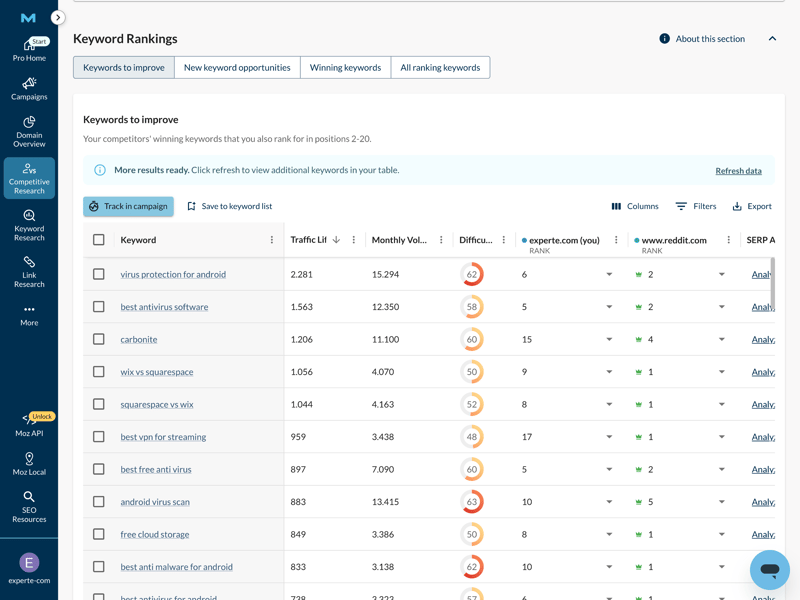
Compare how two sites rank for the listed keywords side by side.
Detailed analysis features for competitors
To understand why a site ranks well today, you often need to look back years. Moz Pro provides reliable data on ranking trends, top pages, and how individual keywords have developed for competitors over time.
The overview shows keyword and URL trends, ranking changes, and how your rankings are distributed. This makes it easy to see which keywords actually drive traffic and how positions shift over time. The interface feels a bit dated compared to newer tools, but the depth of data for keyword analysis is a good foundation.
 Moz |  Ahrefs |  Semrush |  SE Ranking |  Sistrix |  Mangools |  SpyFu |  Ubersuggest |  Serpstat | |
|---|---|---|---|---|---|---|---|---|---|
Number of keywords (history) | ✓ | ✓ | ✓ | ✓ | ✓ | ✓ | ✓ | ✓ | ✓ |
Number of URLs (history) | ✓ | ✓ | ✓ | ✓ | ✓ | ✓ | ✗ | ✓ | ✗ |
Top pages | ✓ | ✓ | ✓ | ✓ | ✓ | ✓ | ✓ | ✓ | ✓ |
Ranking history per keyword | ✓ | ✓ | ✓ | ✓ | ✓ | ✓ | ✓ | ✓ | ✓ |
Ranking changes | ✓ | ✓ | ✓ | ✓ | ✓ | ✓ | ✓ | ✓ | ✓ |
Ranking distribution | ✓ | ✓ | ✓ | ✓ | ✓ | ✓ | ✓ | ✗ | ✗ |
Organic competitors | ✓ | ✓ | ✓ | ✓ | ✓ | ✗ | ✓ | ✓ | ✓ |
Keyword gap analysis | ✓ | ✓ | ✓ | ✓ | ✓ | ✓ | ✓ | ✓ | ✓ |
Total | 8 | 8 | 8 | 8 | 8 | 7 | 7 | 7 | 6 |
Plenty of metrics, but almost no traffic data
If you want to realistically assess your competitors, you need one thing above all: reliable traffic numbers. And that’s where Moz Pro really struggles.
The tool doesn’t offer traffic estimates—not even for its core markets. You won’t find out how many visitors a competitor's site (or your own) gets. Data on paid traffic (SEA) or ad spend is also missing. On top of that, historical data is very limited: traffic history only goes back one year.
Other SEO tools do much better here:
Moz | Ahrefs | Mangools | Semrush | SE Ranking | Serpstat | Sistrix | SpyFu | Ubersuggest | |
|---|---|---|---|---|---|---|---|---|---|
Organic traffic | ✗ | ✓ | ✓ | ✓ | ✓ | ✓ | ✓ | ✓ | ✓ |
Paid traffic | ✗ | ✓ | ✗ | ✓ | ✓ | ✓ | ✓ | ✓ | ✓ |
Trafic value | ✗ | ✓ | ✗ | ✓ | ✓ | ✓ | ✓ | ✓ | ✓ |
Traffic by country | ✓ | ✓ | ✓ | ✓ | ✓ | ✓ | ✓ | ✓ | ✓ |
Traffic history | 1 years | 5 years | 1 years | 14 years | 8 years | 9 years | 5 years | 16 years | 3 years |
SEO tools don’t have access to the actual server data of other websites. They estimate traffic based on rankings and click-through rates. To check how accurate these estimates are, we compared the traffic data from the SEO tools in our review against real reference values.
Since Moz Pro doesn’t provide traffic estimates at all, we couldn’t test its accuracy. The tool is simply not in the running here.
| Traffic estimation accuracy | |
|---|---|
| 53.6 % |
| 51 % |
| 50.1 % |
| 49.1 % |
| 46.1 % |
| 45.9 % |
| 45.4 % |
| 18.9 % |
| 0 % |
Moz Pro’s competitor analysis works well for spotting keyword overlaps and comparing domain authority. But as soon as you need business metrics like estimated visitor numbers or SEA budgets, Moz Pro leaves you empty-handed.
For a full-scale market analysis, it lacks the data depth that other SEO tools now offer as standard. Whether the limited data Moz Pro does provide for competitor analysis is accurate enough remained unclear in our testing.
Backlink Analysis
| Feature set |
| 4.5/5 |
| Number of backlinks | 12,100 referring domains | 4/4 |
| Data quality |
| 3/4 |
| Backlink filters |
| 1/2 |
Backlink analysis has always been one of Moz Pro’s biggest strengths, and that shows in practice. The tool delivers decent data quality and covers all the key metrics, including domain authority (DA), referring domains, inbound links, and ranking-relevant keywords.
Strong foundation for backlink analysis
Where Moz Pro really stands out is the size of its link index and how clearly the data is presented. Quick downloads are handy for reporting. A chart also visualizes the timeline of newly discovered and lost domains, along with the overall balance.
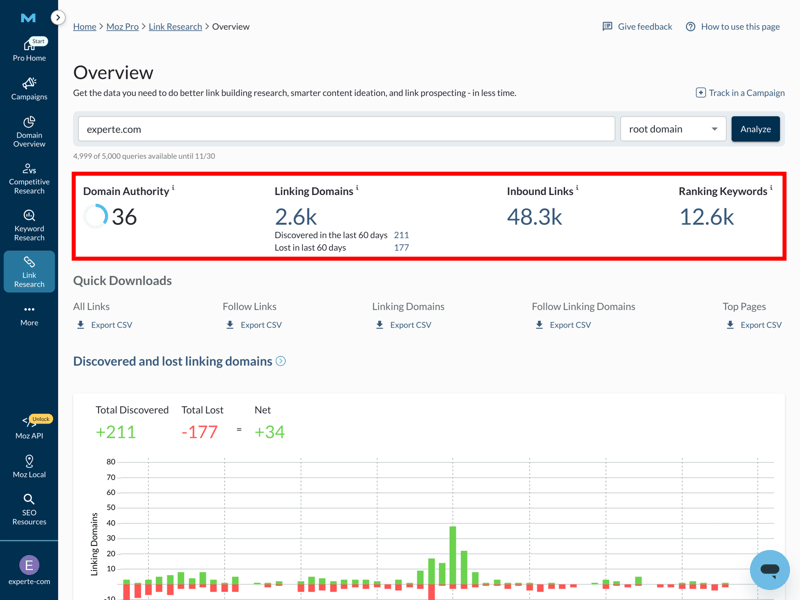
Using experte.com as an example, Moz Pro delivers reliable and easy-to-follow data.
The quality of a link profile is a key ranking factor. To tell strong links from problematic ones, you mainly need historical data and clean anchor text analysis. Moz Pro covers both well: you can see link trends, lost links, and the anchor texts used.
Almost all standard backlink analysis features are included. One detail is missing, though: unlike most other tools in our comparison, Moz Pro doesn’t show referring IPs.
Moz | Ahrefs | Mangools | Semrush | SE Ranking | Sistrix | Serpstat | SpyFu | Ubersuggest | |
|---|---|---|---|---|---|---|---|---|---|
Backlink history | ✓ | ✓ | ✓ | ✓ | ✓ | ✓ | ✓ | ✓ | ✓ |
Referring domains | ✓ | ✓ | ✓ | ✓ | ✓ | ✓ | ✓ | ✓ | ✓ |
Referring IPs | ✗ | ✓ | ✓ | ✓ | ✓ | ✓ | ✓ | ✗ | ✗ |
Lost links | ✓ | ✓ | ✓ | ✓ | ✓ | ✓ | ✓ | ✓ | ✓ |
Toxic links | ✓ | ✓ | ✓ | ✓ | ✓ | ✗ | ✗ | ✗ | ✗ |
Broken links | ✓ | ✓ | ✓ | ✓ | ✓ | ✓ | ✗ | ✗ | ✗ |
Link quality metrics | ✓ | ✓ | ✓ | ✓ | ✓ | ✓ | ✓ | ✓ | ✓ |
Anchor text analysis | ✓ | ✓ | ✓ | ✓ | ✓ | ✓ | ✓ | ✓ | ✓ |
Top pages by links | ✓ | ✓ | ✓ | ✓ | ✓ | ✓ | ✓ | ✓ | ✓ |
Backlink gap analysis | ✓ | ✓ | ✓ | ✓ | ✓ | ✓ | ✓ | ✓ | ✓ |
Total | 9 | 10 | 10 | 10 | 10 | 9 | 8 | 7 | 7 |
How many backlink sources does Moz Pro find?
The value of any backlink analysis depends heavily on the size of the underlying link index. If a tool doesn’t track a referring domain, it simply won’t show up in your analysis—no matter how relevant it actually is.
To compare how well each tool performs, we measured the average number of referring domains found per test URL. Moz Pro ranks among the best here, finding an average of 12,100 referring domains per test URL, tied with Ubersuggest.
| Referring domains (on average) | |
|---|---|
| 12,100 |
| 12,100 |
| 8,927 |
| 5,627 |
| 5,200 |
| 3,505 |
| 2,305 |
| 1,172 |
| 224 |
That puts Moz Pro ahead of even some established market leaders and highlights its strength in backlink data. If your main priority is finding as many links as possible and getting broad coverage of a backlink profile, Moz Pro is an excellent choice.
Filter options could be better
Data is only as useful as your ability to sort through it. To truly understand a link profile, you need to filter backlinks by different attributes.
Moz Pro delivers mixed results here. Basic filters are available: you can sort backlinks by nofollow/dofollow, authority, anchor text, and age. That’s enough for a quick overview.
However, important options are missing for deeper analysis. You can’t filter by link type (e.g., text versus image link) or by position within the content. There’s also no data on estimated traffic or the language of the linking page.
Moz | Ahrefs | Semrush | Mangools | SE Ranking | Sistrix | Serpstat | SpyFu | Ubersuggest | |
|---|---|---|---|---|---|---|---|---|---|
Nofollow/Dofollow | ✓ | ✓ | ✓ | ✓ | ✓ | ✓ | ✓ | ✓ | ✓ |
Link authority | ✓ | ✓ | ✓ | ✓ | ✓ | ✓ | ✓ | ✓ | ✓ |
Anchor text | ✓ | ✓ | ✓ | ✓ | ✓ | ✓ | ✓ | ✓ | ✓ |
Link type (text, image, …) | ✗ | ✓ | ✓ | ✓ | ✓ | ✓ | ✓ | ✓ | ✓ |
Link position (content, footer, …) | ✗ | ✓ | ✓ | ✓ | ✗ | ✗ | ✗ | ✗ | ✗ |
Link age | ✓ | ✓ | ✓ | ✗ | ✓ | ✓ | ✓ | ✗ | ✓ |
Traffic of referring page | ✗ | ✓ | ✓ | ✗ | ✓ | ✗ | ✗ | ✓ | ✗ |
Language of referring page | ✗ | ✓ | ✓ | ✓ | ✗ | ✓ | ✗ | ✗ | ✗ |
Total | 4 | 8 | 8 | 6 | 6 | 6 | 5 | 5 | 5 |
The interface does display various breakdowns, such as top anchor texts or linked pages relative to authority. But there’s no guidance on how to interpret these metrics. Users are left to figure that out on their own.
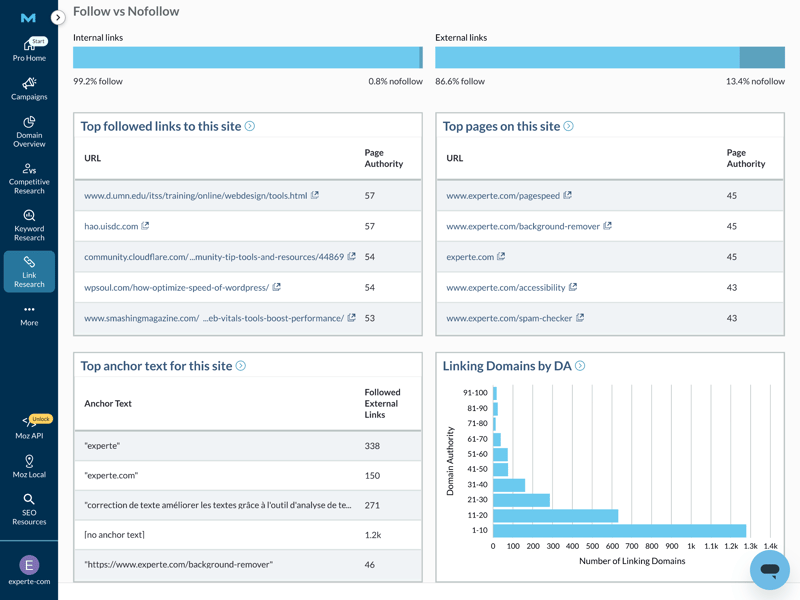
Moz Pro shows top anchor texts and linked pages in relation to their authority.
The presentation also feels inconsistent in places. The tile showing top pages with Page Authority looks more like a domain overview than a backlink analysis and doesn’t add much to understanding the actual link profile.
Despite some limitations, the backlink module remains Moz Pro’s most reliable and convincing feature. If your focus is on link building and authority metrics, you’ll get dependable, historically rich data with strong coverage.
The missing filters for traffic and language do limit detailed analysis, but that’s usually manageable for basic link profile evaluations. That said, the abstract scores can make analysis harder, especially for beginners.
Keyword Research
| Features |
| 3.5/5 |
| Number of countries | 200 countries | 1/1 |
| Number of keywords | 106 keywords | 0/3 |
| Accuracy of search volume | 55.7 % | 2/5 |
| Filters |
| 1/2 |
Keyword research isn’t one of Moz Pro’s strongest modules. The tool provides basic metrics and works well for initial topic exploration. But for in-depth analysis and data-driven content strategies, Moz Pro starts to fall short pretty quickly.
Clear keyword search in the Keyword explorer
Moz Pro offers a dedicated Keyword Explorer for keyword research. At first glance, the feature set looks solid. You can start with either a URL or a classic seed keyword.
Here's the result for the URL experte.com:
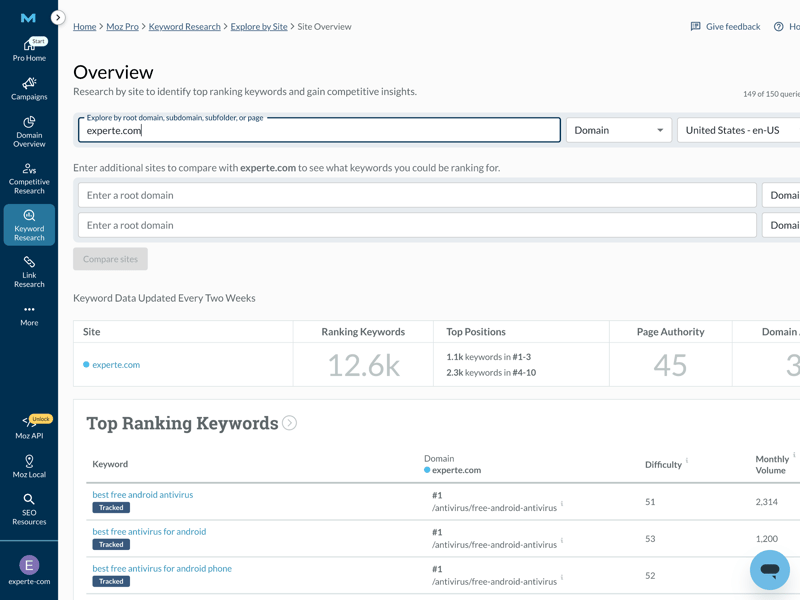
Based on a URL you enter, Moz Pro suggests several thousand keywords to choose from.
Alternatively, you can enter a seed keyword like “free vpn.” You can also select a language and region, which is especially useful for non-English projects.
For each keyword, Moz Pro displays search volume, click-through rate (CTR), difficulty, and a recommended minimum domain authority score.
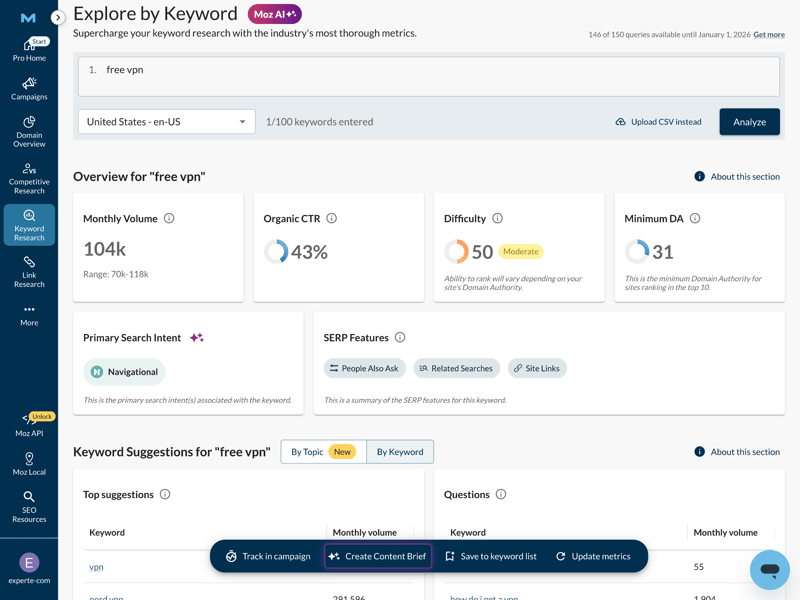
You get search volume, CTR, difficulty, and minimum DA for the selected keyword.
Weak performance and data gaps
Even great data doesn’t help if the tool feels slow. Fast load times and complete metrics are essential for keyword research. And this is another area where Moz Pro struggles. During testing, we repeatedly experienced load times of several seconds. That slows down your workflow and makes the whole tool feel sluggish.
The data gaps are an even bigger problem. For some keywords, Moz Pro can’t reliably determine search intent or search volume. Advanced features like CPC data, historical SERP analysis, or automatic keyword clustering are missing entirely. For basic queries, it might be enough. For more in-depth analysis, it’s not.
Moz | Ahrefs | Semrush | SE Ranking | Sistrix | Mangools | Serpstat | SpyFu | Ubersuggest | |
|---|---|---|---|---|---|---|---|---|---|
Search volume by month | ✓ | ✓ | ✓ | ✓ | ✓ | ✓ | ✓ | ✓ | ✓ |
Search volume by country | ✓ | ✓ | ✓ | ✓ | ✓ | ✓ | ✓ | ✓ | ✓ |
Keyword difficulty | ✓ | ✓ | ✓ | ✓ | ✓ | ✓ | ✓ | ✓ | ✓ |
Cost per click (CPC) | ✗ | ✓ | ✓ | ✓ | ✓ | ✓ | ✓ | ✓ | ✓ |
Search intent | ✓ | ✓ | ✓ | ✓ | ✓ | ✓ | ✗ | ✗ | ✗ |
Current SERPs | ✓ | ✓ | ✓ | ✓ | ✓ | ✓ | ✓ | ✓ | ✓ |
Historical SERPs | ✗ | ✓ | ✓ | ✓ | ✓ | ✗ | ✓ | ✓ | ✗ |
SERP comparison | ✓ | ✓ | ✓ | ✓ | ✓ | ✓ | ✓ | ✓ | ✗ |
SERP overlap | ✓ | ✓ | ✓ | ✓ | ✓ | ✓ | ✓ | ✓ | ✗ |
Keyword clustering | ✗ | ✓ | ✓ | ✓ | ✓ | ✓ | ✓ | ✓ | ✓ |
Total | 7 | 10 | 10 | 10 | 10 | 9 | 9 | 9 | 6 |
Tiny keyword database
If you’re building a comprehensive content strategy, you can't afford to miss relevant topics. A good tool needs to deliver as many keyword variations as possible. To compare tools fairly, we defined 20 identical seed keywords (e.g., “vpn”) and measured how many keyword variations each database returned.
Unfortunately, Moz Pro disappoints here too. It delivered the fewest suggestions of all the tools we tested. It returned less than 10% of the keyword options that our top pick, Ubersuggest, found. This limited data coverage is a real obstacle for professional content work.
| Number of keywords (on average) | |
|---|---|
| 5,325 |
| 3,831 |
| 3,504 |
| 3,331 |
| 3,032 |
| 1,801 |
| 410 |
| 106 |
| - |
Mediocre data quality
There’s often a gap between estimated and actual search volume. With Moz Pro, that gap is noticeable. Our comparison test proves that the tool ranks in the lower middle of the pack when it comes to accuracy.
For this test, we selected 30 keywords where we or our partner websites consistently rank in Google’s top 3. For these keywords, we can see the actual monthly impressions in Google Search Console. We then compared those real impressions to the search volumes reported by each SEO tool.
With an accuracy rate of 55.7%, Moz Pro delivers rough estimates rather than reliable data. That might be fine for a quick orientation. But if you’re planning budgets or trying to calculate traffic potential with any precision, take these numbers with a grain of salt.
| Search volume accuracy | |
|---|---|
| 83 % |
| 75.3 % |
| 73.4 % |
| 72.4 % |
| 65.5 % |
| 55.7 % |
| 54.9 % |
| 52.8 % |
| 29.9 % |
Combined with the already limited number of keyword suggestions, the overall data foundation for professional content planning is pretty thin.
Moz Pro's keyword research leaves something to be desired. It’s fine for a rough topical overview since you can research URLs and seed keywords. But it doesn't meet modern standards for in-depth content strategy.
On the plus side, German-speaking regions are now supported. In practice, though, that doesn’t help much because Moz Pro delivers few keyword suggestions, and the data accuracy is limited.
Other Features
| Rank tracking |
| 3/5 |
| AI-Tracking |
| 2.5/5 |
| Site audit |
| 3.5/5 |
| Additional features |
| 2.5/5 |
Beyond the SEO basics, Moz Pro offers a few specialized tools. The main focus is always on evaluating your domain using proprietary authority metrics like domain authority, page authority, and the relatively new “Brand Authority.” This is most evident in the “Domain Overview” module.
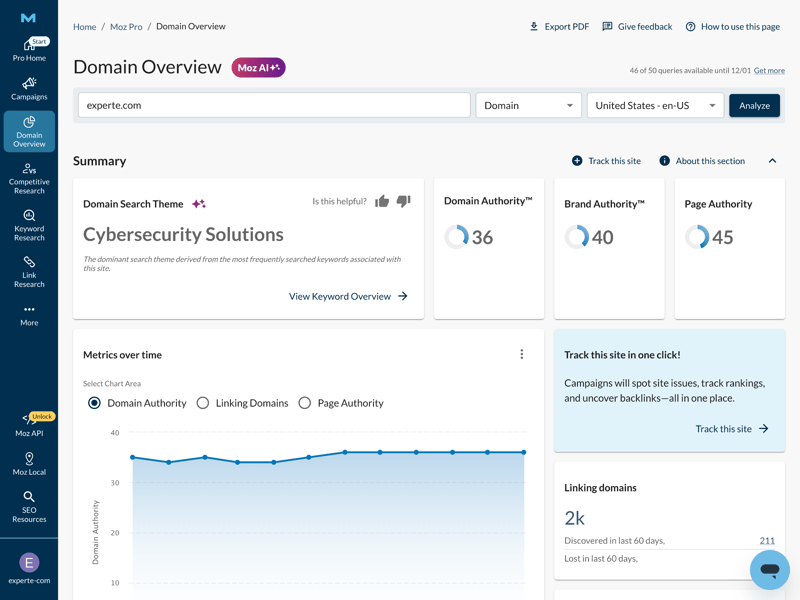
Moz Pro shows how authoritative your domain, pages, and brand are.
Useful authority metrics that need context
These authority scores come exclusively from Moz Pro and aren’t official Google data. That means they need context. A Domain Authority of 36—like in the experte.com example—doesn’t mean much on its own. Without explanatory notes, comparison values, or clear categorization (like a color-coded system), users might end up with more questions than answers.
On the positive side, you can track how these values change over time. Shifts can indicate successful on-page efforts or structural improvements. Moz Pro is trying to make the abstract concept of authority more tangible—a key factor in Google’s algorithm.
The tool also shows how rankings and strong keywords are distributed across your domain:
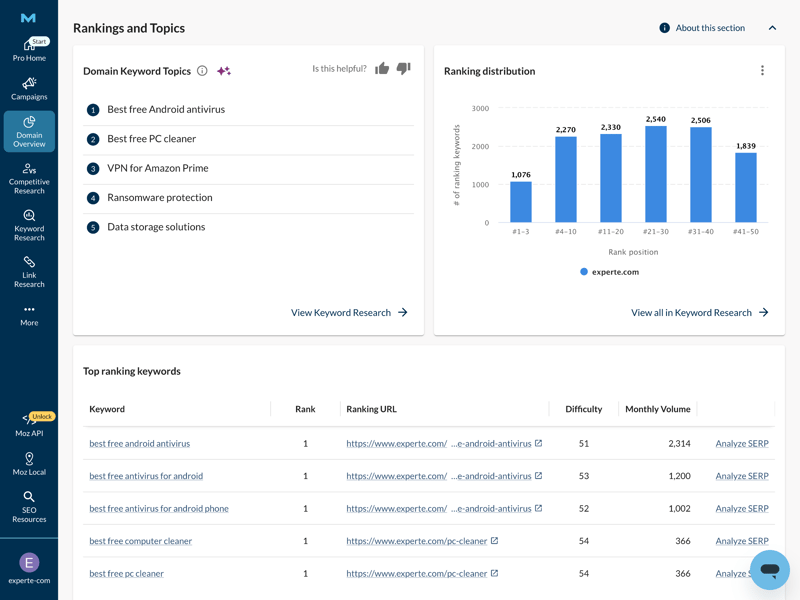
Moz Pro presents the data according to topics, rankings, and key words.
Overlap with rank tracker and crawls
Some features overlap with the Rank Tracker. There, you can run manual crawls and compare results over time. Completed crawls are collected in the Site Crawls module, which makes tracking easier but doesn’t add much new functionality.
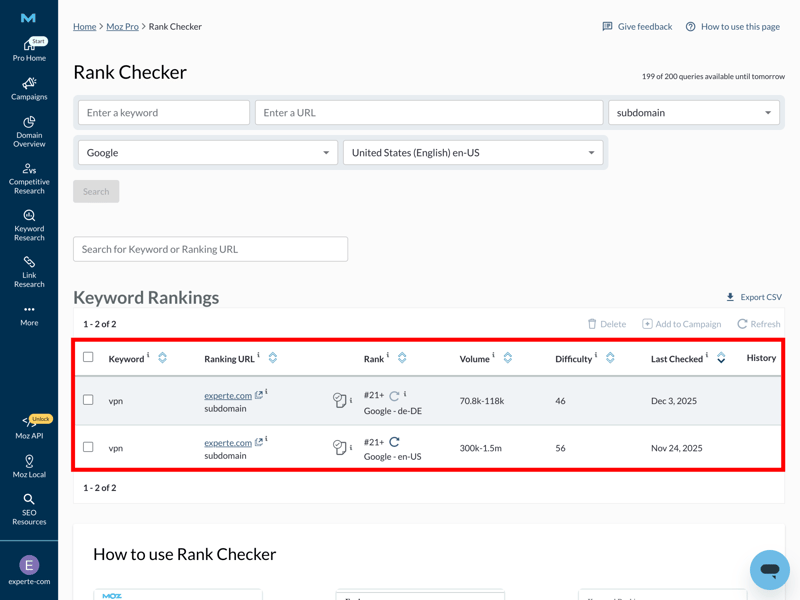
Moz Pro displays all completed crawls (two in this case) in the Site Crawls module.
On-page grader: a hidden highlight
The “On-Page Grader” is far more practical. Here, Moz Pro analyzes individual pages based on a focus keyword and assigns its own “Page Score.” The specific, easy-to-understand optimization tips are especially helpful. They clearly show which factors could influence your rankings.
Here’s an example for experte.com/vpn with the relevant factors and score:
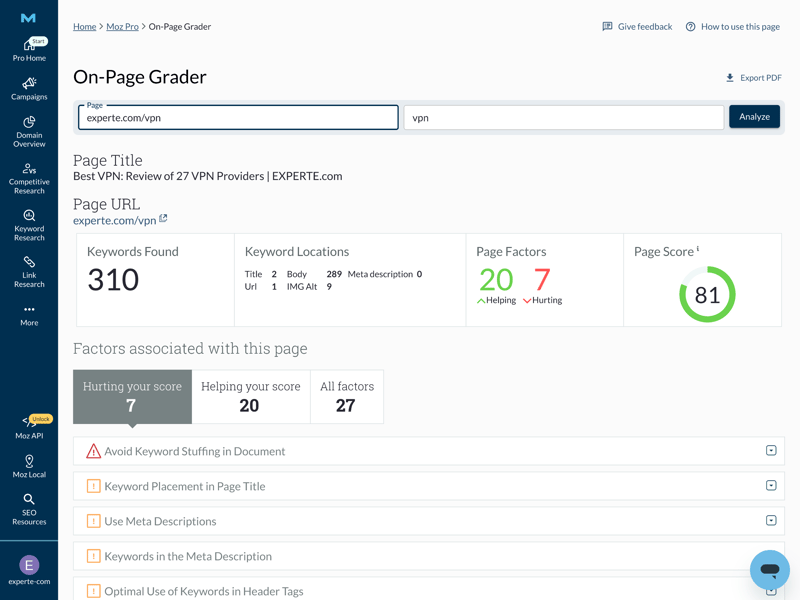
Moz Pro uses red and green color coding to highlight potential issues and strengths.
No AI search, but a reliable site audit
Moz Pro doesn’t offer a true “AI search” feature. However, the Domain Explorer does show whether Google displays AI Overviews for a keyword. This helps you decide if optimization is still worth it—or if Google is already answering the query itself. There’s also AI-powered text generation for marketing purposes.
For technical SEO, the Site Crawl is the most relevant tool. It delivers a structured technical audit with warnings and explanations for errors you can then fix. The crawler also includes backlink insights, including potential issues.
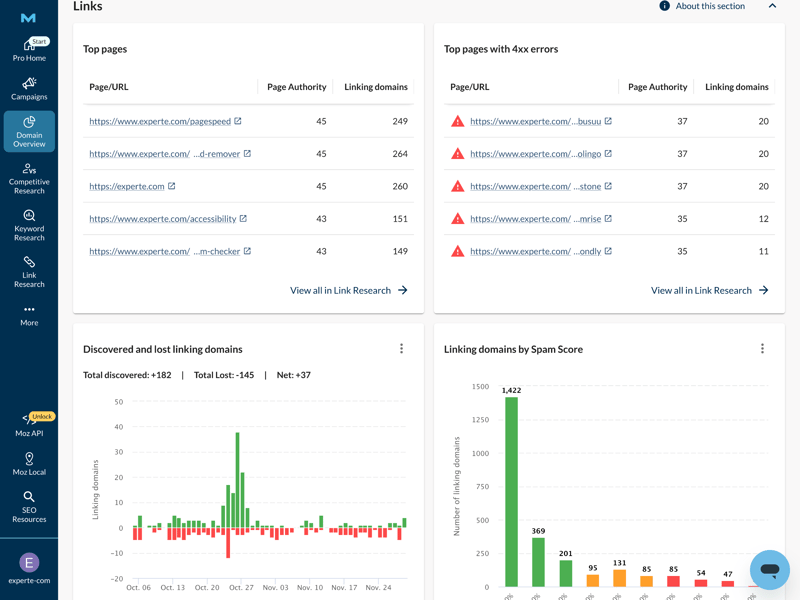
The crawler provides detailed backlink profile information, including problems and warnings.
Good extra features—with a price barrier
When you add a domain as a project, you get personalized optimization tips. This is where Moz Pro finally delivers the context that’s missing in other modules: explanatory text and color-coded labels (red, orange, and blue) show urgency and relevance at a glance.
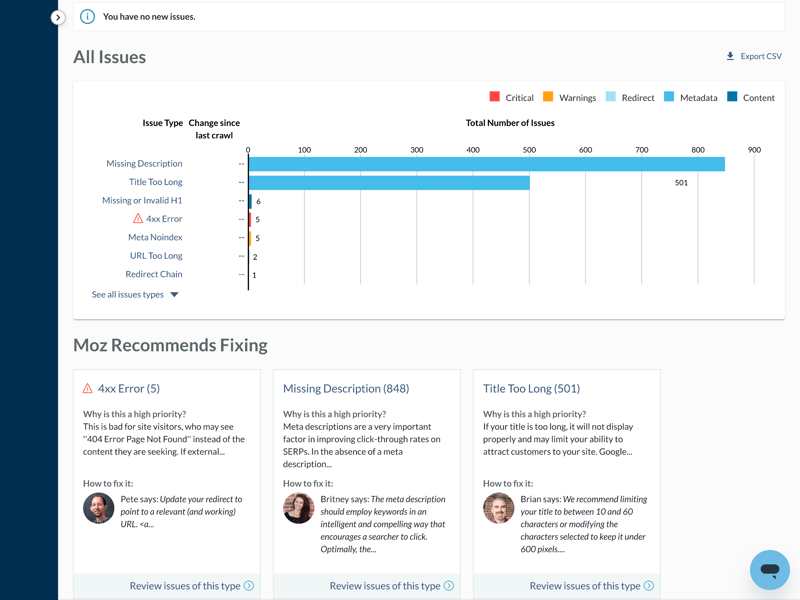
Moz Pro shows how (technical) SEO can work with strong personalization.
There are some limitations when it comes to API access and white-label reports. These are only available in the most expensive plans or as separate add-ons. Features like imports, batch analyses, and local SEO, on the other hand, are always included and work reliably.
On top of that, the MozBar browser extension displays metrics like Domain Authority directly in search results or on websites and allows for basic on-page analysis.
Moz Pro offers plenty of useful features beyond the SEO basics. The technical tools (crawler and On-Page Grader) are especially helpful for beginners, since they provide clear, actionable recommendations.
The AI features, however, aren’t worth mentioning yet. It’s also a shame that helpful concepts like color-coded systems or explanatory hints aren’t used consistently across all modules.
Support
| Documentation and tutorials |
| 1.5/3 |
| Support channels | Support is possible via email (ticket system) or livechat; phone support is not available. | 1.5/2 |
| Quality of support |
| 0.5/2 |
| Reviews on review platforms |
| 2/3 |
Moz Pro’s support and learning resources leave a mixed impression overall. On one hand, there’s a wealth of educational content. On the other, the support experience didn’t always deliver during our testing.
Extensive learning resources—but only in English
The Moz Academy offers a wide range of learning materials with solid depth. Content is organized by skill level, topic, and format, covering everything from basics to advanced SEO strategies. However, all materials are only available in English.
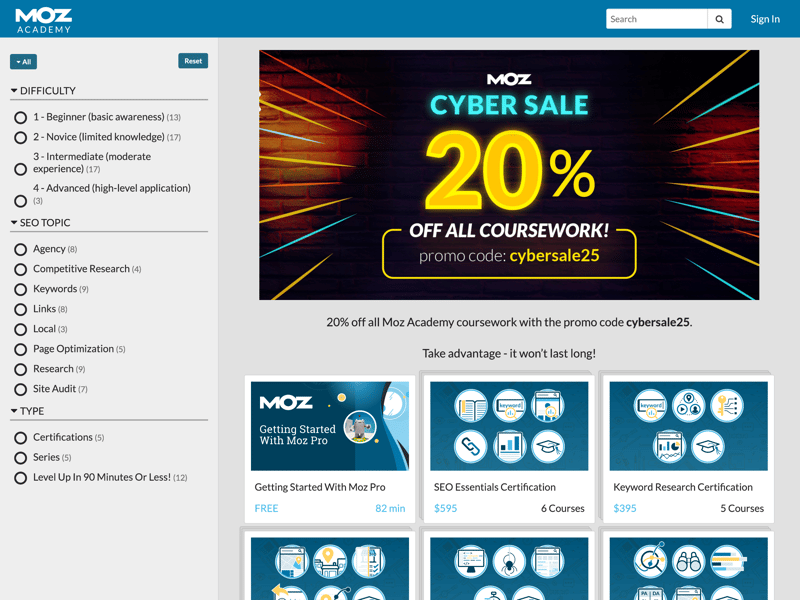
The Moz Academy offers plenty of learning content, sorted by level, topic, and type.
Another issue: the learning resources are spread across multiple sections—Academy, webinars, Help Center, Learning Center, and Guides. The distinctions feel partially arbitrary and make navigation confusing. It’s often unclear where to find the right answer.
If you're new to SEO, the famous Beginner’s Guide to SEO is worth a look—even though it takes about four hours to read it from start to finish.
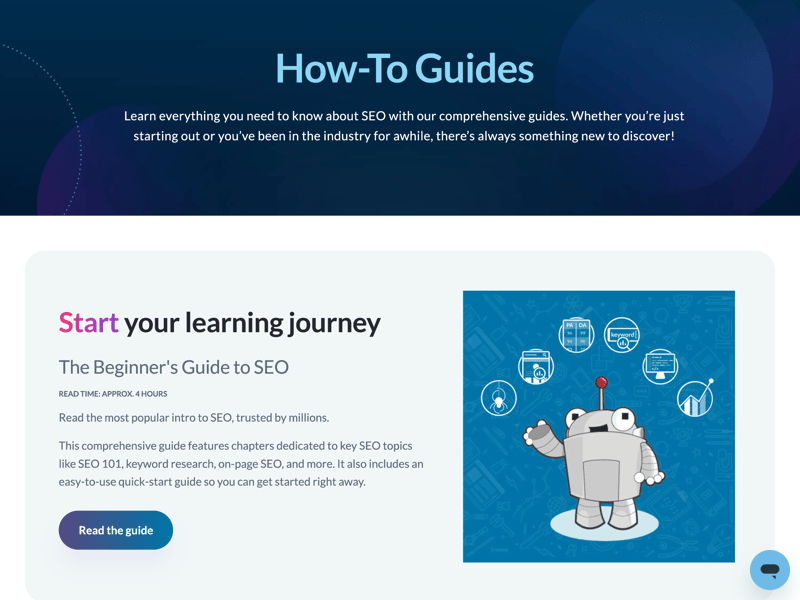
This extensive guide on SEO fundamentals is just one of Moz’s many learning resources.
Livechat and e-mail support in practice
You can access the live chat anytime from the bottom corner of the screen. The chatbot wasn’t very helpful and tried to hand us off to a human fairly quickly.
Once we were connected to a real person, we ran into conflicting and unclear answers. We experienced disconnections, were asked to wait, and then the chat went offline before our issue was resolved.
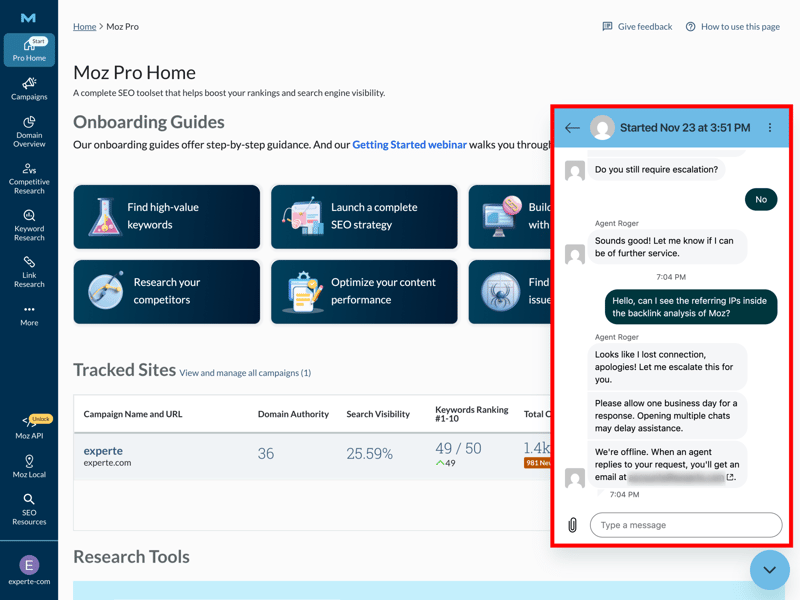
In our hands-on test, the live chat support was disappointing.
Email support, on the other hand, was more reliable. We received a competent response in about six hours—on a weekend. Overall, email support feels slower but much more dependable than live chat, which responds faster but isn’t stable yet. In both cases, English is a must—there’s no German-language support.
A look at external reviews paints a mostly positive picture of the learning resources. Many users appreciate Moz as a knowledge platform with deep SEO expertise and make heavy use of the guides, forum, and documentation.
Moz's static learning resources are excellent—if you’re comfortable with English and willing to invest time in learning. Direct support was decent overall and gets fairly good ratings on review platforms. That said, unstable live chats and inconsistent answers left us with a somewhat mixed impression.
Pricing
| Trial version |
| 2/2 |
| Starter plan | $143.25 | 1/2 |
| Advanced plan | $239.00 | 1/2 |
| Team plan | $235.00 | 1/2 |
| Rank tracking | $143.25 | 1/2 |
Moz Pro sits in the mid-range when it comes to pricing. There are four plans, mainly differing in the number of users, keyword limits, and crawl volume.
Here’s an overview of Moz Pro’s plans:
| Starter | Standard | Medium | |
|---|---|---|---|
| Monthly price | from $39.00 | from $79.00 | from $143.25 |
| Contract period (months) | 1 - 12 | 1 - 12 | 1 - 12 |
| General limits | |||
| Users included | 1 | 1 | 2 |
| Maximum user | unlimited | unlimited | unlimited |
| Reports per day | 2 | 5 | 167 |
| Results per report | 5,000 | 10,000 | 30,000 |
| Historical data | - | - | - |
| Site audit | |||
| Projects | 1 | 3 | 10 |
| Crawled pages | 5,000 | 100,000 | 500,000 |
| JavaScript Rendering | ✗ | ✗ | ✗ |
| Rank tracking | |||
| Keywords | 50 | 300 | 1,500 |
| Frequency | Weekly | Weekly | Weekly |
There’s a free trial that lets you test the features and, more importantly, the data quality for your niche for seven days with no commitment.
Moz Pro price comparison
How does Moz Pro stack up against other SEO platforms in terms of price? To make real-world costs comparable, we looked at four typical usage scenarios:
- 1.
Beginner: 1 user, 100 queries per day
- 2.
Advanced: 1 user, 500 queries per day, min. 50,000 results per query
- 3.
Team: 5 users
- 4.
Rank tracking: 1,000 keywords monitored
Here are the results:
| Beginner | Advanced | Team | Rank tracking | |
|---|---|---|---|---|
| $29.00 | $89.00 | $149.00 | $29.00 |
| $29.00 | $99.00 | $29.83 | $49.00 |
| $37.70 | $52.70 | $145.70 | $97.70 |
| $50.00 | $100.00 | $169.00 | $50.00 |
| $52.00 | $95.20 | $132.00 | $95.20 |
| $117.33 | $416.66 | $297.33 | $208.33 |
| $138.04 | $277.24 | $392.78 | $138.04 |
| $143.25 | $239.00 | $235.00 | $143.25 |
| $208.00 | $374.00 | $448.00 | $208.00 |
In a direct comparison, Moz Pro is the only tool that stays consistently in the mid-price range, without any major outliers on the high or low end.
The plans are primarily aimed at small to mid-sized businesses and in-house teams with a dedicated tool budget. For freelancers, the entry price is often too high compared to modern low-cost alternatives. Large agencies, on the other hand, may find the standard plans lacking in data depth.
Moz Pro’s pricing model is straightforward with no hidden costs. At the same time, you’re clearly paying a premium for the established brand name. If you’re only interested in backlink data, there are cheaper alternatives out there.
For a full-featured SEO suite, competitors often offer more features at the same price. This puts Moz Pro in an awkward spot between specialized niche tools and modern all-in-one solutions.
Final Verdict
Moz Pro feels like a mix between an established industry leader and an aging classic, with all the pros and cons that come with it. The platform still impresses with its well-known metrics like Domain Authority, a good backlink database, and reliable technical SEO tools, especially the crawler and On-Page Grader.
But cracks are showing in several areas: the keyword database is relatively small, URL traffic estimates are completely missing, and the strong focus on English-speaking markets limits its usefulness in the DACH region. Some modern features that competitors now offer are either absent or feel like surface-level additions.
As a result, Moz Pro is best suited today for US-focused businesses that value a stable technical foundation. It serves as a reliable link for metrics but don’t rely heavily on detailed traffic analysis or an easy entry point into SEO. For international users, especially outside the U.S., there are often better alternatives.

Moz Pro User Reviews
What do users think of Moz Pro? We looked at review platforms like G2 and Capterra and gathered the most common feedback:
Established Metrics
Many users appreciate Domain Authority (DA) and Page Authority (PA) as quick reference points for evaluating websites.Clear Audits
The community praises the clarity of the technical analyses. The tool doesn’t just list errors—it often provides easy-to-understand explanations as well.Helpful Browser Extension
The MozBar browser extension is considered a major plus, letting you pull up key SEO data directly while browsing any page.
Data Not Always Up to Date
A recurring complaint is data freshness. Users report that the keyword and link index sometimes lags competitors like Ahrefs or Semrush.Disappointing Value for Money
Several reviews find the price too high relative to the feature set, especially compared to more modern all-in-one tools.Limited Internationalization
Users outside English-speaking countries regularly point out the absence of a localized interface or multilingual support.
Alternatives to Moz Pro
Moz Pro isn’t the right SEO tool for you? Looking for something more modern, affordable, or comprehensive? Here are the best alternatives to Moz Pro:
Sistrix
Sistrix is the gold standard in Germany, much like Moz Pro is in the U.S. Its Visibility Index is often more relevant for German projects than Domain Authority.SpyFu
SpyFu also offers a strong database for the U.S. and UK, especially for competitor and keyword analysis, and it’s significantly cheaper than Moz Pro.Mangools
Mangools is designed for users who want a simple, modern interface. Overall, it feels more up-to-date and approachable than Moz Pro.
You can find a selection of the best alternatives to Moz Pro here: