DreamHost WordPress Hosting Review 2026: How Good Is This Provider, Really?


WordPress makes it easy to get started. But if you host your site yourself, you have to handle updates, security, and performance—all of which take time and technical know-how. That’s where DreamHost’s managed WordPress offering, DreamPress, comes in.
In this review, we put the service to the test to see how easy it is to set up a site, how fast it runs on DreamHost, what features are included, and where you still need to step in despite managed hosting.


DreamHost *is one of the old guard in web hosting. The company started in 1997 as New Dream Network, founded by four students at Harvey Mudd College in California.
Today, the company hosts over 1.5 million websites. Its services target website owners, small businesses, and developers. The portfolio is broad: domain registration, web hosting, VPS, and dedicated servers. DreamHost also offers email hosting and AI-powered website services.
For WordPress, DreamHost offers its own managed hosting plans under the name DreamPress. According to the company, customers benefit from easy setup, a WordPress-optimized environment, 24/7 support, and a 100% uptime guarantee. We tested how well these promises hold up in real-world use.
DreamHost Hosting Review: DreamPress Put to the Test
Easy to use
DreamHost makes getting started simple. WordPress comes pre-installed, and you can set up additional sites quickly using a straightforward setup wizard. The control panel is clean and easy to navigate.Strong security package
The host protects your website with SSL, a firewall, automatic WordPress updates, and daily backups. DDoS protection is also included.Full plugin freedom
DreamHost doesn’t block any WordPress plugins. You’re free to install any extensions you want.
Support isn’t always reliable
Email support is fast and helpful, but other channels disappointed us in testing. The live chat didn’t work, the callback service never called back, and the AI chatbot gave inaccurate answers.Expensive for multiple websites
Even for a single website, DreamPress isn’t cheap. If you run multiple sites, the costs add up quickly, and renewal prices increase significantly after the initial promotional term.
Setup & Ease of Use
| Installation & setup |
| 3/3 |
| Migration |
| 2/2 |
| Control Panel |
| 8/10 |
Ordering a managed WordPress plan from DreamHost is straightforward. You simply choose one of the three DreamPress tiers and decide whether to register a new domain or use an existing one.
However, be prepared for a delay before you can start. DreamHost manually reviews every new account, a process that can officially take up to 24 hours. In our testing, approval took roughly 22 hours—meaning you will have to wait nearly a full day before accessing your hosting panel to begin setup.
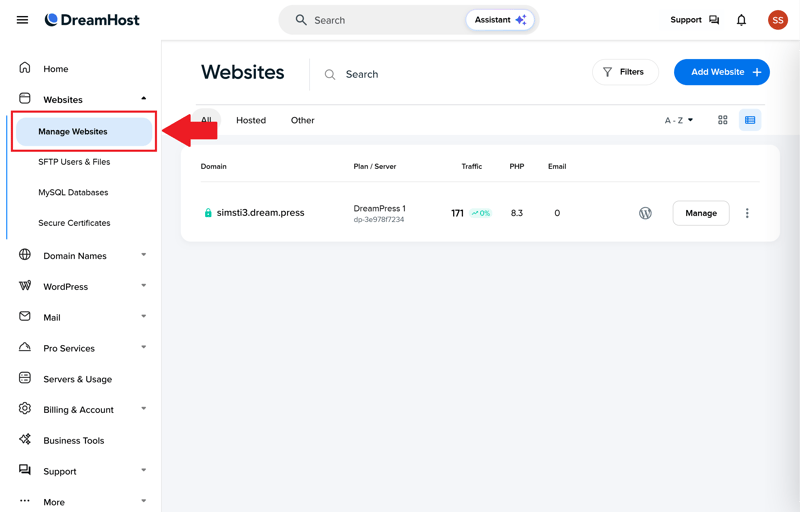
Once approved, you’ll have access to your pre-configured WordPress package.
The good news? There’s not much left to set up. DreamHost’s DreamPress plans come with WordPress pre-installed out of the box.
However, DreamHost uses that initial installation to pre-load no fewer than eight WordPress plugins, including heavyweights like OptinMonster and All in One SEO. Fortunately, you can easily remove any plugins you don't need.
Smart WordPress setup with AI option
If you want to install WordPress again later or add another instance, you can do so at any time (depending on your plan limits). In the Websites section of the control panel, simply click "Add Website".
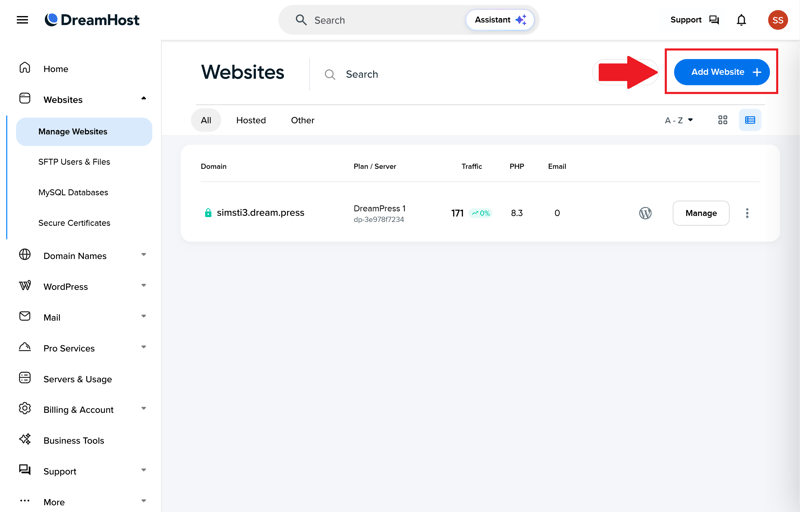
Adding a new WordPress site is quick and easy.
First, pick the domain or subdomain where your site will live. If you haven’t settled on a domain yet, you can use a temporary DreamHost subdomain instead.
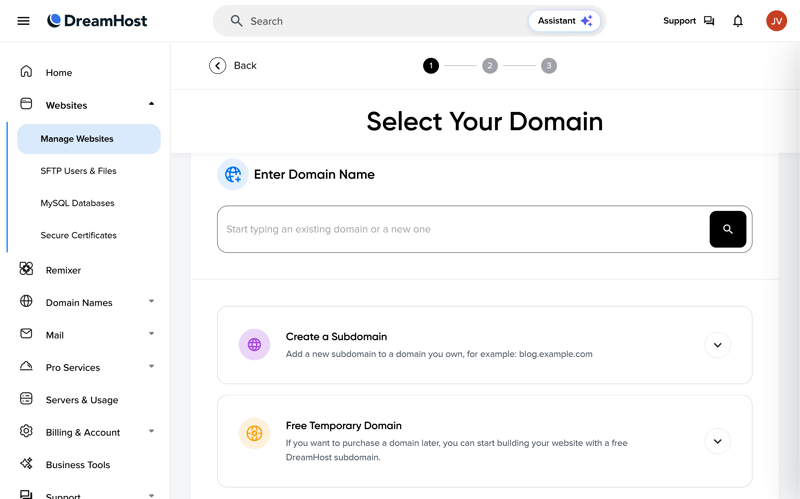
Pick your domain or subdomain.
Next, set a few basic technical details. Choose the directory for your site and the PHP version you want to use.
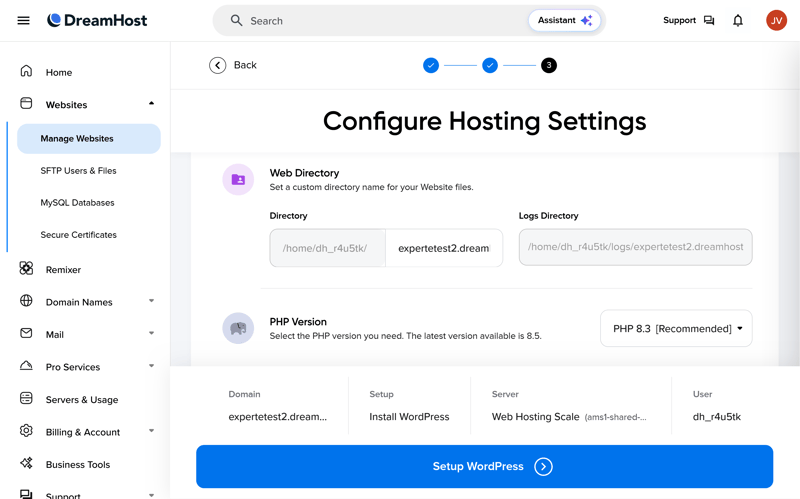
Select your directory and PHP version.
DreamHost then asks how you’d like to set up your site. You can install WordPress, use migration tools, or choose other hosting options. Pick WordPress for a fresh installation.
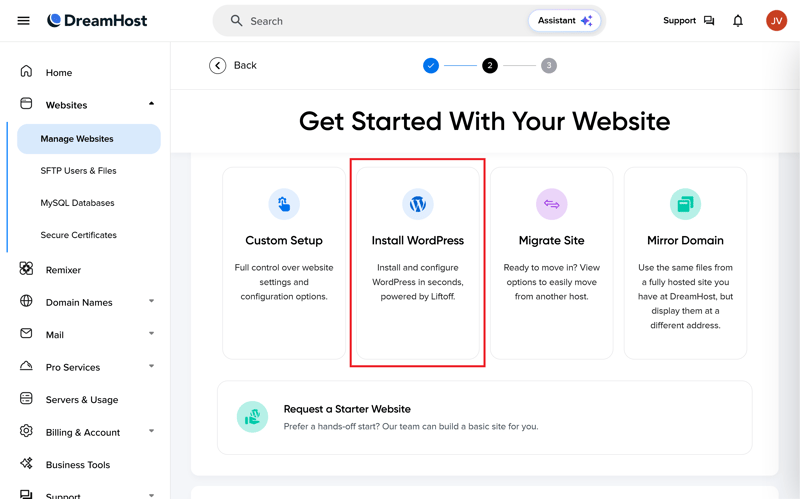
For a new installation, select "Install WordPress."
Now, choose between a standard WordPress setup or DreamHost’s AI-powered website builder, LiftOff. LiftOff is a viable option if you want a ready-to-use site fast.
If you go with the AI builder, describe the type of site you want in plain language. DreamHost automatically generates a structure with pages and sample content.
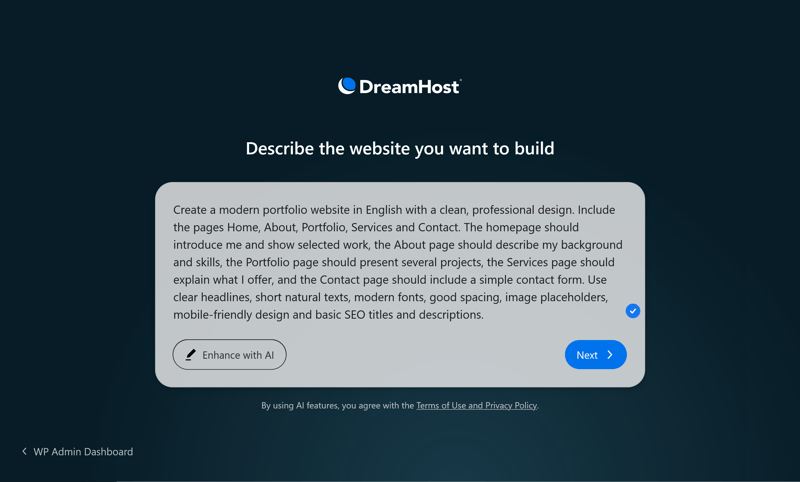
Describe your website in plain language.
In our test, this worked exactly as promised: quick and hassle-free. The AI handles even longer descriptions with ease, generating a usable website in just a few minutes. For simple projects, it really does save time. However, if you need a truly custom design or specific features, you will still need to tweak the results afterward (or hire someone to do it for you).
You can refine the AI-generated website with more prompts.

Here’s what an automatically generated website looks like.
If you’d rather stay in control, the standard WordPress installation is ready to go. DreamHost still asks about your website’s purpose, though. Pick “None” for a completely blank slate with no preset direction.
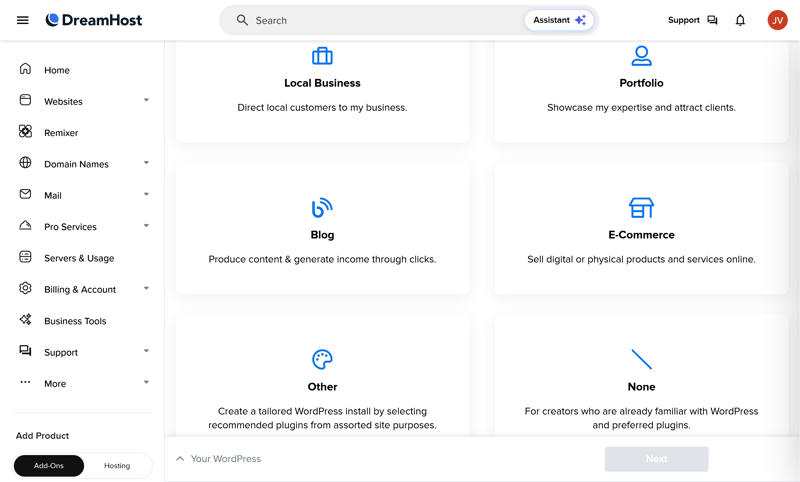
Choose your website’s purpose for tailored recommendations
Unlike the AI website builder, DreamHost doesn’t pre-install a fixed design or demo content. Instead, the setup assistant uses your initial preferences to select relevant plugins and configure basic settings.
Regardless of the options you choose, you’ll land in your new WordPress dashboard within seconds. DreamHost keeps the WordPress interface clean and untouched, without layering on extra management tools or forcing proprietary custom plugins onto your site.
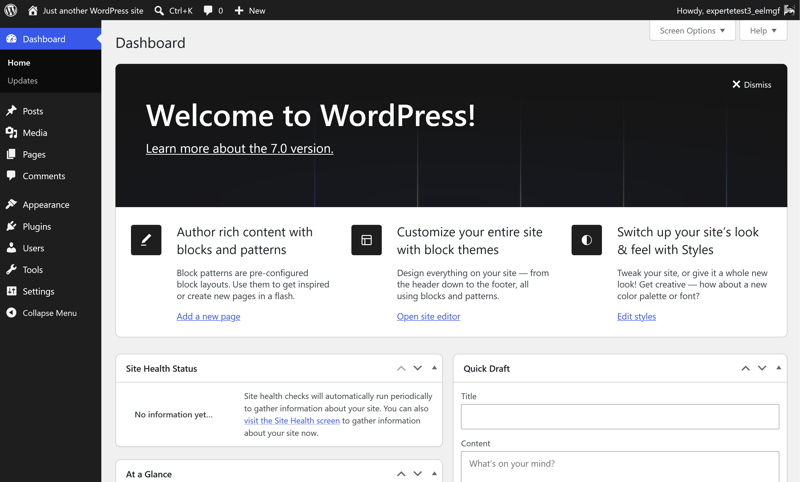
After installation, you get a standard WordPress dashboard.
Clean control panel
DreamHost uses a custom control panel rather than third-party dashboards like cPanel or Plesk. Websites, domains, databases, email accounts, and billing are all managed from a single, centralized location.
The main dashboard provides a clear overview of your active sites and account alerts, while the intuitive navigation menu makes essential tools easy to locate. Overall, the interface is modern, well-structured, and easy to navigate from day one.

DreamHost control panel homepage.
One aspect we don’t love is the heavy self-promotion inside the control panel. Right on the homepage, DreamHost aggressively promotes its other products and services, with upsells appearing directly in the main navigation. While these ads don't hinder daily management, they can feel intrusive over time.
Each website receives its own dedicated dashboard displaying details on your hosting plan, storage usage, WordPress installation, and core settings.
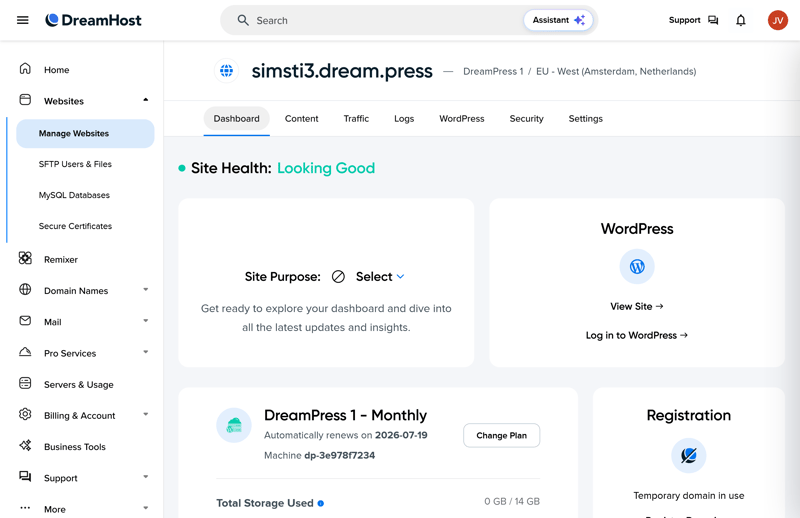
Website dashboard with management features.
Customization options are quite limited. You can pin additional websites to your homepage, but options beyond that are sparse—there is no dark mode support, for instance.
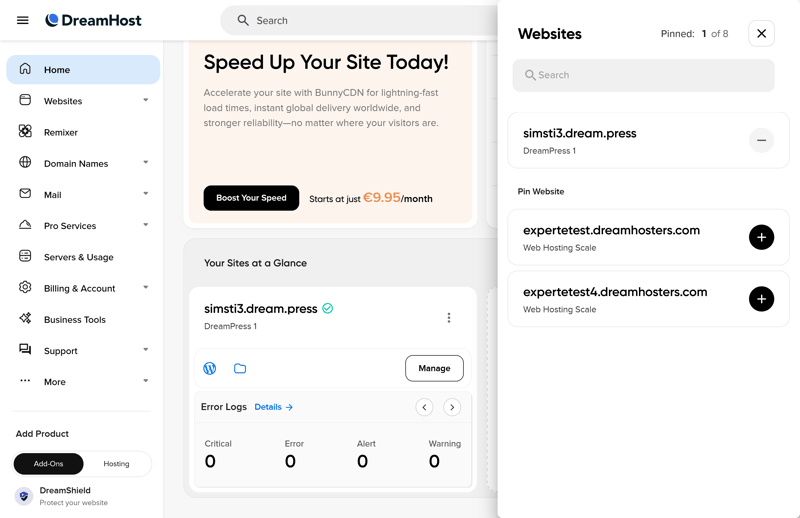
Pin additional websites to your dashboard if needed.
Moving your website to DreamHost: automatically, manually, or with expert help
If you are unhappy with your current host or want to transfer an existing WordPress site to DreamHost, you won't need to build from scratch. DreamHost provides a dedicated migration plugin that automates most of the process.
We tested this by migrating a full WordPress site—complete with active plugins, themes, and content—to a new DreamHost environment, and the transfer completed smoothly without issues.
You initiate the transfer directly from the control panel via the "Add Website" menu by choosing "Migrate Site" instead of creating a fresh WordPress installation.
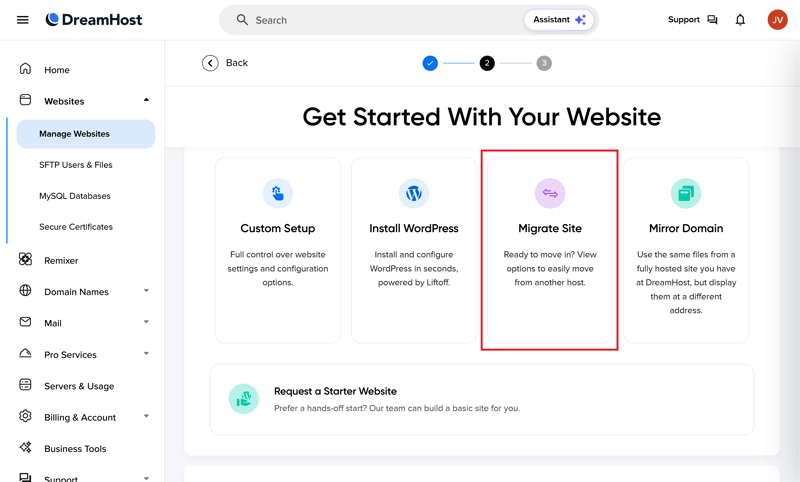
Start your website move with the migration option.
DreamHost offers a few ways to migrate your site. The easiest is the free, automated plugin migration. You can also pay for expert help or handle it manually if you're comfortable with the technical side.
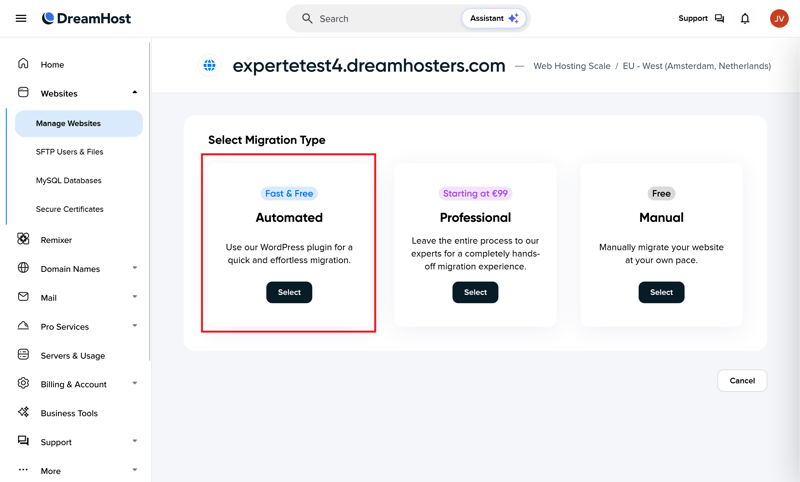
The automatic plugin migration is the simplest option.
First, DreamHost sets up a fresh WordPress installation on your new hosting space. You can even add extra plugins during this step if you'd like.
Next, the system generates a unique migration key for you. This key links your old site to your new WordPress installation on DreamHost.
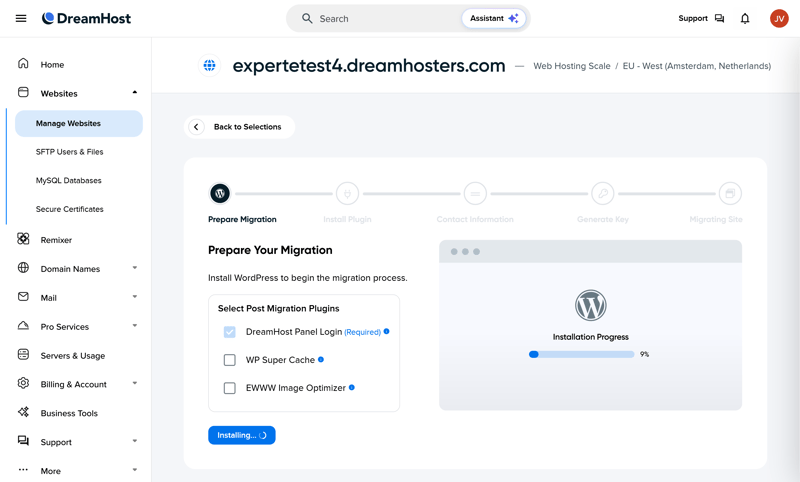
DreamHost prepares the new site and creates your migration key.
Now, install the DreamHost migration plugin on your current site. DreamHost provides this plugin in partnership with BlogVault. Enter the migration key you got earlier.
That’s all you need to do. The transfer starts automatically, moving your files, database, themes, and plugins to your new DreamHost setup.
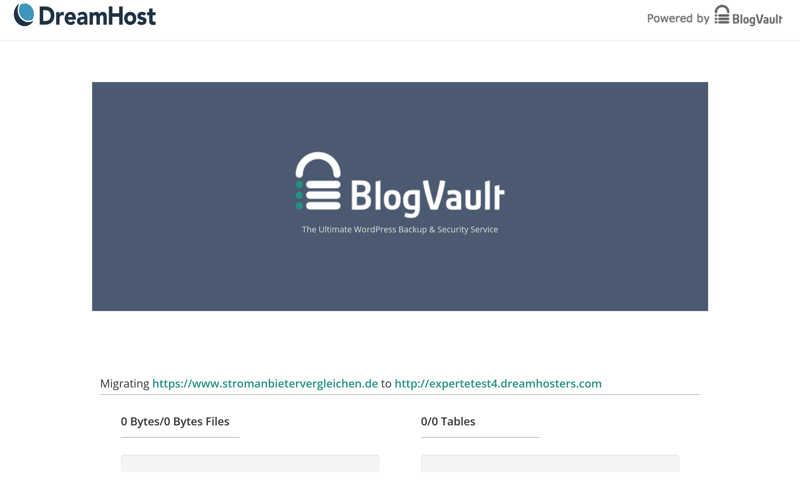
BlogVault handles the actual data transfer for you.
The migration didn’t go smoothly right away. The first attempt failed because BlogVault wouldn’t accept the migration key generated by DreamPress. However, after restarting the process and generating a fresh key, the transfer kicked off as intended.
From there, everything worked seamlessly. The migration completed in about 20 minutes with all content, plugins, and themes fully intact—requiring zero manual cleanup. Despite the initial hiccup, DreamHost's automated migration tool left a solid impression overall.

DreamHost excels in setup and usability. The platform features a clean, intuitive layout that enables even beginners to get up and running quickly. Both new WordPress installations and automated site migrations are straightforward and reliable.
Our main gripe is the aggressive upselling within the control panel, which contrasts with the otherwise sleek interface. Still, the pros far outweigh the cons: DreamHost streamlines site management and stays out of your way where it matters most.
Technology & Features
| Server stack & protocols |
| 1.5/2 |
| PHP |
| 7.5/8 |
| Caching & CDN |
| 4.5/5 |
| Features |
| 4/5 |
A host’s technical setup doesn’t single-handedly determine your website’s speed, but it does reveal the underlying power at your disposal, which technologies and standards are supported.
Fast NGINX web server
DreamHost relies on the NGINX web server to handle incoming requests and deliver your site’s content. NGINX is well known for its speed, low memory overhead, and ability to handle high-traffic environments efficiently.
 DreamHost |  Bluehost |  Cloudways |  GoDaddy |  Hostinger |  IONOS |  Kinsta |  SiteGround |  WordPress.com |  WP Engine | |
|---|---|---|---|---|---|---|---|---|---|---|
Server locations | 3 countries | 9 countries | 8 countries | 3 countries | 11 countries | 2 countries | 21 countries | 7 countries | 19 countries | 12 countries |
Web server | NGINX | Apache | NGINX | NGINX | LiteSpeed | Apache | NGINX | NGINX | NGINX | NGINX |
Control Panel | Custom | cPanel | Custom | Custom | Custom | Custom | Custom | Custom | Custom | Custom |
Database | MySQL | MySQL | MariaDB | MySQL | MariaDB | MariaDB | MariaDB | MySQL | MariaDB | MySQL |
Storage type | NVMe | NVMe | SSD | NVMe | NVMe | NVMe | SSD | SSD | SSD | SSD |
| Protocols | ||||||||||
HTTP/2 | ✓ | ✓ | ✓ | ✓ | ✓ | ✓ | ✓ | ✓ | ✓ | ✓ |
HTTP/3 | ✗ | ✗ | ✗ | ✗ | ✓ | ✗ | ✓ | ✗ | ✓ | ✓ |
DreamHost uses modern NVMe SSDs for storage, delivering significantly faster transfer speeds and lower access latencies than standard SSDs. This speed advantage makes a noticeable difference for dynamic and high-traffic websites.
For databases, DreamHost relies on MySQL—the standard choice for WordPress—ensuring full compatibility across all themes and plugins.
Data centers in the U.S
DreamHost operates data centers in the U.S., the Netherlands, and Singapore.
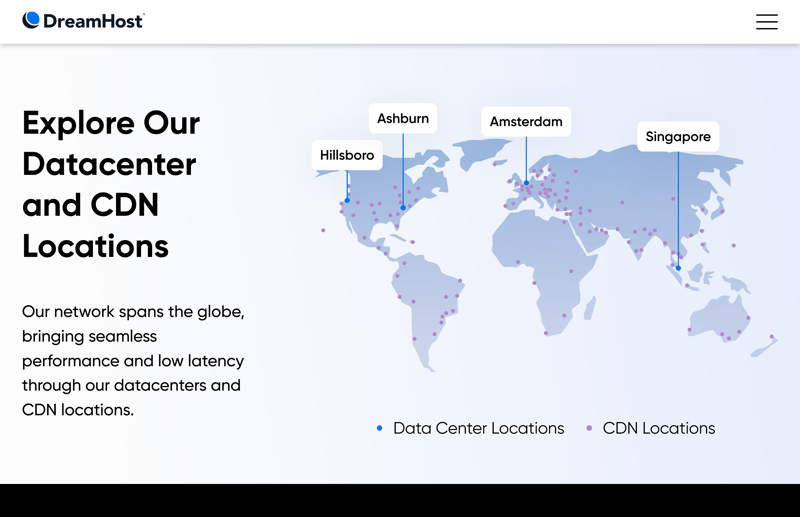
DreamHost operates data centers in three countries.
DreamHost enables HTTP/2 by default to optimize data transfers between browsers and servers, but it currently lacks HTTP/3 support. While not a dealbreaker, HTTP/3 can improve loading performance on mobile or unstable connections, and we would expect a modern managed WordPress host to include it.
Flexible PHP settings
PHP configuration is one of the most critical technical factors in WordPress hosting, dictating plugin compatibility, maximum file upload sizes, and overall memory allocation.
DreamHost provides complete self-service control over these parameters. You can select your PHP version and adjust key variables directly within the control panel without modifying configuration files or contacting support.
DreamHost | Bluehost | Cloudways | GoDaddy | Hostinger | IONOS | Kinsta | SiteGround | WordPress.com | WP Engine | |
|---|---|---|---|---|---|---|---|---|---|---|
PHP version configurable | ✓ | ✓ | ✓ | ✓ | ✓ | ✓ | ✓ | ✓ | ✓ | ✓ |
PHP settings configurable | ✓ | ✓ | ✓ | ✗ | ✓ | ✗ | ✗ | ✓ | ✗ | ✗ |
Max PHP version | 8.5 | 8.5 | 8.4 | 8.3 | 8.5 | 8.4 | 8.5 | 8.5 | 8.4 | 8.4 |
Max memory limit | 768 MB | unlimited | unlimited | 512 MB | 3072 MB | 512 MB | 512 MB | 768 MB | 512 MB | 512 MB |
Max execution time | unlimited | unlimited | unlimited | 180s | unlimited | 360s | 300s | 120s | 850s | 43300s |
Max upload size | 1028 MB | unlimited | unlimited | 1024 MB | 3072 MB | 128 MB | 128 MB | 256 MB | 2048 MB | 50 MB |
At the time of our review, supported releases ranged from PHP 8.1 through PHP 8.5, configurable on a per-website basis. This ensures you can run the latest PHP releases while maintaining backward compatibility for legacy themes or plugins.
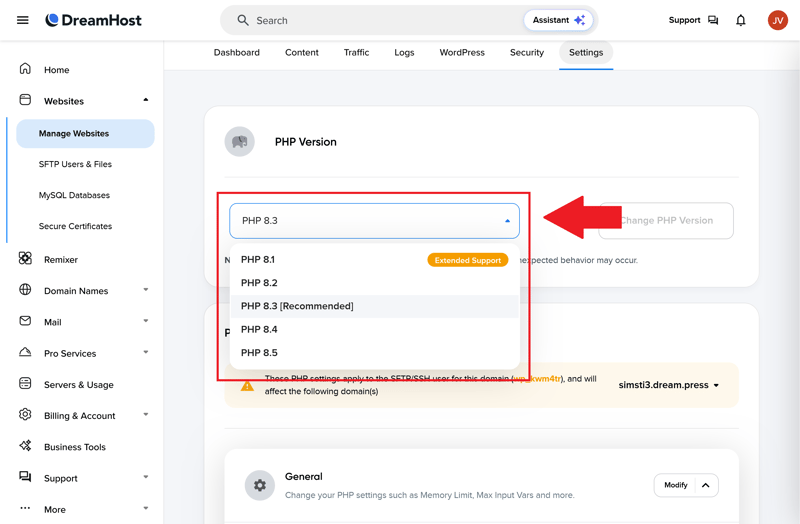
You can change the PHP version in the control panel.
DreamHost also enforces generous resource limits by default: up to 768 MB of memory, a maximum upload size of 1,024 MB, and unlimited execution time.
You can easily adjust these thresholds in the panel, giving advanced developers maximum flexibility while keeping the setup straightforward for beginners.
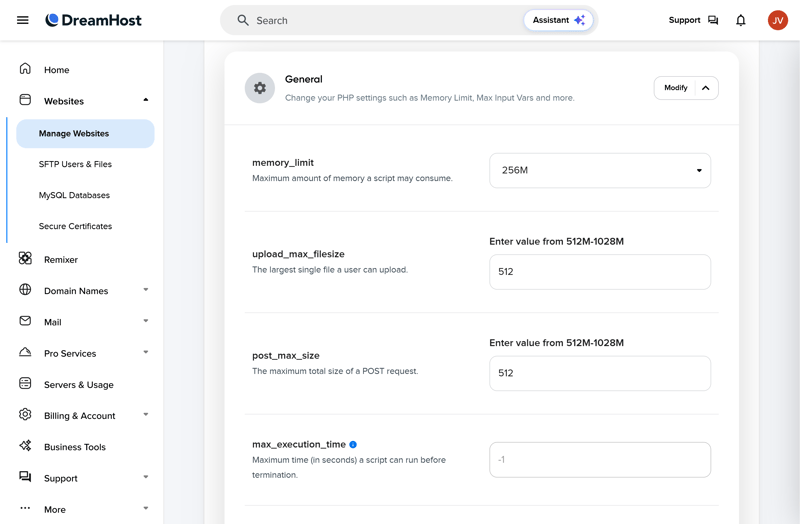
You can customize key PHP settings yourself.
Lots of performance features, but limited customization
Caching is one of the most important performance features for WordPress hosting. It stores frequently accessed content so pages load faster and the server has less work to do. Many hosts also use object caching or a content delivery network (CDN) to deliver data even quicker.
DreamHost checks all three boxes: server-side caching, object caching, and a CDN are included out of the box with DreamPress. However, because the setup is almost entirely automated, you get far fewer customization options than with key competitors.
DreamHost | Bluehost | Cloudways | GoDaddy | Hostinger | IONOS | Kinsta | SiteGround | WordPress.com | WP Engine | |
|---|---|---|---|---|---|---|---|---|---|---|
Server side caching | ✓ | ✓ | ✓ | ✓ | ✓ | ✓ | ✓ | ✓ | ✓ | ✓ |
Object Caching | ✓ | ✓ | ✓ | ✓ | ✓ | ✗ | ✗ | ✓ | ✓ | ✓ |
CDN | ✓ | ✓ | ✗ | ✓ | ✓ | ✗ | ✓ | ✓ | ✓ | ✓ |
Cache exclusions | ✗ | ✓ | ✓ | ✗ | ✓ | ✗ | ✓ | ✓ | ✗ | ✓ |
Automatic cache purge | ✓ | ✓ | ✓ | ✓ | ✓ | ✓ | ✓ | ✓ | ✓ | ✓ |
Inside the WordPress dashboard, you’ll find a dedicated page for NGINX caching. From there, you can clear the cache manually or tweak a few basic settings. But if you need advanced configuration rules or custom caching parameters, the built-in interface falls short.
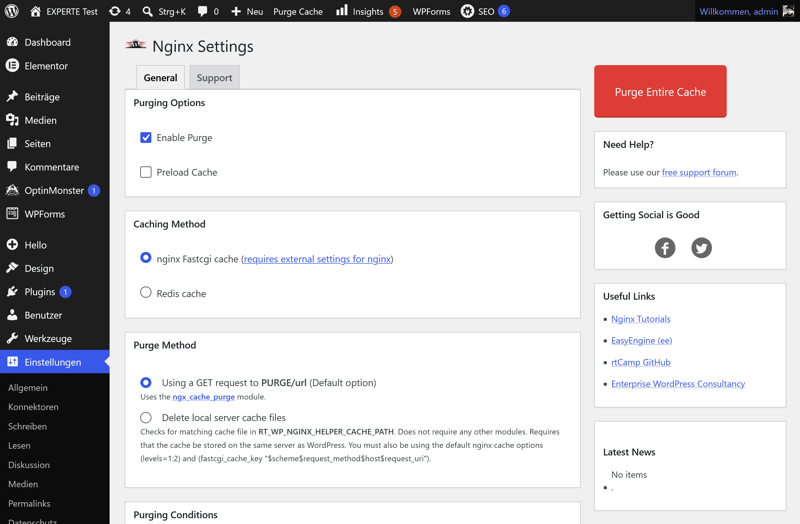
Caching options are limited.
The integrated CDN follows the same plug-and-play approach. DreamHost partners with Bunny CDN, embedding the service directly into its hosting environment. While setting it up requires minimal effort, configuration options remain limited for users seeking granular control.
That’s the theory, but how does it work in practice? For details on how these features affect DreamHost’s performance, check out the Performance section.
Other DreamHost features
DreamHost packs in a lot of features, and we can’t cover every single one. Here are some standout options we haven’t mentioned yet:
Staging environments: Set up a staging site in the WordPress dashboard to test changes before going live.
Clone a website: Need to launch a new WordPress project fast? Use the clone feature to copy an existing site (if your plan allows it).
Email accounts: DreamPress plans include unlimited email accounts.
SFTP, SSH, cron jobs, and WP-CLI: Securely access your site’s data with SFTP and SSH. DreamHost also supports WP-CLI, the WordPress command-line tool, as well as cron jobs.
Statistics: The Traffic section gives you key stats on visitors, bandwidth, and site usage.
No multisite projects: DreamHost’s managed plans don’t support WordPress Multisite. If you need to manage multiple sites under one WordPress installation, the support team recommends using a VPS instead.
Full plugin access: DreamHost doesn’t block any plugins. You can install any WordPress extension you want. Keep in mind, though, that the company warns resource-heavy plugins may slow down your site.
DreamHost delivers a solid technical infrastructure packed with modern tools. Many features that competing hosting providers charge extra for—or lock behind premium, higher-tier plans—come standard with DreamPress.
The primary trade-off is flexibility. DreamHost automates key technical decisions behind the scenes, leaving you with somewhat restricted configuration options. However, that limitation doesn’t diminish the overall takeaway: its underlying technical setup remains one of DreamHost’s greatest strengths.
Security
| Free SSL | Yes | 2/2 |
| Server protection |
| 3/4 |
| WordPress updates |
| 2/2 |
| Backups |
| 2/2 |
Security is one area where managed WordPress hosts vary significantly, making it essential to look closely at what DreamHost includes—and what it holds back.
SSL, firewall, and DDoS protection included in every plan
SSL certificates from Let’s Encrypt come with every plan, including both DreamHost subdomains and external domains. You don’t have to set them up or renew them: it’s all automatic.
Every DreamPress plan also includes a web application firewall and DDoS protection. The firewall blocks malicious requests before they reach your website, and DDoS protection helps keep large-scale attacks from taking your site offline. No configuration needed: DreamHost handles everything behind the scenes.
Extra security with DreamShield
Every DreamPress plan includes a free DreamShield scan. This malware scan checks your website for malicious software once a month. It’s better than nothing, but it won’t be enough for most users.
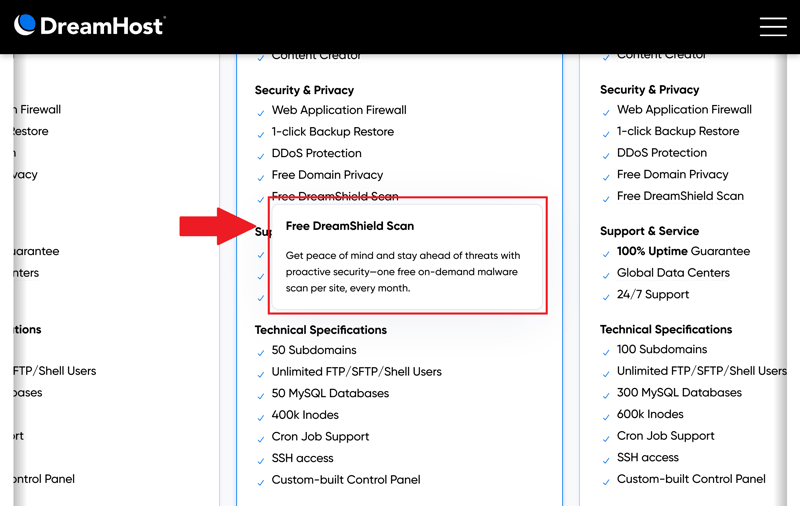
One malware scan per month is included.
This is the biggest gap in DreamHost’s security setup. Many key security features aren’t included by default; they’re sold as part of the DreamShield add-on instead.
With DreamShield, you get daily malware scans rather than just one per month. The service also monitors SSL certificates, logs security events, and alerts you to potential issues via email and inside the Control Panel.
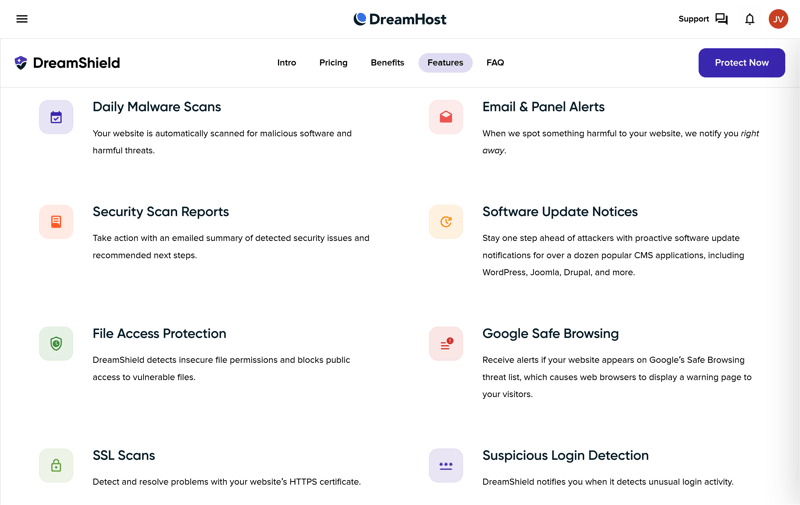
DreamShield offers strong protection, but it’s not free.
DreamShield also flags suspicious logins, insecure file permissions, and outdated software. These alerts help you catch security issues early, before they turn into bigger problems.
Automatic, permanent, and manual Backups
A single faulty plugin update or an accidentally deleted page can take down a WordPress website. That’s why reliable backups and easy recovery matter so much.
DreamHost automatically creates daily backups on all plans and keeps them for 14 days. In our testing, we found a restore point for each of the past two weeks. Restoring a backup takes just a few clicks.
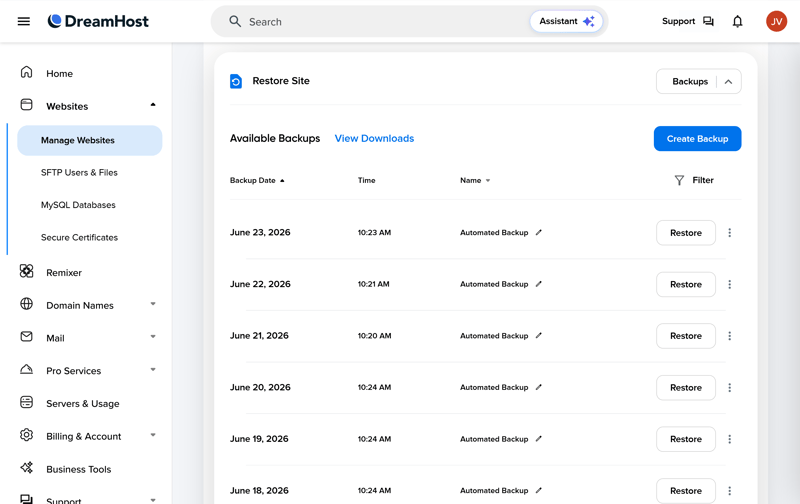
The last 14 automatic backups are ready in the control panel.
DreamHost also supports "locked backups"—up to three save points exempted from the standard 14-day deletion rule. These remain stored permanently until you manually remove them.
Additionally, you can generate up to three manual backups on demand at any time, providing an essential safety net before executing major WordPress updates or site structural changes. The tool is integrated directly into the backup management interface for quick access.
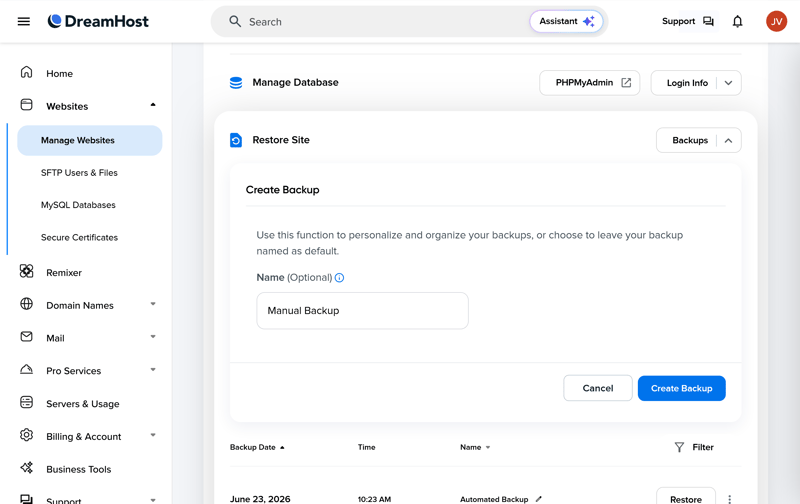
Create a manual backup anytime before making major changes.
There’s one drawback: DreamHost only performs full-system restores. You can’t restore individual files or database tables independently—a level of granular control that several competing managed WordPress hosts provide.
Automatic WordPress Updates
DreamHost automates core WordPress updates, though it deliberately delays major core releases by one to three weeks to ensure stability. The platform handles plugin updates on a similar automated track.
However, you get zero administrative control over this schedule. DreamHost manages the entire process end-to-end, meaning you can’t stage, approve, defer, or roll back updates manually.
DreamHost | Bluehost | Cloudways | GoDaddy | Hostinger | IONOS | Kinsta | SiteGround | WordPress.com | WP Engine | |
|---|---|---|---|---|---|---|---|---|---|---|
Unlimited free SSL certificates (on all plans) | ✓ | ✓ | ✓ | ✗ | ✓ | ✗ | ✓ | ✓ | ✓ | ✓ |
Firewall | ✓ | ✓ | ✓ | ✓ | ✓ | ✓ | ✓ | ✓ | ✓ | ✓ |
DDoS protection | ✓ | ✓ | ✓ | ✓ | ✓ | ✓ | ✓ | ✓ | ✓ | ✓ |
Login protection | ✗ | ✓ | ✓ | ✓ | ✗ | ✗ | ✓ | ✓ | ✓ | ✗ |
Malware scanning | ✓ | ✓ | ✓ | ✓ | ✓ | ✓ | ✓ | ✗ | ✓ | ✓ |
Auto updates WordPress core | ✓ | ✓ | ✗ | ✓ | ✓ | ✓ | ✗ | ✓ | ✓ | ✓ |
Auto updates WordPress plugins/themes | ✓ | ✓ | ✗ | ✓ | ✓ | ✓ | ✗ | ✓ | ✓ | ✗ |
Daily automated backups (on all plans) | ✓ | ✗ | ✓ | ✗ | ✗ | ✓ | ✓ | ✓ | ✗ | ✓ |
Min. 14 day backup retention (on all plans) | ✓ | ✗ | ✓ | ✓ | ✓ | ✗ | ✓ | ✓ | ✗ | ✓ |
If you want to spend as little time as possible managing your site’s security, DreamHost delivers. The platform handles the heavy lifting automatically, keeping routine maintenance to a minimum. The trade-off: you retain virtually no control over the underlying security settings.
It’s also frustrating that key security features are hidden behind a paywall. Monthly malware scans simply aren't enough for a managed WordPress host—it feels more like a box-ticking exercise than a robust security measure.
Still, the foundational protection remains solid. DreamHost reliably shields your website from day-to-day threats right out of the box.
Performance
| Response speed (TTFB) | 0.82 s | 2/10 |
| TTFB outliers | 2.22 % | 0/5 |
| Pagespeed (LCP) | 0.78 s | 4/10 |
| Uptime | 100.00 % | 5/5 |
For our real-world performance test, we ran a live WordPress website on DreamHost for six weeks. We used a standard WordPress setup with the Elementor page builder. Since Elementor is resource-heavy, it’s a good way to see how a hosting plan performs under realistic conditions.
We ran our tests both with and without DreamHost’s built-in optimization features. This let us measure the impact of the performance tools as well as the raw speed of the underlying servers.
For more details on our testing process, check out our comparison of the fastest WordPress hosting providers. Specifically, we tracked these four key metrics:
- 1.
Response speed (TTFB): How quickly does the server respond to the first request for a page?
- 2.
Slow responses (outliers): How much does server speed vary during unusually slow requests?
- 3.
Pagespeed (Largest Contentful Paint): How quickly does the most important visible content appear on the page?
- 4.
Uptime: How reliably is the website available without interruptions?
Server response too slow
We measured how quickly the server responds to requests. This is called Time to First Byte (TTFB), and it tracks how long the server takes to send its first response. DreamHost scored 0.819 seconds, putting it second to last. Its servers respond slower than almost all of its competitors.
For visitors, this translates to a noticeable delay before the page even begins to load. Simply put, DreamHost stands out as one of the slowest hosts in our benchmark suite.
| Response time (TTFB) | |
|---|---|
| 0.186 s |
| 0.23 s |
| 0.232 s |
| 0.264 s |
| 0.266 s |
| 0.271 s |
| 0.305 s |
| 0.387 s |
| 0.631 s |
| 0.819 s |
Frequent response spikes
We also looked at how often the server responds unusually slowly, counting any response that took longer than one second as an outlier. DreamHost had 2.22% of these slow responses, ranking 12th out of 14 providers.
That means more than 2 out of every 100 page loads take over a second just to get the first response. These slow responses aren't rare, and for consistent performance, that's not a great result.
| TTFB outlier | |
|---|---|
| 0.09 % |
| 0.1 % |
| 0.2 % |
| 0.28 % |
| 0.41 % |
| 0.51 % |
| 0.54 % |
| 1.02 % |
| 1.07 % |
| 2.22 % |
Average Pagespeed performance
The Largest Contentful Paint (LCP) measures when a website appears fully loaded to visitors, focusing on when the main content becomes visible. DreamHost scored 0.782 seconds, which puts it in 8th place out of 14 providers.
This speed is right in the middle of the pack. It's not a standout, but it's not bad either.
| Pagespeed (LCP) | |
|---|---|
| 0.46 s |
| 0.519 s |
| 0.573 s |
| 0.612 s |
| 0.683 s |
| 0.683 s |
| 0.782 s |
| 0.792 s |
| 0.949 s |
| 1.282 s |
Uptime at 100%, as promised
Here the picture looks much better: DreamHost delivered 100% uptime in our test, tying for first place with several competitors. The site stayed available at all times, exactly as DreamHost promises.
| Uptime | |
|---|---|
| 100 % |
| 100 % |
| 100 % |
| 100 % |
| 100 % |
| 99.992 % |
| 99.977 % |
| 99.976 % |
| 99.932 % |
| 98.92 % |
Ultimately, DreamHost demonstrates that perfect availability cannot compensate for weak underlying speed. While its network stability is undeniable, its actual server performance falls short of expectations.
Sluggish response times and frequent TTFB spikes are clear red flags. When it comes to pure speed, DreamHost trails much of the competition.
Support
| Documentation |
| 1.5/2 |
| Support channels |
| 1/2 |
| Speed and quality |
| 2/3 |
| Ratings on review platforms |
| 2/3 |
DreamHost offers several support channels: a knowledge base, an AI chatbot, live chat, email ticket requests, and a callback service. Notably, there is no direct inbound phone support.
Comprehensive knowledge base
The knowledge base features an extensive library of English-language articles spanning WordPress, domain management, email, and hosting infrastructure. DreamHost covers technical topics with impressive depth, often surpassing competitors in detail.
However, these guides cater heavily to tech-savvy users. They rely on dense jargon, assume prior technical knowledge, and frequently lack step-by-step screenshots.
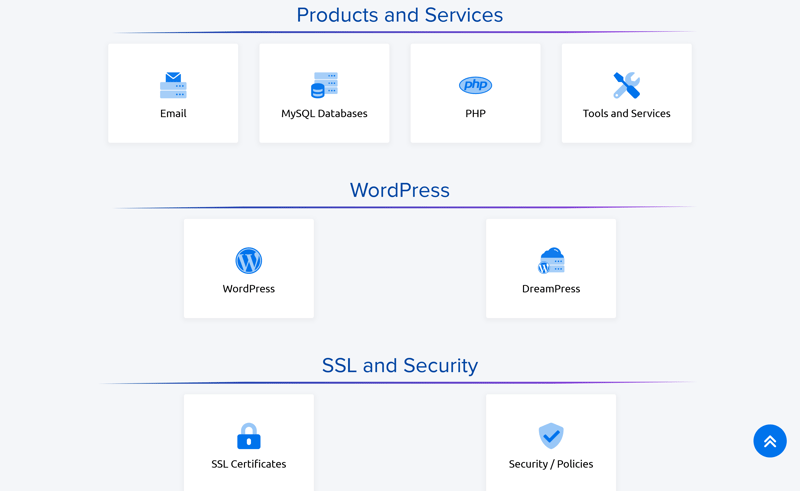
DreamHost’s knowledge base with a dedicated WordPress category
DreamHost also maintains a blog with beginner-friendly guides, though many articles function primarily as promotional pitch pieces for its own services.
Unreliable AI chatbot
The AI chat assistant generally provides relevant answers regarding knowledge base articles and plan specifications, but it isn't entirely dependable—it occasionally hallucinates features or control panel settings that don't exist.
Additionally, clicking the “Talk to an Agent” button fails to initiate a live agent session directly; instead, it routes you to a secondary contact page, adding an unnecessary friction point.
Broken live chat
Throughout our evaluation period, the live chat feature failed entirely. Regardless of the time or day, the module threw persistent load errors that standard troubleshooting steps couldn't resolve.
While DreamHost displays estimated wait times for live chat, the feature is useless if the portal fails to open in the first place.
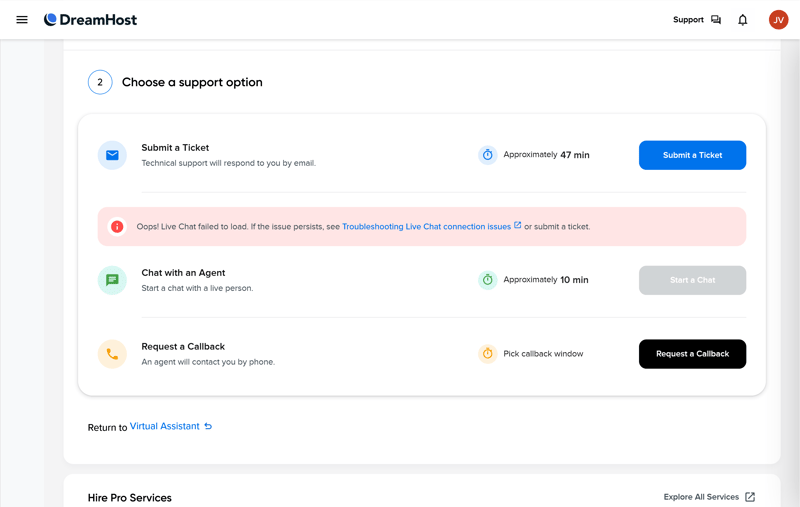
We couldn’t access the live chat during testing.
Fast, high-quality email support
Email ticketing is DreamHost’s primary saving grace. During testing, helpful responses arrived within minutes. Support agents demonstrated solid WordPress expertise, delivering clear, actionable solutions. For reliable help, email is easily the host's best channel.
Non-functional callback service
DreamHost offers phone assistance strictly through an automated callback service for select plans.
In our testing, this feature failed completely. The callback submission button initially froze, and even after successfully queueing a request, we never received a callback.
What do customers say about support?
User reviews on third-party rating platforms frequently praise DreamHost's email team for rapid response times, weekend availability, and articulate WordPress troubleshooting that avoids scripted canned responses.
Conversely, customer dissatisfaction centers on urgent support scenarios. Users report high frustration with the AI chatbot, protracted ticket threads for complex issues, and a callback service that repeatedly fails to follow through.
DreamHost cannot guarantee that every support channel it advertises will function as intended—a significant drawback for a managed host where proactive support is a key part of the value proposition.
While the email support team and knowledge base perform reliably, the remaining channels are marred by broken tech, access barriers, and misleading AI output.
Costs
| 1 project, 10 GB storage | $17.99 | 0/3 |
| 10 projects | $179.90 | 0/3 |
| 50 GB of storage | $24.99 | 0/3 |
| Fair pricing |
| 4/6 |
DreamHost offers three managed WordPress plans. They differ mainly in the number of websites, storage space, and recommended visitor limits. Every plan includes staging, CDN, automatic updates, daily backups, and DDoS protection.
DreamPress 1: The starter plan lets you host one WordPress website with 15 GB of NVMe storage. It’s designed for up to 40,000 visits per month.
DreamPress 2: This plan supports two WordPress websites and 25 GB of NVMe storage. It’s rated for up to 80,000 visits per month. The only added feature over the basic plan is up to three support callbacks per month.
DreamPress 3: The largest standard plan lets you host up to three WordPress websites on 30 GB of NVMe storage. DreamHost says it can handle up to 125,000 visits per month.
Here’s a breakdown of DreamHost’s plans:
| DreamPress 1 | DreamPress 2 | DreamPress 3 | |
|---|---|---|---|
| Monthly price | from $11.99 | from $14.99 | from $16.99 |
| Contract period (months) | 1 - 36 | 1 - 36 | 1 - 36 |
| Included | |||
| WordPress projects | 1 | 2 | 3 |
| Storage | 15 GB | 25 GB | 30 GB |
| Storage type | NVMe | NVMe | NVMe |
| Domains | 1 | 1 | 1 |
| Email accounts | unlimited | unlimited | unlimited |
| Databases | 1 | 2 | 3 |
| Bandwith | unlimited | unlimited | unlimited |
| SSL certificates | unlimited | unlimited | unlimited |
| Backups | |||
| Backup interval | Daily | Daily | Daily |
| Backup retention | 14 days | 14 days | 14 days |
| Manual backups | ✓ | ✓ | ✓ |
| Features | |||
| External domains | ✓ | ✓ | ✓ |
| SSH access | ✓ | ✓ | ✓ |
| CDN | ✓ | ✓ | ✓ |
| Cronjobs | ✓ | ✓ | ✓ |
| Staging environment | ✓ | ✓ | ✓ |
How DreamHost stacks up on price
Comparing managed WordPress hosting prices isn’t straightforward, since plans vary in both features and performance. To make a fair comparison, we looked at the monthly costs for three common scenarios:
1 WordPress site with 10 GB storage
10 WordPress sites
50 GB storage
Here’s how DreamHost’s costs compare to other providers:
| 1 project, 10 GB storage | 10 projects | 50 GB storage | |
|---|---|---|---|
| $3.49 | $4.49 | $4.49 |
| $5.50 | $55.00 | $6.00 |
| $6.49 | $64.90 | $14.47 |
| $6.50 | $65.00 | $20.00 |
| $7.49 | $12.49 | $12.49 |
| $8.49 | $8.49 | $8.49 |
| $17.99 | $179.90 | $24.99 |
| $24.00 | $24.00 | $24.00 |
| $32.08 | $119.17 | $302.50 |
| $41.67 | $187.50 | $283.33 |
DreamHost isn’t a budget option for managed WordPress hosting. Even for single-site setups, its entry-level DreamPress plans fall into the bottom third of our comparison. That higher entry cost might be forgivable if scale delivered better efficiency—but it doesn't.
Instead, DreamHost’s value proposition degrades as your site footprint grows. Managing ten WordPress sites, for instance, costs significantly more here than with many higher-tier competitors that offer far superior bulk value.
Even at the top end, the math remains unfavorable. Provisioning 50 GB of storage requires upgrading to DreamHost’s top-tier Enterprise tier. Including it in our benchmark for completeness only highlights the issue: DreamHost remains one of the priciest options on the market, while several competing hosts deliver identical storage capacity for a fraction of the cost.
The fine print at DreamHost
Always check the fine print before committing to a provider:
Number of WordPress sites depends on the plan
The number of WordPress sites and databases you can create depends entirely on your chosen plan.No hard traffic limits
DreamHost lists a recommended number of monthly visits for each plan, but these aren’t strict limits. They’re just guidelines for what each plan can handle.Higher renewal prices
After your first term, prices go up across all plans. If you pay monthly, the increase kicks in after three months.Free domain for one year
DreamPress plans include a free domain for 12 months, as long as your contract runs for at least a year. After that, you’ll pay for it.Free backup restores
Restoring from backups won’t cost you extra.Monthly contracts available
All DreamPress plans are available on a month-to-month basis.No hidden fees
DreamHost doesn’t tack on extra charges. You pay exactly what the plan costs.Money-back guarantee
You can try DreamHost for up to 30 days and get a full refund if you’re not satisfied.
If you only need hosting for a single WordPress site, DreamPress isn’t the absolute cheapest option, but its pricing remains defensible given the baseline feature set.
However, as your footprint scales, the value proposition quickly collapses. DreamHost levies a heavy premium on additional WordPress installations—making multi-project setups significantly more expensive here than with top-tier competitors.
Final Verdict: Convenience Comes at a Cost
DreamHost shines with a user-friendly interface, a modern infrastructure foundation, and robust automated management. However, it falters in two core pillars of managed WordPress hosting: top-tier performance and consistent support. That trade-off makes it difficult to recommend for mission-critical business applications, even if it remains a viable option for simpler web projects.
For modest WordPress sites or straightforward personal projects, DreamPress offers a reliable, low-maintenance environment—provided you're willing to pay a slight premium for convenience.
However, for resource-intensive applications or multi-site deployments, you'll get far better value elsewhere. Between the steep cost curve for additional installations and the server latency issues, high-performance projects are better served by competing managed hosts.

Customer Reviews
What are customers saying about DreamHost on review sites? We analyzed feedback from multiple platforms to highlight the most common pros and cons:
Great for WordPress users
Customers often choose DreamHost for WordPress and appreciate how hosting, installation, support, and extra features work together.Easy to manage
Not everyone loves the custom control panel, but many find it good enough. Users like having hosting, account settings, and WordPress management in one place, so they don’t have to juggle multiple dashboards.Works well for simple projects
Many customers see DreamHost as a good fit for smaller websites and standard WordPress projects. Hosting, domain management, and core WordPress features integrate smoothly.Support gets the job done
Most customers say support is quick and helpful. They also appreciate the extensive guides and help articles.
Performance can be inconsistent
For smaller sites, performance is usually fine. But for larger projects or ecommerce stores with heavy traffic, customers often complain about slow speeds and reliability issues.Setup isn’t always smooth
Some users report a rocky start, with setup issues that can be frustrating, especially for beginners.Not ideal for complex setups
If you need custom server configurations, precise performance tweaks, or advanced developer workflows, DreamHost’s hosting can feel too restrictive.No phone support
A common complaint is the lack of phone support. If you prefer talking to someone right away for urgent issues, DreamHost isn’t the best choice.Frustrating chatbot
Customers also criticize the AI chatbot for not always being helpful. When the bot goes in circles or gives irrelevant answers, it just wastes time.
Here’s a summary of DreamHost’s customer reviews:
Alternatives to DreamHost
DreamHost didn't quite win you over? These managed WordPress hosts might be a better fit for your needs:
More affordable than DreamHost
Bluehost is worth a look if you want to run several WordPress websites at a lower starting cost. It covers a wide range of needs and offers better overall value.More powerful than DreamHost
Cloudways is a solid choice if top performance matters most to you. You pick your cloud infrastructure and adjust resources flexibly, making it ideal for demanding WordPress projects.More flexible than DreamHost
Hostinger gives you far more configuration options without forcing you into complex cloud hosting.
You can find more DreamHost alternatives here: