Cloudways WordPress Hosting Review 2026: Is It the Best Choice for Your Website?


Looking for a WordPress experience without the technical headache? Managed WordPress hosting promises to take that weight off your shoulders. Today, many providers offer dedicated WordPress platforms, with Cloudways being a prominent contender.
In this review, we examine how Cloudways compares to top alternatives across key metrics like speed, security, and daily usability.


Cloudways* is a managed cloud hosting provider based in Malta, founded in 2012. It became part of DigitalOcean in 2022. Today, over 120,000 businesses use Cloudways for their hosting. The company focuses on agencies and ecommerce store owners, but its plans work for any type of project.
Cloudways stands out from more traditional web hosts. Rather than operating its own data centers, it integrates with cloud providers, allowing you to deploy your site on DigitalOcean, Vultr, Linode, AWS, or Google Cloud.
This model promises an optimal blend of speed, high-level security, and seamless scaling at competitive price points. We benchmarked the platform to see if its performance lives up to the marketing promises.
Cloudways WordPress Hosting Review
Flexible server setup
Cloudways gives you more control than most managed WordPress hosts. You choose your cloud provider, server size, location, database, and software stack. You also tweak PHP limits, caching, and other server settings to fit your needs.Top-notch performance
In our tests, Cloudways delivered fast server response times, strong page speeds, and perfect uptime.Great WordPress tools
You get staging, SSH, SFTP, WP-CLI, cron jobs, multisite support, cloning, and detailed monitoring. Plus, you can set up as many separate WordPress installations as you need.Fair pricing
Cloudways doesn’t lock you into long-term contracts or hike prices after the first term. You pay by the hour and can scale your server resources up or down as your needs change.
Not beginner-friendly
The catch: Cloudways offers plenty of flexibility, but it also demands more technical know-how than traditional managed WordPress hosts. If you just want to run a website, there are simpler options out there.High starting costs
Cloudways carries a higher entry price than typical budget hosts, making it less economical for small or low-traffic sites. The pricing makes sense only if you actually use the extra flexibility and features.
Setup & Ease of Use
| Installation & setup |
| 3/3 |
| Migration |
| 1.5/2 |
| Control Panel |
| 8/10 |
Signing up with Cloudways is quick and easy. Choosing the right "Flexible" hosting setup is where things get more involved. Instead of picking a standard plan, you build your hosting environment from the ground up.
Key technical decisions up front
Cloudways advertises pre-configured starter packages on its website, but you’ll still need to tweak them to fit your needs.
Don’t rush through these choices. You’re making several important technical decisions that affect your costs, performance, and available features.
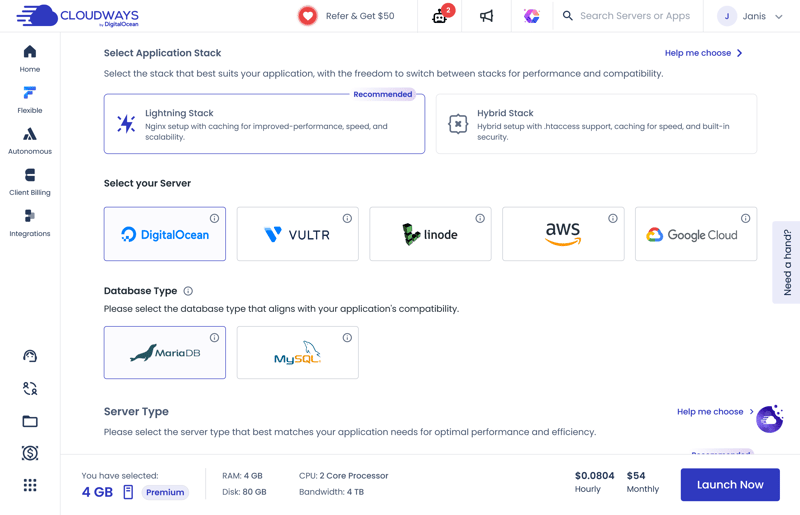
With Cloudways, you build your hosting environment from scratch.
Here’s what you’ll need to choose with Flexible hosting:
Application: Cloudways offers several WordPress options, including the standard software or a speed-optimized package. You may also set up an instance with WooCommerce pre-installed for ecommerce.
Application stack: This is the software combination that powers your server. Cloudways recommends the "Lightning Stack" for maximum speed, while the "Hybrid Stack" offers better compatibility with certain applications.
Hosting provider: Cloudways doesn’t run its own servers. Instead, it uses infrastructure from other cloud providers like DigitalOcean (its parent company), Vultr, AWS, or Google Cloud.
Database: You choose between MariaDB and MySQL. Both store your WordPress website’s content. For most users, the choice makes little practical difference.
Flexible server configuration
That’s just the first step. Next, you’ll configure your actual server resources. These determine your server’s performance and account for most of your costs. If your needs change later, you can scale your resources up or down anytime.
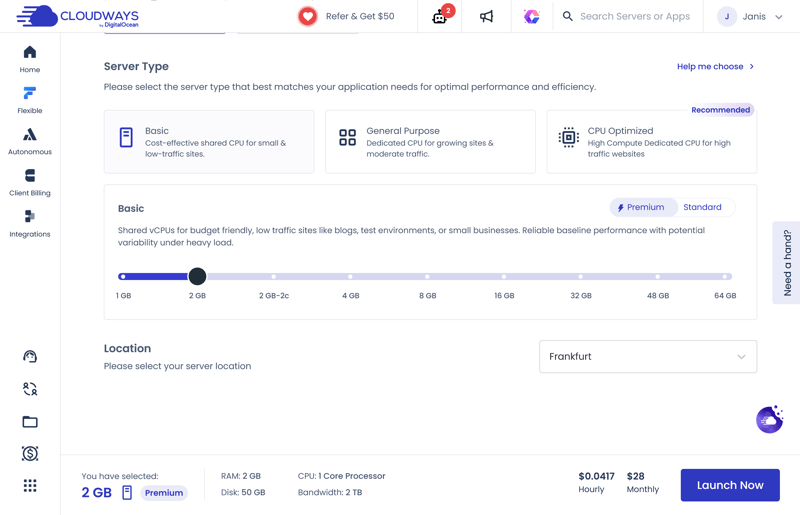
You set the server type, server size, and location.
You'll have the following options for server resources:
Server type: This determines how processing power is distributed. "Basic" works for smaller websites, "General Purpose" fits more demanding projects, and "CPU Optimized" suits websites with especially high traffic.
Server size: Here you decide how much RAM, processing power, and storage your server gets. More resources mean more performance headroom, but they also raise your monthly costs.
Server location: Pick a data center as close to your visitors as possible. For a website targeting US visitors, that usually means a US data center to keep load times short.
Click "Launch Now" and Cloudways sets up your "Flexible" hosting plan. In our test, this took 7 minutes. After that, the server was ready to go, complete with a WordPress instance.
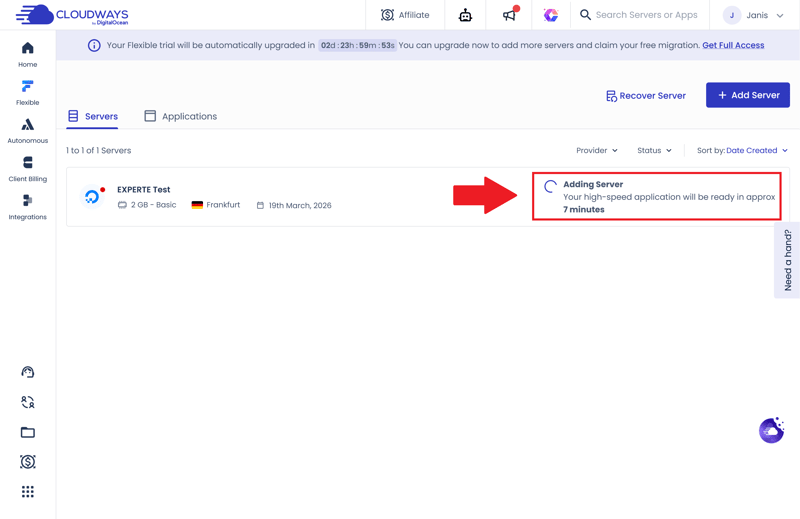
Cloudways sets up your hosting and installs WordPress at the same time.
Even during initial setup, it becomes clear that Cloudways caters to a technical audience. The platform expects you to understand your site's specific resource demands and select the precise cloud infrastructure required to support them.
If your primary goal is launching a basic WordPress site in as few clicks as possible, mainstream hosts offer far more guided onboardings. However, if you possess basic sysadmin knowledge, Cloudways rewards you with deep, unconstrained control over your server environment.
Installing a new WordPress site on Cloudways
To create another WordPress instance, open the "Flexible" section in the main menu and select "Add Application". Every Cloudways plan supports unlimited application installs, allowing you to host multiple WordPress websites on a single server instance without purchasing extra hosting plans.
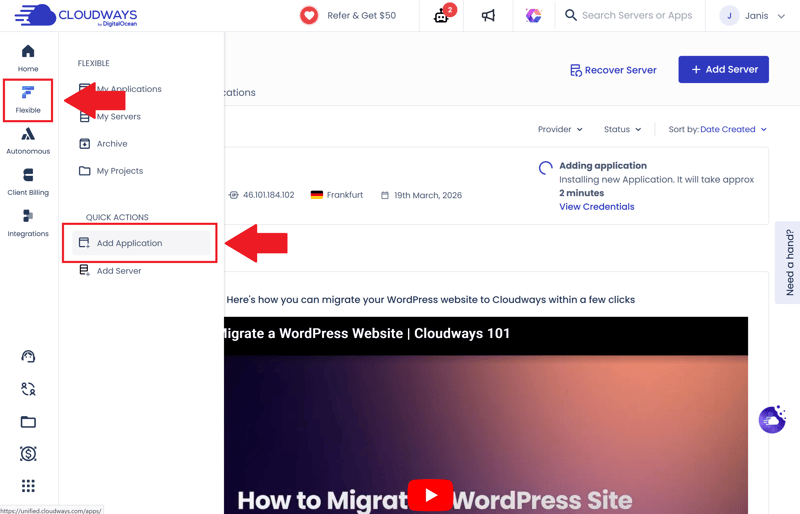
Setting up a new WordPress website only takes a few moments.
First, choose the server where the new website should run. This can be either an existing server or a brand-new one.
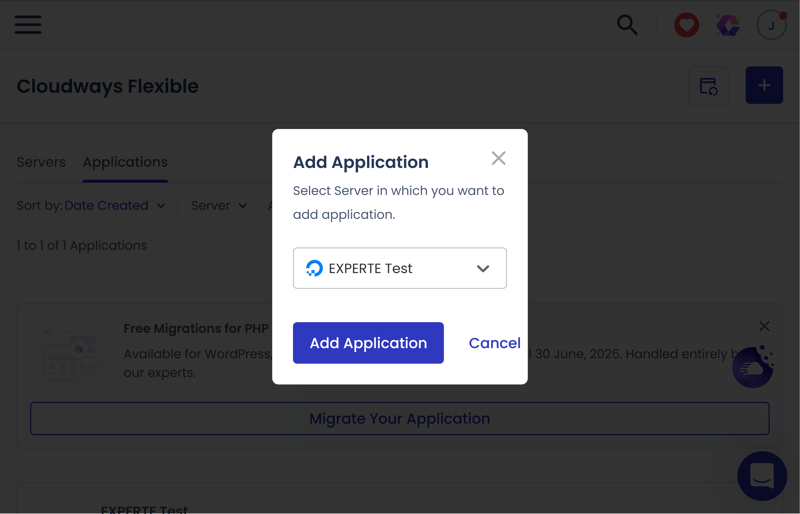
You choose the server for your new WordPress instance.
There isn't much left to do: just select WordPress as the application type, give it a name, and start the installation.
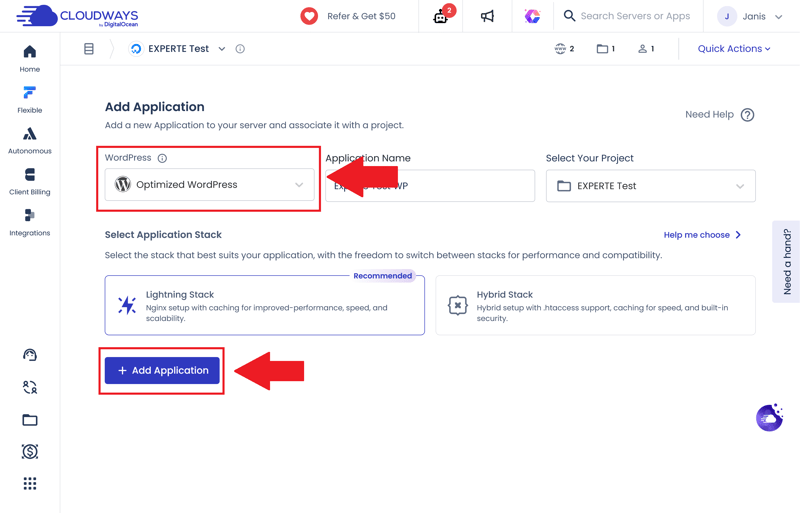
Optimized WordPress or the classic version? The choice is yours.
A few minutes later, your new website is ready. If you chose Cloudways' optimized version of WordPress, an Object Cache plugin and the host's own "Breeze" plugin come preinstalled (more on this later in the caching chapter).
Other than that, the WordPress backend looks just like a standard installation.
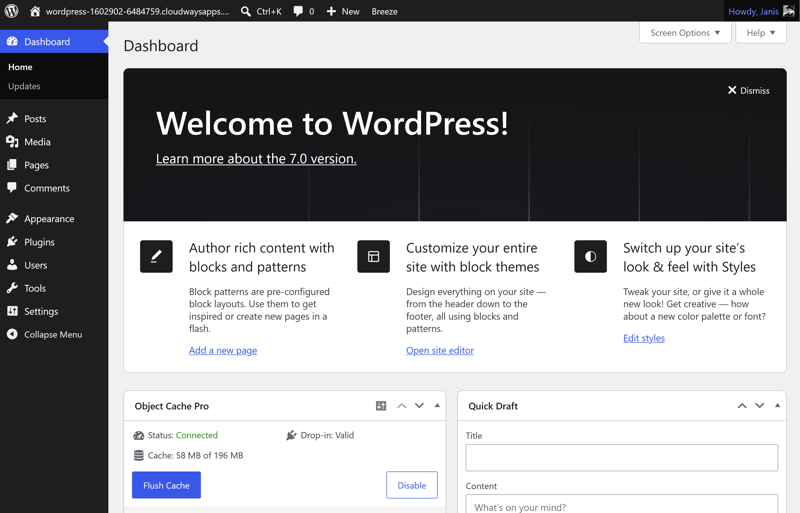
The WordPress backend of your new site.
Migrating a WordPress website to Cloudways
Already have a WordPress website but aren't happy with your current provider? To migrate to Cloudways, you have two options:
Have the Cloudways team handle the WordPress migration for you
Or use the built-in migration plugin and move your site manually.
Cloudways isn't entirely clear on one important detail, though. According to its website, only one migration by the Cloudways team is free. When we asked support, we got a different answer: they told us additional migrations are handled for free too. Either way, migrating through the plugin is always free.
The managed migration service starts with choosing your target app.
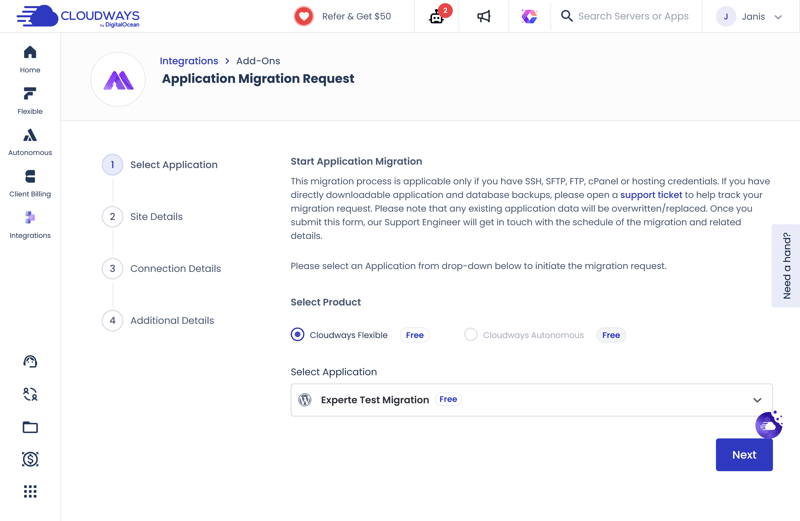
First, select the app you want to migrate to.
For the migration, you’ll need to provide details about your current website: your WordPress login credentials, along with SSH, (S)FTP, cPanel, or similar access details. That’s more than other hosts in our comparison require, since they only ask for your WordPress login and the admin area URL.
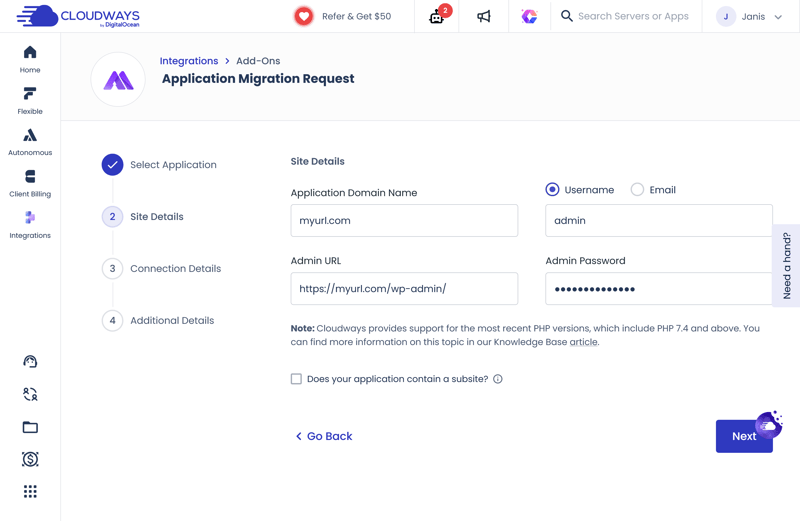
Cloudways asks for more access details than competitors.
In our test, we got a notification after just three hours that the site had been transferred and was undergoing a final quality check. Less than an hour later, Cloudways confirmed the migration was complete.
The entire migration took about four hours, even though Cloudways officially states it can take up to two days. Our website was transferred fully and without errors.
Alternatively, you may migrate your site using the Cloudways WordPress Migrator, a plugin developed by Cloudways and BlogVault. First, install the plugin on your current WordPress site.
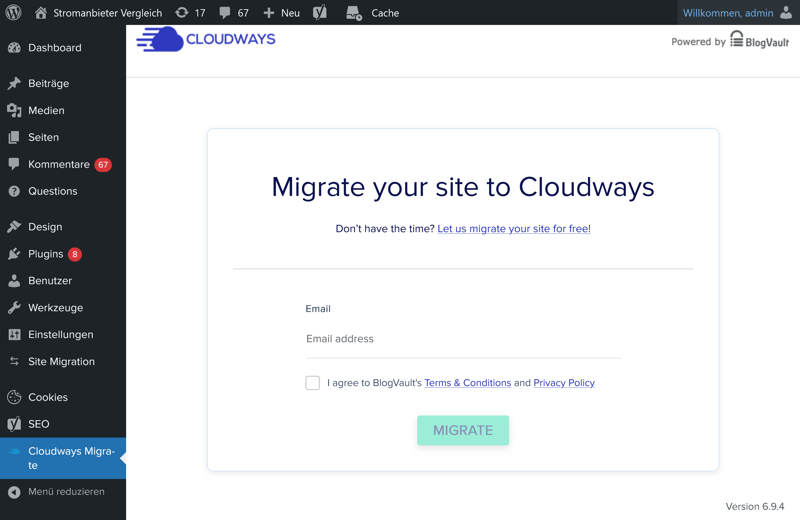
Use the Cloudways WordPress Migrator plugin to move your site manually.
The plugin then asks for some details about your new server, including the server IP address and database name. You’ll find all the required information in your Cloudways hosting panel.
Once that’s done, your migration is ready to go.
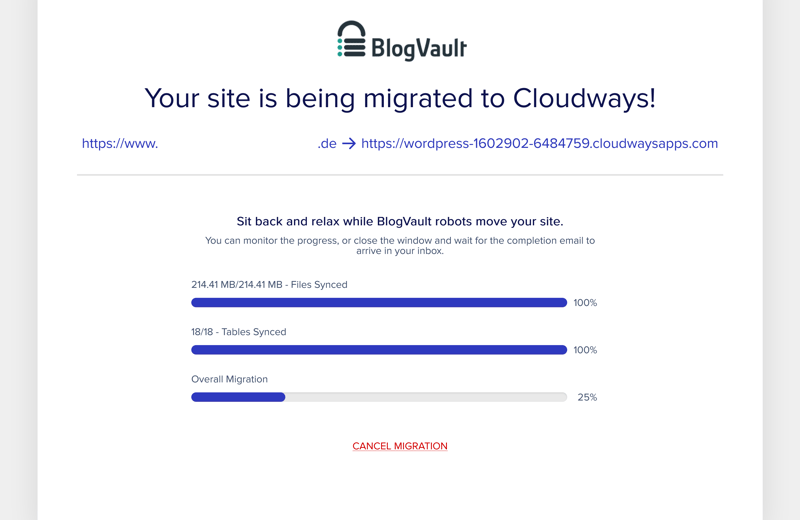
A plugin is handling the migration.
Once started, the migration runs quickly. In our test, the move finished in just three minutes, faster than any other provider we tried.
Cloudways control panel: centralized site and server management
Once you finish setting up or migrating your WordPress site, Cloudways redirects you straight to its main control panel. From here, you manage your servers, WordPress instances, and core hosting configurations in one place.
The main overview panel delivers an instant snapshot of your active servers, applications, system notifications, and billing details.
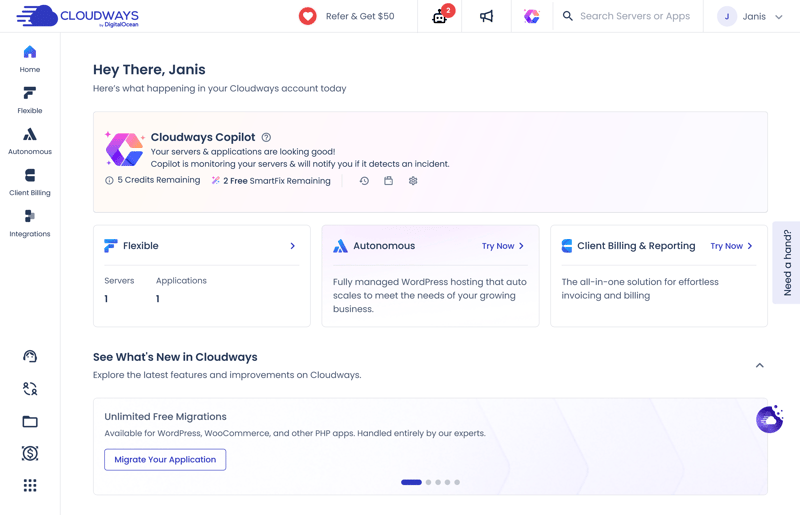
Your Cloudways control panel homepage.
The dashboard stands out for its exceptional speed. Menus open instantly, pages switch without lag, and even heavy management panels load quickly, making Cloudways one of the fastest hosting control panels we have tested.
However, the prominent self-promotion detracts from the experience. Cloudways heavily advertises paid add-ons right on the primary dashboard, occupying valuable screen space and occasionally crowding out essential management tools.
Further down the page, you will find a clean list of your installed applications alongside quick-start guides to help you navigate setup.
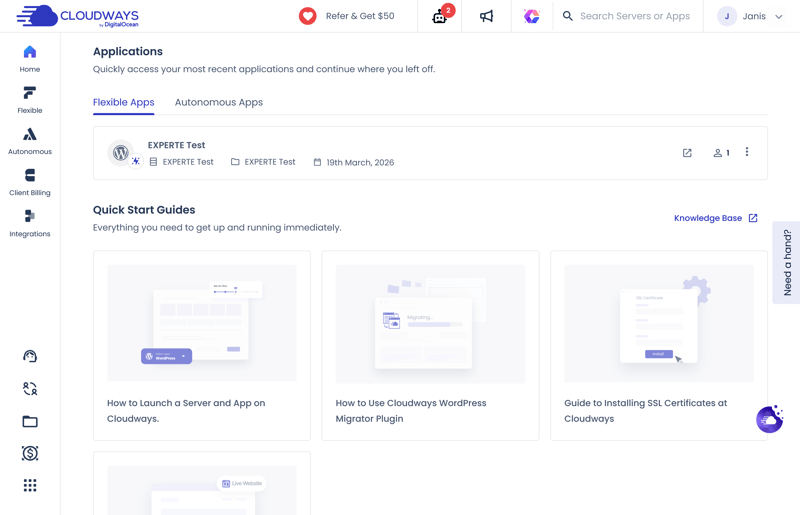
The dashboard homepage also gives you a view of your installed apps.
All key details in one place
When you open a WordPress installation, you land on the “Access Details” screen. It shows everything you need to know about your website at a glance: the URL, login credentials for the WordPress backend (with a direct link), and database access.
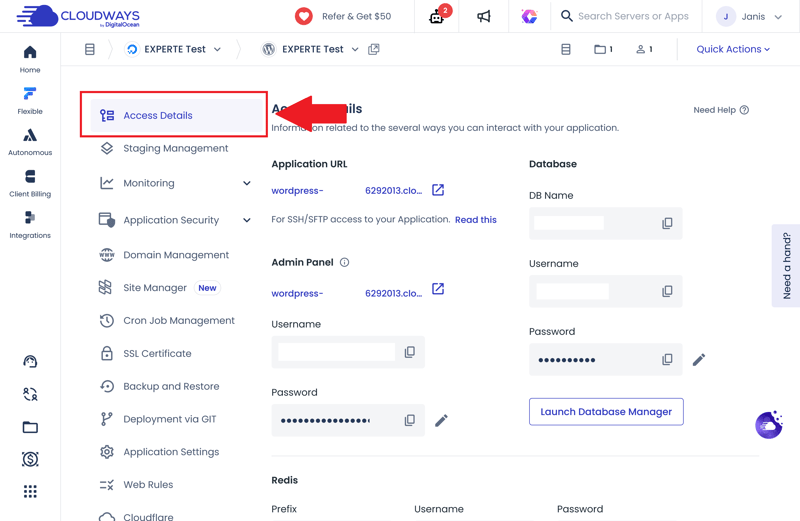
The WordPress management dashboard gives you all the essentials at a glance.
The Site Manager is a new addition that brings various WordPress management tasks together in one place. The basic version is free (for details on what the paid version adds, check out the Security section later).
Two designs: modern vs. classic
Another standout feature is dashboard customization. Cloudways provides two interface themes that function identically but offer distinct visual styles.
The “Modern” theme features a sleek, minimalist aesthetic with ample whitespace, while the “Classic” theme utilizes sharper contrast to make distinct navigation sections easier to spot.
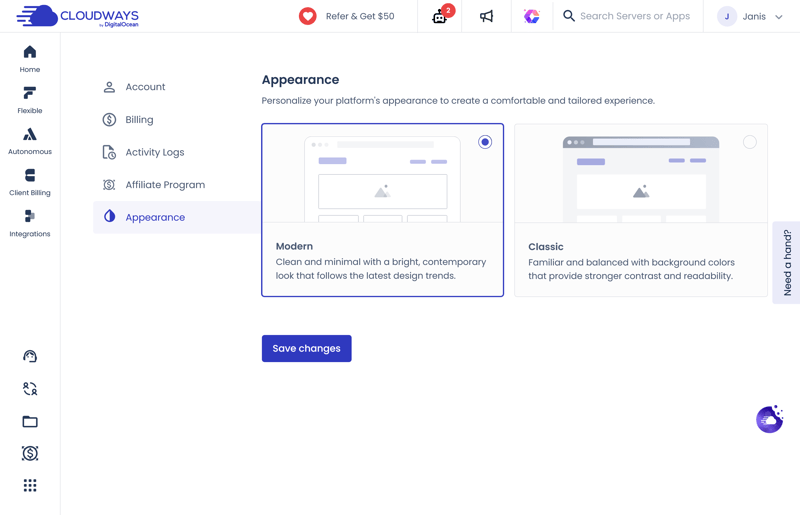
Modern or classic? The choice is yours with Cloudways.
The hosting panel, all management tools, and even the support and knowledge base are available only in English. If you’re not comfortable with technical terms in English, Cloudways might not be the best fit.

Cloudways makes it clear from the start: you call the shots. That takes a little more time upfront, but it gives you far greater control over your hosting environment. Whether that is an advantage or a drawback depends on your technical comfort level.
Overall, the dashboard leaves a strong impression. It responds instantly to commands and provides immediate access to all essential hosting configurations.
At times, however, the interface feels cluttered. Prominent ads for paid add-ons occupy significant space, occasionally overshadowing core management tools.
Despite the deep feature set, the user experience remains straightforward. Once you familiarize yourself with the layout, deploying new WordPress instances or migrating existing websites is fast and seamless.
Technology & Features
| Server stack & protocols |
| 1/2 |
| PHP |
| 8/8 |
| Caching & CDN |
| 4/5 |
| Features |
| 5/5 |
Managed WordPress hosting is engineered specifically for WordPress performance, giving you out-of-the-box access to advanced features that would otherwise require manual configuration or extra plugins.
Cloudways is so confident in its custom PHP tech stack that it dubbed it “ThunderStack.” According to the company, this specialized technology blend delivers “shockingly good” performance. Here is a look at what is under the hood:
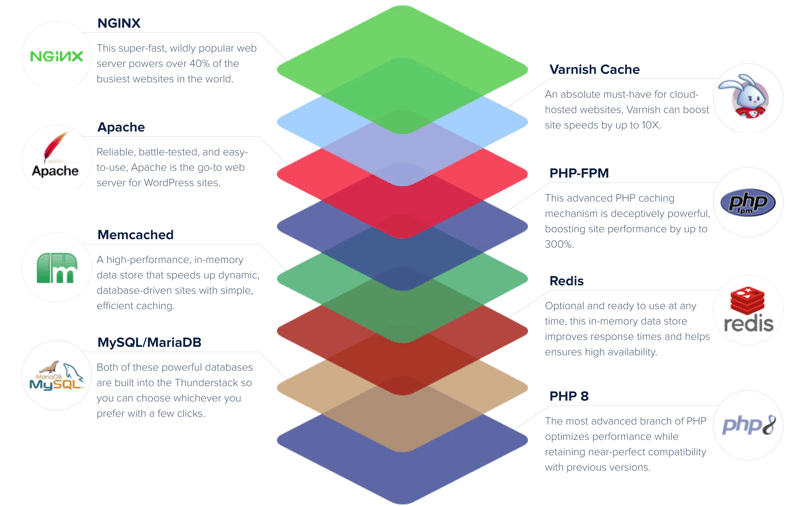
Cloudways' PHP stack is called ThunderStack (Source: Cloudways).
Let's take a closer look at ThunderStack.
Apache and NGINX, MySQL and MariaDB
Apache and NGINX are the two most popular web servers for WordPress. Since each has its own strengths, Cloudways uses both open-source web servers together.
Cloudways also lets you choose your database. ThunderStack supports both MySQL and MariaDB.
 Cloudways |  Bluehost |  DreamHost |  GoDaddy |  Hostinger |  IONOS |  Kinsta |  SiteGround |  WordPress.com |  WP Engine | |
|---|---|---|---|---|---|---|---|---|---|---|
Server locations | 8 countries | 9 countries | 3 countries | 3 countries | 11 countries | 2 countries | 21 countries | 7 countries | 19 countries | 12 countries |
Web server | NGINX | Apache | NGINX | NGINX | LiteSpeed | Apache | NGINX | NGINX | NGINX | NGINX |
Control Panel | Custom | cPanel | Custom | Custom | Custom | Custom | Custom | Custom | Custom | Custom |
Database | MariaDB | MySQL | MySQL | MySQL | MariaDB | MariaDB | MariaDB | MySQL | MariaDB | MySQL |
Storage type | SSD | NVMe | NVMe | NVMe | NVMe | NVMe | SSD | SSD | SSD | SSD |
| Protocols | ||||||||||
HTTP/2 | ✓ | ✓ | ✓ | ✓ | ✓ | ✓ | ✓ | ✓ | ✓ | ✓ |
HTTP/3 | ✗ | ✗ | ✗ | ✗ | ✓ | ✗ | ✓ | ✗ | ✓ | ✓ |
Plenty of server location options
With Cloudways, your server location depends on the infrastructure provider you choose. If you go with DigitalOcean, you can pick from ten data centers across eight countries.
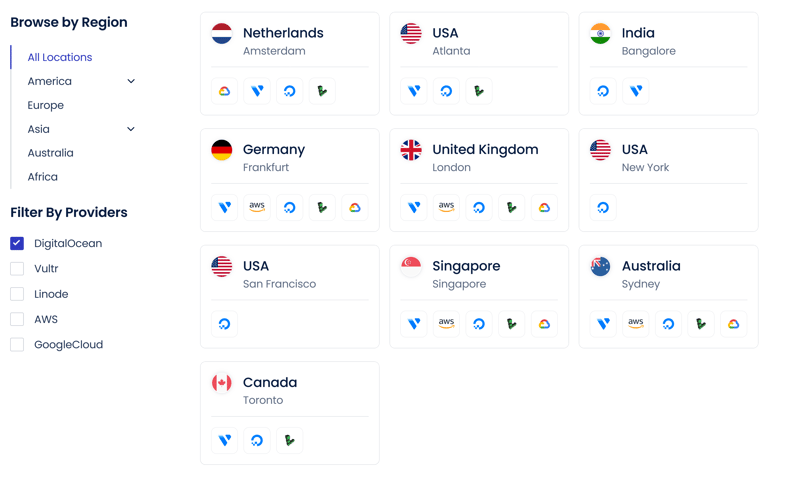
San Francisco is one of DigitalOcean’s data center locations.
PHP 8.4 with version selection
New PHP versions usually bring performance and security improvements, so WordPress hosts should upgrade as soon as possible. At the time of our review, Cloudways supported PHP 8.4, one of the latest versions.
However, after setup, our server still ran an older PHP version by default. Switching is easy, though. Just open the "Settings & Packages" section under "Server Management," select the "Packages" tab, and pick your preferred PHP version.
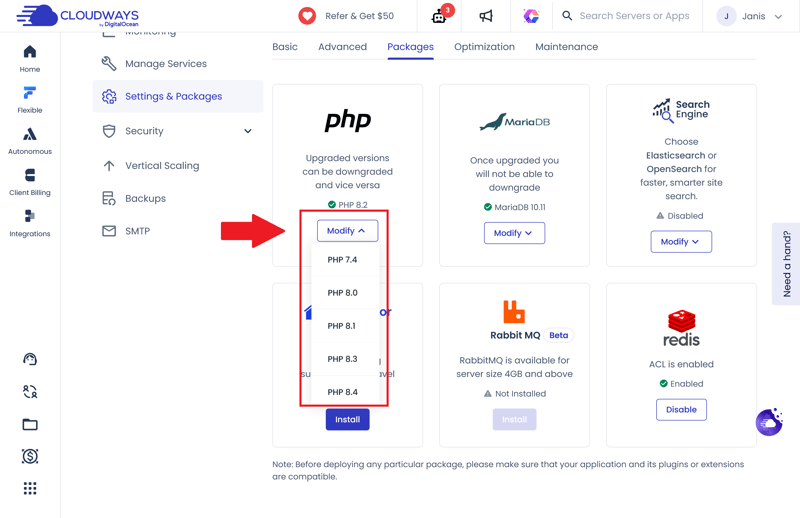
Cloudways supports the latest PHP versions.
The "Settings & Packages" menu also provides you with access to many other server settings. For example, you can adjust the PHP memory limit or free up disk space.
A major advantage: Cloudways doesn’t impose strict limits on PHP settings. There are no hard caps on upload size, script execution time, or PHP memory. Instead, the actual limits depend on your server’s resources.
In practice, this means fewer problems with large file uploads, big WordPress imports, or resource-heavy plugins. Cloudways simply gives you a lot more breathing room.
Here's how Cloudways' PHP features stack up against other providers:
Cloudways | Bluehost | DreamHost | GoDaddy | Hostinger | IONOS | Kinsta | SiteGround | WordPress.com | WP Engine | |
|---|---|---|---|---|---|---|---|---|---|---|
PHP version configurable | ✓ | ✓ | ✓ | ✓ | ✓ | ✓ | ✓ | ✓ | ✓ | ✓ |
PHP settings configurable | ✓ | ✓ | ✓ | ✗ | ✓ | ✗ | ✗ | ✓ | ✗ | ✗ |
Max PHP version | 8.4 | 8.5 | 8.5 | 8.3 | 8.5 | 8.4 | 8.5 | 8.5 | 8.4 | 8.4 |
Max memory limit | unlimited | unlimited | 768 MB | 512 MB | 3072 MB | 512 MB | 512 MB | 768 MB | 512 MB | 512 MB |
Max execution time | unlimited | unlimited | unlimited | 180s | unlimited | 360s | 300s | 120s | 850s | 43300s |
Max upload size | unlimited | unlimited | 1028 MB | 1024 MB | 3072 MB | 128 MB | 128 MB | 256 MB | 2048 MB | 50 MB |
Strong server-side caching for better performance
Good caching is one of the most important factors for fast load times. It eases the load on your server and delivers frequently requested content faster. Cloudways uses a multi-layer, server-side caching setup with Varnish, Redis, and Memcached:
Varnish is a reverse proxy that sits between your server and your visitors. It stores elements temporarily so they don't reload on repeat visits.
Redis is an especially fast cache for frequently needed data. Instead of pulling that data from the database again and again, Redis keeps it ready in memory. This gives WordPress a noticeable speed boost, especially on larger or high-traffic websites.
Memcached serves a similar purpose. Here, too, the server keeps frequently needed data in memory so WordPress doesn't run the same database queries over and over. This cuts load times and speeds up responses for dynamic pages.
You can turn all three caching services on or off or restart them right from the server settings. Several configuration options are available, too. The "Advanced" tab, for example, lets you set the cache lifetime.
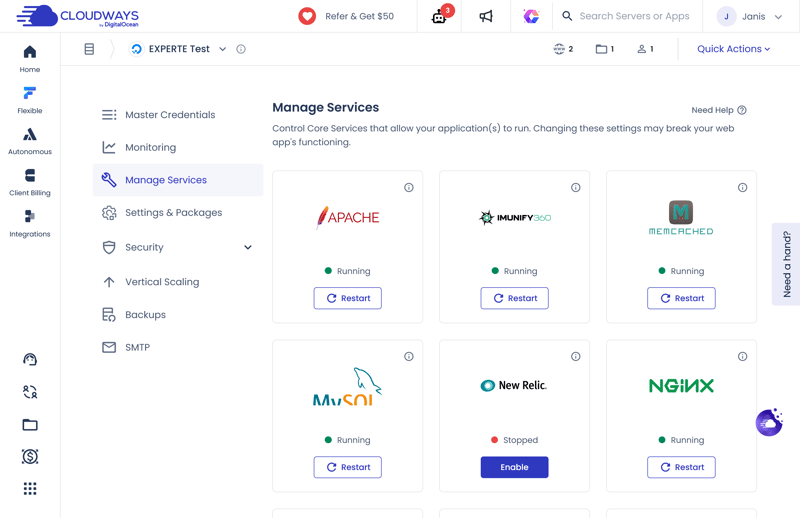
Cloudways optimizes your website’s performance using built-in server-side caching.
Extra caching through a WordPress plugin
Caching extends beyond your server-level Cloudways settings. Selecting the optimized WordPress setup automatically installs Cloudways' custom Breeze plugin, allowing you to fine-tune optimizations specifically for your WordPress site rather than the entire server.
If you prefer not to configure caching, compression, and media optimization settings manually, you can simply activate one of three preconfigured optimization profiles instead.
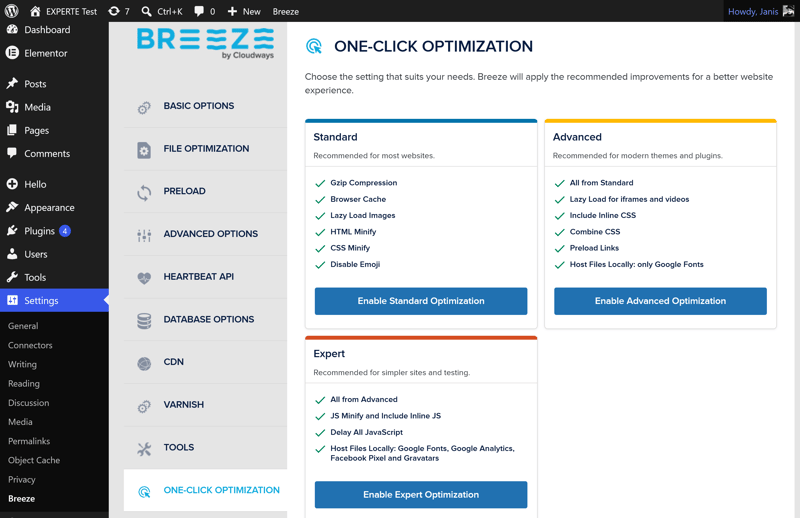
Prefer not to tweak every setting yourself? Just choose an optimization profile instead.
CDN costs extra
Cloudways isn't quite as generous in every area as it is with caching. A content delivery network (CDN), which delivers static content through servers around the globe to cut load times, isn't part of the standard package.
Instead, Cloudways offers a CDN through Cloudflare as a paid add-on. For a hosting service that's otherwise so technically strong, we would have liked to see at least a basic CDN included at no extra cost.
The missing CDN is the biggest flaw in an otherwise well-equipped hosting platform.
Cloudways | Bluehost | DreamHost | GoDaddy | Hostinger | IONOS | Kinsta | SiteGround | WordPress.com | WP Engine | |
|---|---|---|---|---|---|---|---|---|---|---|
Server side caching | ✓ | ✓ | ✓ | ✓ | ✓ | ✓ | ✓ | ✓ | ✓ | ✓ |
Object Caching | ✓ | ✓ | ✓ | ✓ | ✓ | ✗ | ✗ | ✓ | ✓ | ✓ |
CDN | ✗ | ✓ | ✓ | ✓ | ✓ | ✗ | ✓ | ✓ | ✓ | ✓ |
Cache exclusions | ✓ | ✓ | ✗ | ✗ | ✓ | ✗ | ✓ | ✓ | ✗ | ✓ |
Automatic cache purge | ✓ | ✓ | ✓ | ✓ | ✓ | ✓ | ✓ | ✓ | ✓ | ✓ |
That covers the theory, but how does it hold up in practice? To see how these features affect Cloudways' performance, check out the performance chapter.
More Cloudways features
Cloudways offers a long list of features. Here are a few highlights we haven't covered yet:
Staging environments: Set up a staging environment directly within your WordPress dashboard to test changes before pushing them live.
SFTP, SSH, cron jobs, and WP-CLI: SFTP and SSH access let you securely reach your site’s files. The platform also fully supports cron jobs and the WP-CLI command-line tool.
Multisite support: Cloudways supports multisite projects, allowing multiple websites to run off a single WordPress installation. Unlike before, you no longer need a dedicated plan for this.
Built-in cloning: Want to launch a new WordPress project quickly? The cloning feature lets you deploy a new site straight from an existing backup.
Statistics: Cloudways consolidates key metrics in the monitoring section, including traffic analytics and PHP performance.
Full plugin access: Many hosts restrict certain plugins for security or compatibility reasons. Cloudways leaves every plugin available for use.
Domains and email hosting not included
Many WordPress hosts include a free domain and some email features, but with Cloudways, you'll handle domains and email hosting on your own. For email, you can use integrations like Google Workspace.
On the technical side, Cloudways plays in a higher league than many other managed WordPress hosts. It also gives you plenty of ways to customize your hosting environment to fit your site's specific needs.
That flexibility isn't always a plus for beginners, though. Cloudways shows its strengths best if you already know your way around caching, server configuration, and WordPress performance. It won't make these decisions for you, but in exchange, it gives you far more control than many other managed WordPress hosts.
Security
| Free SSL | Yes | 2/2 |
| Server protection |
| 4/4 |
| WordPress updates | No automatic updates | 0/2 |
| Backups |
| 2/2 |
Security is a critical factor in managed WordPress hosting. Automatic protection, reliable backups, and robust defenses against attacks directly dictate how much effort you'll have to invest when issues arise.
Cloudways includes a solid set of security features out of the box, but locks others behind paid add-ons. It is worth carefully reviewing what is included natively versus what requires an extra fee—especially since Cloudways occasionally presents conflicting details regarding these inclusions.
Regardless, Cloudways covers the standard essentials: all plans include unlimited free SSL certificates from Let's Encrypt.
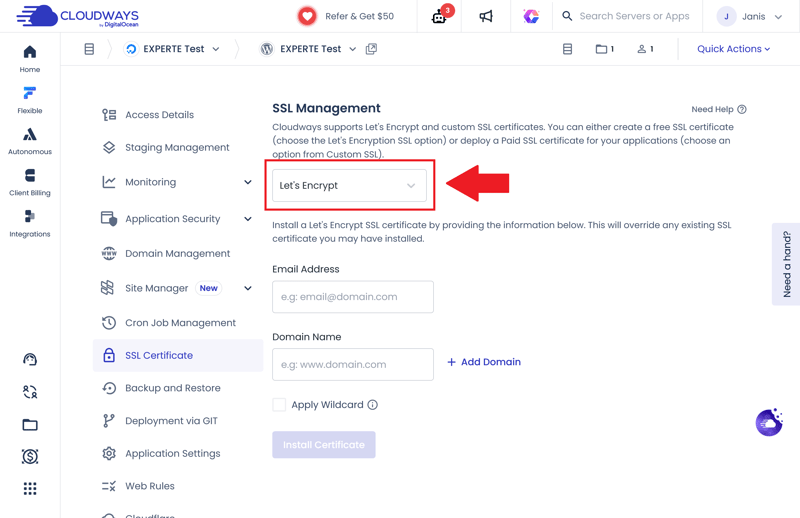
Every Cloudways plan includes SSL certificates from Let's Encrypt.
Protection against DDoS and brute-force attacks
Cloudways protects its servers against DDoS attacks at the network level. According to the provider, it detects and filters out suspicious traffic early, before it can reach your website.
The server-side firewall Imunify360 adds another layer of security. It blocks malicious access, filters suspicious traffic, and protects services like SSH and HTTP from common attacks.
Cloudways also automatically blocks brute-force attacks on WordPress logins, a feature that isn't standard with all managed WordPress hosts. It uses Fail2ban to detect repeated login attempts and block suspicious IP addresses.
Vulnerability scanner at no extra cost
The new Vulnerability Scanner checks WordPress and your installed themes and plugins for known security flaws. If it finds any, you'll get clear instructions on how to fix them.
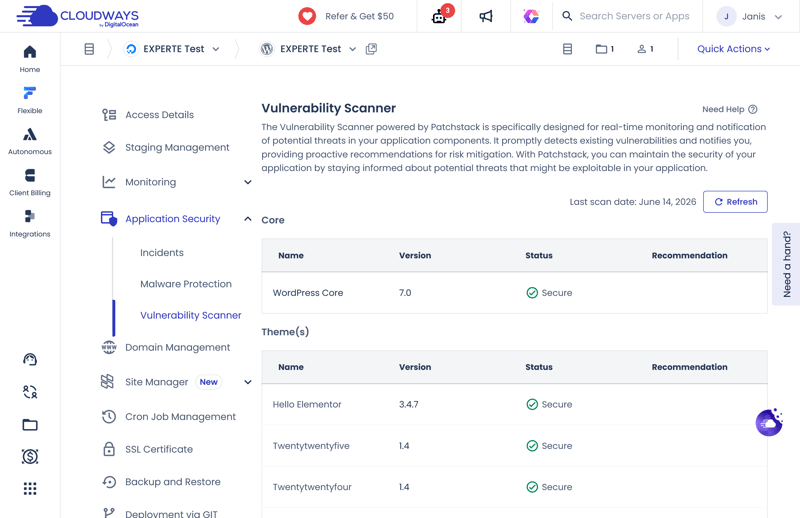
The Vulnerability Scanner monitors WordPress, themes, and plugins.
Malware protection: automatic detection, paid cleanup
Malware protection is somewhat confusing. The Cloudways website implies that malware detection is strictly a paid add-on, and their documentation offers little extra clarity—making it difficult to discern what is actually included.
In reality, Cloudways scans websites for malware even on standard plans without the add-on. However, when queried, support could not clarify the frequency of these scans.
While Cloudways alerts you immediately upon detecting malware, features like automated malware removal and advanced security tools require the paid Malware Protection add-on.
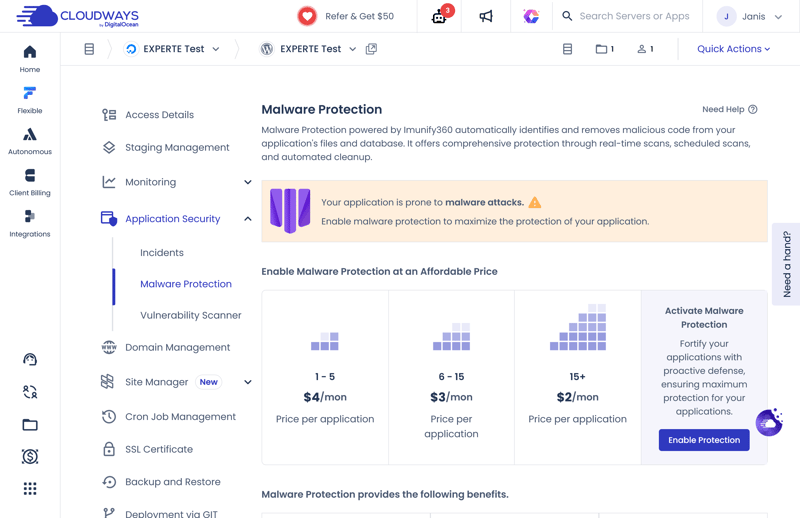
Cloudways charges extra for advanced malware protection.
Web application firewall included
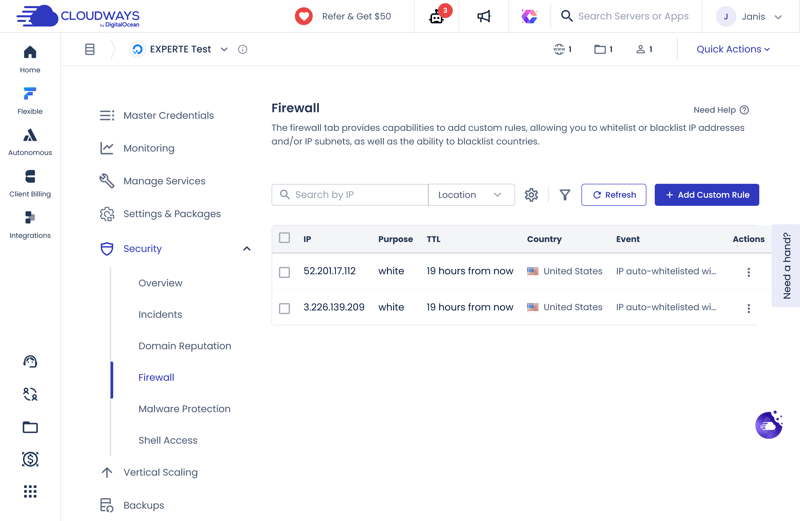
Cloudways includes a web application firewall (WAF) by default. You can manage it directly from the hosting panel to allow or block specific IP addresses.
You can even block entire countries if necessary. This provides significantly more direct control than most managed WordPress hosts, which typically handle firewall rules behind the scenes.
Flexible backup settings
Automatic backups come with every Cloudways plan, and you get far more control over them than most managed WordPress hosts offer.
You can set how often backups run, from hourly to weekly, and how long they’re kept (1 to 4 weeks). You can also pick the exact time for automatic backups.
Need a backup right away? No problem. You can create manual backups anytime, and Cloudways even stores a local copy on your server.
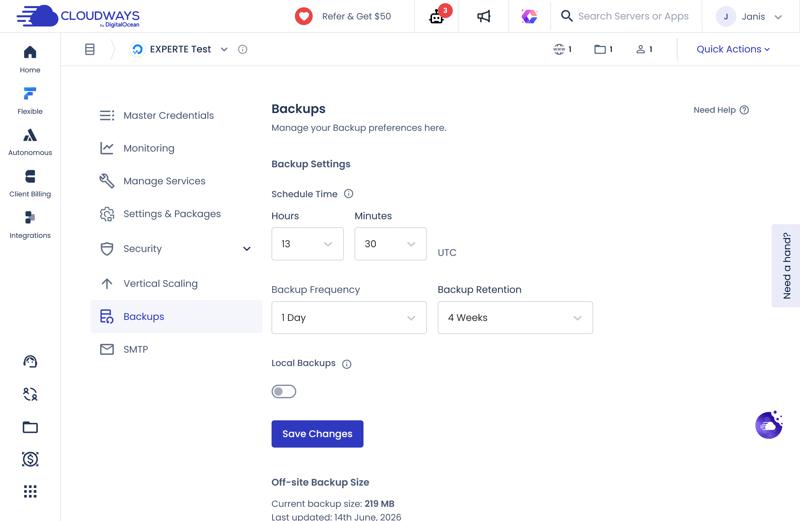
Cloudways offers flexible backup settings.
Need to back up just your WordPress files and database? You can do that too. Find the option in the WordPress management section under "Backup and Restore". There, you can also restore existing backups or run an on-demand backup of your WordPress site.
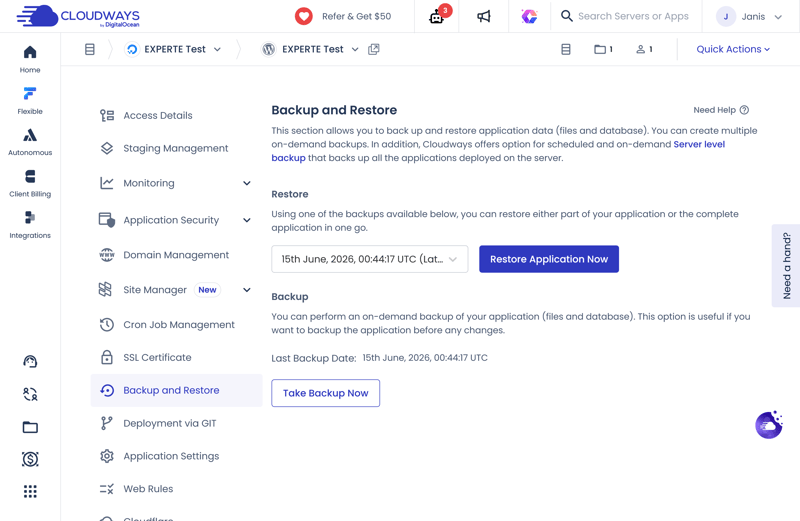
Cloudways offers flexible backup settings.
Automatic WordPress updates cost extra
Automatic WordPress updates are another paid feature. If you want Cloudways to handle plugin, theme, and WordPress updates for you, you’ll need the paid Pro version of the new Site Manager.
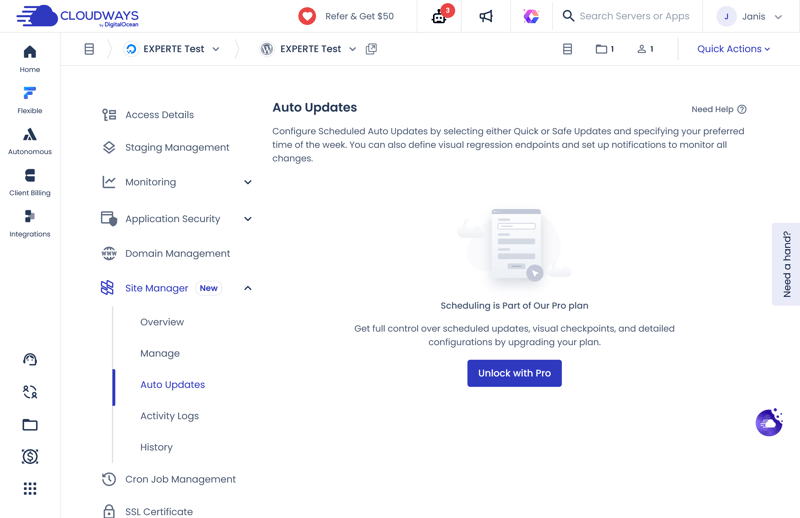
Automatic updates are only available with the paid Site Manager Pro.
That’s a letdown because the Site Manager only really shines with the add-on. The free version omits key WordPress management features. Without the premium upgrade, the new management area feels more like a stripped-down version than a full tool.
Without the add-on, you’ll still need to update WordPress, plugins, and themes manually. You can do this through the Site Manager or directly in the WordPress dashboard, just like before.
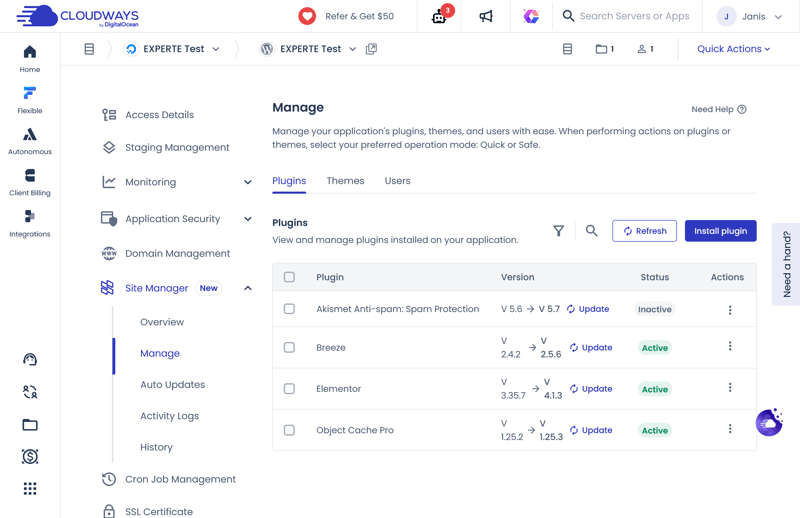
You can apply updates manually at no extra cost.
Here’s how Cloudways’ security features stack up against other providers:
Cloudways | Bluehost | DreamHost | GoDaddy | Hostinger | IONOS | Kinsta | SiteGround | WordPress.com | WP Engine | |
|---|---|---|---|---|---|---|---|---|---|---|
Unlimited free SSL certificates (on all plans) | ✓ | ✓ | ✓ | ✗ | ✓ | ✗ | ✓ | ✓ | ✓ | ✓ |
Firewall | ✓ | ✓ | ✓ | ✓ | ✓ | ✓ | ✓ | ✓ | ✓ | ✓ |
DDoS protection | ✓ | ✓ | ✓ | ✓ | ✓ | ✓ | ✓ | ✓ | ✓ | ✓ |
Login protection | ✓ | ✓ | ✗ | ✓ | ✗ | ✗ | ✓ | ✓ | ✓ | ✗ |
Malware scanning | ✓ | ✓ | ✓ | ✓ | ✓ | ✓ | ✓ | ✗ | ✓ | ✓ |
Auto updates WordPress core | ✗ | ✓ | ✓ | ✓ | ✓ | ✓ | ✗ | ✓ | ✓ | ✓ |
Auto updates WordPress plugins/themes | ✗ | ✓ | ✓ | ✓ | ✓ | ✓ | ✗ | ✓ | ✓ | ✗ |
Daily automated backups (on all plans) | ✓ | ✗ | ✓ | ✗ | ✗ | ✓ | ✓ | ✓ | ✗ | ✓ |
Min. 14 day backup retention (on all plans) | ✓ | ✗ | ✓ | ✓ | ✓ | ✗ | ✓ | ✓ | ✗ | ✓ |
When it comes to fundamental website security, Cloudways is one of the providers we trust most. Its baseline standards are high, and its defense strategy operates across multiple layers.
That is why it is disappointing that Cloudways locks several key security features behind extra fees. Automatic WordPress updates, for instance, ought to be standard with any managed WordPress hosting plan.
Nevertheless, these additional costs do not undermine our overall positive impression. While these paid add-ons enhance the platform, they are not strictly necessary to maintain solid security.
Performance
| Response speed (TTFB) | 0.27 s | 10/10 |
| TTFB outliers | 0.54 % | 3/5 |
| Pagespeed (LCP) | 0.57 s | 8/10 |
| Uptime | 100.00 % | 5/5 |
To get a realistic picture of Cloudways’ performance, we ran a WordPress website on the platform for six weeks. We used a typical setup with the resource-heavy Elementor page builder to see how the platform handles real-world demands.
We tested the site both with and without performance optimizations enabled. That let us evaluate not just how well the optimization tools work, but also the raw speed of the underlying servers. For more on our testing methods, check out our comparison of the fastest WordPress hosting providers.
Our results show how quickly Cloudways delivers content, how stable the platform is, and how reliably the site stayed online during our tests. We tracked these key metrics:
- 1.
Server response time (TTFB): How quickly does the server respond when a page is first requested?
- 2.
Slow responses (outliers): How much does server speed vary, especially during unusually slow requests?
- 3.
Pagespeed (Largest Contentful Paint): How quickly does the most important visible content appear on the page?
- 4.
Uptime: How consistently does the site stay online without interruptions?
Fast server response time
The Time to First Byte (TTFB) measures how long it takes for a server to respond after a website is requested. It tells you how quickly a site starts loading. The lower the number, the faster and more responsive the site feels.
At 0.266 seconds, Cloudways ranks 5th out of the 14 providers we tested, a solid result.
| Response time (TTFB) | |
|---|---|
| 0.186 s |
| 0.23 s |
| 0.232 s |
| 0.264 s |
| 0.266 s |
| 0.271 s |
| 0.305 s |
| 0.387 s |
| 0.631 s |
| 0.819 s |
Too many slow responses
We count any request that takes the server longer than one second to answer as a slow response. The lower this percentage, the more consistently the server performs under varying loads.
Cloudways has 0.54% slow responses, placing it 8th out of 14. That’s a weaker showing than the rest of its performance results would suggest.
| TTFB outlier | |
|---|---|
| 0.09 % |
| 0.1 % |
| 0.2 % |
| 0.28 % |
| 0.41 % |
| 0.51 % |
| 0.54 % |
| 1.02 % |
| 1.07 % |
| 2.22 % |
Websites load fast
The Largest Contentful Paint (LCP) measures how long it takes for the main content of a page to appear. The faster this happens, the quicker the page feels to visitors. LCP is also one of Google’s Core Web Vitals, so it’s a key factor for ease of use.
Cloudways scores an average of 0.573 seconds, earning 3rd place. That’s an excellent result.
| Pagespeed (LCP) | |
|---|---|
| 0.46 s |
| 0.519 s |
| 0.573 s |
| 0.612 s |
| 0.683 s |
| 0.683 s |
| 0.782 s |
| 0.792 s |
| 0.949 s |
| 1.282 s |
Perfect uptime
Uptime shows how reliably a website stays online. The closer the value is to 100%, the fewer outages you'll experience.
Cloudways achieved 100% uptime in our test, tying for first place with Bluehost, DreamHost, SiteGround, and WordPress.com. There wasn't a single outage during the entire testing period.
| Uptime | |
|---|---|
| 100 % |
| 100 % |
| 100 % |
| 100 % |
| 100 % |
| 99.992 % |
| 99.977 % |
| 99.976 % |
| 99.932 % |
| 98.92 % |
The platform's high-spec technical setup is reflected directly in our benchmark tests. Cloudways consistently ranks among the fastest managed WordPress hosts we have evaluated.
The provider delivers excellent results, particularly regarding page speed and uptime. Server response times are similarly strong, with only occasional TTFB spikes leaving room for improvement.
While some hosts only excel in select categories, Cloudways delivers dependable results across nearly every performance metric. That is precisely what you expect from a top-tier managed WordPress host.
Support
| Documentation |
| 1/2 |
| Support channels |
| 1.5/2 |
| Speed and quality |
| 2.5/3 |
| Ratings on review platforms |
| 2/3 |
Even the best hosting platform will run into the occasional technical issue or question. That is why reliable support is so critical: you need assistance that is fast to access and technically capable.
Beyond its knowledge base, Cloudways offers live chat support and a ticketing system. However, its AI assistant, Cloudways Copilot, is only accessible as a paid add-on.
A deep, technical knowledge base
The knowledge base—available strictly in English—contains over 300 detailed articles covering Cloudways platform operations, server configuration, and general hosting. That said, WordPress-specific tutorials make up only a small fraction of the available documentation.
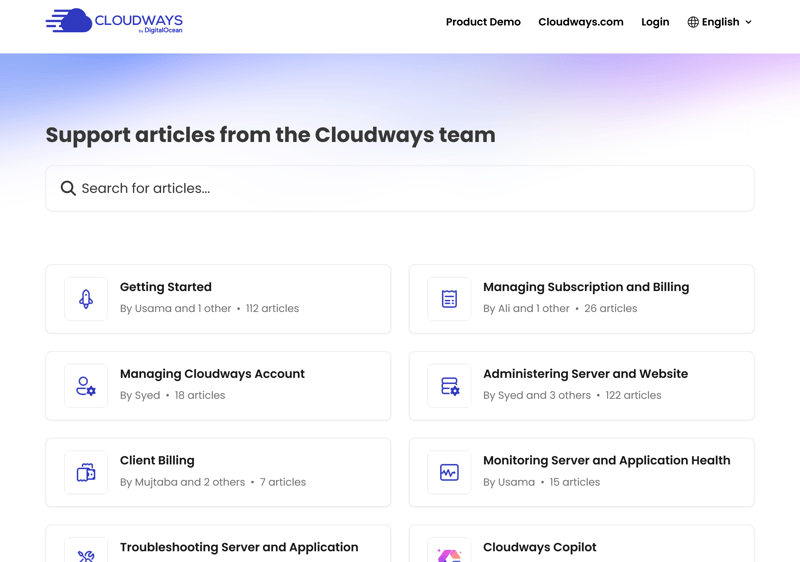
The knowledge base offers detailed guides.
The content quality is solid. Guides walk you through tasks step by step, include helpful screenshots, and go into far more depth than those from many competing hosts.
That said, Cloudways writes primarily for a technical audience. If you lack a basic grasp of hosting concepts, some explanations can be difficult to follow.
AI chat answers many questions
Every support interaction begins with Cloudways' AI assistant. In our testing, it answered most queries accurately and reliably.
A key advantage is that the bot recognizes its own limits: the moment a inquiry grows too complex, it offers to transfer you to a human support agent. You can also request a handoff manually at any point.
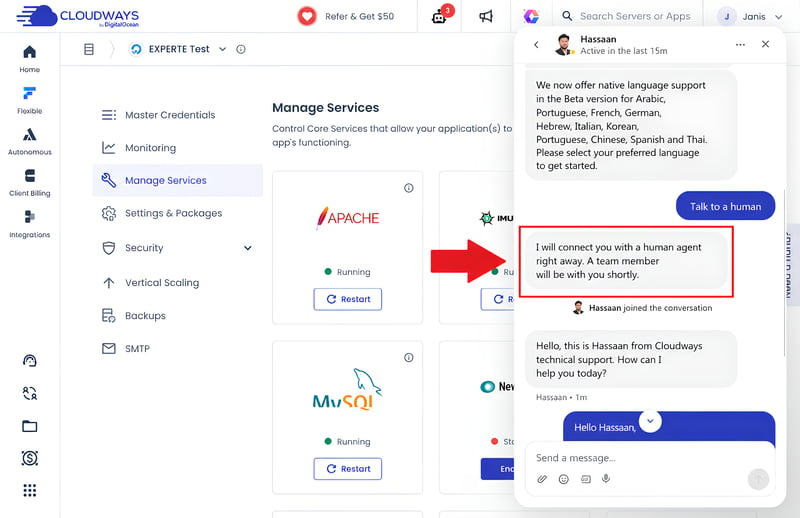
The AI hands things off to a support rep.
Support staff respond quickly
Once a human rep takes over, initial responses typically arrive in under a minute—making Cloudways one of the fastest support options we tested, regardless of the time of day.
The agents demonstrate genuine technical expertise. However, we occasionally noted that initial replies rely on boilerplate templates, requiring a follow-up question to get a tailor-made solution. If an issue remains unresolved after 15 minutes, Cloudways automatically escalates the chat into a support ticket.
Ticket system as a second support layer
When you submit a support ticket, Cloudways automatically suggests relevant knowledge base articles based on your input. As a result, many common issues get resolved before the ticket is even created.
During our testing, we received a thorough, helpful resolution within approximately two hours.
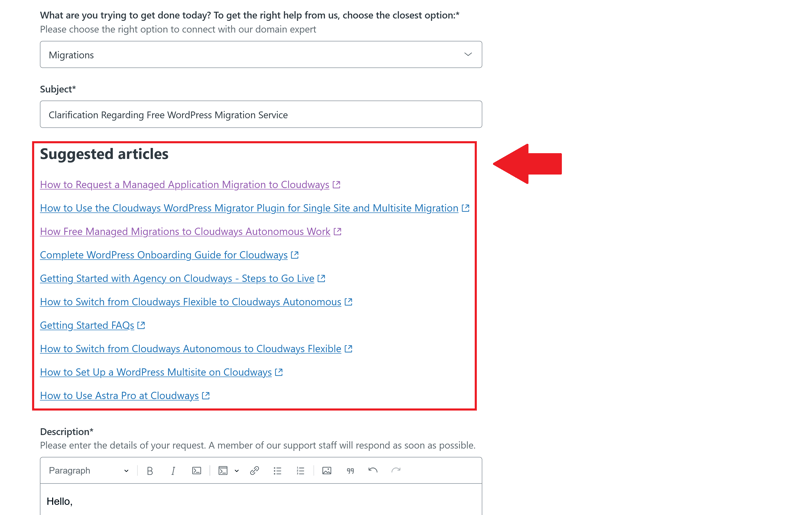
Cloudways points you to matching help articles right when you create a ticket.
Phone support costs extra
Direct phone support is available exclusively through Cloudways' Premium Support tier. With this add-on, phone assistance is accessible around the clock, and subscribers can also collaborate directly with engineers via a dedicated Slack channel.
AI-powered assistance: Cloudways Copilot
Cloudways also offers Cloudways Copilot, an AI assistant available as a paid add-on. It continuously monitors server and application health, alerts you to potential issues, and—upon your confirmation—can automatically execute basic fixes and configuration adjustments.
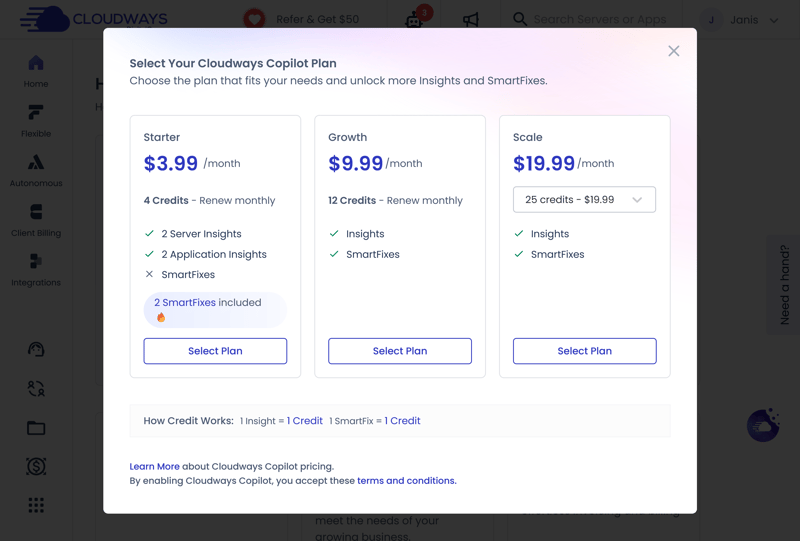
Cloudways Copilot is another support add-on.
Currently, Cloudways Copilot functions strictly at the server level and lacks write permissions for individual applications like WordPress. As a result, it can suggest performance optimizations, but it cannot (yet) execute plugin updates or manage internal site tasks directly.
What Do Customers Say About Cloudways Support?
Customers praise Cloudways for its fast live chat and knowledgeable support team. They also appreciate when reps walk them through fixes step by step, whether that means migrating a site or troubleshooting server errors.
The complaints tend to surface when issues get complicated. Some users report generic responses and endless back-and-forth on tickets without resolution. Others point out that phone support isn't included in standard plans.
Cloudways stands out with fast response times, knowledgeable answers, and a dependable chat and ticketing system. These strengths place it ahead of many competing managed WordPress hosts.
The main point of friction lies in its add-on pricing model. Premium services—such as 24/7 phone support and the AI-driven Cloudways Copilot assistant—are restricted behind additional fees. Given the platform's positioning, it would be reasonable to expect at least one standard high-tier plan to bundle phone support.
Nonetheless, for the vast majority of day-to-day technical needs, Cloudways delivers a highly capable and responsive support experience.
Costs
| 1 project, 10 GB storage | $24.00 | 0/3 |
| 10 projects | $24.00 | 2/3 |
| 50 GB of storage | $24.00 | 1/3 |
| Fair pricing |
| 4/6 |
Due to its modular setup, Cloudways' pricing is a bit more complex than that of most managed WordPress hosts.
Instead of picking a pre-set package, you first choose an infrastructure provider like DigitalOcean, AWS, or Google Cloud. Then you build your own server by selecting the resources you need. Your cost depends on the provider and the server specs you choose.
You also pick a server type:
Basic: The most affordable option. Multiple customers share the processing power of a single server, which is usually enough for small to medium-sized WordPress sites. Performance can fluctuate during high traffic, though.
General Purpose: This gives you dedicated processing power that isn't shared with other users. Performance stays more consistent, making it a good fit for larger business websites or online stores.
CPU Optimized: These servers pack extra processing power but cost significantly more. They're designed for resource-heavy applications or high-traffic websites. Most WordPress projects don't need this much power.
Cloudways plans differ mainly in storage space, CPU cores, and available RAM. When it comes to features, though, every plan includes the same set.
Here’s an overview of the basic plans Cloudways offers through DigitalOcean:
| DigitalOcean Basic Standard 1 GB | DigitalOcean Basic Standard 2 GB | DigitalOcean Basic Standard 4 GB | |
|---|---|---|---|
| Monthly price | $11.00 | $24.00 | $46.00 |
| Contract period (months) | 0 | 0 | 0 |
| Included | |||
| WordPress projects | unlimited | unlimited | unlimited |
| Storage | 25 GB | 50 GB | 80 GB |
| Storage type | SSD | SSD | SSD |
| Domains | 0 | 0 | 0 |
| Email accounts | 0 | 0 | 0 |
| Databases | unlimited | unlimited | unlimited |
| Bandwith | 1,024 GB | 2,048 GB | 4,096 GB |
| SSL certificates | unlimited | unlimited | unlimited |
| Backups | |||
| Backup interval | Daily | Daily | Daily |
| Backup retention | 28 days | 28 days | 28 days |
| Manual backups | ✓ | ✓ | ✓ |
| Features | |||
| External domains | ✓ | ✓ | ✓ |
| SSH access | ✓ | ✓ | ✓ |
| CDN | ✗ | ✗ | ✗ |
| Cronjobs | ✓ | ✓ | ✓ |
| Staging environment | ✗ | ✓ | ✓ |
Cloudways cost comparison
Comparing managed WordPress hosting providers isn’t straightforward. Plans vary in both technical specs and features. Cloudways adds another layer: the cost also depends on which cloud provider you choose. The same server setup can carry different price tags depending on the infrastructure.
To make a fair comparison, we looked at the monthly costs in three common scenarios:
1 WordPress site with 10 GB storage
10 WordPress sites
50 GB storage
For this comparison, we evaluated Cloudways plans hosted on DigitalOcean. Below is how Cloudways’ DigitalOcean plans stack up against competing providers:
| 1 project, 10 GB storage | 10 projects | 50 GB storage | |
|---|---|---|---|
| $3.49 | $4.49 | $4.49 |
| $5.50 | $55.00 | $6.00 |
| $6.49 | $64.90 | $14.47 |
| $6.50 | $65.00 | $20.00 |
| $7.49 | $12.49 | $12.49 |
| $8.49 | $8.49 | $8.49 |
| $17.99 | $179.90 | $24.99 |
| $24.00 | $24.00 | $24.00 |
| $32.08 | $119.17 | $302.50 |
| $41.67 | $187.50 | $283.33 |
If you only need hosting for a single WordPress site, Cloudways’ DigitalOcean plans are rarely the most budget-friendly choice. Even the entry-level server provides performance headroom that a single, standard project won't fully utilize—meaning you could end up paying for resources and flexibility you don't actually need.
However, the value proposition changes dramatically once you host multiple websites on the same server. Because costs are spread across several projects while performance and core features remain uncompromised, multi-site management is where Cloudways truly shines.
That said, if your primary requirement is large amounts of raw storage for a single site, competing managed WordPress hosts often offer more cost-effective entry points.
The fine print at Cloudways
Even though Cloudways doesn’t lock you into long-term contracts, it’s still worth checking the fine print to understand exactly what you’re getting.
Unlimited WordPress installations: There’s no limit to the number of WordPress sites or databases you can set up.
Multisite projects supported: Cloudways fully supports WordPress Multisite (one WordPress installation managing multiple websites).
No hard visitor limits: Cloudways doesn’t cap traffic or visitors. Instead, it advertises “unlimited visits.”
No price hikes at renewal: Unlike many hosts, Cloudways keeps your price the same. No surprise increases.
No free domain: You’ll need to register your own domain. Cloudways doesn’t include one.
Free backup restores: Restoring from backups won’t cost you extra.
No long-term contracts: Cloudways skips traditional contracts and bills by the hour on a pay-as-you-go model.
No hidden fees: What you see is what you pay. No extra charges.
No money-back guarantee: You can test Cloudways free for up to 3 days. After that, there’s no money-back guarantee.
Cloudways isn’t the cheapest option on the market, but the pricing makes sense if you take advantage of its extra features.
The more demanding your project, the better the value proposition becomes. With support for multiple websites, flexible server scaling, and the freedom to choose your cloud infrastructure, Cloudways is built to grow alongside your business—a level of adaptability many traditional managed WordPress hosts simply can't match.
Another major advantage is Cloudways’ transparent pricing structure. With no long-term contracts, zero bait-and-switch introductory rates, and no unexpected renewal price hikes, costs remain predictable from day one
Final Verdict: WordPress Hosting for Pros
Bottom line: Cloudways is a top-tier choice for site owners who need more than basic shared WordPress hosting. The platform delivers exceptional environment control, letting you tailor server resources to your project's exact technical demands.
Its architecture excels when managing growing platforms or running multiple WordPress installations. Transparent pay-as-you-go pricing, isolated cloud resources, and instant vertical scaling offer a clear edge for agencies and expanding sites.
However, Cloudways is likely unnecessary for simple personal blogs or low-traffic portfolio sites. Absolute beginners may also find its deep configuration options and lack of a traditional cPanel overwhelming, making it a poor choice for a first-time hosting environment.

Customer Reviews
Across major review platforms, most users are happy with Cloudways. They praise its performance and customer service, though there’s some criticism too. Here’s what keeps coming up on Trustpilot and similar sites:
Strong performance
Many customers report fast load times and reliable hosting. Cloudways offers built-in caching, scalable resources, and automatically optimized server setups that boost performance.Great support
Users highlight the fast and knowledgeable support team. Many describe the service as professional and solution-focused.Flexible server options
Customers like being able to choose from different cloud providers, server sizes, and locations. This makes it easy to tailor hosting to specific needs and budgets.Feature-rich dashboard
The control panel gets high marks for its wide range of tools. Users can manage servers, apps, backups, SSL certificates, staging environments, and caching all in one place.Great for developers and multiple Projects
Many customers say Cloudways is a smart choice for developers and anyone running multiple websites. Different apps stay neatly separated but can still be managed through a single platform.
Not beginner-friendly
Users with little hosting experience sometimes feel lost. While Cloudways is simpler than managing your own cloud server, it still requires more know-how than a basic WordPress plan.Support can struggle with complex issues
Some users report that support isn’t always helpful with advanced technical problems. Responses can be unclear or slow on trickier issues.Server management is technical
Cloudways handles a lot of the heavy lifting, but you’ll still need to understand basics like server settings, caching, and scaling.Migrations may require extra work
Some customers say their migrations didn’t go smoothly. They had to tweak plugins and databases themselves to get everything working properly.Overkill for small websites
Customers say Cloudways shines for larger, business-critical websites. For smaller projects, the value isn’t always there.
See a full overview of Cloudways customer reviews here:
Cloudways Alternatives
Not sold on Cloudways? Here are some other WordPress hosting providers that might be a better fit:
More affordable than Cloudways
Hostinger is worth a look if Cloudways feels too expensive or too technical. It offers solid WordPress hosting at much lower starting prices and guides you through setup, management, and optimization.More powerful than Cloudways
Kinsta is a great choice if you want premium performance like Cloudways but prefer not to manage servers and cloud details yourself.Alternative with cPanel
Bluehost is a viable alternative if you’d rather use traditional hosting tools like cPanel instead of setting up your own cloud infrastructure.
Want more Cloudways alternatives? Check these out: