Shopify vs. WooCommerce 2026: Which Is Better for Your Online Store?


There's no shortage of ecommerce website builders. But if you're looking for a serious, scalable solution that's built to grow with your business, you can narrow the list down to a handful of options. Shopify and WooCommerce will almost certainly make that shortlist. But which one is better?
We've tested both Shopify and WooCommerce in depth, and both earned a place in our top three ecommerce website builders. Here's how they compare, and which one we think comes out on top.


Shopify vs. WooCommerce
Shopify and WooCommerce have a lot in common, but they differ in a few key areas. If you pick the right platform from the start, you'll save yourself the trouble of having to migrate later.
We scored each platform across six categories, adding up to a total of 100 points. The categories are weighted differently to reflect their importance. Here's how the scoring breaks down:
- 1.
Setup & Ease of Use (15%)
- 2.
Templates & Design (15%)
- 3.
Product Management (20%)
- 4.
Sales Features (20%)
- 5.
Customer Support (10%)
- 6.
Pricing (20%)
Based on these scores, Shopify comes in first with 79.5 out of 100 points, followed closely by WooCommerce with 77.25 points.
It's a close call, and which platform is right for you ultimately depends on your needs. To help you decide, let's compare Shopify and WooCommerce side by side in each category.
Setup & Ease of Use
Both platforms are easy to use, but in different ways. Shopify works more like a traditional website builder (think Wix or Squarespace) in the sense that everything is integrated and ready to use out of the box. As a self-hosted solution, WooCommerce takes a bit more work to set up, but gives you far more control over your store.
 Shopify |  WooCommerce |
|---|
| Shopify | WooCommerce | |
|---|---|---|
Setup & Ease of Use15% | ||
3/4 | 2.5/4 | |
6/8 | 5/8 | |
3/3 | 2.5/3 | |
| 12 / 15 Points | 10 / 15 Points | |
Shopify: A plug-and-play ecommerce builder
Shopify is a fully hosted ecommerce platform. After signing up for a plan, you can immediately start building your store. Hosting, updates, security, and the rest of the technical infrastructure are all included in the package, so there's very little to set up yourself.
The Shopify dashboard is clean, responsive, and easy to navigate, even for beginners. It keeps store management and design separate: products, orders, and customers are managed in the admin backend, while the design of your store is handled in the theme editor.
If you're new to Shopify, a step-by-step setup guide walks you through the first steps from adding your first product to launching your store. There's also a built-in AI assistant. It doesn't just answer questions; it can carry out tasks for you and take you directly to the settings you're looking for.
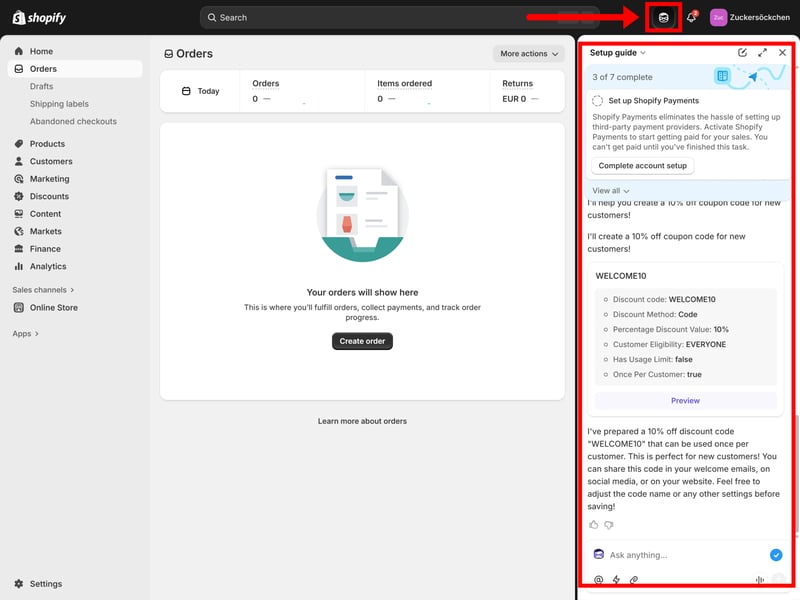
The Shopify dashboard with its AI sidekick.
Shopify is a true plug-and-play solution. You can get your store online quickly and spend your time running your business instead of configuring the platform.
WooCommerce: More effort, more control
WooCommerce isn't a fully hosted solution like Shopify. It's a WordPress plugin that adds ecommerce features to your WordPress site. This gives you much more freedom in how you build and manage your store, but it also means a little more work upfront. Before you can start selling, you'll need to choose a hosting provider, install WordPress on your server, and then install WooCommerce.
None of this is particularly difficult, even if you've never used WordPress before. Most hosting providers make the process even easier with one-click WordPress and WooCommerce installations that handle most of the technical setup automatically. Even so, getting started with WooCommerce takes more effort than with an all-in-one platform like Shopify.
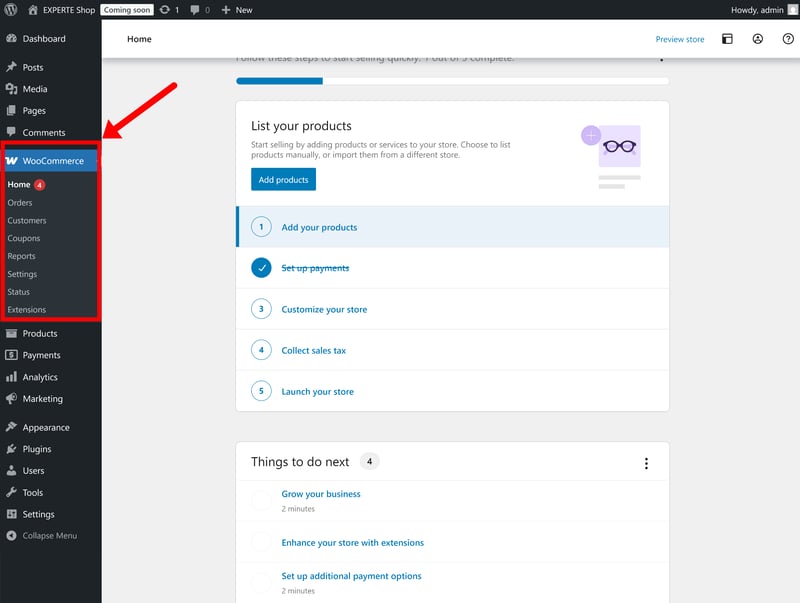
WooCommerce requires a little more hands-on work.
Once everything is set up, you'll manage your store from the familiar WordPress dashboard. If you've used WordPress before, you'll feel at home straight away. If not, expect a bit of a learning curve. The dashboard isn't as polished or beginner-friendly as Shopify's, but it's easy enough to find your way around.
Overall, WooCommerce asks for a little more from you at the start. In return, you get far more control over every aspect of your store.
Shopify is easier to set up and more approachable for beginners. WooCommerce offers greater flexibility and control, but it also requires more time to set up and learn.
If you want to get an online store up and running quickly, Shopify is the better choice. It takes care of the technical side, so you can focus on building and growing your business. WooCommerce is a great alternative if you're willing to invest a little more time upfront in exchange for greater flexibility and customization.
Templates & Design
Both Shopify and WooCommerce offer a huge selection of ready-made templates and powerful design tools. When it comes to flexibility, however, WooCommerce has the edge. Because it's built on WordPress, you can choose from thousands of themes, use different page builders, and customize almost every aspect of your store.
Shopify | WooCommerce |
|---|
| Shopify | WooCommerce | |
|---|---|---|
Templates & Design15% | ||
2/2 | 2/2 | |
2.5/3 | 3/3 | |
3.5/4 | 3/4 | |
4/4 | 4/4 | |
2/2 | 2/2 | |
| 14 / 15 Points | 14 / 15 Points | |
WooCommerce offers more templates
With more than 1,000 design templates covering everything from fashion and electronics to food, beauty, and home décor, Shopify's theme selection is pretty impressive.
It's still no match for WooCommerce, though, which gives you access to the entire WordPress theme ecosystem. You can choose from thousands of additional themes in the official directory, as well as countless options from third-party developers and premium marketplaces.
| Number of templates | |
|---|---|
 | 3,000 |
 | 1,000 |
 | 500 |
 | 225 |
 | 190 |
 | 170 |
 | 70 |
 | 47 |
 | 34 |
 | 12 |
 | 11 |
Shopify: Flexible within its limits
Once you've picked a template, you can customize your store in Shopify's built-in theme editor. Like most modern website builders, it uses a visual no-code editor that lets you customize your site's layout and content without touching a line of code.
The editor is built around predefined sections and blocks, which can be added, removed, and rearranged within the theme's structure. That keeps the editing experience simple and helps maintain a consistent layout, but it also limits how freely you can customize your pages (without editing the theme code). Unlike builders such as Wix, you can't drag elements to any position on the page.

Shopify's website editor.
Shopify's no-code editor is capable, but there are limits to what you can do “visually”, without editing the theme code. If you want to build a highly customized storefront, you'll eventually need to modify your theme or create custom sections using Liquid (Shopify's own templating language), HTML, CSS, and JavaScript.
Fortunately, Shopify includes a built-in code editor, so you can switch from visual editing to editing your theme files whenever you need more control. That requires coding skills, though, or the help of a developer.
WooCommerce: Maximum freedom for design and content
Unlike Shopify, WooCommerce doesn't have a single built-in page builder. Instead, it leverages the capabilities of WordPress, giving you several different ways to design your store.
There are three main options:
- 1.
Using the WordPress editor (Gutenberg)
WordPress includes its own visual block editor, called Gutenberg. It lets you build pages by adding and arranging blocks such as text, images, buttons, and product elements. - 2.
Using third-party page builders
If you're not a fan of Gutenberg, you can use a third-party page builder such as Elementor, Divi, or Bricks. These offer a more polished drag-and-drop editing experience and make it easier to create custom layouts without writing code. - 3.
Using custom code
You can also edit your theme directly. WordPress gives you access to the underlying templates, stylesheets, and code, allowing you to customize virtually every aspect of your store.
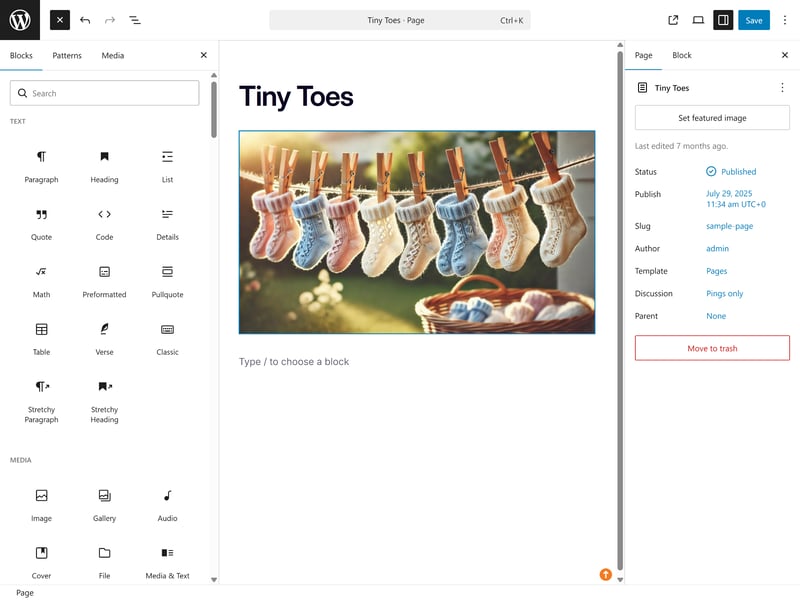
Gutenberg is the standard page builder in WordPress, but only one option among many.
Since there’s more than one way to build your store, WooCommerce can feel a little overwhelming at first. Overall, though, it can do everything Shopify can, and then some, giving you much more freedom to customize your store.
Both platforms offer excellent templates and powerful design tools. WooCommerce comes out ahead because WordPress gives you far more flexibility when it comes to designing and customizing your store.
Shopify is still a great option, though. Its drag-and-drop page builder is easier to use and more than capable of creating professional-looking online stores, even if it doesn't offer the same level of flexibility as WooCommerce.
Product Management
Both platforms offer powerful tools for managing products, variants, and inventory, and both are well suited for everything from small online stores to large ecommerce businesses. Shopify includes more features out of the box, while WooCommerce relies more heavily on plugins.
Shopify | WooCommerce |
|---|
| Shopify | WooCommerce | |
|---|---|---|
Product Management20% | ||
3/4 | 1.5/4 | |
3/3 | 3/3 | |
4/6 | 6/6 | |
3/3 | 2/3 | |
2/2 | 2/2 | |
2/2 | 2/2 | |
| 17 / 20 Points | 16.5 / 20 Points | |
Shopify supports more product types out of the box
Shopify supports a wide range of product types out of the box, including physical and digital products, subscriptions, gift cards, and memberships. Other product types, such as bookings or rentals, require apps.
WooCommerce takes a more modular approach. Out of the box, it only supports physical and digital products. If you want to sell subscriptions, memberships, bookings, or customizable products, you'll need to use plugins, which can come at an extra cost.
Wix | Shopify | |
|---|---|---|
✓ | ✓ | |
✓ | ✓ | |
✓ | ✗ | |
✓ | ✓ | |
✓ | ✓ | |
✓ | ✗ | |
✓ | ✓ | |
✓ | ✓ | |
Total | 8 | 6 |
Managing products: Shopify is easier, WooCommerce is more flexible
Both platforms make it easy to manage products. Shopify has the more polished interface, but WooCommerce gives you more control over the details.
Shopify's product editor is clean, well organized, and easy to navigate. All the most important settings are available in one place, and if the standard fields aren't enough, you can extend them with metafields.
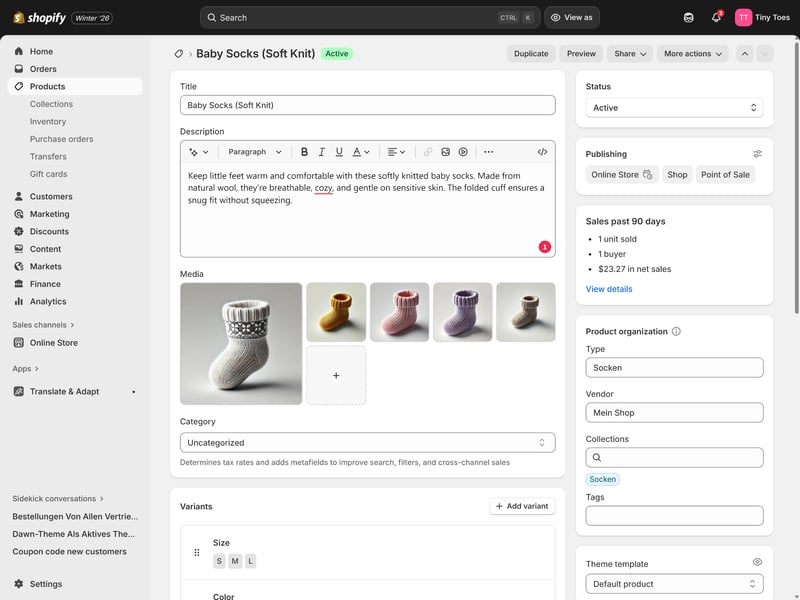
Shopify’s product editor.
WooCommerce's product editor is built into the familiar WordPress dashboard, where products are treated as just another type of content. Because of that, the interface feels a bit more clunky and technical, and some settings are spread across different menus or plugins.
That reflects WooCommerce's modular approach. Some features that come built into Shopify, such as advanced product pricing options, require plugins or custom development in WooCommerce.
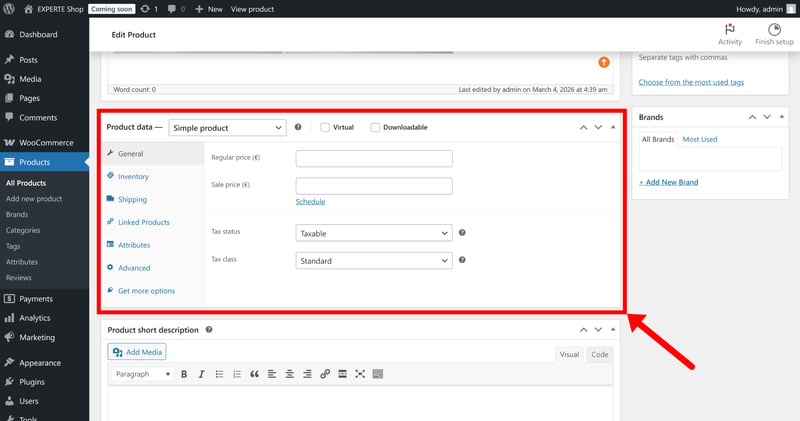
Managing products in WooCommerce.
Shopify's annoying variant limit
If you sell products with lots of variants, WooCommerce has a clear advantage. There are no hard limits on the number of variations or attributes you can create.
Shopify is annoyingly restrictive here, especially for a leading ecommerce platform. A product can have up to 2,048 variants (up from the previous limit of 100), but only three option types (such as “Color”, “Size”, and “Material”). That three-option limit can become restrictive if your products have more complex configurations.
Shopify | WooCommerce | |
|---|---|---|
Max. number of options | 3 | unlimited |
Max. number of variants | 2048 | unlimited |
Variant-specific images | ✓ | ✓ |
Variant-specific pricing | ✓ | ✓ |
Variant-specific SKU | ✓ | ✓ |
Variant-specific inventory | ✓ | ✓ |
Total | 4 | 4 |
Both platforms can handle large inventories
Setting aside Shopify's variant limits, both platforms are well equipped to manage large product catalogs.
Shopify gives you several ways to organize your catalog, including collections, tags, and metafields for structured product data. Its filtering tools are excellent too, especially when paired with Shopify's own Search & Discovery app. There are a few handy time-saving automations, too: products can be assigned to collections automatically based on predefined rules.
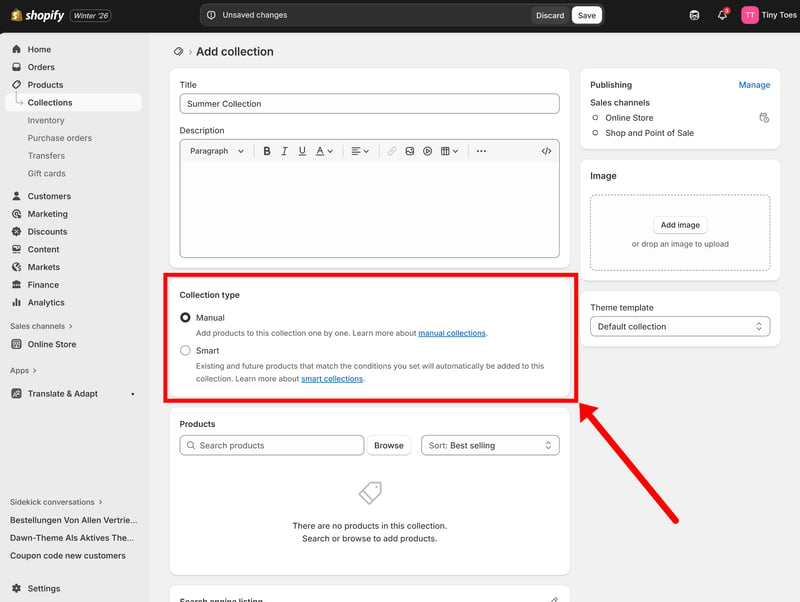
Shopify lets you automatically assign products to collections based on rules.
WooCommerce combines product attributes with WordPress's categories and tags. This combination gives you plenty of flexibility when it comes to organizing products, creating variants, and adding product filters to your store. More advanced filtering and search features typically require plugins, though.
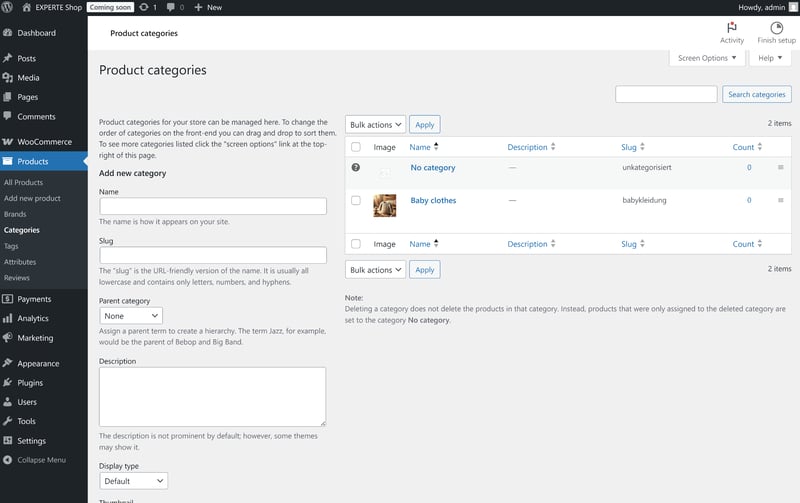
In WooCommerce, you organize your products with categories, tags, and attributes.
There's no clear winner here: Shopify offers a more polished product editor, but its strict variant limits can become a problem if you're selling highly configurable products. WooCommerce is more flexible overall, but that flexibility comes with more setup work (and, often, the need for additional plugins).
Neither platform will hold you back as your store grows. Both can handle large catalogs and complex product setups.
Sales Features
Payments, shipping, taxes, discounts: both platforms have the core ecommerce features covered, but Shopify offers much more functionality out of the box, while WooCommerce often relies on plugins to fill the gaps.
Shopify | WooCommerce |
|---|
| Shopify | WooCommerce | |
|---|---|---|
Sales Features20% | ||
3/3 | 2/3 | |
3/3 | 2/3 | |
3/3 | 2/3 | |
3/3 | 2.75/3 | |
2/2 | 2/2 | |
6/6 | 6/6 | |
| 20 / 20 Points | 16.75 / 20 Points | |
Shopify has most features built-in
With Shopify, all the essential sales features are built into the core platform. Payments, taxes, shipping, discounts, and order management work together out of the box, so there's very little you need to add yourself.
To collect payments, you can use Shopify's own gateway, Shopify Payments, or connect one of the many supported third-party payment providers.
WooCommerce | Shopify | |
|---|---|---|
Number of payment providers | 19 | 100 |
Paypal | ✓ | ✓ |
Stripe | ✓ | ✓ |
Square | ✓ | ✗ |
Amazon Pay | ✓ | ✓ |
Klarna | ✓ | ✓ |
Mollie | ✓ | ✓ |
Native payment solution | ✓ | ✓ |
Manual payment methods | ✓ | ✓ |
Total | 8 | 7 |
Watch out for transaction fees: If you're not using Shopify Payments, Shopify charges an additional transaction fee (that's on top of your payment provider's processing fees).
Taxes are largely automated. Just enter your tax registrations, and Shopify applies the correct tax rates based on where your customers are located. Shipping is just as straightforward. You can create flat-rate, weight-based, or price-based shipping rules, offer local delivery, and connect carriers such as UPS or FedEx through apps.
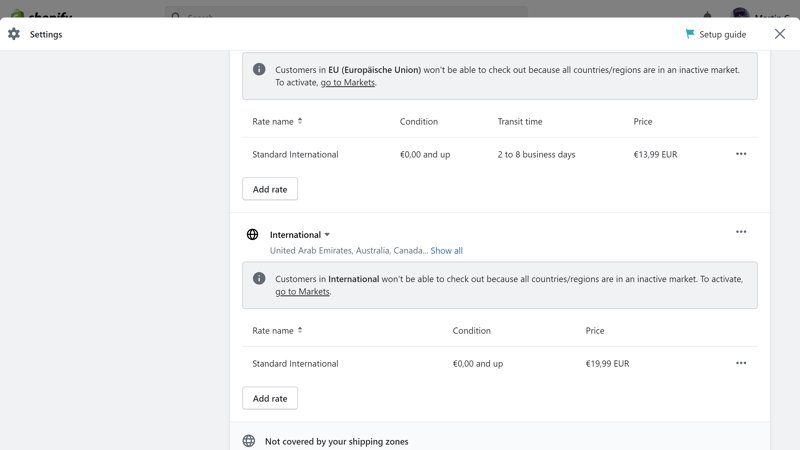
Shipping settings in Shopify.
Shopify's discount engine is pretty powerful, too. Besides standard percentage or fixed-amount discounts, Shopify also supports promotions like Buy X Get Y, free shipping, and customer-specific discounts.
WooCommerce takes a more modular approach
WooCommerce doesn't include as many built-in sales features as Shopify. Instead, it relies on plugins to add much of the functionality that Shopify includes by default.
Take taxes and shipping, for example. Basic tax rates, shipping zones, and flat-rate shipping are easy to set up. But if you want automatic tax calculations, weight-based shipping, or live carrier rates, you'll usually need additional plugins.
The same applies to discounts. Standard coupons are built in, but more advanced promotions like Buy X Get Y, tiered pricing, or more advanced discount rules typically require plugins.
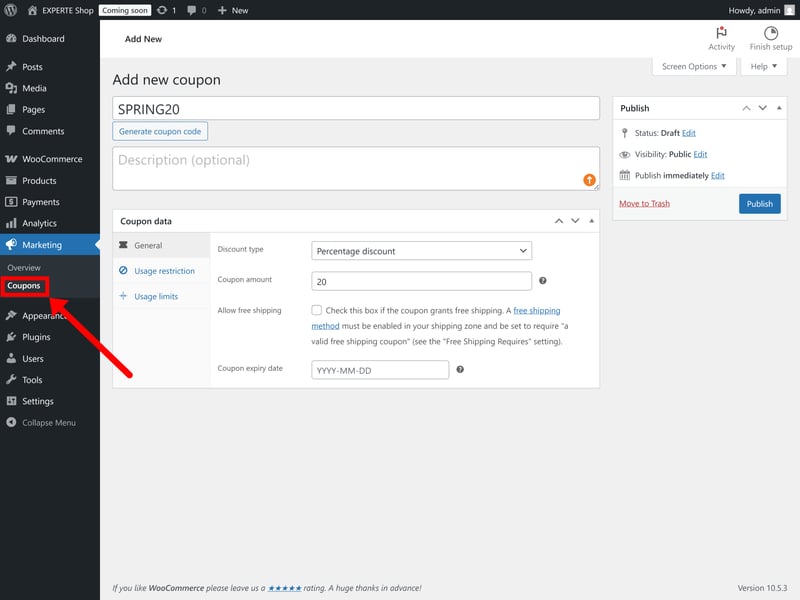
WooCommerce supports coupons and automatic discounts.
That's the recurring theme with WooCommerce: it can do almost anything, but you'll often need to install plugins to get the functionality you need.
Both platforms offer powerful sales features, but Shopify delivers the more complete package. Most of the key features are built in, easy to configure, and work seamlessly together. WooCommerce is more flexible, but you'll often need additional plugins to match Shopify's built-in functionality.
Customer Support
The two platforms take very different approaches to customer support, in the sense that WooCommerce doesn't have any. Or rather: While Shopify has a dedicated support team, WooCommerce relies on documentation, community forums, and the wider WordPress community.
Shopify | WooCommerce |
|---|
| Shopify | WooCommerce | |
|---|---|---|
Customer Support10% | ||
1.5/2 | 2/2 | |
1/2 | 0.5/2 | |
1/3 | 0/3 | |
0/3 | 0/3 | |
| 3.5 / 10 Points | 2.5 / 10 Points | |
Shopify: Fast support, shallow help
Shopify's help center is great. It covers virtually every feature with clear, practical articles, and many guides include screenshots or tutorial videos. We were usually able to find answers without contacting support.
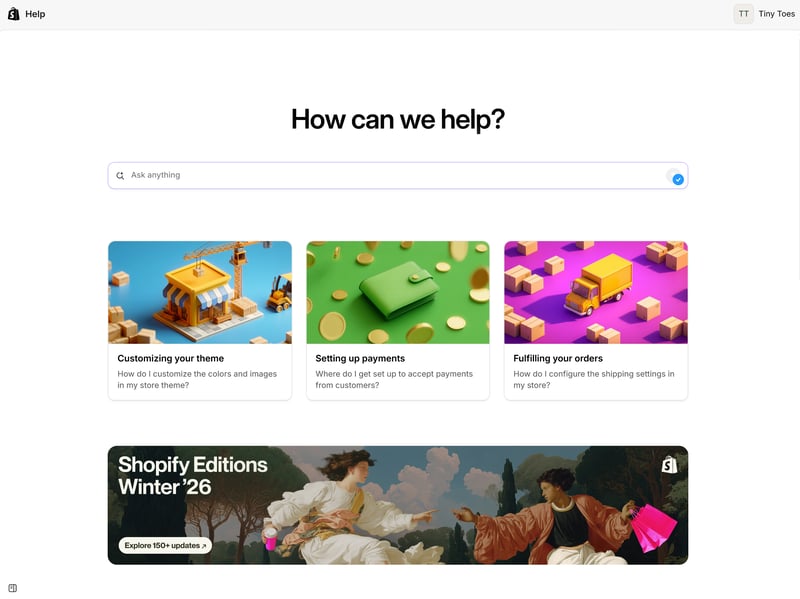
Shopify’s help center.
If you do need help, Shopify offers 24/7 live chat support (phone support is reserved for enterprise customers). We usually reached an agent within a few minutes.
While responses were quick, they weren't always particularly helpful, though. We often received generic replies instead of clear, actionable solutions to our problems. That tracks with what users are saying on review sites like Trustpilot: Shopify's customer support is a common point of criticism.
WooCommerce: Support is DIY, too
WooCommerce is an open-source plugin, so it doesn't come with traditional vendor support, at least not for the core platform. You only receive direct support for paid extensions purchased through WooCommerce.
Instead, WooCommerce relies on its documentation and the wider WordPress community. There are countless tutorials, videos, forum discussions, and blog posts covering almost every topic, so finding an answer is usually not difficult. You will need to find these answers yourself, though. There's no central support team you can contact if you run into a problem.
Both platforms have excellent documentation, and since they're both so widely used, you'll find countless tutorials, videos, and community discussions online.
Direct support is another matter. WooCommerce doesn't have it at all, and while Shopify does, it might not solve your problem. User reviews are overwhelmingly negative, with many customers criticizing generic responses and unresolved issues.
Still, Shopify at least gives you a dedicated support team to turn to when you need help.
Pricing
Shopify and WooCommerce follow very different pricing models. Shopify charges a monthly subscription that includes hosting and most core features. WooCommerce itself is free, but you'll pay separately for hosting, your domain, premium plugins, and any other services.
Because of that, comparing prices isn't as simple as looking at the monthly cost. Let's look at where the money actually goes with each platform.
Shopify | WooCommerce |
|---|
| Shopify | WooCommerce | |
|---|---|---|
Pricing20% | ||
2/6 | 4/6 | |
5/6 | 6/6 | |
3/3 | 3/3 | |
2/3 | 2.5/3 | |
1/2 | 2/2 | |
| 13 / 20 Points | 17.5 / 20 Points | |
Shopify pricing
Shopify charges a recurring monthly subscription. It covers all the basics you need to run your store, including hosting, infrastructure, and most core ecommerce features.
There are four main plans: Basic, Shopify, Advanced, and Plus. The biggest differences are the payment and transaction fees, staff accounts, and advanced features.
| Basic | Grow | Advanced | |
|---|---|---|---|
| Monthly price | from $29.00 | from $79.00 | from $299.00 |
| Contract period (months) | 1 - 12 | 1 - 12 | 1 - 12 |
| Product management | |||
| Number of products | unlimited | unlimited | unlimited |
| Product filters | ✓ | ✓ | ✓ |
| Product variants | ✓ | ✓ | ✓ |
| Product inventory | ✓ | ✓ | ✓ |
| Product reviews | ✓ | ✓ | ✓ |
| Internationalization | |||
| Multiple languages | ✓ | ✓ | ✓ |
| Multiple currencies | ✓ | ✓ | ✓ |
| Automatic tax calculation | ✓ | ✓ | ✓ |
Payment fees depend on your payment provider. With Shopify Payments, fees range from 1.6% to 2.1% + $0.30 per transaction, depending on your plan. If you use an external provider, Shopify charges an extra transaction fee (between 0,2 and 2%), which also depends on your plan.
WooCommerce pricing
WooCommerce itself — as in, the use of the WooCommerce plugin — is free, but running a WooCommerce store isn't. You'll need to pay for hosting, and depending on your setup, you may also need premium plugins, themes, or other services.
Hosting is usually the primary expense. Most providers charge somewhere between $10 and $30 per month at least, often including a free domain for the first year.
Additional costs depend on the features you need. Many plugins require an annual license, and those recurring fees can add up over time. Payment processing fees apply as well and depend on the payment provider you choose. For example, WooPayments charges 1.5% + $0.30 per card transaction.
For our WooCommerce test, we used IONOS as our hosting provider. Here are its current hosting plans:
| Hosting | Hosting & MultilingualPress | ||
|---|---|---|---|
| Monthly price | from $10.00 | from $19.93 | |
| Contract period (months) | 1 - 36 | 1 - 36 | |
| Product management | |||
| Number of products | unlimited | unlimited | |
| Product filters | ✓ | ✓ | |
| Product variants | ✓ | ✓ | |
| Product inventory | ✓ | ✓ | |
| Product reviews | ✓ | ✓ | |
| Internationalization | |||
| Multiple languages | ✗ | ✓ | |
| Multiple currencies | ✗ | ✗ | |
| Automatic tax calculation | ✓ | ✓ | |
Comparing Shopify and WooCommerce
Which platform is cheaper? It's impossible to answer. Your costs depend on the size of your store, the features you need, and how much work you're willing to do yourself.
To compare the platforms somewhat fairly, we estimated the base monthly costs for three different store scenarios:
Small store: 10 products, up to $10,000 in annual revenue, with a custom domain
Medium store: 500 products, up to $200,000 in annual revenue, with product variants
Large store: 10,000 products, up to $2 million in annual revenue, with variants, product filters, and multilingual support
Here are the results:
| Small shop | Mid-size shop | Large shop | |
|---|---|---|---|
| $11.75 | $11.75 | $11.75 |
| $29.00 | $29.00 | $29.00 |
WooCommerce comes out slightly cheaper in our comparison, but these base costs are only part of the story. The calculation includes hosting but not premium plugins, themes, or other paid extensions, which can add significantly to the overall cost.
For smaller stores, Shopify's fixed monthly subscription is easier to budget for. WooCommerce becomes more attractive as your store grows, giving you more control over your hosting, payment providers, and other recurring costs. That also demands more of your time, though: setting up, maintaining, and updating your store is your responsibility — or an additional expense if you hire someone else to do it.
There's no clear winner here. Which platform ends up cheaper depends on your setup:
WooCommerce gives you more control over your expenses and can be cheaper over time, but your costs are less predictable because hosting, plugins, and other services are all billed separately.
Shopify's subscription model is easier to budget for thanks to its predictable monthly pricing. The downside is vendor lock-in: if Shopify raises its prices or changes its terms, there's little you can do but pay.
Final Thoughts: Convenience vs. Control
Shopify and WooCommerce are two of the best ecommerce platforms out there. Both can handle everything from a small online store to a large, complex ecommerce business.
Which one is right for you comes down to one question: convenience or control.
Shopify is the better choice if you want a turnkey, all-in-one solution that lets you get started quickly without worrying about the technical side of running a website.
WooCommerce is the better choice if you want full control over your store, have more specific requirements, don't want to be locked into a single platform, and don't mind spending extra time on setup, maintenance, and optimization.
Of course, there are more ecommerce solutions than just Shopify and WooCommerce. Maybe another platform is a better fit for your project? We tested 11 of the best ecommerce website builders to help you find the right one.