Hostinger Ecommerce Website Builder Review 2026: Can You Really Run a Store for $5/Month?


Can you run a professional online store for less than $5 a month? Hostinger says you can: its all-in-one ecommerce website builder is designed to get you from zero to a working store in just a few steps, without breaking the bank.
We wanted to see how that actually plays out in practice, and whether Hostinger’s ecommerce builder is a legit low-cost option or just another “cheap” tool that cuts too many corners.


But you can’t just host your website with Hostinger — you can build it there, too: Hostinger includes its own AI-powered website builder that allows even complete beginners to create fully functional websites and online stores.
Hostinger Ecommerce Review
Very cheap
Hostinger is one of the cheapest ecommerce website builders out there. If you’re working with a tight budget, it’s an easy way to get a store online without much upfront cost.Many product types
You're not limited to physical products: you can also sell digital downloads, services, gift cards, or even offer bookings and donations. A print-on-demand solution is included, too.Easy to use
The website builder is intuitive and fairly flexible for what it is. You can adjust layouts, content, and store elements without much effort, even if you’ve never built a website before.
Limited to 1,000 products
There’s a hard cap on the number of products you can add. That’s fine for small stores, but you might outgrow Hostinger sooner rather than later.Very little automation
Many things that are much more automated on other platforms — from taxes to shipping and fulfilment — need to be handled manually. That’s manageable at a small scale, but not ideal long term.Lack of features
Compared to dedicated ecommerce platforms like Shopify, Hostinger's sales tools are fairly limited. They won't scale with your business.
Setup & Ease of Use
| Setup |
| 3/4 |
| User interface |
| 6/8 |
| Performance |
| 2.5/3 |
To get started, you’ll first need to pick a plan and create an account. Hostinger does offer free trials, though availability depends on your region. If a trial isn't an option where you are, they have a 30-day money-back guarantee, so you can still try it out risk-free.
After signing up, you’re dropped straight into Hostinger’s website generator. You'll notice that Hostinger actually offers two different site builders, and it’s worth understanding the difference before you get started.
Hostinger Website Builder vs. Hostinger Horizons
Many website builders are leaning into AI these days, but Hostinger takes it a step further. Instead of just adding AI features to its editor, it offers a separate tool called Hostinger Horizons for AI-driven app and website creation.
That means you have two completely different ways to build your store with Hostinger:
- 1.
Hostinger Website Builder
This is the standard option: a no-code builder with a classic drag-and-drop editor. It’s designed to get a website online quickly, without requiring any technical skills. - 2.
Hostinger Horizons
This is a more experimental “vibe coding” tool. Instead of building visually, you describe what you want in plain language, and the AI generates the code for you. It’s not limited to websites, either: you can create apps and other tools as well.
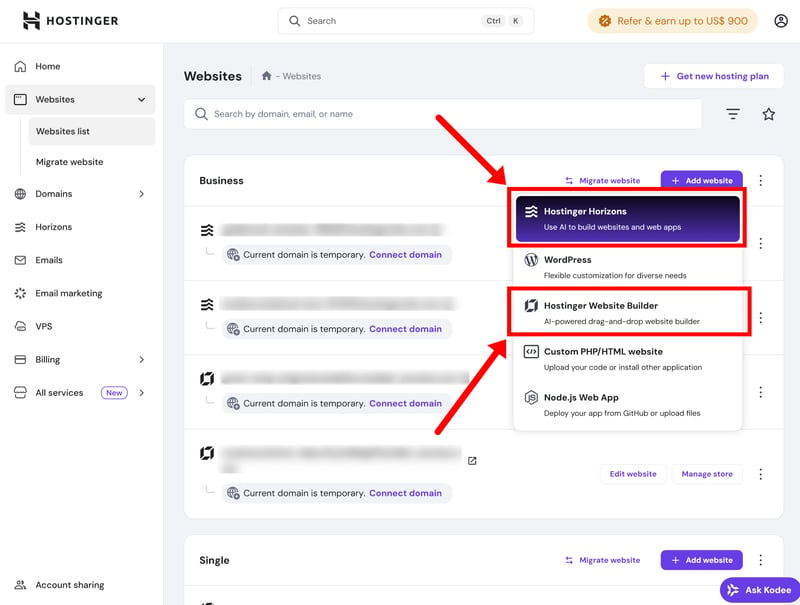
Hostinger offers two website builders: a classic no-code editor, and an AI-powered vibe coding tool.
While Horizons does include ecommerce features and even a code editor, which lets you tweak the code manually, it’s not really built for running a normal online store. It’s better suited for prototyping web apps. We'll stick with the regular website builder for now.
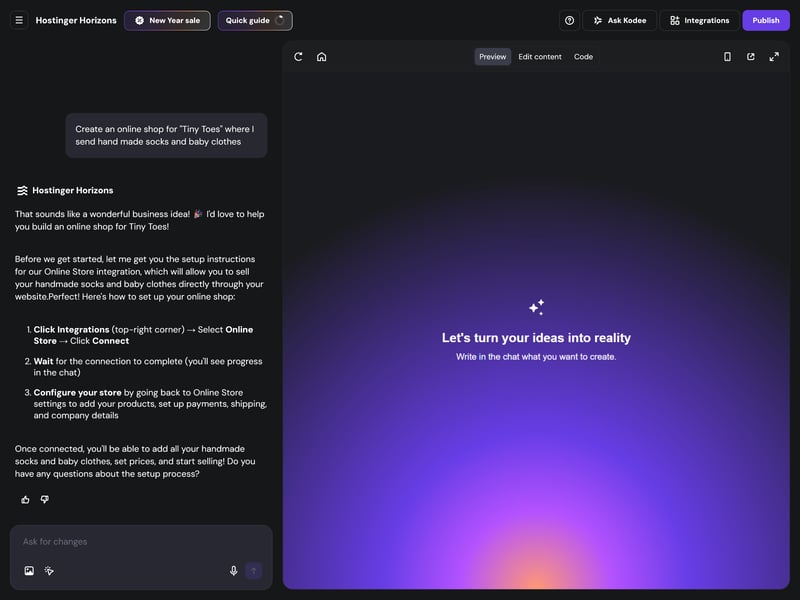
Hostinger Horizons is a nice vibe coding tool, but it’s not really built for online stores.
Setting up your store — with or without AI
Even if you skip Hostinger Horizons, you can use the help of AI to build your store. When you get started, you can either let Hostinger's AI create a website for you, or pick a template and build it yourself.
If you go the AI route, there’s a checkbox to enable ecommerce features from the start ("Add online store to website"). Checking this saves you the trouble of having to add those features manually later on.
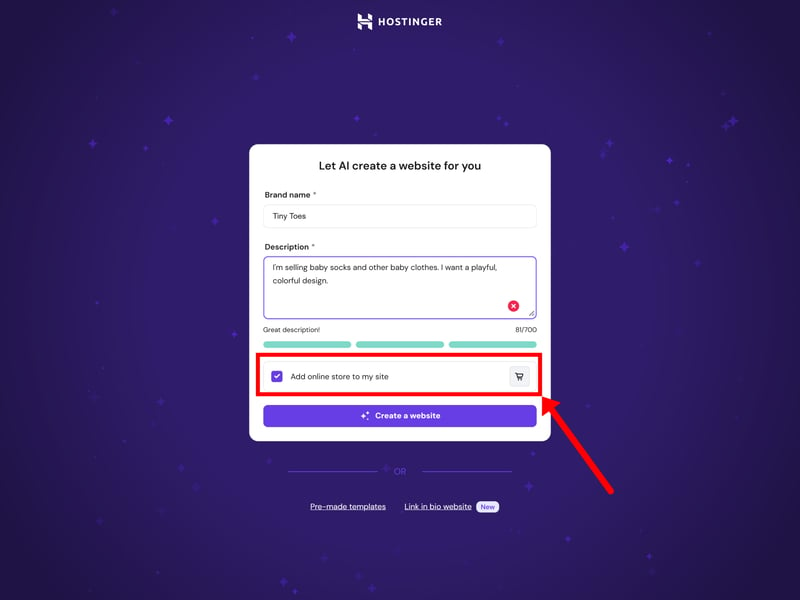
Add an online store to your website.
Regardless of which path you take, you’ll end up in the same editor. From there, you can tweak the layout and content as needed, with AI tools still available to assist you throughout the process.
Working with the website editor
The Hostinger editor is pretty intuitive. The sidebar on the left serves as your main control panel, where you can add pages, tweak the design, manage your inventory, and access SEO or AI tools. There’s a setup checklist for new users that walks you through the basics.
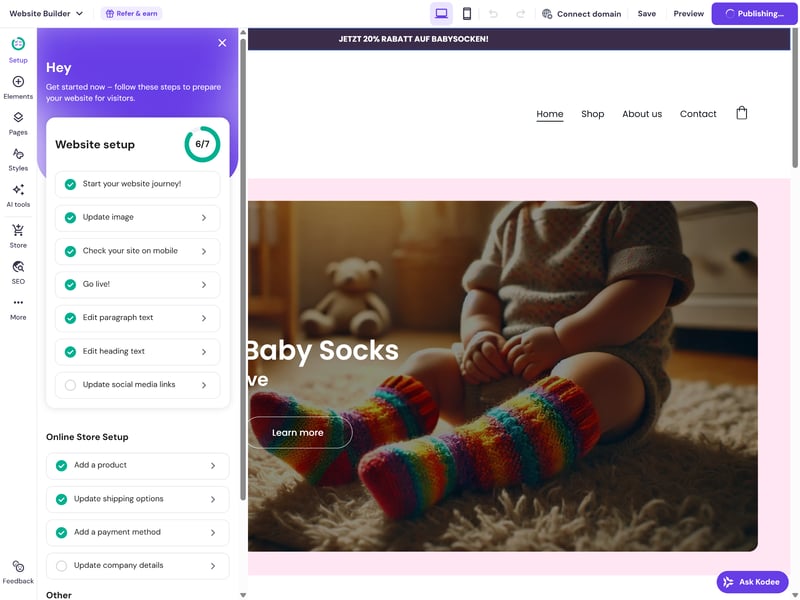
A simple checklist of to-dos helps you set up your store.
As with most site builders, Hostinger keeps the design editor and the store manager separate. You handle the layout in one area and your products, orders, and customer data in another.
The two sides are well-integrated, so jumping between them doesn't feel disruptive. For instance, if you add a new product while working on a page, the editor opens as an overlay, allowing you to update your inventory without leaving the visual builder.
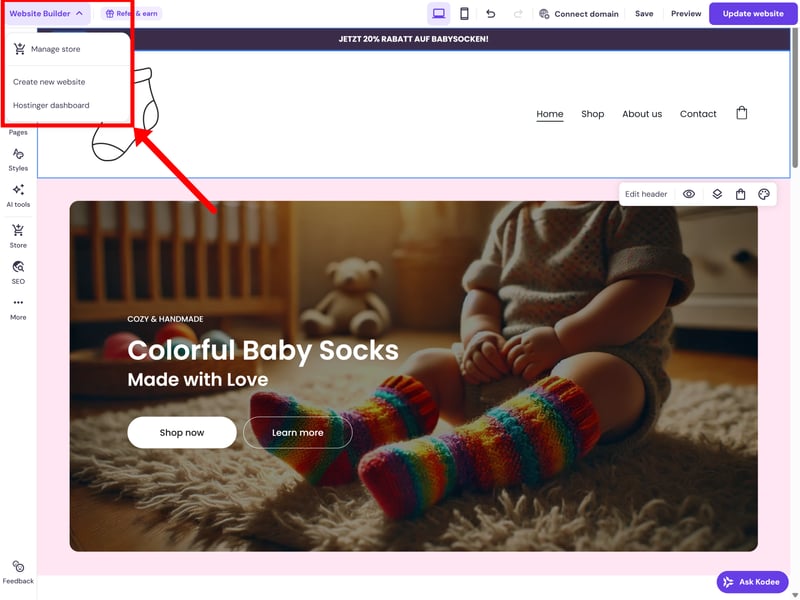
The website editor and store features are kept separate.
Once the store is live, you’ll spend most of your time in the store dashboard. This acts as your main admin hub for managing sales and can be accessed directly from your main Hostinger account.
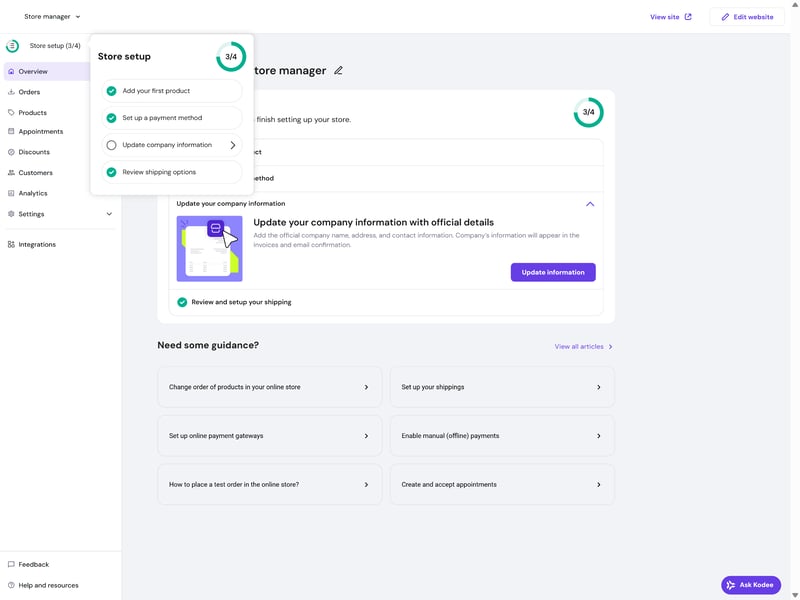
Hostinger's store dashboard is your main admin hub.
While Hostinger’s interface isn’t exactly minimalist, it is pretty well-organized. The dashboard can look a bit busy when you first log in, but it’s intuitive enough that most people will get the hang of it quickly. Everything is generally where you’d expect it to be, so you won’t spend much time hunting for specific settings.
Performance is solid as well. The editor is snappy, pages load quickly, and switching between the website builder and the store admin feels smooth. The only real annoyance is the occasional ad popup, which feels a bit intrusive and tends to cheapen an otherwise polished experience.
Templates & Design
| Number of templates | 170 | 1/2 |
| Template quality |
| 2/3 |
| Website builder |
| 3/4 |
| Customizing shop pages |
| 3/4 |
| Custom code |
| 1/2 |
Hostinger is built for speed. Instead of giving you full creative control, the focus is on getting a store live as quickly as possible with minimal fine-tuning.
AI layouts vs. design templates
As mentioned earlier, you can either let the AI generate a layout for you or go the traditional route by choosing from their pre-made templates.
With the AI option, you enter a short prompt and get a complete site draft within seconds — including a homepage, subpages, and a basic store setup. The results are decent enough, especially compared to similar tools (we're looking at IONOS or Jimdo), but still fairly generic. To be fair, no website builder has nailed truly impressive AI templates yet.
Alternatively, you can pick from a library of over 170 templates, sorted by industry and use case. Around 30 of these are designed specifically for online stores.
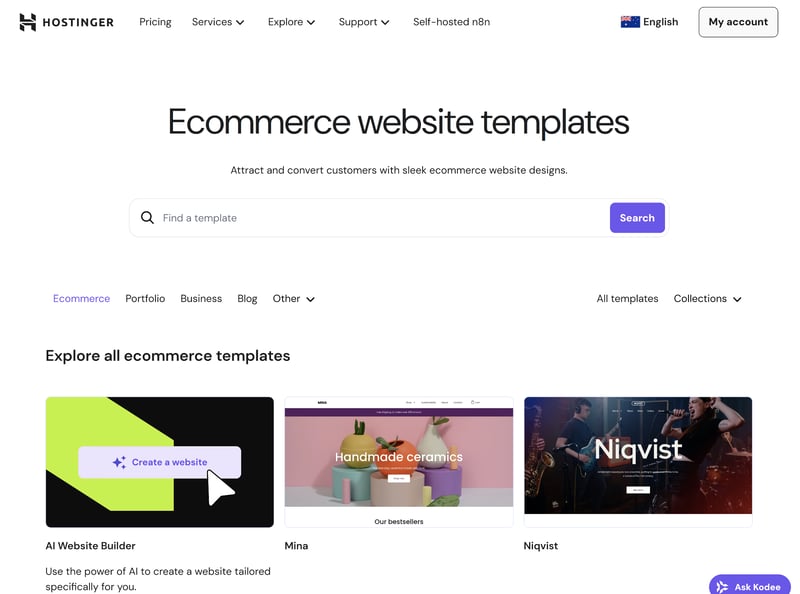
Hostinger's design templates are all available for free.
The designs are modern and functional, but not particularly distinctive. Don't expect visually stunning templates, like on Squarespace. Still, most people should find something that fits their taste.
| Number of templates | |
|---|---|
 | 3,000 |
 | 1,000 |
 | 500 |
 | 225 |
 | 190 |
 | 170 |
 | 70 |
 | 47 |
 | 34 |
 | 12 |
 | 11 |
Once you’ve chosen a template and built your site, you can’t switch to another one later. If you want to start over with a different design, you’ll need to rebuild your site from scratch.
Customizing your design
Hostinger's editor uses a drag-and-drop system based on sections and elements. Pages are built from sections, which contain elements like text, images, or buttons. There’s also a good selection of pre-built page and section templates to speed things up.
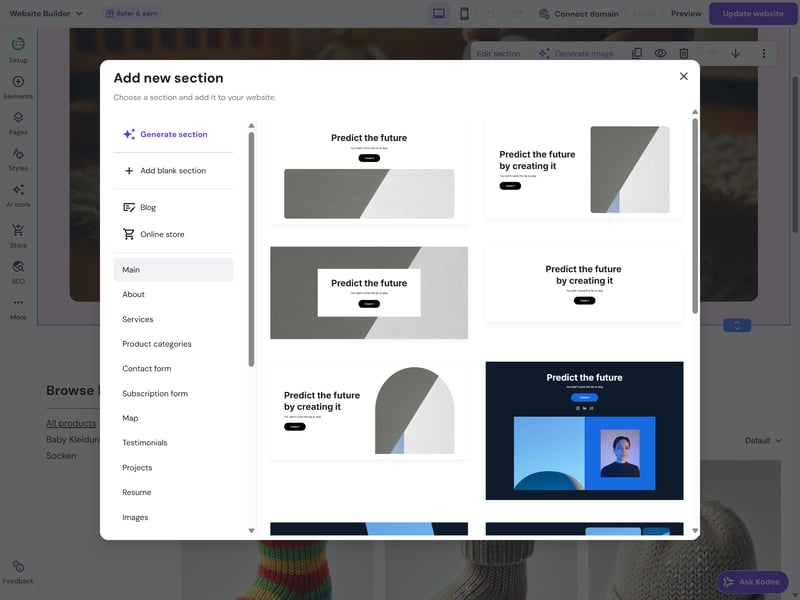
You can either pick a section template or have the AI generate one for you.
When it comes to flexibility, Hostinger occupies a middle ground between advanced builders like Wix and Squarespace and more basic tools like IONOS or Jimdo. You get more control than you would with most beginner-level builders, as you can position elements freely and customize the styling in more detail. It still doesn’t provide the total design freedom found in more advanced editors, though.
Global design settings are managed under the “Styles” tab. From here, you can control your sitewide colors, fonts, and button styles.
Hostinger doesn’t give you full access to the underlying code, so building completely custom templates from scratch isn’t an option. The structure and layout are always tied to the builder.
There's at least some room to override the defaults. You can use custom CSS to adjust specific elements or change styles. It’s also possible to embed your own HTML, CSS, or JavaScript—which is useful if you need to integrate external tools or custom widgets.
Customizing store pages
There are two main types of ecommerce pages in Hostinger: product lists and individual product pages.
Product list sections display multiple products at once. Compared to regular website pages, the layout is more restricted. You can’t freely drag elements around or build fully custom layouts inside these sections.
There are still plenty of settings to tinker with. Beyond basic styling, you can customize the list by adding a search bar, choosing how many products to show per page, or enabling infinite scrolling.
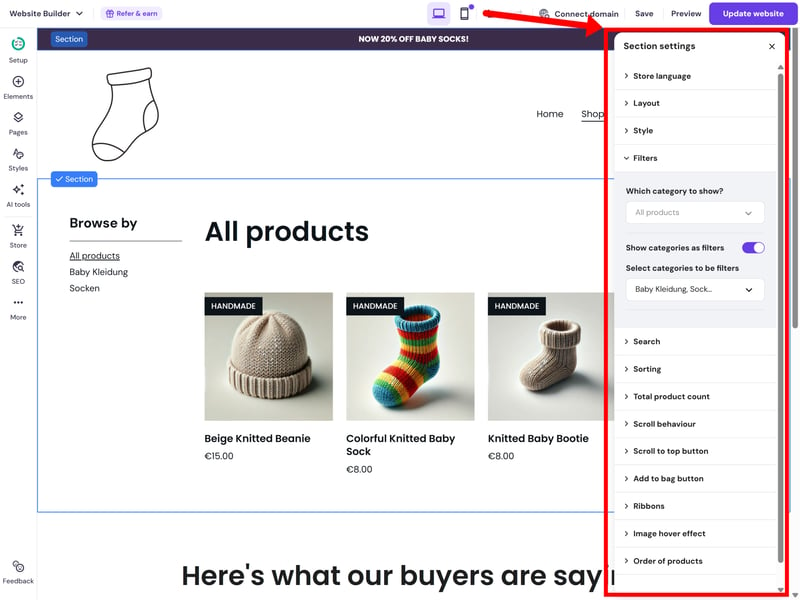
Hostinger offers plenty of settings for product list sections.
You can also filter products by category or display categories as selectable filters. Products themselves can be tagged with labels like “New Arrival” or “Sale”.
Hostinger doesn’t create category pages automatically. Instead, you set them up manually by creating a new page and adding a product list filtered by a specific category. The upside is that you can build these pages more freely, with additional text, images or other sections.
Individual product pages are more restrictive. The overall structure is largely fixed, so while you can adjust things like gallery placement, alignment, and button styles, you can’t fully rearrange the main product elements. You can, however, add extra sections above or below the product information to include additional content or visuals.
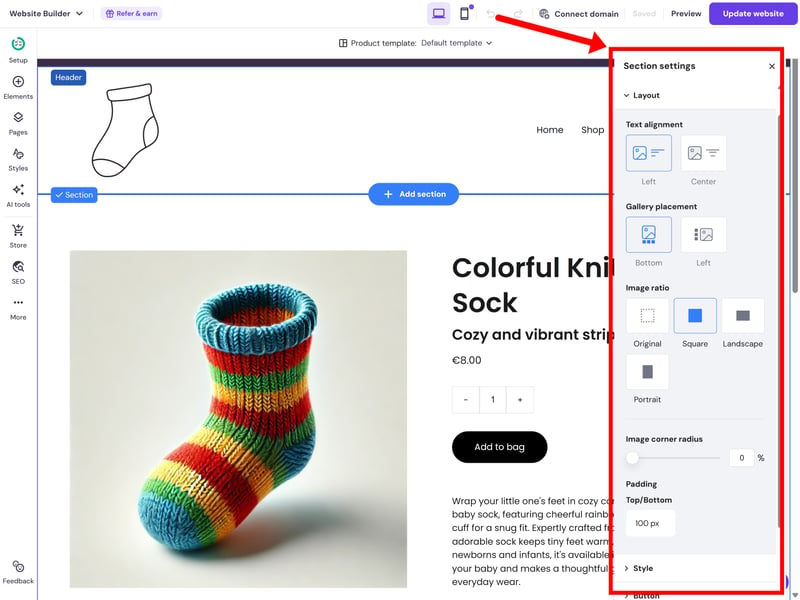
The section settings for product pages arelimited.
You can also create up to three different product templates and assign them to specific products. That gives you some flexibility if you want to present different types of products in different ways.
Independent mobile editing
By default, your mobile site mirrors the desktop layout. However, you can switch to the mobile view to make independent adjustments.
In this mode, you can rearrange elements and sections or tweak settings like text size and alignment without messing up your desktop layout. Just keep in mind that core styling. like font choices or colors, will still apply to both views.
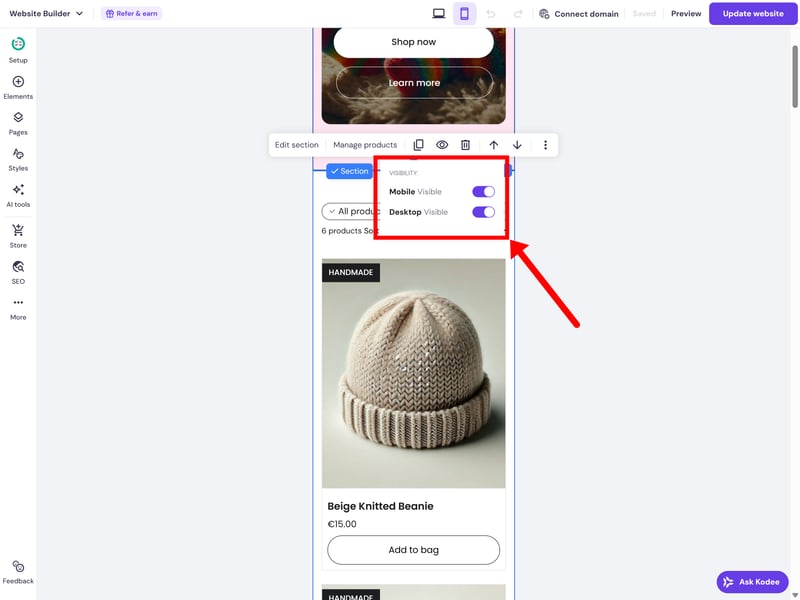
You can control which elements and sections are visible on different devices.
You also have control over which elements or sections are visible on each device. If a specific section doesn't work well on a phone, you can hide it and create a mobile-optimized version to show in its place.
Overall, Hostinger offers enough flexibility to get your site looking right on smaller screens without too much hassle.
It’s definitely possible to build a polished-looking store with Hostinger. The templates are solid, even if they don’t stand out much visually. For a beginner-friendly website builder, you get a reasonable amount of design flexibility, but the platform clearly has its limits.
Since access to the underlying code is restricted, there’s not much you can do to work around those limitations. If you want complete creative control, Hostinger probably isn’t the right platform for you.
Product Management
| Product types |
| 2.5/4 |
| Product features |
| 1.5/3 |
| Product variants |
| 5/6 |
| Product pricing |
| 1.5/3 |
| Product organization |
| 1/2 |
| Inventory |
| 1/2 |
Hostinger handles the basics well enough. You can sell many different product types, add variants, track stock, and organize products into categories. The tools lack the depth and flexibility of more ecommerce-focused platforms, though, missing many of the features that are crucial for larger or more complex stores — from bulk editing to advanced filtering.
Adding new products
In the Store Manager under “Products”, your inventory is managed in a standard list view where you can track all your items at a glance. Adding a new product only takes a few clicks. There’s currently a limit of 1,000 products, meaning you can create and sell up to 1,000 different items.
The first step is picking a product type, and Hostinger is surprisingly flexible here. In addition to physical goods, you can also sell digital downloads, services, gift cards, and even take donations. It also supports print-on-demand and appointment bookings right out of the box.
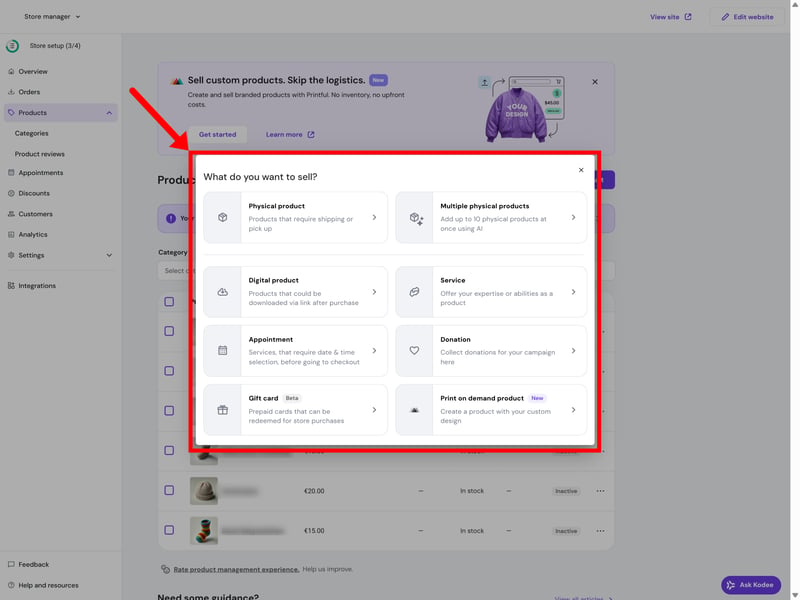
Hostinger supports a wide range of product types.
There’s no native support for memberships, subscriptions, or product bundles yet. However, for a builder at this level, it actually handles more product types natively than most of its competitors.
Hostinger | Wix | Shopify | Squarespace | Ecwid | IONOS | BigCommerce | Jimdo | Sellfy | Square | WooCommerce | |
|---|---|---|---|---|---|---|---|---|---|---|---|
✓ | ✓ | ✓ | ✓ | ✓ | ✓ | ✓ | ✓ | ✓ | ✓ | ✓ | |
✓ | ✓ | ✓ | ✓ | ✓ | ✓ | ✓ | ✗ | ✓ | ✓ | ✓ | |
✓ | ✓ | ✗ | ✓ | ✗ | ✓ | ✗ | ✓ | ✗ | ✗ | ✗ | |
✗ | ✓ | ✓ | ✓ | ✗ | ✗ | ✗ | ✗ | ✗ | ✗ | ✗ | |
✓ | ✓ | ✓ | ✓ | ✓ | ✓ | ✓ | ✗ | ✗ | ✗ | ✗ | |
✓ | ✓ | ✗ | ✗ | ✓ | ✓ | ✓ | ✓ | ✗ | ✗ | ✗ | |
✗ | ✓ | ✓ | ✓ | ✓ | ✗ | ✗ | ✗ | ✓ | ✗ | ✗ | |
✗ | ✓ | ✓ | ✗ | ✗ | ✗ | ✗ | ✗ | ✗ | ✓ | ✓ | |
Total | 5 | 8 | 6 | 6 | 5 | 5 | 4 | 3 | 3 | 3 | 3 |
Editing your products
The product editor is pretty intuitive. At the top, you upload your product images. If you want to save time, Hostinger can AI-generate product details from your images. This works reasonably well, at least for a first draft: the descriptions are quite generic, but titles and categories are usually accurate.
Of course, you can also enter everything manually. You'll find all the standard fields, including titles, subtitles, descriptions, pricing, variants, and categories. You can also add product labels (e.g. “On Sale Now”).
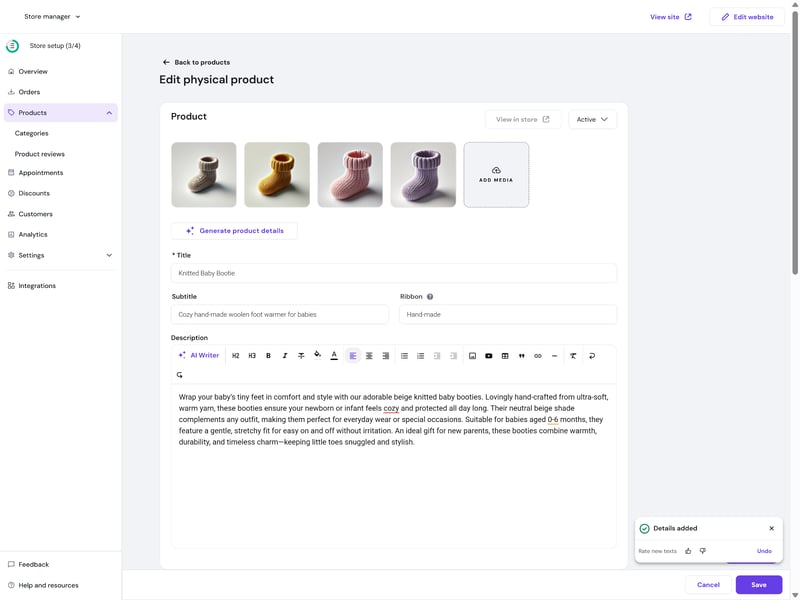
Editing products in Hostinger.
There is also an option to add custom fields for personalizations, such as engravings or special requests. These are just basic text boxes, but they’re enough for simple customer instructions.
One limitation is the lack of proper bulk editing. You can’t update prices or stock levels for multiple products at once; everything has to be edited individually. As a partial workaround, you can create up to ten products at once by uploading multiple images and letting the AI fill in the basics, but that’s about as far as batch management goes.
The pricing options are pretty bare-bones. You can set a standard price, add a “compare-at” price to show a discount, and assign different prices to variants, but that’s about as far as it goes. There’s no support for automatic unit pricing (like price per kg or liter), which is often a legal requirement in some regions, and you can’t set up volume discounts for bulk purchases.
Up to 100 variants per product
Setting up product variants is straightforward. In the “Options” section of the product editor, you can create as many options as you like (e.g. size, color, material), and the builder automatically generates all possible variant combinations.
There's a cap on how many variants you can have, though. While Hostinger’s official documentation still lists the limit as 50 per product, we were able to create up to 100. Each variant can be managed individually, with its own price, SKU, stock level, weight, and unique image.
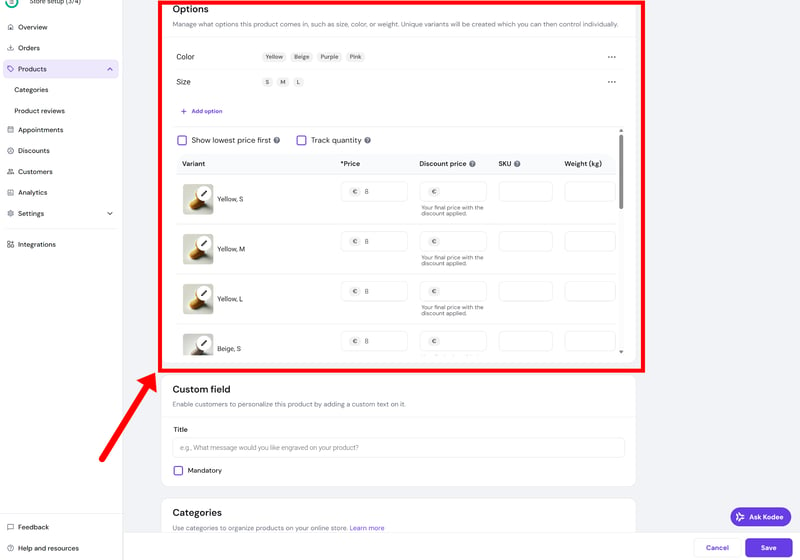
You can offer each product in up to 100 variants.
Since Hostinger is geared toward simpler stores (and the product limit is capped as well), the variant limit shouldn't be too much of a problem. Still, it might be too restrictive for more complex products or larger catalogues. Other ecommerce builders offer more flexibility here — many don’t impose a hard variant limit at all.
Hostinger | BigCommerce | Ecwid | IONOS | Shopify | Square | Squarespace | WooCommerce | Sellfy | Wix | Jimdo | |
|---|---|---|---|---|---|---|---|---|---|---|---|
Max. number of options | unlimited | unlimited | unlimited | unlimited | 3 | 6 | 6 | unlimited | unlimited | 6 | 2 |
Max. number of variants | 100 | 600 | unlimited | unlimited | 2048 | 250 | 250 | unlimited | unlimited | 1000 | 36 |
Variant-specific images | ✓ | ✓ | ✓ | ✓ | ✓ | ✓ | ✓ | ✓ | ✓ | ✗ | ✗ |
Variant-specific pricing | ✓ | ✓ | ✓ | ✓ | ✓ | ✓ | ✓ | ✓ | ✓ | ✓ | ✗ |
Variant-specific SKU | ✓ | ✓ | ✓ | ✓ | ✓ | ✓ | ✓ | ✓ | ✗ | ✓ | ✗ |
Variant-specific inventory | ✓ | ✓ | ✓ | ✓ | ✓ | ✓ | ✓ | ✓ | ✓ | ✓ | ✗ |
Total | 4 | 4 | 4 | 4 | 4 | 4 | 4 | 4 | 3 | 3 | 0 |
Organizing your products with categories
Product organization is fairly basic. You can assign products to one or more categories and use those as filters in your product listings, or build dedicated category pages.
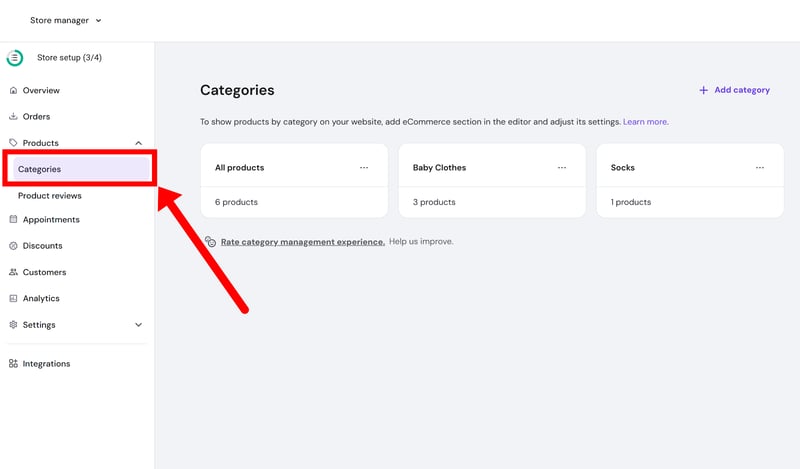
Managing categories.
That’s basically it, though. There’s no support for tags, automated rules, or more advanced filtering options. Compared to other ecommerce builders, this is fairly limited. Shopify, for example, lets you work with collections, tags, and metafields to structure your catalogue and enable more dynamic filtering.
But again: Hostinger isn't really meant for stores that need that level of complexity in the first place. For smaller stores with simple catalogues, the organizational tools might be enough. But as you get closer to the 1,000-product limit, a few more options would be helpful.
Managing your inventory
On the inventory side, Hostinger keeps things fairly simple. You can set stock levels for each product and variant, and choose whether inventory should be tracked automatically. When something sells out, it’s marked accordingly.
There’s also a built-in low-stock alert. Just enable “Track low inventory” and set a threshold — you’ll get notified when stock drops below that level.
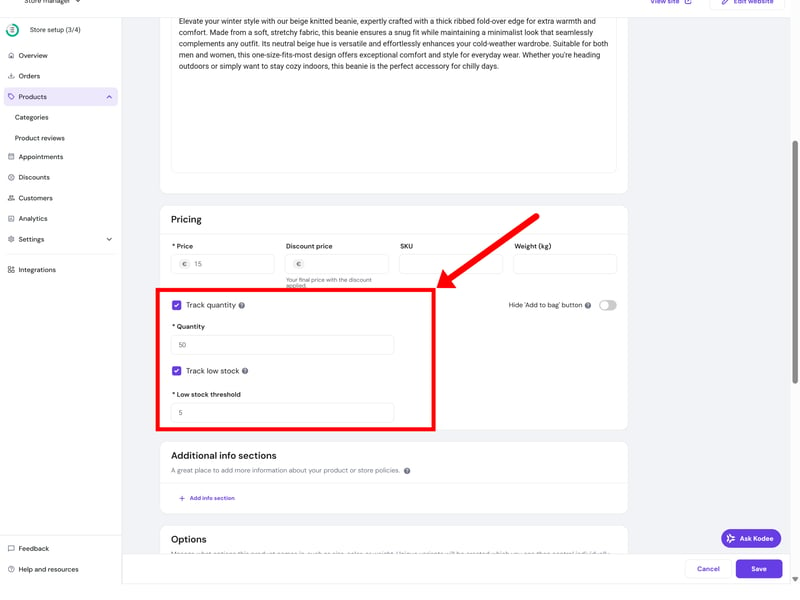
Hostinger will alert you when inventory is running low.
What's missing are more advanced features, such as support for multiple warehouse locations or more complex inventory setups. But once again, that's not really what Hostinger is designed for, anyway — it’s aimed at simpler stores with a single stock source. If you need to manage inventory across multiple locations, tools like Shopify play in a different league.
Hostinger does a decent job with the basics. You can sell many product types out of the box, set up variants, track stock, and keep your catalogue organized with categories. The interface stays clean and easy to use throughout, which fits the platform’s beginner-friendly approach.
As soon as your store grows, though, you'll start to feel the limits. There’s no bulk editing, no tagging system, and not much flexibility when it comes to organizing or filtering products. That might not be a dealbreaker for small shops, but definitely hinders your growth.
Sales Features
| Taxes |
| 1/3 |
| Shipping options |
| 1.5/3 |
| Discounts |
| 1/3 |
| Payment providers |
| 1/3 |
| Order management |
| 1/2 |
| Advanced features |
| 1/6 |
Hostinger isn’t built for high-volume, heavy-duty ecommerce. It’s clearly intended for smaller shops with a manageable number of orders. While the essentials are all there, the platform is pretty light on automation and more advanced sales tools.
Managing payments
You'll find the payment settings under the “Payments” tab in the store manager. Hostinger supports a handful of major providers, but your options will vary depending on your location and currency.
In the US, you can use PayPal, Stripe, and Paysera. Together, they cover the main payment methods, including credit and debit cards, PayPal, as well as Apple Pay and Google Pay.
There’s also support for manual payment methods with custom instructions, for example for bank transfers or cash on delivery.
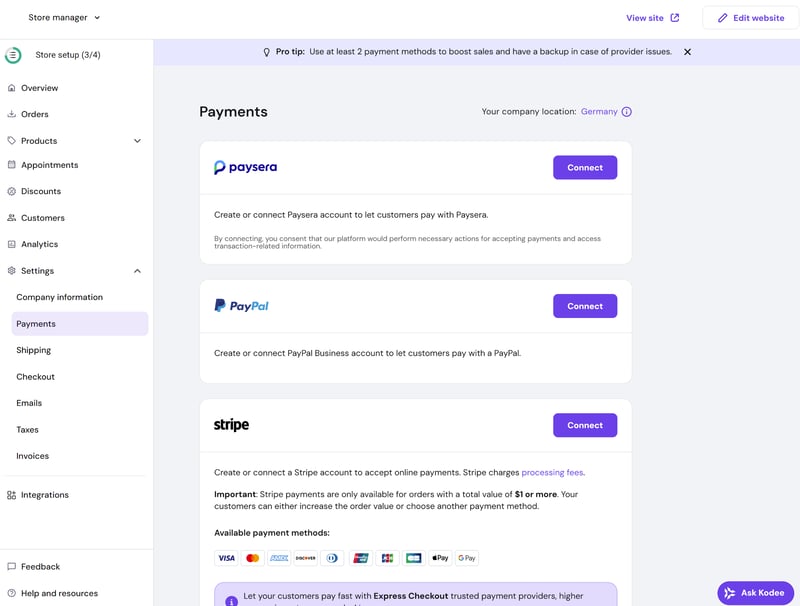
Hostinger supports only a handful of payment providers.
Unlike platforms like Shopify or Wix, Hostinger doesn’t offer its own payment gateway, and the selection of third-party providers is fairly limited as well. That includes not just smaller regional providers, but even some major payment options, like Square or Amazon Pay. Other ecommerce platforms simply give you far more choice here:
Hostinger | WooCommerce | Shopify | Ecwid | IONOS | Wix | BigCommerce | Squarespace | Jimdo | Sellfy | Square | |
|---|---|---|---|---|---|---|---|---|---|---|---|
Number of payment providers | 4 | 19 | 100 | 120 | 120 | 80 | 65 | 5 | 2 | 2 | 1 |
Paypal | ✓ | ✓ | ✓ | ✓ | ✓ | ✓ | ✓ | ✓ | ✓ | ✓ | ✗ |
Stripe | ✓ | ✓ | ✓ | ✓ | ✓ | ✓ | ✓ | ✓ | ✓ | ✓ | ✗ |
Square | ✗ | ✓ | ✗ | ✗ | ✗ | ✗ | ✗ | ✓ | ✗ | ✗ | ✓ |
Amazon Pay | ✗ | ✓ | ✓ | ✓ | ✓ | ✗ | ✓ | ✗ | ✗ | ✗ | ✗ |
Klarna | ✗ | ✓ | ✓ | ✓ | ✓ | ✓ | ✓ | ✓ | ✗ | ✗ | ✗ |
Mollie | ✗ | ✓ | ✓ | ✓ | ✓ | ✓ | ✗ | ✗ | ✗ | ✗ | ✗ |
Native payment solution | ✗ | ✓ | ✓ | ✗ | ✗ | ✓ | ✗ | ✓ | ✗ | ✗ | ✗ |
Manual payment methods | ✓ | ✓ | ✓ | ✓ | ✓ | ✓ | ✓ | ✗ | ✗ | ✗ | ✗ |
Total | 3 | 8 | 7 | 6 | 6 | 6 | 5 | 5 | 2 | 2 | 1 |
Setting up taxes
Tax setup in Hostinger is a strictly manual affair. You have to define your own tax regions and input the rates yourself in the settings menu. There's a simple toggle to decide whether or not to apply tax to shipping, but that’s about as far as the options go.
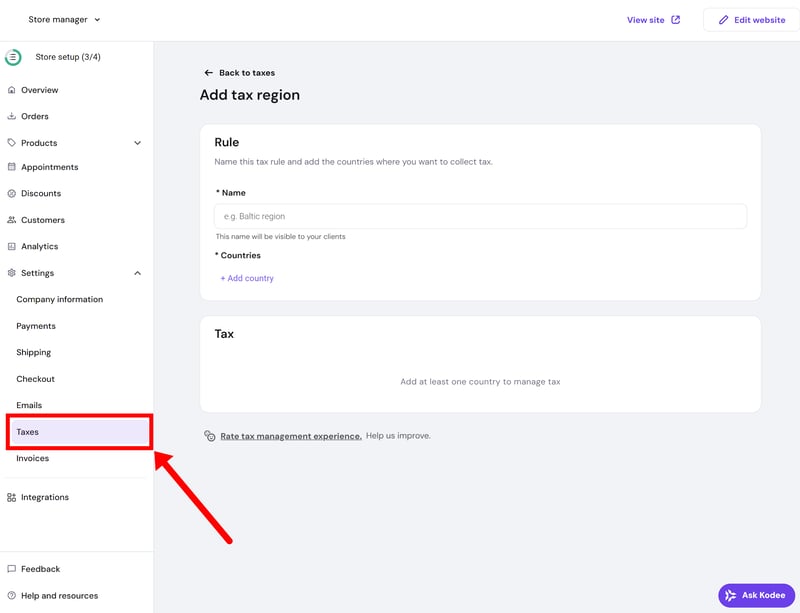
Managing taxes in Hostinger.
There are no automated tax calculations or “smart” features to help you stay compliant. You also can’t set different tax rates for specific products or categories, which can be a problem if you sell items with varying tax requirements. Most other ecommerce platforms are much further ahead when it comes to tax automation.
Shipping and delivery options
Shipping is another area where you’ll have to do most of the work yourself. You need to set up your own shipping zones from scratch. Then, you can define up to 25 different shipping options per zone. Rates can be configured as flat fees or tiered based on the order's weight or total value, and there's also a simple option for local pickup.
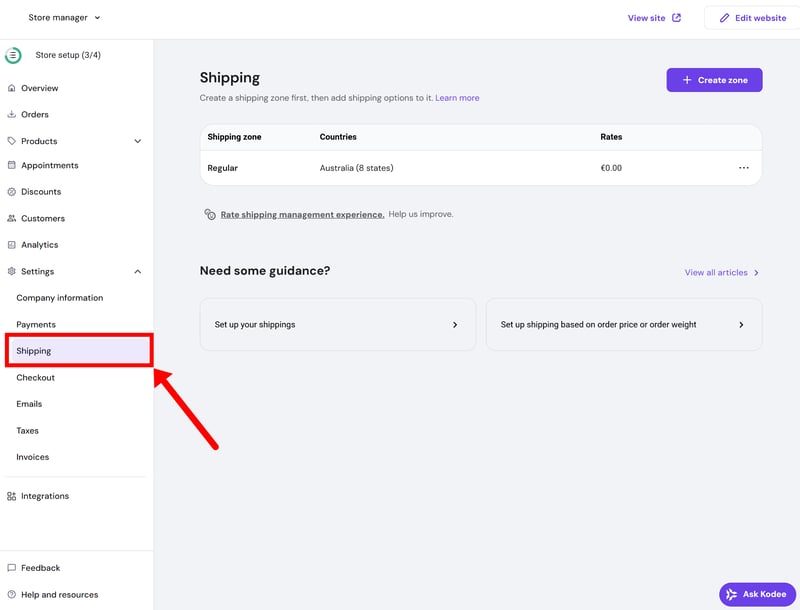
You can create multiple shipping zones, and add different shipping options per zone.
Hostinger doesn't support real-time carrier rates. Since there’s no live integration with carriers like UPS, FedEx, or USPS, you can’t automatically calculate shipping costs at checkout. This makes managing shipping much more hands-on than it is on more advanced platforms.
Setting up discounts
Discounting in Hostinger is strictly limited to coupon codes. You can set these up as either a percentage or a fixed amount and apply them to specific categories or your entire inventory. You also have the standard options for setting usage limits, minimum order values, and expiration dates.
There’s currently no support for automatic discounts, cart-level rules, or any kind of promotion that doesn’t require a customer to manually enter a code at checkout.
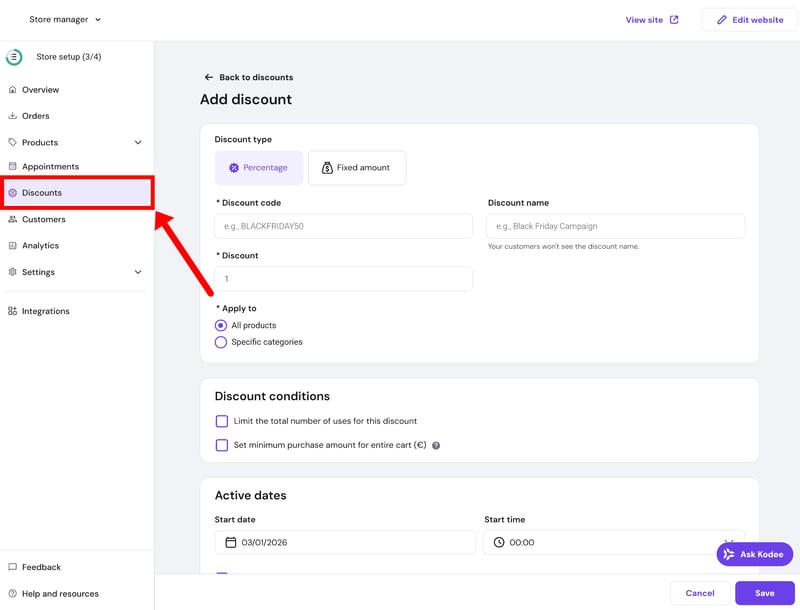
Hostinger supports discounts via coupon codes only.
Order fulfillment and management
The “Orders” section provides a straightforward overview of every sale, including the essentials like customer info, payment status, and fulfillment state. Clicking into an individual order lets you see all the details at a glance, allowing you to mark items as shipped, process refunds, or generate invoices and receipts.
For physical goods, you can add tracking numbers, and the system automatically notifies customers of any shipping updates. Digital products and donations are automatically marked as completed as soon as the payment clears.
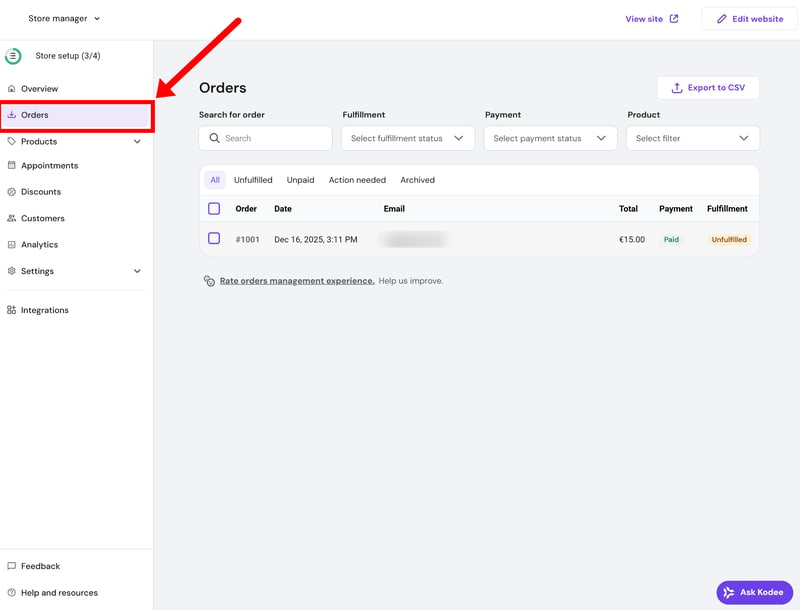
Order management in Hostinger.
As usual, though, Hostinger is very light on automation or advanced workflows. You won’t find bulk actions, custom order statuses, or native integrations with external fulfillment services. The reporting and filtering options are also quite thin, and there’s no unified view if you happen to sell across multiple channels.
Hostinger sticks to the basics
Beyond the core features, Hostinger doesn't really offer much in the way of extras. There’s no support for multichannel selling, no built-in POS system, and no integrations for dropshipping.
The platform comes with a built-in email marketing tool, but it’s a paid add-on. Pricing depends on your number of subscribers.
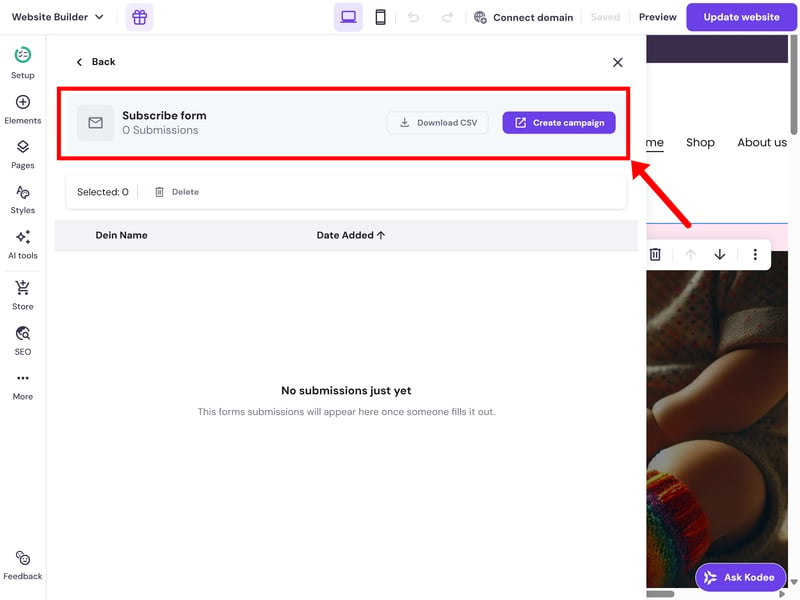
A simple email marketing platform is built in, but it costs extra.
There are a handful of third-party integrations available, but Hostinger doesn’t offer a proper app store or a public API. The platform is pretty closed off: if a feature isn't already built in, you’re likely out of luck.
Hostinger covers the essentials needed to run a simple shop. Payments, taxes, and shipping are all easy enough to set up, but the trade-off is the manual effort involved. Since there’s almost no automation happening in the background, you’ll have to handle most of the day-to-day tasks yourself.
Don’t expect much in the way of advanced features or extra add-ons, either; Hostinger sticks strictly to the basics and doesn’t leave much room for expansion.
Customer Support
| Documentation and tutorials |
| 1/2 |
| Support channels |
| 1/2 |
| Speed and quality |
| 2/3 |
| Customer reviews |
| 2/3 |
Hostinger has a fairly extensive help center that covers its entire product range. For the website builder specifically, there’s a dedicated section with over 270 articles. The content is solid: guides are concise, well-structured, and usually include helpful screenshots.
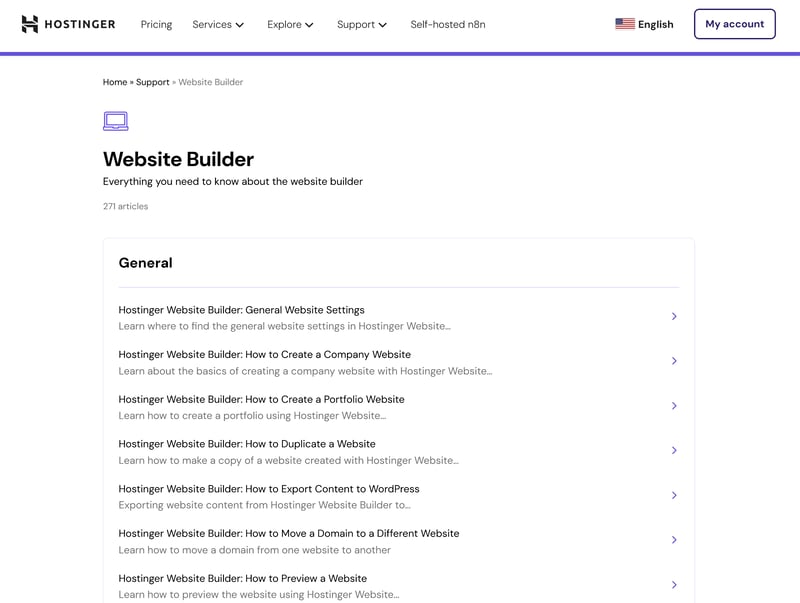
Hostinger's support center.
Hostinger also publishes video tutorials on YouTube. Many of them are genuinely useful and go into decent detail, though the channel as a whole could be a lot better organized.
Human support via live chat
If you need to talk to someone, live chat is your only option. You’ll start with an AI chatbot named Kodee, which acts as a filter. You describe your problem, and it either suggests help articles or tries to answer you directly.
As far as AI assistants go, Kodee does a decent job with basic questions. You need to be very specific, though, and tell Kodee exactly which product you’re using, to get a useful response.
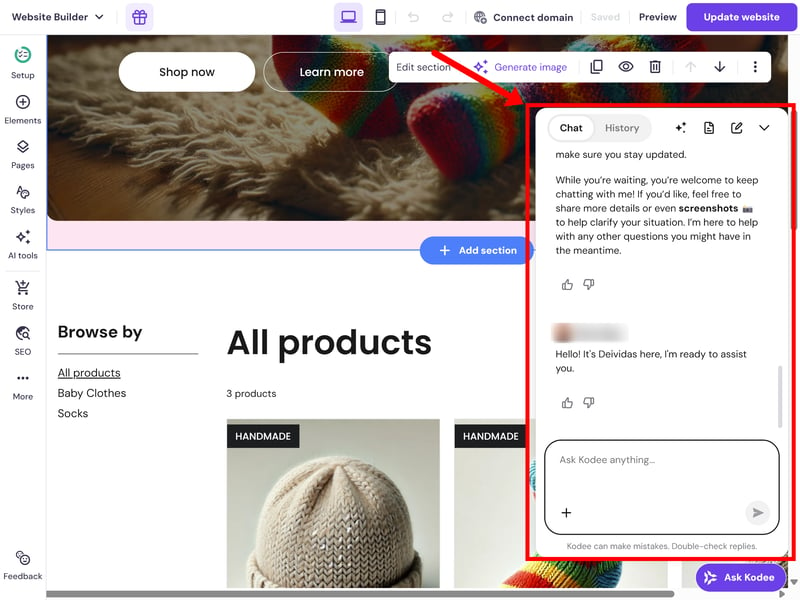
The AI assistant with live chat is always just one click away.
If you’d rather talk to a real person, you can ask Kodee to connect you to an agent. Every time we tried this, it only took a few minutes to get through to a member of the support team.
The agents were helpful enough, but the interactions felt a bit impersonal, as if they were mostly just pulling from a library of pre-written templates. This is a common criticism you’ll see on review sites like Trustpilot, too.
Hostinger’s support is easy to reach and generally helpful for simple questions. The AI chatbot Kodee can handle many basic issues on its own, and human agents usually step in fairly quickly when needed.
For more complex or time-sensitive issues, though, we’re not sure that Hostinger’s support is up to the task. Responses often feel scripted and generic, and there’s not much in the way of proactive troubleshooting or tailored advice.
Pricing
| Costs for a small shop | $2.75 | 6/6 |
| Costs for medium-sized shop | $2.75 | 6/6 |
| Costs for large shop | - | 0/3 |
| Pricing model |
| 3/3 |
| Trial version |
| 1/2 |
Hostinger keeps things simple with a single ecommerce plan (the “Business Website Builder”). It’s very affordable to start with, allowing you to create up to 50 websites and list up to 1,000 products. Hostinger itself doesn’t charge transaction fees, though payment providers still take their cut.
The actual monthly cost depends on how long you’re willing to commit upfront. The lowest rates are reserved for long-term plans (up to four years). Just keep in mind that once that initial term ends, the price jumps significantly — roughly three times higher. Even then, it’s still relatively affordable compared to other ecommerce platforms.
| Business | |||
|---|---|---|---|
| Monthly price | from $2.75 | ||
| Contract period (months) | 1 - 48 | ||
| Product management | |||
| Number of products | 1,000 | ||
| Product filters | ✗ | ||
| Product variants | ✓ | ||
| Product inventory | ✓ | ||
| Product reviews | ✓ | ||
| Internationalization | |||
| Multiple languages | ✓ | ||
| Multiple currencies | ✗ | ||
| Automatic tax calculation | ✓ | ||
Comparing Hostinger to the competition
To compare costs across ecommerce builders, we looked at three typical scenarios and calculated the base cost of the store builder:
Small store: 10 products, up to $10,000 annual revenue, custom domain
Medium store: 500 products, up to $200,000 annual revenue, with product variants
Large store: 10,000 products, up to $2 million annual revenue, with variants, product filters, and multilingual support¹
¹Due to its 1,000-product limit, Hostinger isn’t a viable option for scenario 3.
Here are the results:
| Small shop | Mid-size shop | Large shop | |
|---|---|---|---|
| $2.75 | $2.75 | |
| $10.00 | $10.00 | $19.93 |
| $10.00 | $10.00 | $19.93 |
| $11.75 | $11.75 | $11.75 |
| $12.60 | $22.00 | |
| $14.00 | $14.00 | $68.00 |
| $22.00 | $119.00 | |
| $23.00 | $23.00 | |
| $25.00 | $45.00 | $105.00 |
| $29.00 | $299.00 | |
| $29.00 | $29.00 | $29.00 |
As you can see, Hostinger is by far one of the cheapest options on the market. Remember, though: These low prices only apply during the initial contract term. After that, costs increase noticeably — but even then, Hostinger remains one of the more affordable ecommerce builders overall.
You get what you pay for, though: Hostinger is cheap for a reason, and you can't expect the level of functionality you’d find in Shopify or other top-tier platforms.
Hostinger sticks to its signature pricing strategy, attracting users with introductory rates that are almost impossible to beat. It’s easily one of the most affordable ways to start your own online store — maybe even the cheapest option on the market.
Like with most budget-options, though, you’re trading power and functionality for a lower price tag. Hostinger lacks the automation capabilities, sophisticated sales tools, and third-party ecosystem of more established platforms.
If you're looking for a future-ready platform that will scale with your business, you’ll need to pay a few dollars more and invest in something more capable.
Final Verdict: Not Bad, Considering the Price — But Not Great Either
Considering the price, Hostinger's ecommerce website builder is actually pretty impressive. All the core ecommerce features are there, the drag-and-drop editor is flexible enough, and getting your shop live is about as low-stress as it gets. For what you’re paying, it’s a very polished experience.
Don’t expect a Shopify killer, though. Hostinger simply isn’t built for scale — not only because of the 1,000-product cap, but because it lacks the automation and sophisticated sales tools a serious online store eventually needs. It's a low-cost solution for hobby shops, side projects, or small ecommerce ventures. Nothing more, nothing less.

Hostinger User Feedback
There’s strength in numbers, so it’s always worth looking at user reviews. The overall feedback on sites like Trustpilot is generally pretty positive. Here are some of the most frequent pros and cons:
Fast and responsive support
Many users report that support responds quickly and resolves issues in no time, sometimes within just a few minutes.Easy-to-use website builder
The website builder is described as simple and intuitive. Even users without technical skills can put together a nice-looking online store quickly.Good value for money
Hostinger's low prices are a hit with customers, who also appreciate having everything (hosting, domain, email, SSL, store features) under one roof.
Surface-level support
Some users feel that support relies too heavily on pre-written replies and links to help articles, rather than offering more hands-on help.Limited features
Once you move beyond a basic store setup, Hostinger's limitations become more noticeable. Several users complain about missing features and limited flexibility in managing their store.Account suspensions
Some users report sudden suspensions of domains or entire accounts due to alleged policy violations, which can be frustrating to deal with.
Top Hostinger Alternatives
Not convinced by Hostinger? Depending on what you’re looking for, there are definitely better options out there:
Shopify: The best allrounder
Hostinger simply isn’t built for serious ecommerce projects. If you’re planning to grow your business and really give it a go in the ecommerce space, scalable platforms like Shopify are a much better choice.WooCommerce: More flexibility and control
If you want more control over the technical side of your store, WooCommerce is worth a look. As a WordPress plugin, it gives you full control over your infrastructure, integrations, and customization — but also requires more hands-on setup and maintenance.Squarespace or Wix: More capable website builders
Hostinger isn't just limited in terms of sales tools; its website builder is fairly basic as well. If you’re looking for more creative freedom, Squarespace or Wix are much stronger contenders. They offer a far superior selection of templates and more granular customization.
Find the best Hostinger alternatives here: