Square Online Review 2026: A Solid Website Builder for Ecommerce?


Square (not to be confused with Squarespace) is best known for its point-of-sale system for brick-and-mortar businesses. But the company also offers its own ecommerce website builder for creating online stores and business websites. Is it any good, though?


Square* is an American fintech company best known for its point-of-sale (POS) systems, which let businesses accept card payments in-store and on the go. If you’ve ever paid by card at a café or market stall, there’s a good chance you’ve used one of Square’s little card readers.
Over time, Square has evolved from a simple digital payments company into a broader commerce ecosystem, covering everything from payment processing to online sales. In 2019, the company launched its own ecommerce website builder, which lets businesses create an online store that connects directly to Square’s payment and inventory systems.
Still, unlike platforms like Shopify, Square didn’t start with ecommerce — its roots are in brick-and-mortar retail. Can it still compete with dedicated ecommerce platforms? Read on to find out.
Square Online Review
Free plan
You can start selling for free. Square's free plan covers the basics and is enough to launch a small online store.Online store and POS in one ecosystem
Square connects your online store directly to its POS system, so inventory, payments, and orders stay synced across both channels.Quick to set up
The entire Square platform, including the website builder, is very beginner-friendly. Most users should be able to get a basic online store up and running quickly.
Limited customization
Square’s website builder is fairly basic when it comes to design flexibility and customization. There aren’t many themes to choose from, and only limited ways to customize them.Not great for larger stores
Square works best as a lightweight ecommerce solution for smaller shops with simple catalogues. Its ecommerce tools just aren’t deep and sophisticated enough to support larger and more complex operations.Weak customer support
Don't expect great support. Users complain about long wait times, limited availability, and superficial responses.
Setup & Ease of Use
| Setup |
| 3/4 |
| User interface |
| 6/8 |
| Performance |
| 2/3 |
Square is, first and foremost, a sales and payment platform for merchants. The website builder is really just an add-on to that core system. That comes with a few trade-offs in terms of features, but it also means Square can focus on the essentials, which also helps keep things simple and easy to use.
Setting up your Square account
Thanks to Square’s free plan, getting started is easy and doesn’t require any payment details upfront. You can always upgrade later if you need more features. Once you’re in, you land straight in the dashboard, where you manage your store.
The layout is clean and straightforward to navigate. There’s a fixed sidebar on the left with all the key sections: products, orders, sales channels, analytics, and customer data. When you first log in, the “Home” section shows a short checklist that walks you through the basics: verifying your account, adding products, or taking your first payment.
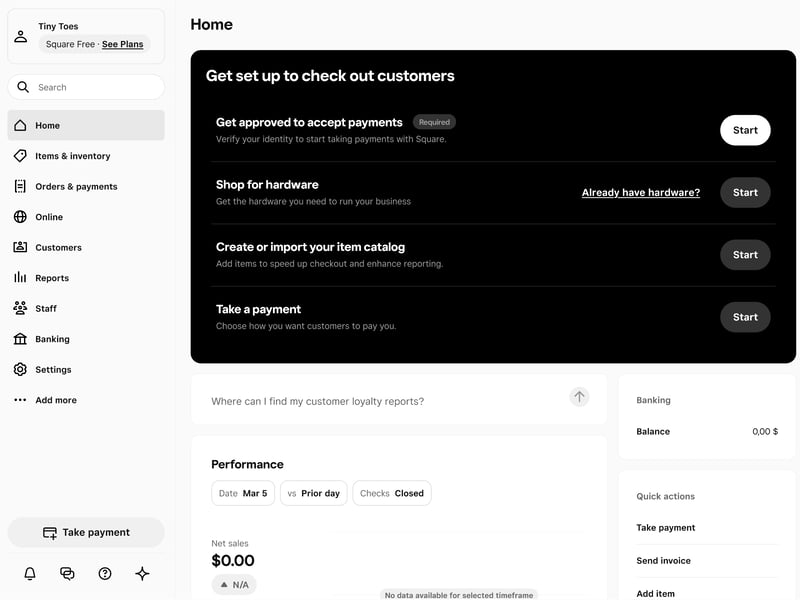
Square's admin dashboard.
Overall, the interface feels pretty intuitive. All the important features and settings area easy to find and never more than a few clicks away.
Managing your store in the Square dashboard
The main dashboard is focused on the business side of things. This is where you manage products, orders, customers, payments, and sales data.
The website builder lives in a separate “Online” section alongside your sales channels. That’s where you build your website and manage your online store.
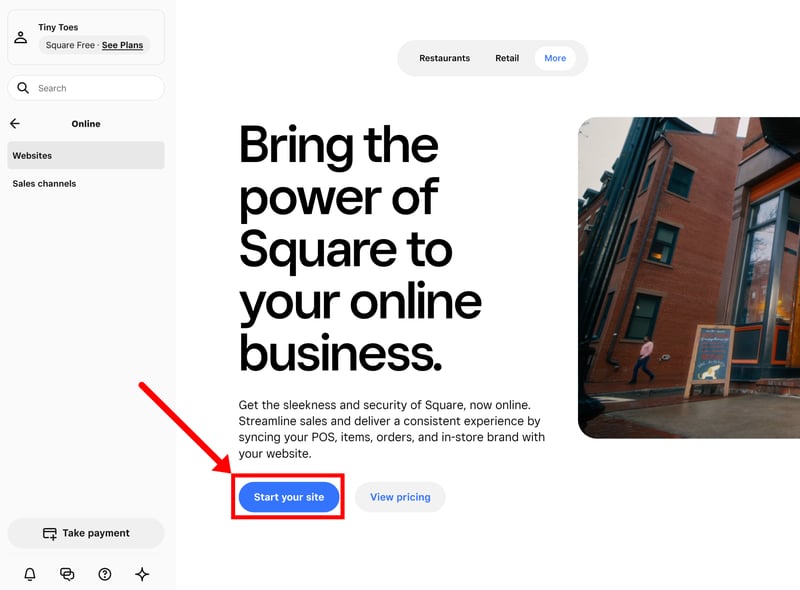
The website builder has its own separate section.
After the initial setup, you’re taken to a dedicated website dashboard for managing your site’s design and content. A built-in setup guide walks you through the main steps, including setting up your website, configuring shipping, verifying your identity, publishing the site, and connecting your domain.
Square also includes a few short video tutorials to help with certain steps. In our case, though, they didn’t work properly. Clicking them just opened the related feature instead of playing a video. Still, the setup process is simple enough that you probably won’t need them anyway.
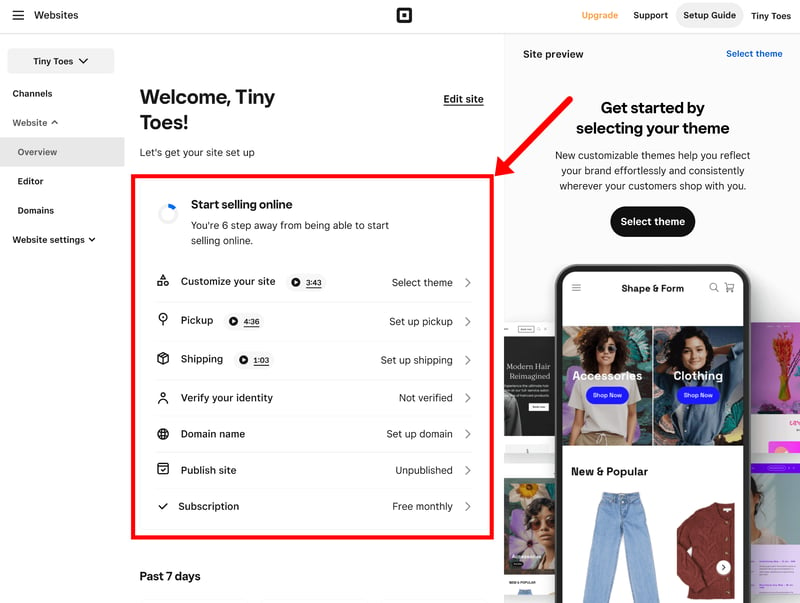
The website dashboard includes a setup guide that walks you through the most important steps.
Snappy performance, with a few hiccups
Performance was fairly smooth in our experience. The dashboard feels fast and lightweight, especially compared to more feature-heavy builders like Wix, which can get quite sluggish.
It’s not flawless, though. We noticed occasional slowdowns when switching between the main dashboard and the website builder. From time to time, pages also got stuck loading or threw up an error message that required a quick refresh.
Square is clearly designed to get businesses up and running quickly. Setup is fast, free, and straightforward, and the dashboard feels clean and organized overall. There are a few minor performance issues here and there, but overall the onboarding experience is smooth, and getting a basic store online takes very little effort.
Templates & Design
| Number of templates | 34 | 0/2 |
| Template quality |
| 1.5/3 |
| Website builder |
| 2/4 |
| Customizing shop pages |
| 1.5/4 |
| Custom code |
| 0/2 |
Square’s website builder is very much about function over form. It’s designed to get products online quickly, not to offer deep design flexibility. Compared to builders like Wix or Squarespace, design and customization options are limited.
34 responsive themes
Every site starts with a theme. Square offers 34 in total, grouped into categories like “Retail”, “Restaurants”, “Services”, or “Memberships”.
That’s a fairly small selection overall, especially compared to platforms like Shopify or Wix, which offer hundreds of themes and templates. In practice, you only get a handful of options per category.
| Number of templates | |
|---|---|
 | 3,000 |
 | 1,000 |
 | 500 |
 | 225 |
 | 190 |
 | 170 |
 | 70 |
 | 47 |
 | 34 |
 | 12 |
 | 11 |
The quality is solid, at least. The designs are clean, modern, and very much product-focused, which makes sense for an ecommerce website builder. Most templates are fairly image-driven with clean, uncomplicated layouts, which works well for smaller shops. All themes are fully responsive, so they also work well on mobile out of the box.
Don’t expect anything especially bold or unique here. But if all you need is a modern, straightforward storefront, the templates work perfectly fine.

The templates are solid, but the selection could be bigger.
Limited control over layout and design
Once you’ve picked a theme, you can customize it in Square’s built-in page editor. It's very easy to use, mainly because customization is so limited. You’re not really building pages from scratch. You’re mostly working with pre-made blocks and layout presets that only allow minor tweaks. Compared to builders like Wix or Squarespace, there’s much less creative freedom here.
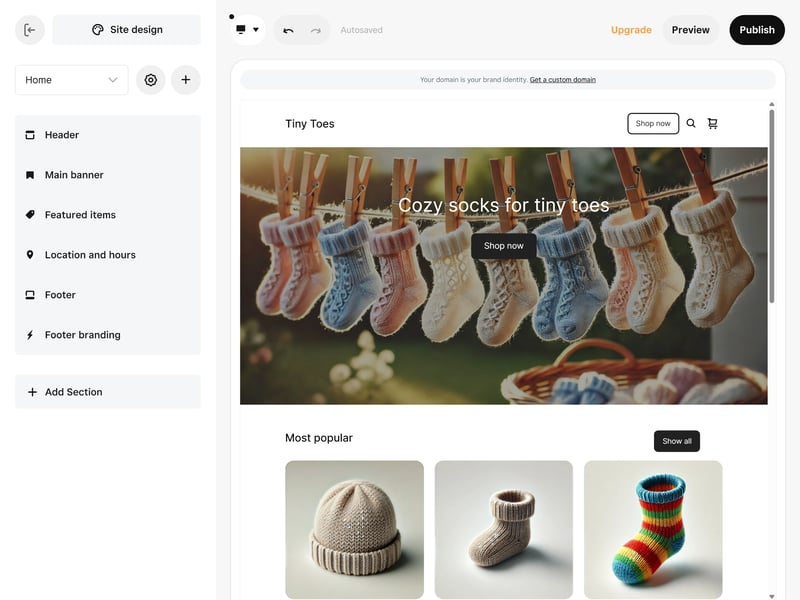
Square's website builder.
Each page is made up of sections. These are larger content areas like hero banners, product lists, or text blocks. To structure the page, you can move these sections around with drag-and-drop.
Inside those sections, though, customization is pretty limited. You can’t freely move elements around or fine-tune layouts in much detail. Instead, you’re mostly choosing between a few preset layouts that change how the content is arranged.
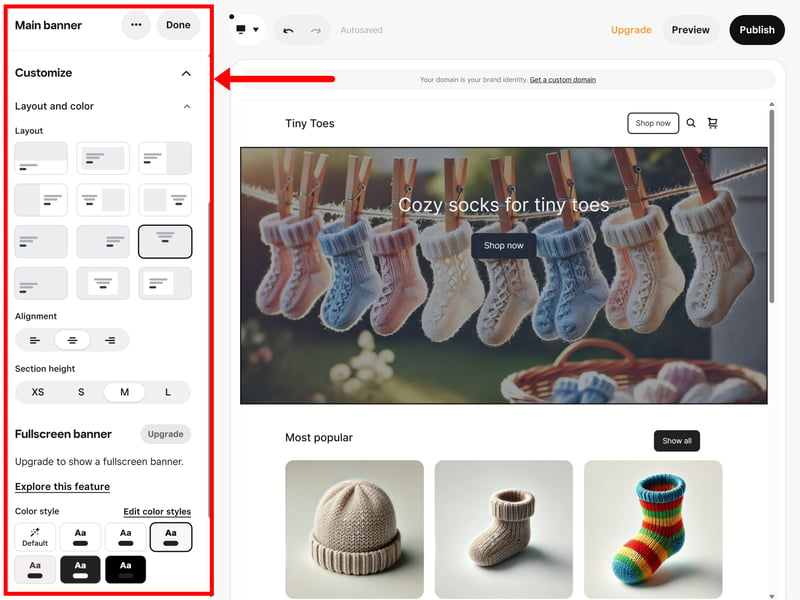
Each section comes with different layout presets.
Depending on the section, you can also adjust things like colors, text styles, spacing, or column layouts. Some sections support multiple items as well, like product rows or image galleries. Overall, though, the level of control is pretty basic.
The “Site Design” area lets you change things like fonts, colors, buttons, spacing, and icons across your entire site. But again, there’s not a huge amount of flexibility here. Most settings rely on predefined styles with only limited room for fine-tuning.
Few section and page templates
Since you can’t really build your store layout from scratch, you’re dependent on the available section and page templates.
There are around 20 section types in total. These cover the basics like text, images, and buttons, alongside ecommerce elements like product grids, featured products, forms, and newsletter sign-ups. It’s not a huge selection, but enough for simple online stores.
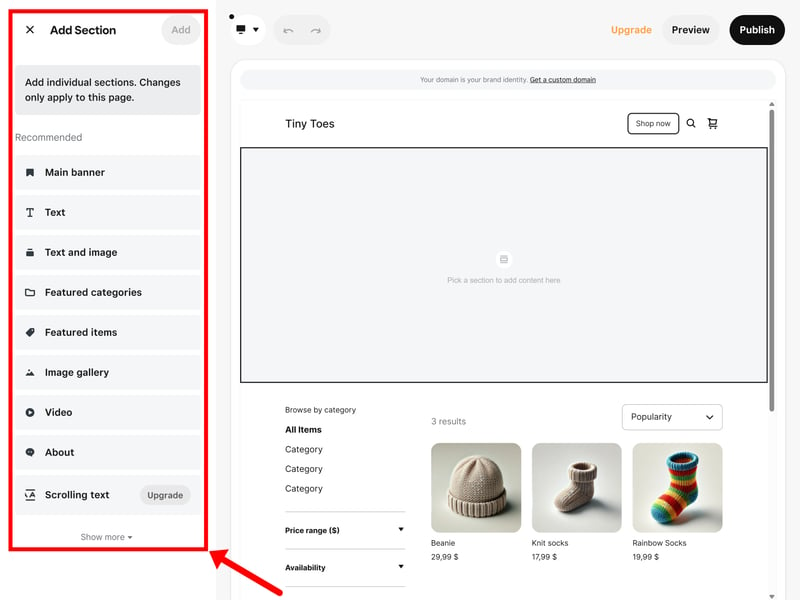
Square's section templates mostly stick to the basics.
Page templates are even more limited. You only get a small handful of standard pages like “Contact”, “About”, or “Gallery”. Product and category pages are generated automatically, so there’s very little control over how those are structured.
Square is a closed system: there’s no access to HTML or CSS, no support for custom themes, and basically no room for deeper customization. You’re limited to the visual website-building tools and layout options that come with the platform.
If you're looking for a shop builder that gives you full design control, Square ain't it.
Responsive layouts and mobile preview
All Square themes are mobile-optimized by default. Layouts, images, and product grids automatically adapt to smaller screens, so there’s nothing you need to configure manually. The editor also includes a mobile preview, which lets you quickly check how your store looks on a phone.
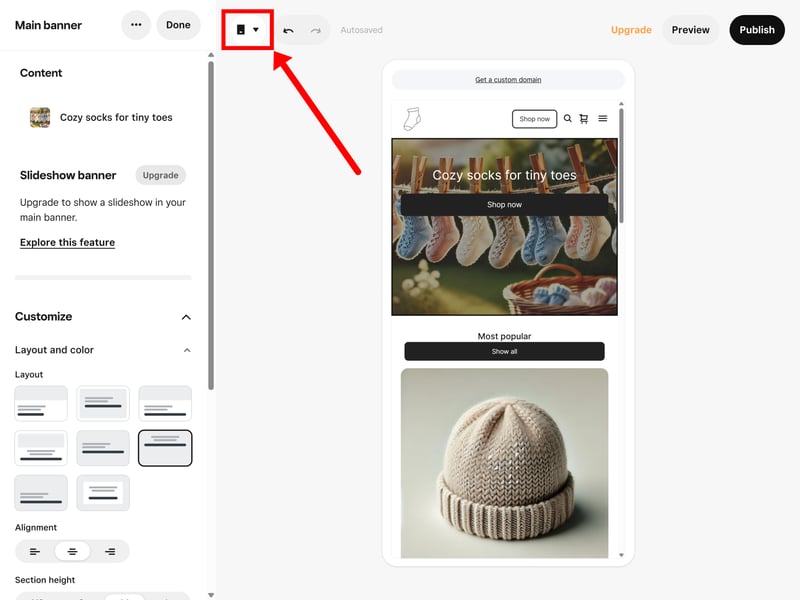
The mobile preview shows how your store will look on a smartphone.
You can’t create separate mobile layouts, but given how limited the design options are overall, that’s not really an issue. The predefined layouts generally translate well to mobile anyway.
Square's website builder is purely a means to an end. There aren’t many design templates to choose from, and not many ways to customize them either. The whole system is built to get a working store online quickly, not to give you full creative control.
If you don’t want to spend much time on design and are happy working with pre-built layouts, Square might do the job. But if you’re planning something larger or more custom, with specific design requirements, Square doesn’t have much to offer.
Product Management
| Product types |
| 1.5/4 |
| Product features |
| 2.5/3 |
| Product variants |
| 4/6 |
| Product pricing |
| 1.5/3 |
| Product organization |
| 0.5/2 |
| Inventory |
| 1.5/2 |
Square's target audience are small retailers, restaurants, and local businesses that want to sell online alongside their physical store. That’s reflected in the platform's product management tools: they're simple, easy to navigate, and cover the essentials, but they're nowhere near as deep or sophisticated as platforms like Shopify.
Adding new products
Products are managed under the “Items & Inventory” section in the dashboard. This is where you can browse your catalogue, create new products, and manage stock.
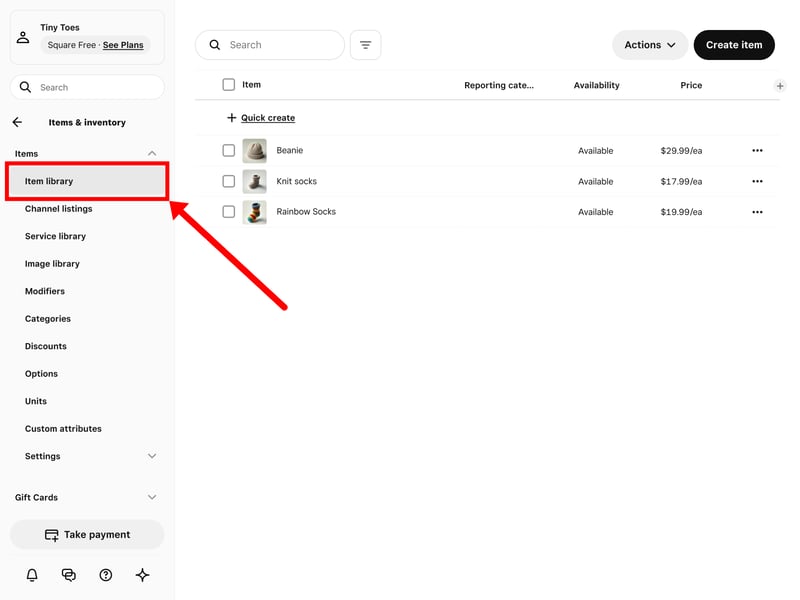
Product management in Square.
Adding new products is simple. You first choose a product type and then fill in the details. Square supports a surprisingly wide range of product types out of the box, including physical and digital products, services, memberships, subscriptions, and customizable items.
Square | Wix | Shopify | Squarespace | Ecwid | Hostinger | IONOS | BigCommerce | Jimdo | Sellfy | WooCommerce | |
|---|---|---|---|---|---|---|---|---|---|---|---|
✓ | ✓ | ✓ | ✓ | ✓ | ✓ | ✓ | ✓ | ✓ | ✓ | ✓ | |
✓ | ✓ | ✓ | ✓ | ✓ | ✓ | ✓ | ✓ | ✗ | ✓ | ✓ | |
✗ | ✓ | ✗ | ✓ | ✗ | ✓ | ✓ | ✗ | ✓ | ✗ | ✗ | |
✗ | ✓ | ✓ | ✓ | ✗ | ✗ | ✗ | ✗ | ✗ | ✗ | ✗ | |
✗ | ✓ | ✓ | ✓ | ✓ | ✓ | ✓ | ✓ | ✗ | ✗ | ✗ | |
✗ | ✓ | ✗ | ✗ | ✓ | ✓ | ✓ | ✓ | ✓ | ✗ | ✗ | |
✗ | ✓ | ✓ | ✓ | ✓ | ✗ | ✗ | ✗ | ✗ | ✓ | ✗ | |
✓ | ✓ | ✓ | ✗ | ✗ | ✗ | ✗ | ✗ | ✗ | ✗ | ✓ | |
Total | 3 | 8 | 6 | 6 | 5 | 5 | 5 | 4 | 3 | 3 | 3 |
Editing your products
The product editor is clean and straightforward. Everything — name, description, images, pricing, and inventory — lives on a single page, so you’re not constantly switching between tabs or menus.
Some fields also only appear when they’re actually relevant, which keeps things even more tidy. Shipping settings, for example, only show up for physical products, while event products include fields for things like dates and locations. It helps keep the interface fairly uncluttered.
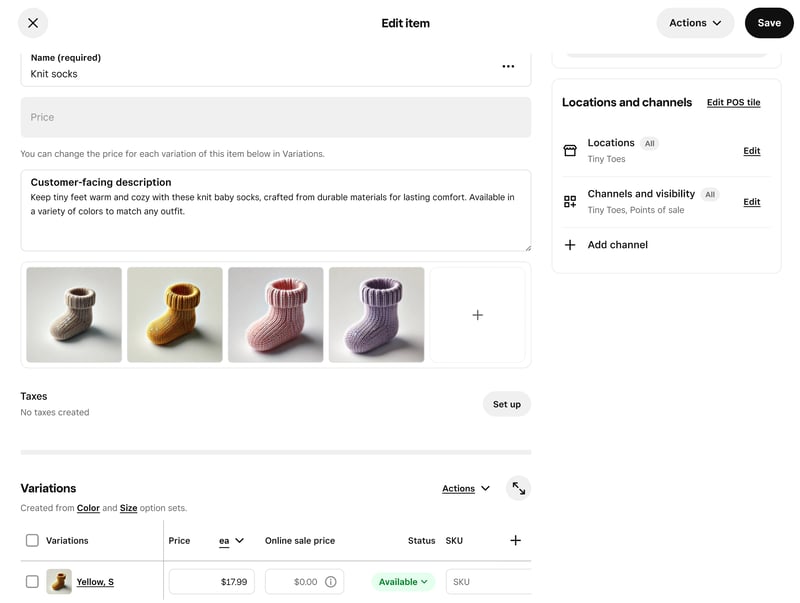
Square's product editor.
If the default fields aren’t enough, you can also create custom attributes. These act as extra product fields for things like specifications, technical details, or other additional information.
Square supports four attribute types:
- 1.
Text: A free-text field for short notes or extra product details.
- 2.
Number: Numeric values for things like dimensions, quantities, or technical specs.
- 3.
Selection: A dropdown menu with predefined options to choose from.
- 4.
Toggle: A simple on/off switch for yes/no properties.
These attributes are handy for storing additional product information, but they’re essentially display-only and don’t play a bigger role in the system. Unlike Shopify’s metafields, for example, they can’t be used for advanced filtering.
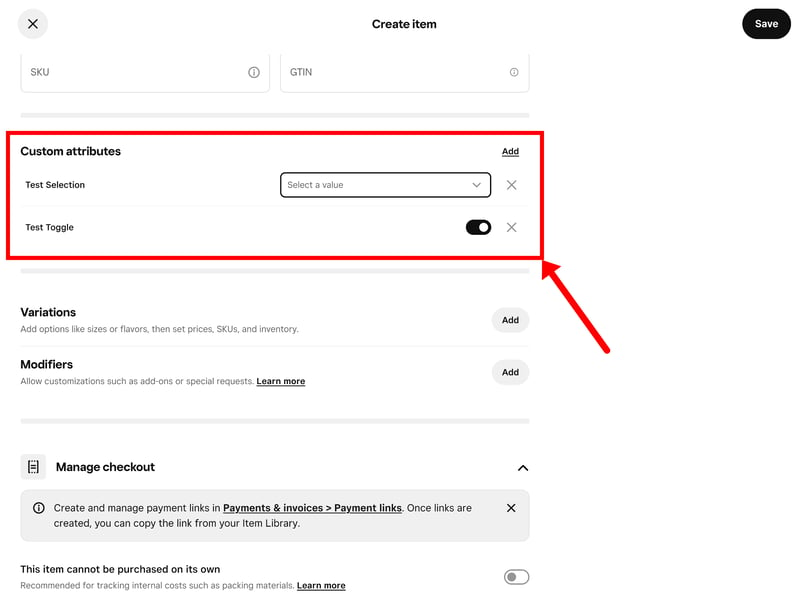
With custom attributes, you can add extra fields to your products.
You can also add extra product options through what Square calls “modifiers.” These let shoppers customize their order before checkout.
Modifiers can either be selectable options or free-text fields, which makes them useful for things like engravings, gift wrapping, or special requests.
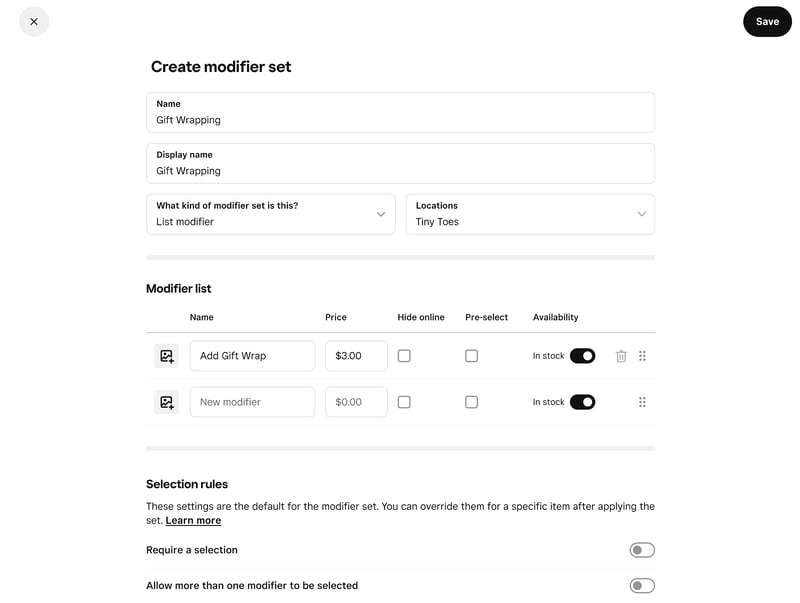
“Modifiers” let customers personalize their orders.
Up to 250 variants per product
If your product comes in different versions, like sizes, colors, or materials, you can create option sets and let Square generate all possible combinations automatically.
Each product supports up to six options and 250 variants in total. Every variant can have its own price, image, SKU, and stock level.
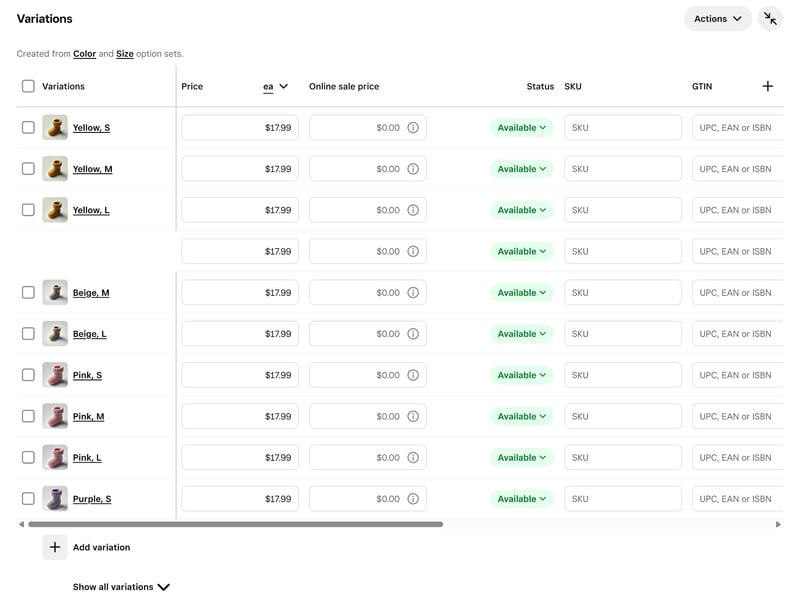
Managing variants in Square.
Square is a bit more restrictive here than some larger ecommerce platforms, many of which don’t impose hard variant limits at all. But since Square is mainly aimed at smaller and simpler product catalogues, the limit should be enough for most users.
Square | BigCommerce | Ecwid | Hostinger | IONOS | Shopify | Squarespace | WooCommerce | Sellfy | Wix | Jimdo | |
|---|---|---|---|---|---|---|---|---|---|---|---|
Max. number of options | 6 | unlimited | unlimited | unlimited | unlimited | 3 | 6 | unlimited | unlimited | 6 | 2 |
Max. number of variants | 250 | 600 | unlimited | 100 | unlimited | 2048 | 250 | unlimited | unlimited | 1000 | 36 |
Variant-specific images | ✓ | ✓ | ✓ | ✓ | ✓ | ✓ | ✓ | ✓ | ✓ | ✗ | ✗ |
Variant-specific pricing | ✓ | ✓ | ✓ | ✓ | ✓ | ✓ | ✓ | ✓ | ✓ | ✓ | ✗ |
Variant-specific SKU | ✓ | ✓ | ✓ | ✓ | ✓ | ✓ | ✓ | ✓ | ✗ | ✓ | ✗ |
Variant-specific inventory | ✓ | ✓ | ✓ | ✓ | ✓ | ✓ | ✓ | ✓ | ✓ | ✓ | ✗ |
Total | 4 | 4 | 4 | 4 | 4 | 4 | 4 | 4 | 3 | 3 | 0 |
Product pricing and discounts
Square offers a decent set of pricing options at the product level. You can set a regular price alongside a separate online sale price that only applies in your web store. Discounted products automatically show the original price crossed out.
You can also sell products in different units. By default, items are sold individually (“Each”), but Square also lets you create custom units for things like weight, length, or quantity and assign them to products.
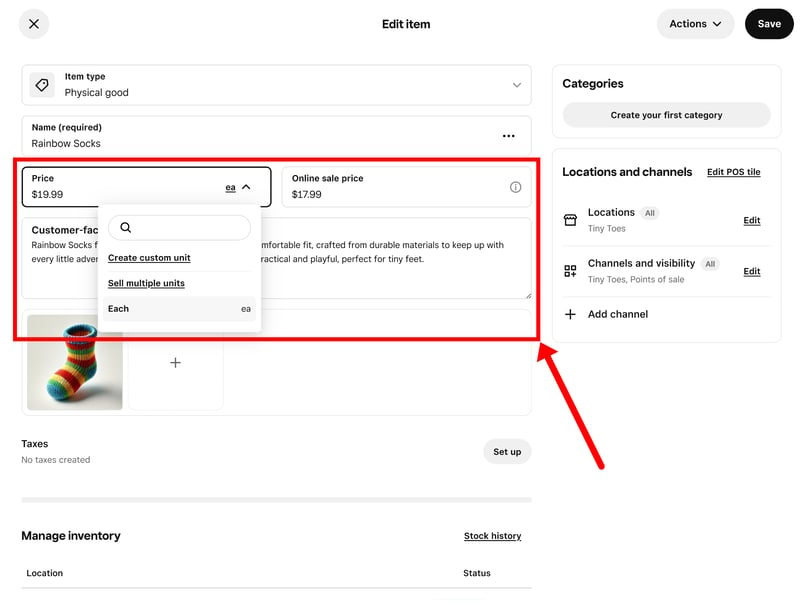
When you add a discount price, the regular price is crossed out.
Categories and subcategories, but no filters or tags
Square organizes products using categories and subcategories. There are no tags, smart collections, or automated product groupings. There’s also no real product filtering on the storefront. Customers can’t filter products by size, price, color, or other attributes. Instead, larger catalogues have to be structured manually through categories and navigation menus.
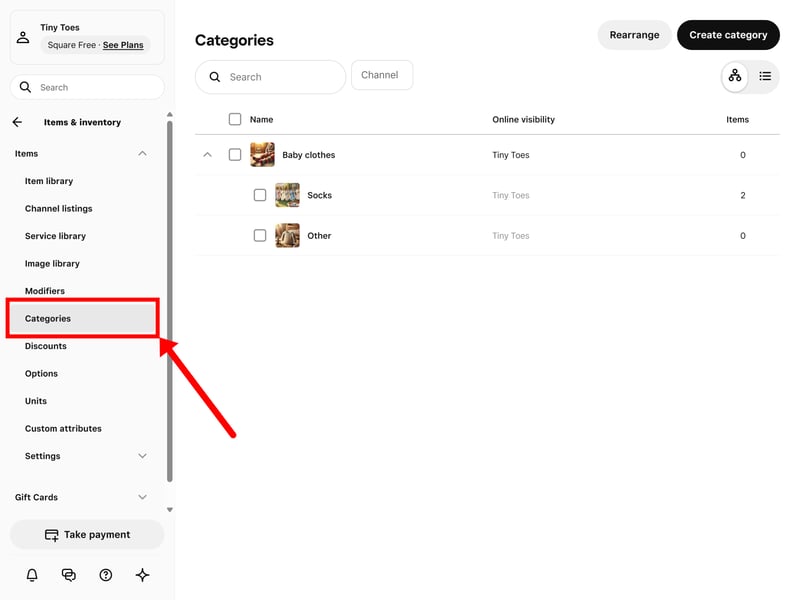
You can assign each product to one or more categories.
That might work well enough for smaller catalogues, but it becomes harder to manage as your store grows. The more products and categories you add, the more difficult it gets to keep everything organized and easy to navigate.
Managing your inventory
Inventory tracking has to be enabled separately for each product. Once turned on, stock levels update automatically whenever a sale comes in. You can also set low-stock alerts to avoid running out unexpectedly.
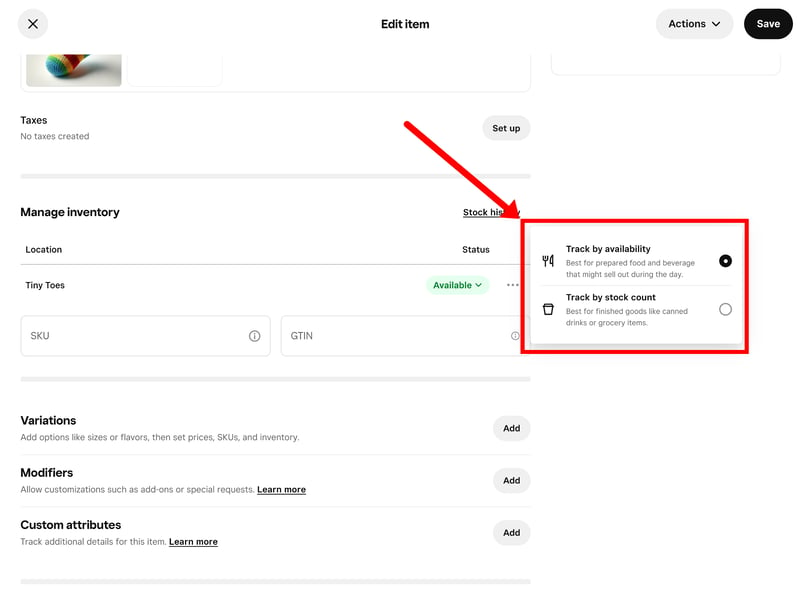
You need to turn on inventory tracking for each product individually.
Square syncs inventory across all sales channels automatically. If a product sells online, the stock available through your Square POS updates as well, and vice versa.
That tight connection between online and in-person sales is one of Square’s biggest strengths. Products, inventory, payments, and sales channels all run through the same system, with every sale pulling from the same stock pool.
Square’s product management is fairly straightforward. You can sell a wide range of product types, create up to 250 variants per product, and offer things like personalization or add-ons. Thanks to the built-in POS integration, inventory also stays synced across all sales channels automatically.
The platform is clearly aimed at smaller stores, though. Product organization is pretty basic, and without a native filtering system for item listings, larger stores quickly become harder to navigate and manage.
Sales Features
| Taxes |
| 1.5/3 |
| Shipping options |
| 2/3 |
| Discounts |
| 2/3 |
| Payment providers |
| 0.5/3 |
| Order management |
| 2/2 |
| Advanced features |
| 3/6 |
When it comes to sales features, you can tell Square comes from a brick-and-mortar background. The online store isn’t really designed as a standalone ecommerce platform, but more as an extension of Square’s broader sales system.
That has advantages and disadvantages. Online and offline sales are tightly connected, but the ecommerce features themselves are fairly basic compared to more dedicated platforms.
Setting up payments
Square handles payments through its own built-in payment system. Payment settings are managed inside the website settings under “Website settings” > “Checkout.”
From there, you can enable payment methods like Apple Pay, Google Pay, Afterpay, and other region-specific options. Customers can also pay using Square gift cards.
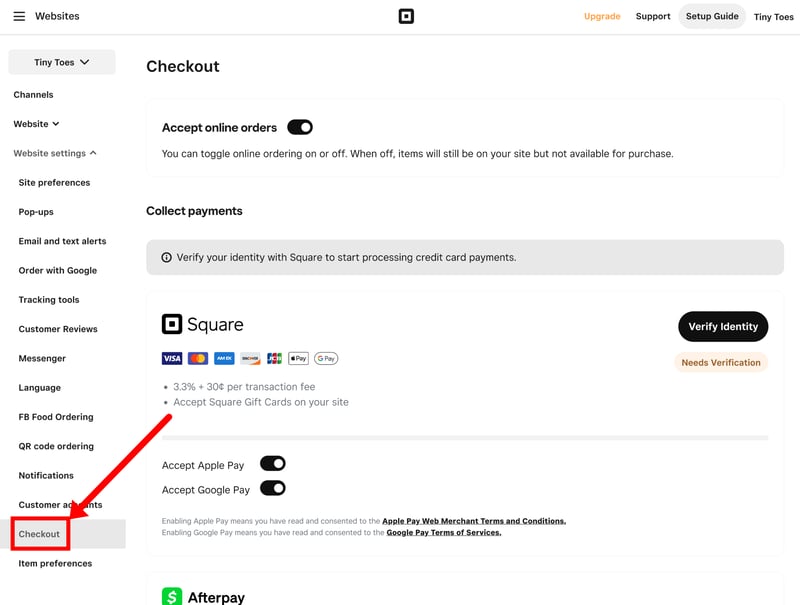
Square relies heavily on its own payment ecosystem.
If you already use Square for in-person payments, setup is very straightforward since everything runs through the same system. The downside is that you get less flexibility than on platforms that support a wider range of third-party payment providers.
Square | WooCommerce | Shopify | Ecwid | IONOS | Wix | BigCommerce | Squarespace | Hostinger | Jimdo | Sellfy | |
|---|---|---|---|---|---|---|---|---|---|---|---|
Number of payment providers | 1 | 19 | 100 | 120 | 120 | 80 | 65 | 5 | 4 | 2 | 2 |
Paypal | ✗ | ✓ | ✓ | ✓ | ✓ | ✓ | ✓ | ✓ | ✓ | ✓ | ✓ |
Stripe | ✗ | ✓ | ✓ | ✓ | ✓ | ✓ | ✓ | ✓ | ✓ | ✓ | ✓ |
Square | ✓ | ✓ | ✗ | ✗ | ✗ | ✗ | ✗ | ✓ | ✗ | ✗ | ✗ |
Amazon Pay | ✗ | ✓ | ✓ | ✓ | ✓ | ✗ | ✓ | ✗ | ✗ | ✗ | ✗ |
Klarna | ✗ | ✓ | ✓ | ✓ | ✓ | ✓ | ✓ | ✓ | ✗ | ✗ | ✗ |
Mollie | ✗ | ✓ | ✓ | ✓ | ✓ | ✓ | ✗ | ✗ | ✗ | ✗ | ✗ |
Native payment solution | ✗ | ✓ | ✓ | ✗ | ✗ | ✓ | ✗ | ✓ | ✗ | ✗ | ✗ |
Manual payment methods | ✗ | ✓ | ✓ | ✓ | ✓ | ✓ | ✓ | ✗ | ✓ | ✗ | ✗ |
Total | 1 | 8 | 7 | 6 | 6 | 6 | 5 | 5 | 3 | 2 | 2 |
Managing taxes
Tax settings are managed in Square’s main admin dashboard (not the website dashboard) under “Payments” > “Sales taxes.” This is where you set up the tax rules for your store.
Square works with tax rates that can be assigned to specific locations or products. You can either add taxes on top of the listed price (“additive tax”) or include them directly in the price (“inclusive tax”).
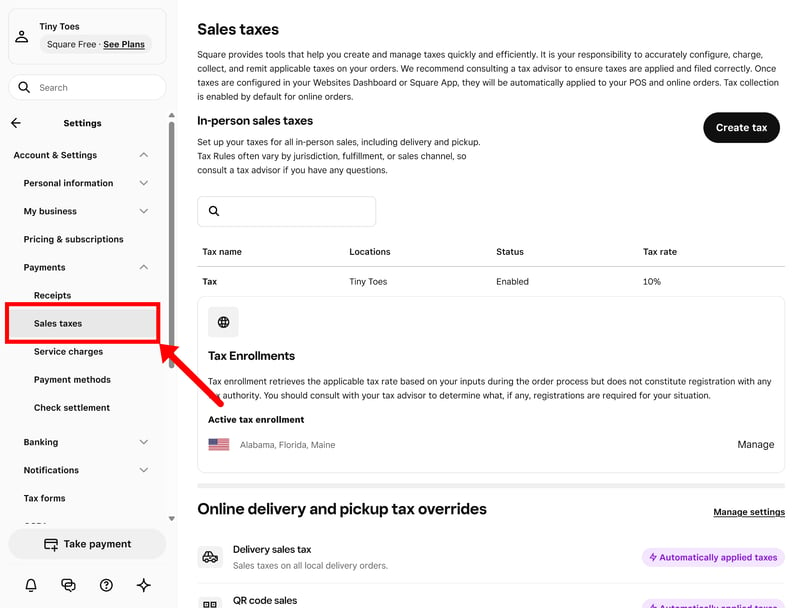
Tax settings in Square.
Once everything is set up, sales tax for US states is calculated automatically. The same rules apply across your online store and point-of-sale, so you don’t have to manage them separately.
Outside the US, though, things become more manual. You’ll need to set up tax rates for individual countries or regions yourself. The system was clearly designed with the US market in mind. Compared to ecommerce platforms with more advanced international tax handling, Square requires more manual setup, especially if you sell across multiple countries or tax zones.
Flexible fulfillment with a focus on local sales
Fulfillment is another area where Square’s brick-and-mortar background really shows. On top of standard shipping, Square also puts a big emphasis on in-store pickup and local delivery.
Generally, Square supports three fulfillment options:
- 1.
Shipping
- 2.
In-store pickup
- 3.
Local delivery
Pickup and local delivery are tightly connected to Square’s POS system. Online orders automatically appear in the POS or Order Manager, where they can be handled alongside in-person sales.
For local delivery, Square offers two different models.
In-house delivery: You handle deliveries yourself. You can define delivery zones (by ZIP code or radius), set minimum order values, offer delivery time slots, and charge custom fees.
On-demand delivery: Powered by Square’s partner Nash, where a third-party courier takes care of delivery. Customers see available drivers at checkout and get live tracking.
Standard shipping is also handled fairly well. You can create shipping profiles for different regions and offer multiple shipping methods.
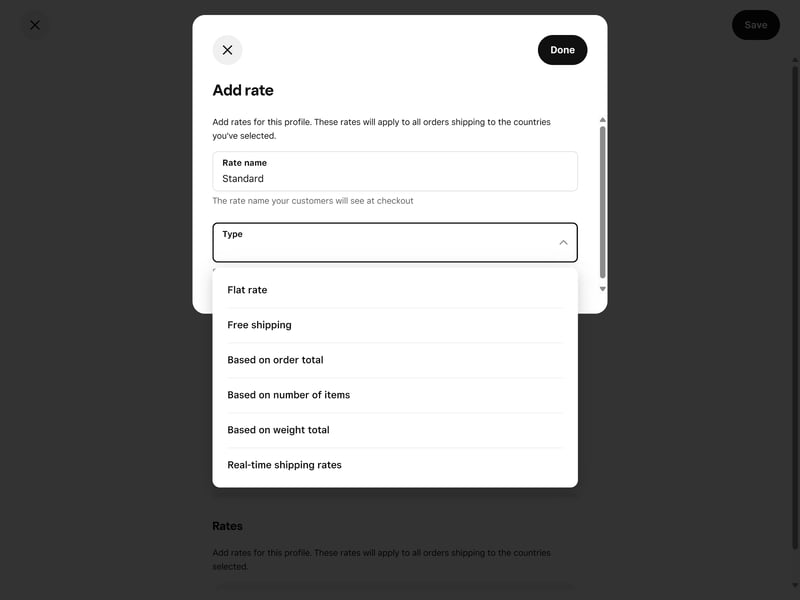
Square supports local delivery options as well as standard shipping.
Shipping rates can be configured as free shipping, flat rates, or based on order value, weight, or item count. Real-time carrier rates are available too, but only on the Premium plan.
Overall, Square’s fulfillment tools work particularly well for businesses that combine online sales with a physical location.
Discounts and coupons
Square supports both coupon codes and automatic discounts, although they’re managed in different parts of the dashboard.
Coupon codes are created under “Customers” > “Coupons.” You can offer fixed discounts, percentage discounts, or free shipping. Discounts can also be limited to specific products, categories, or the entire cart, with conditions like minimum order values or usage limits per customer.
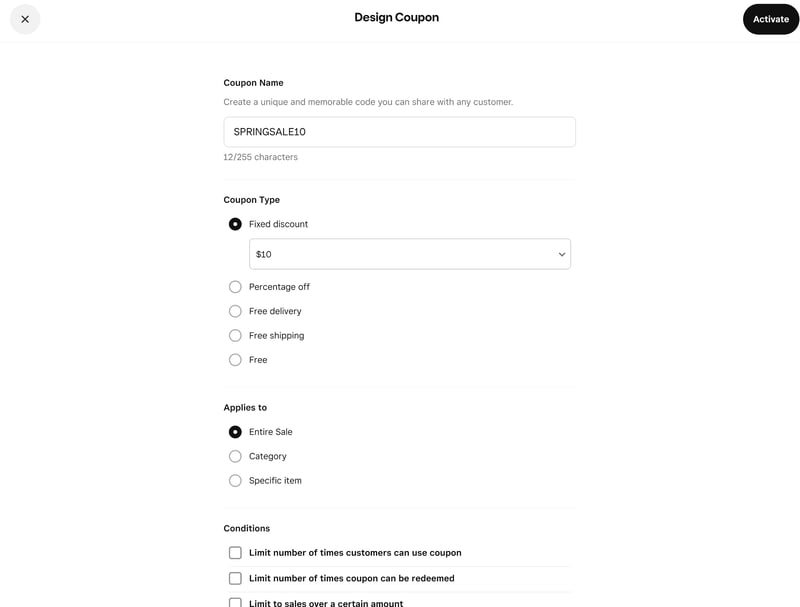
Creating a coupon in Square.
Automatic discounts are set up separately under “Discounts” in the product section. They're a bit more flexible, with support for things like “Buy One, Get One” offers, scheduled promotions, and rules based on minimum or maximum purchase amounts.
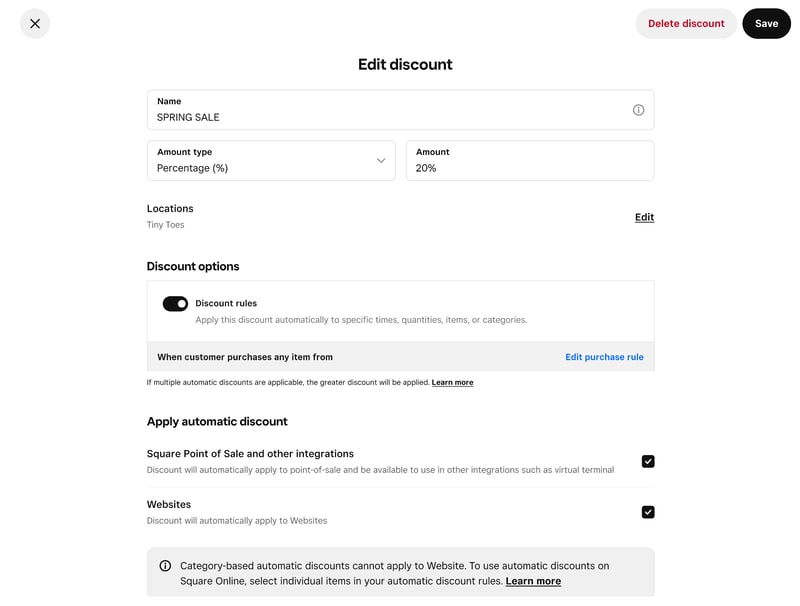
Square supports fixed discounts, percentage discounts, and advanced discount rules.
Connected sales channels across online and offline
One of Square’s biggest strengths is how closely it connects online and offline sales. The website builder is really just one part of a much larger system: you can sell through your online store, a physical Square POS, payment links, or social platforms at the same time.
Everything runs through the same backend. Online orders appear alongside POS transactions in the Order Manager, while inventory and customer data stay synced across all channels.
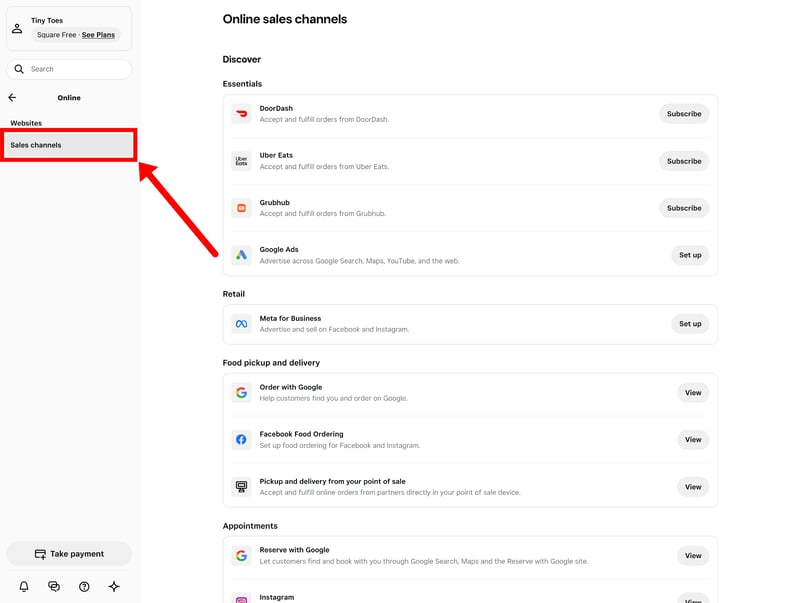
The Square dashboard brings all your sales channels together in one place.
Square also integrates with platforms like Instagram, Facebook, and Google, making it fairly easy to combine online sales, in-person payments, and social commerce.
Compared to larger ecommerce platforms, though, the multichannel features are still fairly limited. Integrations with marketplaces like Amazon or eBay, for example, aren’t available.
A few useful extras and integrations
Square isn’t the most feature-rich ecommerce platform, but it does include a number of useful extras and add-ons around its core system.
You can create payment links without setting up a full online store. These can be shared via email, messaging apps, or social media. There's also Square Marketing, which includes basic email campaigns and customer segmentation tools for promotions and newsletters.
The Square App Marketplace adds integrations for things like shipping, accounting, dropshipping, and CRM tools, although the selection is much smaller than on larger ecommerce platforms.
Square offers an API and integrates with various third-party tools for accounting, marketing, automation, and other business tasks.
Square works best as a connected sales system for businesses that sell both online and in person. The POS integration is strong, and having everything run through the same backend makes day-to-day management fairly straightforward.
Compared to dedicated ecommerce platforms, though, the online store side is much more limited. If you’re running a larger store, selling internationally, or need more advanced ecommerce functionality, Square probably isn’t the right platform for you.
Customer Support
| Documentation and tutorials |
| 1/2 |
| Support channels |
| 2/2 |
| Speed and quality |
| 2/3 |
| Customer reviews |
| 1/3 |
Square leans heavily on self-service support. There’s an AI-powered assistant built into the dashboard that helps with common questions and often links directly to relevant help articles. It handles basic questions around Square's settings and features reasonably well.
The support section includes a large knowledge base with a search bar. The articles cover everything important, but they feel a bit bare-bones. There’s little in terms of screenshots or step-by-step visuals. A few sections include short tutorial videos, but they’re not the norm.
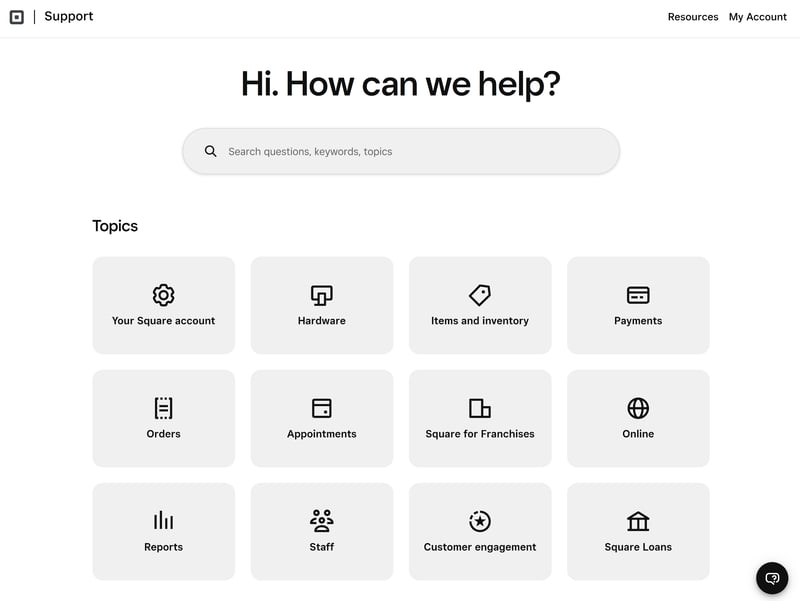
Square's help center.
Direct support via chat and phone
Live support is available Monday to Friday, 6 AM to 6 PM PT. You can either request a human agent through the assistant or contact phone support directly.
In our experience, connecting to an agent was usually fairly quick. The quality of support itself was so-so, though. Some issues were resolved immediately, while other questions mainly resulted in generic replies and links to help articles. Since Square’s main focus is still its POS ecosystem, not every support agent seemed equally familiar with the online store builder and related ecommerce tools.
Support is also a fairly common complaint on review platforms like Trustpilot. Many users report long response times or difficulty reaching support at all, especially for more urgent issues.
Square’s support is pretty standard fare overall and doesn’t stand out from other ecommerce platforms, for better or worse. The help center covers the basics, but it’s a bit bare-bones. Chat and phone support were easy to reach, but the quality was inconsistent — something you’ll also see reflected on sites like Trustpilot.
Pricing
| Costs for a small shop | $49.00 | 5/6 |
| Costs for medium-sized shop | $49.00 | 6/6 |
| Costs for large shop | - | 3/3 |
| Pricing model |
| 2/3 |
| Trial version |
| 2/2 |
Square offers three plans:
Free
A basic plan for getting started without monthly fees. It includes the store builder and core selling features, but comes with limitations: no custom domain, no themes, and Square ads on your site. Transaction fees are 2.2% per online payment.Plus
The standard plan for most users. It removes ads, lets you connect a custom domain, and unlocks all store and selling features. Transaction fees remain at 2.2%.Premium
The Premium plan includes everything in Plus, but with slightly lower transaction fees (1.9%).
For most stores, Plus is the plan that makes sense. Premium only becomes relevant at higher sales volumes, where the lower transaction fees start to offset the higher monthly cost.
Here's an overview of Square's plans:
| Free | Plus | Premium | |
|---|---|---|---|
| Monthly price | $0.00 | $49.00 | $149.00 |
| Contract period (months) | 0 | 1 | 1 |
| Product management | |||
| Number of products | unlimited | unlimited | unlimited |
| Product filters | ✗ | ✗ | ✗ |
| Product variants | ✓ | ✓ | ✓ |
| Product inventory | ✓ | ✓ | ✓ |
| Product reviews | ✗ | ✓ | ✓ |
| Internationalization | |||
| Multiple languages | ✗ | ✗ | ✗ |
| Multiple currencies | ✗ | ✗ | ✗ |
| Automatic tax calculation | ✓ | ✓ | ✓ |
Comparing Square to the competition
Pricing between ecommerce website builders varies a lot, which makes direct comparisons difficult. To keep things fair, we looked at three typical scenarios and calculated the base subscription costs for each.
Keep in mind that these are only the base subscription costs. Additional expenses, like transaction fees, paid apps, premium themes, or third-party tools, aren’t included in the comparison.
The three scenarios are:
Small store: 10 products, up to $10,000 in annual revenue, with a custom domain
Medium store: 500 products, up to $200,000 in annual revenue, with product variants
Large store: 10,000 products, up to $2M in annual revenue, with variants, product filters, and multilingual support*
*Square isn’t really suitable for scenario 3 because it lacks some important features for larger catalogues, especially product filtering.
Here are the results:
| Small shop | Mid-size shop | Large shop | |
|---|---|---|---|
| $2.75 | $2.75 | |
| $10.00 | $10.00 | $19.93 |
| $10.00 | $10.00 | $19.93 |
| $11.75 | $11.75 | $11.75 |
| $12.60 | $22.00 | |
| $14.00 | $14.00 | $68.00 |
| $22.00 | $119.00 | |
| $23.00 | $23.00 | |
| $25.00 | $45.00 | $105.00 |
| $29.00 | $299.00 | |
| $29.00 | $29.00 | $29.00 |
As you can see, Square isn’t exactly a budget option. The Plus plan costs more than many entry-level plans from competing ecommerce website builders. On the other hand, pricing is relatively predictable. The Plus plan already includes all core features, and Square doesn’t rely heavily on paid add-ons or plugins. That helps keep additional costs — aside from payment processing fees — fairly manageable.
Square’s pricing model is simple and transparent. The Plus plan includes everything you need to run a store, and there are no hidden add-on costs to worry about.
It’s not the most affordable option, though, especially for smaller stores. The free plan is a nice way to test out the basic features, but most businesses will need to upgrade fairly quickly to remove ads and use a custom domain.
Final Verdict: Best for Businesses already in Square's Ecosystem
Square makes the most sense for local businesses that already use Square’s POS system and simply want to add online sales without introducing another platform into the mix. That’s clearly what the website builder was designed for. Inventory, orders, payments, and customer data all run through the same backend, and the connection between online and offline sales works quite well.
If your goal is to build a larger, scalable online shop, though, you’re probably better off looking elsewhere. Square’s ecommerce tools are nowhere near as advanced and sophisticated as platforms like Shopify or WooCommerce, and its design tools are far more limited than website builders like Wix or Squarespace.
If your online store is the main focus, dedicated ecommerce platforms will usually be a much better fit. But if you mainly sell locally and just want to add a simple online store to your POS setup, Square is a solid all-in-one option.

Square User Feedback
What do real users think about Square? We looked at reviews on platforms like Trustpilot and Capterra to get a broader picture. Here's some common feedback:
Easy setup & intuitive interface
Many users highlight how quick it is to set up Square and start selling, both online and in person.Straightforward website editor
The website builder is often described as straightforward and easy to use. Even without prior experience, it’s possible to build a decent-looking store quickly.Fast payouts and helpful reports
Users praise the speed of payouts and the built-in reporting tools.
Support can be hard to reach
The most common complaint is customer support. Users report long wait times and responses that don’t always address the issue.Account reviews, freezes, and delayed payouts
Some users mention account reviews, frozen funds, or deactivations without clear explanations, which can be a serious issue for affected businesses.Fees don’t suit every setup
There are also complaints about pricing, particularly around transaction fees, instant payouts, and costs that increase as sales grow.
Top Square Alternatives
If Square feels too limited or just doesn’t fit your setup, here are a few alternatives worth considering:
Shopify: A much better all-rounder
If you’re looking for a stronger all-round ecommerce solution, Shopify is the most obvious option. It’s far more flexible and better suited for larger or more customized stores. Annoyingly, you can’t use Square Payments with Shopify, since the two platforms are direct competitors.WooCommerce: A more flexible platform with Square POS compatibility
If you want more control over your store while still using Square for payments, WooCommerce is a solid choice. It runs on WordPress and gives you much more freedom in terms of design, features, and integrations.Wix or Squarespace: Better for design customization
If your main issue is the limited website editor, builders like Wix or Squarespace offer far more design flexibility and customization options.
Here are the best alternatives to Square: