WP Engine Review 2026: Is It Really the Fastest Hosting Provider?


“A smarter way to WordPress”—that's what WP Engine promises. This managed WordPress host takes care of the technical side so you can focus on your content and running your website. But does it deliver in practice?
We took a close look at WP Engine to see if it really makes WordPress projects easier.


WP Engine* is a Texas-based web hosting provider founded in 2010. Today, it powers over five million websites for around 1.5 million customers in more than 150 countries. WP Engine focuses entirely on WordPress hosting. Its features are built specifically for WordPress users.
WP Engine claims to be the fastest and most secure WordPress host on the market. We put those claims to the test.
WP Engine WordPress Hosting Review
Fast WordPress setup
A new WordPress site is ready almost instantly. In our test, WP Engine even migrated an existing website in a record-breaking 70 seconds.Strong server performance
WP Engine delivered the fastest server response in our entire comparison. Server-side caching, Object Cache, a CDN, and other performance features are all included.Solid built-in security
Every plan comes with a free SSL certificate, malware removal, strong DDoS protection, and daily backups. Many other hosts charge extra for these security features.
Expensive
All those features come at a price. WP Engine ranks among the most expensive managed WordPress hosts out there. For small websites or simple business pages, the cost is difficult to justify, especially since prices climb after the first term.Weak support
We could never reach the advertised 24/7 live chat during our test. That’s frustrating, especially since phone support is only available starting with the Professional plan.
Setup & Ease of Use
| Installation & setup |
| 3/3 |
| Migration |
| 2/2 |
| Control Panel |
| 6/10 |
Signing up with WP Engine is quick and easy. Pick a plan, create an account, enter your payment details, and your hosting is ready to go. No extra verification or waiting is required. That’s how simple modern WordPress hosting should be.
Once you sign up, you get immediate access to the backend. From there, you either create a new WordPress site or migrate an existing one to WP Engine. We’ll walk you through both options next.
Quick and easy WordPress setup
Setting up WordPress with WP Engine is refreshingly simple. To get started, go to the "Sites" section in your dashboard and click "Add Site".
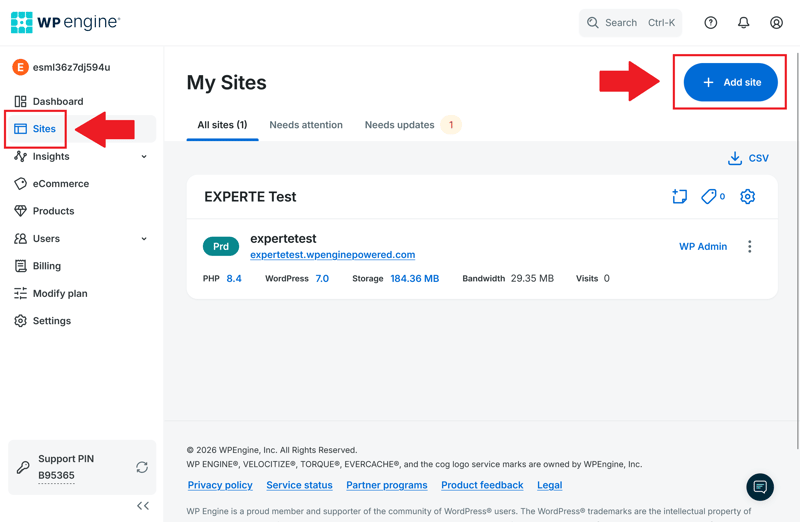
Adding a new WordPress site is quick and easy.
Next, you decide whether to create a new WordPress website or migrate an existing one to WP Engine.
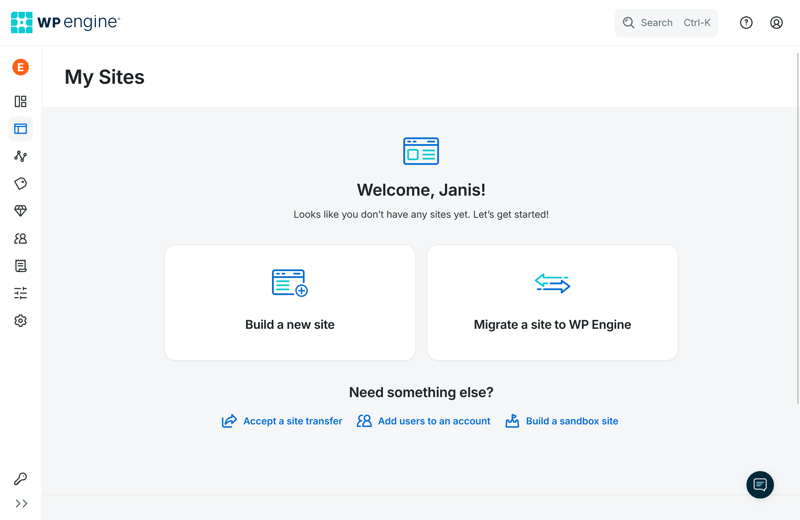
Install a new site or migrate an existing one.
If you choose a new WordPress installation, you pick between a blank website and a WooCommerce setup. Want to build an online store? You'll get a pre-configured WooCommerce website right away. Otherwise, you start with a standard WordPress installation.
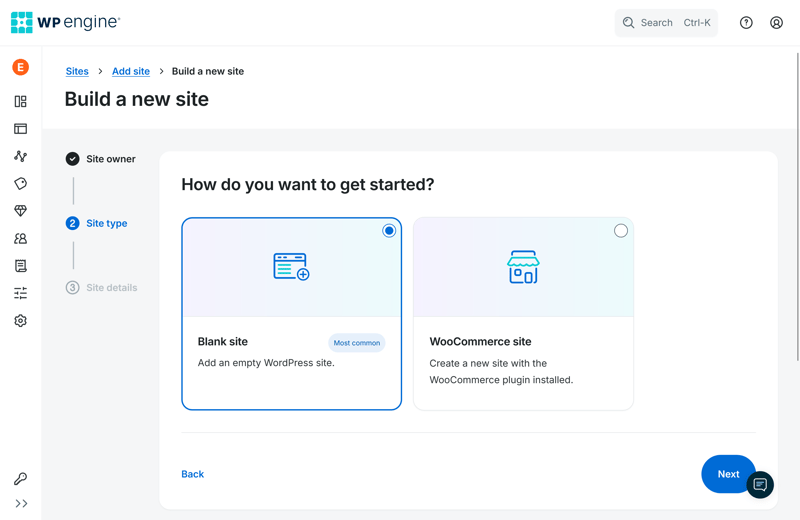
Create a blank site or start with WooCommerce.
Next, you name your website and set up an "environment." That’s WP Engine’s term for your WordPress workspace, whether it’s the live version or a separate demo page hidden from visitors.
WP Engine also assigns a subdomain of your choice, so there’s no need to connect your own domain right away. You start testing or setting up your WordPress website immediately, which speeds things up considerably.
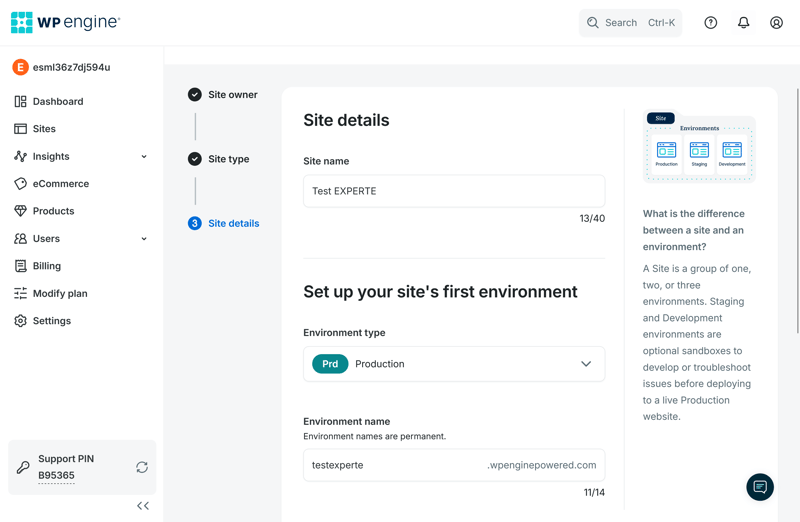
Enter a title and subdomain.
In our test, the installation took only about two minutes. Along the way, WP Engine installs two plugins in the WordPress backend:
Genesis Blocks comes pre-activated and adds extra layout blocks to the block editor.
The comment spam filter Akismet is also installed, but it's turned off by default.
WP Engine keeps things nicely minimal here. Many other hosts load new WordPress installations with far more plugins than that.
WP Engine also has its own management module, which shows up in the left sidebar, right above the WordPress dashboard. From there, you manage your cache settings or jump straight to the host's customer backend with one click.
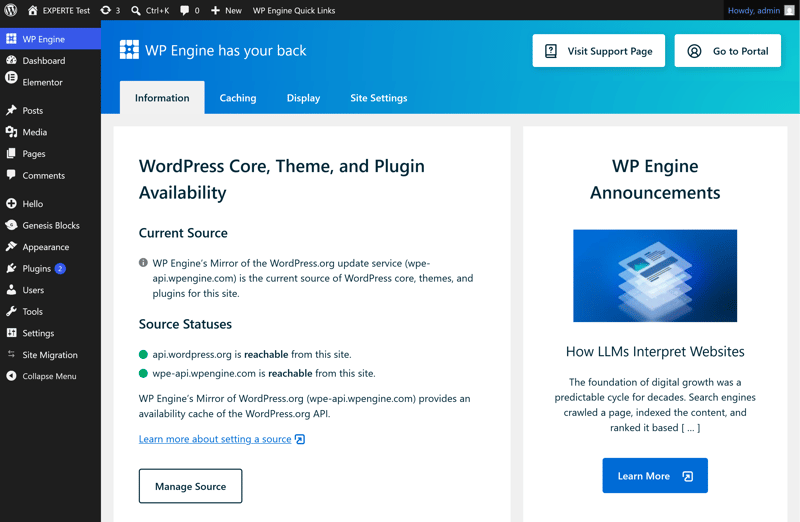
WP Engine has its own section in the WordPress backend.
Free migration via plugin
Almost every managed WordPress host now offers free, automatic migration. WP Engine uses a plugin-based process that worked fast in our test.
You start the migration from the host's dashboard. In the "Sites" section, select "Migrate a site" and click "Get Started".
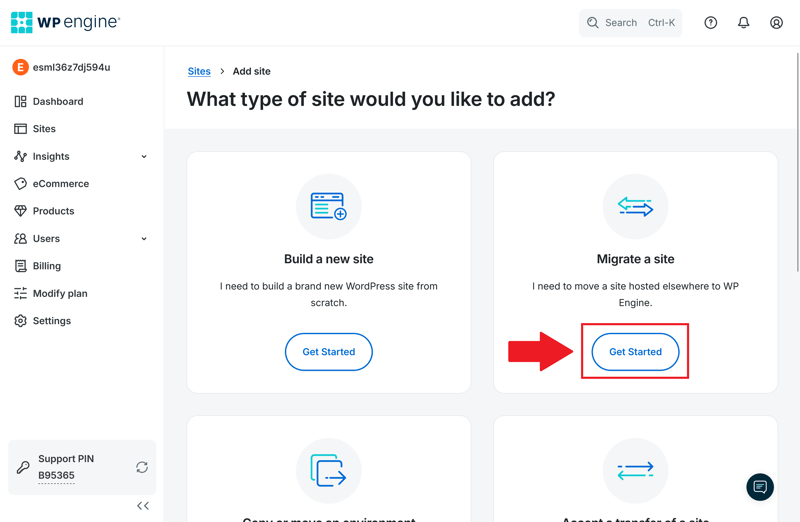
WP Engine's migration service is easy to find.
WP Engine then asks how you'd like to transfer your existing website. By default, it recommends its own migration plugin, but you can also request help with a manual migration. For most users, the plugin is the better choice.
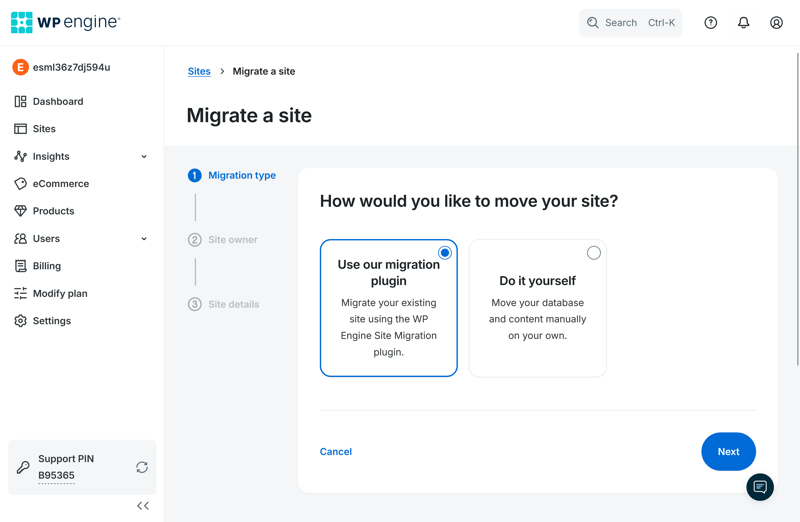
WP Engine recommends automatic migration through its plugin.
Next, go to your existing WordPress website and install the "WP Engine Site Migration" plugin, which the host provides as a ZIP file. Once it's activated, use the plugin to start the actual transfer.
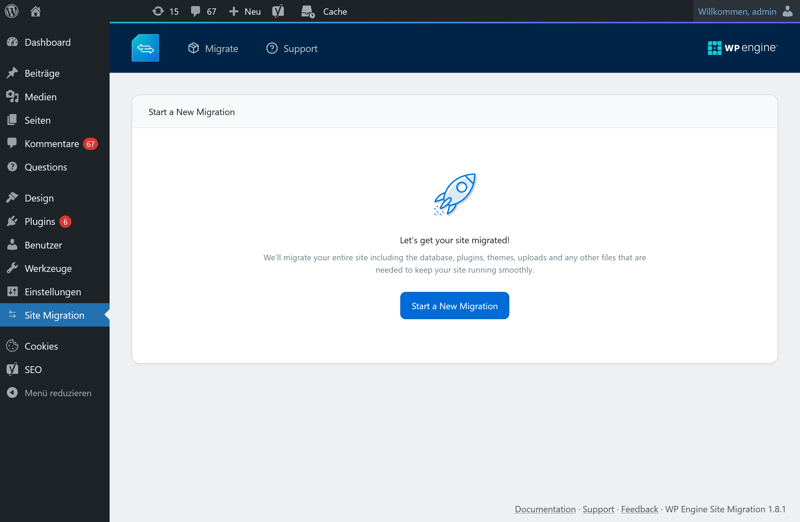
You install the migration plugin on your existing WordPress website.
By default, WP Engine migrates your entire website: themes, plugins, uploads, media files, and the whole database. Prefer to choose what gets transferred? You can do that too. Not every host offers that kind of flexibility.
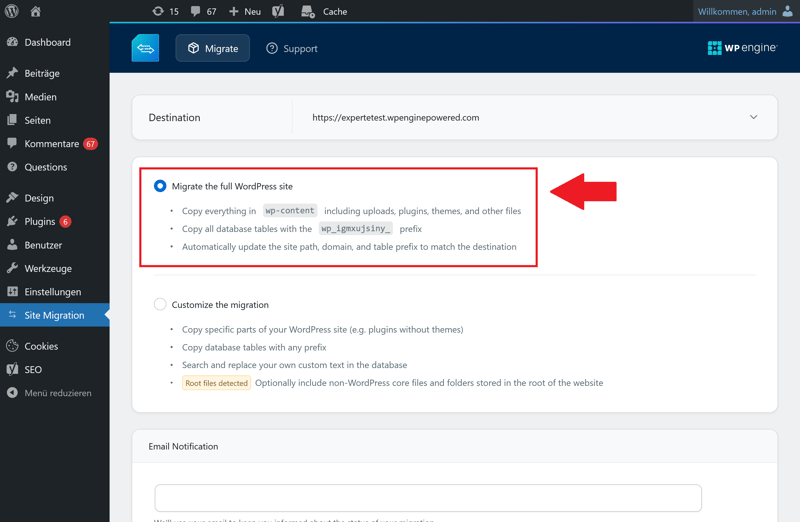
By default, WP Engine takes over your entire WordPress installation.
The transfer speed is impressive. WP Engine moved a roughly 170 MB WordPress site without errors in just 70 seconds. The site went live immediately afterward, accessible under the subdomain we'd set up earlier.
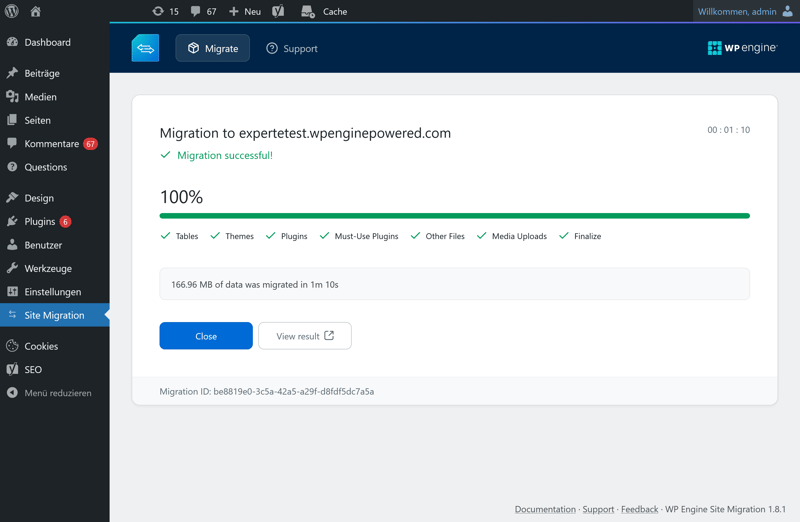
The migration wrapped up in a little over a minute.
This is how a modern WordPress migration should work: fast and simple. WP Engine handles nearly all the work for you. An even smoother option would be migrating without a plugin at all. Some hosts only need your WordPress login details and the URL of your existing site to kick off the move.
A clean dashboard with a sluggish interface
WP Engine's interface looks modern and clean, though it feels a bit more technical than what you'd find with hosts aimed at beginners. The provider sticks to a bright color scheme with plenty of white space and just a few splashes of color. Nothing flashy here.
The left sidebar gets you to every important section quickly. From there, you can manage websites, users, billing, and settings or view "Insights" for your projects. Despite the fairly large feature set, it's easy to find your way around.
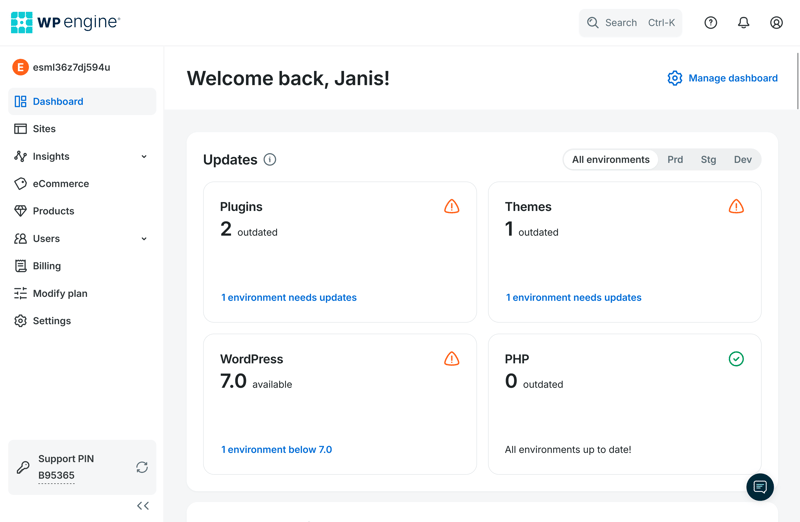
Welcome to the WP Engine dashboard.
You may customize the dashboard with widgets. For example, you can display notices about WordPress updates, invoices, or account alerts.
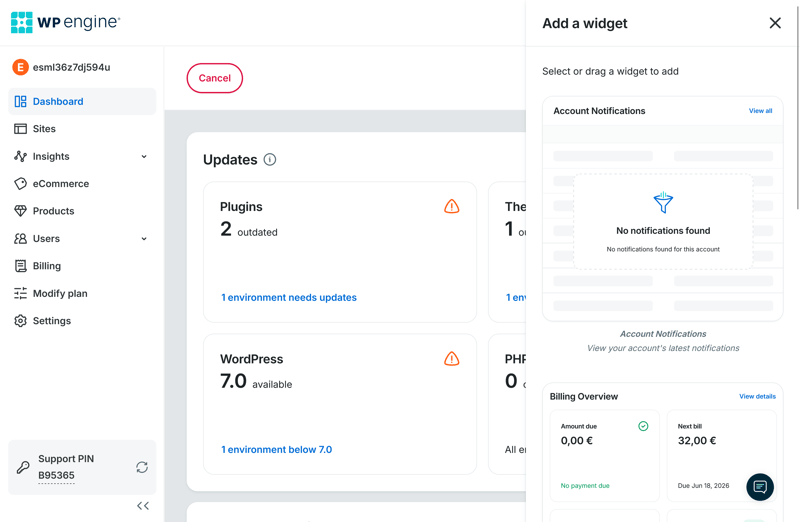
The dashboard is customizable.
One thing that stands out is WP Engine’s self-promotion. Even in the main menu, the provider adds sections for paid ecommerce and product add-ons. Thankfully, the interface doesn’t feel cluttered despite this.
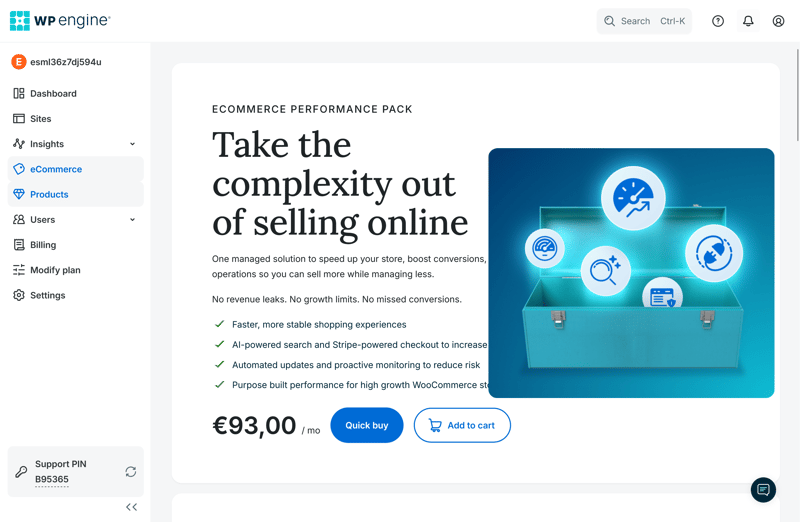
WP Engine displays self-promotion.
The real problem, though, is speed. The admin interface feels sluggish when you access it. Pages sometimes take up to five seconds to load, which slows down everyday tasks.

WP Engine gets the setup right. Signing up, installing WordPress, and migrating your website are all fast and easy. That’s how managed WordPress should work today.
The dashboard is a different story. It’s clean but pretty slow. The limited server locations in Europe show that WP Engine doesn’t prioritize customers outside the US.
Technology & Features
| Server stack & protocols |
| 1.5/2 |
| PHP |
| 5/8 |
| Caching & CDN |
| 5/5 |
| Features |
| 4/5 |
The tech behind a managed WordPress host affects more than just your website’s load times. It also shapes stability and how well your site handles traffic spikes. That’s why the infrastructure deserves a closer look, especially for professional WordPress projects.
Modern infrastructure with minor drawbacks
WP Engine performs well here. It runs NGINX as its web server, which handles requests efficiently and is especially well suited for high-traffic websites.
 WP Engine |  Bluehost |  Cloudways |  DreamHost |  GoDaddy |  Hostinger |  IONOS |  Kinsta |  SiteGround |  WordPress.com | |
|---|---|---|---|---|---|---|---|---|---|---|
Server locations | 12 countries | 9 countries | 8 countries | 3 countries | 3 countries | 11 countries | 2 countries | 21 countries | 7 countries | 19 countries |
Web server | NGINX | Apache | NGINX | NGINX | NGINX | LiteSpeed | Apache | NGINX | NGINX | NGINX |
Control Panel | Custom | cPanel | Custom | Custom | Custom | Custom | Custom | Custom | Custom | Custom |
Database | MySQL | MySQL | MariaDB | MySQL | MySQL | MariaDB | MariaDB | MariaDB | MySQL | MariaDB |
Storage type | SSD | NVMe | SSD | NVMe | NVMe | NVMe | NVMe | SSD | SSD | SSD |
| Protocols | ||||||||||
HTTP/2 | ✓ | ✓ | ✓ | ✓ | ✓ | ✓ | ✓ | ✓ | ✓ | ✓ |
HTTP/3 | ✓ | ✗ | ✗ | ✗ | ✗ | ✓ | ✗ | ✓ | ✗ | ✓ |
WP Engine also includes SSD storage and MySQL as the standard database for WordPress. NVMe storage would have been even better, and some competitors now offer it as standard.
WP Engine keeps up with the latest protocols. It supports HTTP/2 and HTTP/3, which can speed up load times and improve connection stability.
PHP 8.4, but with limited customization
WP Engine offers a modern PHP setup. You can choose your PHP version, with PHP 8.4 enabled by default. This is relevant for both performance and security on modern WordPress sites.
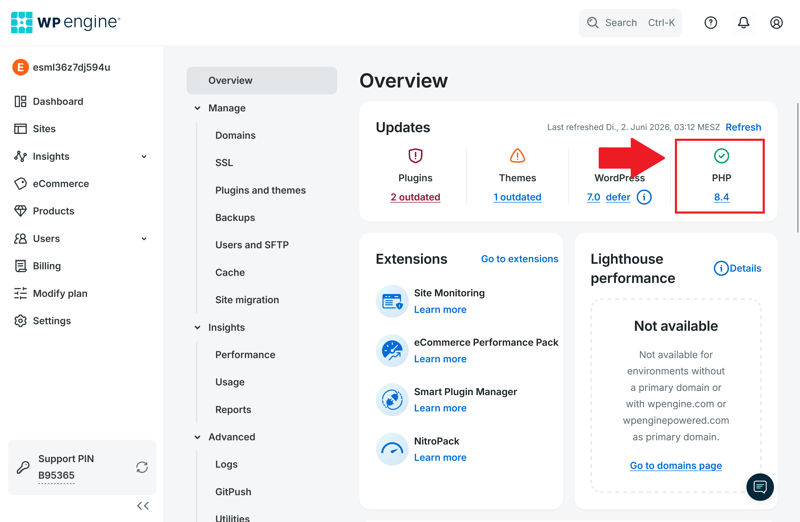
WP Engine comes with the latest PHP version.
With a PHP memory limit of 512 MB, the host gives you plenty of headroom for larger WordPress projects or WooCommerce stores. The maximum execution time of 43,300 seconds is also very generous, preventing interruptions during large backups or migrations.
WP Engine | Bluehost | Cloudways | DreamHost | GoDaddy | Hostinger | IONOS | Kinsta | SiteGround | WordPress.com | |
|---|---|---|---|---|---|---|---|---|---|---|
PHP version configurable | ✓ | ✓ | ✓ | ✓ | ✓ | ✓ | ✓ | ✓ | ✓ | ✓ |
PHP settings configurable | ✗ | ✓ | ✓ | ✓ | ✗ | ✓ | ✗ | ✗ | ✓ | ✗ |
Max PHP version | 8.4 | 8.5 | 8.4 | 8.5 | 8.3 | 8.5 | 8.4 | 8.5 | 8.5 | 8.4 |
Max memory limit | 512 MB | unlimited | unlimited | 768 MB | 512 MB | 3072 MB | 512 MB | 512 MB | 768 MB | 512 MB |
Max execution time | 43300s | unlimited | unlimited | unlimited | 180s | unlimited | 360s | 300s | 120s | 850s |
Max upload size | 50 MB | unlimited | unlimited | 1028 MB | 1024 MB | 3072 MB | 128 MB | 128 MB | 256 MB | 2048 MB |
The 50 MB upload limit is less impressive because files larger than 50 MB can’t be uploaded directly. Moreover, WP Engine doesn't let you tweak individual PHP settings. For a managed WordPress host at this price, we expected more flexibility.
Strong performance features
WP Engine delivers more performance features than most WordPress hosts. Instead of just basic page caching, it combines multiple optimizations to cut load times and reduce server strain.
Server-side caching plays a key role. WP Engine stores ready-to-serve versions of your pages directly on the server, so WordPress doesn't have to rebuild them for every visitor. This makes a big difference for high-traffic websites.
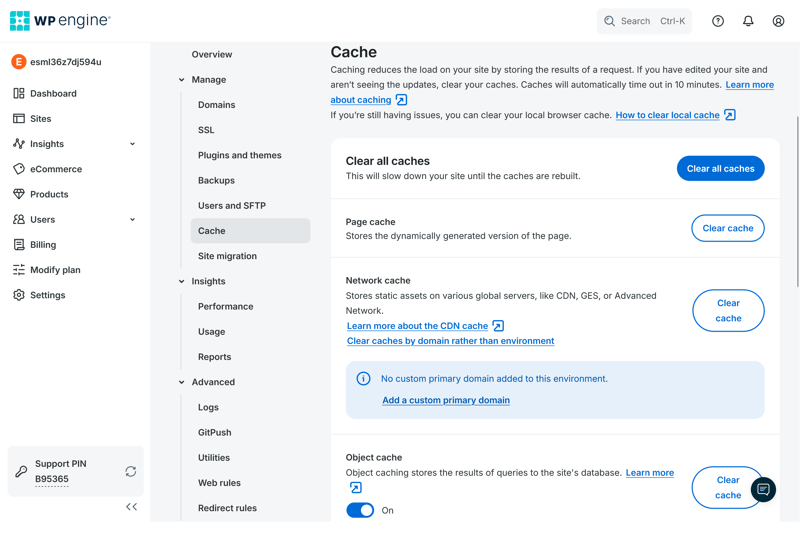
WP Engine includes multiple caching features by default.
WP Engine also enables object caching, which stores frequent database queries in memory so WordPress doesn't have to fetch the same data over and over. This is especially helpful for WooCommerce stores, membership sites, and larger WordPress websites.
A CDN comes included, even in the cheapest plan. It automatically distributes images, CSS, and JavaScript files to servers around the world, so visitors get content from the closest location. That speeds up load times, especially for international audiences.
You can also set up custom cache exceptions. This is relevant for shopping carts and other dynamic content, so visitors always see the latest information.
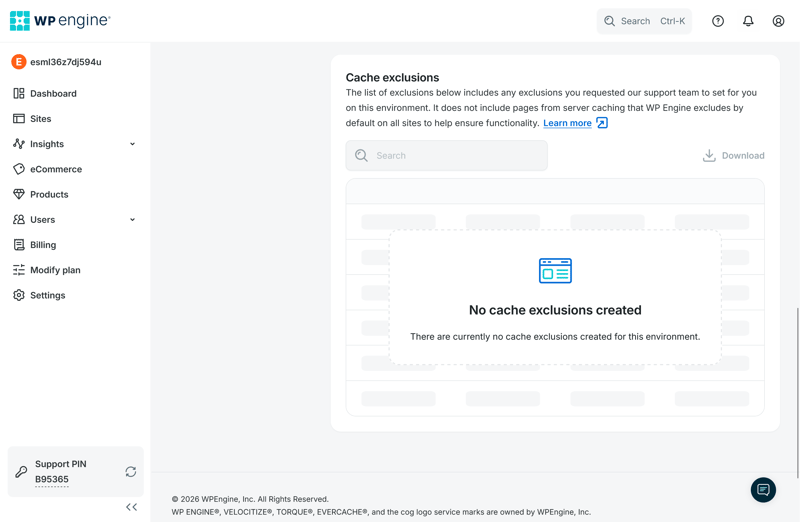
Manage cache exceptions through the dashboard.
WP Engine gives you even more control right in the WordPress backend, where you can clear specific cache areas or adjust cache lifetimes. That's far more control over your website's behavior than most managed hosts offer.
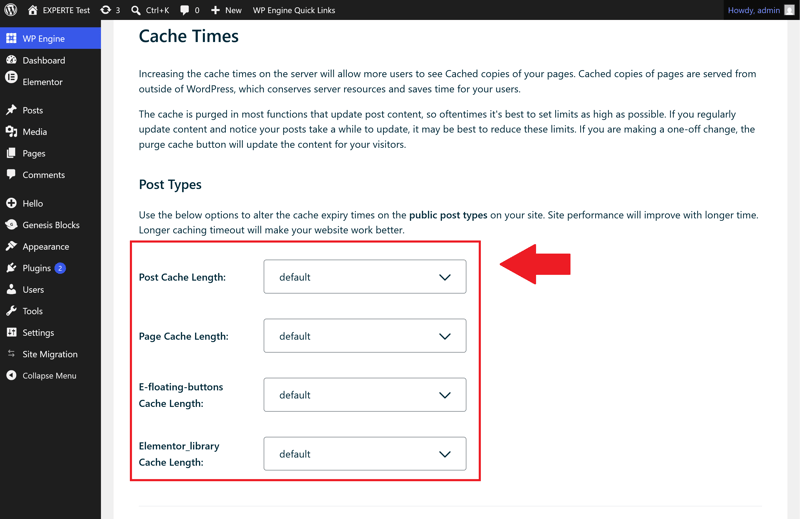
WP Engine adds extra cache settings directly in the WordPress backend.
All these technical options might feel overwhelming, especially for beginners. If you're not familiar with caching and WordPress, many of these features won't be much use.
WP Engine | Bluehost | Cloudways | DreamHost | GoDaddy | Hostinger | IONOS | Kinsta | SiteGround | WordPress.com | |
|---|---|---|---|---|---|---|---|---|---|---|
Server side caching | ✓ | ✓ | ✓ | ✓ | ✓ | ✓ | ✓ | ✓ | ✓ | ✓ |
Object Caching | ✓ | ✓ | ✓ | ✓ | ✓ | ✓ | ✗ | ✗ | ✓ | ✓ |
CDN | ✓ | ✓ | ✗ | ✓ | ✓ | ✓ | ✗ | ✓ | ✓ | ✓ |
Cache exclusions | ✓ | ✓ | ✓ | ✗ | ✗ | ✓ | ✗ | ✓ | ✓ | ✗ |
Automatic cache purge | ✓ | ✓ | ✓ | ✓ | ✓ | ✓ | ✓ | ✓ | ✓ | ✓ |
More WP Engine features
WP Engine offers plenty of other tools for managing and developing WordPress websites. Here are the most important ones:
Staging and development environments: Test updates or changes in a staging environment before going live. You can also create additional development environments at no extra cost.
SFTP and SSH access: Access and customize your files via SFTP or SSH. You can even edit the wp-config.php file this way.
Multisite support: WP Engine supports WordPress Multisite, which lets you run multiple websites from a single WordPress installation. This feature is available starting with the Professional plan.
Maintenance mode: Enable a temporary maintenance mode for updates or fixes. Visitors will see a notification page. WP Engine automatically turns this off after 10 minutes.
Alternative Cron management: WP Engine can replace WordPress’s default WP-Cron system with server-side cron jobs. According to the provider, this makes scheduled tasks more reliable and reduces slowdowns during high traffic.
Restricted WordPress plugins
WP Engine restricts plugin choices more than most WordPress hosts. In total, it blocks 72 WordPress plugins on its servers.
Most of the restrictions target plugins that duplicate WP Engine’s built-in features or create unnecessary server load. Some of the best-known blocked plugins include:
Caching plugins: W3 Total Cache, WP Super Cache, and WP File Cache are not allowed. WP Engine handles caching at the server level to avoid conflicts with additional caching plugins.
Backup plugins: BackWPup, BackupWordPress, WP DB Backup, and WP DB Manager are also blocked. Since WP Engine provides automatic backups, additional backup plugins would only add unnecessary server load.
Stats and related posts plugins: WP PostViews, Dynamic Related Posts, Similar Posts, and Contextual Related Posts are not allowed. According to WP Engine, these plugins generate excessive database queries and can hurt performance.
Security-risk plugins: WP phpMyAdmin, Sweet Captcha, and older versions of TimThumb are blocked due to known security vulnerabilities.
If you’re familiar with WordPress and hosting, WP Engine offers one of the most powerful setups in our test. Many performance features, the CDN, and other optimizations run automatically in the background, with no setup required.
That said, WP Engine isn’t as beginner-friendly as other managed hosts. Without technical knowledge, many caching and performance settings can be difficult to understand. Experienced users might also find the long list of restricted plugins frustrating.
Security
| Free SSL | Yes | 2/2 |
| Server protection |
| 3/4 |
| WordPress updates |
| 1/2 |
| Backups |
| 2/2 |
One of the biggest perks of managed WordPress hosting is that the provider handles most security tasks for you. That includes backups, malware protection, and WordPress updates.
WP Engine covers many of these security tasks right out of the box. You get free SSL certificates, daily automatic backups, malware scans, and automatic WordPress core updates.
SSL certificates enabled automatically
WP Engine automatically enables free SSL certificates from Let’s Encrypt for new websites, even for domains hosted elsewhere. You usually don’t have to lift a finger: your site gets HTTPS protection right away.
SSL protects login details, contact forms, and payment information from prying eyes. Plus, browsers flag unencrypted sites as “not secure,” which doesn’t exactly inspire trust.
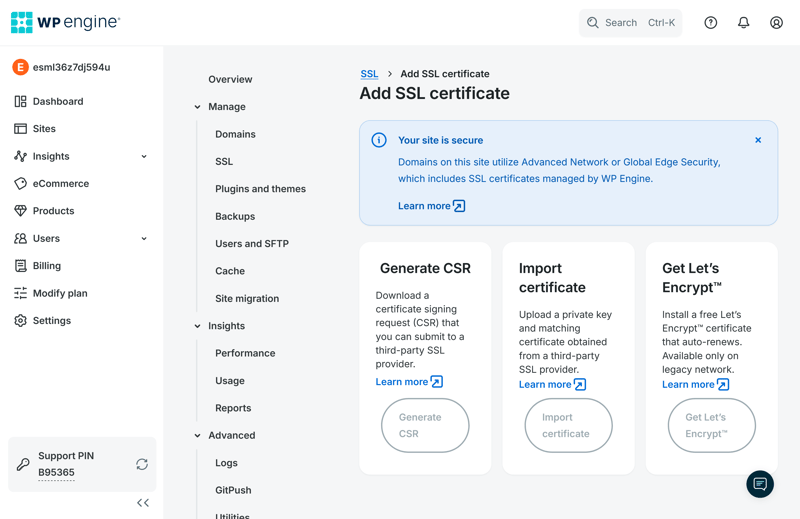
Manage SSL certificates in the dashboard.
Automatic updates for WordPress core only
Outdated WordPress versions are one of the top reasons websites get hacked. To help prevent this, WP Engine automatically installs WordPress core updates.
Automatic plugin updates, however, are only available through the paid “Smart Plugin Manager.” That’s a letdown, since outdated plugins are a common cause of WordPress security issues.
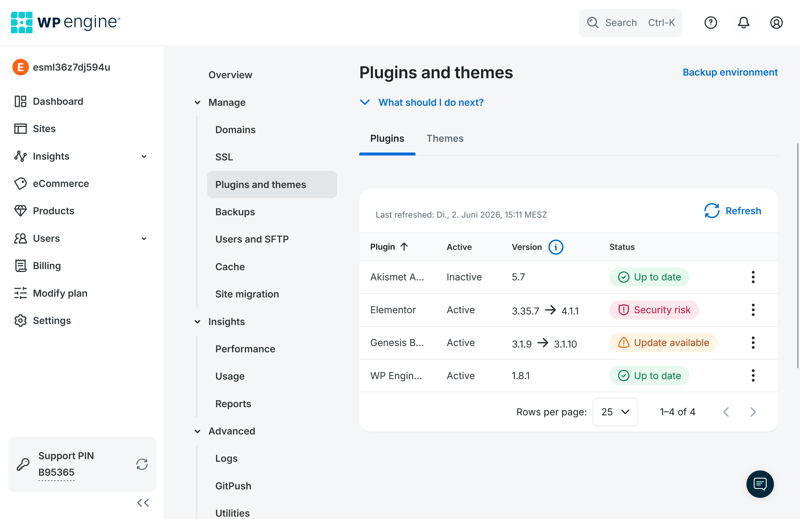
WP Engine notifies you about available plugin updates but doesn't install them automatically.
Free malware removal on all plans
WP Engine automatically scans websites for malware. If it finds any, the provider says it will clean up affected sites at no extra cost.
WP Engine also monitors suspicious traffic and blocks unusual access attempts automatically. This protects your website from common attack patterns and harmful bot traffic.
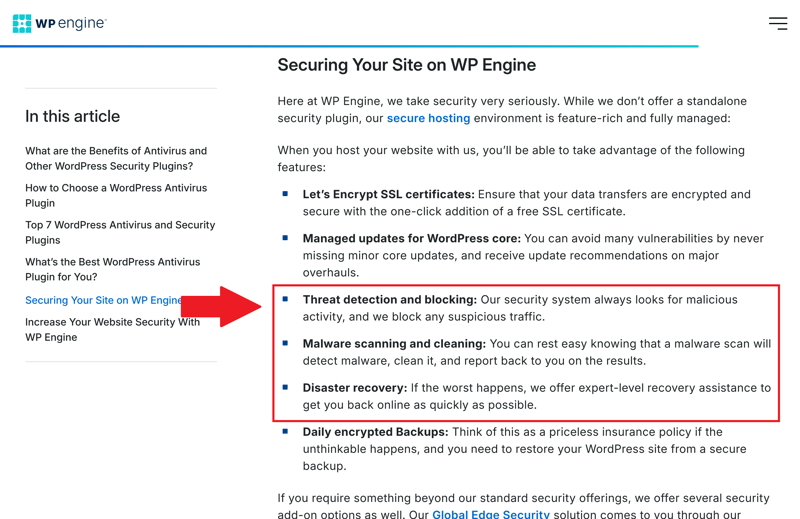
WP Engine automatically blocks threats.
Advanced security features cost extra
Some of WP Engine's most powerful security features only come at an added cost. These include advanced DDoS protection and a web application firewall, both part of the “Global Edge Security” add-on package.
These features guard websites against overload attacks and common techniques like SQL injection. Many customers would probably expect this level of protection to be standard from a premium host like WP Engine.
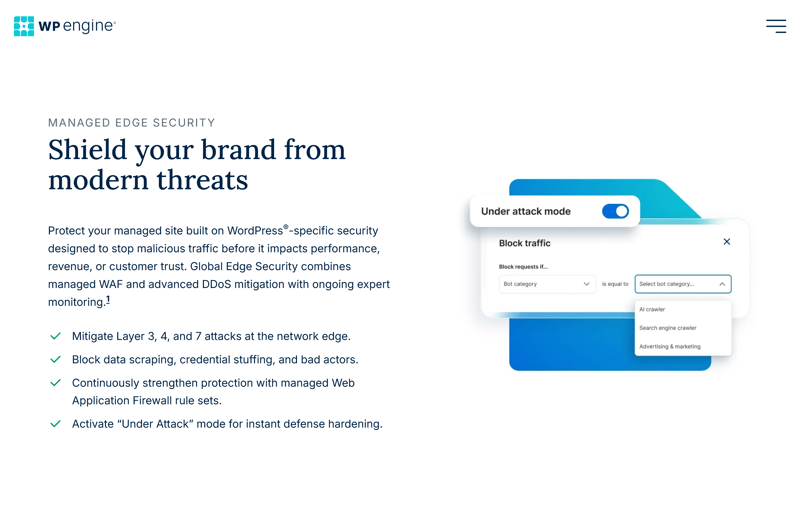
With WP Engine, you'll need to pay more for more security.
Daily automatic backups for everyone
WP Engine automatically creates at least one daily backup of your website with every plan. If something goes wrong after an update or a change, you can restore an earlier backup with just a few clicks.
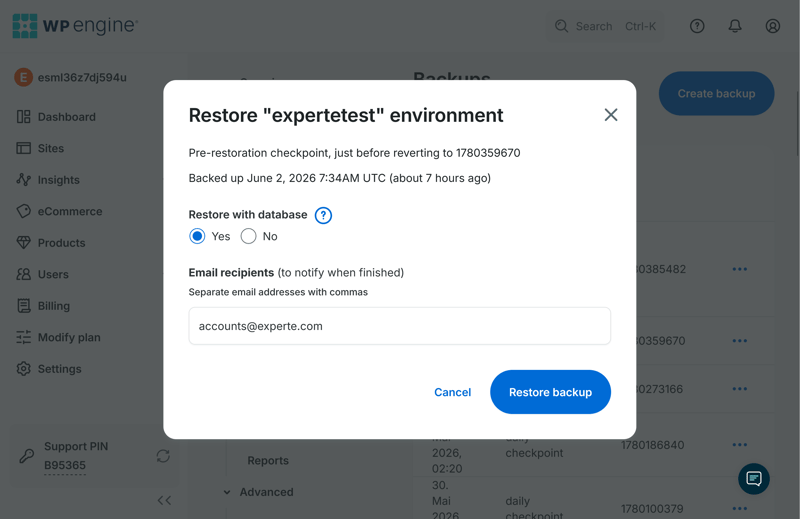
You can quickly restore backups whenever you need to.
Before major changes, WP Engine also creates extra restore points automatically, a thoughtful touch that not every host offers. On top of the automatic backups, you can create manual backups at any time.
All backups stay available for 40 days. That's generous, though not as generous as it used to be: WP Engine once kept backups for a full 60 days.
Here's how the host's security features compare to other providers:
WP Engine | Bluehost | Cloudways | DreamHost | GoDaddy | Hostinger | IONOS | Kinsta | SiteGround | WordPress.com | |
|---|---|---|---|---|---|---|---|---|---|---|
Unlimited free SSL certificates (on all plans) | ✓ | ✓ | ✓ | ✓ | ✗ | ✓ | ✗ | ✓ | ✓ | ✓ |
Firewall | ✓ | ✓ | ✓ | ✓ | ✓ | ✓ | ✓ | ✓ | ✓ | ✓ |
DDoS protection | ✓ | ✓ | ✓ | ✓ | ✓ | ✓ | ✓ | ✓ | ✓ | ✓ |
Login protection | ✗ | ✓ | ✓ | ✗ | ✓ | ✗ | ✗ | ✓ | ✓ | ✓ |
Malware scanning | ✓ | ✓ | ✓ | ✓ | ✓ | ✓ | ✓ | ✓ | ✗ | ✓ |
Auto updates WordPress core | ✓ | ✓ | ✗ | ✓ | ✓ | ✓ | ✓ | ✗ | ✓ | ✓ |
Auto updates WordPress plugins/themes | ✗ | ✓ | ✗ | ✓ | ✓ | ✓ | ✓ | ✗ | ✓ | ✓ |
Daily automated backups (on all plans) | ✓ | ✗ | ✓ | ✓ | ✗ | ✗ | ✗ | ✓ | ✓ | ✗ |
Min. 14 day backup retention (on all plans) | ✓ | ✗ | ✓ | ✓ | ✗ | ✓ | ✗ | ✓ | ✓ | ✗ |
WP Engine's security setup is impressive. With automatic backups, built-in malware removal, and active monitoring for suspicious activity, WP Engine takes a lot of the security work off your plate.
It's disappointing, though, that WP Engine only offers automatic plugin updates for an extra fee. Plugins are one of the most common causes of security vulnerabilities in WordPress. Cutting corners on this particular feature doesn't match the otherwise high security standards.
Performance
| Response speed (TTFB) | 0.19 s | 10/10 |
| TTFB outliers | 0.20 % | 5/5 |
| Pagespeed (LCP) | 0.68 s | 6/10 |
| Uptime | 99.98 % | 2/5 |
For our six-week performance test, WP Engine had to prove itself under the same conditions as every other host we compared. As with all providers in this comparison, we used a plan priced at around $20 per month. We based our testing on a WordPress installation built with the page builder Elementor.
We didn't just look at raw speed. We also checked how consistent the performance remains and how reliably the servers respond. You can find our full testing methodology in our comparison of the fastest WordPress hosts.
Specifically, we measured these four metrics:
- 1.
Response speed (TTFB): How quickly does the server respond to the first request for a page?
- 2.
Slow responses (outliers): How much does server speed vary on unusually slow requests?
- 3.
Pagespeed (Largest Contentful Paint): How fast does the site's main visible content appear?
- 4.
Availability (uptime): How reliably does the site stay online without outages?
Fastest response times
TTFB stands for Time to First Byte. It measures how long a server takes to send the first byte of data to the browser after a request. A lower number means a faster server.
WP Engine achieved a TTFB of 0.186 seconds, putting it in first place. That's an excellent result: no other host responded faster in our test. For visitors, this means pages start loading right away.
| Response time (TTFB) | |
|---|---|
| 0.186 s |
| 0.23 s |
| 0.232 s |
| 0.264 s |
| 0.266 s |
| 0.271 s |
| 0.305 s |
| 0.387 s |
| 0.631 s |
| 0.819 s |
Very high TTFB stability
The slow outlier rate shows how often a server takes an unusually long time to respond. In our test, any request that takes longer than one second counts as a slow outlier.
WP Engine scores 0.20%, placing third out of 14. Only two out of every thousand requests take longer than one second.
| TTFB outlier | |
|---|---|
| 0.09 % |
| 0.1 % |
| 0.2 % |
| 0.28 % |
| 0.41 % |
| 0.51 % |
| 0.54 % |
| 1.02 % |
| 1.07 % |
| 2.22 % |
This shows consistently strong server performance. Slow responses are rare, so visitors usually experience fast, steady load times.
Pagespeed: good, but not top-tier
We measure Pagespeed using the Largest Contentful Paint (LCP). This metric tells you how long the largest visible element, such as an image or text block, takes to load at the top of the page. The lower the LCP, the faster the site feels.
WP Engine’s LCP is 0.683 seconds. That ties for 5th place out of 14: a solid result, even if it doesn’t quite reach the top three.
| Pagespeed (LCP) | |
|---|---|
| 0.46 s |
| 0.519 s |
| 0.573 s |
| 0.612 s |
| 0.683 s |
| 0.683 s |
| 0.782 s |
| 0.792 s |
| 0.949 s |
| 1.282 s |
Uptime is just okay
Uptime tells you how reliably a website stayed available during our test period. The closer to 100%, the fewer outages there were.
WP Engine’s uptime is 99.976%, which puts it in 10th place out of 14.
| Uptime | |
|---|---|
| 100 % |
| 100 % |
| 100 % |
| 100 % |
| 100 % |
| 99.992 % |
| 99.977 % |
| 99.976 % |
| 99.932 % |
| 98.92 % |
The raw numbers are high and more than enough for most websites. Still, compared to other hosts, WP Engine lands only in the lower middle of the pack.
WP Engine delivers excellent benchmark results. Its standout feature is server response time: no other host in our comparison responds faster. This creates a solid foundation for fast loading speeds.
WP Engine also performs well in Pagespeed tests, though it doesn’t quite reach the top tier. Pages load quickly, just not as fast as you’d expect given the rapid initial server response. Server performance stays consistent, too, with few slow outliers and solid uptime.
Overall, WP Engine delivers strong performance that suits demanding and business-critical WordPress websites.
Support
| Documentation |
| 1/2 |
| Support channels |
| 1/2 |
| Speed and quality |
| 0/3 |
| Ratings on review platforms |
| 2/3 |
Managed WordPress hosting is supposed to save you time and hassle. That’s why support needs to be fast and knowledgeable when problems arise. On paper, WP Engine checks the boxes: a large knowledge base and 24/7 support. But in our test, the support didn’t live up to its promises.
Impressive knowledge base
WP Engine’s knowledge base is one of the best we’ve seen. The articles (in English) are clearly written and well-organized. Many start with quick “key takeaways,” so you can grasp the main points right away.
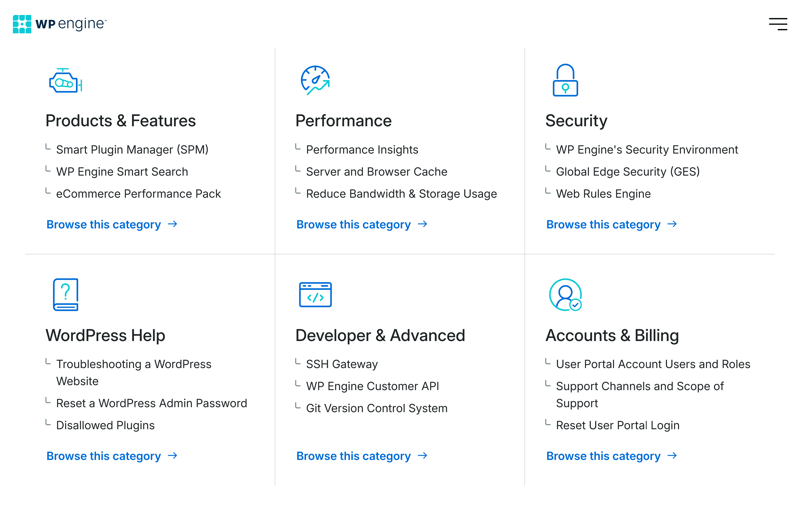
Article in WP Engine’s support center.
WP Engine also enhances articles with screenshots, links to related content, and step-by-step guides. You can even bookmark useful articles for later.
What’s surprising is how small the WordPress-specific section is. It includes only about 15 articles on WordPress topics. For a managed WordPress host, we expected far more content here.
AI helpdesk answers questions reliably
If you'd rather not dig through articles yourself, the support center includes a built-in AI assistant. The chatbot pulls from the knowledge base to suggest relevant help articles and specific solutions.
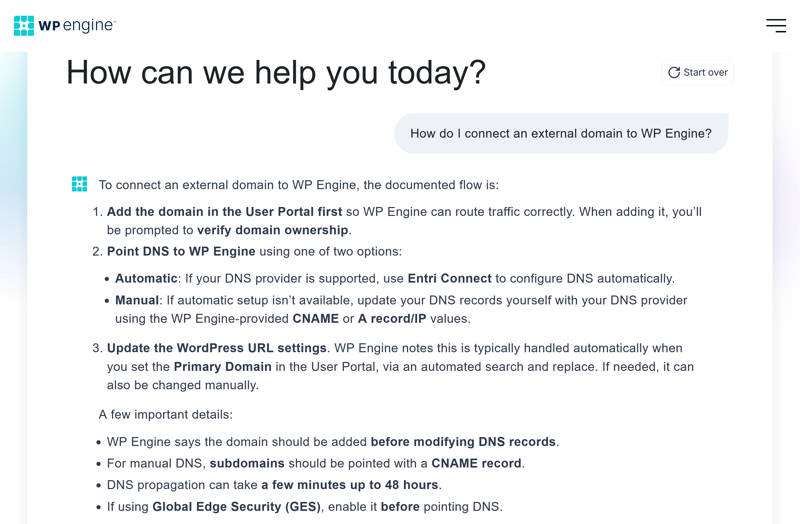
The AI helpdesk assistant answers questions.
In our test, it worked reliably and even handled more complex questions well. If you'd rather talk to a real person, the assistant can quickly connect you to live chat. That's where the problems start.
24/7 live chat unavailable in our test
WP Engine advertises 24/7 live chat support. But in our test, we couldn't reach an agent at any time of day. Instead of a response, we just saw a loading animation.
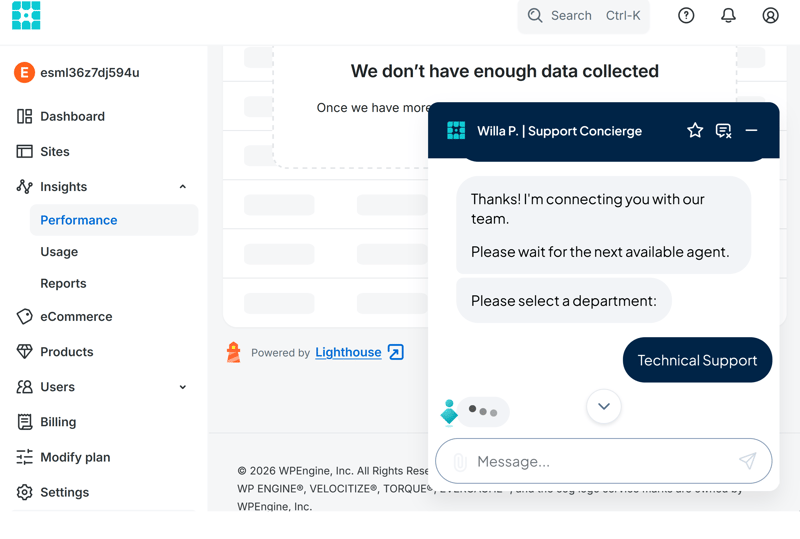
The support chat is supposedly staffed 24/7, but all we see are three dancing dots.
That's frustrating, especially since not all customers have access to phone support. If the chat doesn't work, your only options are the AI assistant or the knowledge base.
WP Engine only offers phone support starting with the Professional plan. Customers can reach an English-speaking hotline via a UK phone number.
What do customers think of WP Engine's support?
Other customers have had better luck with support. In their reviews, many users praise WP Engine’s direct help from knowledgeable staff, calling the support fast and technically skilled.
But there’s criticism too. Some users dislike being forced to start with an AI chatbot. Others report longer wait times or cases that are escalated internally. A few customers say they had to jump through hoops to reach a real person, especially for more complex issues.
If you’re comfortable troubleshooting WordPress and hosting issues on your own, WP Engine’s support is solid. The knowledge base is strong, and the AI assistant reliably answers many questions.
But if you need hands-on help, getting through to someone can be tough. During our entire test, we couldn’t access the promised 24/7 live chat. For a managed WordPress host, that’s a letdown.
Costs
| 1 project, 10 GB storage | $32.08 | 0/3 |
| 10 projects | $119.17 | 0/3 |
| 50 GB of storage | $302.50 | 0/3 |
| Fair pricing |
| 2/6 |
WP Engine keeps its pricing simple. Instead of overwhelming you with options, it offers four managed WordPress plans. The main differences come down to the number of websites, storage space, visitor limits, and a few extra features.
Startup: This entry-level plan lets you host one WordPress website with 10 GB of storage. WP Engine says it’s built for up to 25,000 visits per month. It includes staging, a CDN, daily backups, SSL, and SSH access, but not phone or multisite support.
Professional: This plan raises the limit to three websites and 15 GB of storage. WP Engine rates it for up to 75,000 visits per month. You also get phone support and the ability to run WordPress multisite.
Growth: The Growth plan supports up to ten websites with 20 GB of storage. WP Engine says it’s designed for up to 100,000 visits per month. The features match the Professional plan but leave more room for larger or multiple projects.
Scale: The largest standard managed WordPress plan supports up to 30 websites and offers 50 GB of storage. WP Engine says it can handle up to 400,000 visits per month. This plan works well for larger business sites or several projects running at the same time.
Here’s an overview of WP Engine’s managed WordPress plans:
| Startup | Professional | Growth | |
|---|---|---|---|
| Monthly price | from $32.08 | from $59.58 | from $119.17 |
| Contract period (months) | 1 - 12 | 1 - 12 | 1 - 12 |
| Included | |||
| WordPress projects | 1 | 3 | 10 |
| Storage | 10 GB | 15 GB | 20 GB |
| Storage type | SSD | SSD | SSD |
| Domains | 0 | 0 | 0 |
| Email accounts | 0 | 0 | 0 |
| Databases | 1 | 3 | 10 |
| Bandwith | 75 GB | 150 GB | 240 GB |
| SSL certificates | unlimited | unlimited | unlimited |
| Backups | |||
| Backup interval | Daily | Daily | Daily |
| Backup retention | 40 days | 40 days | 40 days |
| Manual backups | ✓ | ✓ | ✓ |
| Features | |||
| External domains | ✓ | ✓ | ✓ |
| SSH access | ✓ | ✓ | ✓ |
| CDN | ✓ | ✓ | ✓ |
| Cronjobs | ✓ | ✓ | ✓ |
| Staging environment | ✓ | ✓ | ✓ |
How WP Engine’s pricing stacks up
Managed WordPress plans vary a lot between providers, especially when it comes to storage, visitor limits, performance features, and extras. That's why price alone doesn't tell the full story.
To make costs easier to compare, we looked at the monthly prices for three common use cases:
1 WordPress site with 10 GB storage
10 WordPress sites
50 GB storage
Here's how the prices stack up for these three scenarios:
| 1 project, 10 GB storage | 10 projects | 50 GB storage | |
|---|---|---|---|
| $3.49 | $4.49 | $4.49 |
| $6.50 | $65.00 | $20.00 |
| $7.49 | $12.49 | $12.49 |
| $8.49 | $8.49 | $8.49 |
| $11.98 | $46.00 | $11.98 |
| $11.98 | $46.00 | $11.98 |
| $17.99 | $179.90 | |
| $24.00 | $24.00 | $24.00 |
| $32.08 | $119.17 | $302.50 |
| $41.67 | $187.50 | $283.33 |
WP Engine ranks among the most expensive options in all three scenarios. The price gap stands out most for a single WordPress site with 50 GB of storage, where most competitors charge significantly less.
For 10 WordPress sites, WP Engine isn't exactly cheap either, though some premium hosts charge even more.
The fine print with WP Engine
Before signing up, keep a few key details and limitations in mind:
No hard traffic limits: WP Engine doesn't set strict visitor limits. Instead, each plan lists recommended monthly visitor numbers.
Higher renewal prices: After the first 12 months, prices go up for all plans. Factor this into your decision before signing up.
No free domain for the first year: Unlike many competitors, WP Engine doesn't include a free domain with any plan. You only get free subdomains.
Free backup restores: You can restore existing backups at no extra cost.
Monthly billing available: You can choose between a one-month or 12-month term. Either way, you'll pay for the full period upfront.
No hidden fees: WP Engine doesn't tack on unexpected charges, though some extra features may cost extra.
No money-back guarantee: Despite what some comparison sites claim, WP Engine doesn't currently offer a money-back guarantee. Canceling within the first 30 days doesn't automatically entitle you to a refund.
WP Engine is fairly expensive, but our test showed it delivers strong performance and plenty of features for professional WordPress projects. If you actually put these capabilities to use, the higher price can pay off. For smaller business sites or simple WordPress projects, though, the extra cost is harder to justify.
Final Verdict: Strong, But Pricey
WP Engine is worth it for demanding WordPress projects where security, performance, and control matter more than a low price. The platform clearly targets experienced users and teams who manage multiple or business-critical websites and can actually tap into the host's performance potential and extensive feature set.
Despite the premium price, WP Engine doesn't deliver a premium experience across the board. The dashboard feels sluggish, and we couldn't reach the promised 24/7 live chat once during our entire test period. We expected more from a managed WordPress host in this price range.
For simple business websites or smaller WordPress projects, WP Engine is usually too expensive, and its many developer features often add unnecessary complexity. Users should also note that the platform and knowledge base are only available in English.

Customer Reviews
How satisfied are customers with WP Engine day to day? Reviews on Trustpilot and similar sites are largely positive, though there's some criticism as well:
Strong performance
Many customers see WP Engine as a fast and stable WordPress host. According to user reviews, it offers a powerful and reliable platform, especially for business websites.Plenty of options
Reviewers praise the dashboard for making it easy to manage websites, backups, staging environments, and users. That said, some hosting experience definitely helps.Useful WordPress features
Customers appreciate that WP Engine handles many typical WordPress tasks for them. Backups, security features, core updates, staging, and caching are all tightly built into the platform and enabled by default, just as you'd expect from a managed WordPress host.A good fit for businesses and professionals
WP Engine is geared more toward professional users. If you manage multiple WordPress projects or run an important business website, customers say it fits these needs well.
Too expensive for small websites
Price is the biggest drawback. Customers do see the value they're getting, but WP Engine is overkill for simple, small websites.Inconsistent support quality
Some users report unhelpful answers or slow resolutions from support. With a pricier provider like this, that criticism carries more weight, since customers rightfully expect more.Not for beginners
WP Engine takes many tasks off your plate, but it's not the easiest entry point into web hosting. If you already have some experience with hosting and WordPress, you'll find your way around much more easily.Technical limitations
Some customers point out restrictions on certain plugins or CDN configurations. These rules are meant to boost performance and security, but they can get in the way if you want full control over your WordPress installation.
WP Engine Alternatives
Not fully sold on WP Engine? One of these alternatives might be a better fit for your needs:
Cheaper than WP Engine
If you want high standards without the high price tag, SiteGround is worth a look.More powerful than WP Engine
Cloudways is a solid alternative if you want to squeeze as much performance as possible out of a flexible cloud setup. In exchange, it requires more technical know-how and takes fewer management tasks off your hands than WP Engine does.More flexible than WP Engine
Bluehost makes sense if you're managing multiple projects or want more technical freedom with your hosting. It's less strictly focused on premium WordPress, but it offers more flexibility in plans, project limits, and server settings.
Check out the top 5 alternatives to WP Engine WordPress hosting below: