RAID Level: Comparing RAID 1, 5, 6, and 10


Hard drives can fail, often at the worst possible time. A RAID system protects your data and handles failures by combining multiple hard drives. Different RAID levels have their own advantages and disadvantages.
In this guide, we'll look at RAID levels 1, 5, 6, and 10, the most commonly used. They offer a good balance of data protection, performance, and cost.


A RAID system combines multiple hard drives into a single array to protect data and boost performance.
RAID levels vary in how they distribute data and handle failures. Each offers a unique mix of fault tolerance, performance, storage capacity, and cost.
Higher redundancy always comes at the expense of usable storage capacity and often reduces write speed as well.
RAID 1 and RAID 10 excel at security and fast recovery, while RAID 5 and RAID 6 offer more usable storage space.
Our RAID calculator helps you find the best configuration for your needs.
What Is RAID?
RAID stands for Redundant Array of Independent Disks. It's a system that combines multiple hard drives into a single unit. To the outside world, a RAID system appears as one drive. The goal is to increase data security, improve system performance, or both.
In practice, a RAID system either distributes data across multiple hard drives or mirrors it completely. This allows the system to survive drive failures without losing data. That's why RAID is a standard component in many enterprise IT environments, especially in server and storage systems.
RAID is often mistaken for a backup. While a RAID system does protect against individual hard drive failures, it does not protect against other causes of data loss.
Here's why: If you accidentally delete an important file, the RAID system immediately deletes that file on all connected hard drives to keep data in sync. RAID only ensures that data remains available in case of a hardware failure.
The Most Important RAID Levels at a Glance
Over the years, various RAID levels have been developed, but only a few are widely used in real-world setups. The simplest is RAID 0, which distributes data across multiple hard drives without any redundancy. It's designed purely for speed and offers no protection against data loss.
RAID 1 mirrors data one-to-one onto a second hard drive. This increases fault tolerance but cuts usable storage space in half.
RAID 5 and RAID 6 use parity information to achieve redundancy while maximizing storage capacity. For each data block, a checksum is calculated that can be used to restore data if a drive fails.
RAID 10 combines the strengths of RAID 1 and RAID 0 by pairing mirroring with striping. The system distributes data across multiple hard drives to increase read and write speeds.
The best RAID level depends on your budget and what matters most to you: fault tolerance, performance, or storage space.
RAID 1 offers high data security but limited usable storage. RAID 5 is a good compromise between protection and capacity. RAID 6 is ideal for larger systems that need protection against two simultaneous drive failures. RAID 10 is a great choice for applications with high-performance demands.
Our RAID calculator can help you quickly find the right configuration.
RAID 1: Mirroring for Security
A RAID 1 system writes all data identically to two or more hard drives. Each of these drives contains a complete copy of the stored data. If one hard drive fails, another drive takes over seamlessly without any data loss or interruption.
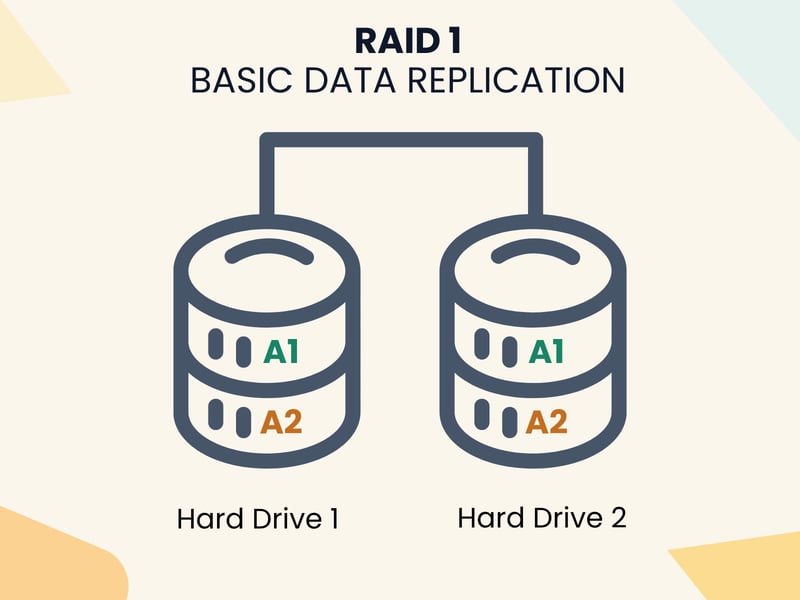
With RAID 1, data is mirrored across two or more hard drives.
The biggest advantage of RAID 1 is this high level of fault tolerance. Since every file exists on at least two drives at the same time, just one working drive is enough to keep the system running.
Recovery after a failure is usually straightforward too. After replacing the defective hard drive, the system automatically copies the data from the intact drive to the new one.

The biggest limitation of RAID 1 is that it cuts your usable storage in half. Since all data is duplicated, only 50% of your total disk space is actually available for use.
A small accounting firm runs its central office server with two SSDs in a RAID 1 configuration. This system hosts the accounting software and critical client data. If one SSD fails, the server keeps running thanks to mirroring. The defective drive can be replaced while the system is still online, and the data is resynchronized without any risk.
RAID 5: Fault Tolerance and Performance
RAID 5 combines the benefits of striping (distributing data across multiple drives) with parity. This method splits data into blocks and spreads them across at least three hard drives.
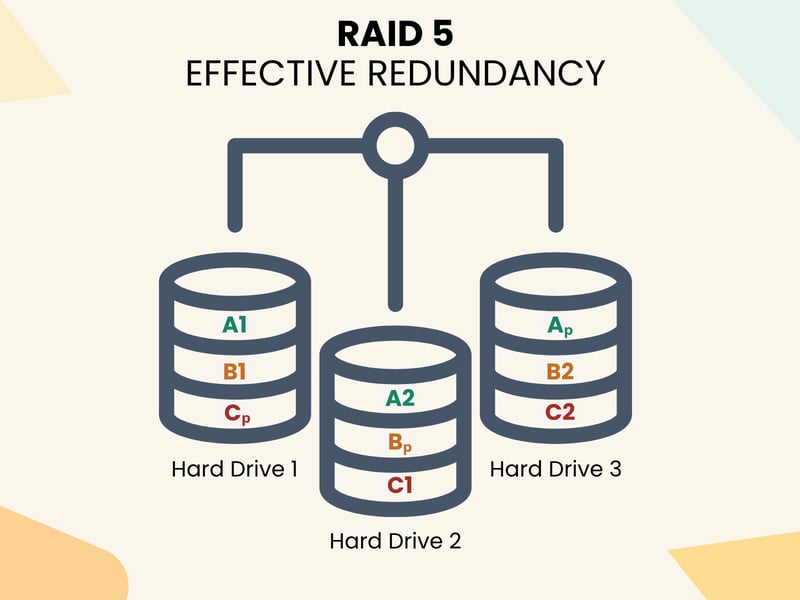
RAID 5 requires at least three hard drives.
The system also calculates parity information for each data block and stores it alongside the data. If a hard drive fails, the RAID can rebuild the missing data using the parity and the remaining blocks. This means the system can handle the loss of a single drive without losing any data.

Write performance is lower compared to RAID 0 or RAID 1 because the system has to calculate and write parity data. The time between a drive failure and its replacement is critical: rebuilding onto a new hard drive can take many hours or even days with today's large storage devices.
A mid-sized company uses a file server to store project files, internal documents, and customer data. The IT department set up a RAID 5 system with four hard drives. This allows fast data access, protects against a single drive failure, and keeps everything running smoothly even if one drive fails.
RAID 6: More Redundancy
RAID 6 picks up where RAID 5 leaves off, with the goal of significantly increasing fault tolerance. Instead of one parity value, RAID 6 uses two parity values per data block. This double protection allows two hard drives to fail at the same time without losing any data.
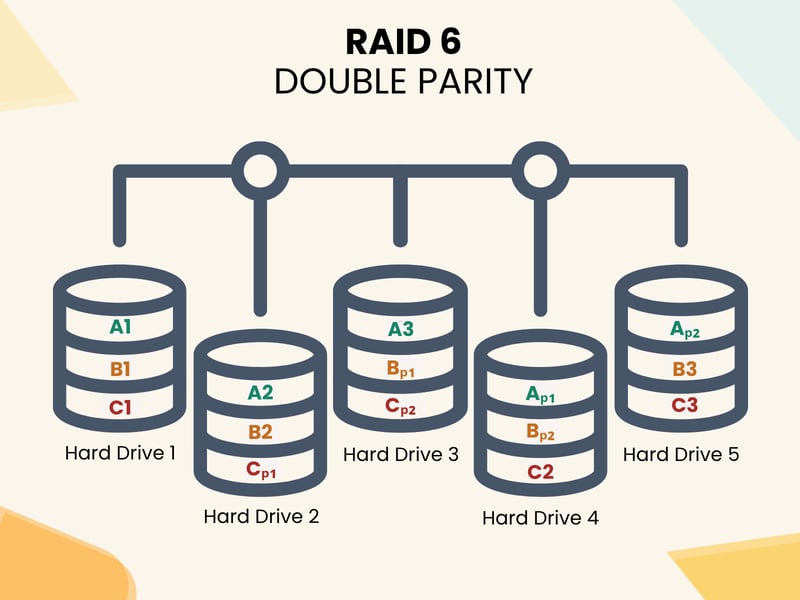
RAID 6 relies on dual parity for additional protection.
With RAID 6, read performance stays high because the system reads data from multiple drives at once. Write operations take longer than with RAID 5 since two parities need to be calculated. Rebuilding after a failure also puts heavy strain on the remaining drives and can take a long time.
An advertising agency archives its finished video projects and raw footage on a NAS with RAID 6 and eight hard drives. Thanks to double parity, access remains available even if two hard drives fail at the same time.
RAID 10: Performance Meets Security
RAID 10 combines the speed of RAID 0 with the security of RAID 1. It requires at least four hard drives. Two drives work together as a mirror pair, keeping a copy of the data.
The RAID 10 system then combines these mirror pairs into a fast array by distributing data across them. If one hard drive fails, its mirror partner takes over.
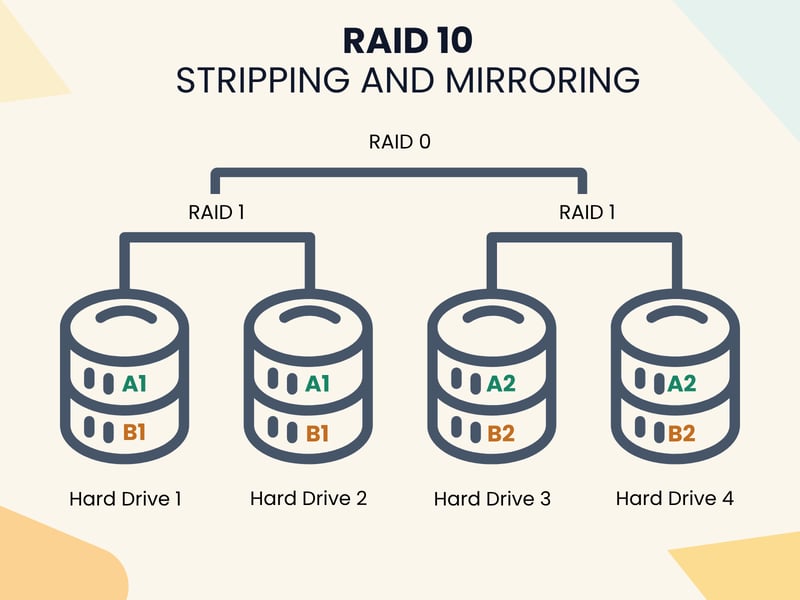
RAID 10 combines the strengths of RAID 1 and RAID 0.
The recovery process after a drive failure is usually quick and straightforward with RAID 10. Since only a 1:1 copy of the healthy drive is needed, the rebuild is much faster than with parity-based RAID levels.

The biggest downside of RAID 10 is its high-capacity requirement. Just like RAID 1, only 50% of the total hard drive capacity is available for data.
An online store uses RAID 10 with fast SSDs for its ecommerce software and customer database. Mirroring and striping ensure high performance even with heavy traffic. During peak sales periods like the holiday season, RAID 10 can keep the store running smoothly and process transactions quickly.
RAID Levels Compared
This overview shows you at a glance how the main RAID levels differ and which ones are best suited for different use cases:
RAID Level | Redundancy | Usable Storage | Key Feature |
|---|---|---|---|
RAID 0 | None | 100% | Maximum speed, but no protection |
Mirroring (1:1) | 50% | Fault tolerance through mirroring | |
1 hard drive | approx. 67–80% | Good balance between security and capacity | |
RAID 6 | 2 hard drives | approx. 60–75% | Higher fault tolerance for large arrays |
Mirroring + striping | 50% | Combines performance and security |
Finding the Right RAID Level
Not sure which RAID level is best for your system? Use our RAID calculator to quickly find the right configuration for your needs.
Usable total capacity
1000 GB
Read speed
approx. 2.0x
Write speed
approx. 2.0x
Fault tolerance
0 failures (no protection)
Conclusion: Which RAID Level for Which Requirements?
Not all RAID systems are suitable for every purpose. RAID 1, for example, is particularly well suited to simple systems with a small number of important files. RAID 5 is a suitable option for traditional file servers or NAS systems, where achieving a balance between storage space, speed, and fault tolerance is important.
RAID 6 is a good choice when you have very high security requirements and can't afford two drives failing at once. RAID 10 is made for environments where top speed and fast recovery after a failure are essential.
One thing remains important in all cases: RAID only protects against hardware failures. It is not a substitute for regular backups, proper monitoring, and a comprehensive security strategy.