Best OpenClaw Hosting 2026: Set Up Your Own OpenClaw Agent in 3 Simple Steps


Running OpenClaw on your own computer isn't always the best option. It needs to stay online 24/7 and have enough power to handle the workload. A VPS takes care of that. Set up OpenClaw once through your host’s dashboard, and it keeps running around the clock.
In this article, we show which VPS providers make getting started easiest. You also learn how to set up and use your OpenClaw agent on your server.


Many hosting providers now offer preconfigured OpenClaw setups. You don't have to order a blank server and install everything manually.
With a VPS, you start with a ready-to-use setup that includes a setup wizard. Your AI agent stays online and handles tasks continuously.
Big names like Hostinger, DigitalOcean, and Contabo make it easy to get started with OpenClaw templates.
Getting started is simple: book a server, set up OpenClaw, connect your first channel, define a use case, and you're done.
Step 1: Choose a VPS With a Setup Wizard
If you prefer running OpenClaw on a VPS instead of your own computer, choose a web hosting provider that handles most of the setup for you.
Providers don't just differ in cost and server performance. The effort required to get OpenClaw running matters just as much.
A setup wizard (also called a one-click setup) handles most of the technical work for you. You don’t have to install software, resolve dependencies, or run server commands. Follow a few simple steps, and OpenClaw is ready to use.
This saves time, reduces early-stage errors, and lets you focus on using your AI agent instead of dealing with server setup.
Preconfigured setups are becoming more common, but they are not yet standard everywhere. Some hosting providers still require manual installation and configuration of OpenClaw.
That’s not the case with Hostinger, DigitalOcean, or Contabo. None of them require you to set up OpenClaw from scratch. However, they differ in how the setup is delivered, their dashboard design, and what happens after deployment.
Hostinger: OpenClaw as a Pre-Configured VPS Template

Hostinger* is a Lithuania-based hosting provider known for web hosting, WordPress hosting, domain services, and easy-to-manage VPS plans.
For OpenClaw, Hostinger offers a ready-made template. When you purchase a VPS, simply select OpenClaw, and the system sets up your server with it preinstalled.
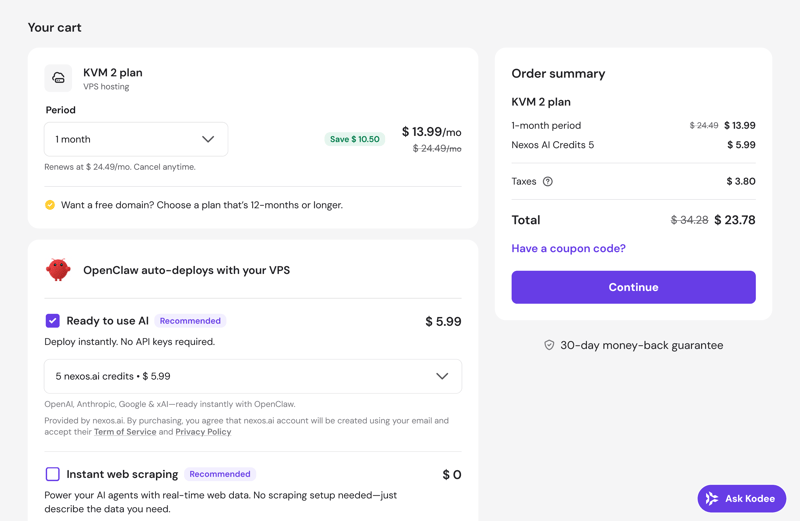
OpenClaw as a template in Hostinger's VPS.
You can also deploy the AI agent on an existing VPS using Hostinger’s Docker manager.
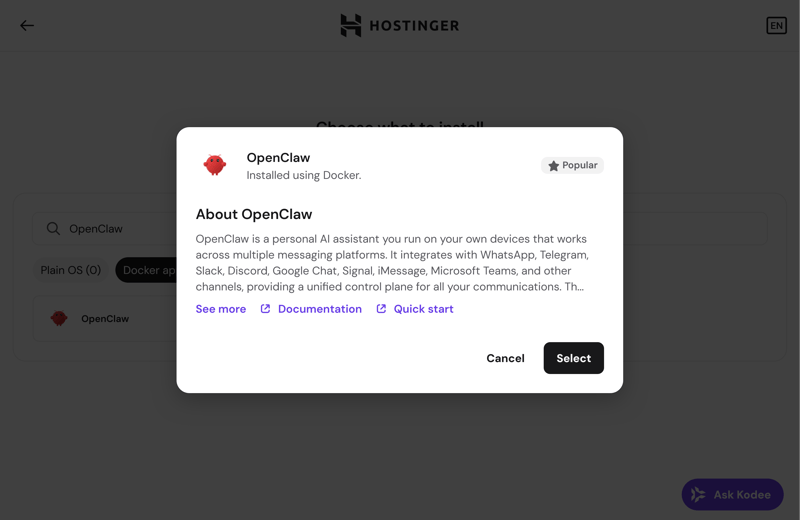
OpenClaw in Hostinger's Docker manager.
The setup process is the same in both cases. A step-by-step assistant guides you through the required inputs. Once completed, OpenClaw appears in your Hostinger dashboard, where you can start the agent and access its web interface.
Hostinger also lets you purchase AI credits upfront. These credits run through nexos.ai and remove the need for an external API key. OpenClaw connects directly to the preconfigured models, which simplifies the setup further.
DigitalOcean: OpenClaw as a 1-Click App in the Marketplace

DigitalOcean* is a U.S.-based cloud provider best known for its Droplets, virtual servers that can be deployed in minutes. It also offers databases, storage, and an app platform. Developers and small teams often choose DigitalOcean because it keeps infrastructure management simple.
For OpenClaw, DigitalOcean uses its Marketplace, where a ready-to-use OpenClaw app is available. Instead of starting with a blank Droplet, you select this app and launch a server with OpenClaw already installed.
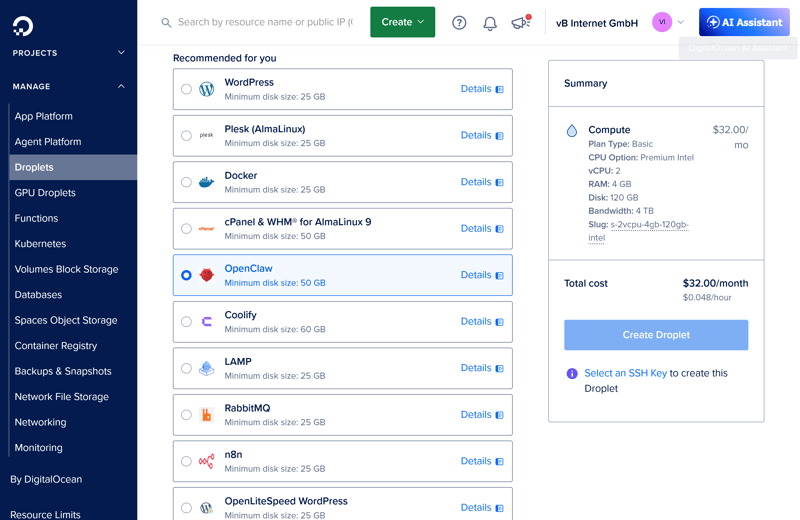
OpenClaw as a Marketplace app on DigitalOcean.
After launching, log in to the preconfigured server to start the OpenClaw setup wizard.
At the end, the system provides a web address. Use it to open the OpenClaw gateway interface in your browser and customize your AI agent.
Contabo: OpenClaw as an Add-On for VPS

Contabo* is a German hosting provider that offers powerful servers at competitive prices. It also provides a preconfigured OpenClaw installation, which you can select during checkout or later in the reinstall section of your VPS. Look for the Application Installation option and choose OpenClaw:
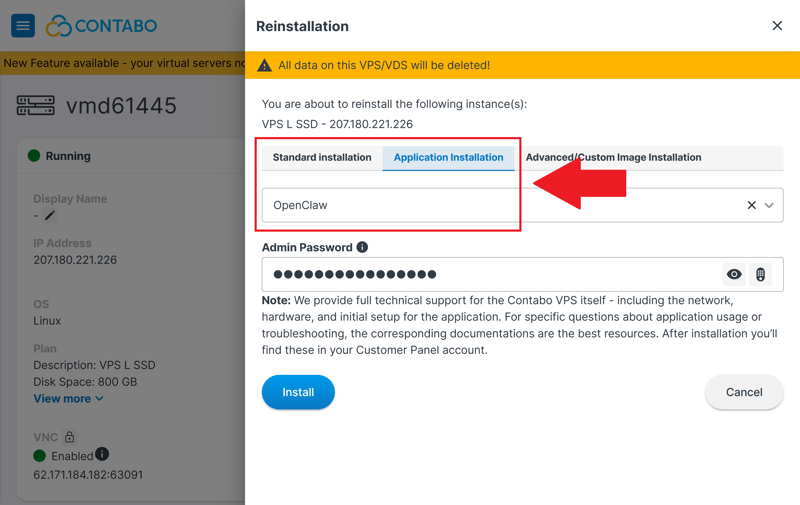
OpenClaw as an application on Contabo.
Contabo then sets up your server from scratch and installs OpenClaw automatically. After that, log in via SSH. The first time you sign in, the OpenClaw setup assistant launches automatically.
One important detail about Contabo: the OpenClaw gateway interface is not publicly accessible by default. According to the provider’s documentation, this is intentional, not a bug.
Step 2: Set Up OpenClaw
Once your VPS is running and OpenClaw is installed, the actual setup begins. A configuration screen appears where you enter the required environment variables.
Choose an AI Provider
OpenClaw doesn’t generate responses on its own. It relies on a connected language model, so you need to choose a provider first, for example OpenAI’s ChatGPT.
For the initial setup, one provider is sufficient. You can add more later. The main goal is to confirm that the connection works and OpenClaw responds correctly.
Enter an API Key
OpenClaw can’t communicate with your AI provider without an API key. Think of it as the credential that links your OpenClaw server to the AI model. Retrieve the key from your provider’s account and enter it here.
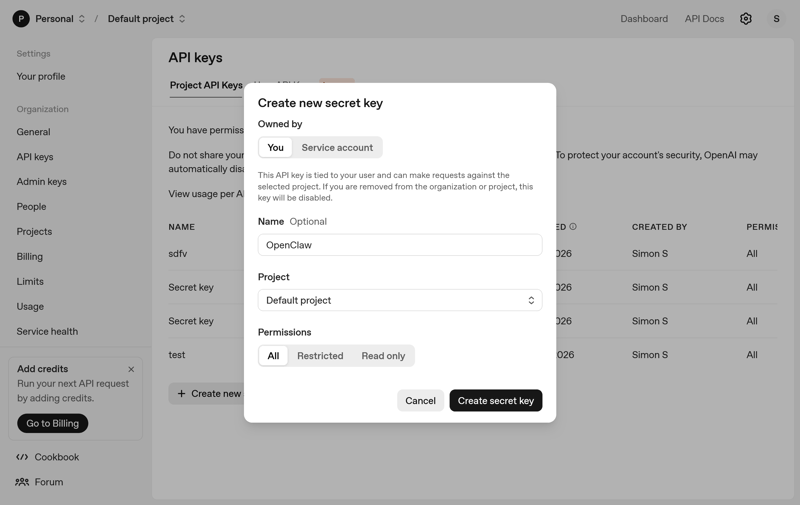
You can get an API key from OpenAI's developer portal, for example.
Here's how to set up OpenClaw with OpenAI (ChatGPT):
Add a Messenger
To use OpenClaw with WhatsApp, set the environment variables like this. The process is the same for other messengers:
The connection between WhatsApp and your AI agent is established via a QR code in the OpenClaw gateway dashboard.
Step 3: Use OpenClaw
Once everything is set up, you're ready to start using your AI agent. At this point, the hosting provider no longer matters, as OpenClaw takes over.
You control OpenClaw like a regular chat. Describe your task in plain English, and the agent handles the rest.
OpenClaw works best for repetitive, multi-step, or tedious tasks. Unlike chatbots, it does more than answer questions – it can take over entire workflows. You define the goal, and the agent determines how to achieve it.
Here's what you can do with it:
Sort emails or draft replies
Open or move files
Open websites and fill out forms
Check log files or run scripts
Monitor recurring tasks and step in only when needed
OpenClaw is especially useful when tasks don’t follow a rigid script. It can decide what to do next based on the context.
Unlike traditional workflow automation, OpenClaw handles context more effectively. It retains past information and uses it to make more informed decisions later on.
Keep in mind that OpenClaw actively interacts with your workflows. The agent can access your files and communication channels. If your instructions are unclear, it may send inaccurate responses on your behalf or expose personal data to the wrong recipients.
Conclusion: Get Your AI Agent Running in 3 Easy Steps
Follow these steps, and your OpenClaw agent will be running on its own server in no time. Book a VPS, launch the preconfigured environment, and make a few final adjustments. That’s all it takes.
A VPS with a one-click setup makes the process much easier. You don’t have to install dependencies manually or deal with common setup mistakes. Your AI agent runs in the background 24/7 without requiring your computer to stay on.
Hostinger, DigitalOcean, and Contabo make installation especially simple, but they're just a few examples. Other VPS hosting providers can work for OpenClaw too, as long as they offer easy deployment, enough resources, and a smooth setup process.