Contabo VPS Review 2026: What Do You Get for Your Money?



Contabo has made a name for itself by offering particularly affordable VPS plans. Prices for VPS hosting start in the low single digits. But what do you actually get for that?
We tested Contabo's VPS offerings in detail and reveal how well performance, features, and stability hold up in real-world use.


Contabo* is a German web hosting provider that has been in business since 2003. The company specializes in budget-friendly solutions for both personal and business customers.
Contabo Server Review
Affordable plans
Contabo's plans are among the cheapest on the market. For just a few dollars per month, you get a VPS with root access.Traffic included
Contabo doesn't charge extra for incoming data traffic. Outgoing traffic is included up to 32 TB per month for VPS plans at EU locations.
Subpar server performance
Weak processor performance, slow memory, and low network throughput: Contabo scores poorly in all areas of our performance review.No phone support
Contabo has discontinued its hotline and replaced it with a live chat featuring an AI chatbot. Both the bot and the support staff respond in English.Delayed VPS provisioning
Compared to other providers, it takes longer to get started with Contabo. You also won't receive a notification when your VPS is ready.
Server Setup & Management
| Interface & usability | Quick, but divided | 1/2 |
| Server setup | Server setup takes time | 6/8 |
| Server management | Important features missing | 5/8 |
| Other features | Not available | 0/2 |
With Contabo, you register when you place your first order. After you select your desired product, you simply enter your contact information. Contabo then automatically creates your customer account. You can register separately in advance, but it's not required.
If you're ordering a server from Contabo for the first time, the company may request additional verification documents, such as a copy of your ID.
This step helps prevent fraud and ensures that customer information is accurate. Contabo isn't alone in this practice, as other hosts follow similar procedures.
The New Contabo Dashboard: A Step Forward
In early 2025, Contabo introduced a redesigned Customer Control Panel alongside the existing interface. The updated version is still in beta, but it already looks much more modern.
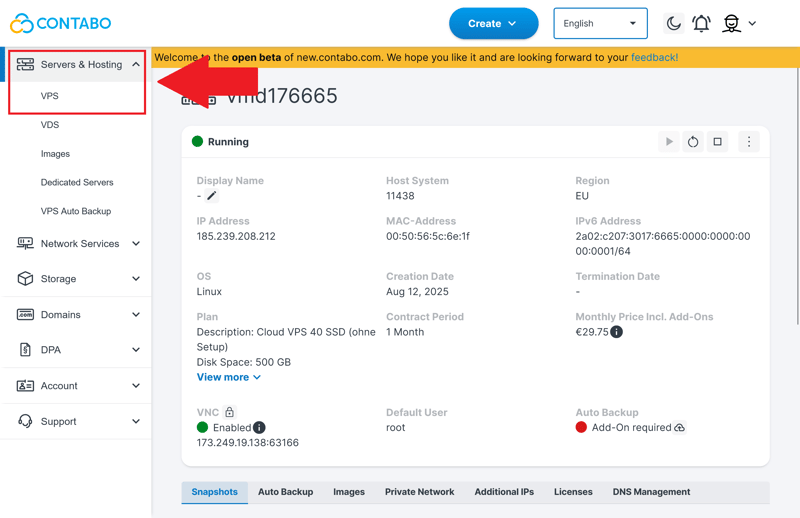
The VPS view in Contabo's new Customer Control Panel.
The new Contabo panel is noticeably cleaner and more intuitive than its predecessor. You can access all key settings in just a few clicks. The redesigned navigation uses a streamlined sidebar with main and subcategories. The panel responds quickly, with minimal loading times.
A prominently placed "Create" button takes you directly to the Contabo shop. In the top bar, you can also adjust the language (English, German, Spanish, or Portuguese) and display mode (light or dark). The top bar includes quick links to billing and account management, which are likewise accessible through the sidebar.
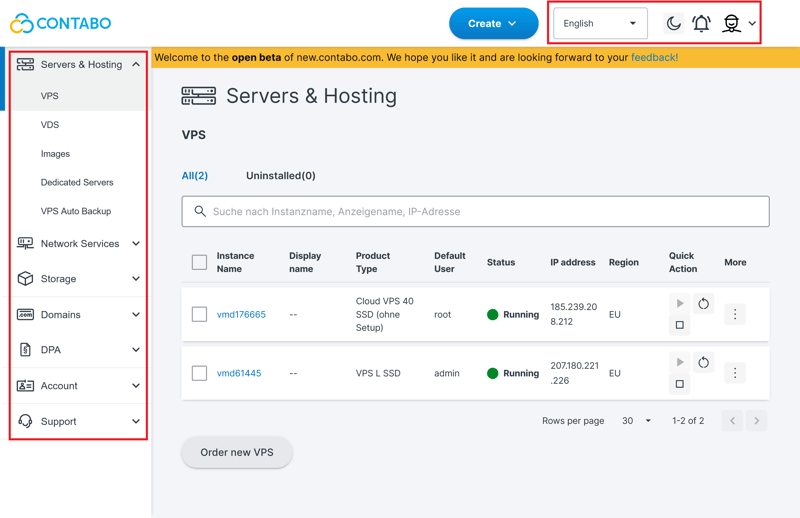
Sidebar and header in the beta version of the dashboard.
Contabo's new dashboard is a step forward, it simplifies the overall experience. The interface is well organized, navigation is intuitive, and loading times are pleasantly short.
Server Setup at Contabo: Could Be Faster
The server setup is well structured and offers plenty of flexibility. First, you select a plan (more on costs later) and the server location.
Although Contabo is a German provider, Germany isn't explicitly available as a hosting option. Instead, Contabo automatically assigns you a data center within the EU. In our review, this was France. Other regions like the USA, Asia, or Australia are available for an extra fee. The host transparently displays the expected latency for all options.
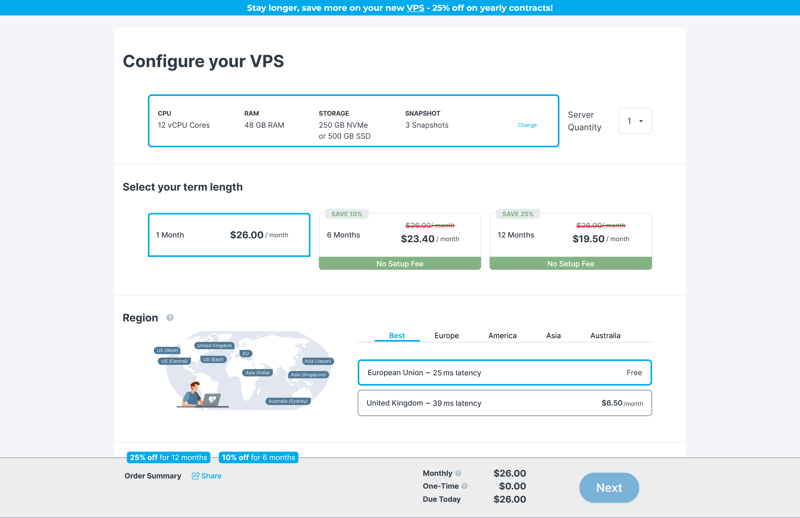
Setting the contract term and VPS location.
For storage, you can choose between traditional SSDs with larger capacity and faster NVMe drives with half the storage space. Ubuntu, Debian, AlmaLinux, and Rocky Linux are available as operating systems at no extra cost. Windows costs extra.
In addition to the operating system, you can configure additional software. This includes paid hosting panels like Plesk and cPanel, as well as free options like Webmin, Docker, or LAMP. There are also pre-configured images for blockchain nodes such as Bitcoin or Ethereum.
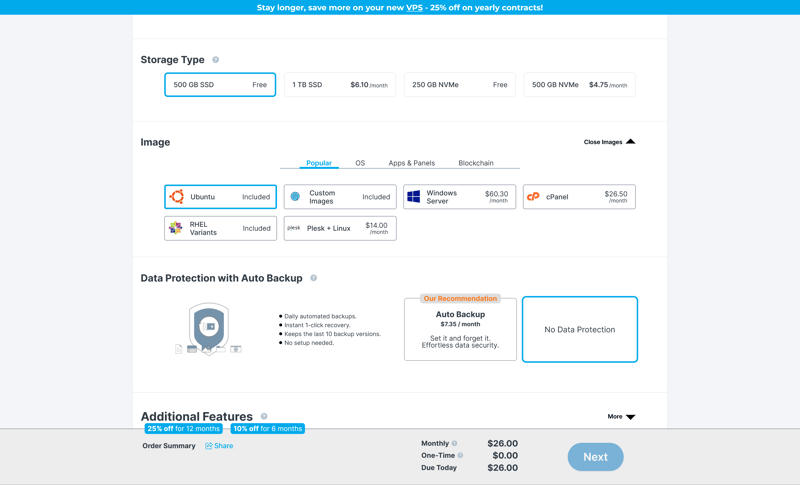
Storage, image, and backup selection.
The ordering process itself is straightforward and self-explanatory. After completing it, you'll receive a confirmation email. However, the server isn't provisioned at this point. In our review, it took three hours before the VPS was active. Other hosts handle this much better, with servers sometimes ready in just a few seconds.
You also don't receive a notification, or at least not immediately. We only discovered the provisioned VPS by chance in the customer area. Strangely, Contabo sends another message 48 hours after ordering, stating that the order is now complete.
This email also contains a VNC connection password in plain text. From a security standpoint, this is problematic. It would be better to let users set their initial VNC password themselves through the Customer Control Panel.
Server Management: Modern With Legacy Baggage
As a new customer, you'll manage your VPS at Contabo mostly through the new Customer Control Panel. However, some key tasks are still only available in the legacy dashboard. These include plan upgrades and location changes.
You usually only find out which panel a feature is in by trial and error. Contabo plans to integrate all management features into the new panel over time. When asked, support said: "We estimate that most features will likely be available by 2026."
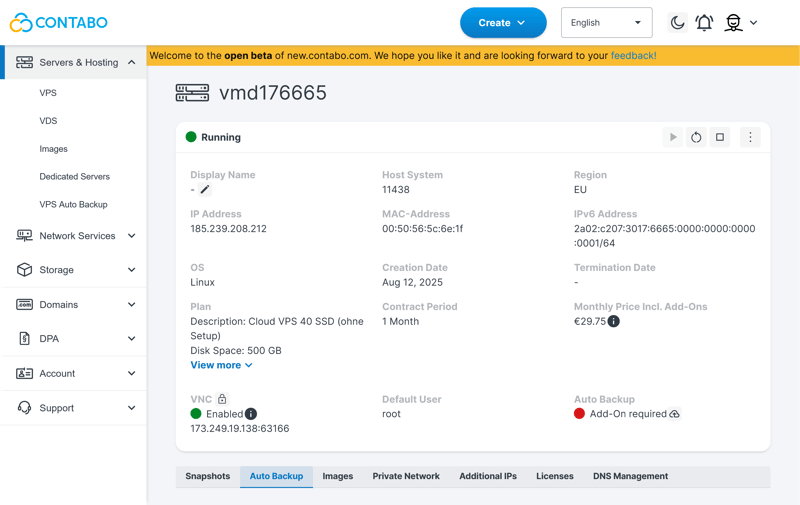
VPS details at a glance.
Contabo collects the most important information about your VPS in the new dashboard under "My Servers." Here you can see the instance name, location, status, IP address, and other details.
Through the context menu, you perform actions such as reinstalling the server and accessing the rescue system or snapshot management.
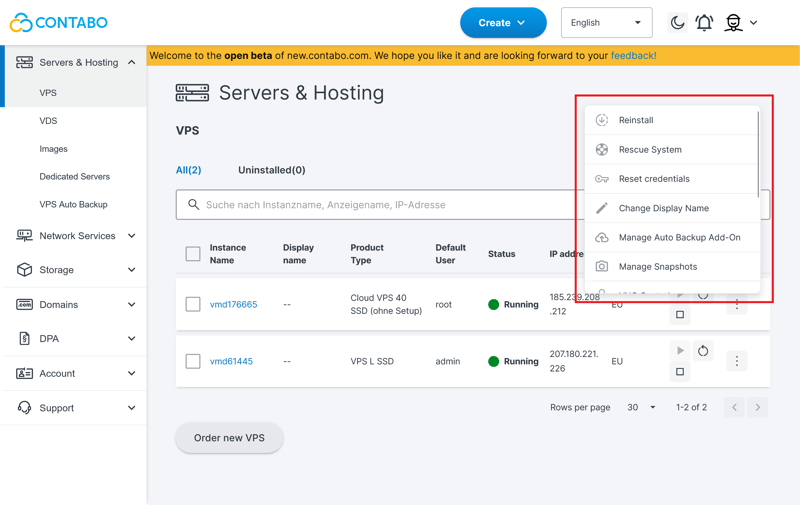
The action menu offers many options.
Unlike many other hosts, Contabo doesn't offer an integrated web console. This means you can't control the server directly through your browser. In the dashboard, you'll only find your VNC credentials and an option to set the password.
Instead of its own web-based solution, Contabo points to external VNC clients such as UltraVNC. You establish the connection manually using your server's IP.
While this works fine, it requires additional software and some experience. An integrated console would make things easier, especially for less experienced users.
During a reinstallation, the interface proves more versatile than during the initial configuration. The selection of images is larger: you can now also choose from Linux distributions such as CentOS, Arch Linux, Debian, FreeBSD, or openSUSE. Several additional Windows Server versions are also available.
The selection of software applications is also larger than before. DeepSeek, Proxmox, and other specialized solutions complement the already familiar options. You can upload your own images, but only in ISO or QCOW2 format.
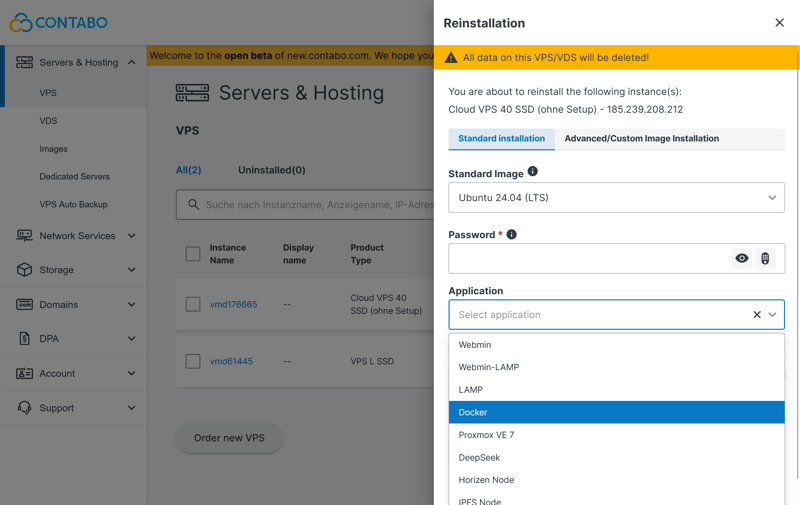
You can install your own or pre-configured images.
The rescue system is useful when you can no longer access your system or need to perform maintenance outside the running operating system.
According to Contabo, using the rescue system for Windows servers is not recommended. Important system features are missing, and accessing NTFS files can be error-prone. The host suggests using VNC as an easier alternative in these cases.
No Free Monitoring Tools
While many other hosts provide at least basic monitoring features by default, Contabo does not include any such solution.
The only option is the expensive "Full Monitoring." If you don't add it when ordering your VPS, you'll need to contact support to have it activated later. There's no way to enable it yourself through either dashboard.
Data Protection: Snapshots and Backups
Contabo offers two options for data protection. Snapshots are included in the price but limited to a maximum of three versions. The exact number depends on your chosen plan. Snapshots capture the state of your VPS at a specific point and can be restored quickly later. Contabo provides a dedicated menu for restoring them.
Daily automatic backups of your VPS can be activated at any time and will store up to ten versions. No manual setup is required as long as the add-on is enabled. Contabo charges an additional monthly fee for auto-backups, which is relatively high.
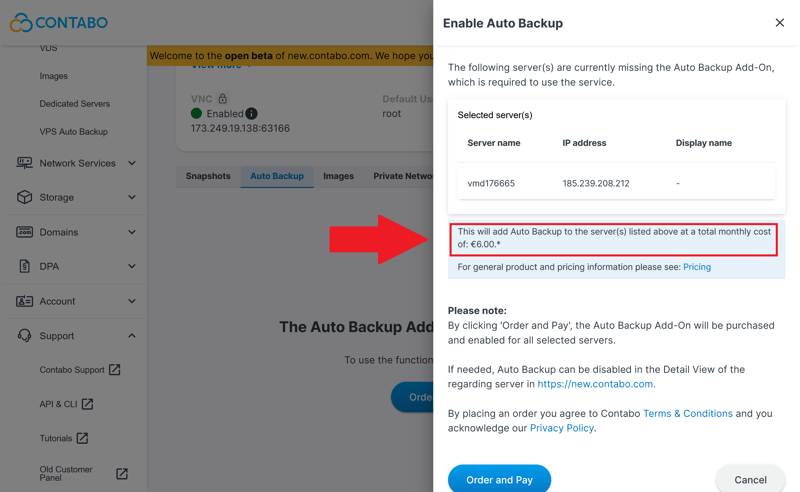
Paid backups as an add-on.
Upgrades, Downgrades, and Adjustments
Scaling server hardware at Contabo isn't flexible or customizable. Instead, scaling is only possible through plan changes. You have two upgrade options:
- 1.
A live migration transfers your existing instance, including all data. The server stays online but needs to be restarted after completion. Contabo charges a fee for this service.
- 2.
Alternatively, you can start with a fresh instance. The host deletes your old data, but there's no additional effort or extra charge.
Downgrades are also possible, but only through a workaround. You sign up for a smaller plan as a new instance and transfer your data yourself. Then you manually cancel the old server.
Object storage for large amounts of data is handled much more flexibly. You can add more storage in 250 GB increments for an additional fee, independent of your server plan. Versioning and object locking are also available. An optional auto-scaling feature adjusts your object storage upward each month as needed.
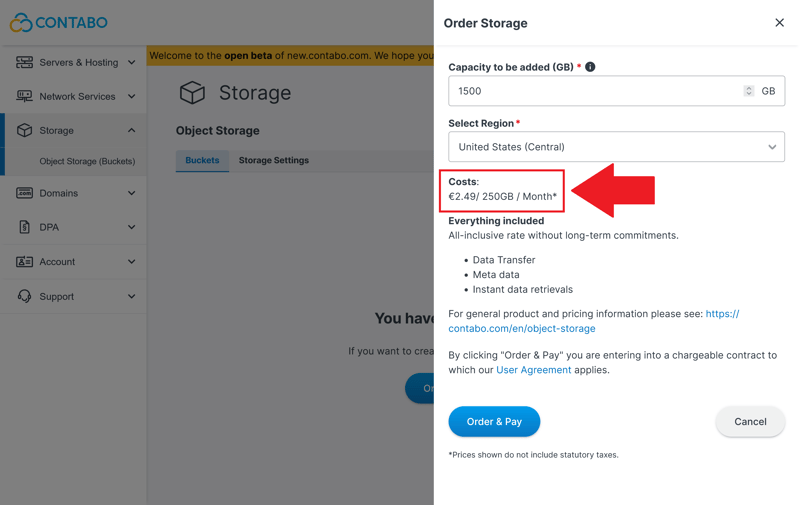
Object storage has a one-month term.
Changing server regions is also possible. You can move your instance from a data center in the US to Europe, for example. Here too, there are two options:
- 1.
With a reinstallation, Contabo creates a fresh instance in your desired region. Your data will be lost.
- 2.
A live migration preserves your server environment and transfers all data. The server stays online during migration. Contabo charges an additional fee for this option. Some locations, like Sydney or Singapore, have extra location fees.
There is no easy-to-configure firewall solution. You have to set up firewall rules manually through the operating system or external tools. Basic protection requires technical know-how. There's no central interface for port management or rule configuration like many other hosts offer.
The following overview shows how Contabo's server features compare to those of other hosting providers:
 Contabo |  DigitalOcean |  Hetzner |  Hostinger |  OVH |  IONOS |  GoDaddy | |
|---|---|---|---|---|---|---|---|
Rescue system | ✓ | ✓ | ✓ | ✓ | ✓ | ✗ | ✓ |
Web console | ✗ | ✓ | ✓ | ✓ | ✓ | ✓ | ✓ |
Monitoring | ✗ | ✓ | ✓ | ✓ | ✓ | ✓ | ✓ |
Backups | ✓ | ✓ | ✓ | ✓ | ✓ | ✓ | ✓ |
Snapshots | ✓ | ✓ | ✓ | ✓ | ✓ | ✓ | ✗ |
Scaling | ✓ | ✓ | ✓ | ✓ | ✓ | ✓ | ✓ |
Firewall | ✗ | ✓ | ✓ | ✓ | ✓ | ✓ | ✗ |
Total | 4 | 7 | 7 | 7 | 7 | 6 | 5 |

Contabo has made noticeable improvements to its server management. The new Customer Control Panel looks more modern and now brings together many key features. The selection of images and add-on options has also grown significantly.
However, running the old dashboard alongside the new one still hurts the user experience. Some important tasks are only available in the old interface, so there's no unified workflow. Features like the web console and monitoring still need work.
Performance
| CPU benchmark | Single-Core: 482 Multi-Core: 1,978 | 0/15 |
| RAM benchmark | 36,342 MiB/sec | 1/5 |
| Disk benchmark | 21,400 IOPS | 0/5 |
| Network benchmark | 292 MBit/s | 0/5 |
We evaluate all providers in our comparison using a standardized benchmark process. This provides a realistic picture of how virtual servers perform in real-world use.
We examine five key areas:
- 1.
CPU performance using a single core
- 2.
Overall performance when using multiple cores
- 3.
RAM speed
- 4.
SSD performance with many small read/write operations
- 5.
Network throughput
These results indicate how well each provider performs in everyday use, helping you decide whether the servers meet your needs.
Learn more about our benchmark methodology here:

Very Low Single-Core Performance
In our single-core performance review, Contabo scores just 482 points, falling well behind the ten competitors in our test.
This weakness is especially noticeable in applications that rely heavily on individual processor cores, such as web servers or database queries. Expect noticeable delays and longer response times.
| Geekbench 6 (Single Core) | |
|---|---|
| 1,771 |
| 1,468 |
| 1,442 |
| 1,105 |
| 1,071 |
| 954 |
| 482 |
Multi-Core Performance Also Disappointing
The VPS we tested shows only minimal improvement when multiple CPU cores are used simultaneously. With 1,978 points, Contabo also ranks near the bottom in multi-core performance.
Applications that rely on parallel processing run noticeably slower. This includes software builds and simultaneous database operations.
| Geekbench 6 (Multi Core) | |
|---|---|
| 7,945 |
| 7,159 |
| 6,177 |
| 5,476 |
| 1,987 |
| 1,978 |
| 1,652 |
Slow RAM Performance
RAM throughput is just 36,342 MiB/s, placing it tenth in our review. This weak performance slows down data-heavy applications that rely on fast memory access.
| stream copy | |
|---|---|
| 117,934 MiB/sec |
| 105,374 MiB/sec |
| 86,477 MiB/sec |
| 56,064 MiB/sec |
| 47,490 MiB/sec |
| 36,342 MiB/sec |
| 18,921 MiB/sec |
Low SSD Performance
In the SSD benchmark, Contabo scores 21,400 IOPS. This value indicates how many small read and write operations the drive can handle per second. Database-heavy applications and storage-hungry web projects benefit from high IOPS numbers. Contabo also falls far behind the competition here, landing in second-to-last place.
| fio (Total IOPS, Block Size 4k) | |
|---|---|
| 120,300 IOPS |
| 115,800 IOPS |
| 100,700 IOPS |
| 57,700 IOPS |
| 52,500 IOPS |
| 40,000 IOPS |
| 21,400 IOPS |
Low Network Throughput
Contabo also finishes last in network throughput with just 292 Mbit/s, falling far behind all other providers. This can become a problem if you regularly transfer large amounts of data or require a stable, fast connection.
| iperf (Receive Speed, IPv4, London) | |
|---|---|
| 6,970 MBit/s |
| 6,220 MBit/s |
| 5,020 MBit/s |
| 4,810 MBit/s |
| 1,950 MBit/s |
| 986 MBit/s |
| 292 MBit/s |
Such a weak result is rare: Contabo ranks near the bottom in every performance category we measured.
The weak processor performance, slow memory, and incredibly low network throughput make Contabo a poor choice for resource-intensive or business-critical applications.
Contabo might work for very basic web projects or personal websites if low costs matter far more to you than good performance. But if speed is important to you, choose a different provider.
Costs
| Price 8 vCPU | $20.80 | 5/7 |
| Price 16 GB RAM | $12.00 | 7/7 |
| Price 250 GB SSD | $3.96 | 7/7 |
| Price 50 TB traffic | $4.95 | 2/4 |
| Backup costs | $7.34 | 1/3 |
| Billing | Monthly billing | 1/2 |
Contabo's entry-level prices look very attractive at first glance. But how affordable are the plans truly? To find out, we checked specific server configurations across all providers and compared their prices directly.
We looked at five fixed comparison metrics:
- 1.
The cheapest VPS with at least 8 vCPUs
- 2.
The cheapest VPS with at least 16 GB RAM
- 3.
The cheapest VPS with at least 250 GB SSD storage
- 4.
The costs of 50 TB of monthly traffic
- 5.
The price of automatic backups
Each category contributes to the overall score using a fixed point system. Providers with lower prices or more flexible models receive more points.
We use regular list prices, including VAT or sales tax, as our baseline. Limited-time discounts or promotional offers are excluded. This provides a realistic comparison that shows which provider truly delivers the best value for money.
Here's how Contabo's costs compare to other providers:
| 8 vCPU | 16 GB RAM | 250 GB SSD | 50 TB Traffic | Backup | |
|---|---|---|---|---|---|
| $9.00 | $9.00 | $9.00 | $2.00 | $7.00 |
| $12.75 | $12.75 | $22.08 | $4.20 | $0.00 |
| $14.09 | $19.59 | $19.59 | $7.59 | $5.62 |
| $19.99 | $9.99 | $19.99 | $7.99 | $0.00 |
| $20.80 | $12.00 | $3.96 | $4.95 | $7.34 |
| $64.99 | $44.99 | $64.99 | $16.99 | $0.00 |
| $96.00 | $96.00 | $96.00 | $6.00 | $4.80 |
Contabo VPS Plans
Contabo offers its virtual servers in six tiers, from the affordable entry-level package (VPS 10) to the high-end instance (VPS 60). Available resources increase significantly with each tier.
One standout feature is the choice of storage technology: All VPS plans are available with either fast NVMe drives or traditional SSDs. NVMe options come with only half the storage capacity.
vCPUs: The smallest instance starts with 3 vCPU cores. The top-tier model offers up to 18 cores.
RAM: Depending on the plan, Contabo offers 8 GB to 96 GB of RAM.
Storage: Options range from 75 GB to 350 GB NVMe or 150 GB to 700 GB SSD.
Traffic: Up to 32 TB of inbound data transfer is included. Outbound traffic is unlimited.
Snapshots: Depending on the plan, one to three server snapshots are included.
Daily automatic backups cost extra, and Contabo stores 10 backup versions.
Here's an overview of Contabo's VPS plans:
| Cloud VPS 10 | Storage VPS 10 | Cloud VPS 10 (Windows) | |
|---|---|---|---|
| Monthly price | from $3.96 | from $3.96 | from $3.96 |
| Contract period (months) | 1 - 12 | 1 - 12 | 1 - 12 |
| Performance | |||
| Storage | 150 GB | 300 GB | 150 GB |
| RAM | 8 GB | 4 GB | 8 GB |
| Cores | 4 | 2 | 4 |
| Dedicated CPU cores | ✗ | ✗ | ✗ |
| Features | |||
| Server type | VPS | VPS | VPS |
| Operating system | Linux | Linux | Windows |
| Managed server | ✗ | ✗ | ✗ |
| SSD storage | ✓ | ✓ | ✓ |
Performance Range and Scaling
The following overview shows which plans are best suited to different types of projects on paper:
Category | Plans | Technical specs | Typical use cases |
|---|---|---|---|
Entry-level | Cloud VPS 10, 20 | 3–6 vCPUs, 8–12 GB RAM, 75–100 GB NVMe or 150–200 GB SSD | Small websites, test systems, and personal projects |
Mid-range | Cloud VPS 30, 40 | 8–12 vCPUs, 24–48 GB RAM, 200–250 GB NVMe or 400–500 GB SSD | CMS hosting, online stores, and container environments |
High-end | Cloud VPS 50, 60 | 16–18 vCPUs, 64–96 GB RAM, 300–350 GB NVMe or 600–700 GB SSD | High-traffic web projects, video streaming, and game servers |
Contabo's VPS plans are among the most affordable options in our comparison. You'll get the best monthly rates with a 12-month contract. But even with flexible month-to-month billing, the prices stay in the lower range.
There's one exception, though: automatic daily backups are significantly more expensive with Contabo than with most competitors. While many providers include this feature in their plan price or charge only a small fee, Contabo is among the priciest for this add-on.
Reliability & Support
| Own documentation & FAQ | Not enough | 1/3 |
| Email support | Quick response | 2.5/3 |
| Phone support | Not available | 0/3 |
| Live chat | Skilled and fast | 3/3 |
| Customer feedback from the web | Rather negative | 3/8 |
If you need assistance from Contabo, you have several options. You can contact support via email, the ticket system, or live chat in English or German. There's also an online documentation section with FAQs and guides.
The help desk mostly consists of short FAQ entries, along with a few more detailed articles. The host's blog also has helpful tutorials, but they're not integrated into the help desk. It's unclear why Contabo keeps these resources separate.
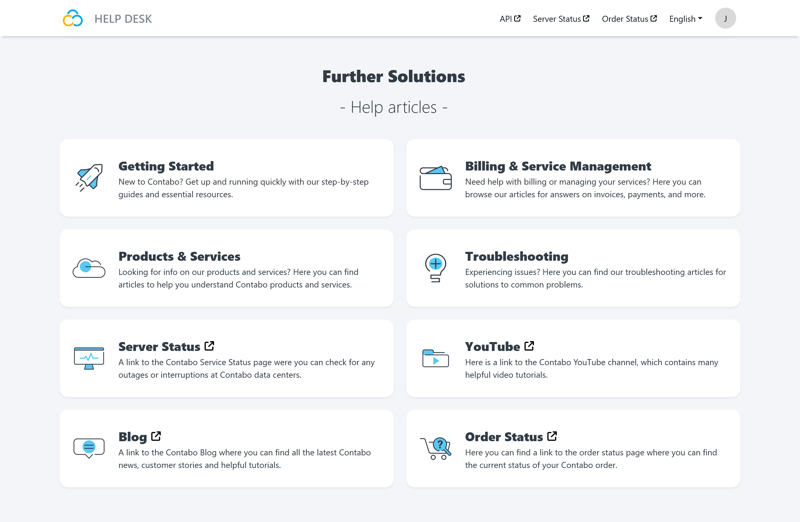
Contabo's help desk.
The content is fairly basic. Many articles are just a few sentences long without images or concrete examples. The language also feels unpolished at times. The German version frequently includes English terms and menu labels.
Links to the Customer Control Panel (both the legacy and new versions) usually just lead to the dashboard homepage, not to the relevant subpage.
Support via Chat and Email
Response times were acceptable in our review. We sent a general inquiry via email on a Monday morning. The confirmation came in English, even though we wrote in German. The actual response arrived about four hours later, this time in German and with accurate information.
In mid-2025, Contabo launched its chatbot "ContaBro." According to the provider, it's designed to learn and hand off conversations to real agents when needed. In practice, it does this pretty quickly when it can't answer a question. A human agent answered our questions competently within four minutes.
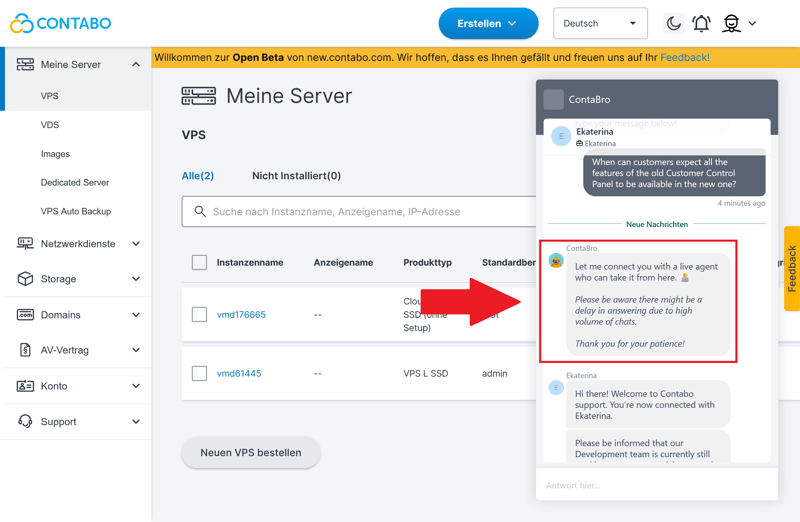
The chatbot "ContaBro."
Unfortunately, the host no longer offers phone support. If you try calling the number listed on their website, you'll only hear a recorded message, even during regular business hours. It directs you to the chatbot and then hangs up. Direct phone contact with the support team is no longer possible.
Customers Complain About Wait Times
Customer reviews and rating platforms paint a mixed picture. Some customers praise the quick response times for simple email inquiries. However, the impression changes significantly when it comes to more complex issues.
Long wait times and generic responses are a recurring theme, rather than personalized assistance. Users also report that support staff often lack the technical expertise to handle more challenging problems. This leads to drawn-out conversations that sometimes go nowhere.
Overall, Contabo's support leaves a mixed impression. The documentation is shallow and sometimes difficult to navigate. The chatbot is well-intentioned but quickly overwhelmed. During our review, we received fairly quick help via email and chat. However, rating platforms show plenty of criticism about wait times.
The decision to eliminate phone support and redirect users to the chatbot seems premature. For a company of this size, the support offering is too weak and confusing. This is especially true for business customers who depend on reliable assistance.
Conclusion
Contabo attracts customers with aggressively low prices, but those savings come at a cost. Our testing shows that the provider can't keep up with competitors when it comes to performance and support.
Whether it's CPU, RAM, SSD, or network: Contabo's VPS servers land near the bottom in almost every category of our performance tests. This makes the provider a poor choice for demanding or business-critical projects.
The new interface is cleaner than before, but managing servers across two separate dashboards still feels unfinished. Support could also be better, faster, and available by phone.
Contabo might work for simple web projects or test environments. But it's not the right choice for users who need strong performance, reliability, and quality support.

Contabo User Reviews
We analyzed customer reviews from rating platforms and summarized the most common feedback, both positive and negative:
Low prices
Many customers appreciate the affordable VPS plans. For simple projects, they find the performance to be solid.Modern control panel
Users like the new dashboard for its improved usability. They also highlight its speed as a positive.
Limited performance
Compared to competitors, customers often rate server speed and response times as weak. The limited performance becomes noticeable quickly with demanding applications.Slow support response
Several users report long wait times and inadequate assistance. Some feel they don't receive enough help when problems arise.
Alternatives to Contabo
Decided against Contabo? One of these alternatives might be a better fit for you:
OVH offers similarly low entry-level prices but delivers better performance. The management interface also feels less modern.
The VPS servers from Hostinger are a bit more expensive but deliver noticeably better performance. If speed matters to you, this is the better choice.
DigitalOcean lets you scale individual resources instead of being locked into fixed plans. This makes the platform especially well-suited for growing projects.
You can find more alternatives to Contabo here: