Best Linux VPS 2026: 7 Linux VPS Providers Tested & Ranked


Many hosting providers offer Linux VPS plans, but not all of them are worth your money. There can be major differences in performance, usability, features, and customer support. This is why we took a close look at seven Linux VPS offerings.
We did not just run benchmarks and compare prices. We also tested how practical everyday server management is and how helpful support actually is in practice. Here is which VPS providers impressed us — and which ones did not.


Linux VPS Review: These Are the Best Providers
We explain the scoring criteria in more detail below. First, here are the seven Linux VPS providers ranked by their overall score, starting with our top pick:
Hetzner: Strong Performance for Experienced Users
Hetzner* has been one of the most well-known Linux server providers in Europe for years. The German company mainly targets users who want to configure their environment themselves and don't need a simplified, all-in-one solution.
Hetzner offers plenty of flexibility. You can choose from various VPS series for every budget, multiple data center locations, and a wide range of Linux distributions. Options include pre-installed Ubuntu, Fedora, Debian, CentOS, Rocky Linux, AlmaLinux, and openSUSE.
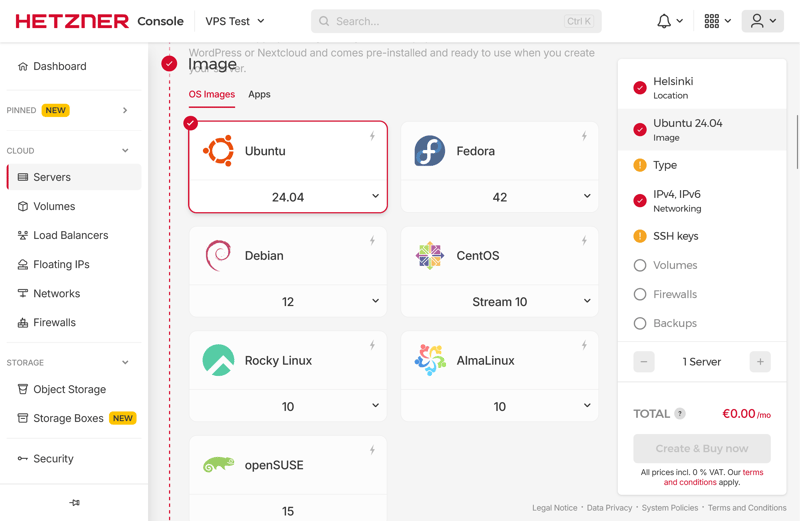
You can choose from seven Linux distributions.
What Do We Like About Hetzner?
One standout is the fast provisioning. New Linux VPS instances are usually available shortly after you place your order. The dashboard looks clean, professional, and reliable.
The pricing structure is also flexible. You can start small and easily upgrade to a larger plan as your needs grow. In our benchmarks, Hetzner delivered stronger CPU and RAM performance than many other providers in our comparison.
What Are the Pros and Cons of Hetzner?
Wide selection of distributions
Hetzner supports multiple Linux systems out of the box. This gives you more flexibility when setting up and running your server. You can also upload custom images if needed.Solid foundation for demanding workloads
Hetzner performed particularly well in our CPU and RAM tests. This makes it a great fit for Linux servers running multiple services, containers, or other resource-heavy applications at the same time.The platform grows with you
If your project requires additional resources, you can easily upgrade to a larger instance.
Not beginner-friendly
If you do not have much experience with Linux VPS, Hetzner can feel overwhelming. The host offers little hand-holding and expects you to handle typical management tasks on your own.SSD performance isn't top-tier
Hetzner's SSD performance did not rank among the best in our comparison. While it is perfectly adequate for many Linux applications, other providers offer noticeably better storage speeds.
Hostinger: Modern Linux VPS Hosting
The Lithuanian host Hostinger* targets users who want to get started quickly and prefer ready-made setup options. Available distributions include Debian, Ubuntu, AlmaLinux, Rocky Linux, Arch Linux, CentOS, Fedora, openSUSE, CloudLinux, Alpine Linux, and Kali Linux.
Watch out for pricing, though: after the initial term, costs can jump significantly. And if your server needs more power, you can't just add individual resources. Instead, you'll have to upgrade to a bigger plan.
What Do We Like About Hostinger?
Hostinger offers a very approachable and modern management experience. The hPanel makes a lot of tasks easier, especially if you'd rather not do everything through the command line.
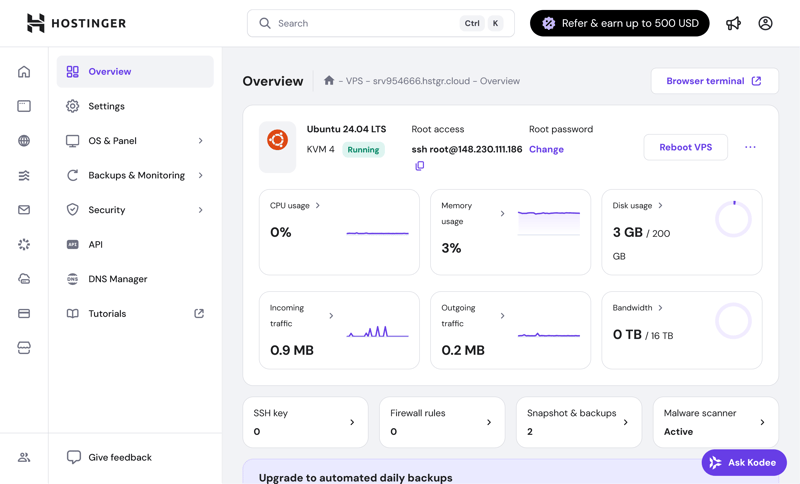
Hostinger's hPanel is clean and well-organized.
The built-in AI assistant Kodee is also a nice touch. It answers technical questions and often gets you to a solution faster than searching through the documentation. That said, the AI doesn't know everything. Sometimes you'll need to look things up yourself or contact support if you can't find an answer.
What Are the Pros and Cons of Hostinger?
Wide selection of Linux distributions
Hostinger supports eleven distributions right out of the gate. That makes it a good fit for many use cases, from a lightweight Alpine setup to servers running Ubuntu or Debian.Strong performance for storage-heavy tasks
In our testing, Hostinger stood out in scenarios that require fast storage access and strong single-threaded performance.Quick setup through hPanel
Your Linux VPS is provisioned fast at Hostinger. You'll have a running Linux instance ready to go with minimal waiting time.
Prices increase significantly after the first term
The low introductory price doesn't last. After the initial billing period, Hostinger's costs typically rise quite a bit.No phone support
Even for urgent issues, you are limited to using the chat or email functions. There is no phone hotline.
IONOS: Affordable With No Major Hurdles
IONOS* targets users who want to spend less and get started quickly with a Linux VPS. The entry price is very low, the panel is clean, and new instances are usually ready within minutes.
IONOS uses fixed server packages instead of individually configurable resources. You can’t adjust CPU, RAM, or storage separately. If your server needs more power, you’ll have to upgrade to the next plan instead of scaling individual components. Backups aren’t included and cost extra.
Ubuntu, Debian, Rocky Linux, and AlmaLinux are available as pre-installable Linux distributions:
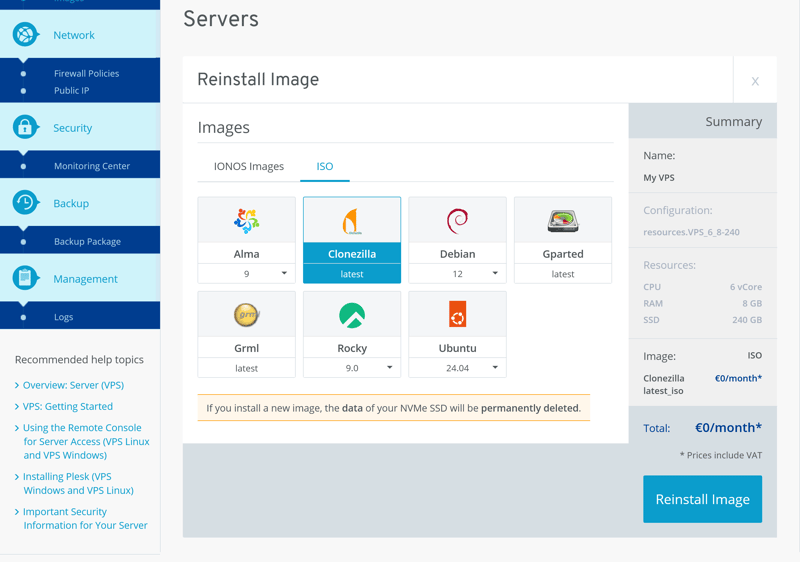
Each Linux distribution is also available with Plesk.
What Do We Like About IONOS?
IONOS makes it easy to get started. The pricing is attractive too, especially with longer contract terms. Another advantage is the 24/7 phone support, which not many VPS providers offer.
What Are the Pros and Cons of IONOS?
Affordable Entry Price
If you’re looking for a Linux VPS with low initial costs, IONOS offers attractive plans, particularly for longer billing cycles.Easy Management
The panel is straightforward and easy to navigate, even for those with little prior experience. This makes IONOS a good fit for simpler setups and smaller projects.Good RAM and Single-Core Performance
IONOS scored well in our tests for applications that benefit from fast per-core response times and high memory bandwidth.
Weak SSD and Network Performance
For data-heavy applications or storage-intensive setups, IONOS performed worse than other providers in our benchmarks.Limited Upgrade Flexibility
If your server needs more power, it is not possible to scale the CPU or RAM individually. Instead, you have to switch to a higher plan.Live and AI Chat Are Unreliable
Live chat isn't consistently available, even on weekdays. The AI assistant doesn't always provide helpful answers either.
OVH: Lots of Options, Bur Not Very User-Friendly
If you're looking for a Linux VPS with a wide range of plans and upgrade options, OVH* is worth a look. The provider spins up new instances quickly, and their lineup covers everything from small servers to much more powerful setups.
In our tests, OVH stood out with strong SSD and multi-core performance. This makes it a good fit for workloads with lots of parallel processes or large volumes of data. RAM and network performance were less impressive, though.
The selection of Linux distributions is extensive:
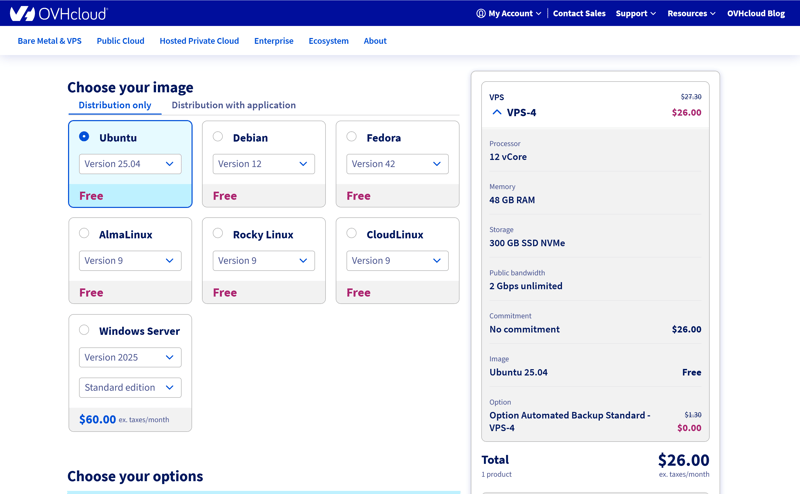
OVH offers a wide range of popular Linux distributions to choose from.
What Do We Like About OVH?
OVH gives you plenty of room to find the right Linux VPS for your needs. The selection is broad enough to cover a wide range of use cases. Another plus: automatic backups are already included in the price.
What Are the Pros and Cons of OVH?
Strong SSD and multi-core performance
In our performance tests, OVH scored well for parallel computing workloads and SSD speed compared to other providers.Auto-backups included
Backups don't need to be booked separately. This makes the plans even more attractive overall.Wide range of plans
OVH offers many configurations for different requirements. This makes it easier to find a package that matches your specific needs.
Cluttered management portal
The panel packs in a lot of features but feels disorganized. The messy interface slows you down when managing your server.Weaker RAM and network performance
When it comes to memory speed and network connectivity, OVH doesn't rank among the strongest providers in our comparison.Free support is limited
The free support tier won't always get you fast answers. More comprehensive assistance is only available at an extra cost.
DigitalOcean: Full Control for Experienced Users
With DigitalOcean*, you can customize your Linux VPS far more than with most other providers. You pick specific resources like CPU, RAM, storage, and server location based on your exact needs. That gives you a lot of control, but it also makes the platform more demanding to use.
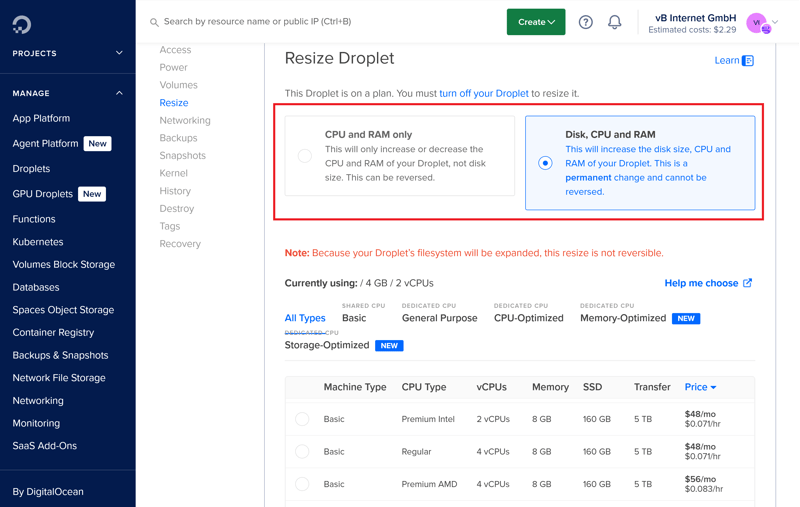
Easy scaling with DigitalOcean.
In our benchmarks, DigitalOcean delivered mixed results. SSD and network performance were solid, but CPU and RAM scores fell behind several competitors. On top of that, DigitalOcean is on the pricier side.
What Do We Like About DigitalOcean?
DigitalOcean lets you tailor your Linux VPS closely to your project's requirements. Provisioning is also fast, and new servers are typically ready within minutes. Pre-installed distributions include Ubuntu, Debian, Fedora, Rocky Linux, AlmaLinux, and CentOS.
The extensive documentation is another plus. You will find plenty of guides and examples for self-managed Linux setups.
What Are the Pros and Cons of DigitalOcean?
Granular configuration options
CPU, RAM, and storage can be specified much more precisely than with standard VPS plans. New configurations are available quickly.Flexible billing
DigitalOcean charges by the hour. That's a real advantage for short-term or changing projects.Worldwide server locations
You can place your server close to your target audience. DigitalOcean operates data centers in multiple regions around the world, and there's no extra charge for choosing a specific location.
Relatively expensive
You pay more for the flexibility than you would with many other providers.Weaker CPU and RAM performance
In our performance comparison, DigitalOcean didn’t deliver the best CPU and RAM results. This can be a drawback for resource-heavy applications.Limited support
Personal support is only available on a limited basis unless you purchase a paid support plan.
Contabo: Cheap, but With Trade-Offs
Contabo* stands out mainly for its low prices, which look appealing for small setups on a tight budget. But our tests quickly reveal where the provider cuts corners.
In our performance benchmarks, Contabo ranks among the weakest providers in our comparison. CPU, RAM, SSD, and network speeds all leave a lot to be desired. For production Linux servers, multiple services, or higher traffic loads, the performance may not be enough.
During initial setup, you can choose from Ubuntu, Debian, AlmaLinux, and Rocky Linux. For reinstallations, Arch Linux, CentOS, openSUSE, and FreeBSD are also available.
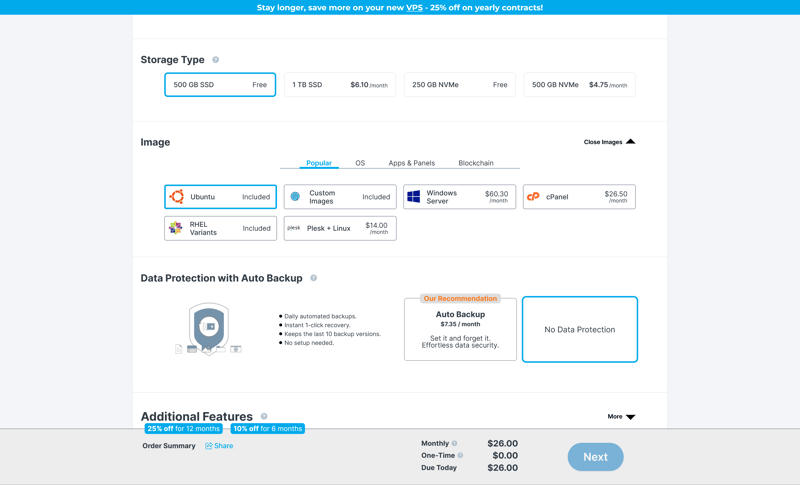
The Linux VPS setup at Contabo.
What Do We Like About Contabo?
Contabo's biggest strength is pricing. Entry-level costs are low, and you get a generous amount of storage and RAM for the money. It's also a plus that snapshots are included and daily backups can be added as an option.
What Are the Pros and Cons of Contabo?
Low entry-level pricing
Contabo is one of the more affordable VPS providers out there. Storage and RAM are especially generous for the price.Wide selection of OS images
Beyond Ubuntu and Debian, Contabo offers many additional Linux distributions to choose from.
Weak overall performance
In our benchmarks, Contabo ranked near the bottom for CPU, RAM, SSD, and network speeds. That's not enough for demanding workloads.Confusing management interface
You'll find yourself switching between a new panel and an old one. It's not always clear where certain features live, which wastes time and makes the whole experience unnecessarily clunky.Slow provisioning
New instances often aren't available right away. Contabo also doesn't notify you when your server is ready, so you have to check manually.
GoDaddy: Easy to Start, Limited in Depth
The US-based host GoDaddy* stands out for its simplicity. Setting up a Linux VPS is quick, the interface is modern and clean, and backups are included in all plans.
But as soon as you need more performance, flexibility, or control, the limitations become apparent. Server performance is average at best, and the selection of Linux distributions is limited.
What Do We Like About GoDaddy?
The management interface is intentionally kept simple. New users should find their way around quickly. Network performance is strong, and the support team also impressed us during testing.
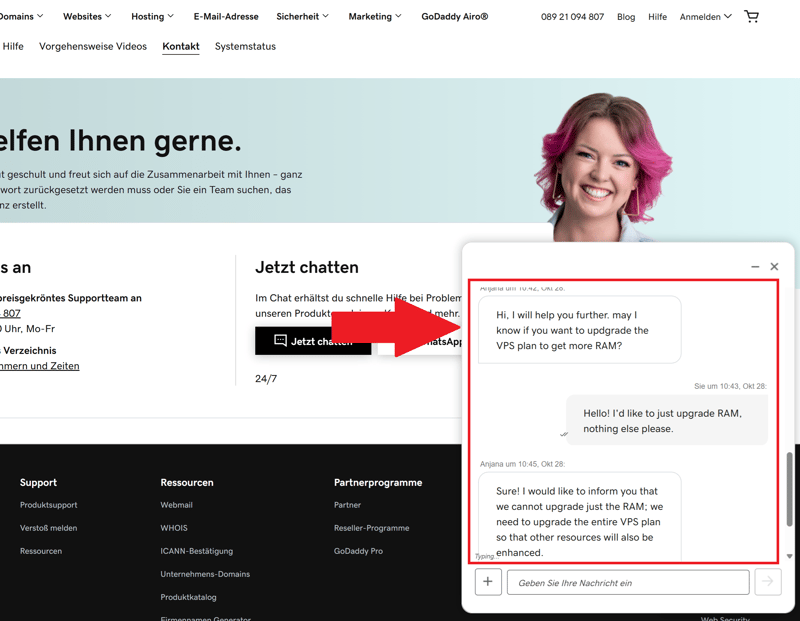
The support chat is helpful and easy to reach.
What Are the Pros and Cons of GoDaddy?
Daily backups included
GoDaddy backs up your Linux VPS automatically at no extra charge. You can also create or schedule additional backups directly in the panel.Fast support
We were able to reach someone quickly via chat and phone, which is definitely not the case with every provider.
Limited Linux options
You can only choose from AlmaLinux, Debian, and Ubuntu. Custom images or pre-built application stacks aren't available.Weak server performance
GoDaddy's CPU, RAM, and SSD results landed in the lower mid-range or below. For more demanding projects, this is likely to become a bottleneck.Very limited scaling
You can't upgrade CPU or RAM individually. Instead, you have to switch to a higher plan entirely. Downgrading isn't an option either.High prices
For what you get, GoDaddy is relatively expensive. Other providers offer significantly more for the money.
Overall Results
Here's a complete overview of all seven Linux VPS hosts from our comparison, ranked by their overall score:


Rating Criteria: How We Tested
We rate every Linux VPS provider based on four categories with a maximum of 100 points total. Each category is weighted as follows:
- 1.
Server Setup & Management (20%)
- 2.
Performance (30%)
- 3.
Reliability & Support (20%)
- 4.
Costs (30%)
Each category gets its own score first. We then combine those scores to calculate the provider’s overall rating.
In the next section, we’ll explain each criterion in detail. But first, here’s the full rating table:
 Hetzner |  Hostinger |  IONOS |  OVH |  DigitalOcean |  Contabo |  GoDaddy |
|---|
| Hetzner | Hostinger | IONOS | OVH | DigitalOcean | Contabo | GoDaddy | |
|---|---|---|---|---|---|---|---|
Server Setup & Management20% | |||||||
2/2 | 2/2 | 2/2 | 0.5/2 | 0/2 | 1/2 | 1/2 | |
8/8 | 7/8 | 6/8 | 7/8 | 8/8 | 6/8 | 4/8 | |
8/8 | 8/8 | 7/8 | 8/8 | 8/8 | 5/8 | 6/8 | |
1/2 | 2/2 | 0/2 | 2/2 | 2/2 | 0/2 | 0/2 | |
Performance30% | |||||||
10/15 | 13/15 | 9/15 | 8/15 | 2/15 | 0/15 | 2/15 | |
5/5 | 4/5 | 5/5 | 2/5 | 0/5 | 1/5 | 2/5 | |
1/5 | 5/5 | 1/5 | 4/5 | 4/5 | 0/5 | 1/5 | |
4/5 | 0/5 | 3/5 | 0/5 | 5/5 | 0/5 | 5/5 | |
Costs30% | |||||||
7/7 | 5/7 | 7/7 | 7/7 | 0/7 | 5/7 | 0/7 | |
5/7 | 7/7 | 7/7 | 7/7 | 0/7 | 7/7 | 0/7 | |
5/7 | 5/7 | 7/7 | 3/7 | 0/7 | 7/7 | 0/7 | |
2/4 | 2/4 | 4/4 | 4/4 | 2/4 | 2/4 | 0/4 | |
1/3 | 3/3 | 1/3 | 3/3 | 1/3 | 1/3 | 3/3 | |
2/2 | 0/2 | 0/2 | 1/2 | 2/2 | 1/2 | 0/2 | |
Reliability & Support20% | |||||||
2.5/3 | 2/3 | 2/3 | 2.5/3 | 3/3 | 1/3 | 1/3 | |
3/3 | 2/3 | 0/3 | 0.5/3 | 3/3 | 2.5/3 | 0/3 | |
3/3 | 0/3 | 3/3 | 1.5/3 | 0/3 | 0/3 | 3/3 | |
1.5/3 | 3/3 | 0/3 | 0/3 | 0/3 | 3/3 | 3/3 | |
7/8 | 6/8 | 6/8 | 2/8 | 7/8 | 3/8 | 6/8 | |
Server Setup & Management (20%)
First, we look at how easy it is to set up and manage a Linux VPS. The key question is: Can you find your way around quickly and access the most important features without hassle?
For setup, we consider factors like available server locations, supported Linux distributions, and control panel options. Provisioning time also matters. The faster your server is ready to go, the better.
For day-to-day use, we focus on management features. Are backups and snapshots available? Can you scale resources up or down as needed? And what about extras like a firewall or monitoring tools?
Here are the features we pay close attention to:
 DigitalOcean |  Hetzner |  Hostinger |  OVH |  IONOS |  GoDaddy |  Contabo | |
|---|---|---|---|---|---|---|---|
Rescue system | ✓ | ✓ | ✓ | ✓ | ✗ | ✓ | ✓ |
Web console | ✓ | ✓ | ✓ | ✓ | ✓ | ✓ | ✗ |
Monitoring | ✓ | ✓ | ✓ | ✓ | ✓ | ✓ | ✗ |
Backups | ✓ | ✓ | ✓ | ✓ | ✓ | ✓ | ✓ |
Snapshots | ✓ | ✓ | ✓ | ✓ | ✓ | ✗ | ✓ |
Scaling | ✓ | ✓ | ✓ | ✓ | ✓ | ✓ | ✓ |
Firewall | ✓ | ✓ | ✓ | ✓ | ✓ | ✗ | ✗ |
Total | 7 | 7 | 7 | 7 | 6 | 5 | 4 |
A good VPS should be ready to use quickly, easy to manage, and come with all the essential features you need.
Performance (30%)
To compare Linux VPS performance as objectively as possible, we run our own VPS benchmark. We measure five key metrics:
- 1.
Single Core – how fast the server handles individual processes
- 2.
Multi Core – how well the server handles multiple tasks at once
- 3.
RAM – how quickly memory processes and delivers data
- 4.
SSD – how many read and write operations per second are possible (IOPS)
- 5.
Network Connection – how fast the server can send and receive data
For testing, we use tools like Geekbench 6, FIO, and iPerf3 via the Yet-Another-Bench script. We also measure memory bandwidth with STREAM. You can find more details about our testing methodology here:

Reliability & Support (20%)
Here, we look at how well a provider supports you in everyday use. What matters most is whether you can solve problems quickly, either through documentation or direct support.
We check how well each provider’s help center is structured and whether tutorials, FAQs, and technical documentation actually help with common Linux questions.
We also test the support channels directly: How easy is it to reach someone via email, phone, live chat, or chatbot? How fast do you get a response, and how useful is it? External reviews also factor into our assessment.
Costs (30%)
In this category, we look at how much value you get for your money. The comparison table is based on the cheapest plan with 8 vCPUs, 16 GB RAM, and 250 GB SSD or 50 TB of outgoing traffic on a 24-month term.
We also account for extra costs, such as automatic backups. Providers that offer flexible billing (per minute or per hour, for example) score higher.
Here’s the price comparison table:
| 8 vCPU | 16 GB RAM | 250 GB SSD | 50 TB Traffic | Backup | |
|---|---|---|---|---|---|
| $9.00 | $9.00 | $9.00 | $2.00 | $7.00 |
| $12.75 | $12.75 | $22.08 | $4.20 | $0.00 |
| $14.09 | $19.59 | $19.59 | $7.59 | $5.62 |
| $19.99 | $9.99 | $19.99 | $7.99 | $0.00 |
| $20.80 | $12.00 | $3.96 | $4.95 | $7.34 |
| $64.99 | $44.99 | $64.99 | $16.99 | $0.00 |
| $96.00 | $96.00 | $96.00 | $6.00 | $4.80 |
Final Verdict
There is no shortage of Linux VPS options. They range from budget-friendly starter packages to highly configurable high-end environments. This variety can make the decision harder. Our three top providers show just how different the approaches really are:
- 1.
Hetzner offers what we consider the strongest overall package for experienced users. You get great performance, flexible configurations, and a platform that can handle larger projects. The trade-off: you’ll need to manage most things yourself.
- 2.
Hostinger stands out with its simple management and quick setup. If you want to get started quickly and prefer a modern, user-friendly interface, this is a very approachable option.
- 3.
IONOS is a solid choice for budget-conscious users. You benefit from low entry prices and an easy setup, but you’ll have to accept trade-offs in performance and flexibility.
Beyond our top three, there are other strong options depending on your needs: GoDaddy works well for simple setups, DigitalOcean is great for maximum control, and OVH can be interesting alternatives depending on your priorities.
What matters most is what your project actually requires: top performance, easy management, or the lowest possible costs. Once you’re clear on your priorities, you’ll quickly find the right Linux VPS.