Most Secure Cloud Storage 2026: Which Providers Truly Keep Your Data Safe?


Convenience tends to come at the cost of privacy and security, especially online. Since cloud storage is all about convenience, can it really keep your files safe? The answer is yes – but with some caveats.
We tested some of the most popular providers and explain what to look for in a secure cloud storage service and which providers offer the best security and privacy.


What Makes a “Secure” Cloud Storage Service?
Let’s get one thing out of the way: there’s no such thing as 100% security online, especially when you’re trusting another company with your data. If you want to avoid the risks that come with cloud storage entirely, you’ll need to keep your files offline.
Of course, local storage has its own risks. Hard drives can fail, laptops can get stolen, and files can be lost or accidentally deleted. Cloud storage, for all its drawbacks, gives you an extra layer of protection against those kinds of problems.
Online security is a bit like investing in the stock market: it’s ultimately about finding a level of risk you’re comfortable with.
The cloud storage provider you choose can make a big difference. Here are the most important things to look for from a security and privacy perspective:
End-to-End Encryption
Cloud storage services can be roughly divided into two groups: those with and those without end-to-end encryption (E2EE).With E2EE, your files are encrypted on your device before they’re uploaded and can only be decrypted by you or someone you’ve shared them with. The provider itself doesn’t have the keys needed to access your files. Without E2EE, your files may still be encrypted, but the provider typically holds the keys and can therefore access them.
Server and Company Location
Where a cloud storage provider is based can affect which privacy laws apply to your data. US companies, for example, may be required under laws such as the CLOUD Act to hand over certain data to US authorities, including in some cases data stored on servers outside the US.Transparency and Privacy Policies
A trustworthy provider should be clear about how it handles, stores, and protects your data. Its privacy policy should also explain what information it collects about you, including activity logs and metadata.Other signs of transparency include regularly published transparency reports detailing government requests for user data, as well as whitepapers explaining how the provider’s security systems work. Open-source software is another plus, as it allows the provider’s claims to be independently scrutinized.
The more transparent a provider is about its practices and technology, the easier it is to judge how seriously it takes security and privacy.Relevant Certifications and Audits
Independent certifications and audits can provide additional evidence that a provider follows established security standards. Look for certifications such as ISO 27001, ISO 27018, and SOC 2 Type II, as well as security audits carried out by reputable third parties.
Certifications aren’t a guarantee that your data will always be safe, but they do provide some independent verification of a provider’s security practices.Past Incidents and General Provider Reputation
A provider’s track record can also tell you a lot. Has it suffered any major data breaches or security incidents? Have researchers uncovered serious vulnerabilities? And if something did go wrong, how did the company respond? A company that acknowledges an incident, explains what happened, and takes clear steps to address it inspires more confidence than one that stays silent or downplays the problem.
It’s also worth looking at the company itself. How long has it been around? Who owns it? Is it clear who is actually behind the service? An established provider with transparent ownership and a solid track record is generally easier to trust than a little-known company that reveals very little about itself.
No provider scores perfectly in all of these areas. Plus, when choosing a provider, security is just one factor among many. What good is a “secure” cloud storage service if syncing is unreliable or you're missing important features?
All of which is to say: “secure” is always relative. Keep that in mind as you look through our picks for the most secure cloud storage services.
The Most Secure Cloud Storage Services
We tested 11 cloud storage services, from household names to privacy-first alternatives. Here are the five most secure options:
Tresorit: Secure cloud storage from Switzerland

What makes Tresorit secure?
Tresorit combines end-to-end encryption with strong privacy protections:
End-to-end encryption on all plans
Tresorit uses zero-knowledge encryption by default. Your files are encrypted on your device before they’re uploaded, which means Tresorit itself can’t decrypt them.Granular access controls
When sharing files and folders, you can control who has access, protect links with passwords, and set them to expire automatically. Higher-tier plans also include detailed access logs.Data centers in Switzerland and the EU
Tresorit stores data in certified data centers in Switzerland and the EU. Its data centers meet several recognized security standards, including ISO 27001, ISO 27017, and ISO 27018.
Are there still security concerns?
Tresorit could be more transparent about government requests for user data. Its most recent transparency report is several years old, while some other cloud storage providers publish updated reports annually.
In 2024, researchers from ETH Zurich examined ten end-to-end encrypted cloud storage services for potential vulnerabilities. Tresorit fared better than many of its competitors, but the researchers still identified a potential weakness.
Specifically, they found that public keys weren’t properly authenticated when files were shared. In theory, this could allow an attacker in a position to manipulate those keys to gain access to shared data.
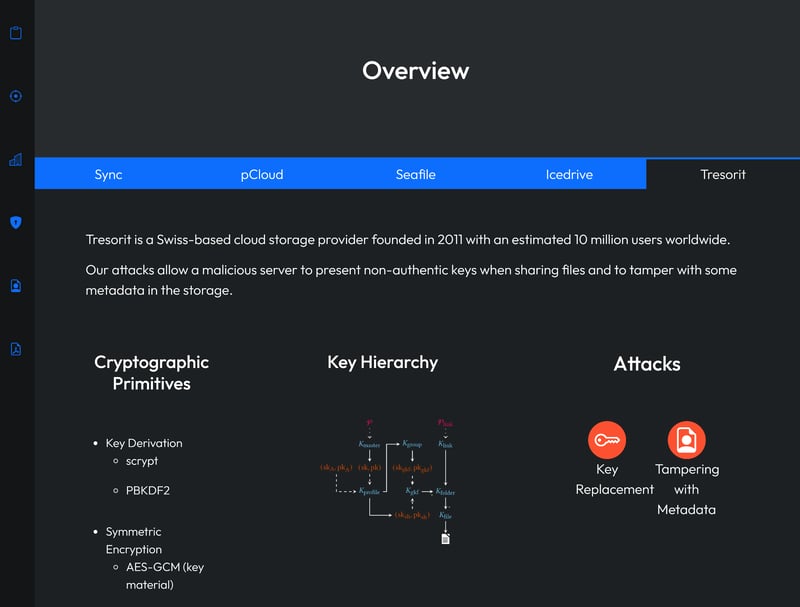
Tresorit performed better than most of the other cloud storage services examined in the ETH Zurich study (Image source).
What else do we like about Tresorit?
Tresorit is also just a solid cloud storage service overall. It combines a clean, intuitive interface with a decent performance and a solid set of features.
Selective sync lets you choose exactly which folders and subfolders you want to keep on your device. Upload and download speeds were decent in our performance benchmark.
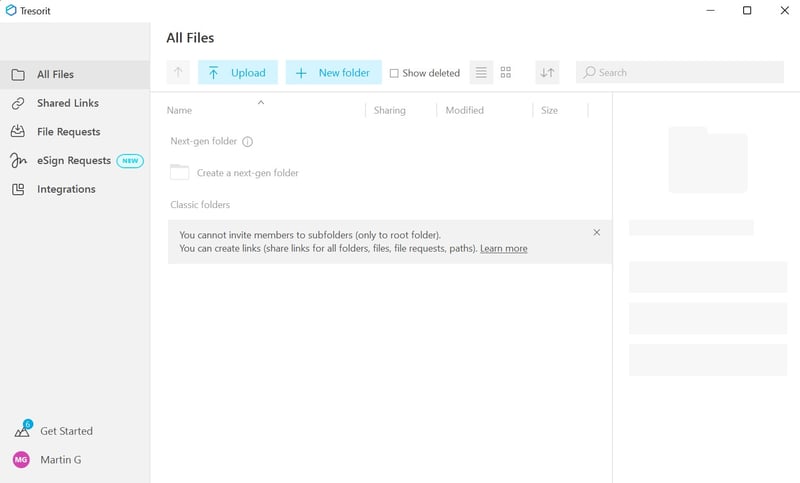
Tresorit's web interface.
What don't we like about Tresorit?
Tresorit’s focus on security comes with a few trade-offs:
Somewhat sluggish performance
Tresorit’s apps look modern and polished, but we experienced occasional stuttering and performance issues during our testing.Limited collaboration features
If you're looking for a collaboration platform like Google Drive or Microsoft OneDrive, Tresorit won't do: it lacks features like real-time document editing.Relatively expensive
Tresorit is considerably more expensive than many competitors for comparable amounts of storage. Its free plan is fairly limited, too, with just 3 GB of storage.
MEGA: Secure storage with 20 GB free

MEGA is a New Zealand-based cloud storage provider with a complicated reputation, thanks in part to its links to online piracy. That association is largely historical: MEGA was launched by some of the people behind Megaupload, the notorious file-sharing platform that was shut down by US authorities in 2012.
Today, MEGA is a fairly conventional cloud storage service for storing, syncing, and sharing files. Privacy is still a major draw, though, since end-to-end encryption means even MEGA can’t see what you upload (which also helps explain its ongoing popularity with pirates).
What makes MEGA secure?
MEGA combines end-to-end encryption with a zero-knowledge approach designed to keep your files private even from MEGA itself:
End-to-end encryption by default
MEGA encrypts your files on your device before they’re uploaded using AES-128 encryption. Only you hold the keys needed to decrypt them – even MEGA can’t access your files.Zero-knowledge architecture
MEGA is designed so that passwords and encryption keys aren’t accessible to the company. This means a breach of MEGA’s servers shouldn’t be enough on its own to expose the contents of your files.Open-source code
MEGA’s apps and browser extensions are open source, so their code can be independently reviewed for security flaws.
Are there still security concerns?
Yes. Despite MEGA’s strong security credentials on paper, researchers have uncovered weaknesses in its encryption architecture.
In 2022, security researchers from ETH Zurich demonstrated several attacks that could, under certain conditions, allow a malicious MEGA server to recover a user’s private key and decrypt their files.
MEGA responded to the findings with security updates and patches. Still, vulnerabilities of this kind are particularly concerning for a service that puts end-to-end encryption and zero-knowledge security at the heart of its offering.
What else do we like about MEGA?
MEGA took the top spot in our roundup of the best cloud storage providers, so there's plenty to like beyond security. In our testing, files synced quickly and reliably, and we found the apps straightforward and easy to navigate. We also liked the amount of control MEGA gives you when sharing files and folders.
MEGA is also very generous with free storage: everyone gets 20 GB for free, more than with any other provider we tested. MEGA is also pretty good value if you need a lot of storage.
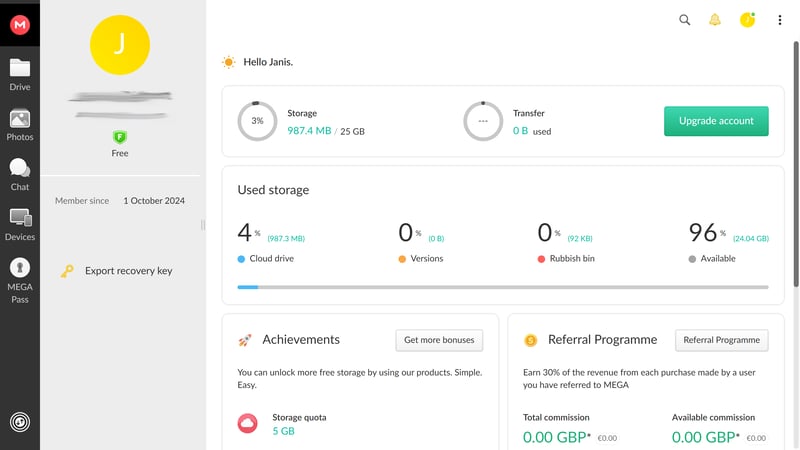
MEGA's web interface.
What don't we like about MEGA?
MEGA isn’t the best fit for everyone:
Limited collaboration features
Just like Tresorit, MEGA is built more for storing and sharing files than collaborating on them. There’s no real-time document editing, commenting, or integrated office suite.Not much choice at the cheaper end
MEGA offers good value if you need lots of storage, but its paid plans are less attractive if you only need a small amount. It simply lacks cheaper options for more modest storage needs.
pCloud: A strong all-rounder with optional E2EE

pCloud is a Swiss cloud storage provider that performed well across the board in our testing, with fast syncing, flexible features, and competitive prices. It does offer end-to-end encryption – but unlike MEGA or Tresorit, you have to pay extra for it.
What makes pCloud secure?
All pCloud users get standard encryption, while end-to-end encryption is available through its optional pCloud Encryption feature:
Optional end-to-end encryption
pCloud offers a “Crypto folder” for confidential files. Files placed inside it are encrypted on your device before they’re uploaded, so pCloud can’t access their contents. This extra layer of protection isn’t included with most personal plans, though – you have to pay extra for it.Encryption for all files
Files outside the Crypto folder are still encrypted, of course. pCloud uses TLS/SSL to protect your files while they’re being transferred and AES-256 encryption while they’re stored on its servers.Choice of server location
When you sign up, you can choose your data region. That gives you some control over where your data is kept, which may be important if you have specific privacy or compliance requirements.
Are there still security concerns?
Our biggest issue with pCloud is simple: end-to-end encryption isn’t included as standard. If you want pCloud itself to be unable to access your files, you need to pay extra and keep those files in the Crypto folder.
We’d also like to see more transparency from pCloud. The company emphasizes its Swiss roots and privacy protections, but there’s relatively little public information that allows users to independently assess its security practices. We couldn’t find regular transparency reports, for example, and pCloud’s apps aren’t open source.
The ETH Zurich researchers mentioned above also identified potential weaknesses in pCloud’s encryption design. Among other things, they raised concerns about key authentication and the integrity of shared files, as well as the amount of metadata and information about directory structures that remains visible.
What else do we like about pCloud?
pCloud did very well in our performance benchmark, with some of the fastest upload and download speeds we measured. Syncing was reliable in everyday use, too, and there are useful extras like selective sync, LAN sync, and bandwidth limits. The sharing options and access controls are extensive as well.
The pricing is fair, and you can get up to 10 GB of storage for free. pCloud also offers lifetime plans, where you pay once for permanent access instead of taking out a monthly or yearly subscription. Just keep in mind that lifetime cloud storage comes with a few risks of its own.
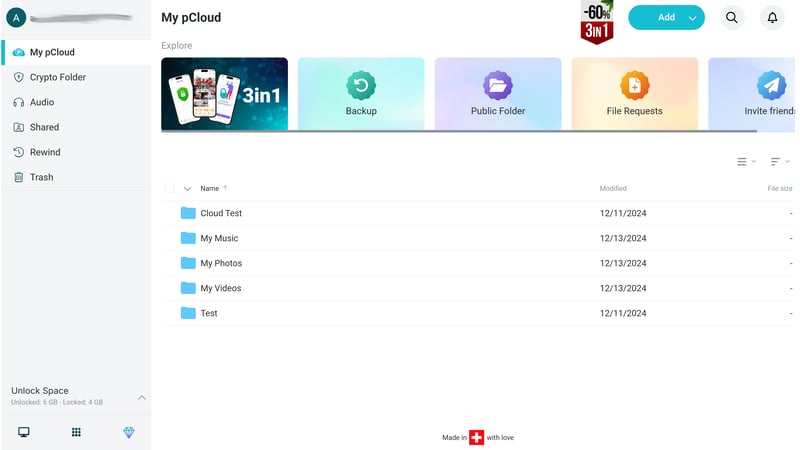
The pCloud web app.
What don't we like about pCloud?
pCloud came third in our overall comparison, but there are a few things we didn’t like:
Limited collaboration features
Like Tresorit and MEGA, pCloud is better suited to storing and sharing files than working on them with others. There’s no built-in document editor for real-time collaboration.Some issues with the web app
During our testing, the web app occasionally froze. The video player also didn't always work reliably.“Backup” is a bit misleading
pCloud has a feature called Backup, but it works more like two-way sync: changes on one side are reflected on the other. That means it isn’t a substitute for a proper cloud backup.
Proton Drive: All-Around Focus on Security

Proton Drive comes from the Swiss company behind Proton Mail, Proton VPN, and Proton Pass. All of Proton’s products put privacy front and center, and its cloud storage service is no different. Its apps are open source, and end-to-end encryption is included in all plans. Outside of security and privacy, Proton Drive still has some catching up to do, though.
What makes Proton Drive secure?
Proton Drive ticks most of the boxes we look for in a privacy-focused cloud storage service:
End-to-end encryption
Your files are encrypted on your device before they’re uploaded. Only you and the people you share them with have the keys needed to decrypt them, so even Proton can’t access your files.Open-source apps
Proton’s apps and cryptographic libraries are open source, so anyone can inspect the code on GitHub.Independent audits and bug bounty program
Proton regularly puts its security to the test through independent audits. It also runs a bug bounty program, which rewards security researchers for finding and reporting vulnerabilities.Based in Switzerland
Proton is based in Switzerland and subject to Swiss privacy laws. It also operates its own server infrastructure, giving it more control over how and where user data is stored.
Are there still security concerns?
Yes, Proton Drive isn't 100% secure either. One privacy issue that has been frequently discussed in the Proton Drive Reddit community concerns email addresses: when you share files or folders with someone, your main Proton email address may be visible to them.
What else do we like about Proton Drive?
We found Proton Drive easy to use across the web, desktop, and mobile apps. And if you already use Proton Mail, Proton VPN, or other Proton services, everything is conveniently tied to the same account.
Proton Drive also has its own document editor. It’s nowhere near as powerful as Google Docs, but you can create and edit documents directly in your browser and work on them with others in real time. Everything in the editor is end-to-end encrypted, too.
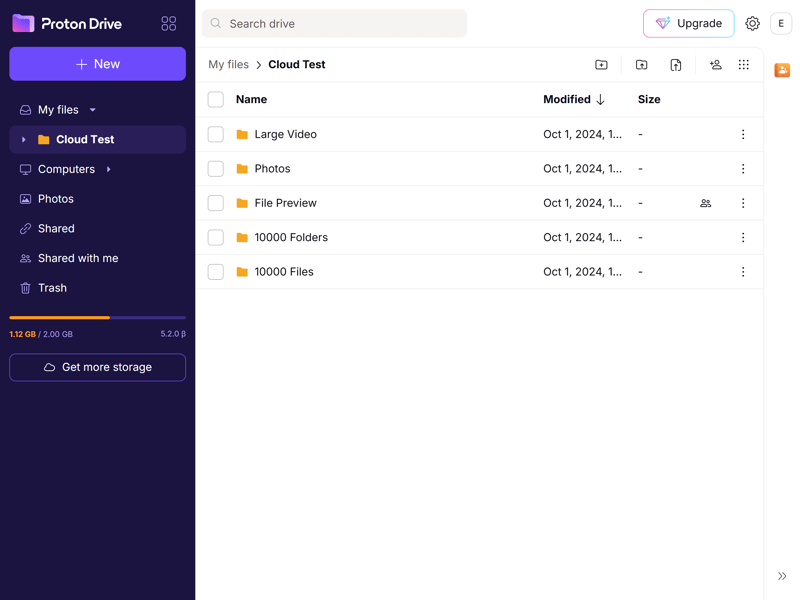
The Proton Drive web app.
What don't we like about Proton Drive?
In our roundup of the best cloud storage providers, Proton Drive didn’t make it past the middle of the pack. Security aside, we ran into quite a few limitations:
Slow sync speeds
Proton Drive was one of the weaker performers in our benchmark. Uploads were the slowest of any service we tested, and download speeds were just average.Some features feel underdeveloped
Proton Drive isn't as feature-rich as other cloud platforms. The sharing options are fairly limited, and file previews don't always work properly.Limited collaboration tools
The built-in document editor is a nice extra, but Proton Drive is still a long way behind Google Drive or Microsoft OneDrive when it comes to working on files with other people.
Alternatives
None of these are quite what you’re looking for? There are plenty of other cloud storage services to choose from. You can find every provider we tested, along with links to our detailed reviews, in the full ranking below:


Are Cloud Storage Services Without E2E Encryption Unsafe?
Not necessarily. A lack of end-to-end encryption doesn’t mean your files aren’t safe there. Major providers like Google, Microsoft, and Dropbox still use strong encryption to protect your files while they’re being transferred and stored, along with measures like two-factor authentication and strict access controls.
What you’re giving up is a degree of privacy: without E2EE, the provider itself can technically access your files. That doesn’t mean someone at Google is sitting around reading your diary or stealing the draft of your novel. But the possibility is there – for example, if the company is required to hand over data by law or needs to access it for certain internal processes.
Ultimately, it comes down to what you value more: maximum privacy or the extra features and convenience that often come with mainstream cloud services.
Tip: If your cloud storage service doesn’t offer E2EE, you can encrypt sensitive files yourself before uploading them. Tools like Cryptomator make this fairly easy and give you more control over who can access your data.
Bottom Line: Secure vs. Private
“Secure” and “private” aren’t quite the same thing when it comes to cloud storage. A service can do an excellent job of protecting your files from hackers and other outsiders while still technically being able to access them itself.
If privacy is your main concern, look for a provider with end-to-end encryption, such as Tresorit, MEGA, pCloud, or Proton Drive. With E2EE, the provider doesn’t have the keys needed to decrypt your files, so their contents remain private even from the company storing them.
If convenience and collaboration matter more, Google Drive, Microsoft OneDrive, or Dropbox may be a better fit. These services still offer strong security, but the provider generally controls the encryption keys. That makes them convenient and secure enough for most everyday files, but less suitable for data you want to keep completely private.