Ecwid Review 2026: The Easiest Way to Add Ecommere to Your Website?


If you already have a website, the last thing you want to do is start from scratch just to add an online store. With Ecwid, you don't have to: the platform plugs right into your existing site. But if you’re starting from scratch, it comes with a standalone store builder, too. Is it any good, though?
We put Ecwid to the test to see who it’s really for and how it stacks up against big names like Shopify or WooCommerce.


Ecwid* is a cloud-based platform now owned by Canadian company Lightspeed. The name (a mashup of “E-commerce Widget”) says it all: Ecwid was designed to make adding a shop to an existing website as easy as possible.
That isn't a unique selling point anymore, since platforms like Shopify let you add buy buttons to other sites as well. Ecwid has also launched its own standalone website builder, so you can use it to create a full site just like any regular ecommerce builder. Still, Ecwid's “plug-and-play” flexibility remains at the core of the platform.
The system works by connecting a central shop backend to your platform of choice, whether that's WordPress, Wix, or Facebook, allowing you to manage everything from one place.
But does this approach actually work in practice — and how does Ecwid compare to industry heavyweights like Shopify? Our review breaks down the pros and cons.
Ecwid Review
Seamless integration with existing sites
Ecwid works as a “drop-in” store module. You can add it to WordPress, Wix, or a custom HTML site without a total overhaul or having to rebuild everything from scratch.Intuitive backend & beginner-friendly editor
The control panel is well-organized and easy to navigate. Even if you're a total beginner, the learning curve is minimal, and the site builder is very straightforward.Strong sales and multichannel features
Ecwid nails the basics, from product variants to discount management. It's also great for selling across multiple platforms, syncing your sales across social media and various marketplaces.
Limited customization
While the “Instant Site” builder is great for getting online quickly, it offers very little design freedom. If you want a highly custom layout, you’ll likely find it too limiting.No free tier or trial period
Ecwid is fully “pay-to-play”. Since the free plan was discontinued and there is no trial period, you have to commit to a paid plan from the start.Product caps on entry-level plans
Ecwid's lower-tier plans have strict product limits. Growing businesses may find themselves forced to upgrade sooner than expected.
Setup & Ease of Use
| Setup |
| 3/4 |
| User interface |
| 5/8 |
| Performance |
| 2.5/3 |
Ecwid promises you’ll be up and running “in no time,” and it actually delivers. The onboarding process is painless, the control panel is intuitive, and the entire user experience feels quite polished.
Getting started: Ecwid is “pay-to-play”
Creating an account only takes a few clicks, but there is a catch: you have to commit to a paid plan immediately. At the time of writing, Ecwid has dropped its free tier and doesn’t offer a trial either, so you’re essentially buying in without trying it first.
Once you’ve cleared the paywall, you’re greeted by a sleek dashboard and a handy setup checklist that walks you through your first steps.
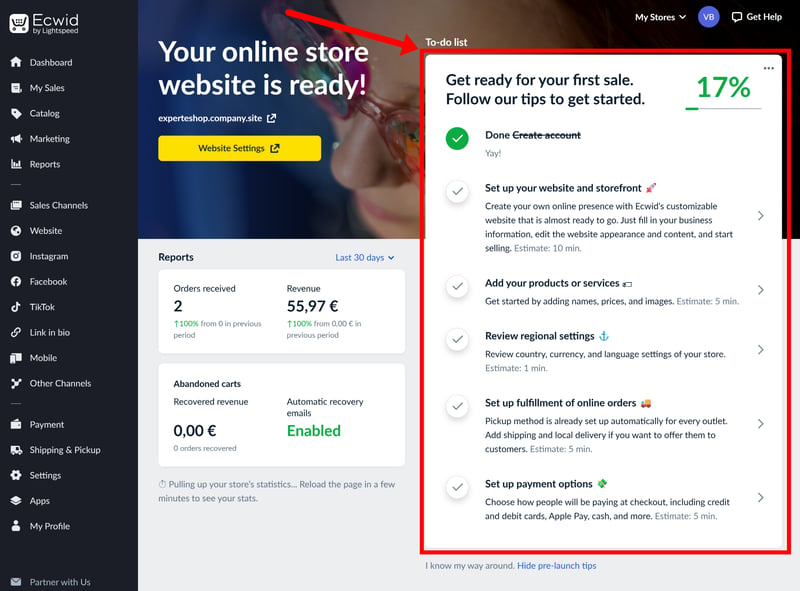
Ecwid guides you through the key steps of setting up your store with a to-do list.
The control panel follows the standard e-commerce playbook, so if you’ve ever used a site builder before, you’ll feel right at home.
On the left, there's a sidebar menu, neatly categorized into sections. At the top, you’ll find your core essentials — product catalogue, sales tracking, marketing tools, and reports. Below that are your sales channels. These include Ecwid’s built-in site builder (under “Website”), which allows you to build a standalone store if you don't already have a website to plug into.
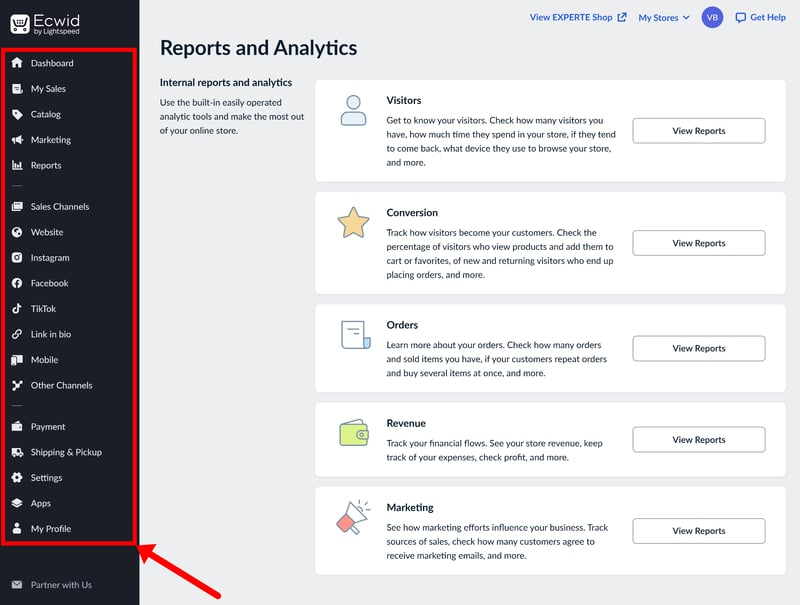
Navigating Ecwid's features.
This clear separation between the shop's “engine” and its “design” makes the day-to-day management feel well-organized.
Building your store: ease of use over creative freedom
If you aren't integrating Ecwid into an existing site, you’ll be using the platform's “Instant Site” editor. After picking a theme, you’re dropped into a beginner-friendly, section-based website builder. You can customize the site by adding or tweaking pre-defined content blocks in a live preview. Each section also comes with different layout options to choose from.
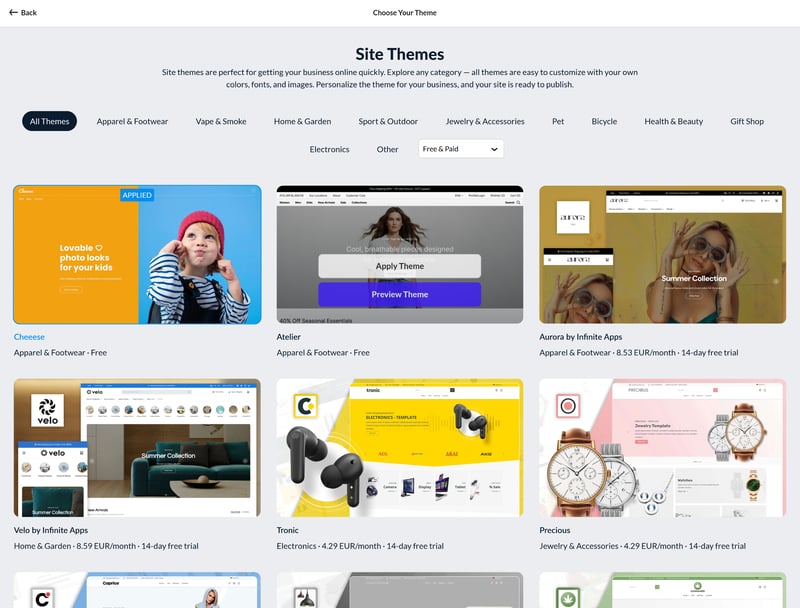
Choosing a template for your store.
However, keep in mind that there is no true drag-and-drop freedom. You can’t just move elements anywhere on the screen; you have to work within the confines of the layout you’ve chosen. It’s a “color-within-the-lines” approach that guarantees a professional-looking result but limits your creative control (more on the editor later).

“Instant Site” is Ecwid's built-in website builder.
Snappy backend, seamless performance
Performance-wise, we found Ecwid pretty snappy. Throughout our testing, the backend remained responsive, with no noticeable lag when switching between menus.
Page transitions are quick, and the system doesn't feel sluggish even when jumping from product management to the website builder. Overall, we found the performance to be consistent and reliable across all interfaces.
Ecwid makes a great first impression. It's quick to set up, easy to navigate, and neatly organized. If you've used a store or website builder before, you'll feel right at home — but beginners shouldn't have any trouble either.
The only real downside is the lack of a “test drive”. Without a free trial or a free tier, you have to take a leap of faith and pay upfront before you can really get a feel for the platform.
Templates & Design
| Number of templates | 70 | 0/2 |
| Template quality |
| 1.5/3 |
| Website builder |
| 2/4 |
| Customizing shop pages |
| 2/4 |
| Custom code |
| 1/2 |
Ecwid’s website builder is built for speed. The goal is to help beginners get their shops online quickly, without getting bogged down in layout decisions or minor design details.
The catch, of course, is that design flexibility takes a back seat. While your store will come together quickly and look professional enough, you can't really customize it beyond the predefined layout and styling options.
Ecwid themes: functional but uninspired
Ecwid offers a library of over 70 themes, categorized by industry. Most are free, though a few “premium” options carry a monthly fee.
The selection is decent — most businesses should find something that works — and the designs are modern and mobile-responsive. However, none of them are likely to “wow” your customers. They are safe, bog-standard layouts that get the job done but don't offer much in the way of unique or standout design.
Before committing, you can preview a live sample site of any theme to see how it feels.
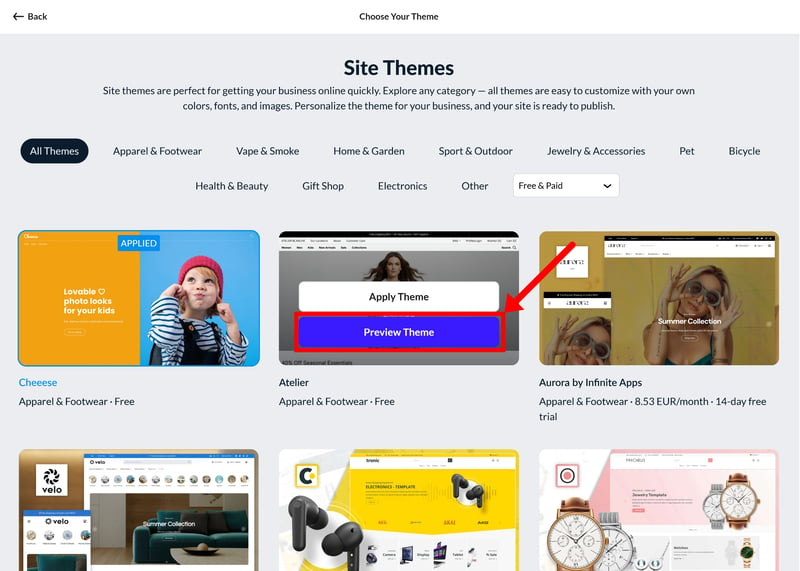
Choose a theme that fits your industry.
Unlike many other website builders, Ecwid doesn’t currently use AI to generate store designs automatically. That’s not a major drawback at this stage, though. Most AI website generators still tend to produce fairly generic results, so in our experience, starting from a well-designed template is usually the better option.
| Number of templates | |
|---|---|
 | 3,000 |
 | 1,000 |
 | 500 |
 | 225 |
 | 190 |
 | 170 |
 | 70 |
 | 47 |
 | 34 |
 | 12 |
 | 11 |
Designing with “Instant Site”
The editor, appropriately named “Instant Site”, is built for a quick turnaround rather than deep customization. The system is easy to grasp: your site is built from a series of “sections” that you can reorder in a sidebar menu. If you want to move a section, you just drag it into place.
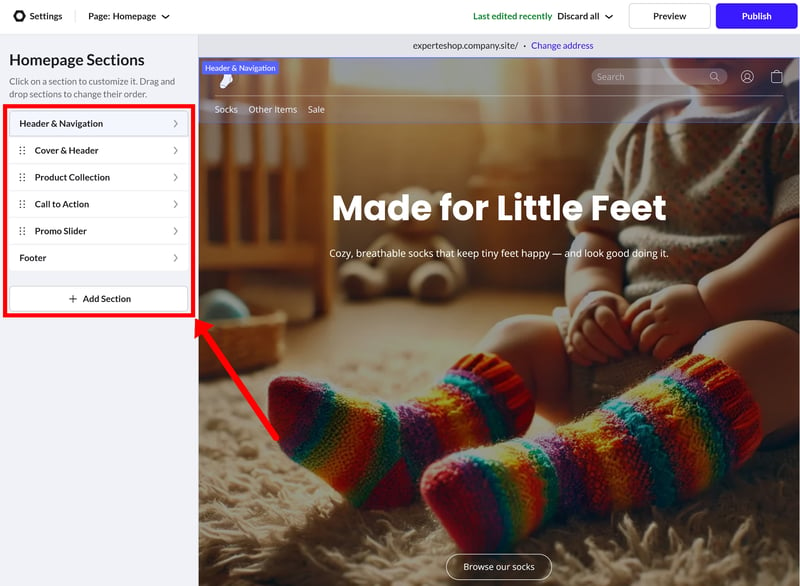
Each page is made up of sections.
There’s a solid library of section templates, covering everything from customer reviews and special offers to contact forms and product grids. You'll also find store-related sections like product lists and collections. Most categories come with several layout options to choose from.
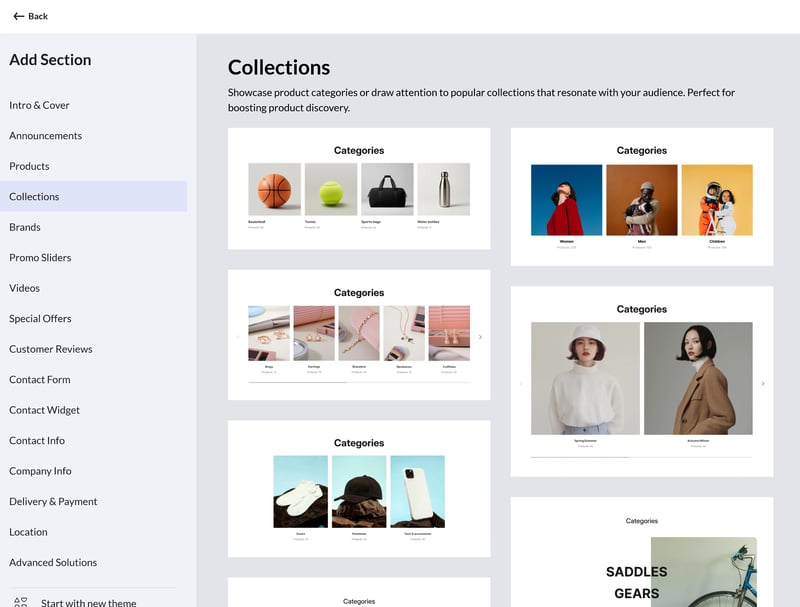
There are plenty of section templates to choose from.
Unlike with many other website builders, you don’t edit text or content directly on the page preview. Instead, you use the settings menu on the left to update titles, swap out images, and configure buttons.
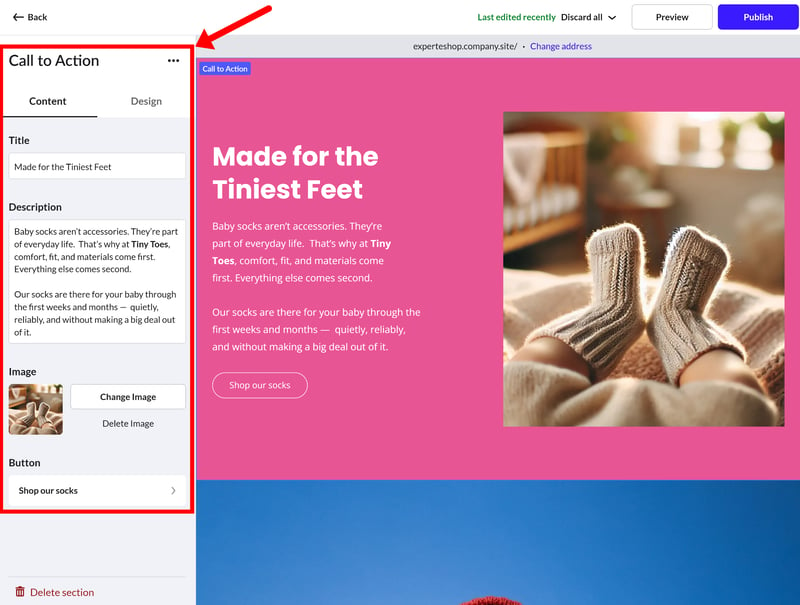
Customize the text, images, and other content on your page.
The biggest catch is that you cannot freely design your pages. There's no true drag-and-drop functionality for individual elements within a section.
In the “Design” tab, you’re limited to a few layout presets that apply to the entire section. While you can toggle certain elements on or off, adjust fonts, or add simple image effects like scroll animations, you are essentially working within a fixed framework.
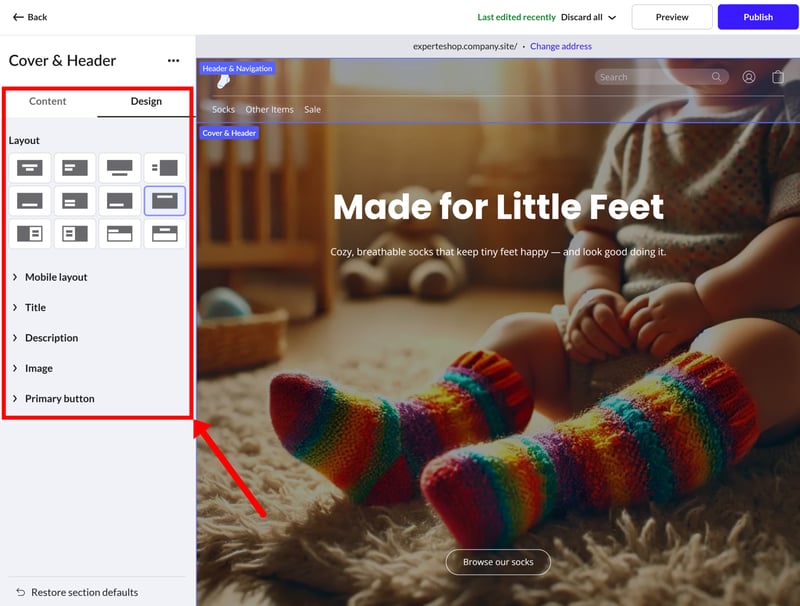
Each section comes with several layout presets.
This “locked-in” approach extends to the mobile view. While you can make some adjustments for mobile devices, your options are very limited. You can choose between a few mobile-specific layout presets, but there's no dedicated mobile editing mode to truly customize the experience for smaller screens.
Customizing store pages
Your actual store pages — the catalogue, category, and product pages — use fixed layouts that only allow for minor tweaks. In the product grid, for example, you can change the image ratio and card size, or choose which details (like the SKU or price) to display. For the product detail pages, you’re again limited to choosing from a few predefined layout presets.
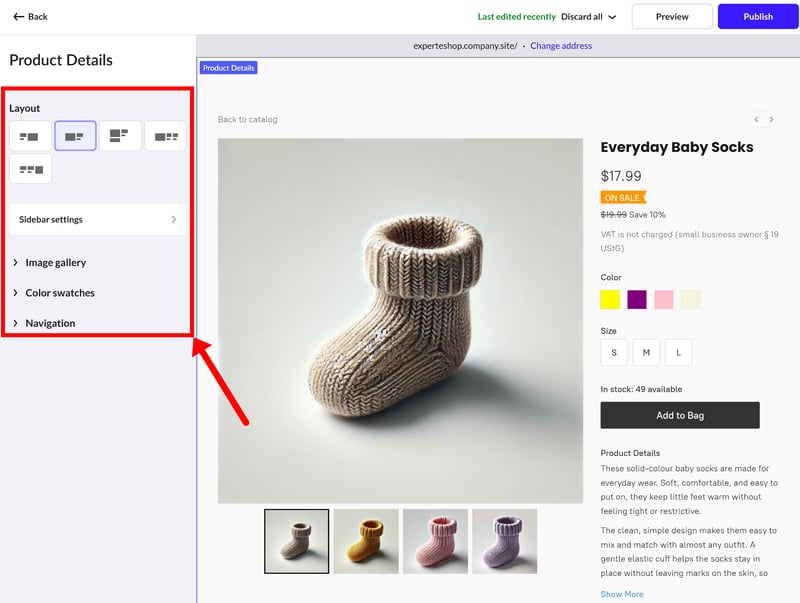
Customize the way your product pages look.
Tweaking the design with custom CSS
Because the built-in tools are so limited, you might find yourself wanting to use custom code. Ecwid does allow this, but only within certain boundaries. You can add your own CSS to make basic design tweaks like changing colors and fonts, or to hide specific elements.
You can also insert code into the header or body of a page, which is useful for adding tracking scripts or external widgets. There's a dedicated section for adding custom HTML, CSS, or JavaScript blocks as well, which is handy for embedding third-party forms or unique content.
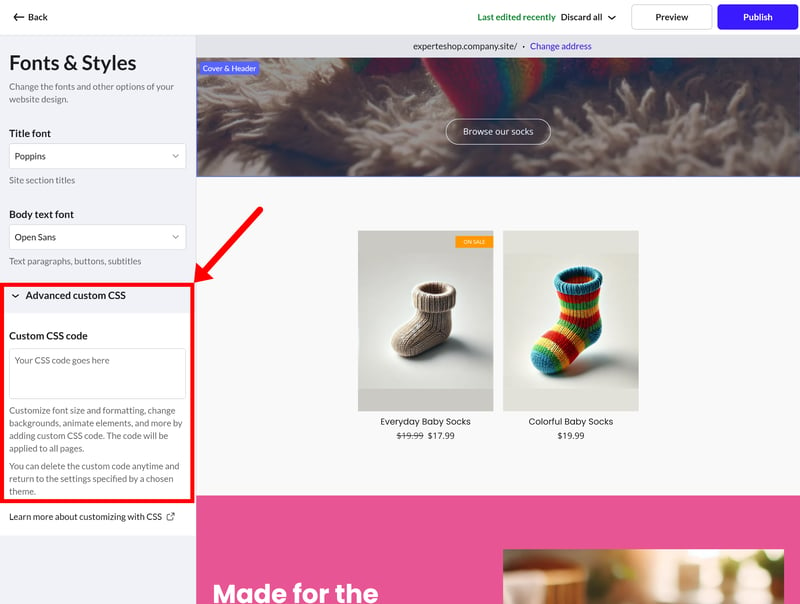
You can add custom code to your page.
You can also insert custom code into the header or body of the page, for example, to add tracking scripts or external widgets. There’s also an option to create a dedicated website section with custom code (HTML, CSS, or JavaScript), which is useful for embedded forms or other third-party content.
So it's definitely possible to inject custom CSS or HTML, but it's not as developer-friendly as other builders. Shopify, for instance, allows you to edit the theme code directly to fully customize the layout and structure
Ecwid prioritizes practicality over customizability. The templates are clean, and the Instant Site editor is intuitive even for users without a design or coding background. You can get a professional-looking shop up and running in a matter of hours. If you want a functional store without the headache of endless design decisions, Ecwid delivers.
This simplicity comes at the expense of flexibility. You aren’t so much building a page as you are filling in a pre-built template. The moment you try to venture outside of those predefined blocks, you’ll hit a wall pretty fast, unless you use custom CSS.
Product Management
| Product types |
| 2.5/4 |
| Product features |
| 2.5/3 |
| Product variants |
| 6/6 |
| Product pricing |
| 2.5/3 |
| Product organization |
| 2/2 |
| Inventory |
| 1.5/2 |
While Ecwid’s website builder is relatively basic, the platform's product features offer surprising depth. It’s a robust engine capable of handling larger catalogues with ease.
Managing your products
Ecwid keeps its store management and design tools in separate lanes. You manage everything through a central catalogue that provides a clean, bird's-eye view of your inventory, where you can create, edit, or duplicate items in a few clicks.
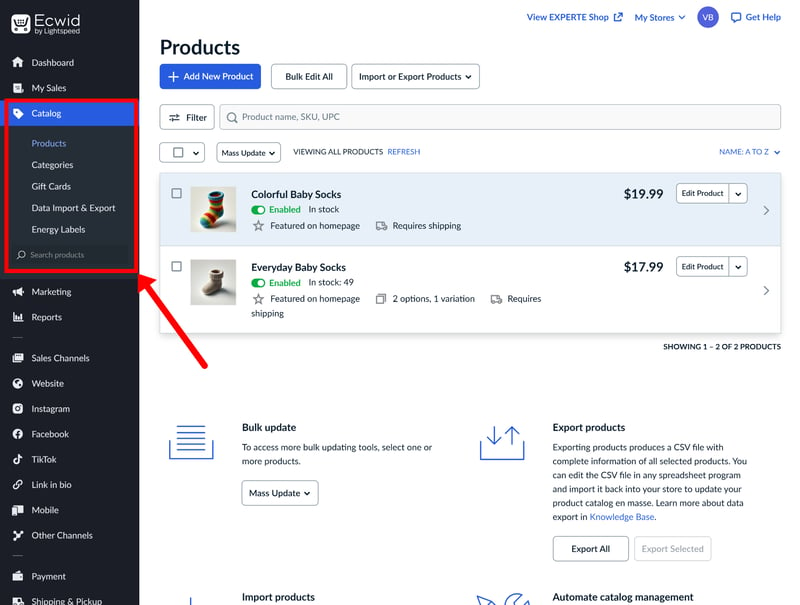
Managing products in Ecwid's shop backend.
Ecwid supports physical goods, digital downloads, gift cards, and subscriptions. It's also possible to add custom input fields to collect info for personalized orders.
Annoyingly, the workflow for digital products is a bit clunky. When you create a new product, Ecwid assumes it’s a physical item by default. To sell a digital product, you need to upload a file in the “Files” tab and disable shipping in the “Shipping & Pickup” tab.
The product limit depends on your subscription (more on those later): the Starter plan is capped at just 10 products, Venture allows 100, and Business goes up to 2,500. You’ll need the Unlimited plan if you want to remove the cap entirely.
Ecwid | Wix | Shopify | Squarespace | Hostinger | IONOS | BigCommerce | Jimdo | Sellfy | Square | WooCommerce | |
|---|---|---|---|---|---|---|---|---|---|---|---|
✓ | ✓ | ✓ | ✓ | ✓ | ✓ | ✓ | ✓ | ✓ | ✓ | ✓ | |
✓ | ✓ | ✓ | ✓ | ✓ | ✓ | ✓ | ✗ | ✓ | ✓ | ✓ | |
✗ | ✓ | ✗ | ✓ | ✓ | ✓ | ✗ | ✓ | ✗ | ✗ | ✗ | |
✗ | ✓ | ✓ | ✓ | ✗ | ✗ | ✗ | ✗ | ✗ | ✗ | ✗ | |
✓ | ✓ | ✓ | ✓ | ✓ | ✓ | ✓ | ✗ | ✗ | ✗ | ✗ | |
✓ | ✓ | ✗ | ✗ | ✓ | ✓ | ✓ | ✓ | ✗ | ✗ | ✗ | |
✓ | ✓ | ✓ | ✓ | ✗ | ✗ | ✗ | ✗ | ✓ | ✗ | ✗ | |
✗ | ✓ | ✓ | ✗ | ✗ | ✗ | ✗ | ✗ | ✗ | ✓ | ✓ | |
Total | 5 | 8 | 6 | 6 | 5 | 5 | 4 | 3 | 3 | 3 | 3 |
Adding and editing products
Adding new items is straightforward. The editor is clean and easy to get the hang of. The “General” tab covers all the essentials, such as titles, descriptions, and pricing. It’s also where you’ll upload your product photos. While you can embed product videos via a link, Ecwid doesn’t support direct video uploads or more advanced media formats like the 3D models you’ll find on Shopify.
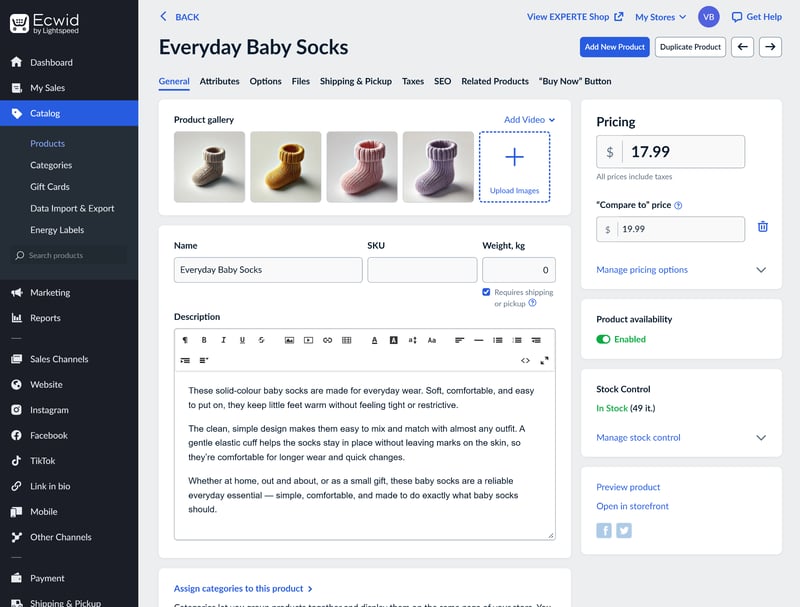
Ecwid's product editor is clean and well-organized.
The “Attributes” tab is home to your backend data, like SKUs and brand names. You can also set up custom properties here, which is a great way to create unique filters to help customers browse your shop later on.
If you need to make changes later, you don’t have to do it one by one. Ecwid includes a “batch editing” tool that lets you update multiple products or variants at the same time.
It works like a spreadsheet, allowing you to tweak prices, stock levels, and attributes all in one go. If you're managing a larger inventory or need to make frequent updates, this is a massive time-saver.
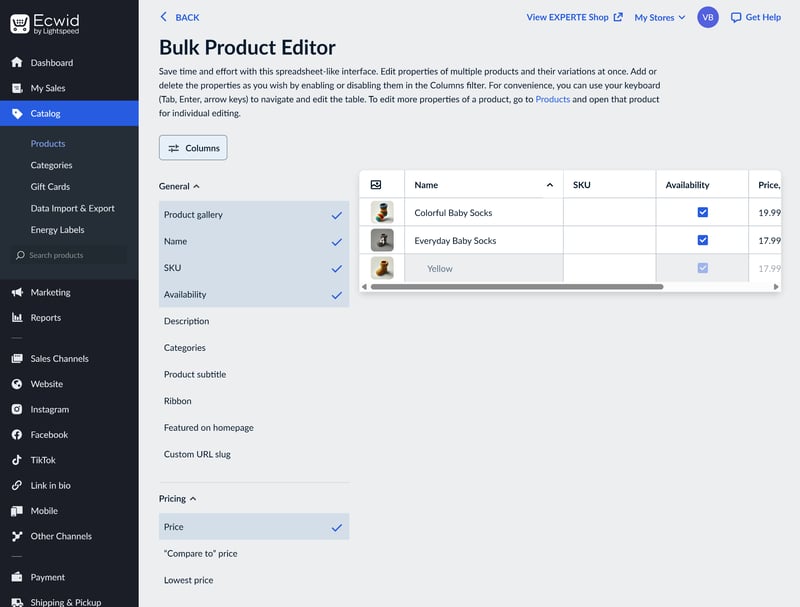
You can save time by editing multiple products at once.
Unlimited variants, manual setup
Starting with the Business plan, you can create product variants. In the “Options” tab, you add your attributes — like color, size, or material — along with their specific values. You also have plenty of flexibility in how they look to your customers; you can display them as dropdowns, color swatches, radio buttons, or checkboxes.
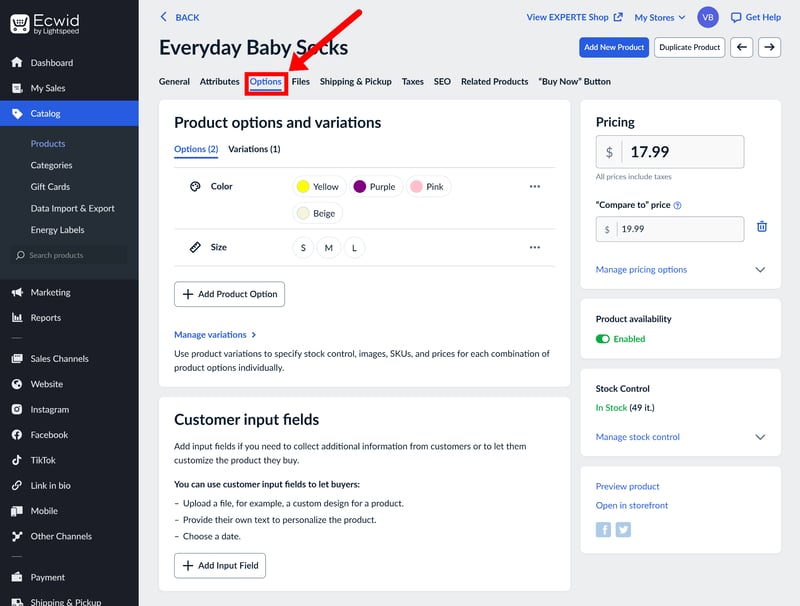
Managing product options and variations in Ecwid.
Once your options are set, customers can pick their preferred combination and add it to their cart. Annoyingly, however, these combinations aren't automatically generated as variants in the backend.
If you want to assign unique images, prices, or stock levels to a specific combination (like “Yellow socks in size M”), you have to create that variant manually first.
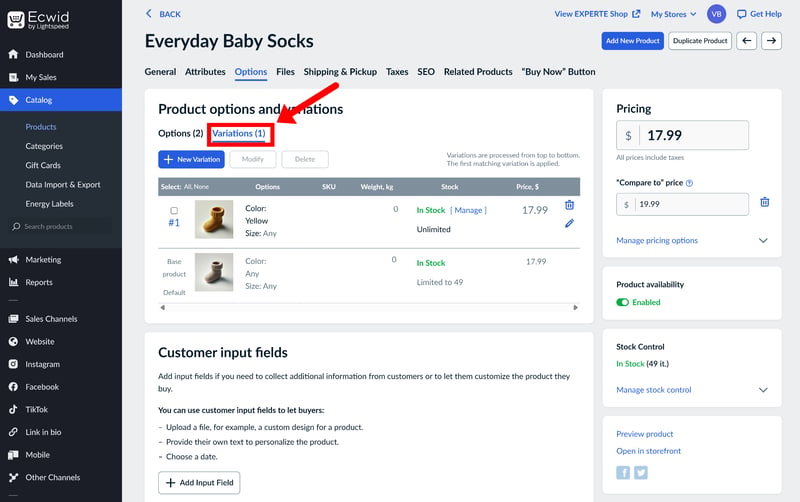
To assign different attributes to product variants, you need to create those variants manually first.
The benefit of this approach is that you only create the variants you actually sell, which keeps your inventory from getting cluttered. The downside is the extra legwork, especially for large catalogues with dozens of combinations.
Fortunately, the bulk editing tool supports variants too, which takes some of the sting out of the setup and maintenance.
Ecwid | BigCommerce | Hostinger | IONOS | Shopify | Square | Squarespace | WooCommerce | Sellfy | Wix | Jimdo | |
|---|---|---|---|---|---|---|---|---|---|---|---|
Max. number of options | unlimited | unlimited | unlimited | unlimited | 3 | 6 | 6 | unlimited | unlimited | 6 | 2 |
Max. number of variants | unlimited | 600 | 100 | unlimited | 2048 | 250 | 250 | unlimited | unlimited | 1000 | 36 |
Variant-specific images | ✓ | ✓ | ✓ | ✓ | ✓ | ✓ | ✓ | ✓ | ✓ | ✗ | ✗ |
Variant-specific pricing | ✓ | ✓ | ✓ | ✓ | ✓ | ✓ | ✓ | ✓ | ✓ | ✓ | ✗ |
Variant-specific SKU | ✓ | ✓ | ✓ | ✓ | ✓ | ✓ | ✓ | ✓ | ✗ | ✓ | ✗ |
Variant-specific inventory | ✓ | ✓ | ✓ | ✓ | ✓ | ✓ | ✓ | ✓ | ✓ | ✓ | ✗ |
Total | 4 | 4 | 4 | 4 | 4 | 4 | 4 | 4 | 3 | 3 | 0 |
Pricing your products
In terms of pricing options, Ecwid offers quite a bit of flexibility at the product level. Beyond the standard selling price, you can set “compare-at” prices to show a strikethrough and add badges (which Ecwid calls “ribbons”) like “Sale” or “New” to your listings.
You can also set up bulk discounts directly in the editor, allowing for tiered pricing based on the quantity ordered. There's even a “Custom Price” setting that lets customers enter their own amount, which works well for donations or pay-what-you-want products.
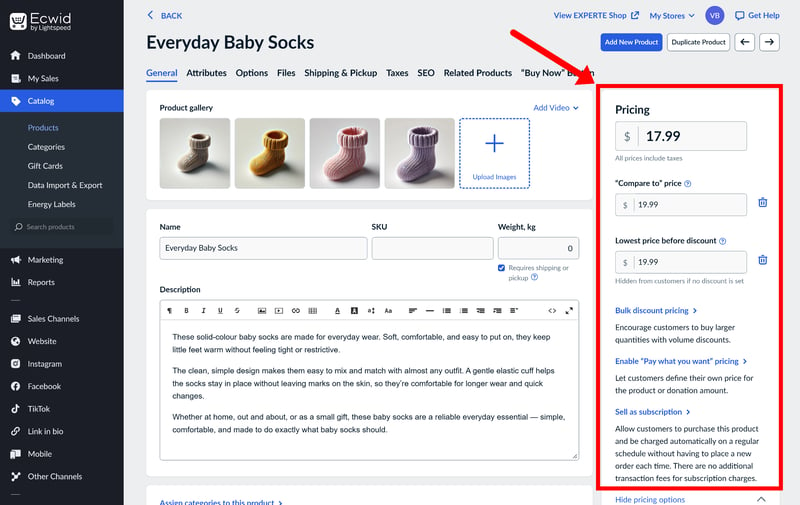
Pricing settings in Ecwid's product editor.
Ecwid supports subscription-based products, too, though you'll need to have Stripe activated as your payment gateway to handle recurring payments (more on that later).
Finally, if you need to show unit prices (like price per lb or oz), you can add them as custom properties. Just keep in mind that these are for display purposes only — Ecwid doesn't calculate unit prices automatically, so you’ll have to enter that data yourself.
Organizing your products with categories and filters
Ecwid offers a few different ways to keep your inventory organized. The most basic building blocks are categories. These are essentially product groups that each get their own store page, making it easier for customers to navigate your shop.
You can set up a multi-level structure with main and subcategories, and assign products to more than one group at a time, which is handy if you want an item to appear in its standard category as well as a “Sale” or “Bestseller” section. You can also designate a “default” category for each item to control the breadcrumb navigation on the product page.
If you’re on the Business plan or higher, you can also use advanced product filters. These are a must-have for larger catalogues, though you do have to remember to toggle them on in the settings first.
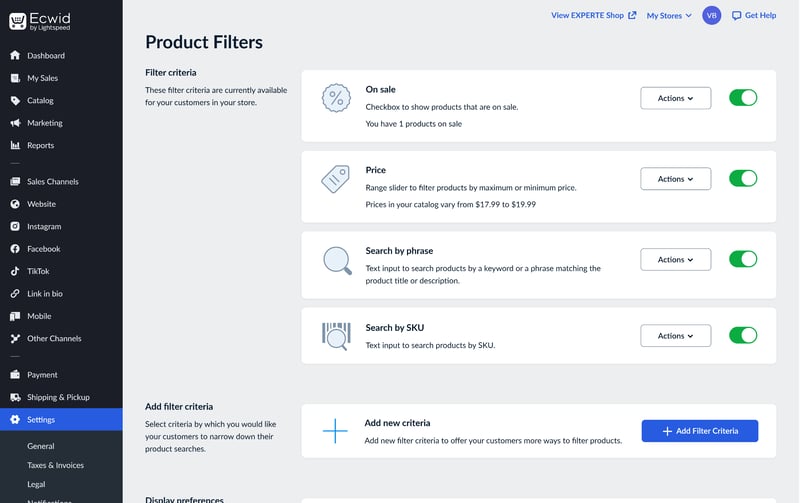
You'll need to enable advanced product filters in the settings first.
Once enabled, Ecwid automatically generates filters based on your product data, like price, size, and availability. You aren't stuck with just the defaults, either; you can create custom filters using your own product attributes and then manage exactly how they appear — or hide them entirely — directly in the site editor.
Overall, Ecwid handles product organization well, even for somewhat larger catalogues. It’s not as flexible as Shopify, though, which offers more complex data logic through “metafields”.
Managing your inventory
Inventory management in Ecwid is fairly straightforward, covering the essentials without getting too complex. You can track specific stock levels for each product or set them to “unlimited”, and the system automatically counts down your stock as you make sales.
If an item sells out, you have a few options for how your shop handles it: you can hide the product entirely, show it as “unavailable”, or switch it over to a pre-order model. You can also toggle on low-stock warnings to get an automated email when your inventory hits a certain level.
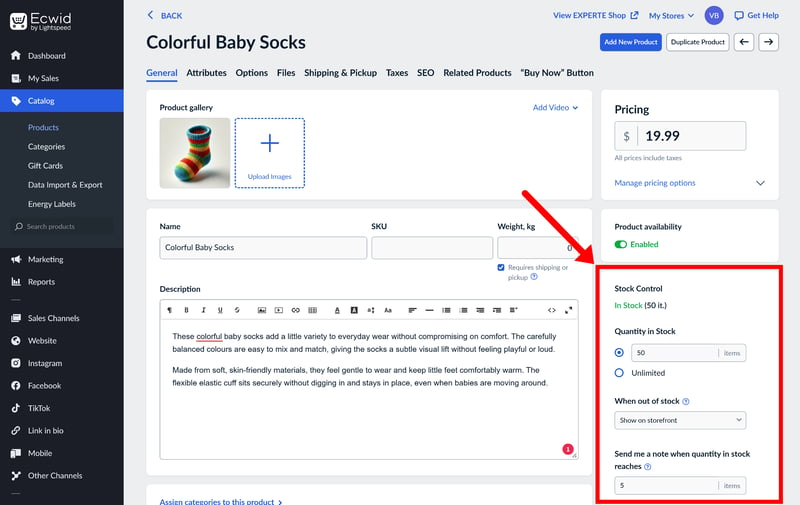
In the inventory module, you can enable a low stock warning.
From the Business plan up, stock tracking gets a bit more granular. You can manage inventory for individual variants, giving each one its own SKU and stock count.
Ecwid doesn’t offer native multi-location inventory tracking. If you need to manage stock across multiple warehouses, you’ll have to rely on third-party extensions to get the job done.
Ecwid’s product management is one of its strongest areas. The system is intuitive and covers everything most stores need. The editor is easy to navigate, bulk editing saves a lot of time, and the robust filtering options make it easy to keep even large inventories organized.
Because of this, Ecwid is a solid choice for businesses with hundreds or even thousands of items. It only starts to fall short if you need advanced logistics or complex product logic, which are better handled by heavy-duty platforms like Shopify. And since variant creation is a manual process, managing a massive catalogue with lots of combinations can feel like a bit of a chore.
Sales Features
| Taxes |
| 3/3 |
| Shipping options |
| 2/3 |
| Discounts |
| 3/3 |
| Payment providers |
| 2.75/3 |
| Order management |
| 1.5/2 |
| Advanced features |
| 5/6 |
Ecwid is well-equipped for most sales workflows, whether you're running a simple storefront or managing a more complex multichannel setup.
Payment processing: plenty of choice
Unlike competitors like Shopify or Wix, Ecwid doesn’t offer its own payment gateway. Instead, it relies entirely on third-party integrations. Stripe and PayPal are the main options, covering all the essentials like credit cards, Apple Pay, and Google Pay.
Depending on your region, you can also connect a range of other providers, including Klarna, Mollie, or Amazon Pay.
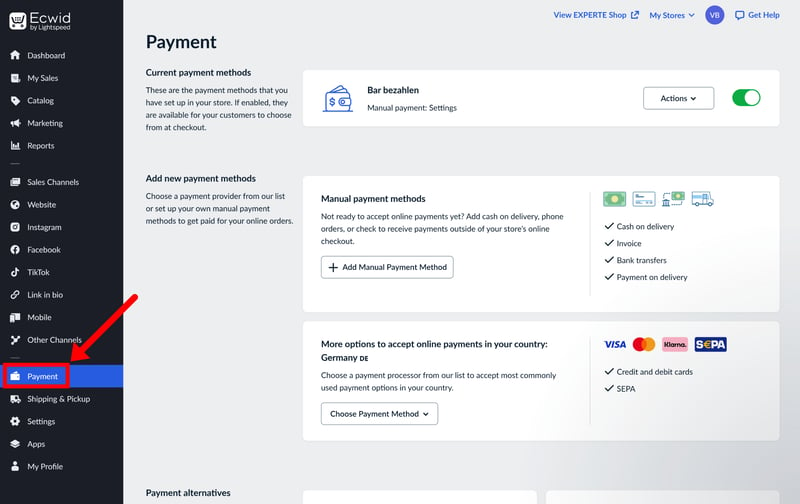
Set up a payment gateway to start accepting payments.
You can also set up manual payment methods, such as bank transfers or cash on delivery, if needed. Overall, the range of supported payment options is solid:
Ecwid | WooCommerce | Shopify | IONOS | Wix | BigCommerce | Squarespace | Hostinger | Jimdo | Sellfy | Square | |
|---|---|---|---|---|---|---|---|---|---|---|---|
Number of payment providers | 120 | 19 | 100 | 120 | 80 | 65 | 5 | 4 | 2 | 2 | 1 |
Paypal | ✓ | ✓ | ✓ | ✓ | ✓ | ✓ | ✓ | ✓ | ✓ | ✓ | ✗ |
Stripe | ✓ | ✓ | ✓ | ✓ | ✓ | ✓ | ✓ | ✓ | ✓ | ✓ | ✗ |
Square | ✗ | ✓ | ✗ | ✗ | ✗ | ✗ | ✓ | ✗ | ✗ | ✗ | ✓ |
Amazon Pay | ✓ | ✓ | ✓ | ✓ | ✗ | ✓ | ✗ | ✗ | ✗ | ✗ | ✗ |
Klarna | ✓ | ✓ | ✓ | ✓ | ✓ | ✓ | ✓ | ✗ | ✗ | ✗ | ✗ |
Mollie | ✓ | ✓ | ✓ | ✓ | ✓ | ✗ | ✗ | ✗ | ✗ | ✗ | ✗ |
Native payment solution | ✗ | ✓ | ✓ | ✗ | ✓ | ✗ | ✓ | ✗ | ✗ | ✗ | ✗ |
Manual payment methods | ✓ | ✓ | ✓ | ✓ | ✓ | ✓ | ✗ | ✓ | ✗ | ✗ | ✗ |
Total | 6 | 8 | 7 | 6 | 6 | 5 | 5 | 3 | 2 | 2 | 1 |
Tax compliance: automated and EU-ready
Taxes are a headache for every store owner, but Ecwid handles a lot of the heavy lifting for you. As long as your initial settings are configured correctly, the platform does a good job of keeping you compliant.
Like most modern ecommerce platforms, Ecwid calculates taxes automatically by cross-referencing your shop’s location with the customer’s shipping address. It applies the correct rates automatically, whether you’re dealing with domestic sales or international orders. If your situation is more unique, you can also set up custom tax rates for specific regions or product categories.
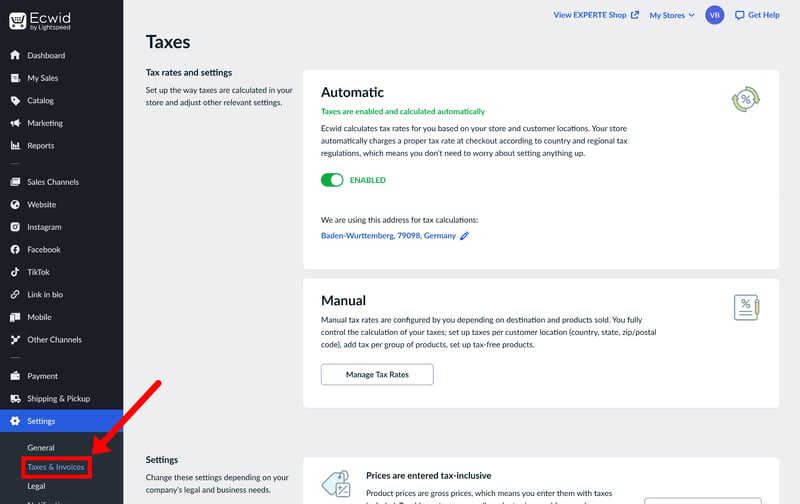
Ecwid calculates taxes automatically.
Ecwid also handles B2B scenarios quite well. If you enable the B2B option, customers can enter their VAT ID during checkout. The platform can even apply the “reverse-charge” mechanism automatically for cross-border EU sales, provided the legal requirements are met.
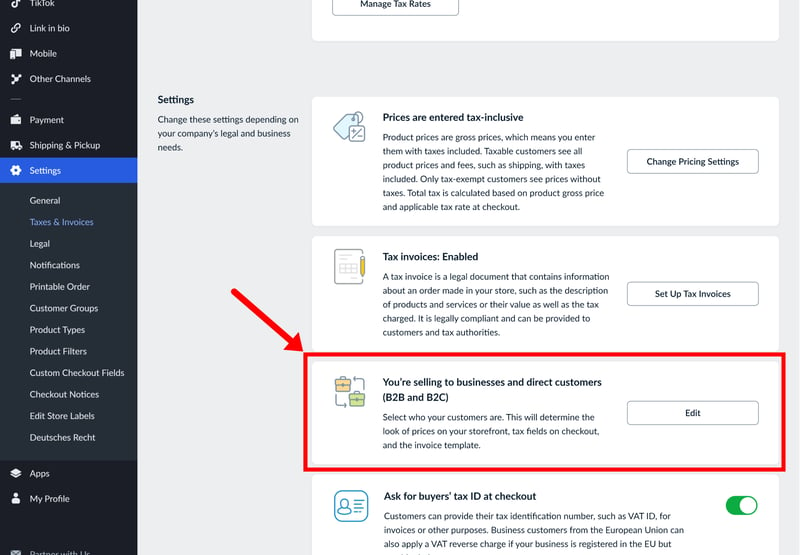
Ecwid also supports B2B sales.
Shipping your products: no live rates
Ecwid offers three main fulfillment options: standard shipping, local delivery (ideal for businesses handling their own drop-offs), and in-store pickup. For standard shipping, major carriers like USPS, UPS, and FedEx are available out of the box.
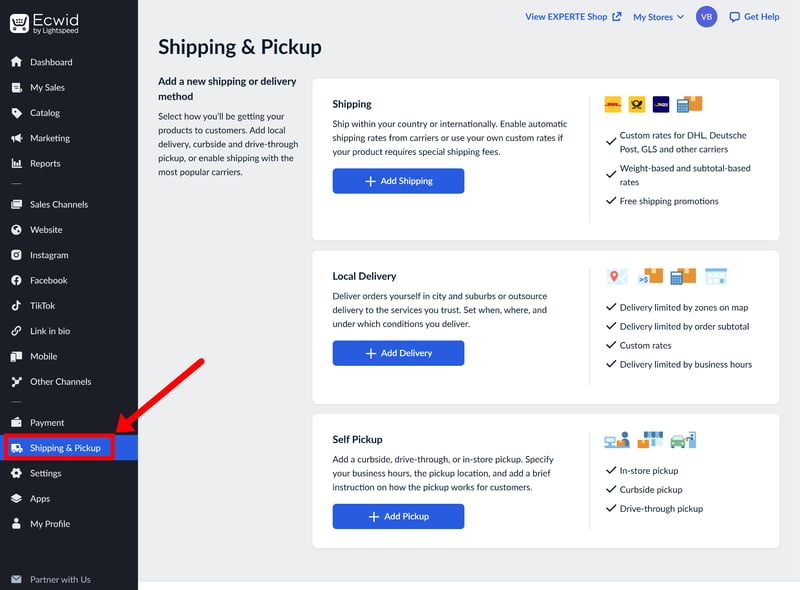
Shipping settings in Ecwid.
For standard shipping, you can choose from common carriers. In the U.S., options like USPS, UPS, and FedEx are already predefined. Don't expect live carrier rates at checkout, though: while the carriers are listed, you have to set the shipping costs yourself. If you want the system to calculate real-time rates for your customers, you’ll need to install a third-party extension.
When setting up your shipping zones, you can choose from four main pricing rules:
- 1.
Free shipping – no cost to the customer.
- 2.
Conditional free shipping – free once a certain order threshold is met (e.g., “Free shipping on orders over $50”)
- 3.
Flat rate shipping – a fixed shipping price for the entire order
- 4.
Custom rates – tiered pricing based on the total weight of the order or the subtotal
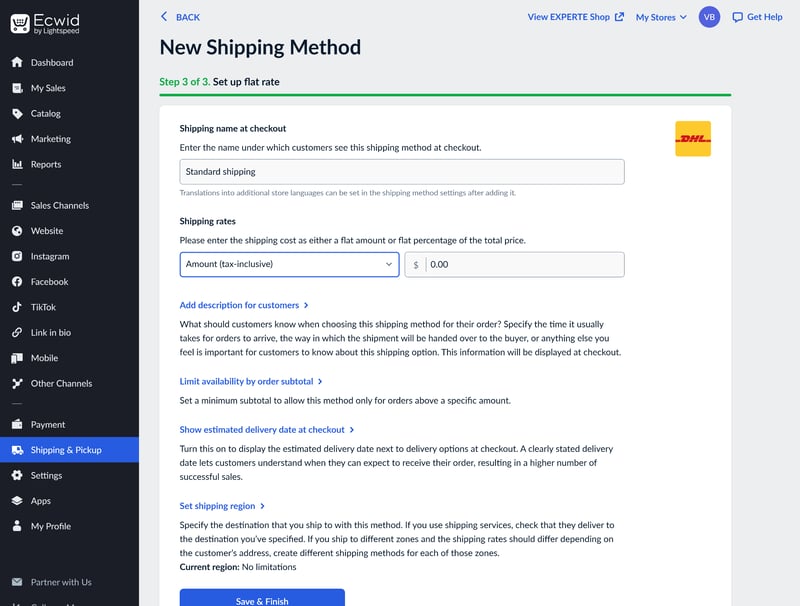
You can set up multiple shipping options for different shipping zones.
Marketing & discounts: versatile options for promotions
Ecwid gives you a solid set of tools for running promotions. Beyond basic coupon codes, you can set up automatic, rule-based discounts to help drive sales.
Everything is managed in the Marketing tab. In the “Discount Coupons” section, you can generate codes with a high degree of flexibility. You’re not limited to simple percentage discounts — you can offer fixed amounts, free shipping, or even combine multiple perks into a single code.
The system also gives you granular control over how those coupons are used. You can set expiration dates, require a minimum spend before a code becomes active, or limit usage to once per customer. If you want to get more specific, you can restrict codes to certain product categories or specific customer segments.
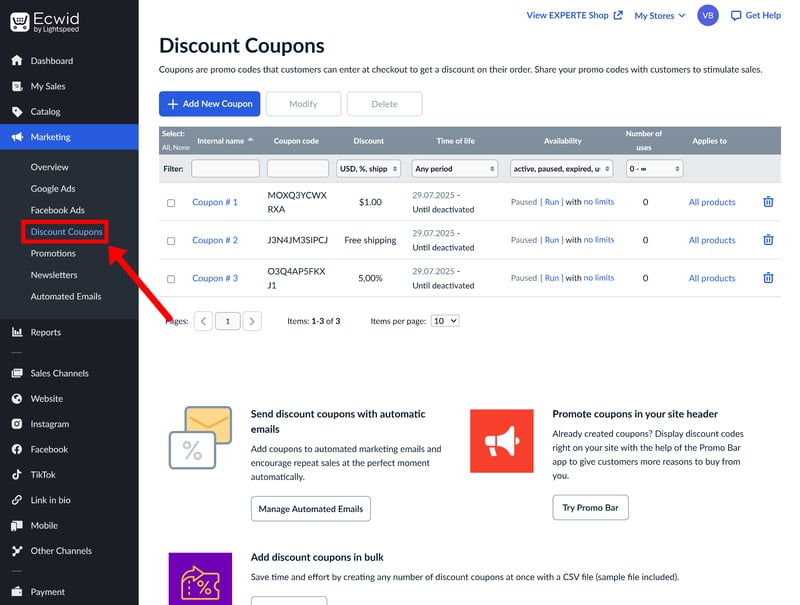
Discount settings in Ecwid.
If you’d rather not force customers to hunt for a code, you can use automatic promotions instead. These apply a discount automatically once the shopper hits a certain cart total or adds a specific product to their order. It’s a great way to create a frictionless “Sale” experience on the storefront.
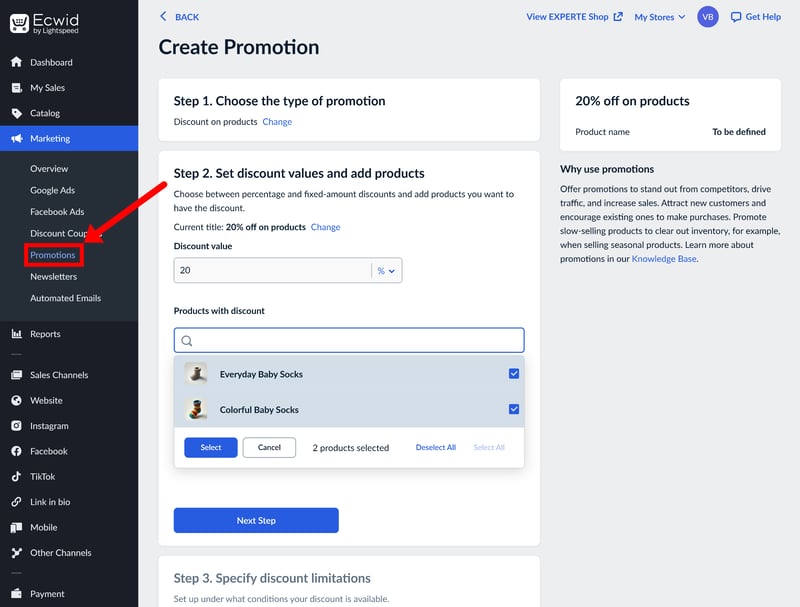
Ecwid also supports promotions with automatic discounts.
Managing your orders
The “Sales” dashboard provides an at-a-glance view of every transaction, including order numbers, dates, totals, and current payment or fulfillment statuses.
New orders are clearly highlighted so they don’t get lost in the shuffle, and you’ll receive instant notifications via email or the mobile app to keep you updated on the go.
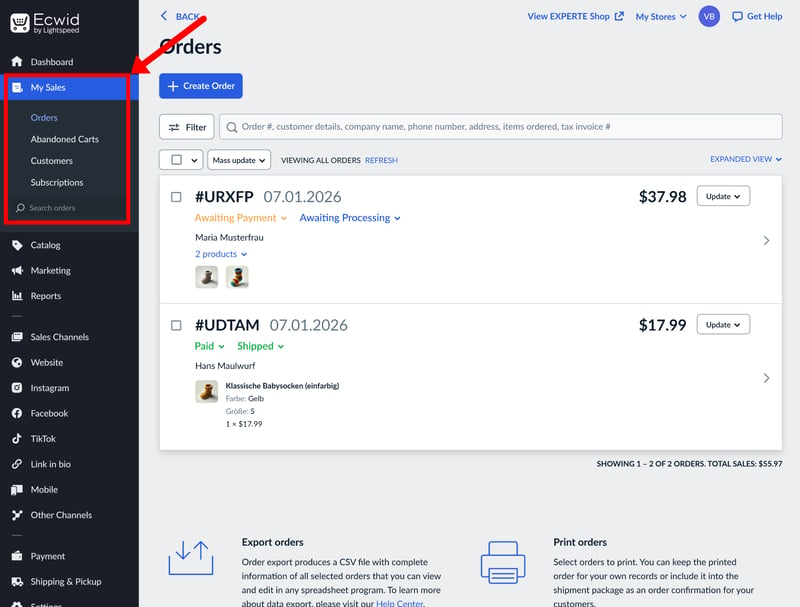
Order management in Ecwid.
Opening an individual order allows you to handle the day-to-day admin: you can manually update statuses, generate invoices, or process cancellations.
Once you mark an order as “shipped”, Ecwid automatically triggers a notification email to the customer. You can also attach tracking numbers to these updates, making it easy for shoppers to monitor their delivery.
Integrating Ecwid with other stores
What really distinguishes Ecwid from traditional all-in-one builders is its modular approach. If you find the native website builder too restrictive (or if you already have a website you’re happy with), you can simply plug in Ecwid as a shop module rather than rebuilding everything from the ground up.
Ecwid offers dedicated widgets for most major platforms, including WordPress, Wix, Weebly, Joomla, and Drupal. This makes it incredibly easy to add a fully functional store to your existing site with very little technical heavy lifting.
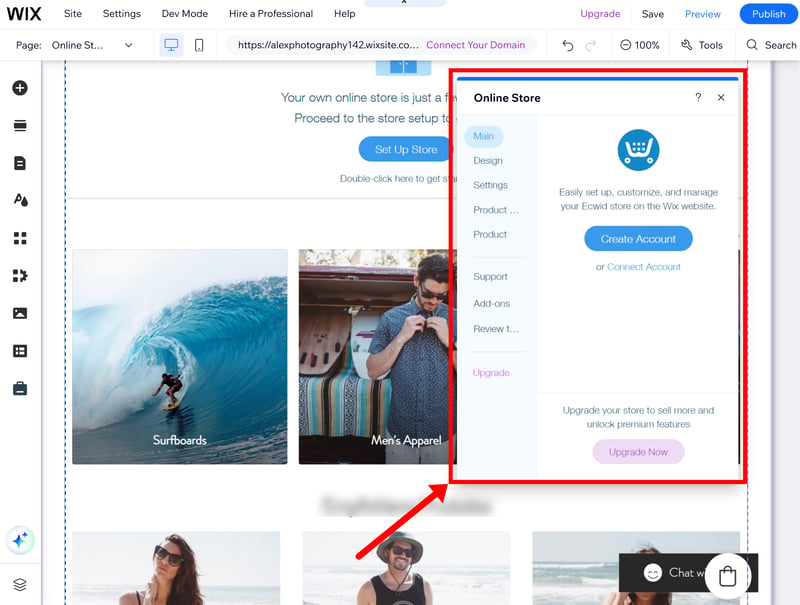
You can embed Ecwid as a shop widget on other platforms.
Even if your specific platform isn't on that list, you can still embed Ecwid using a custom code snippet. The help center provides detailed, step-by-step guides for dozens of different systems, so you won't need a developer to get your store up and running.
Apps, extensions, and extra features
Ecwid packs in plenty of additional functionality that we can’t cover in full detail, but here are a few highlights of what else the platform brings to the table:
Multilingual stores
You can run a shop in multiple languages, but be prepared for some manual work. While Ecwid adds translation fields to your product editor, there is no automatic translation feature—you’ll have to provide the text yourself.
On the bright side, you can update these translations via the bulk editor, which is a huge help for larger inventories.Multiple currencies
With apps like “Currency Converter”, you can show prices in a customer’s local currency. Just keep in mind that this is for display purposes only; the actual checkout will still process in your store’s primary currency.Selling on marketplaces and social media
Multichannel selling is where Ecwid really shines. You can sync your catalogue directly with Facebook, Instagram, TikTok, and Google Shopping. While native support for Amazon and eBay isn't included out of the box, you can easily add them via third-party apps.Point of Sale (POS)
If you sell in person, Ecwid integrates with several external POS systems. This keeps your offline and online sales, inventory, and orders perfectly in sync.Dropshipping
Ecwid is a solid choice for dropshippers. The App Market features well-known extensions like Printful, Spocket, and Syncee, making it easy to import products and automate your fulfillment.Email marketing
Ecwid gives you granular control when it comes to automated emails like order confirmations, shipping notifications, and reminders. For traditional newsletter marketing, there are integrations with services like Mailchimp.App market and extensions
While it’s not as massive as the marketplaces you’ll find on Shopify or Wix, Ecwid’s App Market covers all the essentials — from marketing tools to rewards programs.API and custom integrations
For the tech-savvy, Ecwid provides a robust API. This allows for custom integrations and deeper automations if the standard apps don't meet your needs.
All in all, Ecwid has plenty to offer, but many advanced features require third-party apps, which can occasionally lead to extra monthly costs.
Ecwid packs a lot of punch as a sales engine. From payments to taxes and shipping, it covers all the bases. Another major strength is the multichannel support, which makes it easy to move products across social media and external platforms. And since the platform is modular, you can use all these features on almost any platform.
Customer Support
| Documentation and tutorials |
| 2/2 |
| Support channels |
| 1.5/2 |
| Speed and quality |
| 1.5/3 |
| Customer reviews |
| 1/3 |
Ecwid’s support resources are excellent. Their help center is extensive and neatly organized, making it easy to find answers not just on how to use the platform, but on its broader capabilities as well.
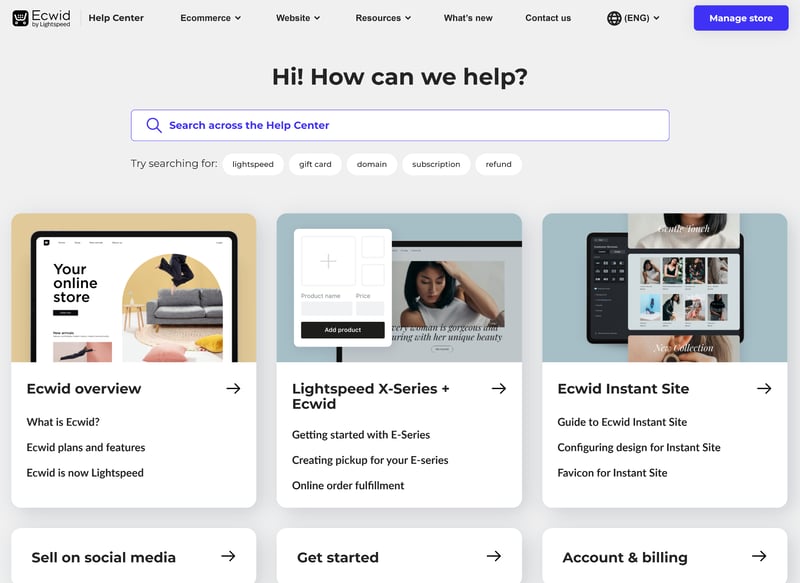
Ecwid's help center.
The articles are clear, easy to follow, and packed with helpful screenshots and links to related topics. A particularly nice touch is that each article clearly labels which subscription plan is required for that specific feature, saving you from digging through settings for a tool you might not have access to.
Direct support via live chat, callbacks, and email
If you can’t find what you need in the documentation, you can reach out to their team directly via the “Get Help” button in the dashboard. They offer 24/5 live chat (Monday–Friday), a callback service, and standard email support.
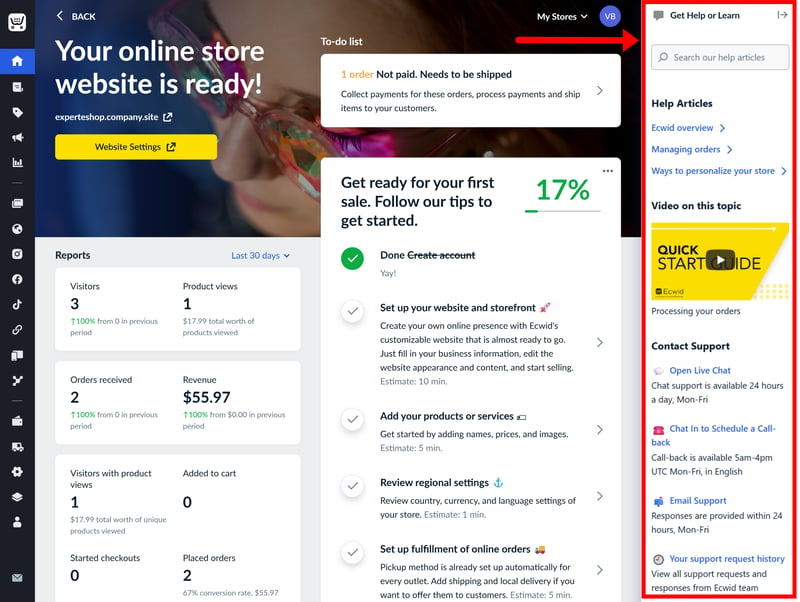
A live chat is built right into the dashboard.
We were usually connected to a chat agent within minutes. The quality of help is a bit hit-or-miss, though: some agents were able to help us quickly and thoroughly, others not at all.
User feedback on sites like Trustpilot reflects this experience. While many users leave glowing five-star reviews, there is a fair share of one-star complaints regarding inconsistent support quality.
Ecwid does pretty well on the self-service front. The help center is a helpful first stop and will likely solve most of your issues. While direct support is easy to reach, the quality is hit-or-miss. Simple questions are handled quickly, but agents seem to struggle once things get more complex or specific to a certain region.
Pricing
| Costs for a small shop | $25.00 | 3/6 |
| Costs for medium-sized shop | $45.00 | 3/6 |
| Costs for large shop | $105.00 | 0/3 |
| Pricing model |
| 2/3 |
| Trial version |
| 0/2 |
Ecwid offers four main tiers: Starter, Venture, Business, and Unlimited. The free plan — once a major draw for the platform — has been discontinued.
Starter: This entry-level tier is only really viable for tiny side projects. You’re limited to just 10 physical products (no digital downloads) and basic storefront features.
Venture: This plan raises the cap to 100 products and unlocks digital goods. You also get access to the App Market, social media selling (Facebook/Instagram), automated taxes, and discount codes.
Business: The product limit jumps to 2,500, and you unlock essential features like subscriptions, marketplaces, product filters, multilingual support, and abandoned cart recovery.
Unlimited: As the name suggests, this plan doesn't have any product caps. It also includes unlimited staff accounts, POS integrations, and priority support.
You can pay month-to-month or opt for an annual plan to save on costs.
One thing to appreciate about Ecwid is its “what you see is what you get” approach. Unlike many competitors, they don’t lure you in with heavily discounted teaser rates that skyrocket after the first year; the price you see on day one is what you’ll continue to pay.
| Starter | Venture | Business | |
|---|---|---|---|
| Monthly price | $5.00 | from $25.00 | from $45.00 |
| Contract period (months) | 1 | 1 - 12 | 1 - 12 |
| Product management | |||
| Number of products | 10 | 100 | 2,500 |
| Product filters | ✗ | ✗ | ✓ |
| Product variants | ✗ | ✗ | ✓ |
| Product inventory | ✗ | ✓ | ✓ |
| Product reviews | ✗ | ✗ | ✓ |
| Internationalization | |||
| Multiple languages | ✗ | ✗ | ✓ |
| Multiple currencies | ✗ | ✓ | ✓ |
| Automatic tax calculation | ✗ | ✓ | ✓ |
How does Ecwid's pricing compare?
It's not that easy to make a direct comparison, since every platform has its own way of bundling features. To get a fair apples-to-apples comparison, we calculated the real-world costs for three common scenarios:
Small store: 10 products, up to $10,000 in annual revenue, custom domain
Medium store: 500 products, up to $200,000 in annual revenue, with product variants
Large store: 10,000 products, up to $2 million in annual revenue, with variants, product filters, and multilingual support
Here are the results:
| Small shop | Mid-size shop | Large shop | |
|---|---|---|---|
| $2.75 | $2.75 | |
| $10.00 | $10.00 | $19.93 |
| $10.00 | $10.00 | $19.93 |
| $11.75 | $11.75 | $11.75 |
| $12.60 | $22.00 | |
| $14.00 | $14.00 | $68.00 |
| $22.00 | $119.00 | |
| $23.00 | $23.00 | |
| $25.00 | $45.00 | $105.00 |
| $29.00 | $299.00 | |
| $29.00 | $29.00 | $29.00 |
As you can see, Ecwid isn’t exactly a budget pick, mostly due to its tight product caps. The Starter tier is really only viable for hobbyist shops, and any store seeing actual growth will outgrow the Venture plan in no time, too.
If you're looking for the cheapest platform out there, Ecwid's not it: Since its product caps are so strict, most growing stores will find themselves having to switch to a more expensive plan sooner than with other platforms. Still, there are no hidden costs, and pricing is transparent.
Final Verdict: Ecwid Is a Powerful “Plug-And-Play” Shop Widget
Ecwid isn't your typical all-in-one builder. It’s a modular e-commerce engine first and foremost, with a site builder added as a bonus. Thanks to this “shop-first” approach, Ecwid delivers strong product features, capable sales tools, and effortless multichannel syncing.
The built-in website is incredibly user-friendly, allowing even beginners to get simple shops online quickly — but it does lack design flexibility. The great thing about Ecwid, however, is that you aren’t tied to their ecosystem. If their editor feels too restrictive, you can simply embed the store into your existing website and just use its backend.
This makes Ecwid a good fit for smaller businesses that want to “bolt on” a professional online store to an existing site without a lot of hassle. As an all-in-one solution, Ecwid sits somewhere between lightweight website builders and full-fledged e-commerce platforms. It's more flexible than tools like Squarespace, but not nearly as deep or complex as Shopify or WooCommerce.

Ecwid User Feedback
To get a better sense of how Ecwid performs in the real world, we looked at the most common feedback from popular review sites. Here’s what people are saying:
Painless setup and day-to-day management
Many users like how intuitive the platform is. Even those with zero technical background find it easy to get a shop live and manage their inventory on a daily basis.Responsive support
Quite a few reviewers highlight the fast response times from the chat and email teams. Users appreciate the solution-oriented approach, especially when dealing with account issues or technical hiccups.A versatile ecosystem
The ease of connecting to third-party tools (like Zapier or ShipStation) and the seamless integration with Google and social media are major highlights for many sellers.
Backlash over the discontinued free plan
Ecwid has faced vocal criticism for dropping its free tier. Many long-time users were frustrated to find themselves locked out of their own data unless they committed to a paid subscription.Rising costs and “paywalled” features
A recurring theme in negative reviews is the frequency of price hikes. Some users also feel that essential features are increasingly being moved to more expensive plans, shrinking the value of the lower tiers.A frustrating cancellation process
Some sellers report that there is no simple way to pause or cancel a subscription yourself. In several cases, users found that the only way to stop being billed was to delete their account entirely.
Top Ecwid Alternatives
Decided Ecwid isn’t the right fit? One of these alternatives might be worth a look:
Best all-in-one shop platform
Shopify balances a powerful site editor with a massive app ecosystem and a professional toolkit. It’s the “gold standard” for a reason — it’s built to handle everything from tiny startups to massive global brands.Total technical control
If you want complete ownership of your site, WooCommerce is a better option. Since it’s a WordPress plugin, you have access to thousands of themes and extensions, giving you unrivalled flexibility. Just keep in mind that it requires more technical “know-how” than Ecwid, as you’ll be responsible for your own hosting and updates.Better for visual design
If Ecwid’s block-based editor feels too restrictive, a drag-and-drop-based website-builder like Wix might be a better fit. It offers more creative freedom for non-coders, allowing you to place elements exactly where you want them on the page
Here are our top Ecwid alternatives: